<html>
    <head>
        <script src="https://shipping.example.com/shipping-service.js"></script>
        <script src="https://profile.example.com/profile-service.js"></script>
        <script src="https://billing.example.com/billing-service.js"></script>
        <title>Parent Application</title>
    </head>
    <body>
        <shipping-service />
        <profile-service />
        <billing-service />
    </body>
</html>
A quick primer on micro-frontends
There's already a lot of material written on micro-frontends, so I'll keep the groundwork brief. As teams expand, maintaining a single monolithic application turns into a liability:
- The codebase balloons, becoming unwieldy and loaded with avoidable complexity.
- Build times drag on, involving a tangled web of dependencies that most engineers can't troubleshoot on the fly.
- Each deployment carries countless modifications, meaning unrelated changes can freeze your release or force an unwanted rollback.
- And the list goes on; monoliths become a bottleneck for large teams, you already know the drill if you've been there.
For large teams, the smarter route is to slice the app into smaller, self-contained units that can live in separate projects, be built independently, and ship on their own schedules. I want to stress that this only pays off when your organization is big enough to justify the overhead. If you're a small team, don't bother—you'll just add friction. At Wix, we waited until we had roughly 100 frontend developers before making the switch.
The most straightforward example of this approach looks like this:
Here we see three isolated bundles. Each one is developed, built, and deployed on its own, and each registers a custom element that the parent app can mount later. Now, custom elements aren't a strict requirement for a micro-frontend setup; these bundles could just as easily drop React components into a global registry that the host checks when rendering (that's essentially our approach at Wix). Still, the custom element example is a clean way to illustrate the concept without getting lost in implementation specifics. And as a side note, registering to a global Map for later lookup is precisely what customElements.define() does under the hood anyway.
Micro-frontends at Wix
I'm going to get into the fine details of our internal architecture and the custom tooling we've built up over the years. So, a quick rundown of the Wix platform will help ground the discussion—don't worry, you don't need to be a Wix expert to follow along.
Wix lets users spin up websites for their ventures through a WYSIWYG editor, plus a suite of business management tools. For instance, an entrepreneur can build a store where visitors browse items, fill a cart, checkout, and monitor their orders—all within a fully customizable site. On the flipside, the owner manages the shop through the **business manager**, a single large app where they can tweak the product catalog, review analytics, manage customers, and handle inventory. But that's just the surface. Sites can host blogs, forums, login flows, restaurant menus with table booking, or event pages where attendees buy tickets and pick seats—even stream live from inside the page. The **business manager** offers equally varied tools: sending newsletters, running ad campaigns, setting up automations (like a follow-up email five days after a delivery), or chatting with visitors currently on the site.
You get the sense—there's a mountain of functionality jammed into both the sites and the business manager. That's why we chose to make both the **viewer** (which displays all sites) and the **business manager** hosts for micro-frontends. In this article, I'll zero in on these two platforms and contrast their demands.
For completeness, we actually have two more micro-frontend hosts: the **editor** (where sites are built) and our **mobile app** (the only micro-frontend React Native app I've come across worldwide). Each of those is a whole article on its own, so I'll leave them untouched here.
A few screenshots to tie it all together:
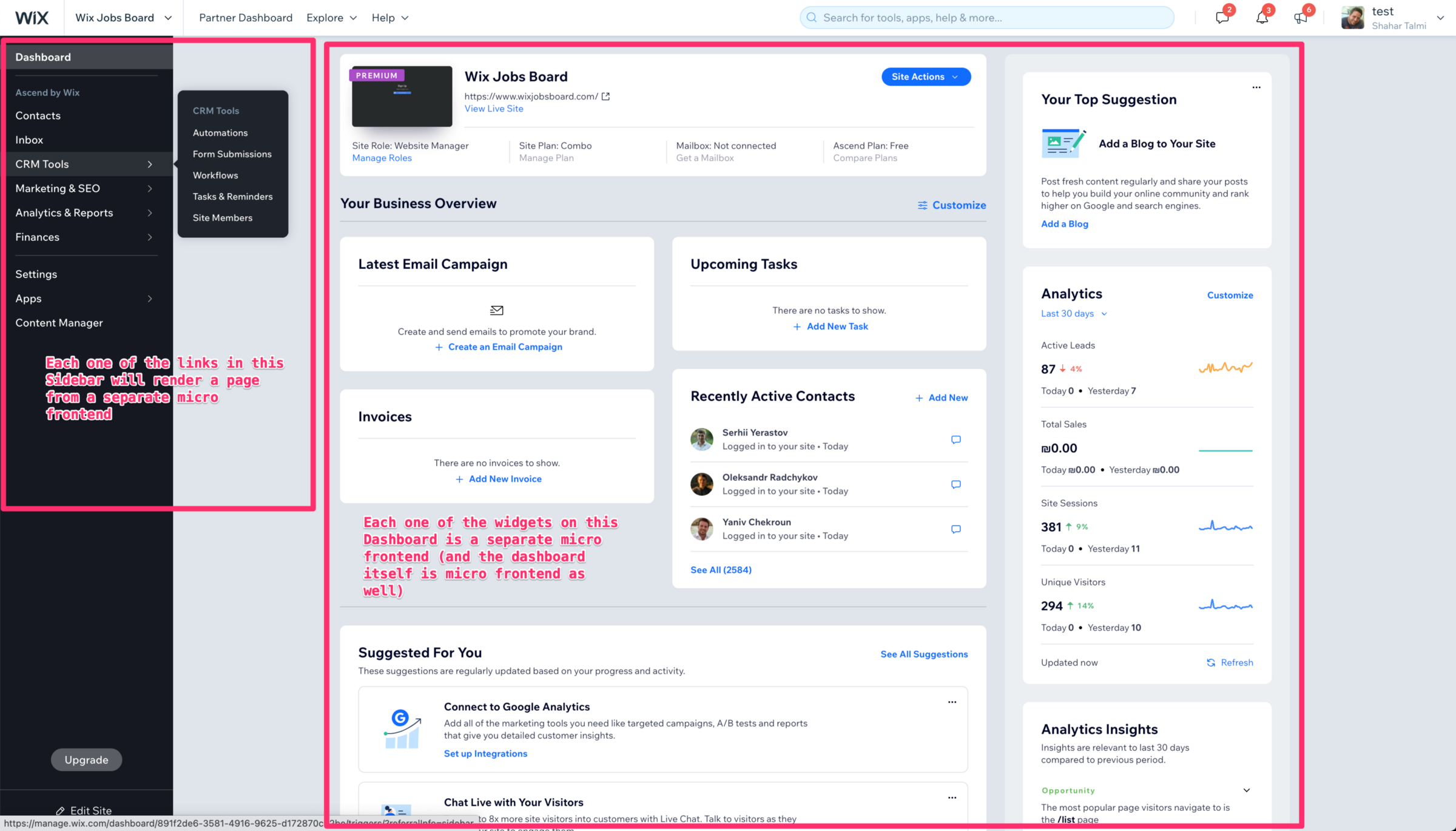
Business Manager (1)
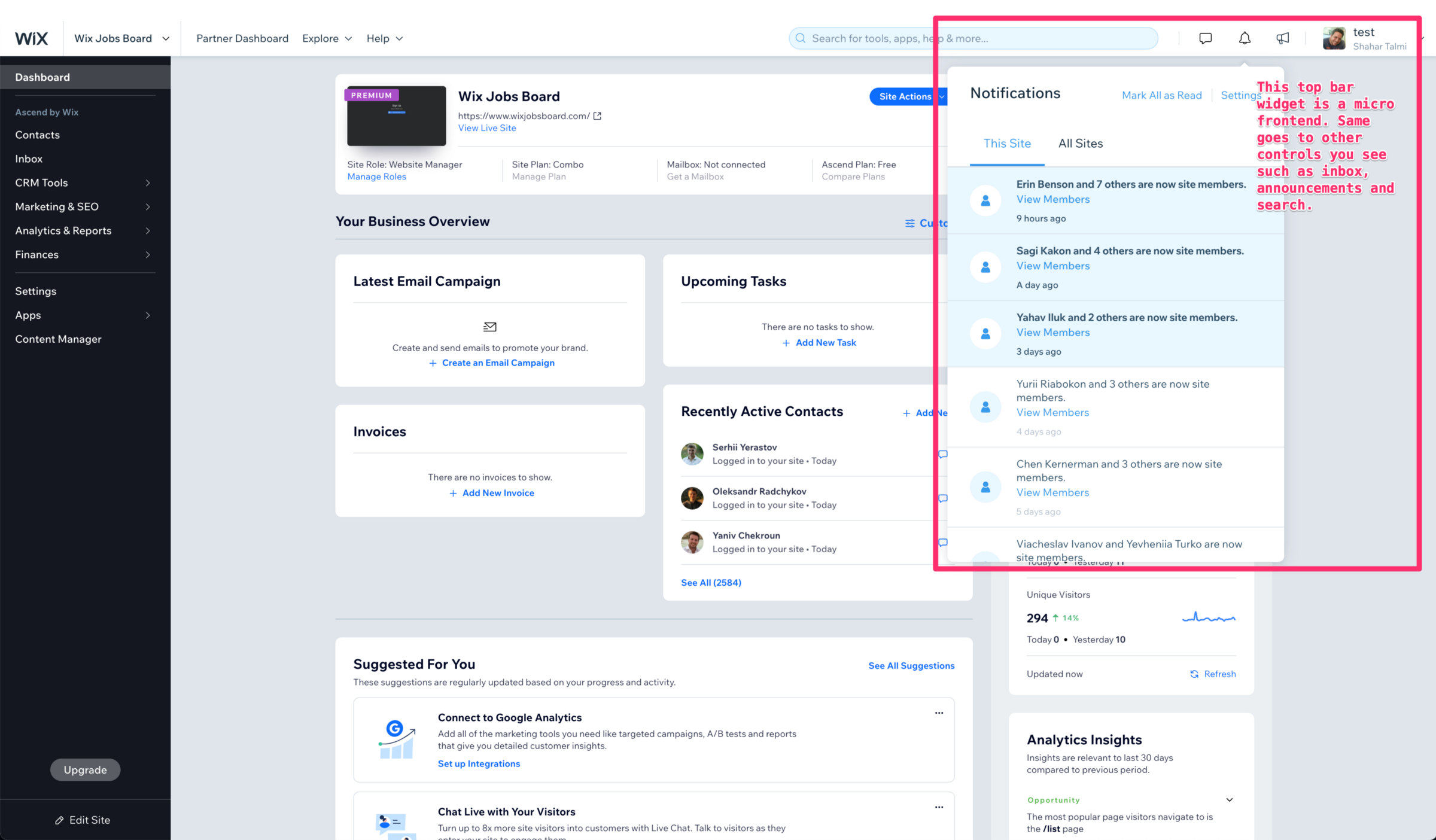
Business Manager (2)
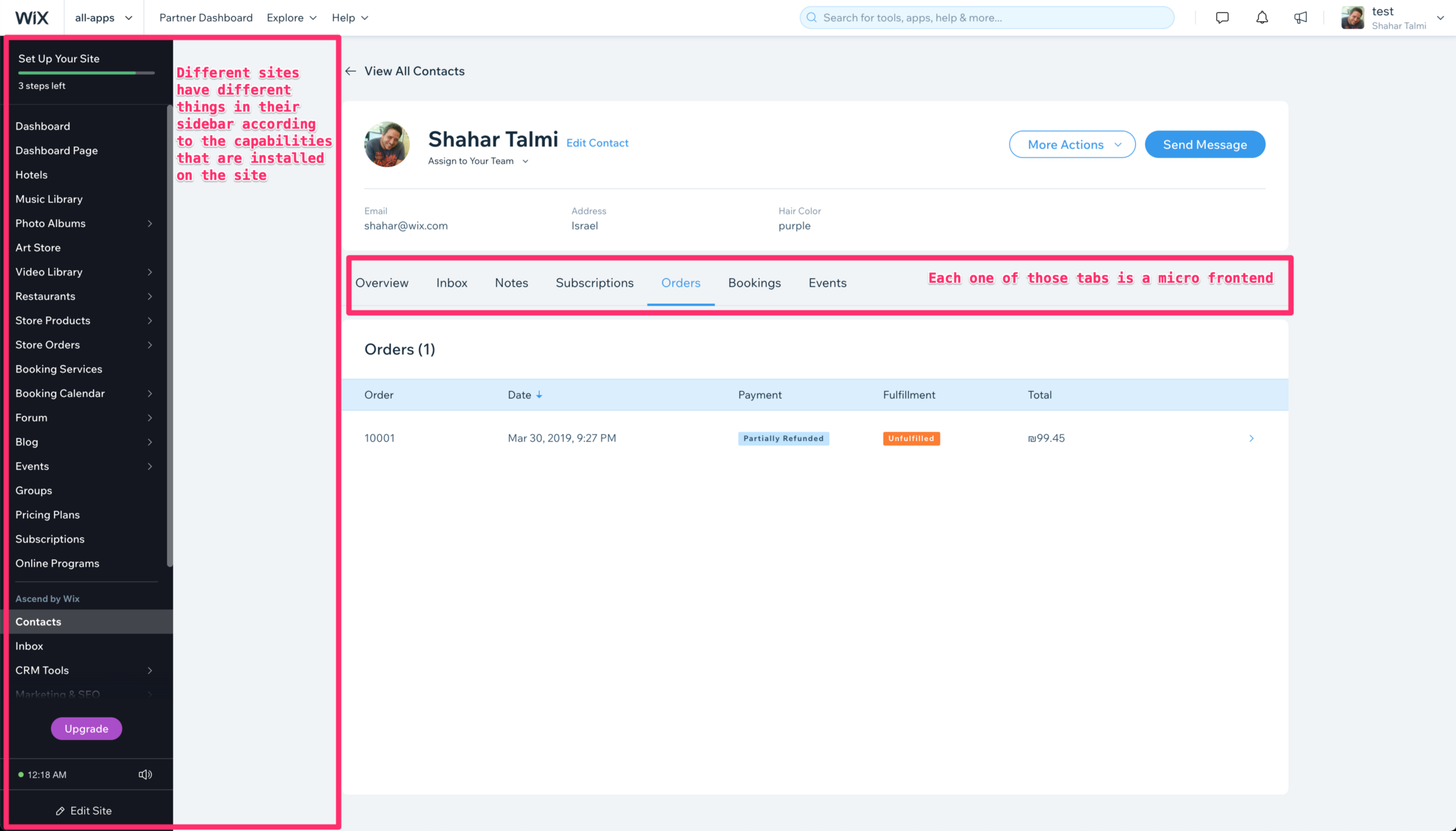
Business Manager (3)
In essence, micro-frontends running inside the business manager can take the form of a full-page experience anchored beside the sidebar, a widget on the top bar, or a widget nested within another micro-frontend.
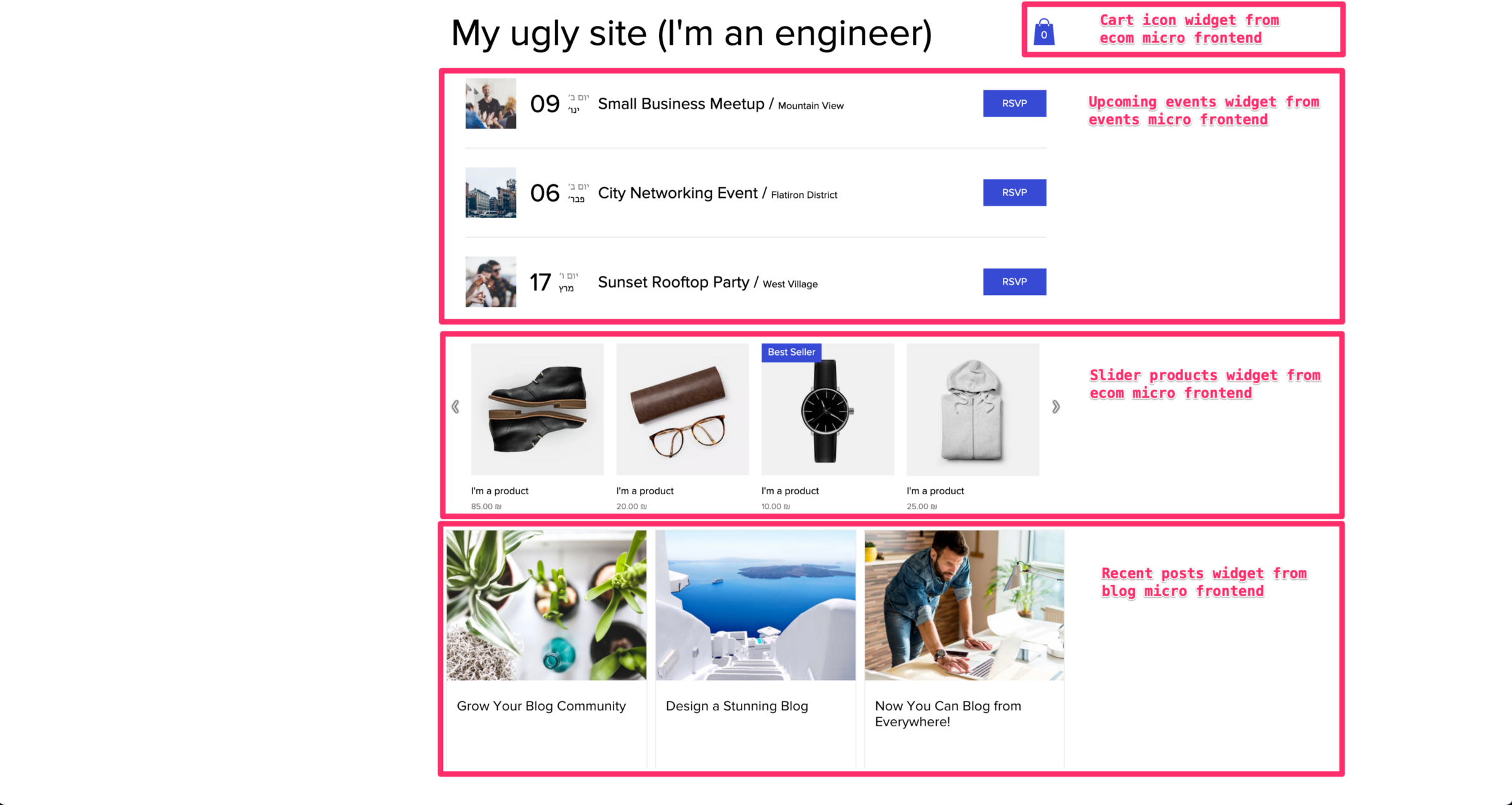
Viewer (1)
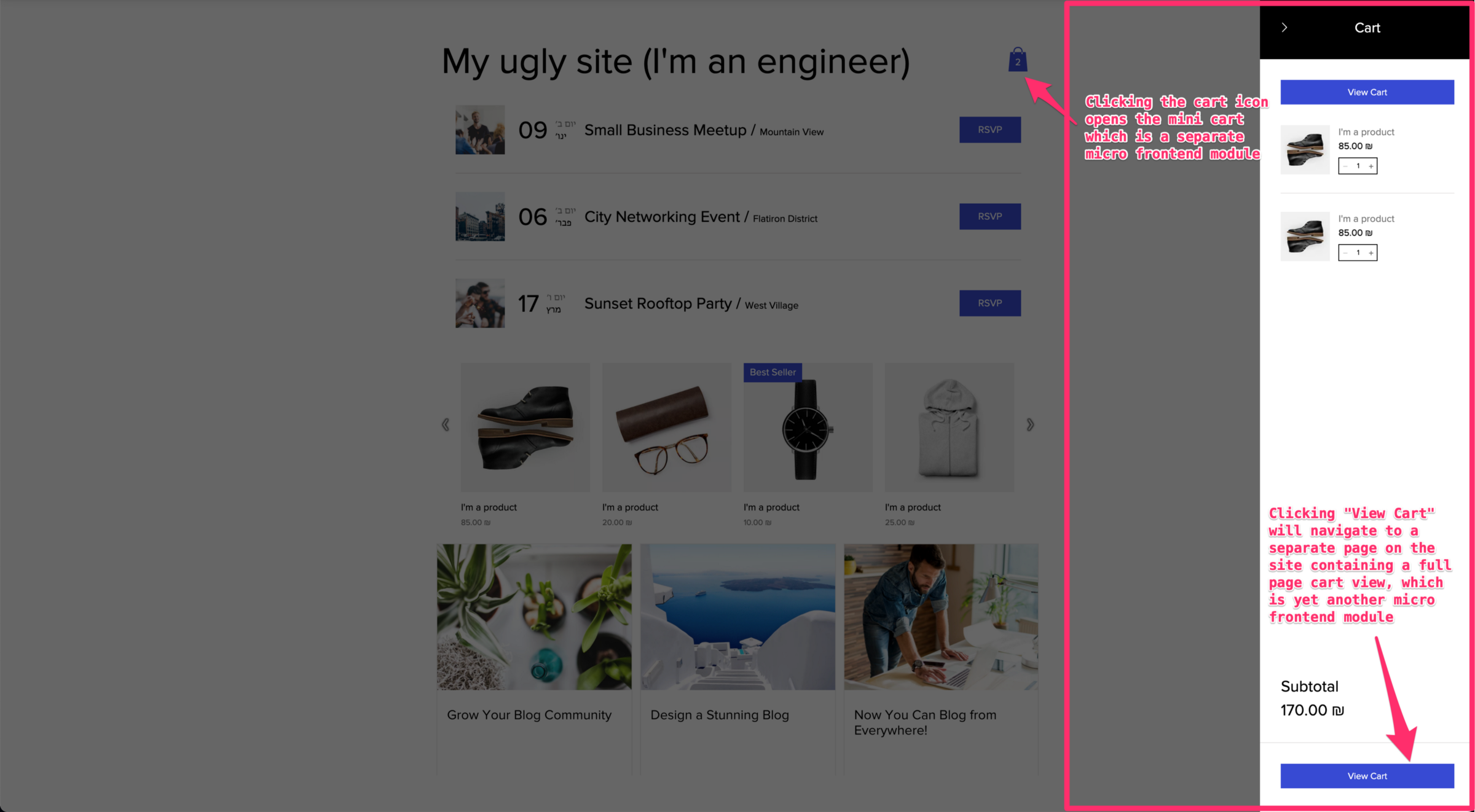
Viewer (2)
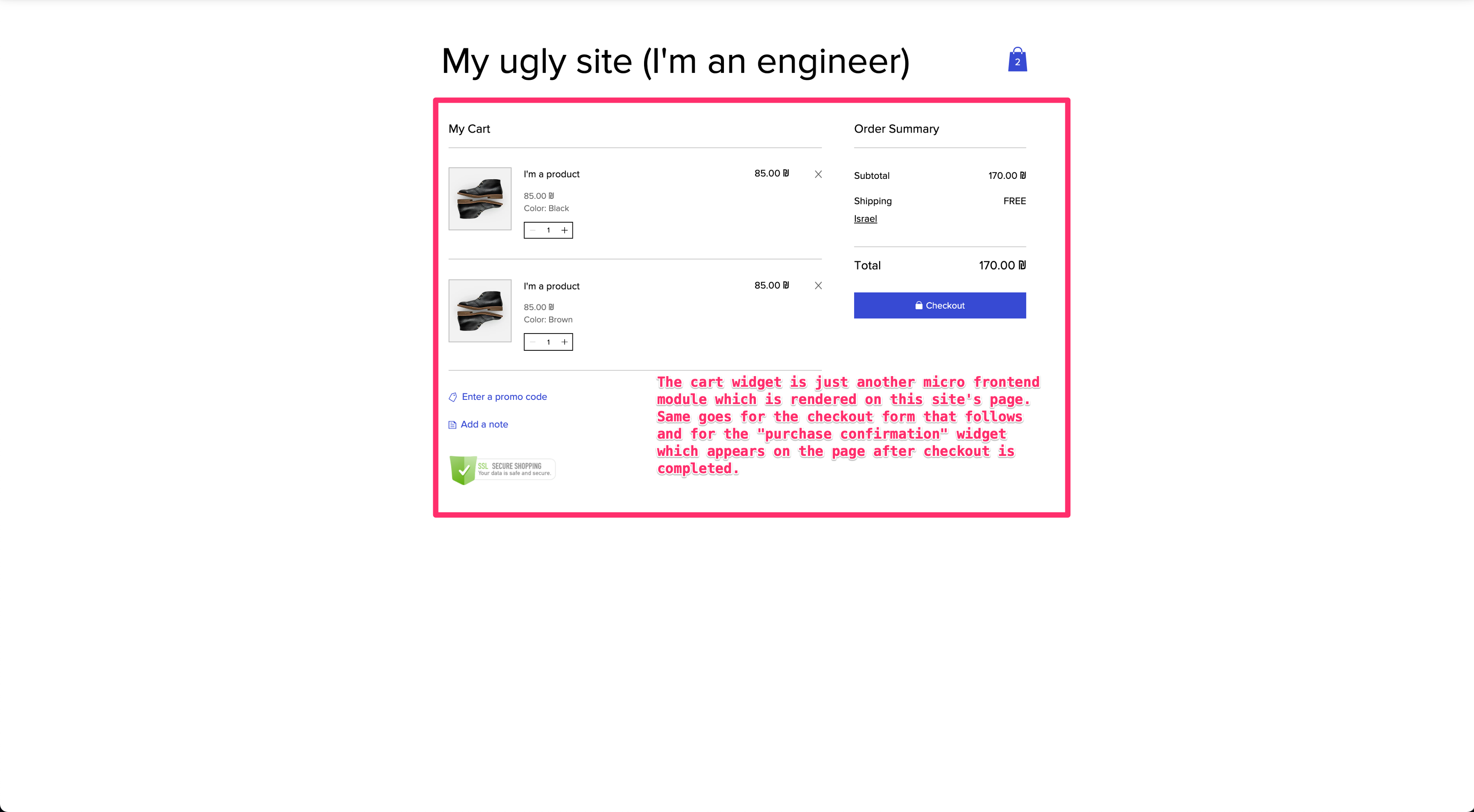
Viewer (3)
The viewer, at its core, takes a hefty JSON generated by the editor and turns it into a dynamic React component tree. Each component originates from the micro-frontend that owns it, fed with the settings and design parameters stored in that same JSON.
Pluggable micro-frontends
With those screenshots in mind, let's tackle the first big hurdle we faced when building the viewer and business manager. Unlike typical apps with a predetermined feature set, ours loads with a totally different set of capabilities based on the environment:
- Individual businesses have various **extensions** installed, and each extension can register a **page** in the business manager's sidebar and router for user navigation.
- Each **extension** can also register other types of business components, like the contact tabs you saw in the *business manager (3)* screenshot.
- Each site page contains different **widgets** that users positioned during editing, and those widgets' placement in the DOM can vary depending on where they were attached.
These aren't demands unique to Wix—they're the classic marks of a pluggable system, and that's exactly what we constructed to address them. Micro-frontends are a natural fit for pluggable setups and played a big part in our solution. Let's break down the core building blocks of a pluggable micro-frontend.
First, we need a central repository for all the info about **extensions**, **pages**, and **widgets** that exist. For instance, we need to know that the **ecommerce** extension includes the **products manager** and **orders manager** pages, each with a dedicated sidebar entry and route in the business manager. We also need to track that the ecommerce extension provides an **orders** contact tab with a title for the contact view. And finally, it offers **products gallery**, **product**, and **cart** widgets that users can drop onto pages (we actually auto-generate pages and place these widgets ourselves so users only customize them—but the editor's internals are out of scope here).
So where does all this metadata live? We have a service called the **dev center**. Every developer at Wix can define a new **extension** there. An extension can hold multiple **components**, each of a different type with type-specific data. Using the **ecommerce extension** as an example, it contains the following components:
- Products manager. **Type**: Business manager page. **Data**: Bundle URL, sidebar label, route path.
- Orders manager. **Type**: Business manager page. **Data**: Bundle URL, sidebar label, route path.
- Orders tab. **Type**: Contact tab. **Data**: Bundle URL, tab title.
- Products gallery widget. **Type**: Viewer widget. **Data**: Bundle URL, plus a pile of editor-related data we won't dig into.
- Product widget. **Type**: Viewer widget. **Data**: Bundle URL, plus editor-related metadata.
- Cart widget. **Type**: Viewer widget. **Data**: Bundle URL, plus editor-related metadata.
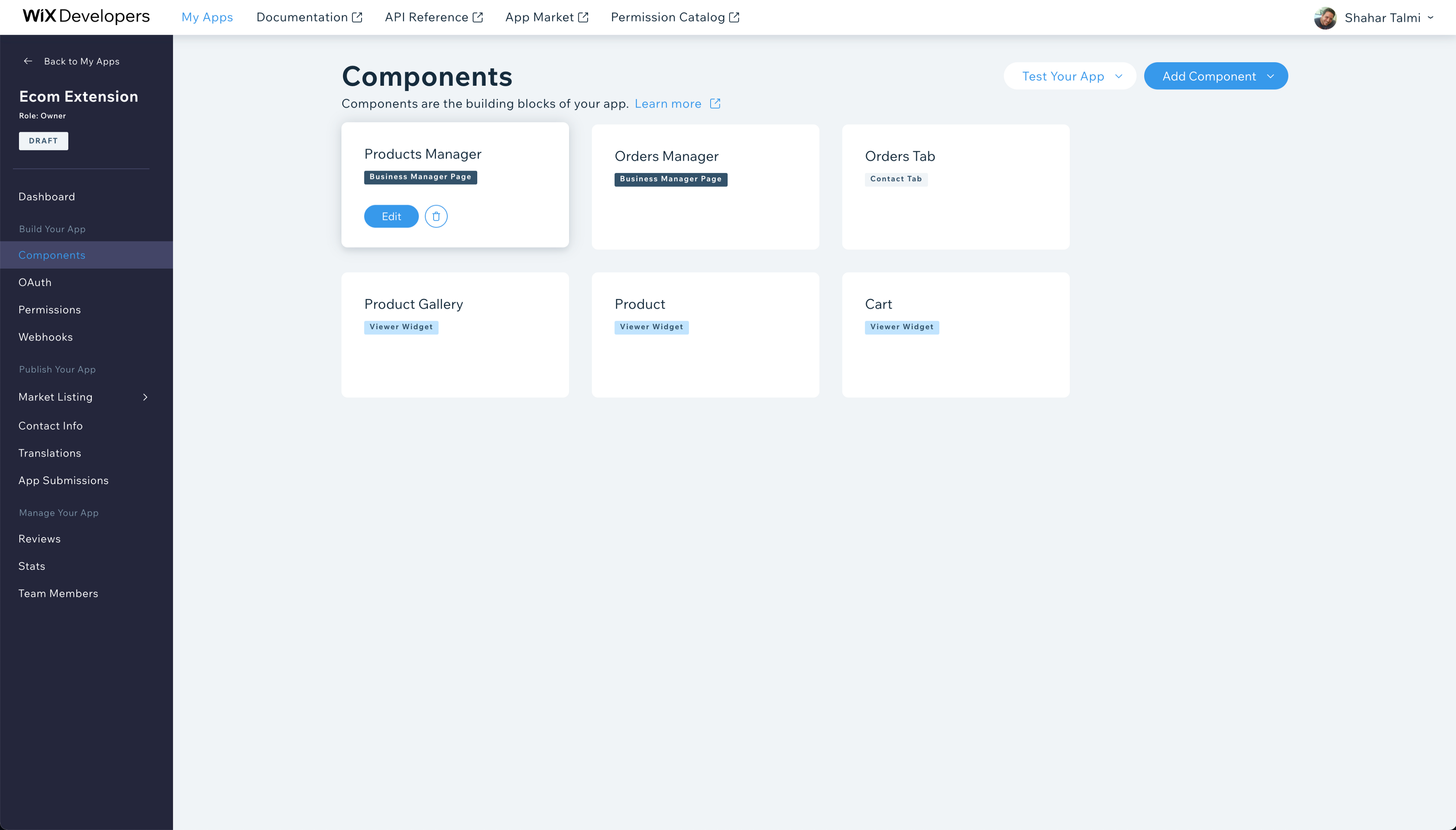
Dev Center (1)

Dev Center (2)
Now, when the business manager spins up, it runs through this sequence:
- Figure out which extensions are installed on this site (a separate service tracks that, and the app market where users install extensions pulls its metadata from the dev center too—we won't go further there).
- For the installed extensions, fetch all **components** of type **business manager page** from the dev center.
- Dynamically add the sidebar links with the right routes based on the components' **data**.
- Dynamically set up the React Router with those routes, so navigation triggers an on-demand import of the correct micro-frontend's **bundle URL** to render the page.
When the business manager's contact page renders, the process repeats almost identically, but it queries for **components** of type **contact tabs** instead. It then populates the tab selector titles from the **components data**, much like the host did with the sidebar. If we wanted, the **components data** for contact tabs could even include a route, letting the contact page set up a nested route in the host's React Router.
The viewer follows a parallel path, with a few subtle differences:
- Determine which **widgets** the page structure requires (a service provides the page layout details).
- Grab the **components data** for those widgets from the dev center.
- Dynamically import the **bundle URLs** for all widgets on the page and build a dynamic React tree matching the structure.
- Repeat this on every page navigation—though note that Wix serves the first visit via SSR, and subsequent navigations happen client-side like an SPA, so this flow can execute on both server and client.
Ultimately, we can distill a general pattern: a pluggable micro-frontend host must discover the **bundle URLs** for what it needs to render, dynamically mount its UI with what's available, and then lazy-load the right bundles at the opportune moment. Crucial here is resisting the urge to prefetch bundles unless it's truly beneficial, and making sure these workflows lean heavily on server-side caching—otherwise performance becomes the bottleneck for such systems almost immediately.
Connecting micro frontends
Up to this point, the focus has been on micro frontends supplying components that the host application—or other micro frontends—render. Each micro frontend accomplishes this by publishing its components into a shared Map, which the host and peers can query by component type. The dev center documents this lookup mechanism, and the associated component data also drives sidebar links, router configuration, and similar UI concerns.
However, there are scenarios where one micro frontend needs to trigger functionality living inside another micro frontend. Consider screenshot viewer (2): clicking the cart icon reveals the mini cart panel. Any viewer widget—even those completely unrelated to the ecommerce extension—can open the mini cart. This works because the same global Map that holds components also serves as a registry for APIs.
Another example comes from the business manager, where the tasks micro frontend invokes the contacts API published by another module:
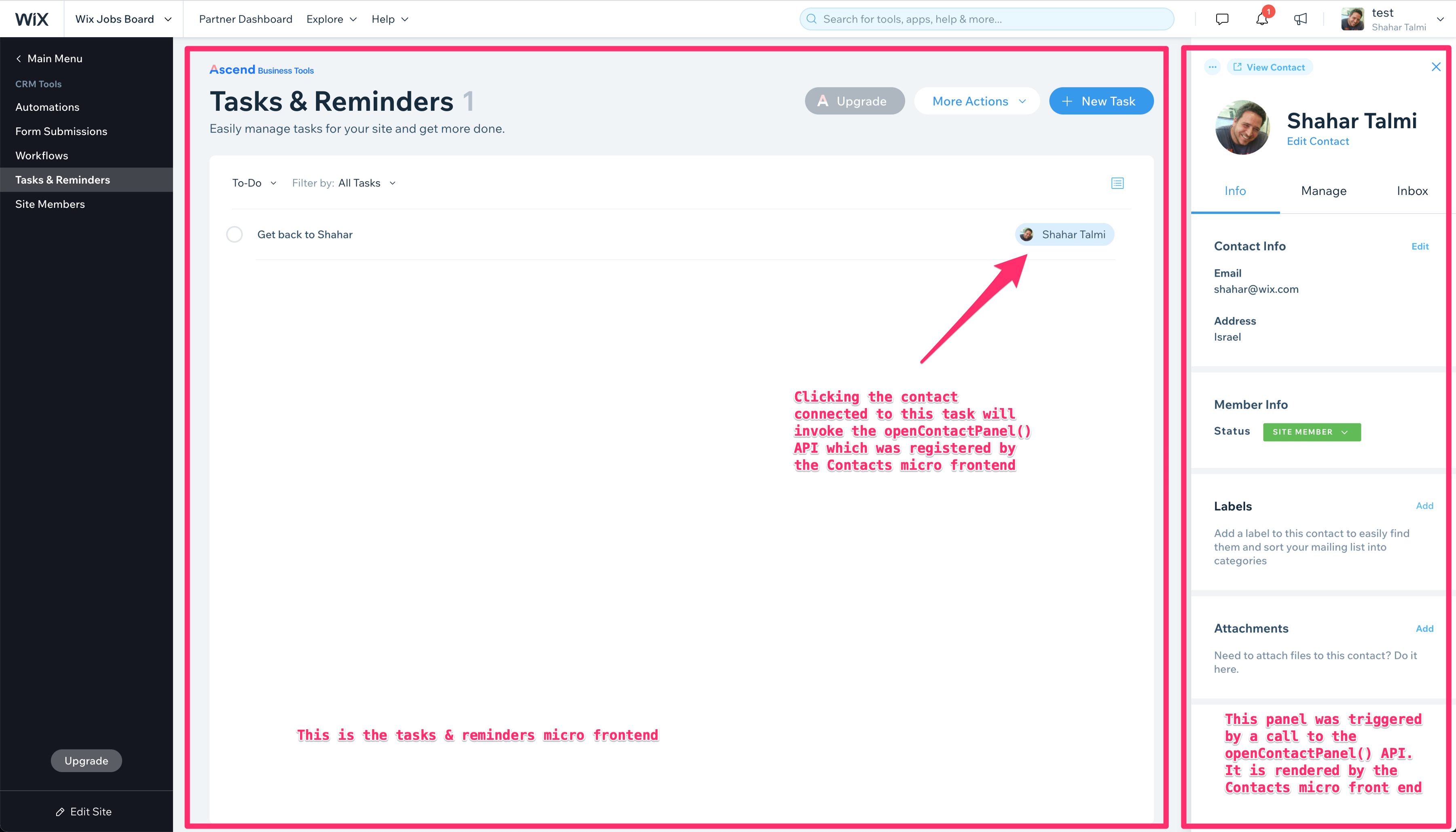
Business Manager (4)
The pluggable architecture described earlier enables all of this. Extensions can declare more than just component entries in dev center with a component type such as business manager page, contacts tab, or viewer widget. They can also register an API provider by using the component type business manager API provider or viewer API provider. In that case, the bundle belonging to the API provider micro frontend registers an API in the global Map rather than a component. We refer to this shared Map as the Module Registry.
Performance considerations
Performance is a major obstacle for micro frontend architectures. Once bundles are deployed independently and owned by separate teams, redundancy tends to creep in quickly:
- Every bundle ends up carrying the same foundational utilities—bi logger, monitoring library, http client, UI components, i18n library, date formatting helpers, state management utilities, polyfills, and more.
- Each micro frontend fetches comparable contextual data from the server, such as information about the site owner, the visitor, the site itself, or various settings.
We rely on two complementary strategies to address these issues:
(1) Externalize and centralize at the host level: Keep the bi logger out of the micro frontend bundles, load it once in the host, and expose it to the micro frontends. Likewise, common context should not be requested by each micro frontend individually; instead, the host fetches it and makes it broadly available. However, this approach comes with substantial trade-offs:
- It effectively establishes a contract between the host and its micro frontends. Those micro frontends depend on the host to supply specific libraries and contextual data. Any change that breaks this contract will break micro frontends, so the contract must remain backward compatible indefinitely—or migrations become very painful.
- This is why we apply this pattern to our bi logger, where the API is stable and we have full ownership. We avoid this approach for external libraries like MobX, where API changes across versions are common and we do not want version upgrades to turn into a cumbersome task.
- Some resources may be needed by only a subset of micro frontends, not the majority. In such cases, externalizing to the host may not be worth the cost if usage is unlikely.
(2) Shared caching at the host level: When the downsides of the first strategy become too significant, we opt to let the first micro frontend that requires a library or server data fetch it, while ensuring subsequent micro frontends reuse the cached client-side copy instead of duplicating the request. Two technologies support this:
- Webpack Module Federation: We declare likely duplicates as shared dependencies. Webpack then downloads these dependencies from the first micro frontend that needs them and reuses the already-loaded version for others. This setup also accommodates multiple versions of the same dependency without conflicts, though we always aim to align micro frontends on identical versions so caching remains effective.
- React Query: Our communication layer internally uses React Query, and the cache is shared across all micro frontends.
Both module federation and react query are relatively new in our stack and still experimental for us. We are in the middle of integrating them, and I will update this article as we gather more real-world experience.
Developer experience
Once we adopted micro frontends, we quickly realized that if spinning up a new micro frontend felt like a chore, developers would simply skip creating new modules and keep piling widgets and features onto existing ones. So we invested heavily in making common tasks—like creating a micro frontend for a business manager page or a viewer widget—extraordinarily simple.
At Wix, a developer starting a new project runs a tool called create-yoshi-app (more on yoshi shortly). The tool asks a few questions—whether the goal is a business manager page, a viewer widget, and so on—and then generates the necessary code. It also configures the new extension and component in the dev center, as described earlier. From there, the generated project only needs to be pushed to GitHub, wired into our CI systems, deployed, and made available to users by clicking a few buttons.
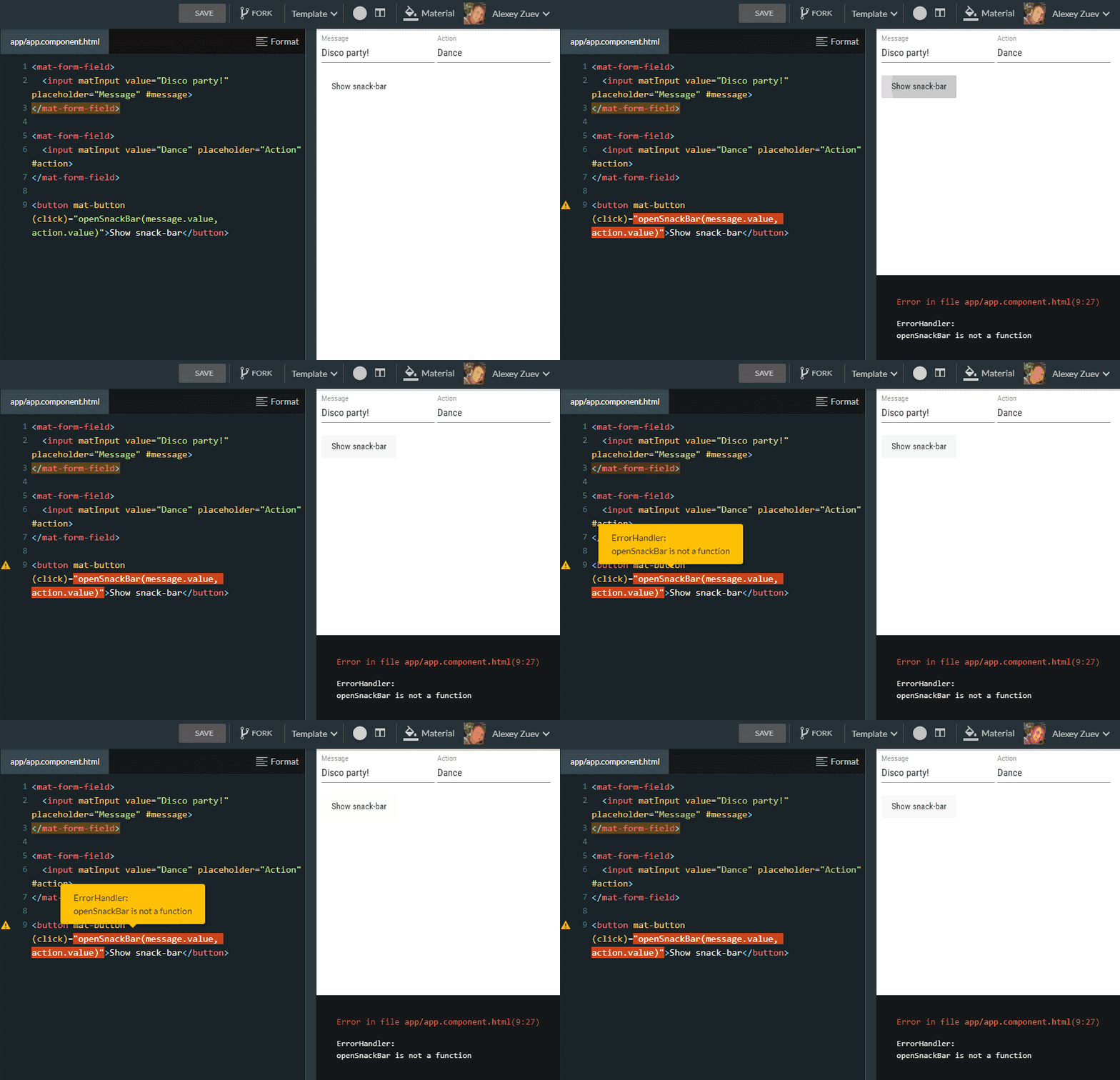
create-yoshi-app
A core design principle for generated projects is zero boilerplate and zero configuration to get started. We drew heavy inspiration from Next.js. For instance, an extension that contains business manager pages consists only of one .ts file per page that exports the page component. Our build tool then compiles that into a bundle carrying all code needed for registration with the business manager and related tasks. A viewer widget is likewise just a .ts file exporting the widget. In the past we also allowed JavaScript generation, but over the last two years we have moved exclusively to TypeScript.
The build tool that handles these projects is called yoshi. Underneath, it runs a deliberately configured Webpack setup that ensures es modules and css modules work correctly. Both are critical for micro frontend isolation—micro frontends must never pollute the global namespace, or debugging becomes extremely painful.
yoshi also abstracts a great deal of complexity—some of it Webpack-related, some of it tied to our platforms—offering developers very few customization knobs. Over the years this has drawn complaints from Wix developers who wanted to tweak their Webpack configuration differently, but this rigidity is precisely what allowed us to introduce module federation and keep externalized dependencies out of bundles. It also made it possible to upgrade Webpack three major versions across hundreds of projects with nearly zero manual effort. Beyond that, yoshi exposes a wealth of functionality that we will cover in the following sections.
One notable example: when running in CI, yoshi generates Webpack stats and uploads them to a service we call dumbledore. Developers can connect to dumbledore and inspect their bundle stats using Webpack bundle analyzer over time—for every commit and every PR. They can watch how their bundles evolve, and even see visual diffs between two versions to understand exactly what changed in the stats.
Dumbledore (1)
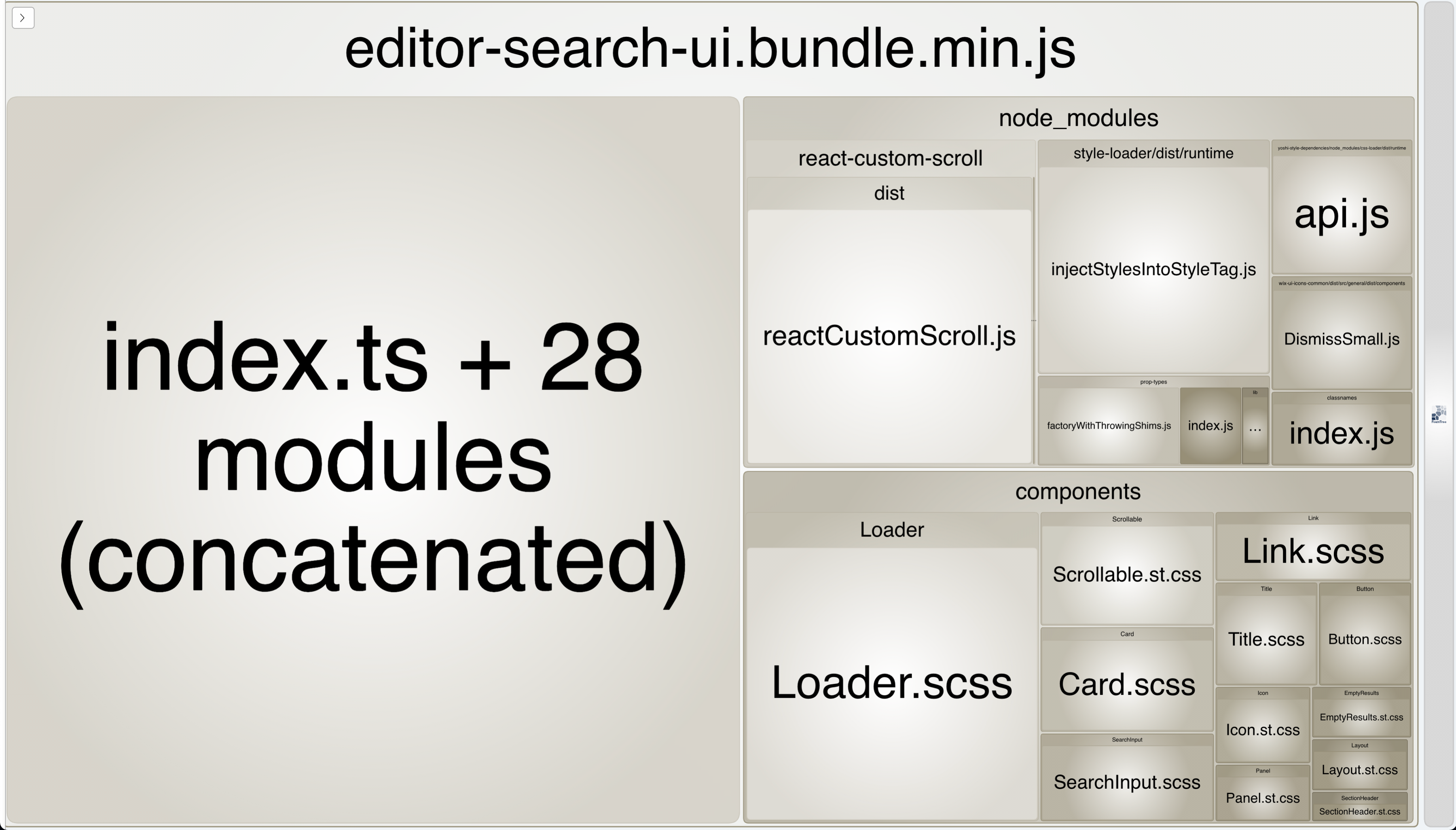
Dumbledore (2)
Local development
Developing a standalone application locally usually follows a familiar pattern: run npm start, and a development server spins up, letting you open a browser at localhost to see the app running. Modern build tools also give us the convenience of seeing every code change reflected in the browser instantly, without a manual refresh—this is known as HMR (hot module replacement).
Micro frontends do not work that way. They are not standalone applications; they require a host to render them. Over the years, we tried several approaches to solve this:
- At first, we used an HTML page that rendered the hosted component as if it were a standalone app. But this forced everyone to write mocks for all the integrations with the host and with other modules.
- Next, the platform team provided a host test kit that ran a local instance of the host, per the config pointing to the local extension rather than pulling it from dev center. Maintaining that test kit was difficult, and it still did not adequately cover integration with other modules.
- Eventually, the simplest and most confidence-inspiring approach turned out to be running the real production host with special parameters that override the dev center configuration.
Let me explain how that last approach works in more detail. As mentioned earlier, the hosts (business manager and viewer) decide during render time which micro frontends should be present, based on their component data. That component data includes bundle URLs along with other metadata the host UI needs, such as sidebar links and routes. So during development, we open the real host and pass a special query parameter that effectively says: here is a JSON blob with some component data, merge it with what you get from dev center, as if it came from dev center. This lets us point the bundle URL of an existing component to localhost.
yoshi manages this entire flow without developers needing to know the internals. Developers just run npm start, and yoshi starts the dev server and opens a page where they pick a site from a list—for business manager or viewer, depending on what they are building—and then opens it with the correct parameters, handling HMR transparently.
Local development with Yoshi
The yoshi magic continues beyond that point. Earlier we mentioned that the viewer performs SSR for the first page. That means the rendering server needs to fetch the bundle from your local machine, which is not as easy as simply placing a localhost URL in a script tag. Happily, yoshi establishes an http tunnel that lets the rendering server retrieve the bundle from your machine. This is also handy when you want to check your changes on a mobile device rather than on the machine where you are coding.
Previewing Deployments
The same mechanism that lets us override components data is also used to swap bundle URLs so they point at our dev server. This enables us to preview any PR or arbitrary commit as if it were already live. For our team, this has been a major workflow improvement: every PR for any micro frontend gets uploaded automatically to the CDN by the build system, and a link is posted as a comment on the PR. When the reviewer follows that link, they see a screen where they pick a site from a list, and once selected, they are redirected to the business manager or viewer with the proper override parameters included.
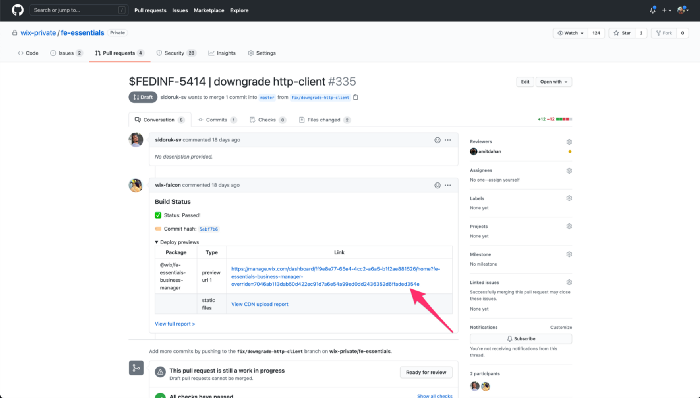
Deploy Preview
A Chrome extension we call Wix Insiders adds another layer to this. Developers can use it to preview any commit or PR of any micro frontend on the page they are currently viewing. This has proven particularly useful for tracking down regressions — we can hop backward through commits until we find the first one where the problem appears.
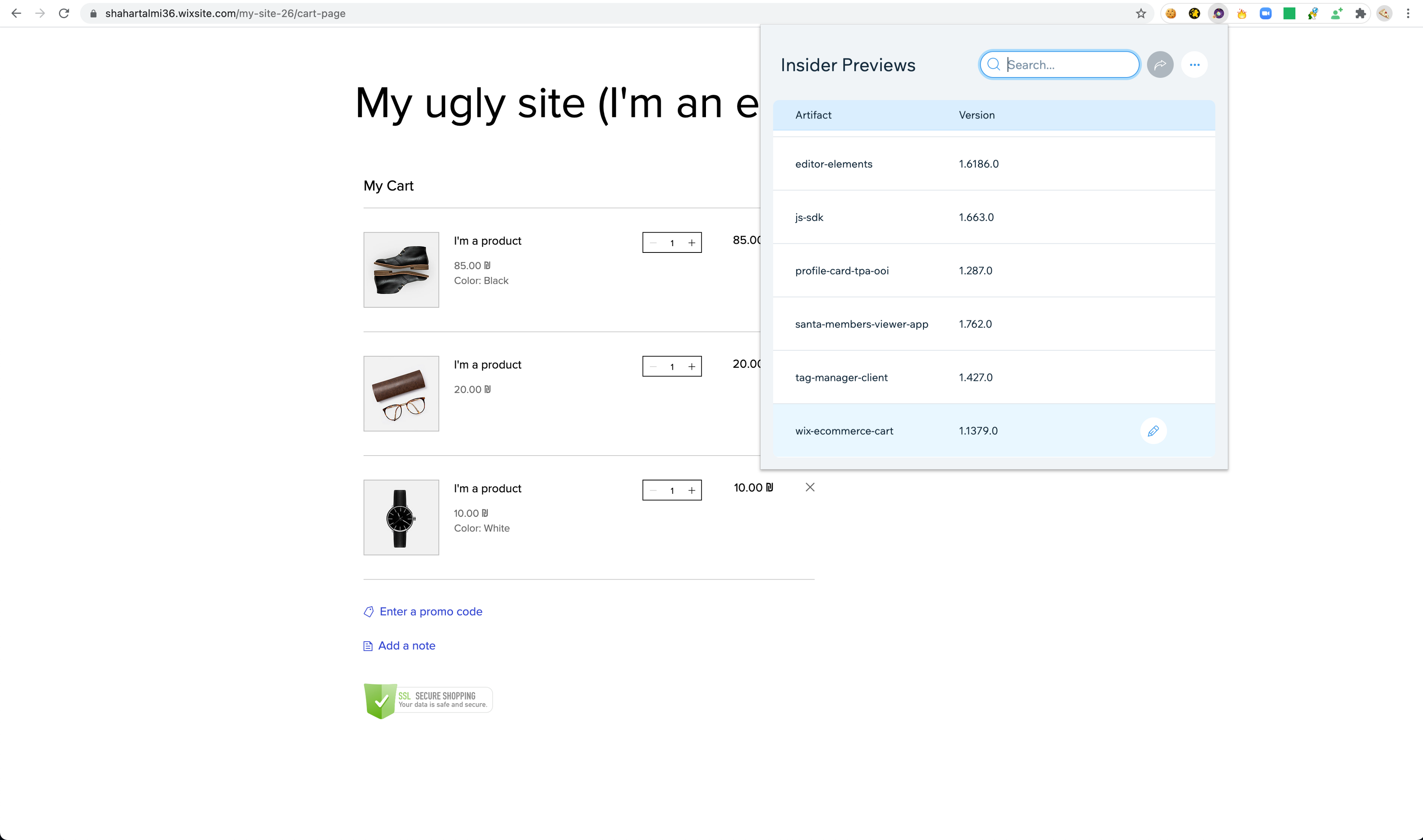
Wix Insiders (1)
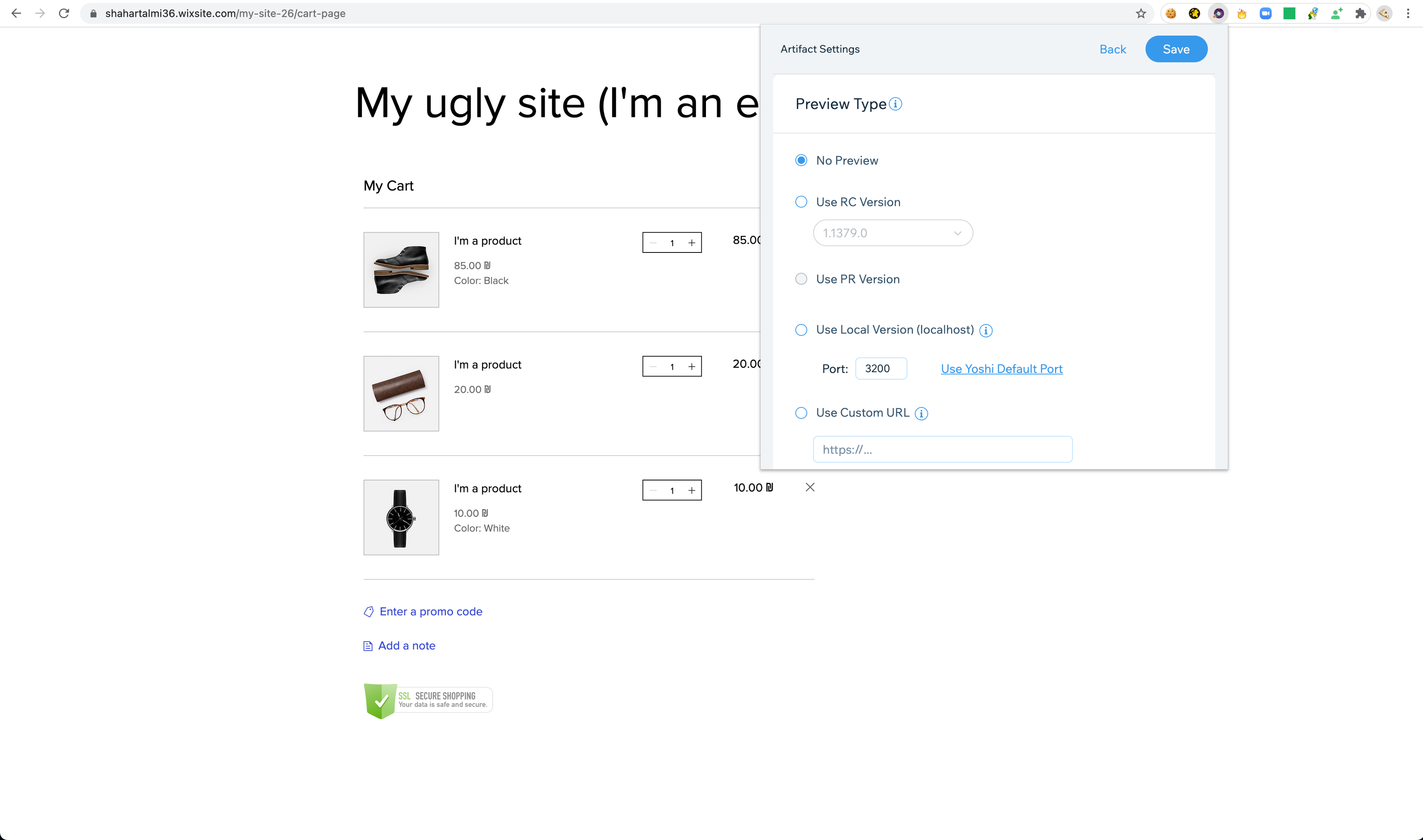
Wix Insiders (2)
End to End Testing
The deploy preview mechanism is also central to our e2e testing strategy. Each micro frontend runs its own e2e suite against the real production host, passing the right parameters so the host renders the version of the micro frontend under test. With each build, CI creates a deploy preview and runs the tests against it. Developers can also spin up a deploy preview locally and run the same e2e tests from their machines.
This approach is somewhat contentious. The conventional wisdom says e2e tests should run against an isolated instance of the system, spun up specifically for testing. But after years of trying variants of that idea, we concluded it just isn't worth it. In practice, that path ends up mocking parts of the system, which means the tests are not truly end to end anymore.
At Wix we place a lot of faith in e2e tests. We don't rely on them exclusively — we try to maintain a healthy balance with component and unit tests — but we do have a substantial number of them. To keep them fast, we built a tool called Sled that runs e2e tests in parallel on AWS lambdas. This makes our e2e suites extremely fast. And because they are fast, Sled can afford to implement sophisticated retry logic, which greatly improves test stability. In short, Sled targets the two classic pain points of e2e tests: performance and flakiness. The third pain point, debug-ability, is on our roadmap, and we have some ideas we're excited about.
Sled also tackles a trickier problem specific to micro frontends: dependencies. A change in a host might pass its own e2e tests but quietly break one of the micro frontends running inside it. Conversely, a change in one micro frontend might pass its tests but break another micro frontend that depends on its API or hosts it internally. Our solution: any micro frontend (A) can mark some of its e2e tests as verifying an integration with another micro frontend (B). Sled tracks this, and when B changes, it not only runs B's own e2e tests but also A's integration tests. If those fail, B's build fails.
Sled also enables benchmarks via a tool called Perfer. Perfer runs a set of scenarios multiple times in parallel, measures how long they take, compares them against benchmarks from previous commits, and fails if performance has degraded. We track a wide range of KPIs: TTI, JavaScript coverage, number of requests, bytes transferred, and Lighthouse score. This is critical for micro frontends — with so much happening on a single page, it's nearly impossible to trace a regression back to its source after the fact. We need to catch degradations the moment they happen, which means every micro frontend must include such benchmarks.
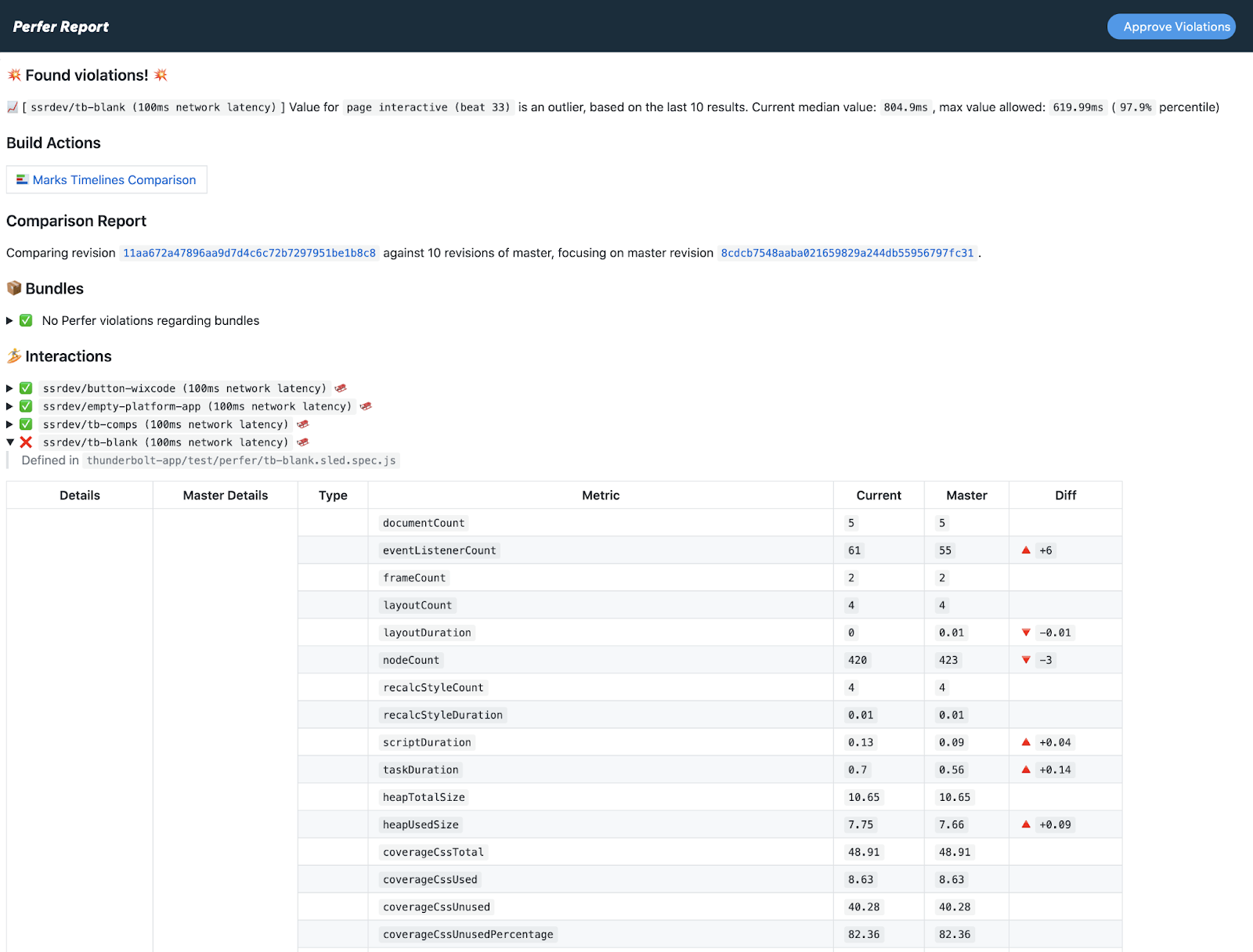
Perfer Report
Monitoring
One of the big downsides of having many micro frontends on one page is that when something breaks — a page fails to load or an exception starts appearing — it's hard to tell which micro frontend caused it and which team should own the fix.
To make sure errors land in the right place, each extension has its own Sentry dashboard. Hosts wrap their components in error boundaries that report failures to the appropriate dashboard. The Sentry dashboard identifier for a micro frontend is defined in the components data in the dev center.
The same error boundary pattern carries over to our communication layer, catching errors that come from asynchronous flows initiated by HTTP requests from a micro frontend. We're also exploring other ways to infer the right dashboard for an error, such as inspecting the call stack. But we accept that we can't cover every case — some errors will inevitably end up on the host's Sentry dashboard. In those situations, the host team does the triage and reaches out to the offending team once they've identified the root cause.
We don't stop at error monitoring. We also run an internal system called FedOps that watches for proactive events from widgets. Take the product widget in the viewer: it has an "add to cart" button. When a user clicks it, the widget reports a "start add to cart" event to FedOps. Once the async flow finishes, it reports a "done add to cart" event. Since this operation should never fail, FedOps alerts the ecommerce dashboard if the success rate dips even slightly. In many cases, FedOps catches issues before Sentry even reaches its alert threshold — or before errors are routed to the right destination.
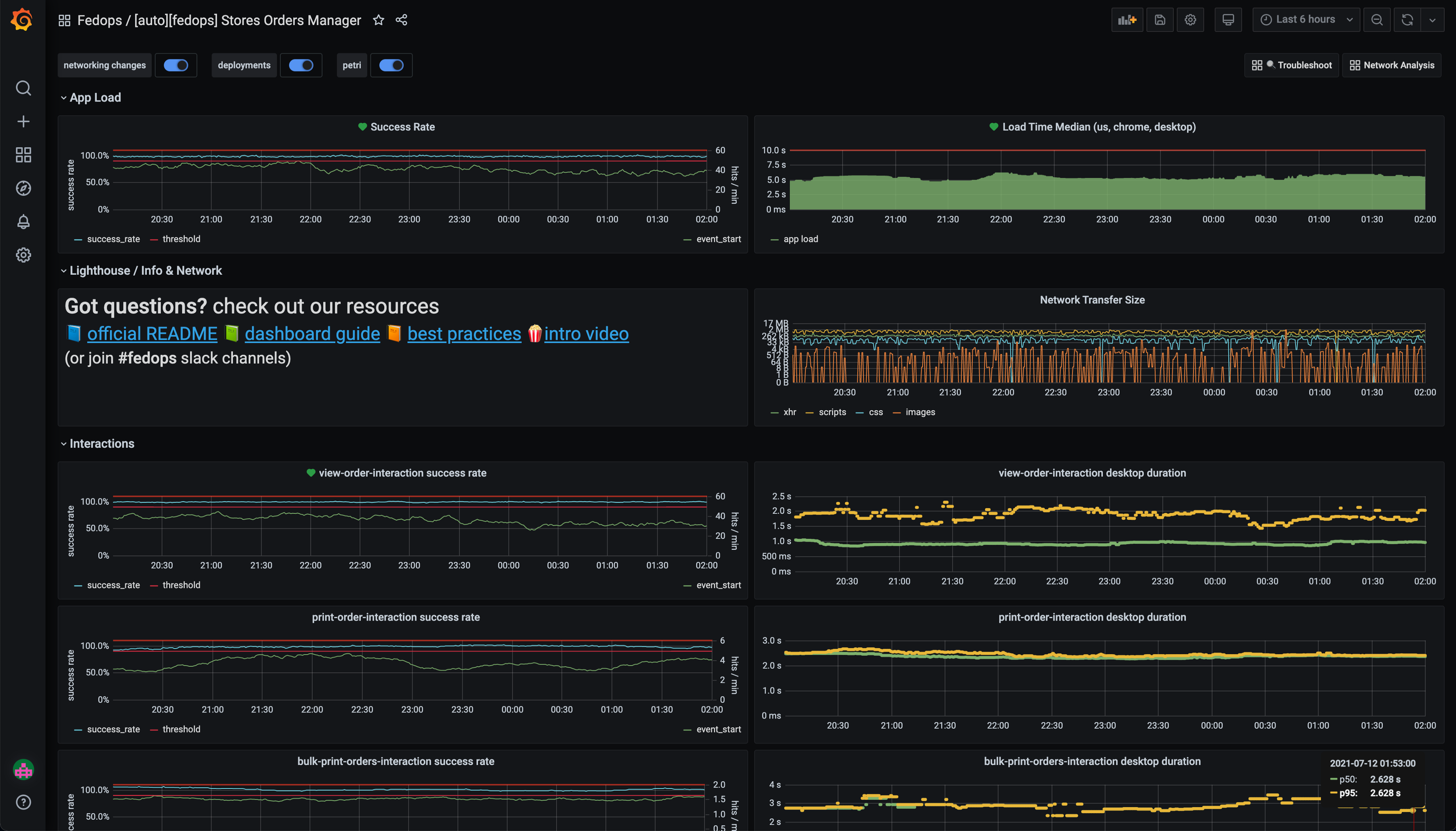
FedOps Dashboard
Gradual Rollout
Wix uses a gradual rollout system called Ark. It incrementally exposes a new version to more users while keeping an eye on alerts from both the micro frontend's monitoring dashboards and the host's. As long as no alerts fire, Ark gradually expands the rollout. If an alert is triggered, Ark automatically rolls back to the last known good version. Ark is also good at identifying users: it can automatically roll out the latest commit to Wix employees. That means when employees use Wix, they see the newest commits and can report problems before a version ever reaches real users.
But if you remember from earlier sections, the bundle URL for a micro frontend comes from the components data in the dev center. So how does Ark control which version gets served? I'll admit, I simplified things earlier. In reality, the URL in the dev center looks something like this: https://cdn.domain.com/ecom-products-gallery/${version('ecom-products-gallery')}/bundle.js
When the host receives this templated URL, it hands it off to a mechanism that returns the real URL with the correct version of ecom-products-gallery. That mechanism is a library provided by the Ark team, and every host uses it. Under the hood, this library subscribes to rollout events so it knows which micro frontend versions are rolling out and to which population. That allows it to fill in the right version. The internal details are a bit involved, so we won't dive into them here.
Enforcing Standards
Micro frontends give teams a lot of freedom, which we love. But that freedom comes with challenges. When we need to make cross-cutting changes — deprecating an old library version or adopting a new mechanism — we can't just do it in one commit the way we would with a monolith.
That's why we built an internal tool called CI Police. It lets us define rules that run during the build of every micro frontend, checking whether each one conforms to the standards we want to enforce. A rule is just a JavaScript function that does whatever is needed to validate compliance. Usually, rules look at package.json or inspect the bundle, but they can do almost anything.
Some of our more elaborate rules verify that each widget has at least one Sled benchmark test, or that every bundle includes a bundle size check. We also use CI Police to enforce that no more than two versions of a shared library exist in module federation, which keeps sharing effective.
To avoid disrupting day-to-day work, CI Police has several soft-landing features. It can send Slack notifications to offending teams before it starts breaking their builds. Teams can also request a grace period. The CI Police dashboard is easy to use: we can see how many projects are violating a rule, track how projects gradually comply, and most importantly, check the behavior of a rule before we enable notifications, ensuring it works correctly.
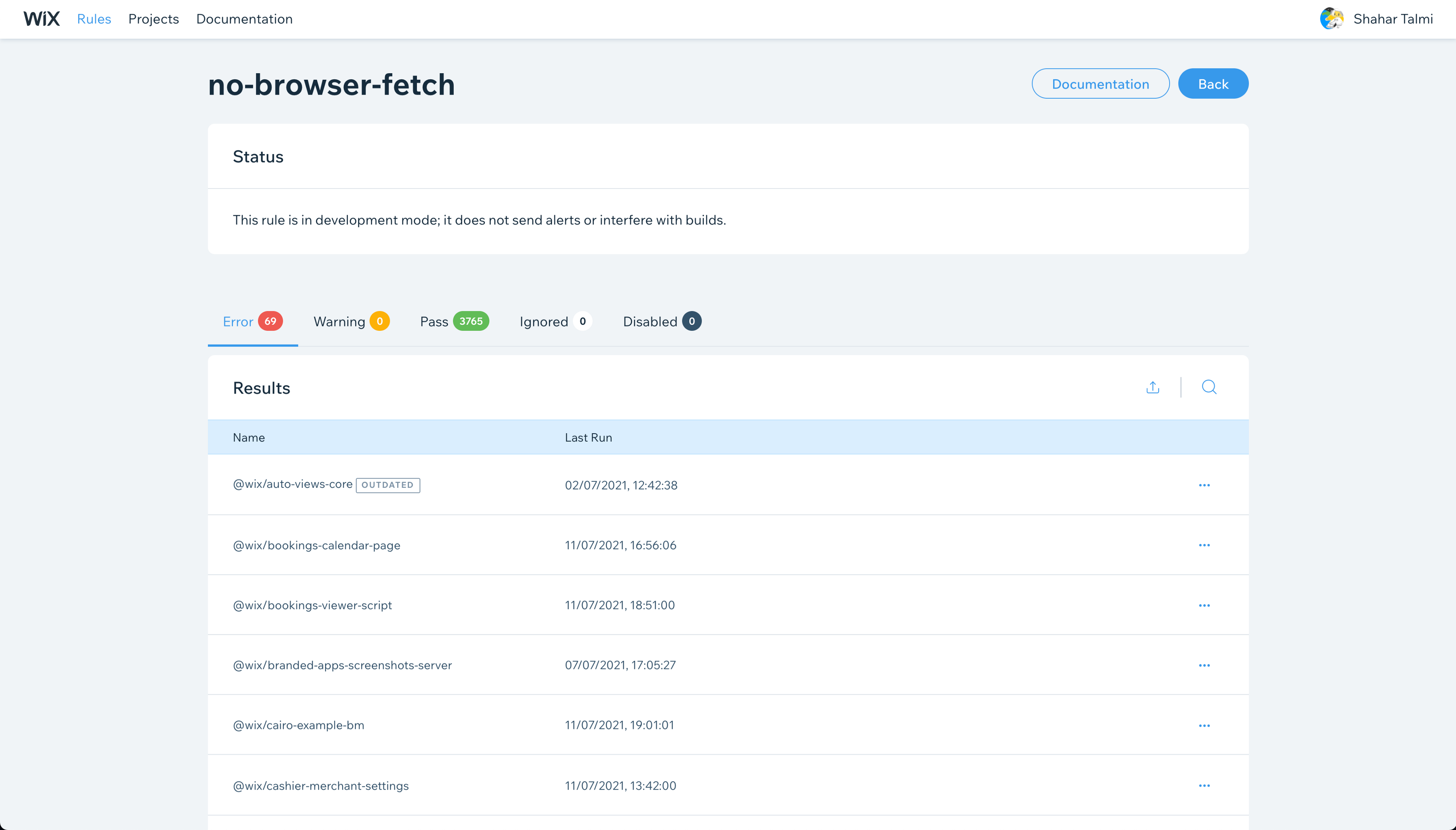
(CI Police — Dashboard)
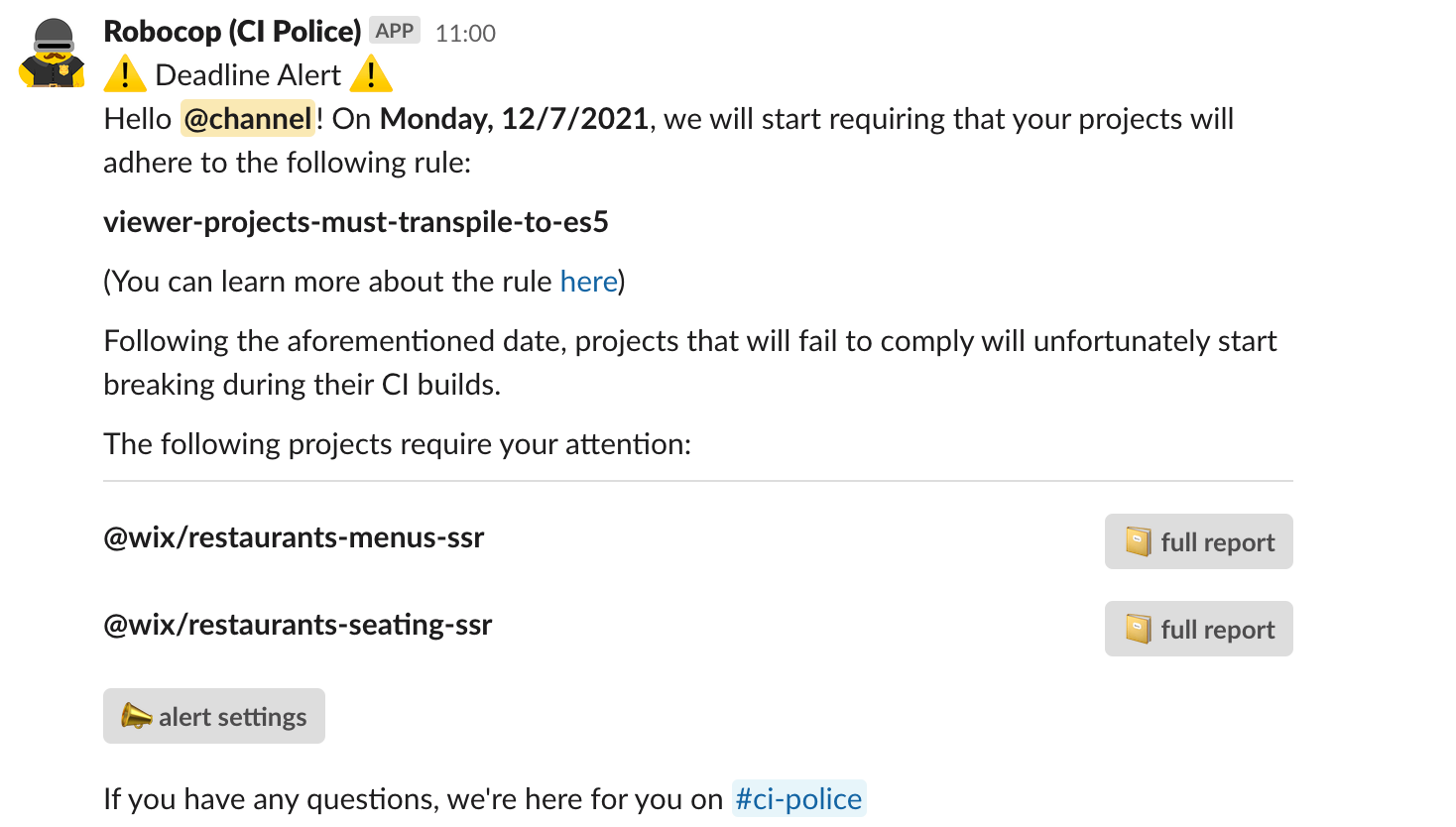
(CI Police — Slack notification)
Soon, we plan to ship codemods along with rules, so CI Police can not only flag offending projects but also open a PR automatically with a fix.
Third Party Micro Frontends
Wix is an open platform, which means we want external developers — people who don't work at Wix — to be able to build business manager pages and viewer widgets. But we still have to keep our users safe. That's why external micro frontends work the "old school way": they're sandboxed inside an iframe. Here's how it works: we have a special micro frontend business manager page that hosts the iframe of the externally developed page and bridges all of the business manager's APIs to it using post messages.
The same goes for viewer widgets, though for the viewer this is not a long-term solution — iframes bring performance problems, SEO issues, and UX friction. We're working on a much better set of solutions for external viewer widgets, and we'll tell you more about that in future articles.
To enable external developers, we opened the dev center publicly at dev.wix.com. External developers can define their own extension with their own components — with one difference. Instead of creating a business manager page, they create a business manager iframe, and instead of providing a bundle URL, they provide an iframe URL. Everything else is largely the same. Their entries show up in the business manager sidebar and router. When rendered, the business manager loads an "iframe container" micro frontend that renders their iframe and bridges their API calls.
Conclusion
As you can see, we put significant effort into solving the many problems micro frontends introduce. We believe this approach brings tremendous velocity and independence to teams working on a massive scale. We hope to one day release some of these tools publicly — we think many people would find them useful. A lot of the solutions we built are also beneficial for monoliths, but there's no question: micro frontends come with a cost.
Over the last two years, we invested heavily in a build system we call Falcon, designed for smartly building very large mono repos. Yes, we looked at Bazel, but for reasons outside the scope of this article, we went with an in-house solution. Falcon is important to us because even in the micro frontend world, we want to keep a mono repo per extension. At the same time, it lets us experiment with alternative setups — such as having one large piece built and deployed as a whole.
I'm not saying we've given up on micro frontends — that would be very far from the truth. We're happy with them and keep investing in them. However, I think it's important not to fall completely in love with one approach. We should always be open to seeing if other things can work.
The most important takeaway for me is that tackling so many infrastructure challenges has been an incredible experience — the kind only engineering organizations living on the bleeding edge can face. And I believe there are plenty more such challenges ahead of us.