Unified Control State Change Events in Angular 18
Angular 18 ships with a fresh event emitter named events, giving developers finer-grained oversight of form data flow. This addition makes it possible to pinpoint exactly which control triggered a change and to tap into form-level submit and reset notifications.
The events property lives on the AbstractControl class, meaning every subclass inherits it: FormControl, FormGroup, FormRecord, and FormArray.
Events from an individual form control
Let’s see the events emitter in action. The example component below defines a single FormControl called nameCtrl.
import { Component, OnInit } from "@angular/core";
import { FormControl, ReactiveFormsModule } from "@angular/forms";

@Component({
  selector: "app-form-control-events",
  standalone: true,
  imports: [ReactiveFormsModule],
  template: `
    <label>Name: </label>
    <input type="text" name="name" [formControl]="nameCtrl" />
  `,
})
export class FormControlEventsComponent implements OnInit {
  nameCtrl = new FormControl<string>("");

  ngOnInit(): void {
    this.nameCtrl.events.subscribe((event) => {
      console.log(event);
    });
  }
}
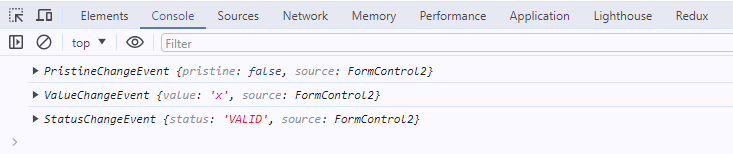
This control is bound to a name <input> element. A subscription to events logs whatever the control emits. Suppose we type a single character, say 'x'.
The console shows three events being fired:
A fourth event appears once we blur the <input> element.
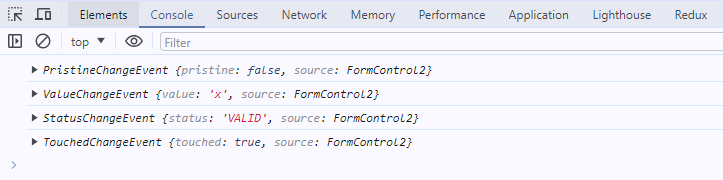
These four event types are: ValueChangeEvent, StatusChangeEvent, PristineChangeEvent, and TouchedChangeEvent. Each one extends the ControlEvent abstract class. Every event object carries two properties. The first is source, which references the control that initiated the event—in this case, nameCtrl. The second property differs by event type, either holding the control’s value or its state.
Looking back at the example:
ValueChangeEvent — mirrors the older valueChange observable. It carries the control’s latest value. By default, it fires whenever the value changes.
StatusChangeEvent — akin to statusChanges. It reports the current validation status. Like ValueChangeEvent, it also fires on every value mutation, even without any validators attached. For controls with async validators, it emerges twice: first with the status set to PENDING, then again once validation completes.
PristineChangeEvent — activates on the initial user-driven value change, whether or not the control started with a value.
TouchedChangeEvent — triggers on first user interaction. This usually occurs when the user leaves the field, even if the value stays the same.
With a grasp on user-triggered events, let’s examine the Reactive Forms API. Methods such as setValue or disable let us modify values and statuses. These accept options like onlySelf or emitEvent to tweak default behavior. The same options now apply to ControlEvents as well. Methods like markAsTouched, markAllAsTouched (for groups and arrays), markAsDirty, markAsPending, markAsPristine, and markAsUntouched all honor an emitEvent flag. Omit it or set it to true, and events are emitted; set it to false, and they are suppressed. But here’s the catch—the control’s state still updates. Only the event dispatch is silenced, as demonstrated below:
const control = new FormControl("Lorem ipsum");
// control.touched -> false

control.markAsTouched({ emitEvent: false });
// control.touched -> true
Even so, the touched property changed.
Events from a group of controls
We’ve explored ControlEvents on a single FormControl. Now it’s time for groups and arrays. Since these classes inherit from AbstractControl, they emit ControlEvents as well. Here’s where the feature truly shines. Previously, we received new values or states for the whole group, but the originating control remained a mystery. With ControlEvents, we can refer to the specific control behind the change directly in our subscription. That’s invaluable for reacting to particular fields. Take this example:
import { Component, OnInit } from "@angular/core";
import { FormControl, FormGroup, ReactiveFormsModule } from "@angular/forms";

@Component({
  selector: "app-form-group-events",
  standalone: true,
  imports: [ReactiveFormsModule],
  template: `<form [formGroup]="form">
    <label>Name: </label>
    <input type="text" name="name" formControlName="name" />

    <br /><br />

    <label>Surname: </label>
    <input type="text" name="surname" formControlName="surname" />

    <br /><br />
    <label>Age: </label>
    <input type="number" name="age" formControlName="age" />
  </form>`,
})
export class FormGroupEventsComponent implements OnInit {
  form = new FormGroup({
    name: new FormControl("John"),
    surname: new FormControl("Doe"),
    age: new FormControl(30),
  });

  ngOnInit(): void {
    this.form.events.subscribe((event) => {
      console.log(event);
    });

    this.form.get("name")?.setValue("Jane");
  }
}
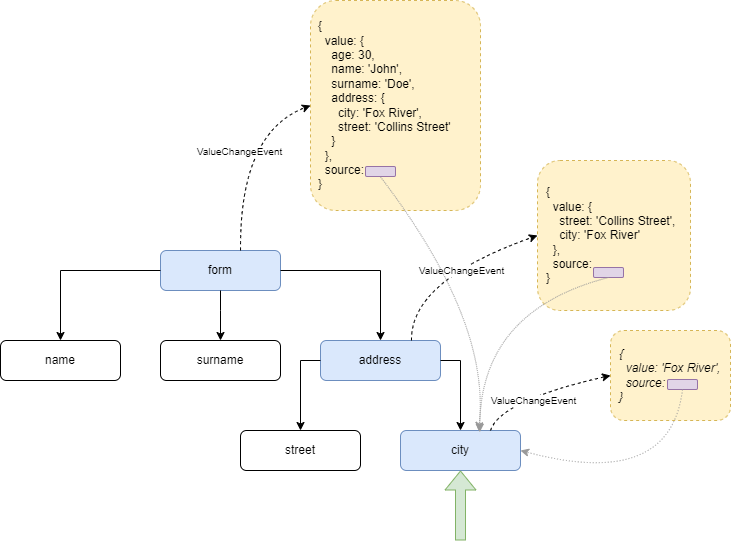
Two events will appear: ValueChangeEvent and StatusChangeEvent. Both offer a source property pointing at the modified control. The secondary field varies by event type, possibly holding the value or state of either the control or the group. It’s important to note the source always identifies the control that actually changed, while the second field always relates to the object we’re observing. This becomes even clearer with more elaborate structures.
The following snippet sets up a form with nested FormGroup objects. There are four subscriptions: one for the entire form, one for an address field, and separate ones for the street and city fields nested inside address.
import { Component, OnInit } from "@angular/core";
import { FormControl, FormGroup, ReactiveFormsModule } from "@angular/forms";

@Component({
  selector: "app-form-group-events",
  standalone: true,
  imports: [ReactiveFormsModule],
  template: `<form [formGroup]="form">
    <label>Name: </label>
    <input type="text" name="name" formControlName="name" />

    <br /><br />

    <label>Surname: </label>
    <input type="text" name="surname" formControlName="surname" />

    <br /><br />

    <label>Age: </label>
    <input type="number" name="age" formControlName="age" />
+
+    <br /><br />
+
+    <fieldset formGroupName="address">
+      <legend>Address:</legend>
+
+      <label>Street: </label>
+      <input type="text" name="street" formControlName="street" />
+
+      <br /><br />
+
+      <label>City: </label>
+      <input type="text" name="city" formControlName="city" />
+    </fieldset>
  </form> `,
})
export class FormGroupEventsComponent implements OnInit {
  form = new FormGroup({
    name: new FormControl("John"),
    surname: new FormControl("Doe"),
    age: new FormControl(30),
+    address: new FormGroup({
+      street: new FormControl("Collins Street"),
+      city: new FormControl("Fox River"),
+    }),
  });

  ngOnInit(): void {
    this.form.get("address.street")?.events.subscribe((event) => {
      console.log(event);
    });

+    this.form.get("address.city")?.events.subscribe((event) => {
+      console.log(event);
+    });
+
+    this.form.get("address")?.events.subscribe((event) => {
+      console.log(event);
+    });
+
+    this.form.events.subscribe((event) => {
+      console.log(event);
+    });
  }
}
Editing the city field triggers the event emitter for that control as well as for each ancestor (this propagation can be halted by passing onlySelf to setValue, but that’s not what we’re doing here).
The diagram below illustrates how ValueChangeEvent moves up the form’s tree and which data lands in the event object at each level.
Submit and reset events
We’ve seen how the events field works with single FormControl instances and FormGroup values and states. But there’s more. Unified Control State Change Events also introduces awaited submit and reset notifications, doing away with workarounds and click listeners on buttons.
Let’s wire this up in our example.
...
@Component({
selector: 'app-form-group-events',
standalone: true,
imports: [ReactiveFormsModule],
template: `<form [formGroup]="form">
<label>Name: </label>
<input type="text" name="name" formControlName="name" />
<br/><br/>
<label>Surname: </label>
<input type="text" name="surname" formControlName="surname" />
<br/><br/>
<label>Age: </label>
<input type="number" name="age" formControlName="age" />
<br/><br/>
<fieldset formGroupName="address">
<legend>Address:</legend>
<label>Street: </label>
<input type="text" name="street" formControlName="street" />
<br/><br/>
<label>City: </label>
<input type="text" name="city" formControlName="city" />
</fieldset>
+
+ <br/>
+
+ <button type="submit">Submit</button>
+
+ <button type="reset">Reset</button>
</form>`,
})
The form is now finished:
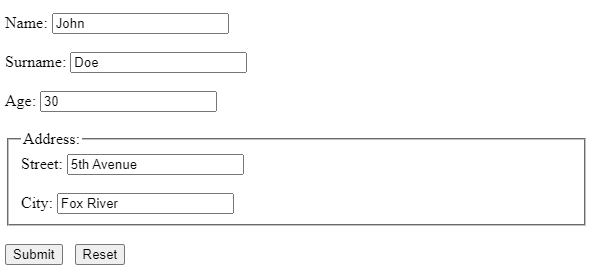
Clicking the Submit button will log the submit event. As opposed to prior events, FormSubmittedEvent carries only a source property, which points to the primary form object—specifically, the one bound to the formGroup directive: <form [formGroup]="form">.
A couple of clarifications are necessary. First, the FormSubmittedEvent fires regardless of the form’s validity or submission state. It trips every time we press the submit button, even if the form has already been submitted. Second, the event originates from the native HTML submit event. That means the <form> tag must contain a submit button. That button can be specified with type="submit" or left without a type (see https://developer.mozilla.org/en-US/docs/Web/HTML/Element/button#type).
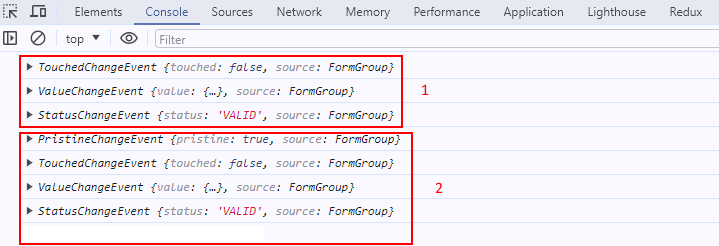
The last event I’ll discuss is FormResetEvent. This one fires whenever the form is reset. Like FormSubmittedEvent, it exclusively exposes a source property. The reset process, however, is more intricate. Resetting means all control values and states revert to their initial conditions. So each control (and group) dispatches three events: TouchedChangeEvent, ValueChangeEvent, and StatusChangeEvent. The root form additionally sends a PristineChangeEvent to signify the reset is complete, and then the root emits the FormResetEvent.
If we have two subscriptions—one for the address field and one for the root object—we can watch the whole reset unfold.
In the image below, the first batch of events belongs to the address field, while the second batch pertains to the top-level form object.
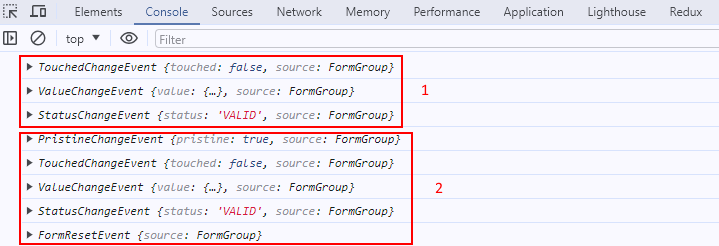
One final note: the FormResetEvent (at the time of writing) only appears when the reset is initiated from the view. Invoking the reset method programmatically triggers all other events but omits this one.
Filtering for the right event
Each value change spams many events. Usually, we care about just a handful. The rxjs filter operator allows us to narrow down to the specific event we need, such as ValueChangeEvent. Here’s how that looks:
form.events
  .pipe(filter((event) => event instanceof ValueChangeEvent))
  .subscribe((event) => {
    console.log(event);
  });
Conclusion
Let’s sum up what we’ve covered. Control State Change Events debuted in Angular v18, designed to unify the events that form controls emit. The advantages are evident:
-
No more juggling two separate subscriptions for
valueChangeandstatusChanges. -
You can monitor user interactions—detecting when a form becomes dirty or touched, since these states are now observable.
-
Submit and reset no longer require listening to button clicks; the forms API handles them reactively.
-
Direct access to the control that triggered the change is provided.