
The European Accessibility Act (EAA) officially comes into force on June 28th 2025, which makes now the perfect moment to dive into Accessibility in Angular. Beyond the EAA itself, this article will walk through the background of Web Accessibility and the Web Content Accessibility Guidelines (WCAG). Sticking with this series will put you in a solid position for the EAA and give you practical insight into building more accessible Angular Apps.
Whether you are a developer, a product owner, or just someone curious about what accessibility means for Angular, this material is for you. This first post kicks off our A11y blog series, which touches on a wide set of concerns:
- Web Accessibility Introduction (this post): A look at where Web Accessibility came from, some key statistics, and the regulatory forces shaping it today.
- Accessibility Testing Tools: The tools I recommend most for detecting accessibility problems in an Angular codebase.
- Accessible Angular Routes: Small, effective adjustments to raise accessibility through the Angular Router.
- ARIA roles and attributes: How to approach WAI-ARIA roles and attributes properly inside Angular.
- Accessible Angular Forms: Design considerations for Angular forms that remain usable for all audiences.
- Enhancing A11y with CDK: A closer look at the a11y module found inside the Angular CDK.
Where Web Accessibility Started
From the very beginning, the World Wide Web, as conceived by its creator Tim Berners-Lee, was intended to be a space of universal access, open to everyone no matter their physical or cognitive capacities.
The concept we now call accessibility, often abbreviated to A11y in the same style as I18n, is about designing products, devices, services, or environments in a way that includes rather than excludes people with disabilities.
How Many People Does It Affect?
Pinpointing exactly how many people live with disabilities is surprisingly difficult, though estimates put the number at roughly one in four across the EU. To give substance to those figures, we turn to data from the Statistische Bundesamt (German Federal Statistical Office) from 2023:
- About 7.86m people in Germany, or 9.4% of the population, are living with a severe disability
- 1.85m people, roughly 2.2%, deal with cerebral disorders, including mental and psychological conditions
- 1.63m people, or 2.0%, are affected by mobility impairments
- 329k people, about 0.4%, are blind or living with a severe visual impairment
- 324k people, also 0.4%, are deaf or have a severe hearing impairment
Even if these numbers describe Germany specifically, they provide a helpful window into disability rates across Europe as a whole.
At the same time, it is worth remembering that accessibility rarely benefits only those with a recognized disability — the ripple effects reach everyone.
Take video captions as an obvious case: they are essential for the deaf and hard of hearing, but they also help people watching in a loud room or those who are not native speakers.
Microsoft put together a graphic that shows how a11y helps in all sorts of situations:

The W3C and the Web Accessibility Initiative (WAI)
In 1997, the World Wide Web Consortium (W3C) decided that accessibility issues needed a systematic response, which led to the creation of the Web Accessibility Initiative (WAI).
The WAI is responsible for developing a set of guidelines, later released as the Web Content Accessibility Guidelines (WCAG), the first version of which appeared in 1999. Along with those guidelines, the WAI continues to publish resources aimed at making the web easier to use for all.
Web Content Accessibility Guidelines (WCAG)
These days, the WCAG provide an internationally recognized structure for building web content and applications that are accessible across the board. The newest version of the standard, WCAG 2.2, came out in December 2023. Both WCAG 2.1 and 2.2 are heavily written into regulatory requirements spanning Europe and North America.
Those tackling it for the first time can consult the free WCAG 2.2 Quick Reference for the full details. Highlights worth knowing:
The Four Principles
Everything else in WCAG 2.2 hangs from four core principles, which together form the basis for accessible digital content:
- 👀 Perceivable: users must be able to perceive the information being presented to them.
- 🕹️ Operable: interface components have to be operable across the full range of devices and inputs people actually use.
- 🧠 Understandable: the content and how to navigate it should not be an obstacle in and of itself.
- 🛡️ Robust: content has to hold up against current and future technologies, including assistive devices.
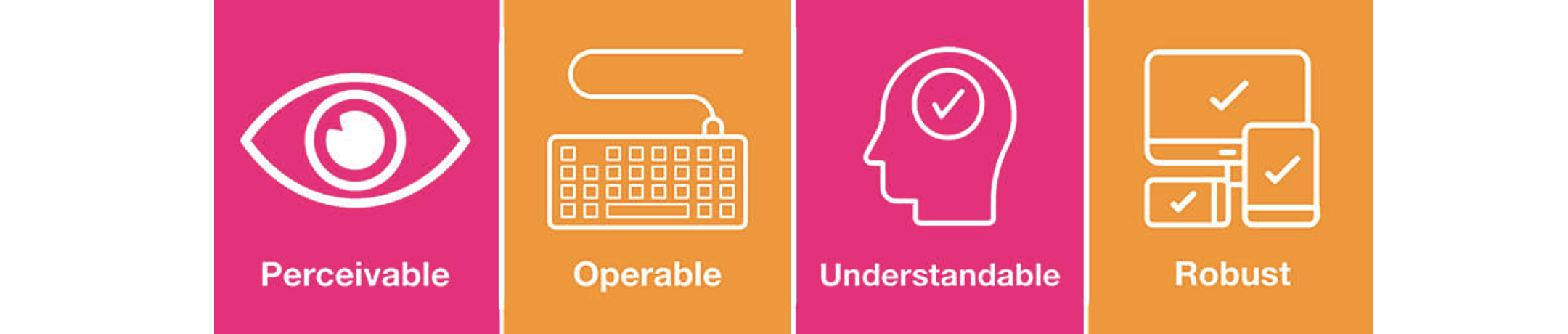
Illustration source.
Levels of Conformance
WCAG sorts compliance into three tiers:
- 🥉 Level A: This sits on the lowest rung. It covers essential A11y features needed for people to interact with content at all. Meeting this level keeps critical information available, but there will still be barriers for some users.
- 🥈 Level AA: Building on top of Level A, this tier goes after the most widespread and consequential barriers. Among other things, it boosts readability, navigation, and day-to-day usability. Most legal and organizational requirements, including the EAA, point at Level AA as the target standard.
- 🥇 Level AAA: Represents the ceiling of web accessibility with the strictest set of criteria. Hitting AAA is only practical in some contexts; it is often reserved for specialized content where the maximum level of A11y is non-negotiable.

In practice, our recommendation is to target Level AA. It offers a sustainable balance between robust accessibility and feasibility, which is also how the regulators see it.
European Accessibility Act (EAA)
Even though it has been around since 2019, the European Accessibility Act (EAA) only becomes fully binding on June 28th 2025. This EU directive leans on the WCAG 2.2 framework and establishes concrete rules for making websites, mobile applications, and additional online services universally accessible. The intent is simple: digital products should be built so that they remove barriers, not create them, so that everyone — including people with disabilities — can get the information and services they need.
Where it matters to our work, the EAA forces organizations to shift their priorities toward accessible online experiences. That is not simply a compliance burden: it gives people with disabilities equal opportunities in digital spaces, while nudging developers to be more inventive in how they design for the web.
In short, the EAA pushes the internet to be more inclusive and, ultimately, more enjoyable for the people using it.
A very long official read on the EAA is available here (warning: it is pure legal text): https://eur-lex.europa.eu/legal-content/EN/TXT/?uri=CELEX%3A32019L0882
How EU Members Rolled It Out
We will now pull out a few concrete national implementations of the directive. Notable detail: Switzerland is not part of the EU, yet they were actually the first country to transpose the EAA into national law 😀
- 🇨🇭 Switzerland: Accessibility Standard 3.0 (eCH-0059) – June 2020
- Official Website: ech.ch/en/standards/ech-0059/ (German / French)
- 🇩🇪 Germany Barrierefreiheitsstärkungsgesetz (BFSG) – July 2022
- Private website about the BFSG: bfsg-gesetz.de (German)
- 🇦🇹 Austria: Barrierefreiheitsgesetz (BaFG) – July 2023
- Austrian camber of commerce: About the BaFG (German)
Online Services Covered by the Act
The EAA provisions extend to various categories of digital services. Among them:
- 📚 E-books: digital, often academic, publications whose core content remains primarily text and imagery, including how those works are circulated and shared.
- 🛒 E-commerce: retail web platforms and mobile apps that handle online transactions fall inside the accessibility requirements.
- 🏦 Online banking: web and mobile banking experiences need to be accessible, since financial services obviously matter to all users equally.
- 🚌 Public & transportation services: depending on the case, access requirements extend to ticketing and check-in. That said, government websites and public-sector apps fall under a different EU instrument, the Web Accessibility Directive.
It would be fair to say some gray areas remain in how the EAA should be applied. For instance, the text does not name Angular, nor indeed any JavaScript framework. What it does demand is accessibility for certain web applications and websites, so those technical details are ultimately left to interpretation.
We invite you to follow the rest of our A11y blog series to get a clearer idea of what this all means in practice and how to bring your Angular Apps up to speed.
Accessibility Workshop
If you want to push your complementary Angular skills further, there are workshops available in English and German:
- ♿ Accessibility Workshop
- 📈 Best Practices Workshop (with accessibility topics woven in)
- 🚀 Performance Workshop
Wrapping Up
We’ve covered the core concepts of web accessibility—tracing its evolution, examining pivotal data points, and reviewing the legal framework, with special attention to the forthcoming European Accessibility Act. Regardless of whether you build applications, craft visual designs, or manage products, grasping and applying these principles is key to building Angular Apps that are welcoming to all users.
This piece was authored by Alexander Thalhammer. Connect with me via Linkedin, X, or giThub.