
Update on 2022-10-10: Updated for Angular 14.2.0.
In the previous article in this series, we explored Standalone Components that are slated for upcoming Angular releases. Because these components are self-contained and do not rely on NgModules, applications become more streamlined.
This naturally raises the question: how can you ready an existing Angular codebase for a world without Angular modules? Below, I outline four strategies for doing exactly that.
Option 1: The Ostrich Approach
Let's begin with the most straightforward route—the ostrich approach. Simply bury your head in the sand and disregard everything happening around you:

Despite sounding somewhat dismissive, there's genuinely nothing wrong with this tactic. No one is forcing us to migrate applications to Standalone Components. Angular will continue supporting Angular modules indefinitely; after all, the entire ecosystem is built upon them. You can safely ignore Standalone Components altogether or reserve them solely for new applications and fresh sections of existing ones.
Option 2: Discarding Angular Modules Entirely
This strategy may also appear flippant at first glance: you simply eliminate every Angular module from your codebase. This doesn't need to happen all at once either, because Standalone Components integrate seamlessly with Angular modules. Angular modules can be imported into Standalone Components, and the reverse is equally true.
For example, the listing below demonstrates a Standalone Component that imports several NgModules:
import { Component, OnInit } from '@angular/core';
import { TicketsModule } from '../tickets/tickets.module';

@Component({
    selector: 'app-next-flight',
    standalone: true,
    imports: [
        // Existing NgModule imported
        // in this standalone component
        TicketsModule
    ],
    [...]
})
export class NextFlightComponent implements OnInit {
    [...]
}
To illustrate the inverse scenario, this listing shows an NgModule that pulls in a Standalone Component:
@NgModule({
  imports: [
    CommonModule,

    // Imported Standalone Component:
    FlightCardComponent,
    [...]
  ],
  declarations: [
    MyTicketsComponent
  ],
  [...]
})
export class TicketsModule { }
This bidirectional compatibility stems from the mental model underpinning Standalone Components.
Under this model, a Standalone Component is essentially a component and a module fused into one. Even though the technical implementation doesn't create dedicated Angular modules, this concept helps bridge the divide between both worlds. It also clarifies why NgModules and Standalone Components can import each other freely.
Should you adopt this strategy, you'll need to bring the compilation context directly into the Standalone Component via its imports array. I prefer to think of this compilation context as the component's neighborhood: it encompasses all other Standalone Components, Standalone Directives, and Standalone Pipes, as well as any NgModules the component requires.
Ideally, the Angular language service—and consequently editors and IDEs like Visual Studio Code or WebStorm/IntelliJ—will offer auto imports for this purpose. To lend a hand here, my colleague Rainer Hahnekamp created a helpful schematic that automates some of the involved steps. As of now, we don't believe full automation is feasible, since it demands application-specific knowledge—such as understanding which providers are utilized in which locations.
Option 3: Swapping Angular Modules for Barrels
Barrels are EcmaScript files that (re)export related building blocks:
import { NavbarComponent } from './navbar/navbar.component';
import { SidebarComponent } from './sidebar/sidebar.component';
Consumers can then import everything the barrel exposes in a single statement:
import { NavbarComponent, SidebarComponent } as shell from '../shell';When the barrel is named index.ts, importing just the barrel's folder suffices. Beyond mere grouping, barrels offer the advantage of defining public APIs: any building block exported through the barrel becomes accessible to other parts of the application—they simply import from the barrel. Everything else remains an implementation detail that other components shouldn't touch. Consequently, such internal details are straightforward to modify without introducing breaking changes elsewhere. This is a straightforward yet powerful measure for maintaining stable software architecture.
As a further step, each barrel could be assigned a path mapping in the tsconfig.json. In that scenario, the application can reference the barrel using clean names similar to npm package identifiers:
import { NavbarComponent, SidebarComponent } from '@demo/shell';However, barrels bring their own challenges—cyclical dependencies being a frequent culprit:
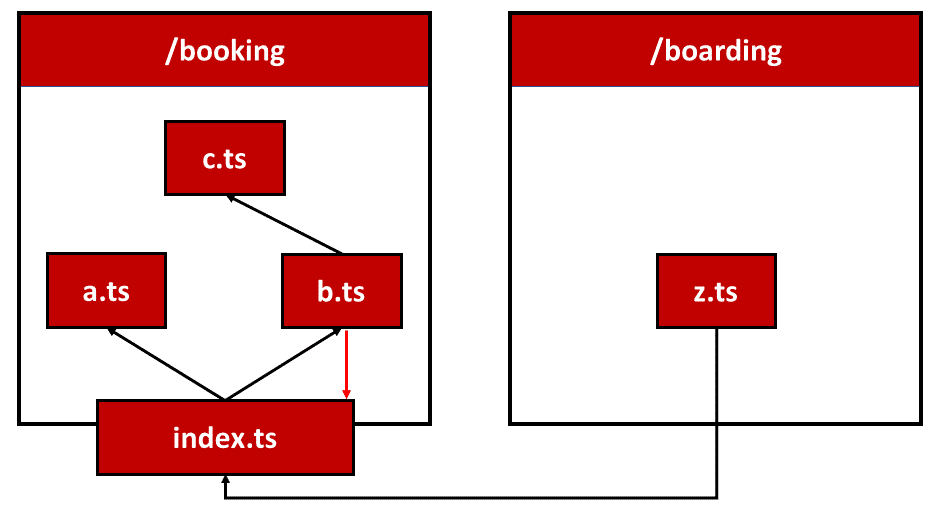
Here, b.ts is referenced by the barrel index.ts on one hand while simultaneously accessing the barrel itself.
Two consistent rules can prevent this issue from the outset:
- A barrel may only expose elements from its own "area." This area spans the barrel's folder and all its subfolders.
- Within each "area," files should reference one another using relative paths, bypassing the barrel entirely.
While these rules might seem abstract initially, putting them into practice is less complex than you'd expect:
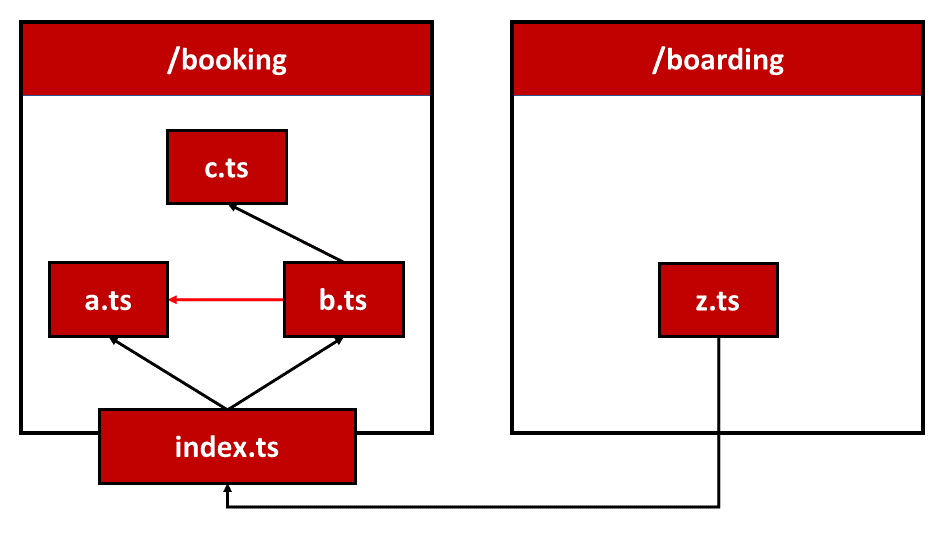
In this example, b.ts accesses a.ts directly—both residing in the same "area"—to sidestep the earlier cycle. The roundabout through the barrel is thus avoided.
Another drawback is that any part of the program can bypass the designated barrels—and consequently the public API they establish. Relative paths pointing to private sections of the respective "areas" are all that's needed.
Linting offers a solution to this problem. A linting rule could detect and flag unauthorized access. The widely used tool Nx includes such a rule, which can also prevent other unwanted interactions. The following section expands on this idea.
Option 4: Nx Workspace with Libraries and Linting Rules
The popular Nx tool builds upon the Angular CLI and delivers substantial convenience for developing enterprise-scale projects. Nx enables splitting a large project into multiple applications and libraries. Each library exposes a public API via a barrel named index.ts. Nx also supplies path mappings for every library. Moreover, Nx includes a linting rule that prevents barrel bypassing while permitting additional restrictions.
This linting rule makes it possible to enforce a fixed frontend architecture. For instance, the Nx team advises dividing large applications vertically by subject domains and horizontally by technical library categories:
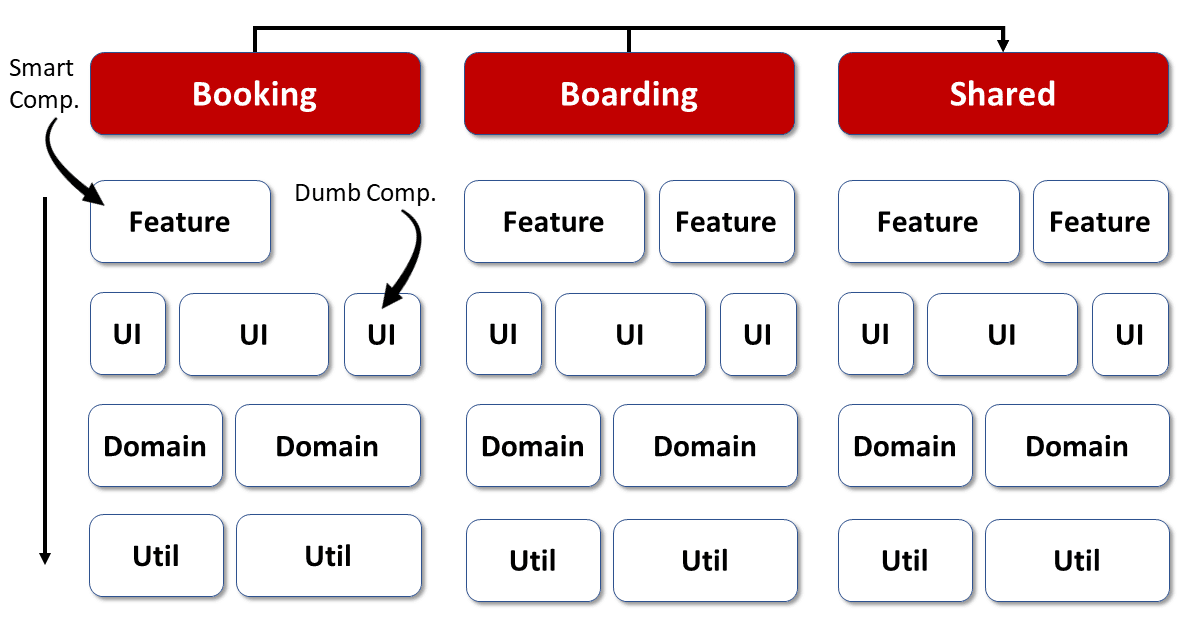
Feature libraries contain smart components that realize specific use cases, whereas UI libraries house reusable dump components. Domain libraries encapsulate the client-side domain model along with services operating on it, and utility libraries collect general-purpose helper functions.
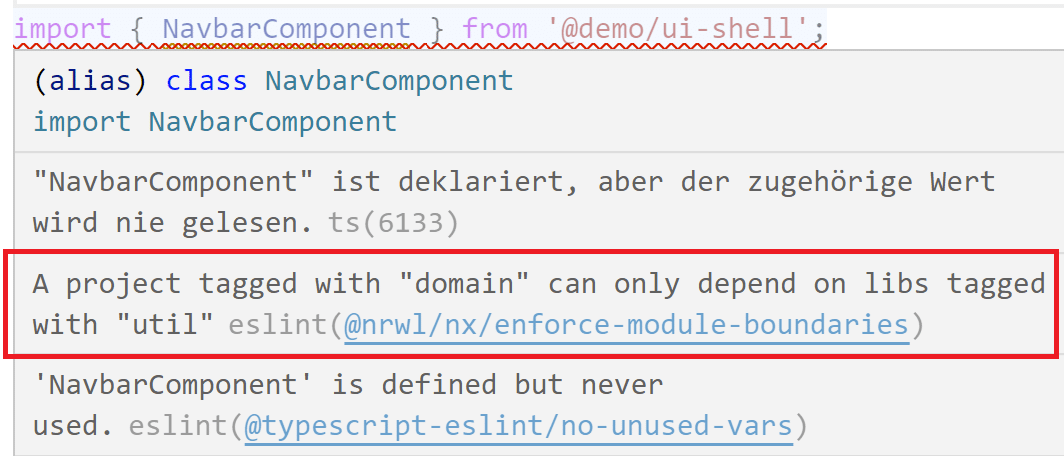
Using the aforementioned linting rules, you can guarantee that each layer only accesses layers beneath it. Cross-domain access can also be blocked. Libraries belonging to the Booking domain, therefore, cannot reach into Boarding libraries. If you need shared constructs across domains, place them in the shared area, for instance.
Should someone violate one of these rules, the linter provides immediate feedback:
The folder structure Nx employs reflects the architecture matrix shown above:
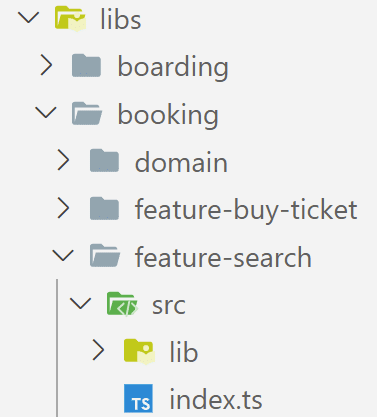
The subfolders within libs denote domains. Libraries inside these folders receive prefixes like feature- or domain-, signaling their technical category and thus their architectural layer.
For a deeper dive, refer to our Nx tutorial.
The beauty of this fourth option lies in its long track record of combining Angular modules with Nx to structure substantial solutions:
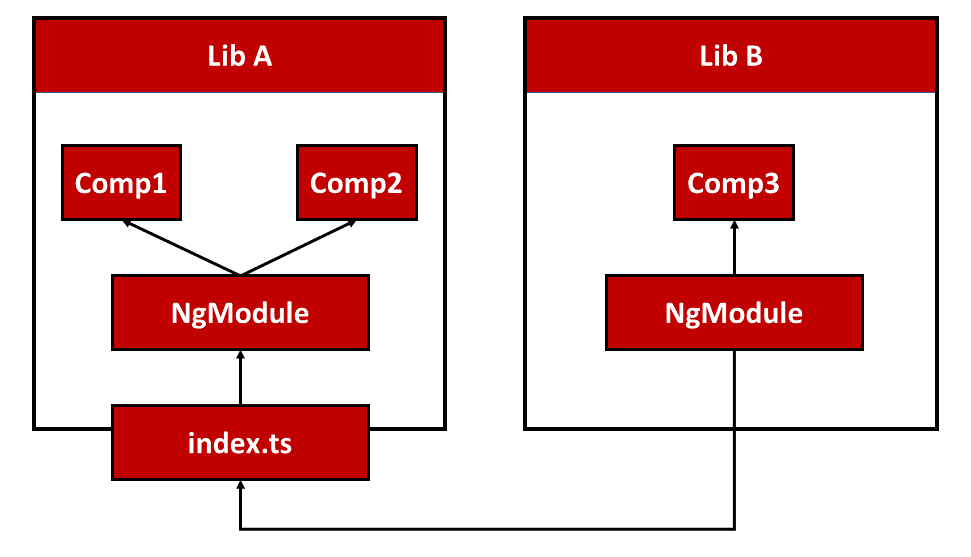
Thanks to Standalone Components, Angular modules can now be dropped entirely:

In this arrangement, libraries alone handle structuring: their barrels group related building blocks, such as Standalone Components, and the linting rules let us enforce our architectural constraints.
What Comes Next? More on Architecture!
So far, we've seen how Nx helps structure Angular-based applications and how its concepts align perfectly with the emerging world of Standalone Components. Yet, working with Nx raises further questions:
- What criteria should guide the subdivision of a massive application into libraries and sub-domains?
- Which access restrictions make the most sense?
- Which established patterns should we rely on?
- How can we progress our solution toward micro frontends?
Our free eBook (roughly 100 pages) addresses all these topics and more:
Feel free to download it here today!