
Assembling Related Building Blocks
One thing the examples in the previous post don't match is the grouping capability of NgModules. Those modules let you bundle pieces that are typically used in combination.
The most straightforward way to group related code is by putting it in the same folder. But you can also use a barrel: an EcmaScript file that re-exports related elements. These are commonly named public-api.ts or index.ts. In the sample project, an index.ts inside the shell folder groups two navigation components:
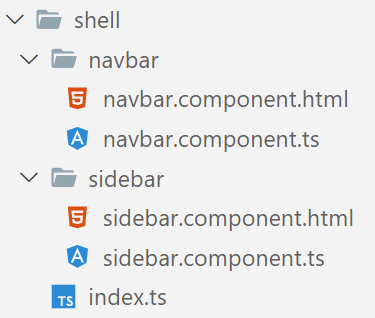
The barrel re-exports both components:
export { NavbarComponent } from './navbar/navbar.component';
export { SidebarComponent } from './sidebar/sidebar.component';
The real benefit is genuine modularization. Anything the barrel exposes is available to the rest of the app; everything else stays private. You can refactor those internal details freely as long as the barrel’s public API remains backward compatible.
To consume the barrel, just import from it:
import {
    NavbarComponent,
    SidebarComponent
} from './shell/index';

@Component({
    standalone: true,
    selector: 'app-root',
    imports: [
        RouterOutlet,

        NavbarComponent,
        SidebarComponent,
    ],
    templateUrl: './app.component.html',
    styleUrls: ['./app.component.css']
})
export class AppComponent {
    [...]
}
If the barrel is named index.ts, you can even skip the filename entirely, since index is the default when the TypeScript compiler follows Node.js resolution rules — which is the case in Angular and CLI projects:
import {
    NavbarComponent,
    SidebarComponent
} from './shell';

@Component({
    standalone: true,
    selector: 'app-root',
    imports: [
        RouterOutlet,

        NavbarComponent,
        SidebarComponent,
    ],
    templateUrl: './app.component.html',
    styleUrls: ['./app.component.css']
})
export class AppComponent {
    [...]
}
Importing Entire Barrels
In the previous section, both the NavbarComponent and the SidebarComponent were part of the shell’s public API. Still, Angular has no built-in mechanism to import everything a barrel exports in one go.
In most situations, that’s completely fine. Auto-imports add whatever you need, so this way of coding stays convenient. Being explicit also helps the tree shaker do its job.
But there are edge cases where certain building blocks are always used together — for instance, due to a strong mutual dependency. In those situations, grouping them into an array can make life easier. Think of all the directives that come with the FormsModule. Most of us don’t know their exact names or which ones work together.
Here’s an example of that idea in practice:
import { NavbarComponent } from './navbar/navbar.component';
import { SidebarComponent } from './sidebar/sidebar.component';

export { NavbarComponent } from './navbar/navbar.component';
export { SidebarComponent } from './sidebar/sidebar.component';

export const SHELL = [
    NavbarComponent,
    SidebarComponent
];
Interestingly, these arrays resemble the exports section of an NgModule. Keep in mind the array must be a constant, because the Angular Compiler reads it at build time.
You can drop such arrays directly into the imports array — no spreading required:
import { SHELL } from './shell';

[...]

@Component({
    standalone: true,
    selector: 'app-root',
    imports: [
        RouterOutlet,

        // NavbarComponent,
        // SidebarComponent,
        SHELL
    ],
    templateUrl: './app.component.html',
    styleUrls: ['./app.component.css']
})
export class AppComponent {
    [...]
}
Again, be careful with this array-based style. It’s useful for grouping things that always come together, but it also reduces tree-shaking opportunities.
Friendly Barrel Names: Path Mappings
Direct import statements that point into other parts of your application often produce long, confusing relative paths:
import { SHELL } from '../../../../shell';

@Component ({
    standalone: true,
    selector: 'app-my-cmp',
    imports: [
        SHELL,
        [...]
    ]
})
export class MyComponent {
}
To avoid that, you can set up path mappings in your TypeScript configuration (tsconfig.json at the root of your project) for the barrels you import:
"paths": {
 "@demo/shell": ["src/app/shell/index.ts"],
  [...]
}
This lets you reference a barrel with a clear, short name instead of wrestling with sometimes excessive relative paths:
// Import via mapped path:
import { SHELL } from '@demo/shell';

@Component ({
    standalone: true,
    selector: 'app-root',
    imports: [
        SHELL,
        [...]
    ]
})
export class MyComponent {
}
The Natural Evolution: Workspace Libraries and Nx
You can create these path mappings by hand, of course. But it’s a bit easier with the CLI extension Nx, which generates them automatically for every library in the workspace. Libraries are the better approach anyway — they subdivide the workspace more cleanly, and Nx prevents code from bypassing a library’s barrel.
Each library therefore has a public — effectively published — surface and a private part. The library’s public API is whatever it exports through its barrel. Everything else is private: a “secret” that other parts of the app cannot see.
Those secrets are a simple but powerful foundation for stable architectures. Anything that isn’t published can be changed later without ripple effects. The public API, on the other hand, should only change deliberately, since breaking it can break other parts of the project.
An Nx workspace that models the various parts of an Angular solution as libraries might look like this:
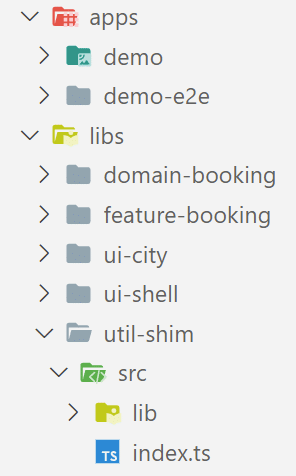
Each library gets a barrel that represents its public API. The prefixes in the library names follow a categorization the Nx team recommends. Feature libraries contain smart components that know about use cases; UI libraries hold reusable dumb components; domain libraries provide the client-side view of the domain model along with the services that operate on it; utility libraries contain general helper functions.
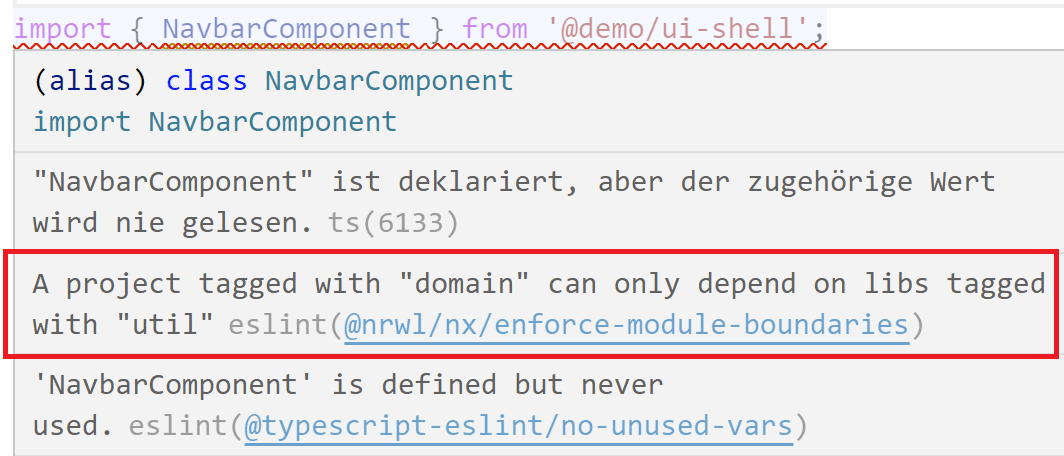
Based on those categories, Nx lets you define lint rules that block unwanted access between libraries. For example, you could enforce that a domain library only depends on utility libraries — not UI ones:
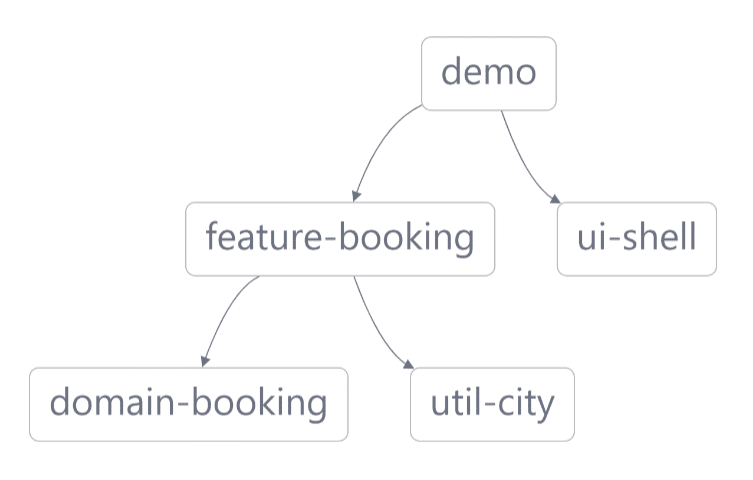
Nx also lets you visualize the dependencies between libraries:
To see all of this in action, check out the Nx version of the sample project: 📂 Source Code at GitHub.
Our article series on Nx and DDD (especially the Strategic Design part) goes into the underlying ideas in more depth.
Wrapping Up
Standalone Components point to a lighter future for Angular applications. NgModules become unnecessary; you just use plain EcmaScript modules instead. That makes Angular solutions more direct and lowers the barrier for newcomers. And because the mental model treats a standalone component as a component plus its own mini-module, existing code stays compatible.
For grouping related pieces, simple barrels work well for small projects. On larger ones, moving to monorepos with the CLI extension Nx feels like the natural next step. Libraries split the overall solution into meaningful parts with barrel-based public APIs. On top of that, Nx lets you visualize and enforce dependency rules between libraries using linting.
Coming Up: More Architecture Topics
So far, we’ve seen how Nx helps structure Angular applications and how well its ideas match the world of Standalone Components. But once you start using Nx, more questions come up:
- How do we split a large application into libraries and sub-domains?
- Which access restrictions make sense where?
- Which established patterns should we apply?
- How can we grow towards micro frontends?
Our free eBook (roughly 100 pages) covers all those questions and more:
You can download it here.