
Why NgModules Were Introduced in the First Place
The original motivation behind NgModules was largely practical: developers needed a mechanism to group related building blocks together. This served two purposes — improving developer convenience and supporting the Angular Compiler, whose development had not quite caught up. In the latter case, the term "compilation context" comes into play. The compiler relied on this context to determine which components could be referenced from which part of the application code:
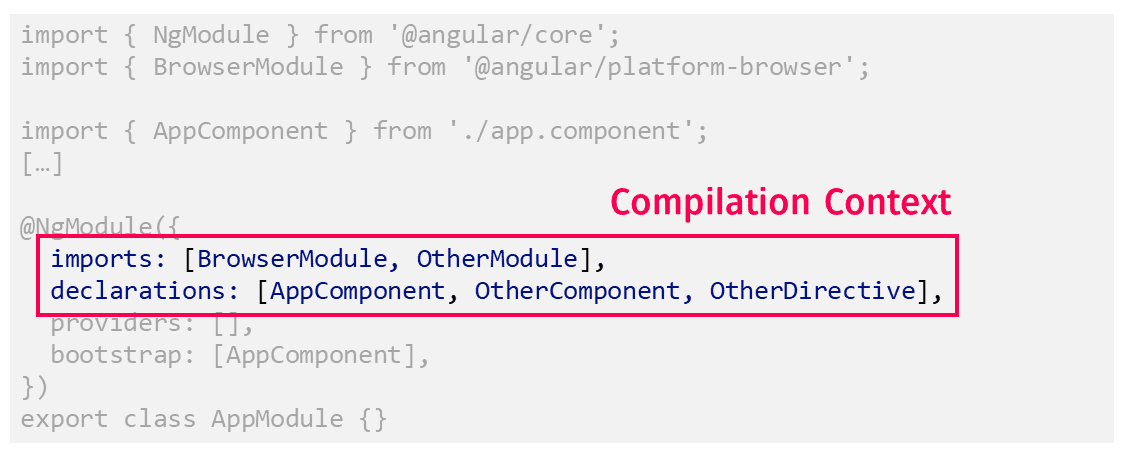
That decision, however, never sat well with the community. Introducing a second modular system on top of EcmaScript modules felt redundant and made the learning curve for newcomers steeper. In response, the Angular team designed the Ivy compiler so that the runtime would not depend on modules at all. Every component compiled with Ivy carries its own compilation context. Although that sounds elaborate, the context is simply a pair of arrays pointing to the adjacent components, directives, and pipes.
With the old compiler and its execution environment fully removed as of Angular 13, the time came to expose this capability through Angular's public API. A design document and an accompanying RFC have described a world where Angular modules are not required. The term "optional" is significant here — existing code that depends on modules continues to work as before.
Getting Started with Standalone Components
Creating a Standalone Component is straightforward. You set the standalone flag to true in the Component decorator and list everything the component needs in its imports:
@Component({
  standalone: true,
  selector: 'app-root',
  imports: [
    RouterOutlet,
    NavbarComponent,
    SidebarComponent,
  ],
  templateUrl: './app.component.html',
  styleUrls: ['./app.component.css']
})
export class AppComponent {
    [...]
}
The imports array defines the compilation context — all the components, directives, and pipes the Standalone Component is allowed to use. This can include both other Standalone Components and existing NgModules.
Listing every dependency explicitly makes the component self-contained and, in principle, more reusable. It also pushes developers to think carefully about what the component actually depends on. That said, this process can quickly become repetitive and tedious.
To address that, there are plans to add auto-import support to the Angular Language Service used inside IDEs. Just like the auto-import feature for TypeScript modules, the IDE could suggest adding an entry to the imports array the moment you first use a component, directive, or pipe in a template.
The Mental Model
A useful way to think about Standalone Components is to imagine each one as a component bundled together with its own implicit NgModule:
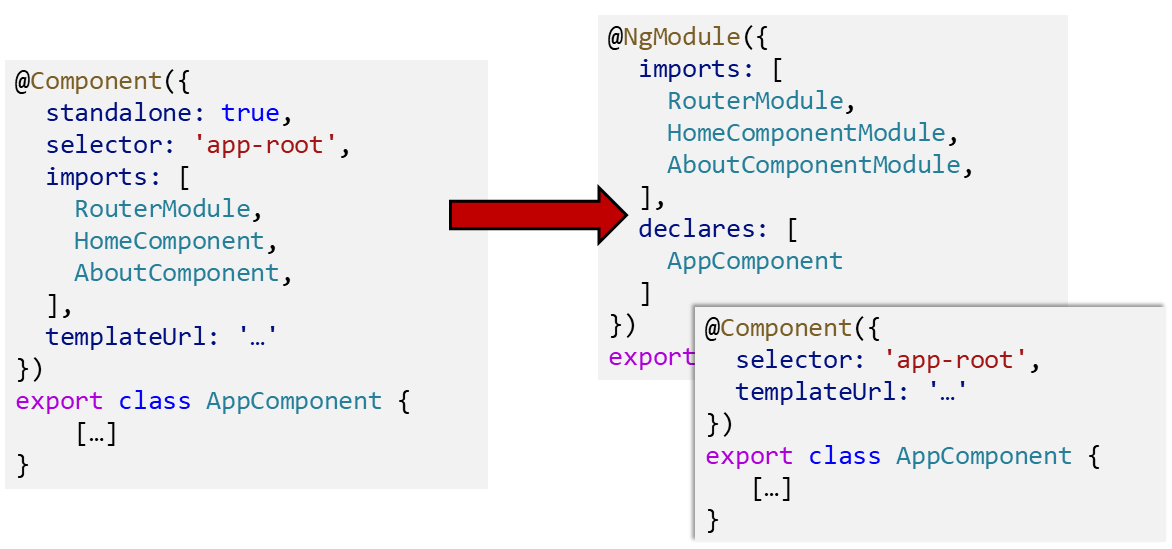
This resembles the SCAM pattern popularized by Lars Nielsen. The difference is that SCAM relies on an explicit module, whereas here the module exists only conceptually.
While this mental model helps reason about Angular's behavior, it is important to understand that the actual implementation does not create hidden NgModules behind the scenes.
Pipes, Directives, and Services
Standalone components are not the only building blocks that can work without modules — standalone pipes and directives follow the same pattern. Both the pipe and directive decorators accept a standalone property. Here is an example of a standalone pipe:
@Pipe ({
  standalone: true,
  name: 'city',
  pure: true
})
export class CityPipe implements PipeTransform {

  transform (value: string, format: string): string {[…]}

}
And this is what a standalone directive looks like:
@Directive ({
    standalone: true,
    selector: 'input [appCity]',
    providers: […]
})
export class CityValidator implements Validator {

    [...]

}
Services, on the other hand, have been able to operate without NgModules for some time thanks to tree-shakable providers. The key is the providedIn property:
@Injectable ({
  providedIn: 'root'
})
export class FlightService {[…]}
A later part of this series will examine dependency injection in more detail within the context of Standalone Components. One important point worth mentioning now: relying on modern tree-shakable providers rather than the older provider style registered in NgModules makes migration to Standalone Components considerably easier.
The Angular team recommends using providedIn: 'root' whenever feasible. Somewhat surprisingly, providedIn: 'root' works fine with lazy loading as well — if a service is used only in lazy-loaded parts of the application, it is loaded together with those parts.
Bootstrapping Standalone Components
In the past, bootstrapping always required a module. Angular expected a module that declared a bootstrap component, typically called AppModule, which defined the root component along with its compilation context.
With Standalone Components, bootstrapping a single component directly becomes possible. Angular offers the bootstrapApplication method for use in main.ts:
// main.ts

import { bootstrapApplication } from '@angular/platform-browser';
import { provideAnimations } from '@angular/platform-browser/animations';
import { AppComponent } from './app/app.component';
import { APP_ROUTES } from './app/app.routes';
import { provideRouter } from '@angular/router';
import { importProvidersFrom } from '@angular/core';

[...]

bootstrapApplication(AppComponent, {
  providers: [
    importProvidersFrom(HttpClientModule),
    provideRouter(APP_ROUTES),
    provideAnimations(),
    importProvidersFrom(TicketsModule),
    importProvidersFrom(LayoutModule),
  ]
});
The first argument to bootstrapApplication is the root component — in this case, the AppComponent. The second argument takes application-wide providers, which are the providers you would normally register with the AppModule in a module-based setup.
The helper function importProvidersFrom bridges the gap to existing NgModules. It works not only with NgModules themselves but also with ModuleWithProviders objects returned by methods such as forRoot and forChild.
This makes it possible to use existing NgModule-based APIs right away. Over time, however, we will see more dedicated functions replacing the need for importProvidersFrom. For example, provideRouter registers the router with a given configuration, and similarly, provideAnimations sets up Angular's animation support.
Compatibility with Existing Code
As mentioned, the mental model treats a Standalone Component as a component with its own private NgModule. This is also what ensures compatibility with code that still relies on NgModules.
On one side, whole NgModules can be imported into a Standalone Component:
import { Component, OnInit } from '@angular/core';
import { TicketsModule } from '../tickets/tickets.module';

@Component({
    selector: 'app-next-flight',
    standalone: true,
    imports: [
        // Existing NgModule imported
        // in this standalone component
        TicketsModule
    ],
    [...]
})
export class NextFlightComponent implements OnInit {
    [...]
}
On the other side, a Standalone Component (or a standalone directive or pipe) can be imported into an existing NgModule:
@NgModule({
  imports: [
    CommonModule,

    // Imported Standalone Component:
    FlightCardComponent,
    [...]
  ],
  declarations: [
    MyTicketsComponent
  ],
  [...]
})
export class TicketsModule { }
Notably, standalone components are imported, not declared, the way classical components are. This may seem odd at first, but it aligns perfectly with the mental model of a Standalone Component carrying its own NgModule.
There is also a semantic distinction. Declaring a traditional component implies a strong whole-part relationship — a component can belong to exactly one module. A Standalone Component, by contrast, is not owned by any NgModule and can be reused in many places. Using imports for standalone pieces therefore makes much more sense.
Side Note: The CommonModule
One of the most widely used NgModules in Angular is certainly the CommonModule. It bundles built-in directives such as *ngIf and *ngFor along with built-in pipes like async and json. While importing the entire CommonModule is still possible, you can now import just the specific directives and pipes you actually need:
import {
    AsyncPipe,
    JsonPipe,
    NgForOf,
    NgIf
} from "@angular/common";

[...]

@Component({
  standalone: true,
  imports: [
    // CommonModule,
    NgIf,
    NgForOf,
    AsyncPipe,
    JsonPipe,

    FormsModule,
    FlightCardComponent,
    CityValidator,
  ],
  selector: 'flight-search',
  templateUrl: './flight-search.component.html'
})
export class FlightSearchComponent implements OnInit {
    [...]
}
This works because the Angular team refactored the building blocks inside CommonModule into standalone directives and pipes. Fine-grained imports will become especially valuable once IDEs support auto-import for standalone building blocks. In that scenario, using something like *ngIf for the first time would prompt the IDE to add it to the imports array automatically.
As a future part of this series will explain, the
RouterModulenow also exposes standalone building blocks. You can importRouterOutletdirectly instead of pulling in the entireRouterModule. At the time of writing, the same is not yet possible for other modules such asFormsModuleorHttpClientModule.
Interim Conclusion: Standalone Components — and Now?
So far, we have seen how Standalone Components make our Angular applications leaner and more straightforward. We have also seen how the underlying mental model ensures compatibility with existing module-based code.
What remains to be explored is the broader impact on application structure and architecture. The next part of this series addresses exactly that.
» Next Part: Angular's Future Without NgModules - Part 2: What Does That Mean for Our Architecture?
More on Architecture?
When designing enterprise-scale Angular applications, several additional questions tend to surface:
- How should a large application be split into libraries and sub-domains?
- What access restrictions are sensible and practical?
- Which proven architectural patterns are worth applying?
- How can we move toward a micro frontend setup over time?
Our free eBook, around 100 pages long, addresses all of these topics and more:
Feel free to download it here now!