The motivation behind Ivy
Many developers have encountered comparisons of compiled bundle sizes for simple apps built with different JavaScript frameworks. Angular applications often come out on the heavier side. This has been a persistent worry, particularly given the push toward mobile-first, performance-sensitive web apps. The Angular framework bundles a wide array of libraries — including i18n, HTTP, routing, and animations — and prior to Ivy, the ViewEngine renderer itself could not be tree-shaken. That meant the entire renderer was shipped to the browser, adding significant weight to the final bundle.
The drive to make the framework itself smaller by eliminating dead code, and to render the renderer tree-shakable, led to the creation of Ivy as the new default compiler and runtime.
How Ivy tree-shakes framework code
The Ivy runtime follows the Incremental DOM pattern, producing a sequence of instructions that directly update the DOM. These instructions are generated from the templates you write and are fully capable of creating and updating the DOM without any Angular interpreter at runtime.
Because the interpreter isn’t required, it doesn’t need to be included in the final bundle. The compiled template instructions themselves represent just the logic your template uses. For instance, if no pipes are used in a template, the generated JavaScript won’t contain any CreatePipe() calls, making it easy for bundlers like Webpack or Rollup to drop the relevant code from the Angular core.
Trying tree-shaking hands-on
This experiment is based on Kara’s talk, where she demonstrates how Ivy removes unused instruction methods from the renderer, keeping only what the template requires. I wanted to verify it myself, so let’s do that.
We'll start by generating a new Angular 9 project named helloApp using the CLI. The full source is available here.
ng new helloApp
Check the package.json to ensure you're on Angular 9 or later. If not, follow the update guide.
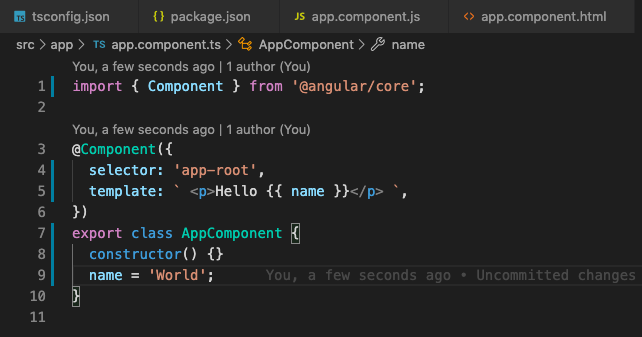
Next, let’s modify the app.component.ts file.
app.component.ts
The template now consists of just <p>Hello {{name}}<p>, paired with a name property in the component class.
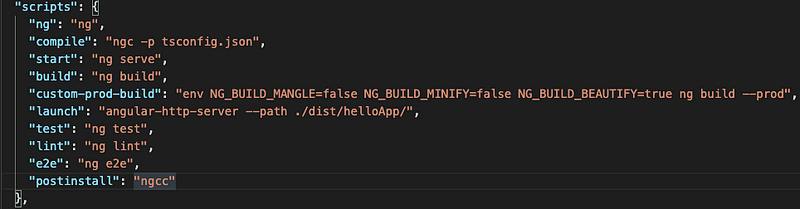
I’ve added a custom compile script in package.json that invokes the Angular compiler (ngc) to turn the component into JavaScript files:
package.json scripts section
Let’s run the compile and inspect the resulting app.component.js.
npm run compile
This script essentially performs ngc -p tsconfig.json, placing the output in the dist/out-tsc directory as specified in tsconfig.json.

dist directory containing the compiled files.
Now, let’s look at the compiled app.component.js.
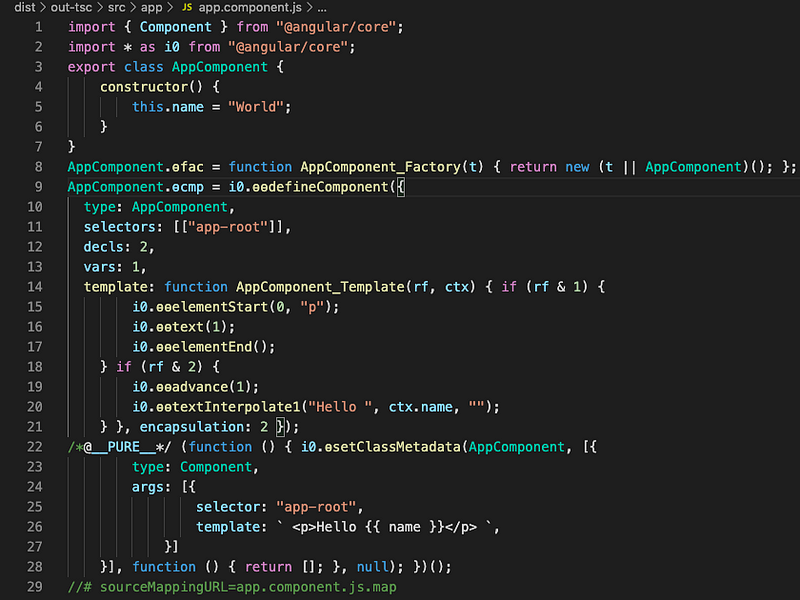
The compiled output isn’t hard to read (I know it's just a Hello World, but still). For our purposes, the interesting part is between lines 15 and 20. What you see there are the Ivy instructions — the template instructions that handle DOM creation or updates. Angular Core houses a wide set of these. For a deeper dive, this talk offers a clear walkthrough.
In this case, we're rendering Hello World inside a p tag using text interpolation. Ivy has generated exactly the instructions needed for that, and I want to confirm the production bundle only includes those.
The plan is to run a production build and then look for those instruction functions — ɵɵelementStart, ɵɵtextInterpolate1 — inside main.bundle.js. But here’s the catch: a standard production build mangles function names and minimizes the code, making such a search impractical.
While searching for a way to keep production optimizations while preventing name mangling, I found out that the Angular CLI supports specific environment variables to control mangling, minification, and beautification during production builds. This saves the hassle of overriding Webpack configuration.
Angular CLI environment variables:
NG_BUILD_MANGLE,
NG_BUILD_MINIFY,
NG_BUILD_BEAUTIFY
With these, I can run the production build exactly as I need it.
env NG_BUILD_MANGLE=false NG_BUILD_MINIFY=false NG_BUILD_BEAUTIFY=true ng build --prod
I'm using angular-http-server to serve the production build in the browser. You can find the exact custom-prod-build and launch script in my package.json.
Once the build is up at localhost:8080, let’s inspect main.bundle.js. I recorded the search in this short video:
I looked for both elementStart and textInterpolate and found them, which makes sense because the application needs those functions to work. But that’s only half the story. What would happen if we removed the interpolation from the template? Would Ivy drop the associated methods from the bundle?
Let’s modify app.component.ts so the template no longer uses interpolation — I’ll remove the <p> tag as well.
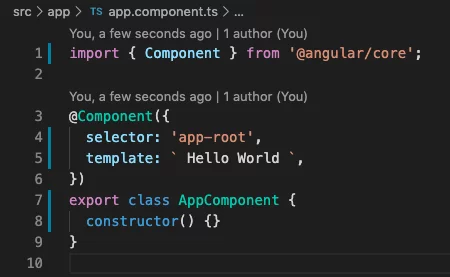
Now, let’s check the compiled app.component.js again.
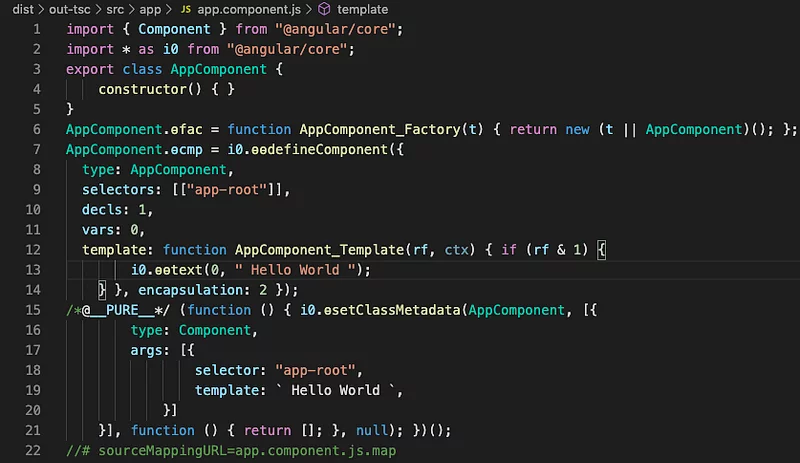
app.component.js
This time, the template only needs a single instruction (line 13) to render the HelloWorld text — using the ɵɵtext() function. Since we're not creating a p tag or doing any interpolation, there is no need for ɵɵelementStart or ɵɵtextInterpolate1. Those instructions shouldn’t appear in the final, production bundle at all.
Time for a custom production build to validate this.
npm run custom-prod-build
npm run launch
As you'll see in the video, the text method is present as expected. Yet, there is no trace of any interpolation or elementStart function anywhere. The Angular compiler, running in production mode, successfully removed those unused methods from its renderer code. That's a significant win for keeping Angular bundles lean.
A big thank you to the Angular team and all contributors for constantly refining the framework and its tooling!
If you have any feedback or spot any mistakes, feel free to leave a comment. You can also reach me on Twitter (@esanjiv).
Happy coding!