Handling Event Cancellation in Angular Components
Angular components typically rely on output properties backed by EventEmitter to broadcast events. Yet, there are scenarios where the parent component needs the ability to veto or halt the event emission entirely. Out of the box, Angular lacks a built-in mechanism to cancel events. So how can we empower the parent to intercept and cancel events triggered by a child component?
Let’s walk through a practical example: imagine you are constructing a tab control component that enables users to switch between different content panels.
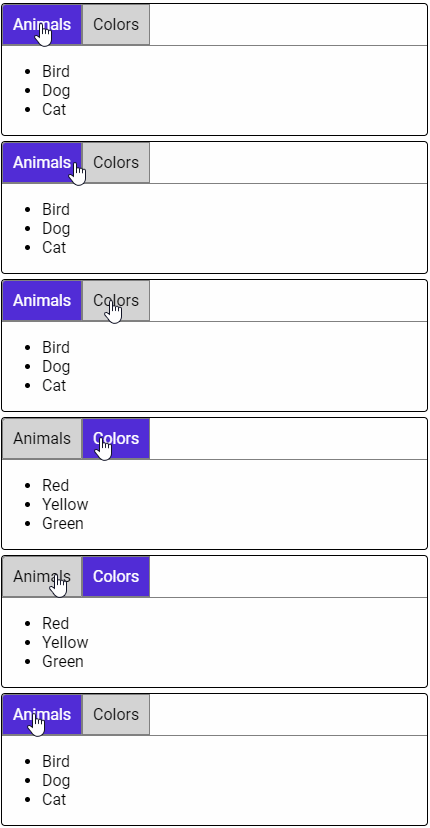
This tab component manages both the rendering of the projected content and the navigation logic for selecting the active tab, following an architecture similar to Angular Material Tabs.
<tab-group>
    <tab label="my label">
    	<!-- tab content -->
    </tab>
</tab-group>
Check out a live demo of the component on StackBlitz.
Now, imagine the consumer wants to block tab navigation whenever there is unsaved or stale data present. What hooks can we expose to the consumer to make event cancellation straightforward?
Approach 1: Leveraging an Input Property
Let’s enhance the tab-group component by introducing an input property that governs event cancellation. We will name this property canActivateTab, and it will accept a function returning a boolean. If no function is supplied, the default behavior will allow navigation (i.e., return true). When the user selects a tab, the component will invoke canActivateTab to determine whether the parent wants to prevent the switch.
@Component({
  selector: 'tab-group',
  templateUrl: './tab-group.component.html',
  styleUrls: ['./tab-group.component.css']
})
export class TabGroupComponent {

  // Additional tab group component code omitted

  @Input()
  canActivateTab = () => true;

  _onSelectTab(tab: TabComponent) {
    if(this.canActivate()) {
      this._setTab(tab);
    }
  }

}
tab-group.component.ts
To utilize the canActivateTab property, the consumer passes a function as an input binding.
<tab-group [canActivateTab]="_onCanActivateTab">
    <tab label="my label">
    	<!-- tab content -->
    </tab>
</tab-group>
app.component.html
@Component({
  selector: 'my-app',
  templateUrl: './app.component.html',
  styleUrls: [ './app.component.css' ]
})
export class AppComponent  {
  _onCanActivateTab() {
    // insert conditional tab switching logic
    return true;
  }
}
app.component.ts
At first glance, this appears to be an elegant solution! Consumers can simply define a function that returns a boolean to control the behavior. However, a closer look reveals a catch: inside the _onCanActivateTab function, you no longer have access to the other properties of the component class.
@Component({
  selector: 'my-app',
  templateUrl: './app.component.html',
  styleUrls: [ './app.component.css' ]
})
export class AppComponent  {
  private cancelTab = true;

  _onCanActivateTab() {
    return this.cancelTab; // ❌ Returns undefined!
  }
}
Because the tab-group component is the one invoking the provided function, the context of `this` within that function is not what you might expect. For more details, see the documentation on the `this` keyword.
To ensure that `this` refers to the AppComponent instance, you would need to explicitly bind the function using the bind method, passing the correct context.
<tab-group [canActivateTab]="_onCanActivateTab.bind(this)">
    <tab label="my label">
    	<!-- tab content -->
    </tab>
</tab-group>
Using bind is certainly a valid solution, and it does address the context issue. That said, I’m not a fan of requiring the consumer of the component to be aware of JavaScript’s `this` semantics. While `this` is a fundamental concept in JavaScript, the goal here is to build components that are **easy to use** and feel natural within the Angular framework. With that in mind, let’s explore an alternative approach.
Input Property StackBlitz Demo
Approach 2: Using an Output Property
What if, instead of an input property, we turn to output properties for event cancellation?
Let’s update the tab-group component to emit an event whenever a tab switch is attempted. First, we define an interface that includes a cancellation token.
export interface TabActivateArgs {
  cancel: boolean;
}
Next, we add a new Output that emits the TabActivateArgs.
@Component({
  selector: 'tab-group',
  templateUrl: './tab-group.component.html',
  styleUrls: ['./tab-group.component.css']
})
export class TabGroupComponent {

  @Output()
  canTabActivate = new EventEmitter<TabActivateArgs>();

  _selectTab(tab: TabComponent) {
    const activateArgs = {cancel: false};

    this.canTabActivate.emit(activateArgs);

    if(activateArgs.cancel) {
      return;
    }

    this._setTab(tab);
  }

}
tab-group.component.ts
When the user attempts to change tabs, the canTabSwitch output property will be emitted. The consumer listens to this event in the parent component and sets the cancel flag to true to veto the tab change.
<tab-group (canTabActivate)="_onCanTabActivate($event)">
    <tab label="my label">
    	<!-- tab content -->
    </tab>
</tab-group>
app.component.html
@Component({
  selector: 'my-app',
  templateUrl: './app.component.html',
  styleUrls: [ './app.component.css' ]
})
export class AppComponent  {

  _onCanTabActivate(args: TabActivateArgs) {
    // logic to determine if tab switching should be cancelled
    args.cancel = true;
  }
}
This output property strategy works because, by design, EventEmitters operate synchronously.
I was initially worried that this pattern might break when the component is used as a custom element via Angular Elements. Fortunately, that’s not the case! Even though EventEmitters are adapted to dispatch custom events, those custom events are also dispatched synchronously.
If exposing a mutable property feels slightly awkward to your consumers, a cleaner alternative is to offer a cancel function directly within the event payload.
_selectTab(tab: TabComponent) {
   let cancelled = false;
   const activateArgs = {
     cancel: () => { cancelled = true; }
   };

   this.canTabActivate.emit(activateArgs);

   if(cancelled) {
     return;
   }

   this._setTab(tab);
 }
}
The consumer can then call this function to void the event.
In my view, this approach is far more intuitive. It avoids the need for any specialized JavaScript context tricks and stays aligned with standard Angular conventions.
Output Property StackBlitz Demo
Wrapping Up
Although Angular doesn’t ship with a ready-made event cancellation mechanism, leveraging output properties to give consumers this control feels like a much more natural fit.
Do you have a different approach in mind? I’d be excited to see it! Feel free to fork my StackBlitz and share your ideas.