What Is A2UI?
A2UI — short for Agent-to-UI — is a standard introduced by Google that bridges the gap between an agent and a dynamically generated interface. At its core, A2UI defines a vocabulary of pre-built components with their properties, plus a message format the agent uses to tell the client which components to show and what data to fill them with.
Instead of returning plain text, the language model picks from a catalog of predefined components and ships the associated data along with them. The client only has to render these components — and it decides the concrete visual representation itself. The agent determines the "what", the client decides the "how". As a result, dynamically produced UI fragments do not look like foreign objects but blend into the existing application design.
Unlike approaches such as MCP Apps, where the agent ships complete components, A2UI's strict separation of structure and presentation also prevents the client from having to load third-party code at runtime.
At the time this article was written, two versions of A2UI existed: the stable 0.8 release and the upcoming 0.9 draft. This article already looks at the latter.
A2UI in Action: Examples of Dynamically Generated UIs
A dynamic A2UI response can be seen in a demo application in which an agent asks a follow-up question in the form of an interactive form:
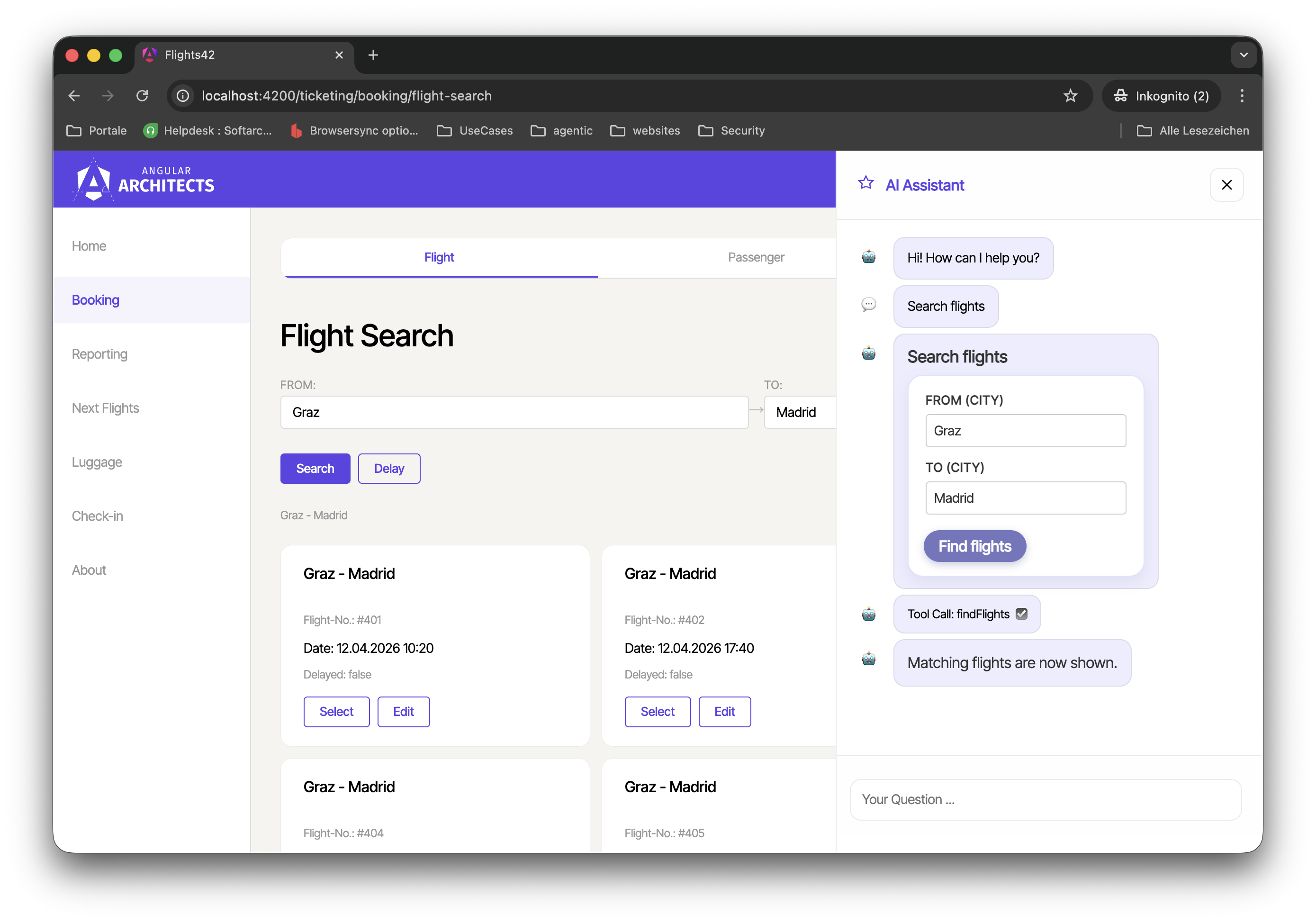
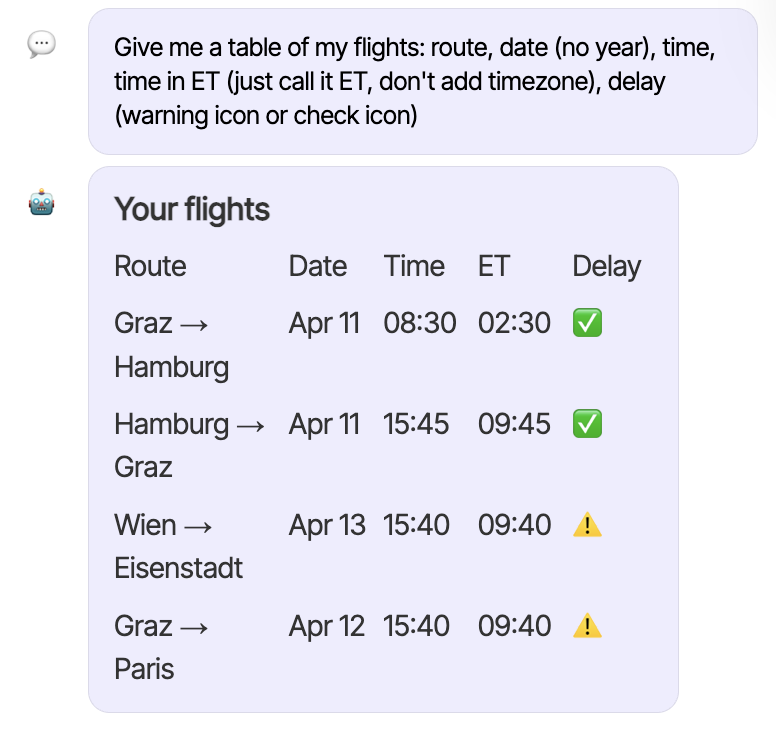
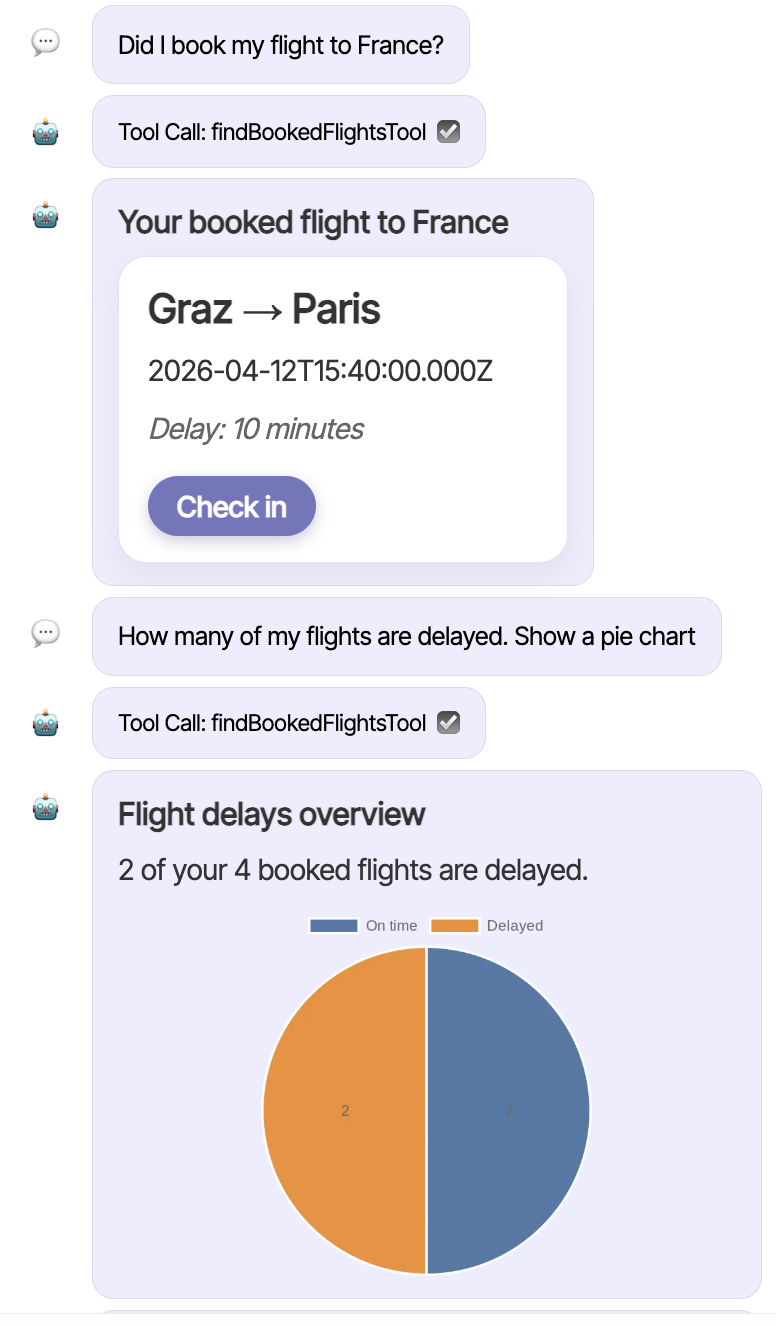
This extends the UI far beyond classic chat histories. The LLM delivers the components to be displayed as JSON. This can be used to implement not only dialogs, but also interactive lists, charts, or status indicators. More examples of dynamically LLM-defined responses:
Which Components Does the A2UI Basic Catalog Contain?
The central idea of A2UI is a so-called component catalog. Such a catalog describes a set of components that both the agent and the client know. The Basic Catalog defined by A2UI includes a range of common UI building blocks, which can be grouped as follows. The following overview is taken from the specification:
| Kategorie | Komponente | Beispiel |
|---|---|---|
| Display | Text | Zeigt Text an. Unterstützt einfaches Markdown. |
| Image | Zeigt ein Bild von einer URL an. | |
| Icon | Zeigt ein vom System bereitgestelltes Icon aus einer vordefinierten Liste an. | |
| Video | Zeigt ein Video von einer URL an. | |
| AudioPlayer | Ein Player für Audio-Inhalte von einer URL. | |
| Layout | Row | Ein horizontaler Layout-Container. |
| Column | Ein vertikaler Layout-Container. | |
| List | Eine scrollbare Liste von Komponenten. | |
| Container | Card | Ein Container im Karten-Stil. |
| Tabs | Eine Reihe von Tabs, jeweils mit Titel und untergeordneter Komponente. | |
| Divider | Eine horizontale oder vertikale Trennlinie. | |
| Modal | Ein Dialog, der über dem Hauptinhalt erscheint und durch einen Button im Hauptinhalt ausgelöst wird. | |
| Input | Button | Ein anklickbarer Button, der eine Aktion auslöst. Unterstützt die Varianten „primary" und „borderless". |
| CheckBox | Eine Checkbox mit Label und booleschem Wert. | |
| TextField | Ein Feld für Texteingaben durch den Benutzer. | |
| DateTimeInput | Eine Eingabe für Datum und/oder Uhrzeit. | |
| ChoicePicker | Eine Komponente zur Auswahl einer oder mehrerer Optionen. | |
| Slider | Ein Schieberegler zur Auswahl eines numerischen Wertes innerhalb eines Bereichs. |
Which Functions Does A2UI Offer?
Beyond the components themselves, A2UI also offers functions that the LLM can reference within component definitions. This way, values that need to be determined or formatted at runtime — such as formatted numbers and dates — can be described declaratively without the language model having to execute the underlying logic itself. The Basic Catalog ships a number of frequently used functions like formatNumber or formatDate out of the box. This overview also comes from the specification:
| Kategorie | Funktion | Beschreibung |
|---|---|---|
| Validierung | required | Prüft, dass der Wert nicht null, undefined oder leer ist. |
| regex | Prüft, dass der Wert einem regulären Ausdruck entspricht. | |
| length | Prüft Einschränkungen für die Stringlänge. | |
| numeric | Prüft Einschränkungen für numerische Bereiche. | |
| Prüft, dass der Wert eine gültige E-Mail-Adresse ist. | ||
| Formatierung | formatString | Führt String-Interpolation von Datenmodellwerten und registrierten Funktionen durch. |
| formatNumber | Formatiert eine Zahl mit Tausendertrennung und Nachkommastellen. | |
| formatCurrency | Formatiert eine Zahl als Währungszeichenkette. | |
| formatDate | Formatiert ein Datum/eine Uhrzeit anhand eines Musters. | |
| Verknüpfung | and | Logische UND-Verknüpfung einer Liste boolescher Werte. |
| or | Logische ODER-Verknüpfung einer Liste boolescher Werte. | |
| not | Logische NICHT-Verknüpfung eines booleschen Wertes. | |
| Sonstige | openUrl | Öffnet eine URL in einem Browser. |
| pluralize | Wählt eine lokalisierte Zeichenkette basierend auf einer numerischen Anzahl aus. |
How Do A2UI Messages and the Renderer Work?
The client displays the components through a renderer. The renderer is the instance that receives A2UI messages and creates the corresponding UI elements. For the messages exchanged between agent and client, A2UI defines four message types:
| Nachrichtentyp | Beschreibung |
|---|---|
createSurface |
Weist den Client an, eine neue Surface zu erstellen. |
updateComponents |
Liefert eine Liste von Komponenten-Definitionen, die einer bestimmten Surface hinzugefügt oder dort aktualisiert werden. |
updateDataModel |
Liefert neue Daten, die in das Datenmodell einer Surface eingefügt werden oder dieses ersetzen. |
deleteSurface |
Entfernt eine Surface und deren Inhalte explizit aus der UI. |
A surface is a logical display area in the client that the agent creates with createSurface, populates with updateComponents, and removes when needed with deleteSurface. The data used inside components is managed by A2UI in a separate data model per surface, which can be updated via updateDataModel. Components bind to values of this data model through data binding, so changes are reflected in the display automatically.
Integrating the A2UI Renderer into Angular
So that developers do not have to implement the protocol themselves, the A2UI project already offers renderers for several languages as well as adapters for various frameworks. The renderer for JavaScript is found in the package @a2ui/web_core, and the adapter built on top of it for Angular in @a2ui/angular. Both packages can be fetched via npm as usual:
npm install @a2ui/angular @a2ui/web_coreExample: A Passenger Card with A2UI in Angular
To make the way A2UI works tangible, we start with a minimal example located in the sample project under projects/a2ui-demo. Instead of a real language model, our example code first generates the A2UI messages as hardcoded data. This way, we can fully focus on the data format and the client-side processing.
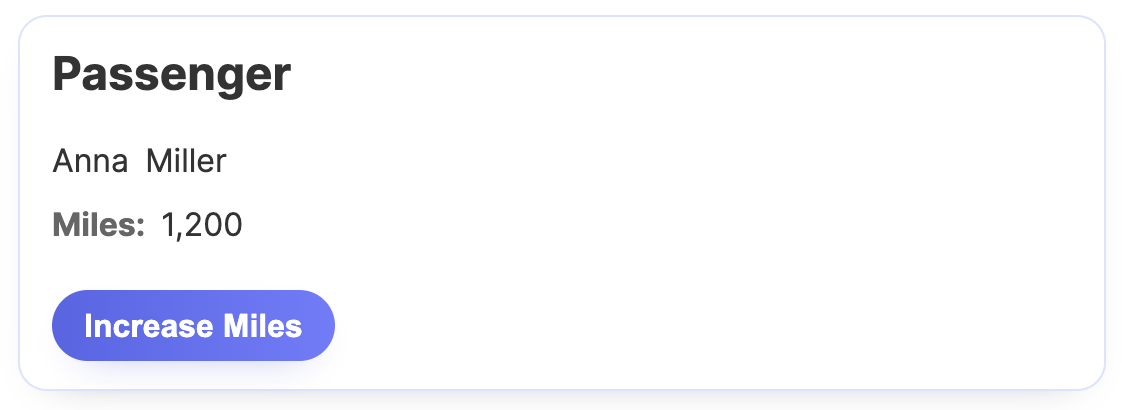
The demo shows a card with a passenger's data as well as a button to increase the accumulated bonus miles:
The passenger card is defined with the createSimpleCard function, which produces an array of A2UI messages:
import type { A2uiMessage } from '@a2ui/web_core/v0_9';

export function createSimpleCard(
  surfaceId: string,
  catalogId: string,
  passenger: Passenger,
): A2uiMessage[] {
  return [
    {
      version: 'v0.9',
      createSurface: {
        surfaceId,
        catalogId,
      },
    },
    {
      version: 'v0.9',
      updateComponents: {
        surfaceId,
        components: [
          { id: 'root', component: 'Card', child: 'content' },
          {
            id: 'content',
            component: 'Column',
            children: ['headline', 'name-row', 'miles-row', 'button'],
          },
          {
            id: 'headline',
            component: 'Text',
            text: 'Passenger',
            variant: 'h2',
          },
          {
            id: 'name-row',
            component: 'Row',
            children: ['first-name', 'last-name'],
          },
          {
            id: 'first-name',
            component: 'Text',
            text: { path: '/passenger/firstName' },
            variant: 'body',
          },
          {
            id: 'last-name',
            component: 'Text',
            text: { path: '/passenger/lastName' },
            variant: 'body',
          },
          {
            id: 'miles-row',
            component: 'Row',
            children: ['miles-label', 'miles-value'],
          },
          {
            id: 'miles-label',
            component: 'Text',
            text: 'Miles:',
            variant: 'caption',
          },
          {
            id: 'miles-value',
            component: 'Text',
            text: {
              call: 'formatNumber',
              args: {
                value: { path: '/passenger/bonusMiles' },
                decimals: 0,
              },
              returnType: 'string',
            },
            variant: 'body',
          },
          {
            id: 'button',
            component: 'Button',
            child: 'button-label',
            action: {
              event: {
                name: 'increaseMiles',
                context: {
                  passenger: { path: '/passenger' },
                },
              },
            },
          },
          {
            id: 'button-label',
            component: 'Text',
            text: 'Increase Miles',
            variant: 'body',
          },
        ],
      },
    },
    {
      version: 'v0.9',
      updateDataModel: {
        surfaceId,
        path: '/passenger',
        value: passenger,
      },
    },
  ];
}
The first message of type createSurface creates a new surface. The second message describes the components to be displayed via updateComponents: a Card as the root, containing a column with a heading, name row, miles display, and button. Some outputs are bound to values in the data model via the path property. The example defines this data model in the third message, which has the type updateDataModel.
Every component receives its own ID; nested components are referenced via child or children using these IDs. Through this kind of referencing, all nodes of the component tree sit on the same level — A2UI intentionally avoids nesting inside the JSON document, since that poses a challenge for language models.
The button declaratively states that a click should trigger an increaseMiles event with the passenger data as context. Handling this event is the client's job.
To display the described structure, the example uses the A2uiRendererService provided by the Angular adapter:
import {
  A2UI_RENDERER_CONFIG,
  A2uiRendererService,
  SurfaceComponent,
} from '@a2ui/angular/v0_9';

[...]

@Component({
  selector: 'app-root',
  imports: [SurfaceComponent],
  template: `
    <a2ui-v09-surface [surfaceId]="surfaceId" />
  `,
  styleUrl: './app.css',
})
export class App {
  private readonly renderer = inject(A2uiRendererService);
  protected readonly config = inject(A2UI_RENDERER_CONFIG);
  private readonly destroyRef = inject(DestroyRef);
  protected readonly surfaceId = 'passenger-card-surface';

  constructor() {
    this.render();
    this.registerHandler();
  }

  private render(): void {
    const passenger: Passenger = {
      id: 42,
      firstName: 'Anna',
      lastName: 'Miller',
      bonusMiles: 1200,
    };

    const messages = createSimpleCard(
      this.surfaceId,
      this.config.catalogs[0].id,
      passenger,
    );

    this.renderer.processMessages(messages);
  }

  private registerHandler(): void {
    [...]
  }
}
The A2uiRendererService processes incoming A2UI messages with its processMessages method. The actual display is handled by the SurfaceComponent, which takes the desired surfaceId.
New: Agentic UI with Angular
If you don't just want to integrate A2UI, but want to embed it cleanly into larger architectures:
In my book Agentic UI with Angular, I go into exactly these patterns and trade-offs in detail.
Since the button in our card fires an increaseMiles event, the example registers a handler for it on the onAction property:
import type { A2uiClientAction } from '@a2ui/web_core/v0_9';

[...]

private registerHandler(): void {
  const subscription = this.renderer.surfaceGroup.onAction.subscribe(
    (action: A2uiClientAction) => {
      console.log('[A2UI Event]', action);

      if (action.name !== 'increaseMiles') {
        return;
      }

      const passenger = action.context['passenger'] as Passenger;

      this.renderer.processMessages([
        {
          version: 'v0.9',
          updateDataModel: {
            surfaceId: this.surfaceId,
            path: '/passenger',
            value: {
              ...passenger,
              bonusMiles: passenger.bonusMiles + 300,
            },
          },
        },
      ]);
    },
  );

  this.destroyRef.onDestroy(() => {
    subscription.unsubscribe();
  });
}
The handler for increaseMiles receives the passenger data passed in the context and updates the bonus miles in the bound data model with an updateDataModel message. The renderer detects the change in the data model and automatically refreshes the bound displays.
Unfortunately, onAction is not an RxJS Observable. That's why the unsubscribe is done programmatically here via a DestroyRef.
So that the renderer knows which catalogs are available and how any Markdown content should be transformed, the Angular adapter provides a central configuration that is supplied via providers:
import {
  A2UI_RENDERER_CONFIG,
  A2uiRendererService,
  BasicCatalog,
  provideMarkdownRenderer,
} from '@a2ui/angular/v0_9';
import {
  ApplicationConfig,
  inject,
  provideBrowserGlobalErrorListeners,
} from '@angular/core';
import { marked } from 'marked';

export const appConfig: ApplicationConfig = {
  providers: [
    provideBrowserGlobalErrorListeners(),
    {
      provide: A2UI_RENDERER_CONFIG,
      useFactory: () => ({
        catalogs: [inject(BasicCatalog)],
      }),
    },
    provideMarkdownRenderer(async (markdown) =>
      marked.parse(String(markdown ?? '')),
    ),
    A2uiRendererService,
  ],
};
The shown example configures the Basic Catalog supplied by A2UI, which the adapter provides as a service. For this, the catalog is registered for the token A2UI_RENDERER_CONFIG. In addition, the A2UI team's implementation of the Basic Catalog requires a Markdown renderer, which is wired up via provideMarkdownRenderer.
Summary
A2UI enables a language model to reply to requests not just with text, but with concrete UI structures that the client can render directly at runtime. The model combines existing components into suited interfaces — tailored to the respective context and the current interaction.
A central advantage lies in the separation of structure and presentation: the client decides on the concrete rendering and does not execute any foreign code. This keeps the dynamically generated UI fragments consistent with the application and makes them feel native rather than alien.
The Next Step
We now know how to render A2UI in Angular. The next part looks at having the UI generated by an agent and connecting it via AG-UI.
Interested in Production-Ready Agentic UI Architectures?
In my workshop, we cover AG-UI, A2UI, MCP Apps, HITL patterns, and modern Angular architectures for real agentic systems.

Häufig gestellte Fragen
Was versteht man unter A2UI?
A2UI (Agent-to-UI) ist ein von Google eingeführter Standard, der die Verbindung zwischen einem Agenten und einer dynamisch erzeugten Benutzeroberfläche herstellt. Er legt einen Satz vordefinierter Komponenten mit ihren Eigenschaften sowie ein Nachrichtenformat fest, über das ein Agent den Client anweist, welche Komponenten angezeigt und mit welchen Daten sie befüllt werden sollen.
Warum ist A2UI relevant?
Mit A2UI können Sprachmodelle auf Anfragen nicht allein mit Text reagieren, sondern auch mit konkreten UI-Strukturen wie Listen, Karten, Diagrammen oder Eingabeformularen. Dadurch lassen sich agentische Sidecars und Assistenten deutlich über herkömmliche Chat-Verläufe hinaus erweitern, ohne dass der Client zur Laufzeit externen Code nachladen muss.
Was beinhaltet der Basic Catalog in A2UI?
Der Basic Catalog ist die im Lieferumfang von A2UI enthaltene Sammlung gängiger UI-Bausteine. Er umfasst Anzeige-, Layout-, Container- und Eingabekomponenten wie Text, Image, Card, Column, Row, Button oder TextField sowie Standardfunktionen wie formatNumber, formatDate oder typische Validierungen.
Wie lässt sich A2UI in eine Angular-Anwendung einbinden?
Für Angular stellt A2UI das Paket @a2ui/angular bereit, das auf dem JavaScript-Renderer @a2ui/web_core basiert. Der A2uiRendererService verarbeitet die eingehenden A2UI-Nachrichten, die Komponente SurfaceComponent rendert das erzeugte Surface, und der gewünschte Katalog wird über das Token A2UI_RENDERER_CONFIG registriert.
Für die Einbindung sind folgende Schritte erforderlich:
- Installation des Pakets
@a2ui/angularüber den Paketmanager. - Import des Moduls
A2uiModulein das gewünschte Feature-Modul. - Bereitstellung des Katalogs über
A2UI_RENDERER_CONFIGin der App-Konfiguration. - Platzierung der
SurfaceComponentan der Stelle im Template, an der das Surface erscheinen soll. - Aufruf des
A2uiRendererService, um eine A2UI-Nachricht in ein Surface umzuwandeln.
Nach der Registrierung des Katalogs und der initialen Konfiguration kann der Service wiederholt verwendet werden, um unterschiedliche Surfaces basierend auf Agentenantworten zu erzeugen und darzustellen.