The Angular team has been busy since the 19.0 release, and version 19.1 arrives with another set of refinements and capabilities. Let's explore what this update brings to the table.
TypeScript 5.7 Compatibility
Angular 19.1 now works seamlessly with TypeScript 5.7.3, which was published shortly before this release. Developers get full access to the latest TypeScript tooling and language features.
Notable additions in TypeScript 5.7 include:
- Enhanced error diagnostics: The compiler can now flag variables that are used before being initialized, offering better code quality checks.
- ES2024 support: New utilities such as
Object.groupByare available, enabling cleaner and more expressive object manipulation. - Compiler performance: Several optimizations have been made to speed up builds and improve overall compilation efficiency.
For a complete breakdown of changes, visit: https://devblogs.microsoft.com/typescript/announcing-typescript-5-7/
Routing Visualization in DevTools
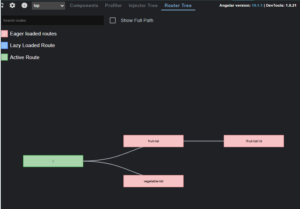
The Angular DevTools extension now includes a visual representation of the application's routing structure. Loaded routes can be inspected as a graph, making navigation patterns easier to understand.
Signal visualization has also been introduced, though it currently relies on the internal ɵgetSignalGraph() function. Plans are in place to make this a fully supported, interactive signal graph within DevTools in upcoming releases.
To activate the routing graph, open Angular DevTools, navigate to settings, and enable the "Router Graph" option.
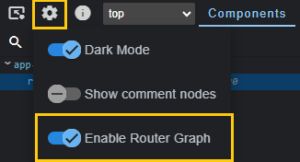
A new "Router Tree" tab will then be visible on the right-hand panel.
Cleanup of Unused Standalone Imports
Previously, the CLI only issued warnings about unused standalone imports. Starting with Angular 19.1, these can be removed automatically by running a new command:
ng generate @angular/core:cleanup-unused-imports.
Enhanced NgComponentOutlet
NgComponentOutlet is a directive that enables dynamic component insertion at a designated location. Previously, dynamic loading required working within TypeScript files. Angular 19.1 changes that.
In earlier versions, dynamic component creation involved:
- Using Angular APIs like
ComponentFactoryResolverto instantiate components programmatically. - Writing extra TypeScript logic to handle component creation, dependency injection, and lifecycle management.
Here is an example of the older pattern:
import { Component, ComponentFactoryResolver, ViewChild, ViewContainerRef } from '@angular/core';

@Component({
  selector: 'app-root',
  template: '<ng-container #dynamicContainer></ng-container>',
})
export class AppComponent {
  @ViewChild('dynamicContainer', { read: ViewContainerRef }) container!: ViewContainerRef;

  constructor(private resolver: ComponentFactoryResolver) {}

  loadComponent(component: any) {
    const factory = this.resolver.resolveComponentFactory(component);
    this.container.clear();
    this.container.createComponent(factory);
  }
}
With the latest update, dynamic components can be loaded directly from templates using NgComponentOutlet, bypassing the need for manual TypeScript setup. The syntax looks like this:
<ng-container
  *ngComponentOutlet="dynamicComponent"
  #outlet="ngComponentOutlet">
</ng-container>
*ngComponentOutlet="dynamicComponent": This binds the directive to a component class provided through thedynamicComponentvariable from the component class.#outlet="ngComponentOutlet": This creates a local reference to the directive, granting access to the component instance and its public interface.
The supporting TypeScript code is minimal:
import { Component } from '@angular/core';
import { MyDynamicComponent } from './my-dynamic.component';

@Component({
  selector: 'app-root',
  templateUrl: './app.component.html',
})
export class AppComponent {
  dynamicComponent = MyDynamicComponent; // Przypisanie klasy komponentu
}
This approach significantly reduces boilerplate, removes the necessity for manual instantiation in TypeScript, and offers more flexibility for dynamic UI scenarios.
A new input, componentInstance, has also been added. It exposes the directive-created component's instance, enabling:
- Direct access to the component's methods and properties.
- The ability to modify data or push new inputs after the component has been rendered.
- Interactions that were previously cumbersome, given that
NgComponentOutletdid not offer direct instance access.
Multilingual subPath Option
For i18n, Angular 19.1 introduces subPath, a new feature that builds upon the existing baseHref mechanism. It automatically manages URL prefixes for different locales (e.g., /pl or /en) and organizes build output into language-specific folders.
Here's a side-by-side look at the two approaches:
| baseHref | subPath |
We need to build the application separately for each language, for example:
Result: Separate sets of files for each language. If you have more languages, the number of builds increases proportionally. |
The application is built only once with a single baseHref setting (e.g., /). Multilingual support is handled by Angular’s router, which parses URL subpaths (e.g., /pl, /en) and loads the appropriate resources.
Result: The build process is faster and more efficient because we generate only one version of the application. |
For each language, we need to place separate files on the server in the appropriate directories:
Result: This requires additional server configuration and more storage space since files are duplicated. |
All application files are shared and located in a single directory. The server handles different languages by analyzing the URL (e.g., /pl, /en) and redirecting to a single index.html.
Result: This is simpler to configure and takes up less space on the server. |
The URL is more static, for example:
If no additional mechanisms are applied, the application may not always reflect the language in the URL, which can hinder SEO. Result: We can achieve /pl/ or /en/, but only by building separate versions of the application for each language. |
Each language is clearly visible in the URL, for example:
Result: This is beneficial for SEO, as search engines can recognize separate pages for each language. |
| We may require additional logic during the build process, such as loading translations for a specific language depending on the configuration.
Result: Changing the language in a running application may require a page reload, as baseHref alters the entire base path of the application. |
Angular Router enables dynamic language handling. Translations are loaded based on the URL subpath, which simplifies the code.
Result: Changing the language in the application (e.g., from /pl to /en) does not require a page reload. |
In essence, with subPath, Angular takes care of generating subdirectories and setting the appropriate baseHref for each language. This streamlines deployment and enhances developer productivity.
The folder structure and a sample angular.json configuration using subPath are shown below:
/dist/
  my-app/
    pl/ (<base href="/my-app/pl/">)
      index.html
      main.js
      styles.css
    en/ (<base href="/my-app/en/">)
      index.html
      main.js
      styles.css
    "my-app": {
      "i18n": {
        "locales": {
          "pl": {
            "translation": "src/locale/file.pl.json",
            "subPath": "pl"
          },
          "en": {
            "translation": "src/locale/file.en.json",
            "subPath": "en"
          }
        }
SSR Language Redirection
The server-side renderer now automatically redirects users to their preferred locale by inspecting the Accept-Language request header. This functions out of the box without any extra setup.
Template Hot Module Replacement
While Angular 19.0 enabled HMR for styles by default, version 19.1 extends this to HTML templates. When a template is edited, only that specific view is hot-swapped instead of triggering a full reload. This preserves the application state and cuts down on rebuild time.
A live demonstration is available on the official Angular YouTube channel: https://youtube.com/shorts/1h0ViHgAOGY?si=W_evMrztW0x6oZBX
Streamlined Library Creation
With ng-packagr now serving as the builder through @angular/build:ng-packagr, developers can run ng generate library without requiring the @angular-devkit/build-angular package to be installed separately.
Closing Thoughts
Angular 19.1 delivers a set of upgrades that improve the overall development workflow. Highlights include native TypeScript 5.7 support, DevTools advancements, automated import cleanup, and new i18n capabilities. The build pipeline also benefits from template HMR, automated locale redirection in SSR, and a leaner library generation process.