OnPush Becomes the Default Change Detection Strategy
A long-debated decision within the Angular community has finally materialized: OnPush is now the default change detection strategy. This shift makes sense in light of the growing adoption of Signals and Zone-less Angular. When Signals are used, the framework receives precise change notifications, and OnPush leverages these to the fullest. The result is efficient change detection that focuses specifically on the components affected by a change.
Developers who require the previous behavior can manually set the strategy to Eager:
import { ChangeDetectionStrategy, Component } from '@angular/core';

@Component({
  selector: 'app-legacy',
  changeDetection: ChangeDetectionStrategy.Eager,
  template: `...`
})
export class LegacyCmp { [...] }
The Eager setting replaces the original Default configuration, which is now deprecated. With this in place, change detection scans the entire component tree for updates.
To minimize breaking changes, ng update automatically enables Eager during an Angular version upgrade when OnPush was not explicitly set.
Resource API Reaches Stability in Angular 22
Until now, the Resource API was the missing piece in the Signals ecosystem. It enables reactive, asynchronous data derivation — typically HTTP requests triggered by changes to Signals. Despite its central role, it remained experimental for a considerable time. Angular 22 changes this decisively: resource, rxResource, and httpResource are now stable and ready for production use.
The most convenient entry point is the httpResource function. It takes a lambda expression that returns an HTTP request. This expression is reactive: whenever a Signal used within it changes, the request automatically re-executes.
import { httpResource } from '@angular/common/http';
import { ChangeDetectionStrategy, Component, signal } from '@angular/core';
import { Flight } from '../../data/flight';

@Component({
  selector: 'app-flight-search',
  changeDetection: ChangeDetectionStrategy.OnPush,
  [...]
})
export class FlightSearch {
  protected readonly filter = signal({ from: 'Hamburg', to: 'Graz' });

  protected readonly flightsResource = httpResource<Flight[]>(
    () => ({
      url: 'https://demo.angulararchitects.io/api/flight',
      params: {
        from: this.filter().from,
        to: this.filter().to,
      },
    }),
    { defaultValue: [] },
  );

  protected readonly flights = this.flightsResource.value;
  protected readonly error = this.flightsResource.error;
  protected readonly isLoading = this.flightsResource.isLoading;

  protected search(): void {
    this.flightsResource.reload();
  }
}
The type parameter Flight[] defines the expected response shape. The defaultValue argument guarantees that the component does not encounter undefined at startup. To prevent the resource from issuing a request, simply return undefined:
protected readonly flightsResource = httpResource<Flight[]>(
  () => {
    const filter = this.filter();
    if (!filter.from || !filter.to) {
      return undefined;
    }
    return {
      url: 'https://demo.angulararchitects.io/api/flight',
      params: { from: filter.from, to: filter.to },
    };
  },
  { defaultValue: [] },
);
The resource manages its state through Signals: value holds the loaded data, error provides error details, and isLoading reflects the loading state. Additionally, the resource exposes a more granular status with values idle, loading, reloading, error, resolved, and local (for locally overridden values).
These Signals can be consumed directly within the template, for example to display the loading indicator and iterate over the loaded data:
@if (flightsResource.isLoading()) {
  <div>Loading ...</div>
}

@if (flightsResource.error()) {
  <div>Error: {{ flightsResource.error() }}</div>
} @else {
  <div class="row">
    @for (flight of flightsResource.value(); track flight.id) {
      <app-flight-card [item]="flight" />
    }
  </div>
}
Race conditions are resolved automatically: if multiple requests are issued in rapid succession, only the result of the most recent one is applied, and earlier ones are aborted where possible. This behavior mirrors the mechanics of switchMap in RxJS.
Incremental Hydration Enabled by Default
Starting with Angular 22, provideClientHydration() activates Incremental Hydration automatically. Applications that do not require it can disable it explicitly using the new withNoIncrementalHydration() feature. A schematic migration is provided to assist with the upgrade process.
Signal Forms Now Stable for Production
Signal Forms has also reached production readiness. The journey from experimental API to a stable release was remarkably swift. This was made possible through extensive internal case studies at Google, where typical form applications were systematically examined.
The core of Signal Forms is the form function. It accepts a Signal with the form data and an optional schema containing validation rules:
import { linkedSignal } from '@angular/core';
import { form, minLength, required } from '@angular/forms/signals';

@Component({ [...] })
export class FlightEdit {
  private readonly store = inject(FlightDetailStore);

  protected readonly flight = linkedSignal(() =>
    normalizeFlight(this.store.flight()),
  );

  protected readonly flightForm = form(this.flight, (path) => {
    required(path.from);
    required(path.to);
    required(path.date);
    minLength(path.from, 3);
  });
}
The result is a FieldTree: a deeply nested Signal structure where each property is represented as a Signal carrying form status information (value, dirty, invalid, errors). For template binding, the FormField directive is used:
<input [formField]="flightForm.from" id="flight-from" />
<div>{{ flightForm.from().errors() | json }}</div>
Introducing the @Service Decorator for Concise Registration
A notable addition is the new @Service decorator. It covers the common scenarios where @Injectable() or @Injectable({ providedIn: 'root' }) was previously written, while aligning more closely with the actual intent of providing a service:
import { Service } from '@angular/core';

@Service()
export class FlightClient { [...] }
By default, the service is registered in the root scope. For those who prefer otherwise, the service can be manually provided — for instance in app.config.ts, at the component level, or on a route. In such cases, autoProvided should be set to false:
@Service({ autoProvided: false })
export class TabRegistry { [...] }injectAsync: Lazy Dependency Injection
With injectAsync, dependencies can be injected lazily — only when they are actually required. This proves especially valuable for services that load substantial libraries and are needed only upon specific user interaction.
import { injectAsync } from '@angular/core';

@Component({ [...] })
export class CheckinPage {
  private readonly upgradeService = injectAsync(() =>
    import('./upgrade-service').then((m) => m.UpgradeService),
  );

  protected async upgrade(): Promise<void> {
    const flightNumber = this.checkinFormModel().ticketId;
    const upgradeService = await this.upgradeService();
    upgradeService.upgrade(flightNumber);
  }
}
The injectAsync function takes a lambda expression that returns a Promise. The outcome is a function whose first invocation handles the service loading. The import of UpgradeService — and thus the loading of the corresponding bundle — occurs only when upgrade() is called for the first time.
For lazy loading to operate correctly, the injected service must be auto-provided, meaning it is decorated with either @Injectable({ providedIn: 'root' }) or the newer @Service() decorator.
Prefetching with injectAsync and onIdle
Lazy loading inherently introduces a delay on the first invocation. To mitigate this, the bundle can be loaded in advance.
This is precisely what the prefetch option of injectAsync enables: it references a function that returns a Promise. Once that Promise resolves, Angular proceeds with loading the service.
This mechanism can be combined with the onIdle helper. It returns a Promise that resolves as soon as the browser is idle:
import { injectAsync, onIdle } from '@angular/core';

private readonly upgradeService = injectAsync(
  () => import('./upgrade-service').then((m) => m.UpgradeService),
  { prefetch: onIdle },
);
Internally, onIdle delegates to requestIdleCallback and falls back to setTimeout when the browser does not support this API. A configurable timeout ensures prefetching is triggered at the latest after a specified duration:
injectAsync(
  () => import('./upgrade-service').then((m) => m.UpgradeService),
  { prefetch: () => onIdle({ timeout: 100 }) },
);
To modify this behavior application-wide, the underlying IdleService can be replaced using provideIdleServiceWith, typically in the app.config.ts.
Resource Composition via Snapshots
A fundamental principle of reactive programming is deriving values from other values. A computed originates from one or more Signals and updates whenever its sources change. For Resources, such derivation was previously only possible indirectly: one could project their individual Signals (value, error, isLoading) but not transform the resource as a whole. Since Angular 21.2, a dedicated concept exists for this: Snapshots allow a resource to be fully transformed into a new resource without altering the original loading logic.
The starting point is the snapshot Signal of a resource, which contains the complete current state including status and value. A snapshot thus represents the entire state as an object of Signals. This object can be mapped to a new object of derived Signals. From this derived snapshot, resourceFromSnapshots constructs a new resource.
To illustrate, consider an example that filters the loaded data — for instance, showing only baggage items above a specified minimum weight:
import {
  linkedSignal,
  Resource,
  resourceFromSnapshots,
  ResourceSnapshot,
  Signal,
} from '@angular/core';

export function withMinWeight(
  input: Resource<Luggage[]>,
  minWeight: Signal<number>,
): Resource<Luggage[]> {
  const derived = linkedSignal<
    { snap: ResourceSnapshot<Luggage[]>; min: number },
    ResourceSnapshot<Luggage[]>
  >({
    source: () => ({ snap: input.snapshot(), min: minWeight() }),
    computation: ({ snap, min }) => {
      if (snap.status === 'resolved') {
        return { ...snap, value: snap.value.filter((item) => item.weight >= min) };
      }
      return snap;
    },
  });

  return resourceFromSnapshots(derived);
}
The computation callback of the linkedSignal determines how the new snapshot is assembled from the source Signals. Whenever either the source resource or the minWeight Signal changes, the computation re-runs automatically. The derived resource thus remains consistent with its inputs at all times.
This pattern can be applied generically to any transformation. One particularly interesting use case, also highlighted by the Angular team in conjunction with snapshots, is preserving the last loaded value during a reload instead of showing undefined:
export function withPreviousValue<T>(input: Resource<T>): Resource<T> {
  const derived = linkedSignal<ResourceSnapshot<T>, ResourceSnapshot<T>>({
    source: input.snapshot,
    computation: (snap, previous) => {
      if (snap.status === 'loading' && previous?.value?.status === 'resolved') {
        return { ...snap, value: previous.value.value };
      }
      return snap;
    },
  });

  return resourceFromSnapshots(derived);
}
The previous argument of the computation callback contains the most recently produced snapshot of the derived resource. This allows the prior value to be intentionally carried over into the new snapshot.
debounced: Debouncing for Signals and Resources
Signals are inherently agnostic to time. Unlike Observables, they lack any concept of delay or throttling. This has made debouncing impossible in pure Signal chains — at least without breaking this mental model.
For forms, the Angular team integrated debouncing directly into Signal Forms, which covers the majority of use cases. For everything else, the new debounced function now exists.
In contrast to Signals, Resources are indeed time-aware. This is where debounced comes into play. The function creates a Resource whose value is updated with the specified delay. The resource's status indicates whether the value is still within the pending window:
import { debounced } from '@angular/core';

const filter = signal('');
const debouncedFilter = debounced(filter, 300); // 300ms

effect(() => console.log(debouncedFilter.value()));
FormRoot and the Submission API in Signal Forms
Since Angular 21.2, the submission API for Signal Forms has been available. It enables defining the entire form submission logic directly within the form call:
import { FormRoot, submit } from '@angular/forms/signals';

@Component({
  imports: [ [...], FormRoot ],
  [...]
})
export class FlightEdit {
  protected readonly flightForm = form(this.flight, flightSchema, {
    submission: {
      action: async (form) => this.save(form),
      ignoreValidators: 'none',
      onInvalid: (form) => this.reportValidationError(form),
    },
  });
}
The action property holds the asynchronous storage logic and may return server-side validation errors, which Signal Forms then integrates into the form status. The ignoreValidators option determines whether failing or pending validators block submission (none | pending | all). The onInvalid callback fires when validation prevents submission.
In the template, the FieldTree representing the entire form is bound to the form tag via the new FormRoot directive. This directive handles three responsibilities: it suppresses the browser's default validation behavior (such as native tooltips on required fields), connects the action from the submission configuration to the form's submit event, and prevents duplicate validation messages. To trigger the submit event, a regular button suffices — without an explicit type attribute, as it acts as a submit button within a form by default:
<form [formRoot]="flightForm">
  [...]
  <button>Save</button>
</form>
If additional submit actions are required — for example, in an approval workflow — the submit helper function can be used. It executes the submission only when the form is valid:
import { submit } from '@angular/forms/signals';

protected async requestApproval(): Promise<void> {
  await submit(this.flightForm, {
    action: async (form) => {
      await this.store.requestApproval(form().value());
    },
    ignoreValidators: 'none',
    onInvalid: (form) => this.reportValidationError(form),
  });
}
The onInvalid handler can also be used to automatically focus the first invalid input field after a failed validation. Signal Forms provides the focusBoundControl() method for this purpose:
private reportValidationError(form: FieldTree<Flight>): void {
  this.snackBar.open('Please correct the validation errors', 'OK');
  const errors = form().errorSummary();
  if (errors.length > 0) {
    errors[0].fieldTree().focusBoundControl();
  }
}Modern Angular
✓ Already updated to Angular 22!
For more on Signal Forms and modern Angular architecture, refer to my new eBook Modern Angular. It covers Signals, architecture, testing, AI assistants, and practical solutions for contemporary business applications.
Styling Signal Forms with Conditional CSS Classes
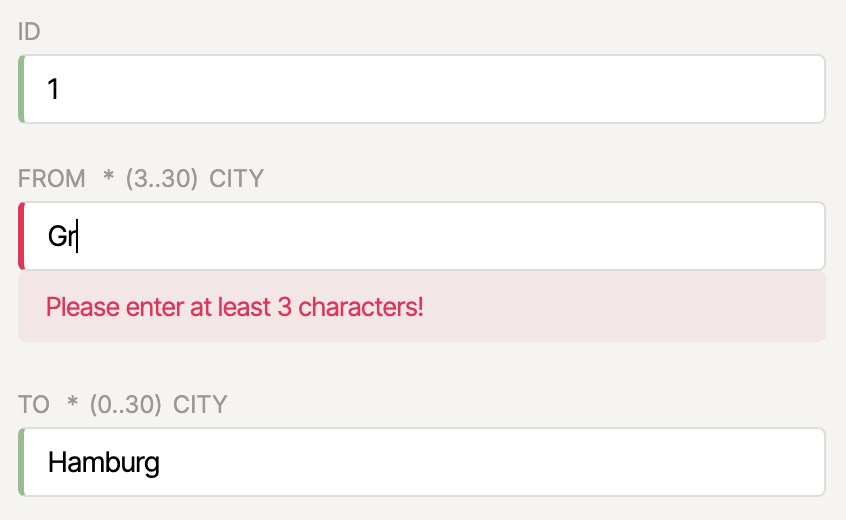
Since Angular 21.2, Signal Forms supports conditional CSS styling in the same way as Template-driven and Reactive Forms. A mapping of CSS class names to form-status predicates is defined via provideSignalFormsConfig:
import { provideSignalFormsConfig } from '@angular/forms/signals';

export const appConfig: ApplicationConfig = {
  providers: [
    [...],
    provideSignalFormsConfig({
      classes: {
        'ng-invalid': field => field.state().invalid(),
        'ng-valid':   field => field.state().valid(),
        'ng-dirty':   field => field.state().dirty(),
        'ng-pristine': field => !field.state().dirty(),
        'ng-pending': field => field.state().pending(),
      }
    }),
  ],
};
The corresponding CSS rule definitions could look like this:
input.ng-valid {
  border-left: 3px solid darkseagreen;
}

input.ng-invalid.ng-dirty {
  border-left: 3px solid var(--color-error);
}

input.ng-pending {
  border-left: 3px solid var(--color-border);
}
Signal Forms automatically applies the configured classes to the bound input fields:
If you want the exact same classes used with Reactive or Template-driven Forms, the pre-built configuration object NG_STATUS_CLASSES from the compat namespace is available:
import { NG_STATUS_CLASSES } from '@angular/forms/signals/compat';

provideSignalFormsConfig({
  classes: NG_STATUS_CLASSES
}),
Bridging Signal Forms and Reactive Forms
Signal Forms integrates smoothly with existing Reactive Forms setups. The bridge compatForm from @angular/forms/signals/compat connects a signal-based form model with reactive form controls:
import { compatForm, SignalFormControl } from '@angular/forms/signals/compat';

@Component({ [...] })
export class CheckinPage {
  protected readonly address = new SignalFormControl(
    this.addressFormModel(),
    (path) => {
      required(path.street);
      required(path.zipCode);
      required(path.country);
    },
  );

  protected readonly checkinForm = compatForm(this.checkinFormModel, (path) => {
    required(path.ticketId);
  });
}
SignalFormControl behaves like a typical AbstractControl and can be embedded directly into existing Reactive Forms structures. In the opposite direction, Signal Forms understands legacy form controls, CVA-based (Control Value Accessor) inputs, and classic validators. This means Signal Forms can also work with existing legacy form controls. The interop bridge to CVA can be disabled per field if needed:
<input ngNoCva [field]="myField">validateStandardSchema with Dynamic Rules
Standard Schema is a community-driven interface implemented by validation libraries such as Zod and Valibot. Because Signal Forms includes validateStandardSchema, a function that directly understands this interface, schemas from any of these libraries can be used for form validation without writing a dedicated adapter.
As of Angular 21.2, the schema can also adapt dynamically. Instead of a fixed schema object, you pass a lambda expression to validateStandardSchema, which is internally converted into a computed. When a signal used inside changes, the computed is automatically recalculated and the updated validation rules take effect immediately:
import { Signal } from '@angular/core';
import { SchemaPathTree, validateStandardSchema } from '@angular/forms/signals';
import { z } from 'zod';
import { Flight } from './flight';

const FlightZodSchema = z.object({
  id: z.number().int(),
  from: z.string().min(3).max(20),
  to: z.string().min(3).max(20),
  date: z.string(),
  delayed: z.boolean(),
});

const StrictFlightZodSchema = z.object({
  id: z.number().int(),
  from: z.string().min(10).max(30),
  to: z.string().min(10).max(30),
  [...]
});

export function validateWithSchema(
  path: SchemaPathTree<Flight>,
  strict: Signal<boolean>,
) {
  validateStandardSchema(
    path,
    () => strict() ? StrictFlightZodSchema : FlightZodSchema,
  );
}
This enables context-dependent validation strategies. The form switches automatically between a loose and a strict schema as soon as the strict signal changes.
disabled, readonly, and hidden with the when Property
Signal Forms provides the helper functions disabled, readonly, and hidden to make input fields conditional on form state. The new feature: the condition is now supplied via a when property in the parameter object. This makes the API more consistent and allows returning a descriptive string instead of true in case of an error:
import { disabled, hidden, readonly } from '@angular/forms/signals';

disabled(path.delay, {
  when: (ctx) => (ctx.valueOf(path.delayed) ? false : 'not delayed'),
});

readonly(path.delay, {
  when: (ctx) => ctx.valueOf(path.delayed),
});

hidden(path.delay, {
  when: (ctx) => ctx.valueOf(path.delayed),
});
The ctx parameter provides contextual access to other field values, so complex cross-field conditions can be expressed cleanly.
Route Auto Cleanup for Environment Injectors
In Angular, services can also be configured at the route level using the providers property of a route configuration. Previously, there was a catch: services registered this way were not cleaned up when leaving the route; they lived until the application shut down. The reason lies in the historical behavior of the underlying Environment Injectors. They are the counterpart to the providers previously set up at the NgModule level, and their original lifecycle behavior was intended to be preserved.
Since Angular 21.1, this can be changed. With withExperimentalAutoCleanupInjectors, Environment Injectors of a route — along with all service instances registered there — are automatically destroyed when leaving the route:
import {
  provideRouter,
  withComponentInputBinding,
  withExperimentalAutoCleanupInjectors,
} from '@angular/router';

export const appConfig: ApplicationConfig = {
  providers: [
    provideRouter(
      routes,
      withComponentInputBinding(),
      withExperimentalAutoCleanupInjectors(),
    ),
    [...]
  ],
};
This feature remains experimental for the time being.
Determining Active Routes with isActive as a Signal
Angular 22 introduces isActive, a new way to programmatically determine whether a route is active. The function returns a signal and is automatically recalculated in the template whenever the route state changes:
import { isActive, Router } from '@angular/router';

@Component({ [...] })
export class BookingNavigation {
  private readonly router = inject(Router);

  protected readonly flightSearchActive = isActive(
    '/ticketing/booking/flight-search', this.router
  );
  protected readonly passengerSearchActive = isActive(
    '/ticketing/booking/passenger-search', this.router
  );
  protected readonly summaryActive = isActive(
    '/ticketing/booking/summary', this.router,
    { paths: 'exact' }
  );
}
The optional third parameter accepts IsActiveMatchOptions and controls the comparison logic:
paths('exact'|'subset'): must all segments match, or is a subset sufficient?matrixParams('exact'|'subset'|'ignored'): comparison of matrix parameters of the matching segments.queryParams('exact'|'subset'|'ignored'): comparison of query parameters.fragment('exact'|'ignored'): comparison of the URL fragment.
By default, subset matching applies for paths: a route is considered active if it represents a subset of the current URL. In the example, paths: 'exact' was set for summaryActive so the route must match exactly. The signal is then used directly in the template for the active CSS class:
<a [routerLink]="['./flight-search']" [class.active]="flightSearchActive()">
  Flight
</a>
HttpClient in Angular 22: FetchBackend as the Default
Starting with Angular 22, HttpClient uses the FetchBackend by default. The explicit withFetch() is now deprecated and can be removed.
The reasoning: the Fetch API is now available in all relevant browsers and modern JavaScript runtimes. Compared to XMLHttpRequest (XHR), it provides a more modern, promise-based API, better support for streaming scenarios, and works better as a shared HTTP abstraction for browser and SSR. However, Fetch does not support upload progress events.
Accordingly, Angular 22 replaces the previous blanket reportProgress option (deprecated) with two dedicated variants that enable upload and download progress separately:
// Download-Fortschritt (funktioniert mit Fetch)
http.get('/large-file', { reportDownloadProgress: true, observe: 'events' });

// Upload-Fortschritt (erfordert withXhr())
http.post('/upload', file, { reportUploadProgress: true, observe: 'events' });
If reportUploadProgress is used together with the FetchBackend, Angular throws an exception. This is a deliberately hard signal that withXhr() is required in this case.
For those who need the original behavior, for example a progress indicator during upload, switching back to XHR is the way:
provideHttpClient(withXhr());When updating the version, ng update automatically adds withXhr(). This prevents unintended behavior changes in existing applications.
Template Syntax Enhancements in Angular 22
Angular 21.1, 21.2, and the prerelease versions of Angular 22 have brought a number of useful extensions for template expressions, summarized here. Examples from the respective pull requests are used for illustration.
Since Angular 21.1, templates support object spread, array spread, and rest arguments in function calls — syntax that was previously only allowed in TypeScript classes:
<div [class]="{ ...baseClasses, active: isActive() }"></div>
<ul>
  @for (item of [...preferred, ...rest]; track $index) {
    <li>{{ item }}</li>
  }
</ul>
{{ sum(...numbers()) }}
Also since 21.1, @switch supports multiple consecutive @case markers for the same block, similar to fall-through behavior in other languages:
@switch (state) {
  @case ('a')
  @case ('b') { <p>A oder B</p> }
  @case ('c') { <p>C</p> }
  @default    { <p>Sonst</p> }
}
Angular 21.2 added arrow functions with implicit return values in template expressions. They are particularly useful in combination with @for and event bindings:
@for (item of items(); track item.id) {
  <button (click)="select((x) => x.id === item.id)">…</button>
}
Arrow functions with block bodies ({ … }) and pipes inside the body are not allowed. Functions that use only their own parameters are hoisted by the compiler to the module level; functions that reference template context are stored on the view to ensure identity stability.
Also since 21.2, type checks with instanceof are possible directly in the template:
@if (event instanceof MouseEvent) {
  <p>ClientX: {{ event.clientX }}</p>
}
Exhaustive switch-case analysis for @switch also arrived in 21.2: with @default never; at the end of an @switch block, TypeScript verifies at compile time that all variants of a union type are handled. If the union is later extended and a new value goes unhandled, the compilation fails:
state: 'loggedOut' | 'loading' | 'loggedIn' = 'loggedOut';@switch (state) {
@case ('loggedOut') { <button>Login</button> }
@case ('loading') { <p>Loading ...</p> }
@case ('loggedIn') { <p>Welcome back!</p> }
@default never;
}Here the @switch expression (state) is itself the union. In the @default branch, TypeScript recognizes that state has the type never after all cases are covered. If the union is later extended, for example with 'banned' without a corresponding @case, the compiler fails.
Often, however, you switch not on the union itself but on one of its properties — for instance, the discriminator of a discriminated union. TypeScript can narrow the queried property but cannot determine whether the parent union is thereby fully covered. Angular 22 closes this gap. With never(<expression>) you can explicitly specify which expression should be checked for exhaustive coverage:
state!: { mode: 'show'; menu: number } | { mode: 'hide' };@switch (state.mode) {
@case ('show') { {{ state.menu }} }
@case ('hide') {}
@default never(state);
}Specifying never(state) tells the compiler explicitly to check full coverage against the parent state union. If it is later extended with another mode without a corresponding @case, the template compiler reports the error.
Angular 22 brings two further clarifications regarding null and undefined. The behavior of ?. in templates now matches JavaScript semantics exactly: when the chain breaks at a null or undefined point, the result is undefined. If you need the old Angular-specific behavior, wrap the expression with $null(...):
{{ user?.profile?.name }} <!-- jetzt: undefined wenn Kette bricht -->Additionally, the type-check block now supports proper TypeScript narrowing across ?.. After a truthiness check, the type is narrowed as in regular TS code, so subsequent access without ?. is type-safe:
@Component({
  template: `
    @if (user?.isMember) {
      {{ user.isMember }}
    }
  `,
})
export class UserComponent {
  user?: { isMember: boolean };
}
Finally, Angular 22 also allows //- and /* … */-comments inside HTML element definitions. This is useful for structuring long attribute lists:
<div
  // primary button
  class="btn btn-primary"
  /*
    Achtung: greift nur, wenn `loading` false ist
  */
  [disabled]="loading()"
></div>@defer: Optional Timeout for on idle
@defer (on idle) can now accept a timeout in milliseconds, analogous to IdleRequestOptions.timeout. This helps prevent a defer block from waiting indefinitely for an idle phase that never arrives:
@defer (on idle(2000)) {
  <heavy-widget />
}
Weitere Neuerungen im Detail
-
httpResourceund Transfer State: Serverseitig vorgeladene Ressourcen arbeiten jetzt nahtlos mit dem HTTP Transfer State zusammen. Dadurch entfallen doppelte HTTP-Anfragen beim ersten Rendering im Browser, da der Client auf die bereits vom Server gelieferten Daten zurückgreift. -
Web MCP Tools (
provideExperimentalWebMcpTools,declareExperimentalWebMcpTool): KI-Tools lassen sich direkt im Injector von Angular-Anwendungen registrieren. Beim Zerstören des Injectors werden diese Tools automatisch abgemeldet — eine ideale Ergänzung zu Route-Providern undwithExperimentalAutoCleanupInjectors. -
ApplicationRef.bootstrapmit Konfiguration: Diebootstrap()-Methode derApplicationRefakzeptiert nun analog zucreateComponentein Konfigurationsobjekt. Das ist besonders für Micro-Frontends relevant, die gezielt in bestimmte Seitenbereiche geladen werden:appRef.bootstrap(MyComponent, { hostElement: document.querySelector('#root')! }). -
Bootstrap mit Shadow Roots: Angular kann nun direkt unter einem Shadow Root starten. Styles werden im
SharedStylesHostkorrekt am übergeordneten Shadow Root registriert — ein weiterer Schritt in Richtung sauberer Web-Component- und Micro-Frontend-Integration. -
Wildcard-Routen mit umgebenden Segmenten (seit 21.1): Das Wildcard-Segment
**darf jetzt von vorangestellten und nachfolgenden Segmenten eingerahmt werden, etwa'foo/**/bar'. Bisher war dies nur über einen eigenen Path-Matcher realisierbar. Shell-Anwendungen profitieren hiervon, wenn sie anhand eines Musters das passende Micro-Frontend laden möchten. -
KI-gestütztes Runtime-Debugging: Im Dev-Mode stellt Angular KI-Debugging-Werkzeuge auf der Seite bereit. Dazu gehört
angular:di-graph, das den vollständigen Dependency-Injection-Graphen (Element- und Environment-Injectors) für In-Page-KI-Assistenten liefert. Damit sind künftig KI-gestützte Analysen des DI-Graphen direkt im Browser möglich. -
Trailing-Slash-Location-Strategien (seit 21.2): Mit
TrailingSlashPathLocationStrategyundNoTrailingSlashPathLocationStrategystehen zwei neue Subklassen bereit, die bestimmen, ob URLs in der Adressleiste mit oder ohne abschließenden/angezeigt werden. -
heightinImageLoaderConfig(seit 21.2): Der Image-Loader unterstützt nun nebenwidthauch eineheight-Angabe. -
Custom-Transformationen für Image-Loader (seit 21.1): Die eingebauten Loader für Cloudflare, Cloudinary, ImageKit und Imgix akzeptieren eine
transform-Eigenschaft für anbieterspezifische URL-Optionen:provideCloudflareLoader('https://cdn.example/', { transform: { format: 'webp', sharpen: 50 } }). -
TypeScript 6 (seit 21.2): Angular unterstützt jetzt TypeScript 6. TypeScript 5.9 wird nicht mehr unterstützt.
-
Node.js 26: Angular kompiliert und läuft nun offiziell auf Node.js 26.
Weiterführend: Angular Architecture Workshop (Remote, Interaktiv, Fortgeschritten)
Werden Sie fit für unternehmensweite und langlebige Angular-Anwendungen mit unserem Angular Architecture Workshop!

Deutsche Version | English Version
Häufige Fragen zu Angular 22
Was sind die wichtigsten neuen Features in Angular 22?
Die Resource API (resource, rxResource, httpResource) sowie Signal Forms sind stabil. Zudem ist OnPush die neue Standard-Change-Detection-Strategie, und Incremental Hydration ist standardmäßig aktiviert. Hinzu kommen @Service, injectAsync mit onIdle-Prefetching, die debounced-Funktion sowie zahlreiche Erweiterungen bei Template-Syntax und Router.
Ist Signal Forms in Angular 22 für die Produktion geeignet?
Ja. Signal Forms hat den experimentellen Status verlassen. Mit Submission API, dynamischen Schemata über validateStandardSchema, bedingten CSS-Klassen und Interop mit Reactive Forms liegt ein produktionsreifer Formular-Stack auf Signal-Basis vor.
Muss ich nach dem Update auf Angular 22 meine Change-Detection-Strategie anpassen?
In der Regel nicht. ng update setzt für bestehende Komponenten ohne explizite Strategie automatisch ChangeDetectionStrategy.Eager, um das bisherige Verhalten beizubehalten. Wer OnPush aktiv nutzen möchte, kann die Migration schrittweise pro Komponente durchführen.
Ersetzt der @Service-Dekorator @Injectable() vollständig?
Nein. @Service() ist eine ergonomischere Kurzform für den häufigsten Fall (providedIn: 'root'). @Injectable() bleibt weiterhin verfügbar und ist dort sinnvoll, wo abweichende Provider-Konfigurationen zum Einsatz kommen.
Fazit
Angular 22 markiert einen entscheidenden Reifegrad in der Signal-Ära: Mit der stabilen Resource API und Signal Forms stehen zentrale Bausteine für moderne, reaktive Angular-Anwendungen bereit für den Produktiveinsatz. Der neue @Service-Dekorator, die Debounce-Funktion debounced, dynamische Schemata und die Submission API runden das Bild ab und zeigen die konsequente Arbeit des Angular-Teams an einem kohärenten, ergonomischen API-Design.
Die Erweiterungen der Template-Syntax und die Router-Neuerungen wie das Auto Cleanup für Route-Injectors sowie die reaktive Funktion isActive vervollständigen eine Version, die in ihrer Breite beeindruckt. Wer in den letzten Monaten mit dem Update gewartet hat, erhält nun eine stabile Grundlage, die den Umstieg auf signalbasierte Entwicklung ganz ohne experimentelle Features erlaubt.