🪄 A First Look at the Magic
My initial encounter with a demo of the View Transition API left me genuinely impressed — it feels almost like a trick. The behavior almost seems impossible at first glance.
At its heart, the mechanism works like this: the browser takes a snapshot of whatever elements carry the view-transition-name CSS property, capturing their visual state before the DOM gets updated. Once the update is complete, the browser animates the differences between the old and new snapshots, using CSS Animations to fill the gap.
To get a real feel for the power here, browse through these live demos:
- Demo 1: A layout shuffle like IsotopeJS
- Demo 2: Cards being added and removed
- Demo 3: A playlist application
This snippet shows the standard pattern for kickstarting a view transition:
function handleClick(e) {
  // Fallback for browsers that don't support this API:
  if (!document.startViewTransition) {
    updateTheDOMSomehow();
    return;
  }

  // With a View Transition:
  document.startViewTransition(() => updateTheDOMSomehow());
}
Just call updateTheDOMSomehow? Somehow? And that's all it takes? Absolutely. That alone demonstrates how forgiving and adaptable this API really is.
This piece won't walk through the foundational concepts of the View Transition API. If you're new to it, the official guide is the perfect starting point. A working knowledge of Angular components, signals, and CSS will be helpful for the rest of this discussion.
🚧 The Angular Challenge: Beyond Route Transitions
While Angular developers can already leverage the View Transition API for route navigation, animating individual elements within a page is a different story. This capability is not natively supported. How can developers work around this limitation?
⚙️ Setting the Stage
Start by scaffolding a minimal Angular component for your tests:
@Component({
  selector: 'basic-demo',
  styleUrl: './basic-demo.component.scss',
  template: `
    <button (click)="toggle()">Toggle position</button>

    <div class="relative">
      <div class="box" [class]="position()">
        <span>{{ position() }}</span>
      </div>
    </div>
  `,
})
export class ViewTransitionBasicDemoComponent {
  position = signal<'left' | 'right'>('left');

  toggle() {
    this.position.set(this.position() === 'left' ? 'right' : 'left');
  }
}
This component renders a box that starts on the left side. The button click toggles its horizontal placement and updates the displayed position label inside the box. The styles are excluded here for readability; the entire working sample can be viewed on StackBlitz.

Next, try to animate this element using the View Transition API.
First, ensure the following rules are present in the global styles:
:root {
  view-transition-name: none;
}
This configuration guarantees that only elements with an explicit view-transition-name will participate in the animation.
The View Transition API relies on two critical conditions to animate an element:
- The target element must have the
view-transition-nameCSS property assigned a unique identifier. - The
document.startViewTransition()method must be invoked; the callback passed to it needs to update the DOM.
Applying the CSS property is simple:
<div class="box" [class]="position()" style="view-transition-name: box">
  <span>{{ position() }}</span>
</div>
The second requirement, however, introduces a hurdle in the Angular context.
A straightforward—though flawed—attempt might look like this:
toggle() {
  document.startViewTransition(() => {
    this.position.set(this.position() === 'left' ? 'right' : 'left');
  });
}
And here's the surprise: it functions! The animation plays out. You can see the result on StackBlitz.

The reason this works is somewhat counterintuitive, and it will become clearer as we add more complexity to the example and revisit the fundamental principles of SPA rendering.
Add a computed property and an additional DOM element whose visibility depends on that new property:
@Component({
  selector: 'app-root',
  styles: `// omitted for brevity`,
  template: `
    <button (click)="toggle()">Toggle position</button>

    <div class="box-container">
      <div class="box" [class]="position()" style="view-transition-name: box">
        <span>{{ position() }}</span>
      </div>
    </div>

    @if (isCircleVisible()) {
      <div class="circle" style="view-transition-name: circle"></div>
    }
  `,
})
export class App {
  position = signal<'left' | 'right'>('left');

  isCircleVisible = computed(() => this.position() === 'right');

  toggle() {
    document.startViewTransition(() => {
      this.position.set(this.position() === 'left' ? 'right' : 'left');
    });
  }
}
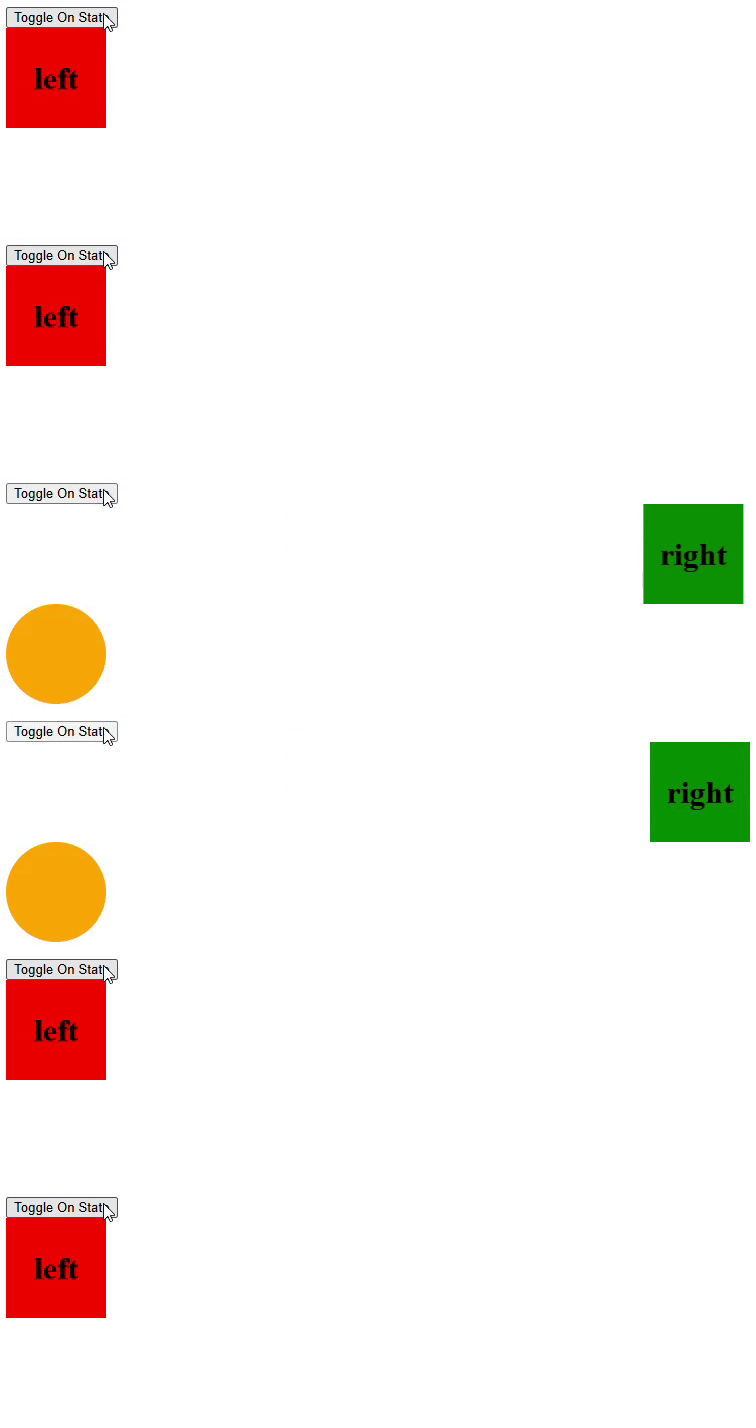
Now, when toggling between "left" and "right," the box still animates, but the circle does not, even though it has the view-transition-name style set, as demonstrated in this StackBlitz example.
🔄 The SPA Paradigm: Data Updates vs. DOM Manipulation
Keep in mind that the callback passed to startViewTransition is expected to directly modify the DOM:
document.startViewTransition(() => {
  updateTheDOMSomehow();
});
In a typical SPA framework like Angular, developers manage application state and let the framework handle the DOM rendering based on state mutations. Bypassing this process to directly manipulate the DOM is an anti-pattern.
Consequently, the updateTheDOMSomehow() function isn't readily available for Angular devs. Instead, the natural inclination is to write an updateTheDataSomehow() function, but this doesn't neatly fit the View Transition API's contract.
The animation succeeds for the box in the simpler scenario because Angular is likely quick enough to reconcile the state change and reflect it in the DOM within the synchronous execution of the callback:
document.startViewTransition(() => {
  this.position.set(this.position() === 'left' ? 'right' : 'left');

  // Angular is quick enough to update DOM dependent on `position` here
});
However, the computed property probably triggers a distinct rendering cycle that happens outside the immediate execution stack of the startViewTransition callback. This timing is why the circle isn't animated.
Moreover, the box animation itself can become unreliable. It might animate smoothly in one direction but fail in the other. Stripping out the circle-related code could unexpectedly fix these intermittent issues.
The fundamental issue is that Angular renders DOM updates on its own schedule, which is influenced by several internal factors. You can't just modify the state inside the startViewTransition callback and expect the DOM to be synced immediately.
Developers need a mechanism to guarantee that the DOM has been updated within that callback:
document.startViewTransition(async () => {
  this.position.set(this.position() === 'left' ? 'right' : 'left');

  await angularUpdatedTheDOM(); // <-- Need to do this
});
🌉 Bridging the Gap between the View Transition API and Angular
To keep responsibilities clear, isolate the logic for handling view transitions within its own service:
@Injectable({ providedIn: 'root' })
export class ViewTransitionService {
  run(stateChangeFn: () => void) {
    if (!document.startViewTransition) {
      stateChangeFn();
      return;
    }

    document.startViewTransition(async () => {
      stateChangeFn();

      await createRenderPromise(); // <-- TODO
    });
  }
}
Angular exposes the afterNextRender function, which is perfectly suited for crafting the createRenderPromise helper:
function createRenderPromise(injector: Injector) {
  return new Promise<void>((resolve) => {
    afterNextRender({
      read: () => {
        resolve();
      }
    }, { injector });
  });
}
Now, refactor the component to use this new service:
export class App {
  private viewTransitionService = inject(ViewTransitionService);

  position = signal<'left' | 'right'>('left');

  isCircleVisible = computed(() => this.position() === 'right');

  toggle() {
    this.viewTransitionService.run(() => {
      this.position.set(this.position() === 'left' ? 'right' : 'left');
    });
  }
}
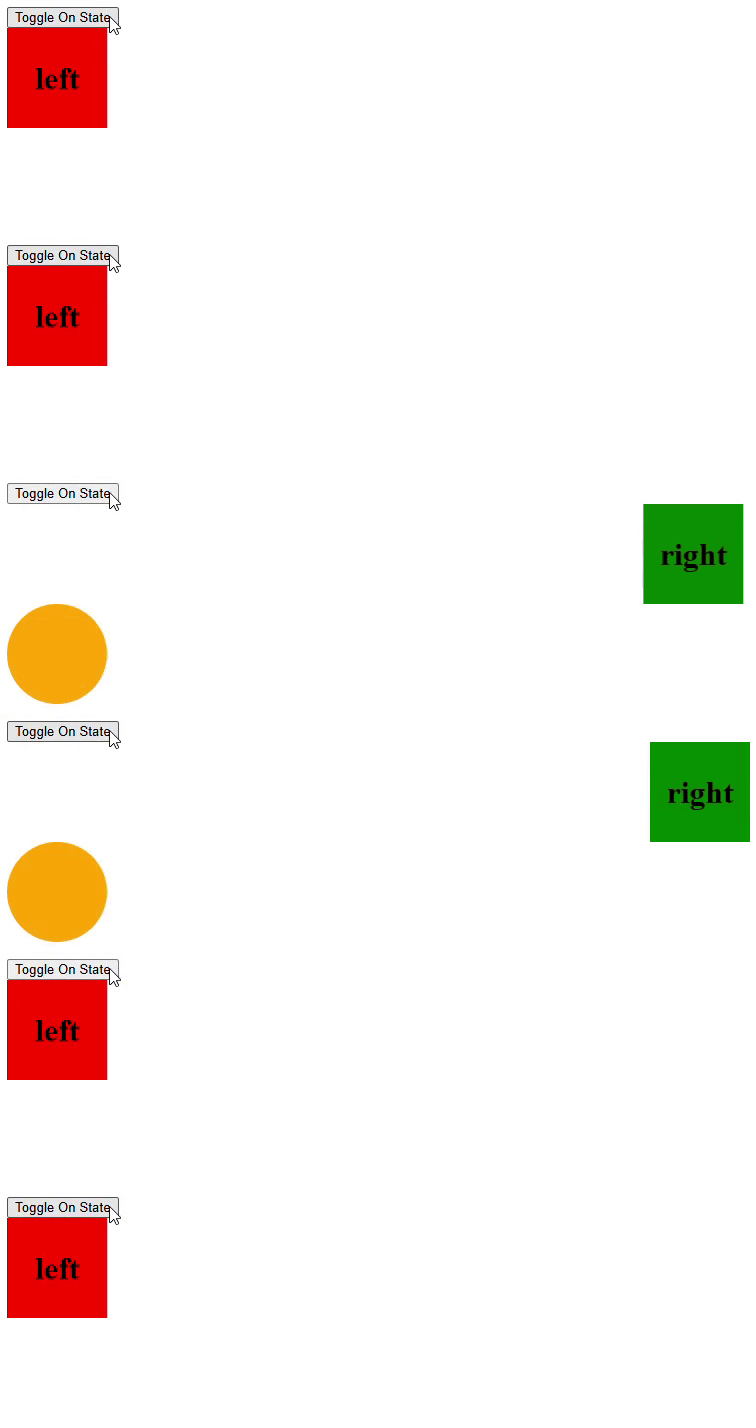
With this service integrated, all animatable elements should function correctly. See the complete result on StackBlitz.
🚦 Handling Concurrent Transitions: A Potential Pitfall
Let’s tweak the demo to examine a tricky scenario. First, extend the duration of all view transition animations to 3 seconds to make the behavior more visible:
::view-transition-group(*) {
  animation-duration: 3s;
}
Add another element—a triangle—that operates under its own animation schedule:
@if (isTriangleVisible()) {
  <div class="triangle" style="view-transition-name: triangle"></div>
}
Simplify the component to display the triangle after a short waiting period:
isTriangleVisible = signal<boolean>(false);

toggle() {
  this.viewTransitionService.run(() => {
    this.position.set(this.position() === 'left' ? 'right' : 'left');
  });

  setTimeout(() => {
    this.viewTransitionService.run(() => {
      this.isTriangleVisible.set(!this.isTriangleVisible());
    });
  }, 700);
}
Check out this implementation on StackBlitz.
Insert some logging statements into the run method of the ViewTransitionService:
run(stateChangeFn: () => void) {
  // ...

  console.log('start transition');
  document.startViewTransition(async () => {
    console.log('state change');
    stateChangeFn();

    await createRenderPromise(this.injector);
    console.log('rendered');
  });
}
Clicking the "toggle" button produces an unexpected outcome. The first pair of elements starts to animate, but around 700ms in, the animation comes to an abrupt halt. The animated items snap to their end positions, and only then does the triangle begin its transition.
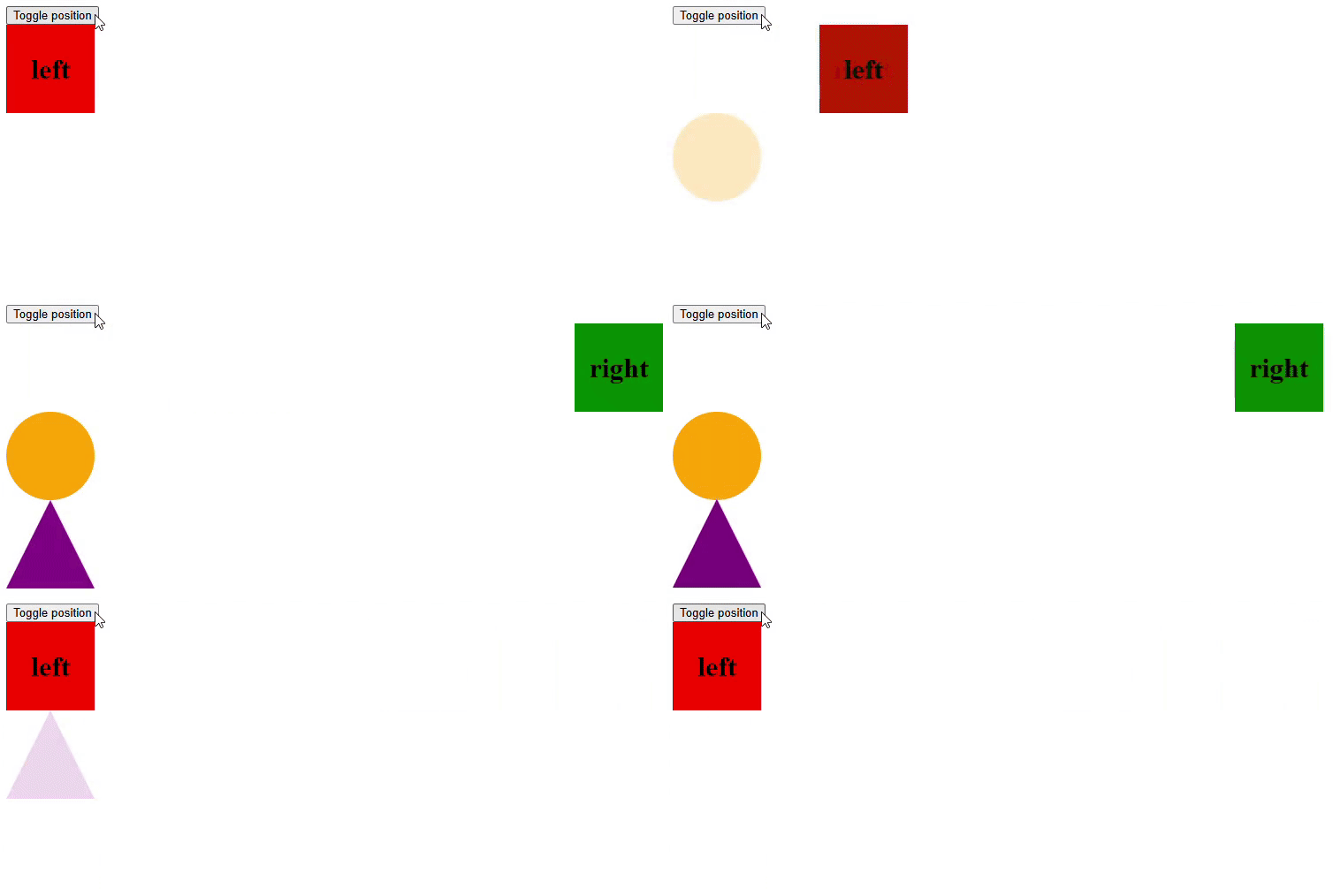
The console logs reveal:
start transition
state change
rendered
start transition
state change
rendered
This is actually by design. The browser permits only one view-transition animation at a time. When a second one is triggered before the first completes, the original is cancelled. A proposal for Scoped View Transitions exists, but it's not yet implemented in browsers.
From the service's perspective, it might be worth adding options to manage this conflict. For example, the run method could accept a configuration object dictating how to handle an incoming animation: (1) abort the ongoing one, (2) discard the new animation, or (3) defer the new one until the current finishes.
Delving into these implementations might be worthwhile, yet another significant issue deserves our attention.
⏱️ A Case For Optimizing the Overlapping Transitions
Now, adjust the delay for the triangle animation from 700ms down to 2ms. With this setup, clicking the "Toggle" button will still likely cause the second animation to invalidate the first. But the console output may differ:
start transition
start transition
state change
rendered
state change
rendered
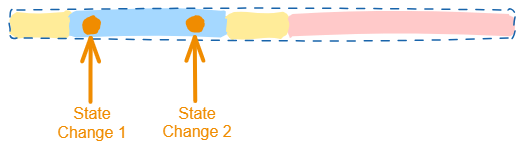
The createRenderPromise() function introduces a tiny latency, which could exceed 2ms on certain machines. Consequently, both view transitions are initiated before Angular has a chance to commit the DOM changes from the first state update. This situation creates a chance for optimization. Below is a timeline illustrating where the view transitions intersect with the Angular rendering sequence:
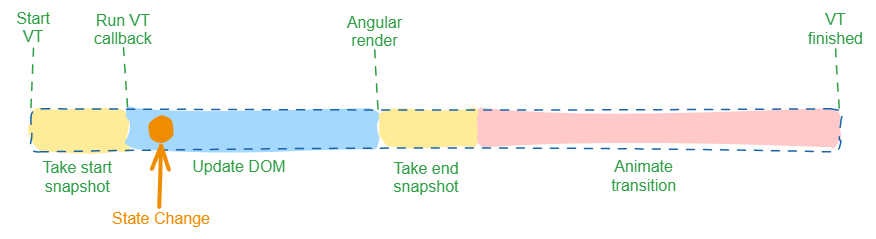
- Initial Snapshot (Yellow): This phase occurs when
document.startViewTransitionis invoked. It presumably freezes the initial visual state of the target elements. - State Change and Render (Blue): The view transition callback runs. At this point, Angular's state is mutated, prompting DOM updates. The render promise then awaits Angular's completion of these changes.
- Final Snapshot (Yellow): Once the callback is done, the browser captures the final look of the DOM.
- Animation (Red): The browser then executes the actual visual transition.
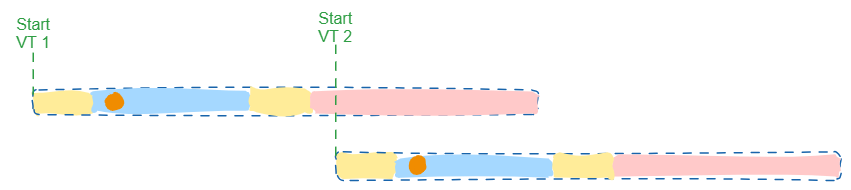
In the initial case with the 700ms hold, the sequence of the two view transitions appeared like this:
With the 2ms wait, however, the timeline shifts to this:
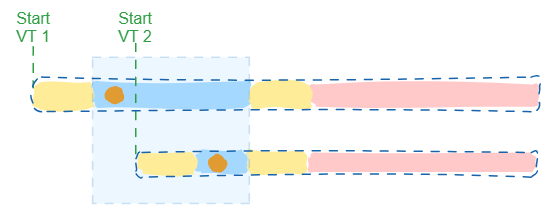
Notice that the blue blocks representing state mutations now intersect. In this situation, initiating a second view transition is unnecessary. The second state modification could be folded into the first view transition since Angular hasn't finished rendering yet:
While this might seem like an improbable edge case, mastering this detail is vital for robust view transition handling in Angular.
To handle this, update the run method within the ViewTransitionService to:
- Queue every incoming
stateChangeFninstead of running it right away. - If there's no active view transition, start one. Inside that transition's callback, flush all buffered
stateChangeFnfunctions sequentially. - If a view transition is underway:
- if Angular hasn't completed its render cycle yet, run the queued
stateChangeFnfunctions - if Angular has finished rendering and the View Transition API has kicked off its animation, defer the next
.runcall until the current view transition wraps up
- if Angular hasn't completed its render cycle yet, run the queued
Employing a buffer is essential to prevent loss of state change functions that arrive after Angular has finalized its render for the active view transition. This buffer also guarantees that the functions execute in the order they were queued (FIFO).
A streamlined version of the ViewTransitionService incorporating these refinements is available on StackBlitz.
The implementation is getting rather verbose, so from this point on, I'll lean on StackBlitz references for the more substantial code segments.
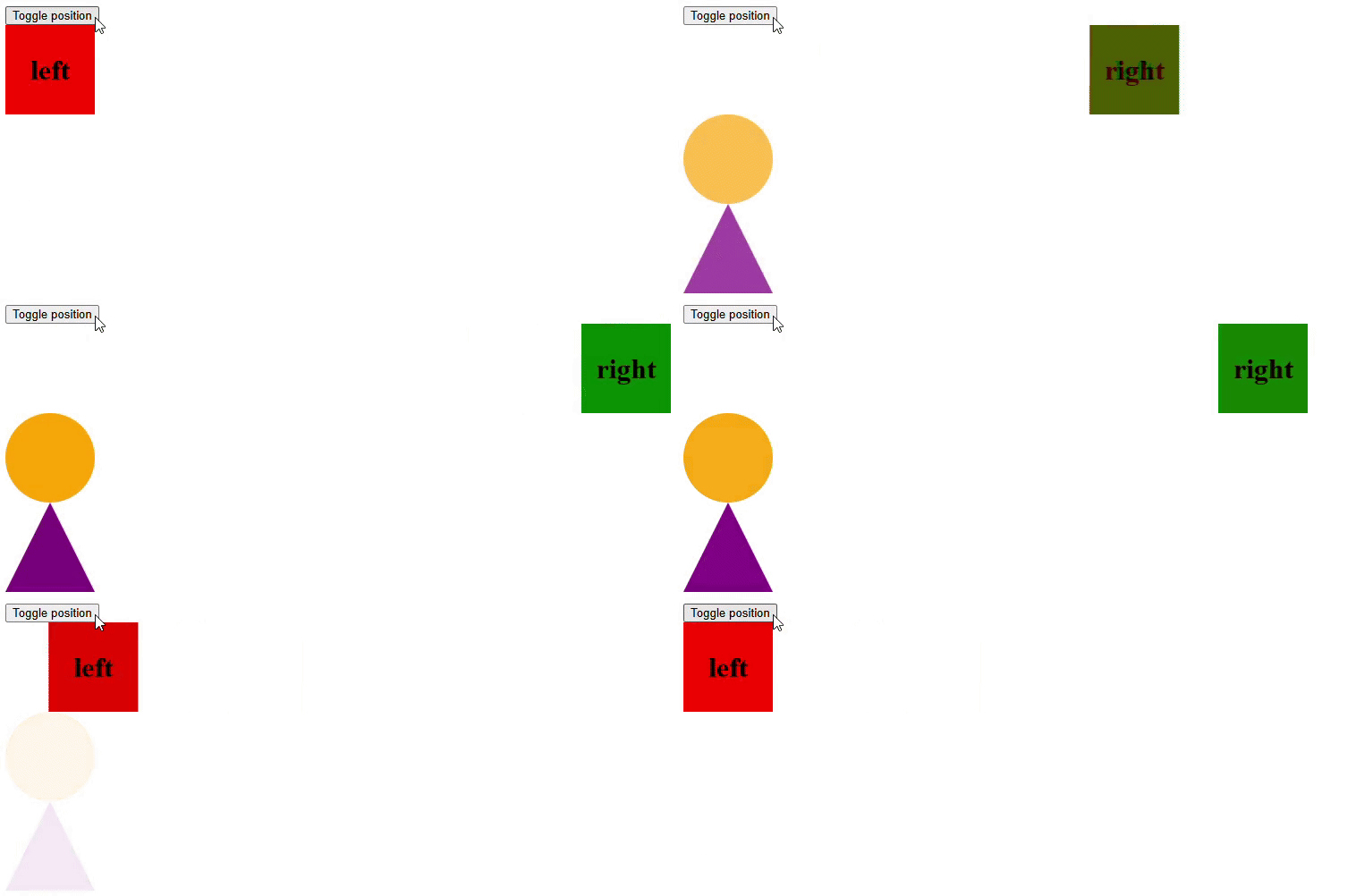
With this upgraded service, pressing the "Toggle" button should trigger all animations seamlessly:
🛠️ Refining the API: Moving Closer to the DOM
Although the ViewTransitionService gets the job done, there's room to polish the developer experience. Right now, animating anything requires wrapping the state mutation inside viewTransitionService.run(() => { /* ... */ }). This pattern tends to inject rendering concerns into the business logic, which complicates maintenance. A more elegant approach would allow marking elements for view transitions directly in the template. Imagine something like this:
<ng-container *vt="stateProp">
  <div style="view-transition-name: box;">
    Element to animate - {{stateProp}}
  </div>
</ng-container>
We need a directive that monitors the bound stateProp. Right before that state changes, it should invoke viewTransitionService.run(() => { /* ... */ }) to capture the "start" snapshot for the View Transition API. Inside the run callback, we'd place the actual state update.
🤔 The Challenge of Timing: Capturing the "Before" State
This brings up a tricky question: how can we hook into the exact moment before the state mutation is painted to the screen? Angular's ngOnChanges lifecycle hook fires after the property has already been updated, missing the perfect window to freeze the "from" state for the transition.
Younes Jaaidi has shared impressive research on intercepting the gap between state updates and DOM rendering in Angular. Yet, his method relies on patching Angular's internal APIs. While that might lead to a more seamless directive API—we'll take a route that avoids such experimental hacks.
Instead, our directive will depend on an auxiliary state variable whose responsibility is to alter the DOM after viewTransitionService.run is called.
✨ Introducing the *vt Directive: A Custom Rendering Strategy
Below is a foundational version of this directive:
@Directive({
  selector: '[vt]',
  standalone: true,
})
export class ViewTransitionRenderer<T> {
  private viewTransitionService = inject(ViewTransitionService);
  private document = inject<DocumentWithViewTransition>(DOCUMENT);
  private templateRef = inject(TemplateRef);
  private viewContainerRef = inject(ViewContainerRef);
  private cdr = inject(ChangeDetectorRef);

  trackingData = input.required<T>({ alias: 'vt' });

  private context: Context<T> = createContext(null as any);

  ngOnChanges(changes: Changes) {
    const shouldAnimate = !changes.trackingData.firstChange;

    // assign these variables outside of the callback to avoid closure issues
    const firstChange = changes.trackingData.firstChange;
    const currentValue = changes.trackingData.currentValue;

    if (!this.document.startViewTransition || !shouldAnimate) {
      this.render(firstChange, currentValue);

      return;
    }

    this.viewTransitionService.run(() => {
      this.render(firstChange, currentValue);
    });
  }

  private render(isFirstChange: boolean, trackingData: T) {
    this.context.$implicit = trackingData;

    if (isFirstChange) {
      this.viewContainerRef.createEmbeddedView(this.templateRef, this.context);
    }

    this.cdr.detectChanges();
  }
}

interface Context<T> {
  $implicit: T;
}

function createContext<T>(data: T): Context<T> {
  return { $implicit: data };
}
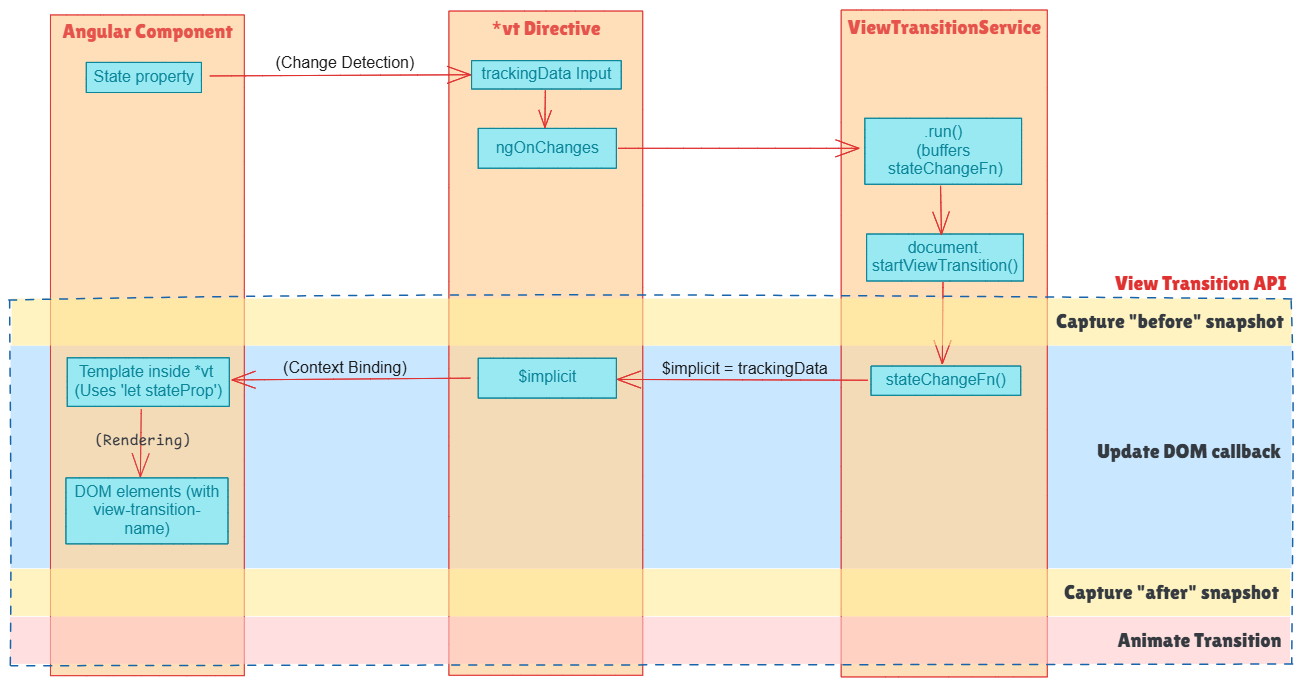
In this directive, the trackingData input holds the value destined for rendering when the view transition is prepared—specifically, inside the callback passed to viewTransitionService.run.
Within that .run callback, the input's current value is assigned to the $implicit variable of the directive's context.
The idea is that the template associated with the *vt directive will refer to this new implicit context variable instead of the original state property.
<ng-container *vt="stateProp; let state">
  <div style="view-transition-name: box;">
    Element to animate - {{state}}
  </div>
</ng-container>
Take note of {{state}} appearing where one might expect {{stateProp}}.
For a more ergonomic syntax, you can assign the original property name to the $implicit context, effectively mirroring the type of usage you'd have without the directive:
<ng-container *vt="stateProp; let stateProp">
  <div style="view-transition-name: box;">
    Element to animate - {{stateProp}}
  </div>
</ng-container>
This pattern works, though its classification as a 'best practice' is debatable. Any thoughts?
With this directive ready, the demo component can be refactored to take advantage of it:
@Component({
  selector: 'app-root',
  imports: [ViewTransitionRenderer],
  template: `...`,
})
export class App {
  position = signal<'left' | 'right'>('left');

  isCircleVisible = computed(() => this.position() === 'right');

  isTriangleVisible = signal<boolean>(false);

  toggle() {
    this.position.set(this.position() === 'left' ? 'right' : 'left');

    setTimeout(() => {
      this.isTriangleVisible.set(!this.isTriangleVisible());
    }, 2);
  }
}
Template:
<button (click)="toggle()">Toggle position</button>

<div class="box-container">
  <ng-container *vt="position(); let position">
    <div class="box" [class]="position" style="view-transition-name: box">
      <span>{{ position }}</span>
    </div>
  </ng-container>
</div>

<ng-container *vt="isCircleVisible(); let isCircleVisible">
  @if (isCircleVisible) {
    <div class="circle" style="view-transition-name: circle"></div>
  }
</ng-container>

<ng-container *vt="isTriangleVisible(); let isTriangleVisible">
  @if (isTriangleVisible) {
    <div class="triangle" style="view-transition-name: triangle"></div>
  }
</ng-container>
To see this fully realized, visit StackBlitz.
This diagram depicts the data flow among the hosting component, the *vt directive, the ViewTransitionService, and the View Transition API:
🎯 Fine-Grained Control: Enabling View Transitions on Demand
Let's tweak the demo to trigger the animation for the triangle element independently:
<button (click)="toggleBox()">Toggle Box</button>

<button (click)="toggleTriangle()">Toggle Triangle</button>
toggleBox() {
  this.position.set(this.position() === 'left' ? 'right' : 'left');
}

toggleTriangle() {
  this.isTriangleVisible.set(!this.isTriangleVisible());
}
Next, head to Chrome Dev Tools > Animations, hit the "Pause" button, and then activate "Toggle Triangle." Switch to the "Elements" tab and review the active view transitions. The result looks like this:
::view-transition
  ::view-transition-group(box)
  ::view-transition-group(circle)
  ::view-transition-group(triangle)
This finding reveals that, even when only the triangle is the intended focus, the box and circle are still swept into the view transition. Even though their positions don't change, this blanket inclusion comes with potential downsides:
- Other ongoing animations could affect the timing of the view transition for the designated element.
- An excessive number of simultaneous animations might introduce unpredictable interference.
- Troubleshooting becomes more difficult when every animation is fired by default.
We clearly need a mechanism to activate or deactivate view transitions selectively. Ideally, this control should be as automated as possible.
In the current demo, the trio of elements is always included because their view-transition-name CSS property is always set. To exclude an element from a transition, this property must be switched to none.
Let's build a new directive to sit alongside the *vt directive. This auxiliary directive will enforce a specific view-transition-name only while an animation is active:
<ng-container *vt="isTriangleVisible(); let isTriangleVisible">
  @if (isTriangleVisible) {
    <div class="triangle" vtName="triangle"></div>
  }
</ng-container>
By default, it assigns none to the view-transition-name style. However, as soon as the parent *vt directive begins a view transition, the vtName directive applies the requested value. When the transition ends, it reverts to none.
The complete code for this directive is intentionally omitted to keep the article focused. For those keen on the details, the implementation is available on Github.
🧩 Advanced Use Cases: Animating an Item in the Lists and Customizing Transitions
Before we finish, let's tackle another everyday scenario.
Picture a vertical list of cards rendered using a for loop. Each card comes with "up" and "down" buttons to reorder it:
@Component({
  // ...
})
export class Cards {
  cards = signal<number[]>([0, 1, 2, 3]);

  up(id: number)) {
    this.cards.update(move(id, 'up'));
  }

  down(id: number)) {
    this.elements.update(move(id, 'down'));
  }
}
@for (card of cards(); track card) {
  <div class="card">
    <button (click)="up(card)">Up</button>
    <button (click)="down(card)">Down</button>
  </div>
}
To add a basic movement animation, wrap the container with the *vt directive and decorate each card with the [vtName] directive:
<ng-container *vt="cards(); let cards">
  @for (cardId of cards; track cardId) {
    <div class="card" [vtName]="'card-' + cardId">
      <button (click)="up(cardId)">Up</button>
      <button (click)="down(cardId)">Down</button>
    </div>
  }
</ng-container>
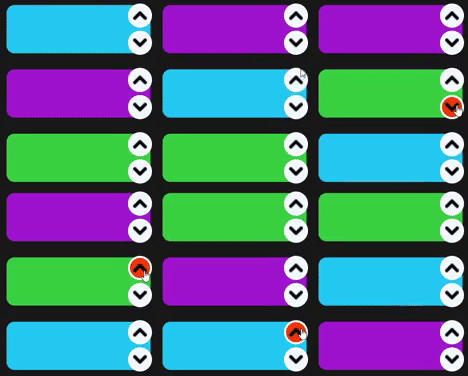
Executing this code yields the expected sliding effect:
However, what if you need a specialized animation for the card that was clicked? The issue is that you can't easily single out that card's view transition, as all cards receive dynamically assigned view-transition-name values:
::view-transition-image-pair(???) {
  animation: size-up-and-down ease-in 0.5s;
}
We need a way to assign a custom view-transition-name to the clicked element without prior knowledge of its generated name.
Introduce a new property and a method in the ViewTransitionService:
activeViewTransitionNames = signal<string[] | null>(null);

setActiveViewTransitionNames(...ids: string[]) {
  this.activeViewTransitionNames.set(ids);
}
The expectation is that this method is called immediately before the view transition kicks in. Once the transition wraps up, the activeViewTransitionNames should be cleared:
this.currentViewTransition.finished.finally(() => {
  this.activeViewTransitionNames.set(null);
});
With this in place, we can design a new directive, [vtNameForActive]. This directive inspects the activeViewTransitionNames signal to check if it contains the value passed to the [vtName] directive on the same element. If there's a match, it applies a distinctive view-transition-name (like 'target-card'):
<div
  class="card"
  [vtName]="'card-' + cardId"
  [vtNameForActive]="'target-card'"
>
</div>
The Cards component would then be adjusted as follows:
export class Cards {
  private viewTransitionService = inject(ViewTransitionService);

  cards = signal<number[]>([0, 1, 2, 3]);

  up(id: number)) {
    this.viewTransitionService.setActiveViewTransitionNames(`card-${card.id}`);
    this.cards.update(move(id, 'up'));
  }

  down(id: number)) {
    this.viewTransitionService.setActiveViewTransitionNames(`card-${card.id}`);
    this.elements.update(move(id, 'down'));
  }
}
Now, you can zero in on the clicked element with a targeted CSS rule:
::view-transition-image-pair(target-card) {
  animation: size-up-and-down ease-in 0.5s;
}
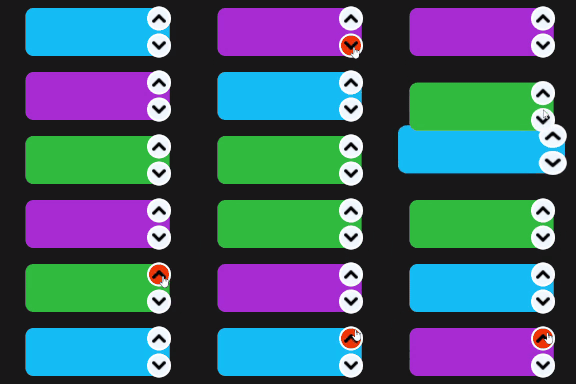
For the sake of brevity, the inner workings of the [vtNameForActive] directive aren't spelled out here. You can find its source within the @ngspot/view-transition package on Github.
The complete example for this cards animation is available here.
Packaging the Pattern: The @ngspot/view-transition Library
Throughout this series, we've examined the intricacies of wiring the View Transition API into Angular applications. Every service and directive discussed above is available in the @ngspot/view-transition package.
The library also ships additional directives tailored for specific scenarios. In particular, [vtNameForRouting] and [vtNameForRouterLink] make it much easier to leverage view transitions when the user moves between routes.
You can browse the live demos to see these effects — and more — in action, all powered by the View Transition API combined with the @ngspot/view-transition toolbox.
One final ask: I'd love for the Angular community to give this package a try and share your findings. The integration surface here is still fresh, and I have little doubt that new edge cases and obstacles will surface as more developers adopt it. If we work together to refine the directives and the underlying API, we can make this integration approachable for everyone. 🙌