
Angular Service Layer — The Store Architecture
With Angular, structuring and building the View layer of an application has never been easier.
However, the service layer — sometimes called the data layer — which constitutes the functional core of the application, presents a number of architectural choices:
- How should the service layer be organized?
- Should we adopt a store?
- Is Redux the right fit?
- Could plain RxJs suffice?
- What role does NgRx Store play?
Store solutions have become quite prominent across the Angular ecosystem.
These patterns originated in the React community and followed the typical adoption lifecycle: rapid popularity, the realization that they are not a universal fix, and ultimately finding their place in specific scenarios while being set aside in others.
Why did stores gain such traction in React?
What drove the widespread popularity of stores in React? Is there a single explanation, or is it a mix of factors? Do those same reasons carry over to Angular, or are there other approaches available? What specific issues do stores address?
Have you noticed that there is plenty of material on store implementations, yet comparatively little on when and why to use them? Let's explore these questions in detail.
Content Overview
This article will address the following points:
- When is it appropriate to use Redux or similar store patterns?
- Is a store typically required?
- What accounts for Redux's popularity in the React ecosystem?
- Are the challenges Redux addresses also present in Angular?
- What problems does a store actually solve?
- Which types of applications benefit the most from a store?
- What kind of tooling is associated with store architectures?
- One-Way Data Flow in React and Angular
- Stores and their impact on testability
- Performance considerations with stores
- Tooling advantages of stores
- Redux versus Mobx
- A comparison of tooling with Mobx and CycleJs
- Proposal for a practical approach
- Summary and recommendations
Note: below you will find a video demonstrating the Ngrx DevTools. You might also be interested in this other post covering the centralized store pattern and NgRx Store — Angular Ngrx Crash Course Part 1: Ngrx Store — Understand It By Grasping The Original Facebook Counter Bug.
When should Redux or stores in general be used?
Store concepts originated within the Redux ecosystem, so examining that context first makes sense, and then we can draw broader conclusions.
Consider the react-howto guide for the React ecosystem — what recommendations does it make? Here's a key excerpt:
You’ve probably heard of Flux. There’s a ton of misinformation about Flux out there. A lot of people sit down to build an app and want to define their data model, and they think they need to use Flux to do it. This is the wrong way to adopt Flux.
There is also a widely known article by Redux's creator — You Might Not Need Redux — whose advice applies broadly to any store solution.
Additionally, the React How-To includes another statement that seems equally relevant to original Flux, Redux, NgRx Store, or any store variant:
You’ll know when you need Flux. If you aren’t sure if you need it, you don’t need it.
This suggests that even some of the original creators of store patterns do not advocate for their indiscriminate use. Their writing reveals concern that stores might be viewed as a universal remedy.
However, we also encounter posts like I Always Seem to Need Redux.
Despite cautious recommendations from their creators, stores achieved widespread adoption in the React world. What explains this?
When is Flux or Redux recommended?
Delving deeper into the React How-To documentation reveals specific situations where Flux proves beneficial:
React components are arranged in a hierarchy. Most of the time, your data model also follows a hierarchy. In these situations Flux doesn’t buy you much. Sometimes, however, your data model is not hierarchical. When your React components start to receive props that feel extraneous, or you have a small number of components starting to get very complex, then you might want to look into Flux.
Further investigation into the associated issues yields additional guidance. A store-like architecture is suggested when:
You have a piece of data that needs to be used in multiple places in your app, and passing it via props makes your components break the single-responsibility principle (i.e., makes their interface make less sense).
Additionally, this scenario is highlighted:
There are multiple independent actors (generally, the server and the end-user) that may mutate that data.
These conditions point to specific cases where pairing a store with React is advised. Let's see how these translate to Angular.
Stores and applications with concurrent updates
If we consider only the last criterion, then only a limited set of applications — typically those requiring server-push capabilities — would derive significant benefit from Flux. That's because concurrent modification by multiple actors is precisely the situation that led to the original Facebook counter bug, which motivated Flux's creation.
For more detail on the original counter issue, refer to the initial Flux presentation:
It is worth noting that server push is not required to encounter this problem. Long-polling with setInterval or mutating data inside a setTimeout can equally lead to multiple actors editing the same data concurrently.
It would be fair to say that many applications do not face this particular issue, right? It is certainly a significant challenge to design for when present, but do most apps encounter it? Likely not — only a specific class of applications does.
So why has Redux become so universally adopted in the React sphere? That points us towards the other reason mentioned earlier.
What is the most frequent problem that Redux solves?
Redux also addresses the “extraneous props” concern. And this appears to be one of the primary drivers behind Redux's popularity in the React community.
What would “props feeling extraneous” mean in an Angular context? Props are analogous to the @Input() member properties of an Angular component.
In other words, Redux assists when we find ourselves passing inputs through the component tree via @Input(), but those inputs seem out of place — not truly belonging to the components that merely relay them.
Consider passing something through five or ten levels of the component hierarchy. The leaf components know how to use the data, but for the intermediate components, the input appears unnecessary, reducing their reusability and increasing their coupling to the application. That is just one illustration.
Extraneous props — what else could it imply?
The extraneous props issue essentially boils down to a component intercommunication challenge.
There are scenarios where components positioned in entirely different branches of the component tree depend on one another. Passing inputs ten levels down and callback functions ten levels up, then five levels down another branch, becomes an untenable complexity burden.
Additional examples of such situations include:
- Transmitting data deep into the tree and responding to events several levels higher
- Handling interdependent sibling components — like a folder list showing unread message counts alongside a header displaying the total unread counter
These patterns are quite common. If we were limited to props or @Input() as the sole communication mechanism, we would quickly hit scalability problems. Relying solely on input bindings cannot sustain growing complexity.
These scenarios are, in fact, extremely prevalent — and there we have our answer.
Why is Redux so popular in the React world?
Probably because it addresses the extraneous props issue, which means it offers a remedy for more intricate component interaction demands.
This is a foundational problem that must be solved to build anything beyond trivial applications, and Redux addresses it head-on.
Almost every non-trivial application encounters such scenarios; it doesn't require a massive app. Most typical enterprise applications will face some degree of complex component intercommunication.
Why does Redux work well in those cases?
Attempting to solve these problems with event buses, like AngularJs $scope.broadcast(), often degenerates into an “event soup” where events chain unpredictably, making the application difficult to reason about.
That's because an event can easily morph into a command, causing the emitter to depend on the receiver's internals. Moreover, events can accidentally chain together.
Redux may look like an event bus, but it is fundamentally different. A Redux store is actually a blend of the Command and Observable patterns. We send the store a command object known as an action:
We dispatch an action into the store, and the store acts on the internal data. Yet, the emitter has no knowledge of what the store will do with that action.
We might also dispatch another action from a completely different part of the application:
The store processes it and updates the list of messages. The results are then broadcast to any part of the app that subscribes. However, the receiving end has no idea what triggered the data change:
- a new message arrived from the backend
- a refresh was requested
- a message was marked as read
So, what does this have to do with decoupling and managing complexity?
How stores enable decoupled component interaction
Components that consume the updated data (maybe a message list and a counter) have no knowledge of what caused the data to change, much like subscribing to an RxJs Observable — we don't know what produced the emission, only that a new value has arrived.
The consuming components subscribe to the store, just as if they were subscribing to an RxJs Observable. This approach succeeds because converting the emitted data back into a command would require deliberate effort, whereas with event buses, such a transformation happens all too easily.
What about server push?
Suppose the server is continually pushing new data, such as fresh messages. That data is likewise dispatched as an action:
In each case, a new list of messages is received and rendered, whether into a message list or an unread counter. The rendering remains consistent: we won't see a list where all messages are read while the counter asserts three unread messages exist.
This is where a store truly excels
A store provides an ideal solution for the combination of editable data and multiple actors, but let's imagine the data is not being pushed from the server. In that situation, we are left only with the component interaction and coordination challenge, without the risk of race conditions.
In such a case, the problem we are merely trying to solve is component interaction across disparate points of the component tree, correct?
We no longer require a mechanism to coordinate concurrent edits of the same data. This observation highlights an important characteristic of Redux and stores generally.
Stores are a compound solution for multiple problems
This example demonstrates that stores are a multi-purpose solution:
- They handle component interaction through the Observable pattern
- They offer a client-side cache, helping to avoid redundant Ajax requests
- They provide a location for temporary UI state, such as form inputs or search criteria while navigating across router views
- They enable safe modification of transient client-side data by multiple actors
Stores are not a single-issue fix; they address all these concerns simultaneously.
What is the drawback of a multi-responsibility solution?
A potential issue is that these problems don't always arise together. You may need to solve one without the others. Not every application shares the constraints of Facebook — the world's largest web application with over 1.8 billion users.
Consider a typical enterprise application serving fewer than 100 users: there is likely little need for a client-side cache, and server push is probably not a requirement. Even if server push exists, the data may be largely read-only.
In such cases, a store architecture might not offer substantial benefits (more on this later).
Moreover, you might encounter a complex component interaction scenario without the need to persist that data in memory. The crucial point is that these problems don't always coincide: they cluster together only for particular application types, not for others.
Does Redux eliminate state-related issues?
It's essential to recognize that Redux does not, nor do other global store solutions, naturally avoid state-related problems. With Redux, we construct a large, global application-level state: the store is essentially an application-wide singleton service.
The problem with global application state is not how it is created; it's that it exists in the first place. It becomes easy to introduce subtle bugs by failing to clean it up appropriately. Using pure reducer functions or immutable state changes doesn't fundamentally alter this.
While those practices help, we have still introduced global state, and the core difficulty remains: it exists, we must manage its lifecycle correctly everywhere, and that does not scale well in complexity.
But there is nothing inherently wrong with global state if used deliberately: for instance, user data needed across the app — why not load it once and place it in a singleton service?
What is the best way to deal with global state?
The surest way to avoid global application state is not to create it unless strictly necessary — which is often the case. Modern applications do tend to require more state than their predecessors, such as remembering the last search results of a form while navigating between views.
We don't want to re-run a search every time we navigate back from a detail view to the master list, even if we triggered a router change.
Can temporary local state be used?
The ideal approach for such scenarios would be to create state that is scoped only to that specific interaction, say within a master-detail setup, and have it automatically disposed of after use.
This is precisely what Angular enables us to achieve, as we'll see shortly.
Are there alternate solutions in the Angular world besides a store?
Angular provides a comprehensive set of built-in mechanisms for handling complex component interaction scenarios. The foundational element here is the Angular Dependency Injection system:
- Services can be injected deep into the component tree as needed — see Angular Smart Components vs Presentational Components: What's the Difference, When to Use Each, and Why?
- We can inject components into each other or services into components where there is inherent tight coupling
- We can create shared data services that may or may not persist data
That is only the beginning. Revisiting the master-detail scenario: we could create a non-global service and bind it to a specific page section through hierarchical injection. This would allow the service and its associated state to be cleaned up automatically.
Creating Local State that Cleans Itself Up
Imagine we navigate to a section of the app containing a message list, and then click on an item to see its detail.
Here is the top-level component of that route:
Notice the MessagesService in the providers property. Why is that significant? It indicates that this service is not an application-wide singleton. So, if we wanted to keep the master list's search results in memory while opening and closing multiple details, MessagesService would be an ideal place for that, rather than a global store. Why?
Because this instance of MessagesService is scoped to MessagesContainerComponent and its related components. It can only be injected there, not anywhere else in the application.
Alternatively, you could create a MessagesTableService and inject it at the table level, using it to load and paginate data, with multiple tables each having their own instance.
The beauty of these local, subtree-scoped services is that they are automatically disposed when you navigate away, along with their host component.
This local stateful service could, for instance, be implemented as an Observable Data Service.
Angular and Stores — a frequent option?
As we've seen, Angular offers a range of inter-component communication mechanisms beyond just @Input(). We also have facilities for creating temporary local state that gets cleaned up automatically.
In Angular, a store might not be necessary to address these problems; several built-in solutions exist.
Often, a store is added to an app to get an observable-like API for handling certain component interactions. Why not simply use an Observable in the first place?
Introducing a store imposes significant constraints on the application's overall architecture and results in a large amount of global application state. If lighter, built-in alternatives are available, why not evaluate them instead?
Using a Store Comes at a Cost
While a store solves component interaction challenges, it also creates a new set of state management obligations that might otherwise be nonexistent with other approaches.
This might mean that, in Angular, a store is needed far less often than in React? Interestingly, the React community experienced a similar evolution, seeking alternatives after the initial phase, as we'll discuss.
Other arguments frequently made in favor of store solutions include performance, testability, tooling, and maintaining predictable, simple-to-understand applications. Let's address each of these, starting with the last one.
Unidirectional Data Flow
Unidirectional data flow is an often-mentioned property in both React and Angular contexts. It refers to a desirable trait that ensures applications remain predictable and easy to reason about.
Unidirectional Data Flow in React
In the original Flux discussions, unidirectional data flow is described as follows: the user triggers an action, which gets dispatched to the stores. The stores then generate a new model and pass it to the view.
However, the view cannot dispatch additional actions during the rendering process, nor can another action be dispatched if one is already in progress.
Avoiding such scenarios appears to be one of the central goals of Flux, based on the initial presentation, as noted here. Another reference can be found here. The original Flux dispatcher code, which enforces this check, is available here.
UI predictability in React and Flux seems to be primarily achieved by imposing a useful constraint on the data layer: preventing chained dispatches.
Redux and Unidirectional Data Flow
It's crucial to note that Redux itself does not guard against the chained dispatch scenario described in the original Flux talks. With Redux, we can trigger a new dispatch from within the subscribe method, whereas in original Flux, this was not possible if an action was already being dispatched.
Thus, the desire to enforce unidirectional data flow does not appear to be a primary driver behind Redux's popularity. By design, and at least according to the original Flux definition, Redux does not prevent the chained dispatch issue.
Perhaps that's because the constraint was too strict, and in practice, such an issue does not occur frequently.
Unidirectional Data Flow in Angular
Angular also promotes unidirectional data flow as a feature that enhances predictability and reasoning about the application.
However, the concern here is somewhat different, though related: it's not about constraining the data layer, which can take any shape.
In Angular, unidirectional data flow is about ensuring the view cannot update itself. What does that entail?
Unidirectional Data Flow and Rendering in Development Mode
When rendering begins, we traverse the component tree in a single pass. A component cannot, during rendering, produce different results on a subsequent pass or modify a parent component.
In essence, evaluating template expressions or invoking certain component lifecycle hooks cannot trigger further view changes, thereby avoiding a situation akin to AngularJs's multi-step digest cycle, which could produce unpredictable outcomes.
Breaking Angular Unidirectional Data Flow
Imagine you are displaying a random number on the screen: if you try to compute it via a component getter method and use it in a template expression, the application will break in development mode because the value won't remain stable across the second top-to-bottom pass:
Try it, and you should see:
Expression has changed after it was checked
So, to ensure predictable UI rendering and prevent the view from self-updating, a store-like architecture is not necessarily required.
Next, let's examine another commonly cited benefit: performance improvements, followed by testability and tooling considerations.
Stores and Performance
Stores are sometimes promoted as a means to enhance application performance. By using immutable state with tools like ImmutableJs or Deep Freeze, we can then employ OnPush change detection throughout.
Angular's Change Detection system is exceptionally fast out of the box and behaves quite intuitively. By default, it only tracks expressions used in the template, ignoring everything else (see this post for more).
OnPush is essentially an optimization that only a subset of applications will truly benefit from — such as those loading extensive data (though how much data can be loaded that is still useful to the user?), or applications running on highly constrained devices.
It's reasonable to state that most applications do not fall into these categories, given current smartphone capabilities. If you still require OnPush, you can use it independently of any store, especially if your data is mostly read-only.
For a real-time dashboard like a chart view, it might be more effective to throttle data or use another solution. We could even detach a UI branch from change detection and regulate its rendering.
The key takeaway is that adding a store does not automatically render an application more performant or easier to optimize. The change detection system can be optimized independently of the store — they can be used together but are not inherently linked.
Another frequent argument for store adoption is testability. Let's consider that, as it's the final point before we get to the tooling demonstration.
Stores and Testability
One major benefit often attributed to stores is improved application testability.
It's true that reducer functions are straightforward to test, but introducing a store does not inherently make the entire application more testable, any more so than injecting dependencies via the DI system instead of instantiating them directly within components.
Suppose an application does not involve much data modification or concurrent updates from server and user. In that case, it likely does not require a store, and introducing one wouldn't improve testability either.
Last but certainly not least, we arrive at a substantial benefit: the tooling.
Stores and Tooling
One of the most compelling reasons to use a store is the ecosystem of tools available. The tooling is remarkable — time-travel debugging, attaching store state to a bug report, and hot reloading are significant conveniences.
Check out this short video demonstrating the NgRx DevTools. If you've never seen them, it's truly worth a look.
These tools are fantastic, but nowadays Redux is not considered a must-have in new React applications. So how does that reconcile with tooling arguments?
A frequent alternative to Redux
After the initial wave of Redux adoption, many React applications are now being built with MobX, which is essentially a variation on the Observable pattern.
The documentation describes it as follows:
MobX adds observable capabilities to existing data structures like objects, arrays and class instances. This can simply be done by annotating your class properties with the @observable decorator (ES.Next).
Here is a small example of what that looks like:
If you watched the earlier video on NgRx Dev Tools, does this seem familiar? There are also developer tools available for MobX, similar to Redux DevTools:
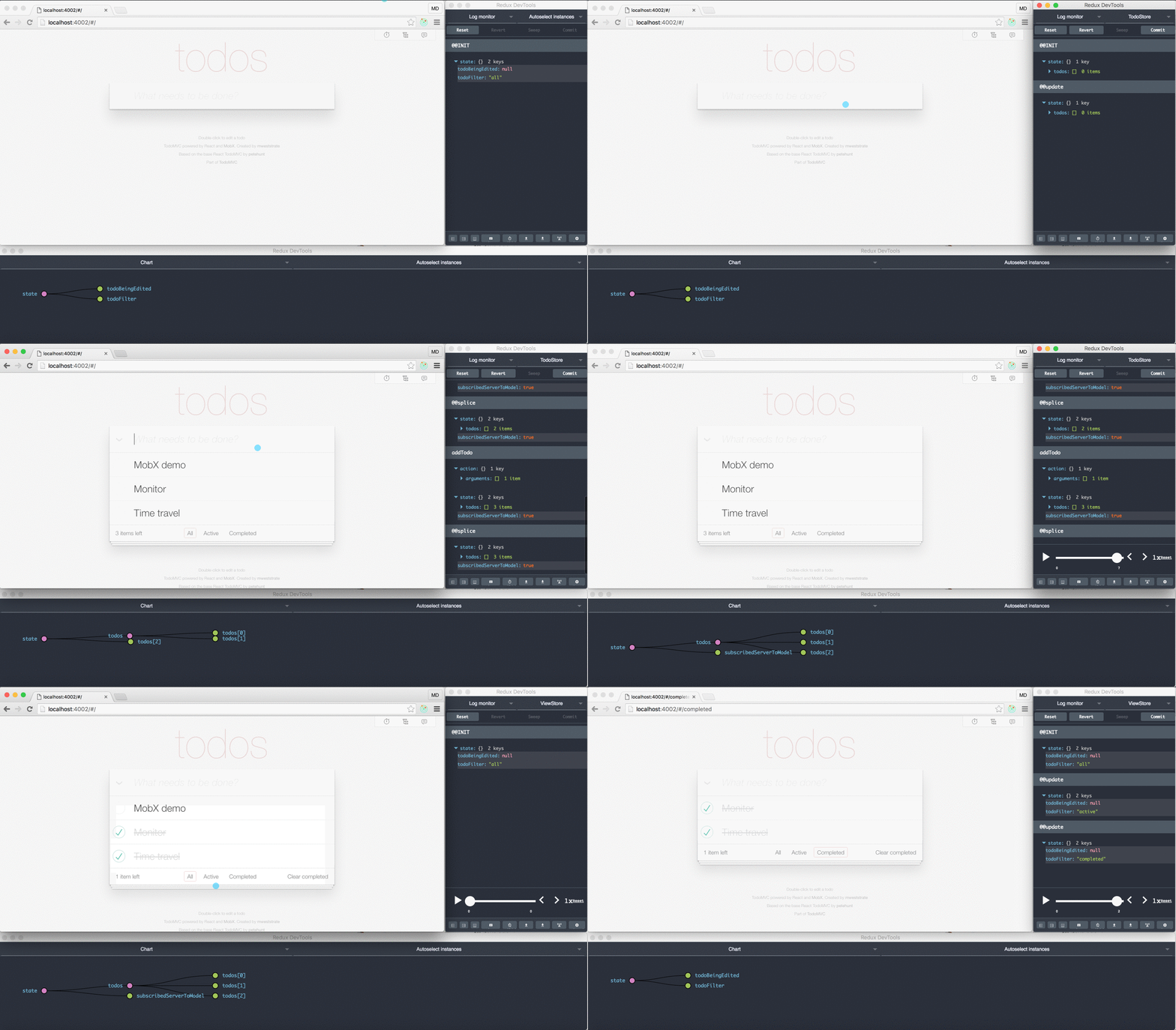
In fact, the MobX developer tools use the same browser extension. Based on this example, it seems that achieving this advanced level of tooling does not necessarily require adopting a store architecture.
All that's needed is to structure your application using an Observable library with a growing and capable tooling ecosystem.
Tools in other related ecosystems
The CycleJs ecosystem similarly deals with streams, the observable pattern, and its variants.
Here we see a perspective on Flux, Redux, and a demonstration of some DevTools in the CycleJs world. Just before that, there is a thought-provoking discussion about adding tooling without forcing a predefined architecture on the app (by @andrestaltz).
The entire talk is worth watching, but if you're deciding on an application architecture, the five-minute segment here starting at 13:03 raises some compelling points:
Tooling is subsequently demonstrated at the end, although much of this advanced tooling is still a work in progress across various ecosystems.
The essential point here is that there are indeed other routes to excellent tooling without committing to a store architecture.
Conclusions
It might well be that store architectures first gained popularity in the React world because they provided solutions to fundamental problems that React, as a pure View layer, deliberately did not address out of the box:
- Providing an Observable-like pattern for decoupled component interaction
- Offering a temporary client-side container for UI state
- Serving as a cache to reduce redundant HTTP requests
- Managing concurrent data modifications by multiple actors
- Creating a natural hook for developer tooling
Subsequently, within about six to twelve months, the ecosystem matured into using stores selectively for specific app types. A similar transition may be underway in the Angular community, potentially leading to the same outcome. Tooling will remain a key focal point, and one of the primary promises of RxJs 5 is enhanced debugability.
Suggestions
So, what does all this mean for someone selecting an application architecture? The initial advice from the React How-To still seems relevant:
You’ll know when you need Flux. If you aren’t sure if you need it, you don’t need it.
Here is a suggestion: unless you have a concurrent data modification requirement, consider building your application initially with simple RxJs services, leveraging local services and the dependency injection system.
Then, later on, if a genuine need emerges, you can always refactor part of your application into a store.
On the other hand, if you do have a scenario with concurrent data updates within a section of your application, starting with a store right away is advisable, as it represents an excellent solution for that situation.
If you're interested in using RxJs specifically within Angular applications, we recommend the Reactive Angular Course, which covers numerous relevant reactive design patterns for building Angular apps.
If you are just starting with Angular, take a look at the Angular for Beginners Course:

Continue reading: Other Angular articles
If this post was helpful, you might also want to check out some other popular content on the blog:
- Angular Router – Building a Menu Navigation System with Nested Routes and Bootstrap 4
- Angular Router – Extended Tour and Common Pitfalls
- Angular Components – The Fundamentals
- Observable Data Services with Angular – Common Pitfalls and How to Avoid Them
- Angular Forms – Template-Driven vs Model-Driven
- Angular ngFor – All Features including trackBy, and Why It Works with More than Just Arrays
- Angular Universal in Practice – SEO-Friendly Single Page Apps
- How Angular Change Detection Really Works
- TypeScript 2 Type Definitions Crash Course – Types and
npm,@types, and Compiler Opt-In Types