
The Injector Hierarchy
Most Angular developers are aware that the framework establishes a root injector responsible for singleton providers. However, there is actually an injector positioned even higher than this one in the hierarchy.
From a developer's perspective, it's essential to grasp how Angular assembles its injector tree. Here is a representation of the uppermost portion of that tree:
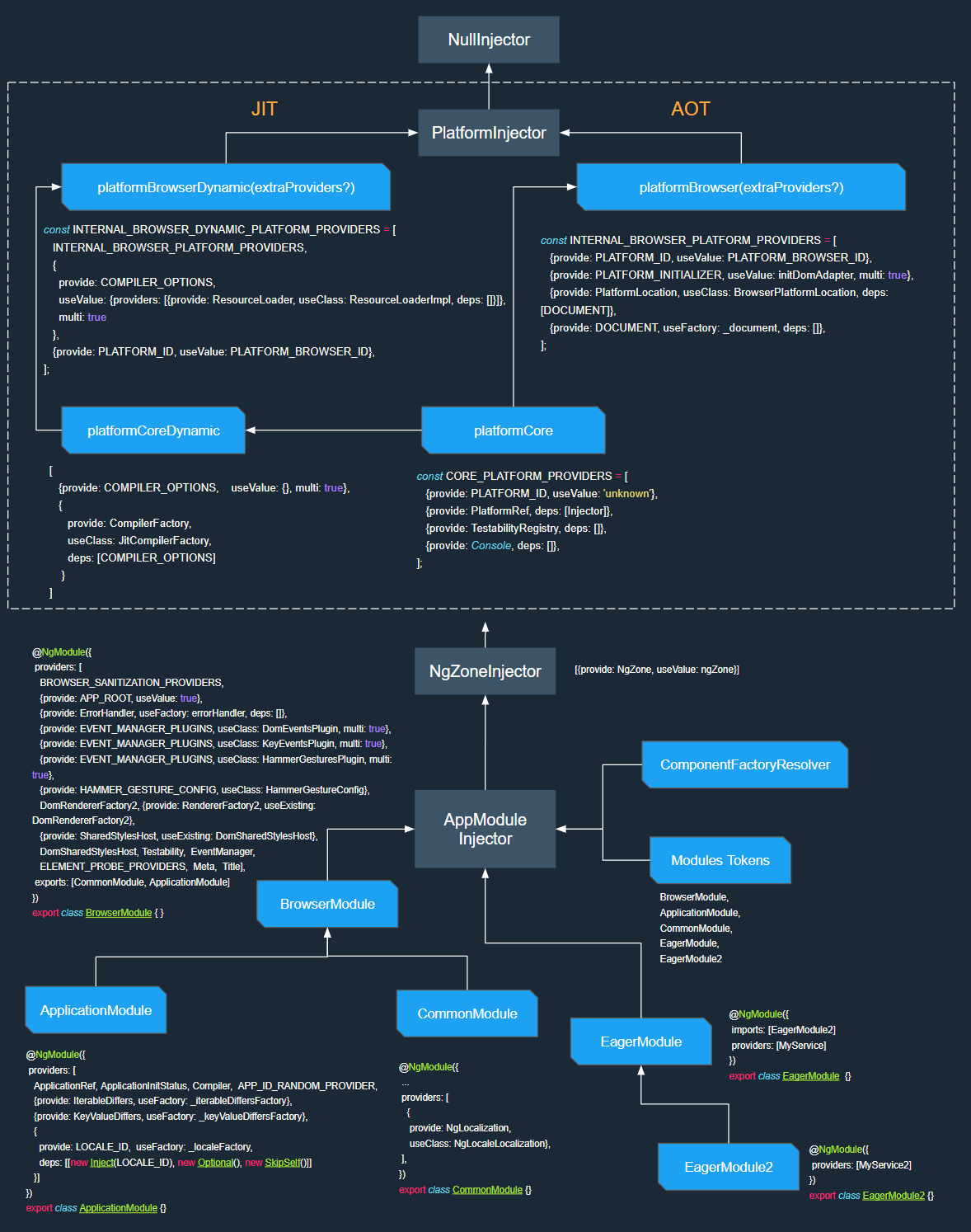
Uppermost Section of the Angular Injector Tree
This diagram is incomplete—no components are depicted yet. We'll expand on that later. For now, let's focus on the AppModule Injector, which is the most frequently utilized part of Angular's dependency injection system.
Root AppModule Injector
The well-documented Angular application root injector appears as AppModule Injector in the diagram above. As mentioned previously, this injector aggregates all providers from the transitive module graph. The practical consequence is:
When a module declares providers and is imported either directly in
AppModuleor transitively through any module already part of theAppModuleimport chain, those providers become visible application-wide.
By this logic, MyService2 originating from EagerModule2 ends up in the root injector.
Angular also attaches a ComponentFactoryResolver to the root module injector. This resolver is essential for dynamically creating components, holding factories for all entryComponents.
Another detail worth observing: the root injector also contains Module Tokens, which represent the types of every merged NgModule. We will revisit these tokens when discussing tree-shakeable providers.
To instantiate the NgModule injector, Angular runs the AppModule factory found in the module.ngfactory.js file.
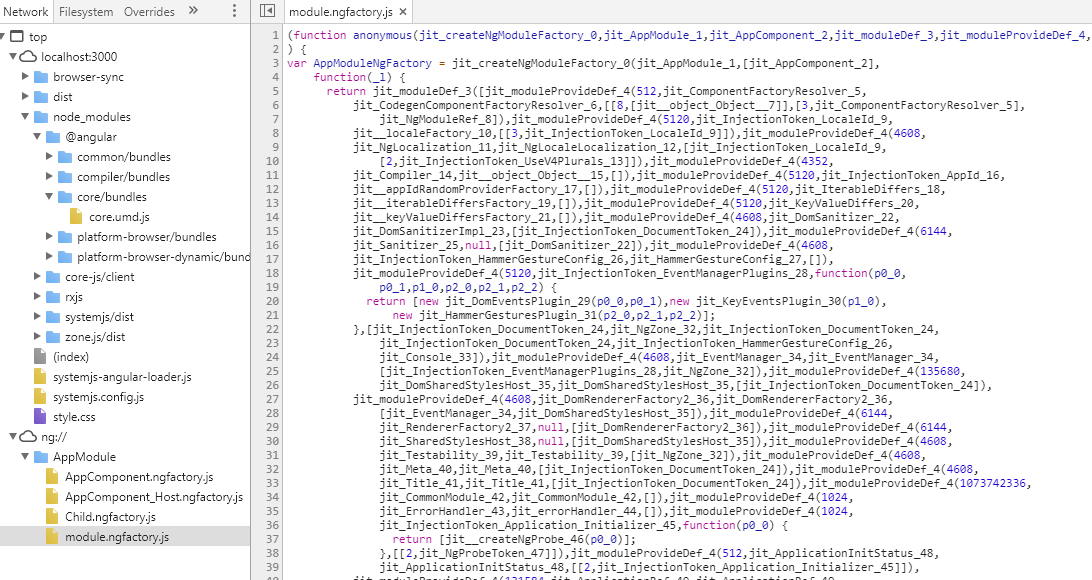
AppModule factory
This factory yields the module definition along with all aggregated providers, a familiar sight for many developers.
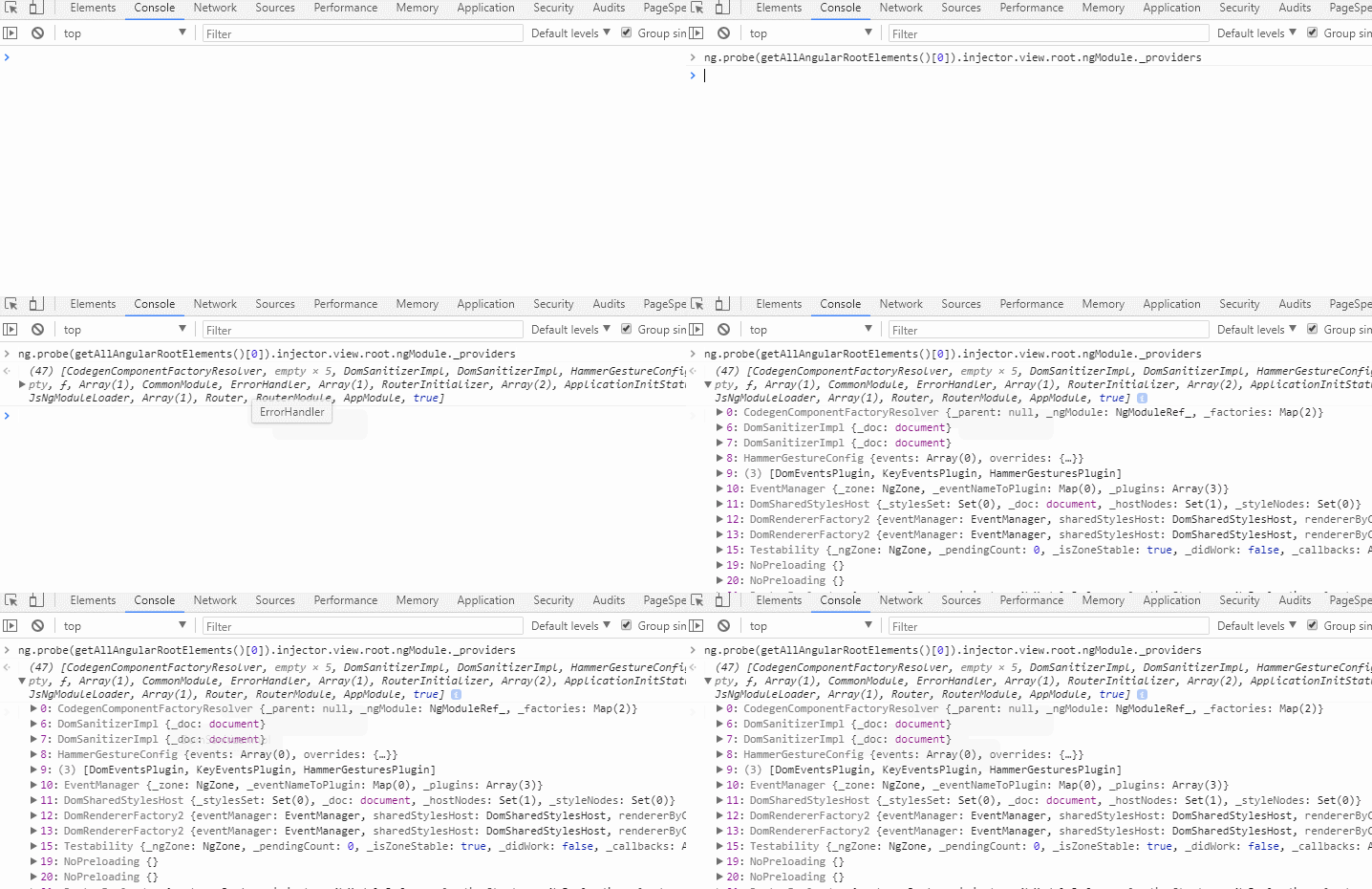
Tip: For a running Angular app in dev mode, you can inspect all providers on the root AppModule injector by entering this in the devtools console:
ng.probe(getAllAngularRootElements()[0]).injector.view.root.ngModule._providers
Many other aspects of the root injector are thoroughly covered in the official documentation, so I will not repeat them here:
Platform Injector
The AppModule root injector is not the top of the tree; it has a parent known as NgZoneInjector, which itself is a child of PlatformInjector.
The platform injector typically holds built-in providers, but you can add your own during platform creation:
const platform = platformBrowserDynamic([ {
  provide: SharedService,
  deps:[]
}]);
platform.bootstrapModule(AppModule);
platform.bootstrapModule(AppModule2);
Any extra providers supplied to the platform must be of type StaticProviders. If the distinction between StaticProvider and Provider is unclear, this SO answer clarifies it.
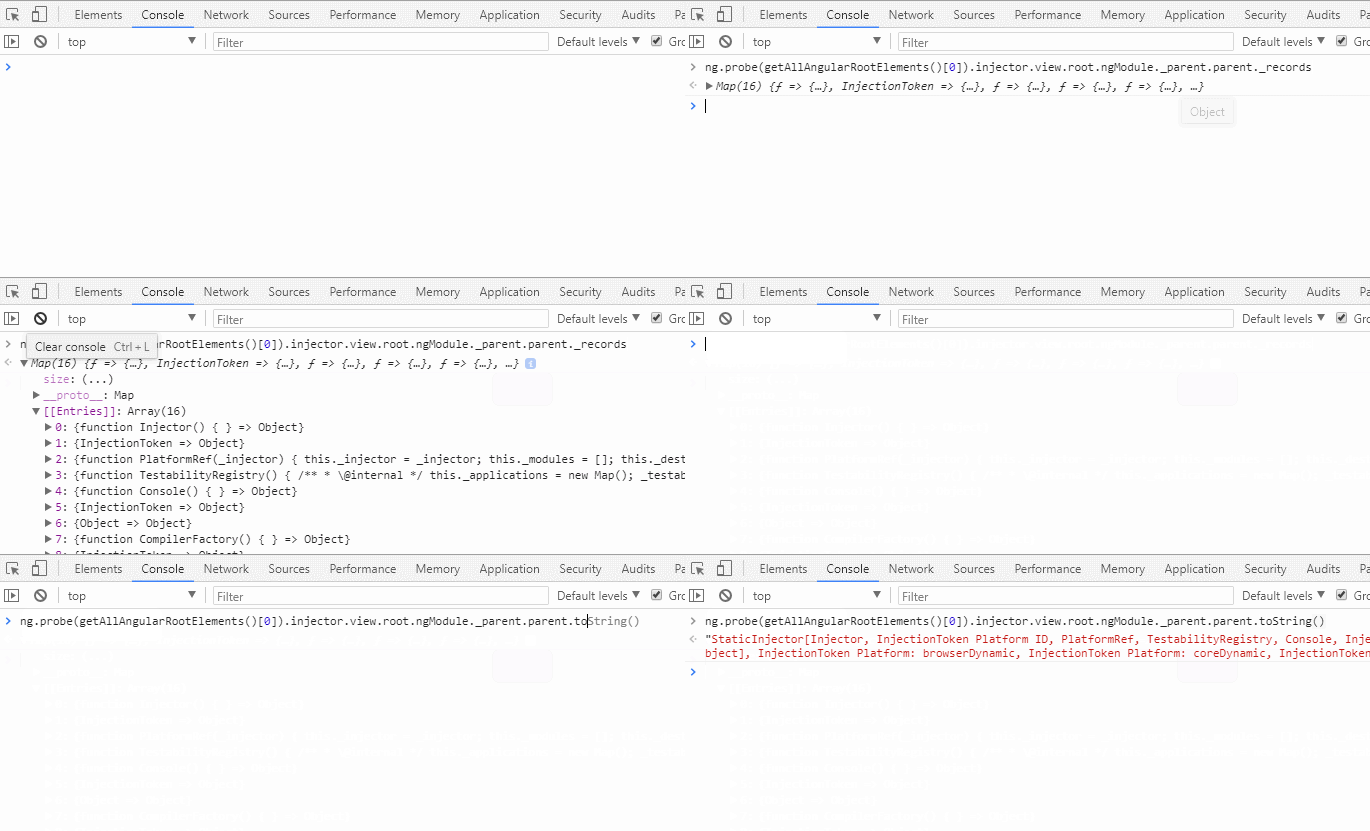
Tip: To see all providers from the Platform injector in a dev-mode application, run this in the devtools console:
ng.probe(getAllAngularRootElements()[0]).injector.view.root.ngModule._parent.parent._records;

// to see stringified value use
ng.probe(getAllAngularRootElements()[0]).injector.view.root.ngModule._parent.parent.toString()
While the dependency resolution process at the AppModule injector level and beyond is fairly straightforward, I found the behavior at the component level quite puzzling. This prompted my investigation.
EntryComponent and RootData
When mentioning ComponentFactoryResolver, I referred to entryComponents. These components are typically specified in either the bootstrap or entryComponents array of an NgModule. The Angular router also generates components dynamically.
For each entryComponent, Angular creates a host factory, making these the root views for all other views. Consequently:
When any dynamic component is created, Angular establishes a root view seeded with root data, holding references to the elInjector and the ngModule injector.
function createRootData(
    elInjector: Injector, ngModule: NgModuleRef<any>, rendererFactory: RendererFactory2,
    projectableNodes: any[][], rootSelectorOrNode: any): RootData {
  const sanitizer = ngModule.injector.get(Sanitizer);
  const errorHandler = ngModule.injector.get(ErrorHandler);
  const renderer = rendererFactory.createRenderer(null, null);
  return {
    ngModule,
    injector: elInjector, projectableNodes,
    selectorOrNode: rootSelectorOrNode, sanitizer, rendererFactory, renderer, errorHandler
  };
}
Let's imagine an Angular application is running.
What unfolds when this piece of code executes?
platformBrowserDynamic().bootstrapModule(AppModule);
Countless operations happen in the background, but our focus is on the moment Angular creates the entry component.
const compRef = componentFactory.create(Injector.NULL, [], selectorOrNode, ngModule);
This is the pivotal point where the injector tree splits into two parallel branches.
Element
Injector vs Module Injector
With the widespread adoption of lazy loaded modules, a peculiar issue was reported on GitHub: the dependency injection system was instantiating lazy modules twice. This led to a redesign. Since that change, we have two separate trees: one for elements and one for modules.
The core principle is:
When a component or directive requests a dependency, Angular utilizes a Merge Injector to traverse the element injector tree. If the dependency is not located there, it switches to the module injector tree for resolution.
Note that I use "element injector" deliberately, not "component injector".
What exactly is the Merge Injector?
Have you ever written something like this?
@Directive({
  selector: '[someDir]'
}
export class SomeDirective {
 constructor(private injector: Injector) {}
}
In this scenario, the injected injector is a merge injector, which can similarly be injected into a component constructor.
The merge injector is defined as follows:
class Injector_ implements Injector {
  constructor(private view: ViewData, private elDef: NodeDef|null) {}
  get(token: any, notFoundValue: any = Injector.THROW_IF_NOT_FOUND): any {
    const allowPrivateServices =
        this.elDef ? (this.elDef.flags & NodeFlags.ComponentView) !== 0 : false;
    return Services.resolveDep(
        this.view, this.elDef, allowPrivateServices,
        {flags: DepFlags.None, token, tokenKey: tokenKey(token)}, notFoundValue);
  }
}
As the code shows, the Merge injector is simply a composition of the view and the element definition. It acts as a conduit between the element injector tree and the module injector tree during dependency resolution.
This injector can also provide access to built-in services like ElementRef, ViewContainerRef, TemplateRef, and ChangeDetectorRef. Intriguingly, it can even return another merge injector.
In fact, every element can have a merge injector, even if no tokens are provided on it.
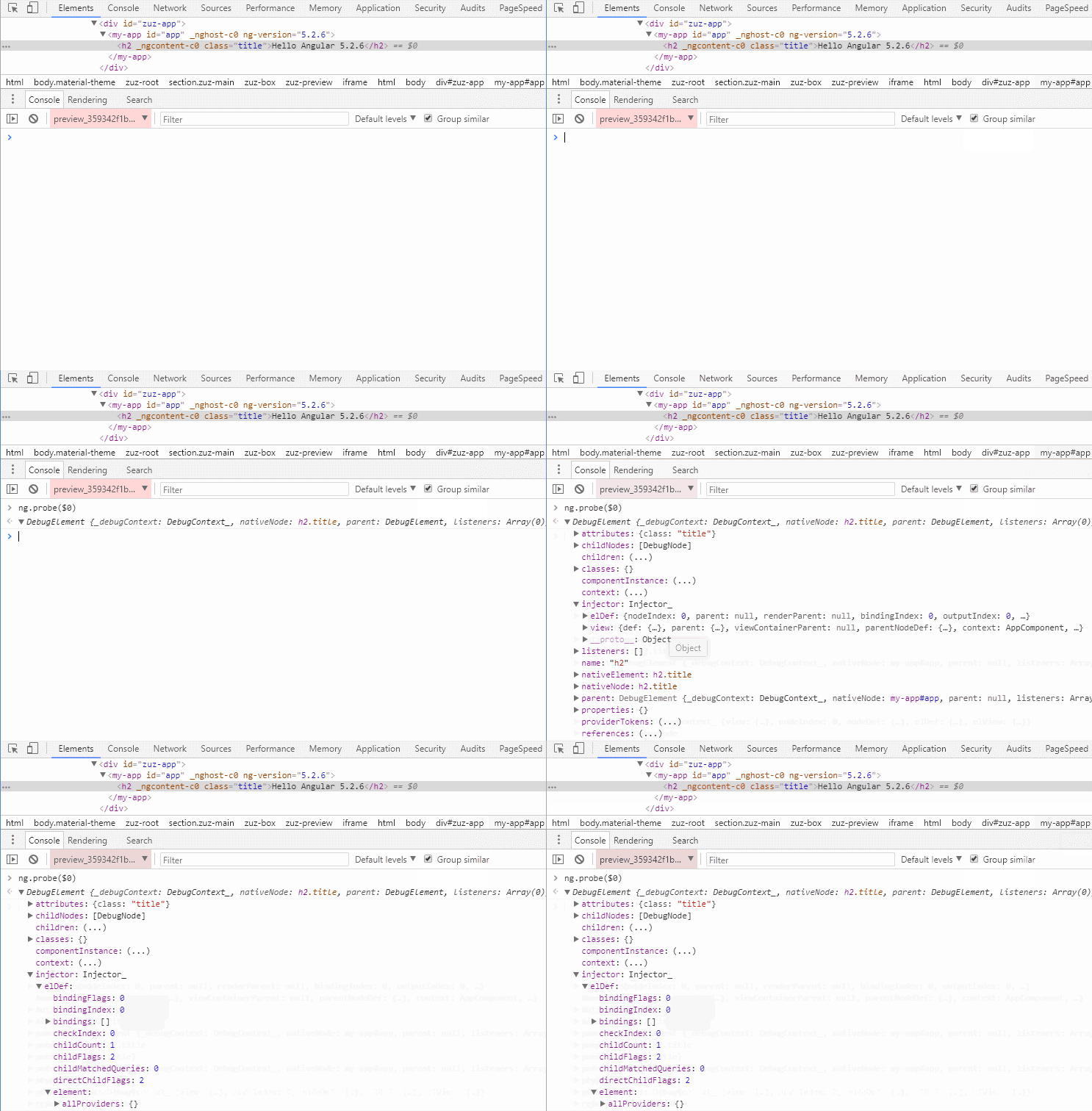
Tip: To get a merge injector, enter this in the console:
ng.probe($0).injector
So, what then is the element injector?
As is well known, Angular parses a template to generate a factory containing a view definition. The view is a representation of the template, composed of various node types like directive, text, provider, and query. Among these is the element node, which hosts the element injector. Angular stores provider information on this node using these properties:
export interface ElementDef {
  ...
  /**
   * visible public providers for DI in the view,
   * as see from this element. This does not include private providers.
   */
  publicProviders: {[tokenKey: string]: NodeDef}|null;
  /**
   * same as visiblePublicProviders, but also includes private providers
   * that are located on this element.
   */
  allProviders: {[tokenKey: string]: NodeDef}|null;
}
Let's examine how the element injector resolves a dependency:
const providerDef =
  (allowPrivateServices ? elDef.element!.allProviders :
    elDef.element!.publicProviders)![tokenKey];
if (providerDef) {
  let providerData = asProviderData(searchView, providerDef.nodeIndex);
  if (!providerData) {
    providerData = { instance: _createProviderInstance(searchView, providerDef) };
    searchView.nodes[providerDef.nodeIndex] = providerData as any;
  }
  return providerData.instance;
}
It simply consults the allProviders or publicProviders property, depending on the privacy of the lookup.
This injector holds the component or directive instance along with all providers registered by them.
These providers are populated during view instantiation, with the primary source being ProviderElementContext, a part of the Angular compiler. Diving into this class reveals some interesting nuances.
For instance, Angular enforces certain restrictions when using the Host decorator, and viewProviders on the host element can be a solution. (Also see this related discussion: https://medium.com/@a.yurich.zuev/angular-nested-template-driven-form-4a3de2042475).
Another interesting scenario: if a component and a directive on the same element both provide the same token, the directive's provider takes precedence.
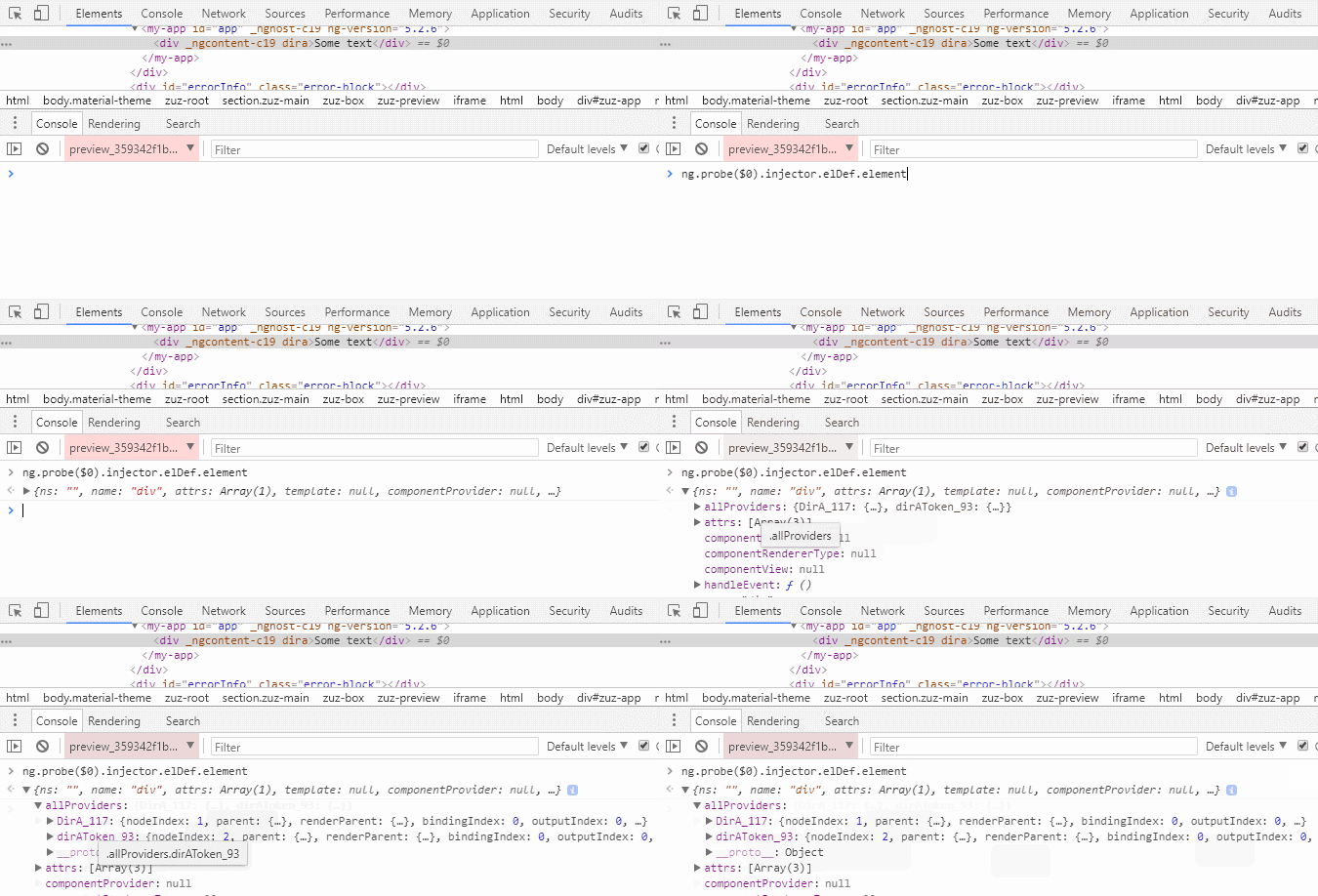
Tip: To access the element injector, enter this in the console:
ng.probe($0).injector.elDef.element
Resolution algorithm
The core of Angular's dependency resolution within a view is detailed here. This is the logic the merge injector uses in its get method, specifically via Services.resolveDep. To grasp this algorithm, you need to understand the concepts of a view and the view parent element.
Consider a root AppComponent with the template <child></child>. This creates three distinct views:
HostView_AppComponent
    <my-app></my-app>
View_AppComponent
    <child></child>
View_ChildComponent
    some content
The resolution algorithm navigates based on the view hierarchy:
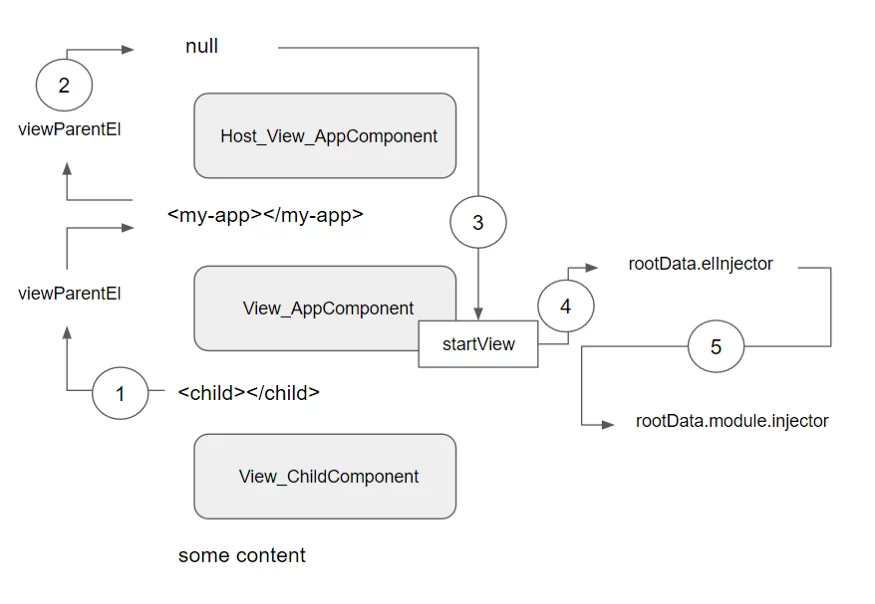
When a dependency is requested in a child component, the search begins at the child's element injector, checking its elRef.element.allProviders|publicProviders. If not found, it then ascends through all parent view elements(1), checking providers in each element injector. When the next parent view element is null(2), it returns to startView(3), checks startView.rootData.elnjector(4), and finally, if still unresolved, checks startView.rootData module.injector(5).
In essence, Angular looks for the parent element of the view, not the parent element of the component as it walks up the hierarchy. The function below is used to find the view parent element:
/**
 * for component views, this is the host element.
 * for embedded views, this is the index of the parent node
 * that contains the view container.
 */
export function viewParentEl(view: ViewData): NodeDef|null {
  const parentView = view.parent;
  if (parentView) {
    return view.parentNodeDef !.parent;
  } else {
    return null;
  }
}
Let's test this with a small example:
@Component({
  selector: 'my-app',
  template: `<my-list></my-list>`
})
export class AppComponent {}

@Component({
  selector: 'my-list',
  template: `
    <div class="container">
      <grid-list>
        <grid-tile>1</grid-tile>
        <grid-tile>2</grid-tile>
        <grid-tile>3</grid-tile>
      </grid-list>
    </div>
  `
})
export class MyListComponent {}

@Component({
  selector: 'grid-list',
  template: `<ng-content></ng-content>`
})
export class GridListComponent {}

@Component({
  selector: 'grid-tile',
  template: `...`
})
export class GridTileComponent {
  constructor(private gridList: GridListComponent) {}
}
Suppose we are inside a grid-tile component and attempt to inject GridListComponent. It resolves successfully, but how?
What is the view parent element at this moment?
Here's a step-by-step approach to figure it out:
- Locate the starting element. The
GridTileComponentmatches thegrid-tileselector, so we find thegrid-tileelement. - Identify the template that the
grid-tileelement belongs to, which is theMyListComponenttemplate. - Determine the view for this element. If it's not inside an embedded view, it's a component view (our case, so it's
View_MyListComponent). - Find the view parent element, which is the parent element for the view, not the element itself.
There are two possibilities here:
- For an embedded view, this is the parent node that holds the view container.
For example, if we put a structural directive on grid-list:
@Component({
  selector: 'my-list',
  template: `
    <div class="container">
      <grid-list *ngIf="1">
        <grid-tile>1</grid-tile>
        <grid-tile>2</grid-tile>
        <grid-tile>3</grid-tile>
      </grid-list>
    </div>
  `
})
export class MyListComponent {}
Then the view parent element for grid-tile would be div.container.
- For a component view, this is the host element.
In our original app, the view parent element is my-list, not grid-list.
So how does Angular resolve ****GridListComponent**** if it skips ****grid-list**** ?
The secret lies in how Angular gathers providers for elements: it employs prototypical inheritance.
Whenever a token is provided on an element, Angular creates new
allProvidersandpublicProvidersarrays that are inherited from the parent node. If no token is provided, the element simply shares the same arrays with its parent.
The implication is that grid-tile is already aware of all providers registered on any parent element within its view.
Here is the basic process Angular follows to gather providers for elements in a template:

As shown, grid-tile can easily get GridListComponent from its element injector via allProviders, because those providers include ones from the parent element.

Let's look at this SO answer for further details.
This prototypal provider pattern is why we run into issues using the multi option to provide tokens at multiple levels. Fortunately, DI is flexible, and there are workarounds, as shown here: https://stackoverflow.com/questions/49406615/is-there-a-way-how-to-use-angular-multi-providers-from-all-multiple-levels
With this foundation, we can proceed to graphically map the injector tree.
Simple my-app->child->grand-child application
Consider this straightforward application:
@Component({
  selector: 'my-app',
  template: `<child></child>`,
})
export class AppComponent {}

@Component({
  selector: 'child',
  template: `<grand-child></grand-child>`
})
export class ChildComponent {}

@Component({
  selector: 'grand-child',
  template: `grand-child`
})
export class GrandChildComponent {
  constructor(private service: Service) {}
}

@NgModule({
  imports: [BrowserModule],
  declarations: [
    AppComponent,
    ChildComponent,
    GrandChildComponent
  ],
  bootstrap: [AppComponent]
})
export class AppModule { }
We have three component levels, and Service is requested in GrandChildComponent.
my-app
   child
      grand-child(ask for Service dependency)
Here's the resolution path Angular takes.
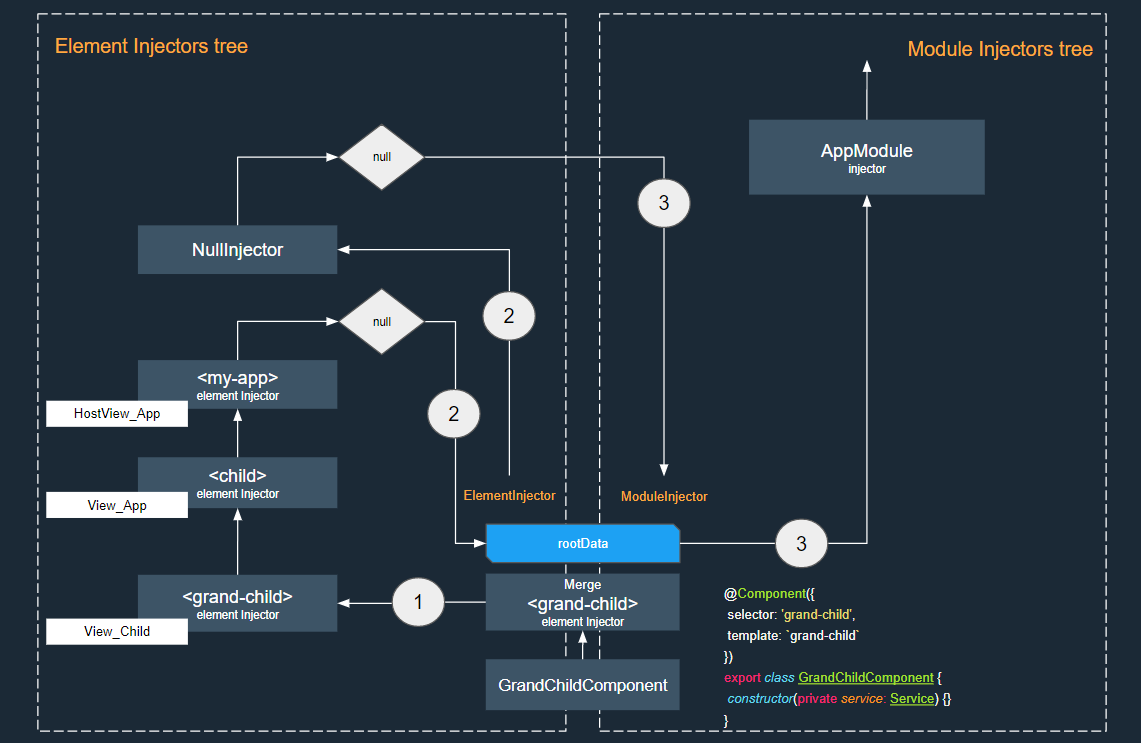
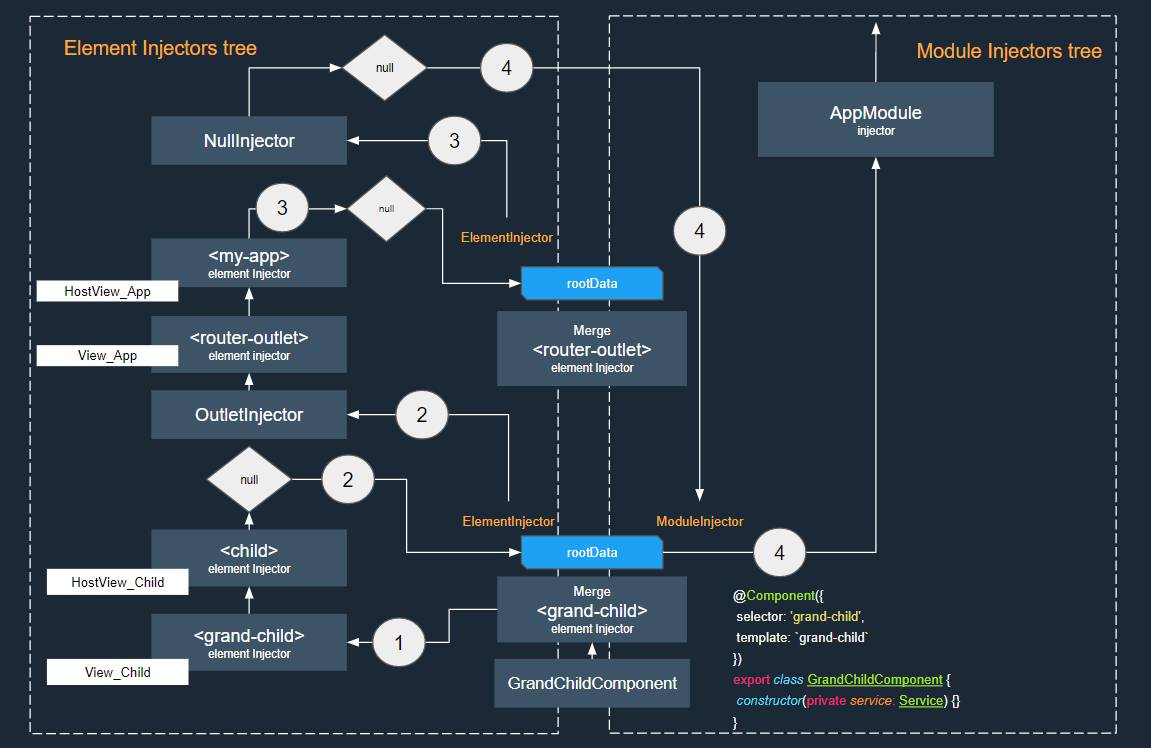
In the diagram, we begin at the grand-child element, found on View_Child (1). Angular ascends through all view parent elements. Once there are no more parent elements (since my-app has none), it first [looks at the root](https://github.com/angular/angular/blob/master/packages/core/src/view/provider.ts#L401) [elInjector] (2):
startView.root.injector.get(depDef.token, NOT_FOUND_CHECK_ONLY_ELEMENT_INJECTOR);
Here, startView.root.injector is a NullInjector, which holds no tokens. Failing that, it switches to the module injector (3):
startView.root.ngModule.injector.get(depDef.token, notFoundValue);
Angular then proceeds to resolve the dependency in this manner:
AppModule Injector
        ||
        \/
    ZoneInjector
        ||
        \/
  Platform Injector
        ||
        \/
    NullInjector
        ||
        \/
       Error
Simple routed application
Let's add a router outlet to ChildComponent in our app.
@Component({
  selector: 'my-app',
  template: `<router-outlet></router-outlet>`,
})
export class AppComponent {}
...
@NgModule({
  imports: [
    BrowserModule,
    RouterModule.forRoot([
      { path: 'child', component: ChildComponent },
      { path: '', redirectTo: '/child', pathMatch: 'full' }
    ])
  ],
  declarations: [
    AppComponent,
    ChildComponent,
    GrandChildComponent
  ],
  bootstrap: [ AppComponent ]
})
export class AppModule { }
This changes the structure to resemble:
my-app
router-outlet
child
grand-child(dynamic creation
Now, let's examine the point where the router creates dynamic components:
const injector = new OutletInjector(activatedRoute, childContexts, this.location.injector);
this.activated = this.location.createComponent(factory, this.location.length, injector);
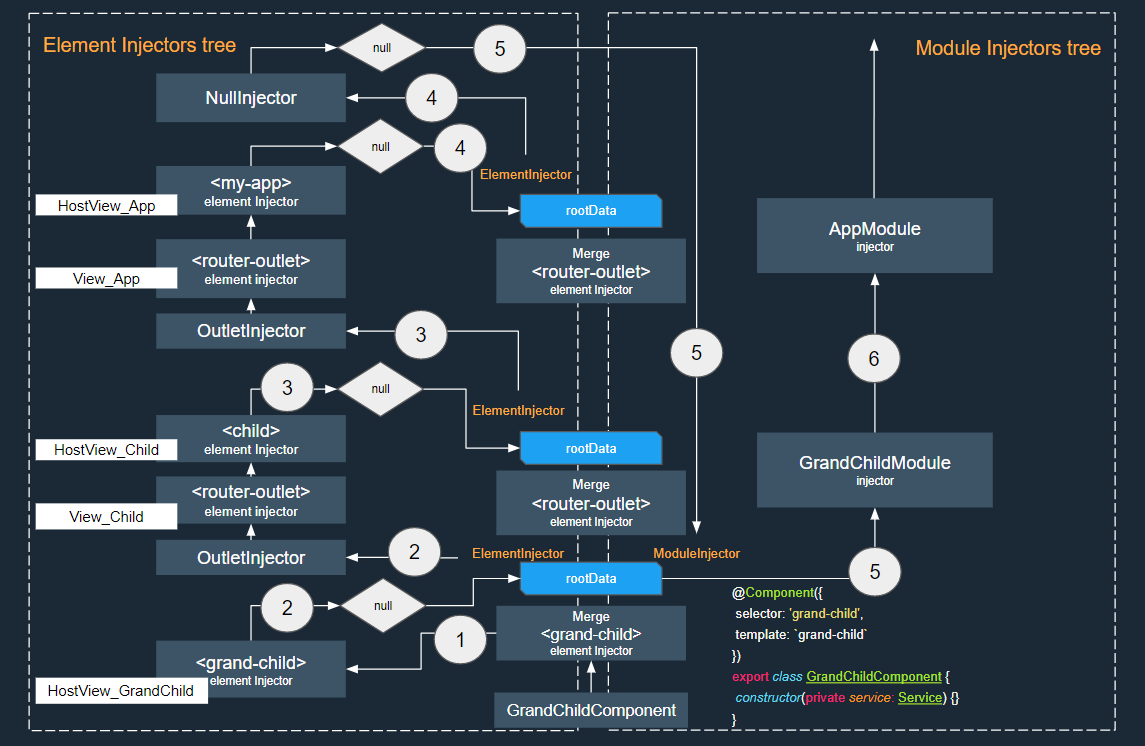
At this juncture, Angular creates a new root view with a fresh rootData. Notice that an OutletInjector is passed as the root elInjector. This OutletInjector is constructed with its parent as this.location.injector, which is the injector for the router-outlet element.
The OutletInjector is a special injector that acts as a link between the routed component and the parent router-outlet element. You can find its code here.
Simple application with lazy loading
Finally, let's move GrandChildComponent into a lazy loaded module. This requires adding a router-outlet to the child component's view and adjusting the router configuration:
@Component({
  selector: 'child',
  template: `
    Child
    <router-outlet></router-outlet>
  `
})
export class ChildComponent {}
...
@NgModule({
  imports: [
    BrowserModule,
    RouterModule.forRoot([
      {
        path: 'child', component: ChildComponent,
        children: [
          {
             path: 'grand-child',
             loadChildren: './grand-child/grand-child.module#GrandChildModule'}
        ]
      },
      { path: '', redirectTo: '/child', pathMatch: 'full' }
    ])
  ],
  declarations: [
    AppComponent,
    ChildComponent
  ],
  bootstrap: [AppComponent]
})
export class AppModule {}
my-app
   router-outlet
   child (dynamic creation)
       router-outlet
         +grand-child(lazy loading)
Let's draw the two separate trees for this lazy-loaded application:
Tree-shakeable tokens are approaching
Angular is actively working on reducing the framework's footprint, and from version 6 onward it will offer an alternative mechanism for provider registration.
Injectable
Previously, applying the Injectable decorator to a class did not signal that it might have dependencies, nor was it tied to its usage elsewhere. In fact, if a service has no dependencies, the @Injectable() decorator can be omitted without any negative consequences.
Once the API becomes stable, we will be able to configure the Injectable decorator to inform Angular which module the service belongs to and how it should be instantiated:
export interface InjectableDecorator {
  (): any;
  (options?: {providedIn: Type<any>| 'root' | null}&InjectableProvider): any;
  new (): Injectable;
  new (options?: {providedIn: Type<any>| 'root' | null}&InjectableProvider): Injectable;
}

export type InjectableProvider = ValueSansProvider | ExistingSansProvider |
StaticClassSansProvider | ConstructorSansProvider | FactorySansProvider | ClassSansProvider;
A straightforward demonstration of this feature looks like this:
@Injectable({
  providedIn: 'root'
})
export class SomeService {}

@Injectable({
  providedIn: 'root',
  useClass: MyService,
  deps: []
})
export class AnotherService {}
With this approach, rather than including all providers in the NgModule factory, Angular saves the provider information inside the Injectable metadata. This is the key to making libraries smaller. If providers are registered via Injectable and consumers never import them, they won't appear in the final bundle. Therefore,
Favor registering providers in
InjectableoverNgModule.providersoverComponent.providers
Earlier we touched upon Module Tokens, which get attached to the root module injector. This allows Angular to identify which modules exist within a given module injector.
The Resolver leverages this data to verify whether a tree-shakeable token belongs to the module injector.
InjectionToken
Similarly, when using InjectionToken, we'll have the ability to specify how the DI system should construct the token and in which injectors it should be accessible.
export class InjectionToken<T> {
  constructor(protected _desc: string, options?: {
    providedIn?: Type<any>| 'root' | null,
    factory: () => T
  }) {}
}
This means it is intended to be utilized in the following manner:
export const apiUrl = new InjectionToken('tree-shakeable apiUrl token', {
  providedIn: 'root',
  factory: () => 'someUrl'
});
Conclusion
Dependency injection is a deep and intricate subject within Angular. A clear grasp of its internals brings confidence to your daily work, so I highly recommend exploring the Angular source code from time to time…