Saving User Position in Angular Lists
Think about browsing a long product catalog online. You spot something interesting, click through to the product page, and then hit the back button. A polished web experience will return you to the exact spot in the list where you left off, rather than forcing you to scroll down again.
A Practical Example
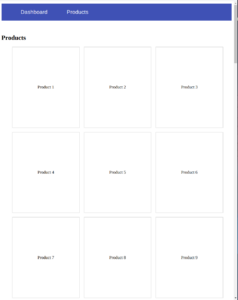
Let's build a small application to illustrate why this matters. The app below displays a grid of products that extends beyond the initial viewport, requiring the user to scroll.
The grid contains more than 9 items, and users can scroll to view all of them.
In a production application, we'd typically fetch this data from a backend endpoint via an HTTP call within a service. For this demo, we'll create a service that provides mock data.
products.service.ts
@Injectable({
  providedIn: 'root',
})
export class ProductsService {
  get() {
    const products = [...new Array(50)].map((it, index) => ({
      id: index + 1,
      name: `Product ${index + 1}`,
      price: 100,
      description: `This is product ${index + 1}`,
    }));
    return of(products);
  }
}
We also need a component to display the products from the service.
products.component.ts
@Component({
  selector: 'app-products',
  standalone: true,
  imports: [
    NgFor, RouterLink, AsyncPipe, NgIf
  ],
  template: `
    <h2>Products</h2>
    @if (products$ | async; as products) {
      <ul class="products-container">
        @for (product of products; track product.id) {
          <li
            class="products-container--product-item"
            [routerLink]="['/products', product.id]"
          >
            <div>
              {{ product.name }}
            </div>
          </li>
        }
      </ul>
    }
  `,
  styles: [
    `
      .products-container {
        display: flex;
        gap: 16px;
        flex-wrap: wrap;

        &--product-item {
          list-style: none;
          width: 250px;
          height: 300px;
          border: 1px solid #ccc;
          display: flex;
          align-items: center;
          justify-content: center;
          cursor: pointer;
        }
      }
    `,
  ],
})
export class ProductsComponent {
  products$ = inject(ProductsService).get();
}
The Core Issue
When you run this app, click on a product to view its details at the route products/:id, and then hit the back button, ideally, the list would appear exactly as you left it—scroll position and all.
To get this behavior, we can use the withInMemoryScrolling function, a routing feature that has built-in support for restoring the scroll position.
export const appConfig: ApplicationConfig = {
  providers: [
    provideRouter(
      routes,
      withInMemoryScrolling({
        scrollPositionRestoration: 'enabled',
      }),
    ),
  ],
};
With this enabled, navigating to a product's details and then returning to the list should restore your previous scroll location.
This seems perfect, but there's a subtle complication we need to address.
Take a look at the products.service.ts file. It returns the product list instantly. In reality, network requests introduce latency. Let's add a simulated delay to our service using the delay operator from RxJS.
@Injectable({
  providedIn: 'root',
})
export class ProductsService {
  get() {
    const products = [...new Array(50)].map((it, index) => ({
      id: index + 1,
      name: `Product ${index + 1}`,
      price: 100,
      description: `This is product ${index + 1}`,
    }));
    return of(products).pipe(
      delay(3000), // Simulate network latency
    );
  }
}
With this artificial network delay in place, you'll notice that returning to the product list no longer restores the scroll position; instead, you land at the top. The issue is that Angular attempts to scroll to the recorded position before the page has finished rendering its full height.
Let's illustrate this with a simple example. Imagine a viewport height of 800px. With 50 products, the maximum scrollable distance is 2000px. You scroll down to position 1000px and click a product. Upon navigating back, Angular tries to restore the position to Y=1000, but the list hasn't loaded yet. At that moment, the page's maximum scroll height is still 800px (equal to the viewport), so it cannot reach the target position of 1000px, and it appears as if the scrolling restoration has failed.
Formulating a Strategy
To overcome this, we need a way to save the user's exact scroll position and then scroll back to it once they return to the page. More importantly, we need to know when the list is ready.
Here is our plan:
- Track Scroll Position: We can capture the current vertical scroll offset using the
window.pageYOffsetproperty, which gives us the number of pixels the document has been scrolled. - Restore Scroll Position: To return to a specific point, we use the
window.scrollTo(x, y)method, which moves the document to the specified coordinates.
While these are the core building blocks, keeping track of a single scroll position isn't a very scalable or reusable solution for multiple lists in a larger application.
While brainstorming this problem, my CTO, Ryan Hutchison, pointed me in the right direction: the scroll position is actually part of the routing event itself. This is a crucial insight!
Indeed, when you enable the withInMemoryScrolling feature, the router records this information in its event stream.
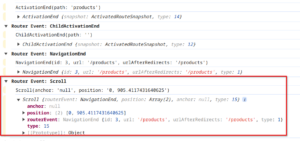
If you inspect the event, you'll notice a property called position. It's an array containing two numbers: the first representing the X-axis coordinate and the second representing the Y-axis coordinate.
Armed with this knowledge, we no longer need to manually store the scroll position. We just need to listen for the Scroll event and then use it to set our position.
Implementing the Fix
Our first step is to create an RxJS stream that listens for the Angular router's Scroll event.
inject(Router).events.pipe(
      filter((event): event is Scroll => event instanceof Scroll),
);
This event object includes several properties like anchor, position, routerEvent, and type. We are only interested in the position property, which is a tuple of [x, y] coordinates.
inject(Router).events.pipe(
      filter((event): event is Scroll => event instanceof Scroll),
      map((event: Scroll) => event.position),
 )
Now, we need to scroll to that position. While we could use the browser's window.scrollTo method directly, it's more idiomatic in Angular to use the ViewportScroller wrapper from the @angular/common package. Its inner implementation is based on the standard window object. For more details, see the source code.
this.viewportScroller.scrollToPosition([x,y]);Let's assemble the logic we have so far:
constructor() {
    inject(Router)
      .events.pipe(
        filter((event): event is Scroll => event instanceof Scroll),
        map((event: Scroll) => event.position),
      )
      .subscribe((position) => {
        this.viewportScroller.scrollToPosition(position || [0, 0]);
      });
  }
Even with this, the restoration still fails. Why? Because we're attempting to scroll at the wrong moment. Our service simulates a network delay, meaning we're working with asynchronous data. We need to scroll only after our product list has been rendered into the DOM. Therefore, we must synchronize our scroll action with the moment our data is fully displayed.
We can achieve this by using a template reference variable in our HTML and a signal query to get a reference to the rendered list element. As soon as the signal query returns a value, it signals that the products are present in the view.
template reference variable
<ul #scrolling class="products-container">query the scrolling reference
scrollingRef = viewChild<HTMLElement>('scrolling');However, signal queries return a signal, not an RxJS observable. To reconcile this with our RxJS stream, we need to adapt our code.
We'll convert our RxJS stream that emits the scroll position into a signal using the toSignal function.
const scrollingPosition: Signal<[number, number] | undefined> = toSignal(
  inject(Router).events.pipe(
    filter((event): event is Scroll => event instanceof Scroll),
    map((event: Scroll) => event.position || [0, 0]),
  ),
);
Then, we'll use an effect to reactively check two conditions:
- Our products are rendered, checking the truthiness of
this.scrollingRef(). - The rolling position has a value, checking the truthiness of
scrollingPosition().
effect(() => {
  if (this.scrollingRef() && scrollingPosition()) {
     this.viewportScroller.scrollToPosition(scrollingPosition()!);
   }
});
Here's the final, complete code for the component:
export class ProductsComponent {
  products$ = inject(ProductsService).get();
  viewportScroller = inject(ViewportScroller);
  scrollingRef = viewChild<HTMLElement>('scrolling');

  constructor() {
    const scrollingPosition: Signal<[number, number] | undefined> = toSignal(
      inject(Router).events.pipe(
        filter((event): event is Scroll => event instanceof Scroll),
        map((event: Scroll) => event.position || [0, 0]),
      ),
    );

    effect(() => {
      if (this.scrollingRef() && scrollingPosition()) {
        this.viewportScroller.scrollToPosition(scrollingPosition()!);
      }
    });
  }
}
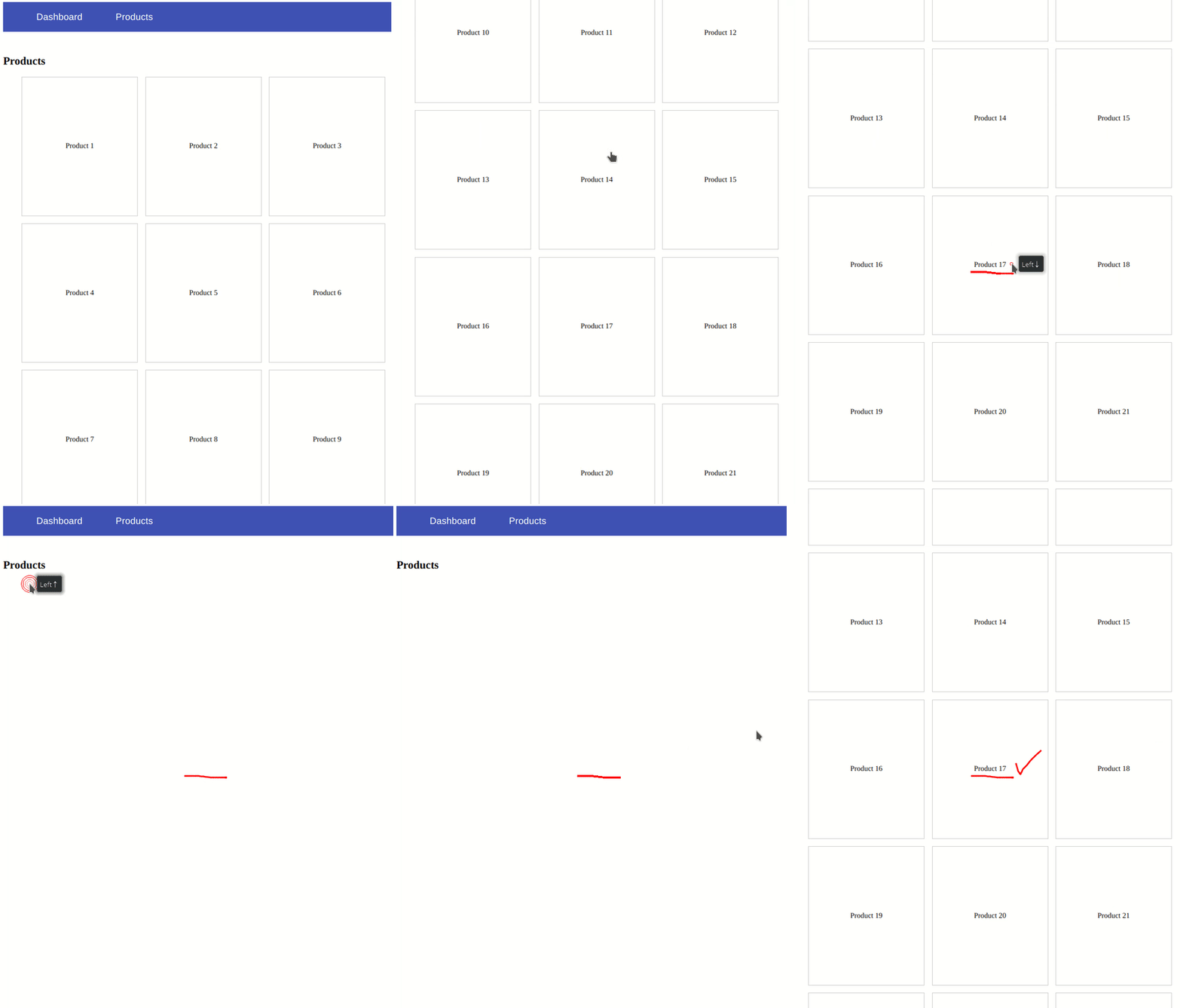
The brief video below demonstrates the final behavior in action.
Wrapping Up
Restoring a user's scroll position is a significant detail that greatly enhances the overall user experience.
The solution we built works correctly, though it's a bit tailored to this specific use case. If you are interested in a more generic and scalable approach, I recommend checking out my YouTube video for a detailed walkthrough: https://youtu.be/U7GeEkyv2Lk?si=55rivMSV43cUuvmx.
Thank you for reading!