What to Expect from Angular 8: A Comprehensive Preview
This post covers the highlights from ngConf and Google I/O 2019, providing an overview of what Angular 8 has in store. If you missed either event, this will bring you up to speed on the upcoming features and changes. This article was written together with Roman Yavoriv.
Overview
The excitement after NgConf 2019 is undeniable as we look forward to Angular 8. Igor Minar’s keynote touched on a wide range of topics, including tooling enhancements and differential loading, among other impressive features.
We will dive into how these changes will affect your projects, discussing the details of each feature as well as any deprecations or breaking changes you should be aware of.
New Capabilities
Differential loading
Based on your browserlist configuration, the build process will generate a dedicated bundle for polyfills. This results in the following:
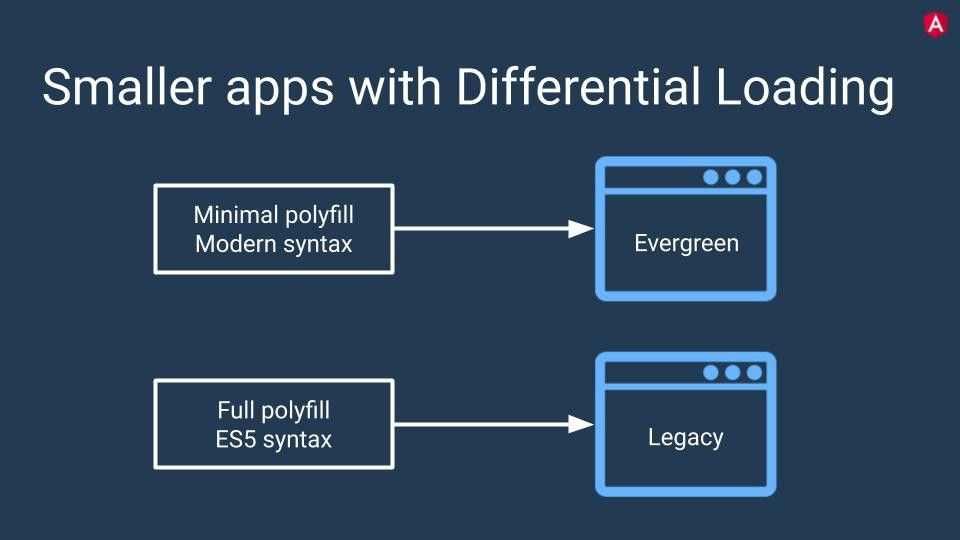
Source: Keynote by Brad Green & Igor Minar(ng-conf 2019)
This approach can help reduce the overall bundle size.
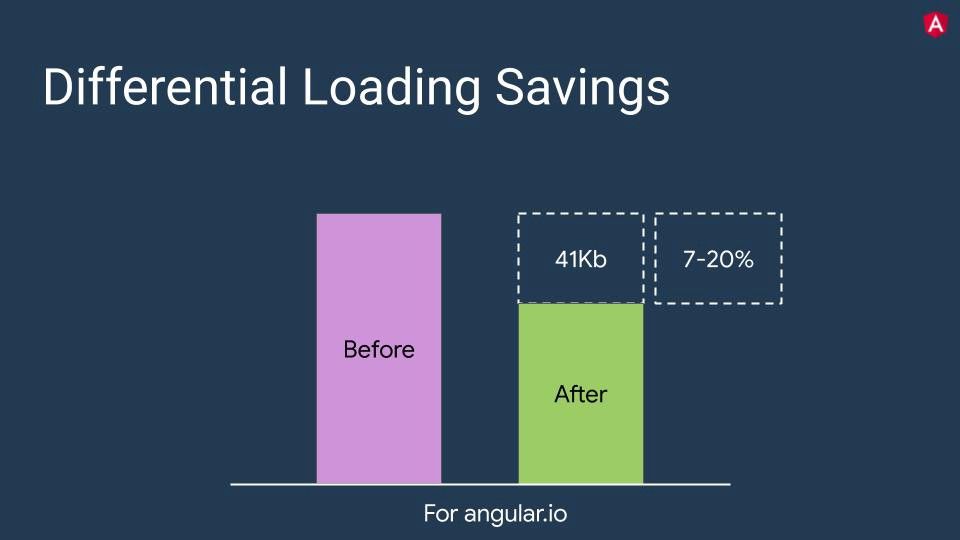
Source: Keynote by Brad Green & Igor Minar(ng-conf 2019)
So, how does this mechanism function?
Angular will generate extra files containing polyfills, and these will be included using [nomodule] attributes.
<body>
  <pp-root></pp-root>
<script type="text/javascript" src="runtime.js"></script>
  <script type="text/javascript" src="es2015-polyfills.js" nomodule></script>
  <script type="text/javascript" src="polyfills.js"></script>
  <script type="text/javascript" src="styles.js"></script>
  <script type="text/javascript" src="vendor.js"></script>
  <script type="text/javascript" src="main.js"></script>
</body>
The nomodule attribute is a boolean attribute that prevents a script from being executed in user agents that support module scripts. This allows selective execution of module scripts in modern user agents and classic scripts in older user agents.
SVG templates
Now you have the ability to use SVG files as templates. Previously, you could only choose between inline HTML or an external HTML file.
@Component({
  selector: "app-icon",
  templateUrl: "./icon.component.svg",
  styleUrls: ["./icon.component.css"]
})
export class AppComponent {...}
Experimental Ivy Rendering Engine
Ivy remains in experimental status. With Angular 8, you can opt in by setting the enable-ivy flag to true, as shown below. Keep in mind that this is just a preview and not fully functional. As Igor Minar suggested during ngConf 2019, sticking with the View Engine for new projects is still the recommended path.
For an existing project, you can enable Ivy by setting the enableIvy option inside the angularCompilerOptions in your project’s tsconfig.app.json
"angularCompilerOptions": {"enableIvy": true}
You also have the option to start a new application with the new Engine:
$ ng new my-app --enable-ivy
The Ivy engine is set to bring several benefits, with the first three slated for Angular 9:
- Faster compilation (V9).
- Better type checking for templates (V9).
- Reduced bundle size (V9) (if you missed I/O 19, Vikram Subramanian showed an app compiled to just 4.3 KB).
- Backward compatibility.
- And my personal favorite: template debugging capabilities (a feature many developers will definitely appreciate).
Bazel Support
Bazel is another tool that Google has open sourced, and we’re certainly grateful for that. According to Igor Minar, Bazel has been a staple internally for years and is now accessible to everyone. You can check out the official Bazel documentation and learn about its integration with Angular.
You might be asking: “Is Bazel production-ready?” The short answer is: not yet. Currently, it’s available as an “opt-in preview.” To quote Alex Eagle, the lead of Angular tooling at Google:
If you tried Bazel in the past there were a lot of sharks…
(Now) Sharks have been dealt with, but the water still might be cold.
Bazel is now available as an opt-in and is anticipated to be fully integrated into @angular/cli in version 9.
Adopting Bazel comes with several benefits:
- Decreased build times (the initial build may take some time, but subsequent builds will be significantly quicker). Angular itself is already leveraging it, and CI time has dropped from around 60 minutes to just 7.5 minutes.
- Incremental builds: deploy only the components that have changed, rather than rebuilding the whole application.
- The Bazel files are hidden by default, but you have the option to eject them.
To add Bazel support, run the following command:
$ ng add @angular/bazel
Creating a new app with Bazel is also possible:
$ npm install -g @angular/bazel
$ ng new my-app --colection=@angular/bazel
Builders API
The latest release introduces the Builders API, also known as the Architect API.
Angular relies on builders for core operations like serve, build, test, lint, and e2e. You can see a list of the current builders in your angular.json file.
...
"projects": {
  "app-name": {
    ...
    "architect": {
      "build": {
        "builder": "@angular-devkit/build-angular:browser",
        ...
      },
      "serve": {
        "builder": "@angular-devkit/build-angular:dev-server",
        ...
      },
      "test": {
        "builder": "@angular-devkit/build-angular:karma",
        ...
      },
      "lint": {
        "builder": "@angular-devkit/build-angular:tslint",
        ...
      },
      "e2e": {
        "builder": "@angular-devkit/build-angular:protractor",
        ...
      }
    }
  }
}
Now, you have the ability to craft your own custom builders. This brings to mind the gulp/grunt commands from earlier days.
At its core, a builder is a function containing a set of commands that you pass to the createBuilder() method, which is exported from the @angular-devkit/architect package.
import { createBuilder } from '@angular-devkit/architect';
function customBuild(options, context) {
  return new Promise((resolve, reject) => {
    // set of commands
  })
}
createBuilder(customBuild);
You can explore the built-in Angular builders here.
For a deeper dive, these two articles are recommended:
- https://indepth.dev/angular-cli-builders/
- https://blog.angular.io/introducing-cli-builders-d012d4489f1b
Lazy loading changes
The loadChildren:string syntax used for lazy loading modules is being deprecated in this version.
Here’s the old syntax:
loadChildren: './lazy/lazy.module#LazyModule';
And the new one:
loadChildren: () => import('./lazy/lazy.module').then(m => m.LazyModule)
If you’re dealing with many lazy-loaded modules and want to automate the migration, refer to Upgrading Lazy Loaded Route by Craig Spence.
$location AngularJS API Support
To better support developers migrating from AngularJS, the Angular team has enhanced the $location service. A new package, angular/common/upgrade, has been introduced.
- You can now retrieve the state from the location service.
- It’s now possible to track all location changes.
- Access to
hostname,protocol,port, andsearchproperties, which were available in AngularJS, is now provided. - The
MockPlatformLocationAPI has been added to facilitate testing of the location service.
Web Worker
Angular 8 introduces support for Web Workers. You can now generate web workers to run time-consuming tasks in the background. To create a new web worker via the Angular CLI, execute the following command:
$ ng g webWorker <name>
Service Worker
With the growing popularity of PWAs, the service worker has received a number of improvements.
- A notable addition is the
SwRegistrationOptionsoption. - It now supports hosting multiple apps on a single domain.
Additional details on Service Workers can be found in the Angular Docs.
Form enhancements
- A new
markAllAsTouchedmethod has been added, making it easier to mark every control in aFormGroupastouched. This is particularly handy when you need to trigger validation for all controls at once. Previously, this required the following workaround for aFormGroup:
validateFormAndDisplayErrors(form: FormGroup) {
  Object.keys(form.controls).map((controlName) => {
    form.get(controlName).markAsTouched({onlySelf: true});
  });
}
2. You can now clear (remove all) elements from a FormArray.
To fully empty a formArray before, you had to loop through and remove the first element until none were left:
while (formArray.length) {
  formArray.removeAt(0);
}
Those days are over, as a dedicated native method is now available****.****
formArray.clear()
TypeScript 3.4.x Support
Angular has moved up to TypeScript 3.4 (while v7 was on 3.2.x). The breaking changes are minimal, so it’s likely a smooth transition for most projects. For a detailed list, see here.
Performance boosts
Previously, ServerRendererFactory2 instantiated a new DomElementSchemaRegistry for each request, which is inefficient. Now, a single global instance of DomElementSchemaRegistry is shared across all requests.
Angular Firebase
Good news for Angular Firebase users! You’ll be able to deploy your application directly using the Angular CLI, which is quite exciting.
Here’s the command to deploy your app via the CLI:
ng run [PROJECT_NAME]:deploy
You can find more details about this feature on Angular Firebase.
Deprecated APIs
Usage of `any` in TestBed.get
TestBed.get()supports two signatures—one is strongly typed, while the other accepts and returnsany. Theanyvariant is now deprecated. All calls toTestBed.get()should use the typed signature. This change primarily affects users of string tokens (which are unsupported) and abstract class tokens.
Old way:
TestBed.configureTestingModule({
  providers: [{ provide: "stringToken", useValue: new Service() }],
});
let service = TestBed.get("stringToken"); // type any
New way:
const SERVICE_TOKEN = new InjectionToken<Service>("SERVICE_TOKEN");
TestBed.configureTestingModule({
  providers: [{provide: SERVICE_TOKEN, useValue: new Service()}],
});
let service = TestBed.get(SERVICE_TOKEN); // type Service
Removal of DOCUMENT from @angular/platform-browser
The DOCUMENT constant has been moved out of @angular/platform-browser. If you were importing DOCUMENT from that package, you’ll need to switch to importing it from @angular/common.
Removal of @angular/http
The @angular/http package was deprecated in Angular 5 but remained available since @angular/platform-server depended on it. This dependency has now been resolved, and the package has been fully removed.
Breaking Changes
It’s not common knowledge, but Angular used to automatically fix invalid usage of tr and col HTML elements.
For the tr element—a correction was made if it wasn’t a direct child of tbody, tfoot, or thead, wrapping it inside a tbody automatically.
For the col element—Angular would wrap it in a colgroup if it wasn’t already inside one.
This behavior has been changed to place that responsibility on the developer to avoid conflicts. You’ll need to wrap these elements yourself.
More details can be found here.
Configuring ViewChild/ContentChild Query Timing
It’s now necessary to provide a static flag to specify when you expect a ViewChild or ContentChild instance to be resolved.
You’ve likely encountered the inconsistency where query results were sometimes ready in ngOnInit but other times weren’t resolved until ngAfterContentInit or ngAfterViewInit.
// Ensure Change Detection runs before accessing the instance
@ContentChild('foo', { static: false }) foo!: ElementRef;
// If you need to access it in ngOnInit hook
@ViewChild(TemplateRef, { static: true }) foo!: TemplateRef;
Note that this flag is not applicable to ViewChildren or ContentChildren, which will still be resolved after Change Detection runs.
Important caveat: Setting static: true means you won’t be able to get results for elements in dynamic templates, like those toggled by *ngIf.
A schematic has been included to help migrate existing code to the new syntax, as it’s required for Ivy. Just run ng update @angular/core to update your codebase automatically.
For a deeper explanation of this option, refer here.
Angular Material
The Angular Material project has been renamed to Angular Components. The package names themselves are unchanged.
Conclusion
Angular 8 is nearly here, and the Angular team continues to make life easier for developers. Each new version brings a more seamless update experience than the last.
The Air France example is a good illustration of this trend.
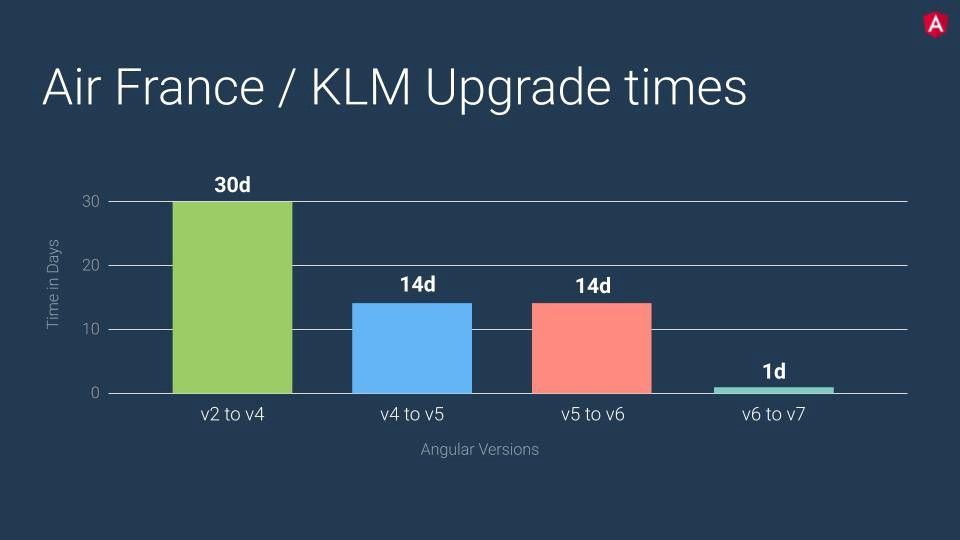
Source: Keynote by Brad Green & Igor Minar(ng-conf 2019)
That being the case, the upgrade process should run smoothly and likely won't be very time-consuming.
For a detailed, step-by-step migration guide, head over to https://update.angular.io.
Angular 8.0.0-rc.0! Like with some bugs to be ironed out in the next days, but ?❤️ ? pic.twitter.com/o62iNu0FGl
— Igor Minar (@IgorMinar) April 26, 2019
According to Igor Minar, assuming all the bugs are worked out, we can expect the stable release to arrive the week of May 22nd.
The future is looking good for Angular. What we do with it is up to us.