
During the recent Angular live interview in January 2025, the host posed the question: "Are we ditching Observables and RxJs?".
In short, RxJs is no longer a mandatory component, yet it remains far from outdated. The arrival of signals has introduced another option within Angular's reactive programming toolkit, but RxJs is still essential for dealing with intricate data streams, event-driven logic, and live updates.
Back in 2024, I published two pieces on Advanced RxJs Operators You Know But Not Well Enough - part 1 and part 2, both of which were well received.
Despite the extensive operator list available in the official RxJs documentation, situations often arise where a bespoke operator is needed to address a specific scenario.
This article aims to demonstrate the process of building custom RxJs operators and then present several operators (beyond mere logging utilities) that could prove beneficial in your projects. All operators covered here are available in the Github Repository. These custom operators are:
filterNil()- removesnullandundefinedentries from the data flowdataPolling()- fetches API data at regular intervalshandleError()- manages errors thoroughly by forwarding them to Sentry and alerting usersrememberHistory()- stores the most recent N values and enables access to prior statesobjectValueChanged()- performs deep object comparisons, releasing only altered states relative to the prior oneobjectChangedFields()- identifies which fields of an object (or form) have changedloadingStatus()- functions akin to therxResource()API but operates with Observables
What Is An Operator?
To address this, the most effective approach is to examine the Github RxJs implementations of every available operator. For instance, take the widely-used map() operator and review its implementation. As of this writing, with RxJs version 7.8.1, the code for the map() operator appears like this:
export function operate<In, Out>(
	{ destination, ...subscriberOverrides }: OperateConfig<In, Out>
) {
  return new Subscriber(destination, subscriberOverrides);
}

export function map<T, R>(
	project: (value: T, index: number) => R
): OperatorFunction<T, R> {
  return (source) =>
    new Observable((destination) => {
      // The index of the value from the source.
      let index = 0;
      // Subscribe to the source
      source.subscribe(
        operate({
          destination,
          next: (value: T) => {
            // Call the projection function with the context,
            // and send the resulting value to the consumer.
            destination.next(project(value, index++));
          },
        })
      );
    });
}
All of that is well and good, but what does this snippet actually reveal? The key insight for me is that the map() operator is just a JavaScript function returning a designated OperatorFunction<T, R> type. The internal implementation details are now beside the point. Instead, what matters is the returned type. Checking the return type explanation on Github, the authors clarify that two operator varieties exist: OperatorFunction and MonoTypeOperatorFunction.
According to the OperatorFunction type, it "always takes a single parameter (the source Observable) and returns another Observable.". This type pairs with the map() operator because it accepts a generic input T and yields a distinct output R. That's logical since we can craft a predicate that reshapes the complete structure of the input object T -> R.
If the output type matches the input type, the MonoTypeOperatorFunction comes into play. Its definition states it’s “A function type interface that describes a function that accepts and returns a parameter of the same type.”.
An additional point: the source variable holds the Observable that gets handed to the operator function when it's called inside a pipe chain. This means that when you execute source.subscribe(value => ... ), the value signifies the data moving through the pipe chain into that function.
Start With Basics
Enough theory, let's get hands-on to grasp the core concepts. For building a basic custom operator, imagine having a sequence of numbers that we want to scale by a certain factor. Below is the target outcome:
const source$ = of(1, 2, 3);
source$.pipe(multiplyBy(6)).subscribe(console.log);
//  6, 12, 18
Based on the points covered up to this point, we can put together an implementation along these lines:
export function multiplyBy(val = 2): MonoTypeOperatorFunction<number> {
  return (source: Observable<number>): Observable<number> =>
    new Observable<number>((subscriber) => {
      return source.pipe(map((d) => d * val)).subscribe({
        next(value) {
          subscriber.next(value);
        },
        error(err) {
          subscriber.error(err);
        },
        complete() {
          subscriber.complete();
        },
      });
    });
}
The identifier of this function is multiplyBy(), and it is placed within a pipe chain. Its return type is MonoTypeOperatorFunction, given that the data is transformed without any change to its type. Within the function body, we subscribe to the provided Observable to retrieve the values passed through the pipe chain, and we return a new Observable as a result.
While this code operates correctly, I wasn't fond of the unnecessary indirection introduced by wrapping the source Observable in a fresh Observable, in addition to the explicit subscription to that source. Such a pattern proves valuable when complete command over subscription handling or intricate bespoke logic is required. As neither scenario aligns with our needs, we can refine the custom operator in this manner:
export function multiplyBy(val = 2): MonoTypeOperatorFunction<number> {
  return (source) => source.pipe(map((d) => d * val));
}
The shorter form is easier to follow, so I'll stick with it while going through a handful of operators you might find handy in your own codebase, building up from easier examples to more advanced ones.
Custom RxJs Operators
1.) Filter Nil
This operator draws its inspiration from the ngxtension package, which I relied on for a while and definitely advise you to explore. The core concept is straightforward: strip out any undefined or null values that might flow through your pipe chain.
export function filterNil<T>(): MonoTypeOperatorFunction<T> {
  return (source) => source.pipe(
	  filter((d) => d !== null && d !== undefined)
	 );
}
2.) Data Polling
Certain use cases call for loading information from a backend, retaining it locally, and yet still re-fetching that data at periodic intervals for the entire session—examples include weather dashboards, stock tickers, or inbox notifications. In my experience, crafting an operator for this scenario turned out to be surprisingly straightforward:
export function dataPolling<T>(data: {
  loader: () => Observable<T>;
  reloadSeconds: number;
}): MonoTypeOperatorFunction<T> {
  return (source) =>
    source.pipe(
      switchMap(() =>
        timer(0, data.reloadSeconds * 1000).pipe(
          switchMap(data.loader)
        )
      )
    );
}
// Component
private http = inject(HttpClient);

constructor() {
  const api = '...'
  this.http.get(api)
    .pipe(
      dataPolling({
         reloadSeconds: 10,
         loader: () => this.http.get(api),
      }),
    ).subscribe((x) => console.log(x));
}
3.) Complex Error Handling
Although I mentioned skipping logging examples since there’s plenty available, it’s still worth noting: when your logic inside catchError() grows more involved, wrapping that logic into a dedicated operator can be beneficial. Below, for instance, you can see how this approach combines sending logs to Sentry with alerting the end user about a failure.
export function handleError<T, K>(
  returnValue: K,
  errorMessage = "Server Error"
): OperatorFunction<T, K | T> {
	const sentry = inject(SentryService);
	const notification = inject(NotificationService);

  return (source) =>
    source.pipe(
      catchError((err) => {
	    // log error in sentry
		sentry.log(error, 'error')

		// notify the user
		notification.notifyUser(errorMessage, 'error')

		// return something in the pipe chain
        return of(returnValue);
      })
    );
}
4.) Remember History
Have you ever needed an “undo change” button? Perhaps you wanted to cache values coming in over a Websocket, or keep a record of the user’s last N form edits? A straightforward way to cache such data might look like this:
// defining an interface for the function
// current and crevious values can be different, therefore T & K
type RememberMemory<T, K = T> = {
	// previous value that was cachced
  previous: null | K;
  // currently cached value
  current: T;
  // previous N cached values
  historyChain: unknown[];
};
export function rememberHistory<T>(
	// how many last N values to remember
  memory = 3
): OperatorFunction<T, RememberMemory<T>> {
  return (source) =>
    source.pipe(
      scan(
        (acc, curr) => ({
          current: curr,
          previous: acc.current,
	        // remember last N values
          historyChain: [...acc.historyChain.slice(-(memory - 1)), curr],
        }),
        {
          current: null as T, // ignore initial null
          previous: null,
          historyChain: [],
        } as RememberMemory<T>
      )
    );
}
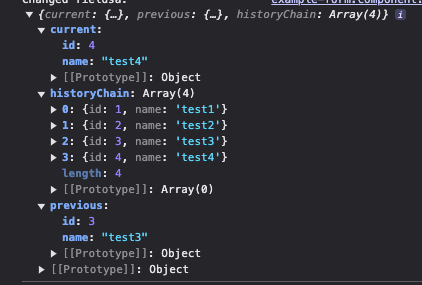
Imagine you’re working with a data stream and need to store its emissions. Using the snippet below, the output will match what’s shown in the accompanying figure. If you’d prefer the most recent item to appear at the beginning of the array rather than the end, you can simply tweak the ordering logic inside the historyChain.
from([
  { id: 1, name: "test1" },
  { id: 2, name: "test2" },
  { id: 3, name: "test3" },
  { id: 4, name: "test4" },
]).pipe(
    rememberHistory(4)
  )
5.) Object Value Change
In form-related scenarios, you may subscribe to the form's valueChanges observable and wish to trigger calculations solely when the form genuinely changes. Intermediate modifications—such as keystrokes or character deletions—should be disregarded; only substantive updates matter. One approach is using distinctUntilChanged() with a custom comparison function, implemented as follows:
this.myForm.valueChanges.pipe(
  debounceTime(800),
  distinctUntilChanged(
    (prev, curr) => JSON.stringify(prev) === JSON.stringify(curr)
  ),
  map(d => /* do something */ )
 )
By leveraging the stringification predicate, you construct a guard that allows execution solely when the form has changed relative to its prior state. This predicate executes a thorough comparison, encompassing both form arrays and nested form groups.
However, suppose you require this same functionality but prefer to steer clear of JSON.stringify? In that case, you’d seek a mechanism to evaluate the previous and current object states, emitting values exclusively when a difference exists. To restrict the use of distinctUntilChanged() and implement bespoke logic for comparing object changes, you can achieve this as follows:
/**
 * creates a deep comparison between previous and current state
 * and emits only when object values changed (even for nested keys)
 */
export function objectValueChanged<T extends Object>(
  config: {
    debounceTime: number;
  } = {
    debounceTime: 500,
  }
): MonoTypeOperatorFunction<Partial<T>> {
  const isObjectValueChange = <K extends Object | {}>(
    prev: K,
    curr: K
  ): boolean => {
    return Object.keys(curr).some((key) => {
      // value can be anything - string, number, object, etc.
      const previousValue = prev[key as keyof K] as any;
      const currentValue = curr[key as keyof K] as any;

      // if value is object - check child key and value changes
      if (currentValue instanceof Object) {
        return isObjectValueChange(previousValue, currentValue);
      }

      return previousValue !== currentValue;
    });
  };

  return (source) =>
    source.pipe(
      // start with empty object make first emit
      startWith({}),
      // wait for user's input typing
      debounceTime(config.debounceTime),
      // use previous and current object values
      pairwise(),
      // only filter changed values for the object
      filter(([prev, curr]) => isObjectValueChange(prev, curr)),
      // return current object
      map(([_, curr]) => curr)
    );
}
6.) Object Field Changes
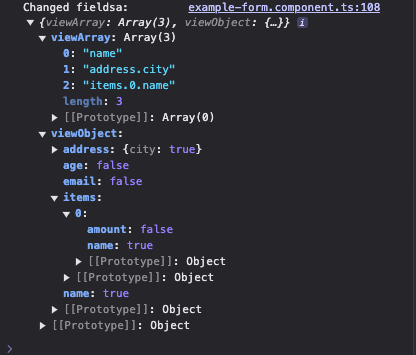
When it comes to forms, a more applicable scenario involves observing a form and detecting which specific fields were modified or touched. The idea is to feed the form's (or object's) original state into the pipe, and receive two distinct results: a list of keys that have changed, plus an object mapping each form field name to a boolean value that tells whether that particular field has been edited. This pipe is understandably more intricate, and getting a deep grasp of it isn't necessary. Here, I'll show how it behaves when applied directly to a form.
type Booleanify<T> = {
  [K in keyof T]: T[K] extends object ? Booleanify<T[K]> : boolean;
};

export function objectChangedFields<T extends Object>(
  initial: T
): OperatorFunction<
  Partial<T>,
  {
    viewArray: string[];
    viewObject: Booleanify<T>;
  }
> {
  // identify which fields have changed between two states.
  const getChangedFields = <K extends Object | Array<any>>(
    initial: K,
    current: Partial<K>,
    currentKey = ""
  ): string[] => {
    let changedKeys: string[] = [];
    for (const key of Object.keys(current)) {
      // value can be anything - string, number, object, etc.
      const previousValue = initial[key as keyof K] as any;
      const currentValue = current[key as keyof K] as any;

      // create key to save
      const newKey = currentKey !== "" ? `${currentKey}.${key}` : key;

      // if value is object - check child key and value changes
      if (currentValue instanceof Object) {
        // save nested path
        changedKeys.push(
          ...getChangedFields(previousValue, currentValue, newKey)
        );
        // go to next key
        continue;
      }

      // string or number comparison
      if (previousValue !== currentValue) {
        changedKeys.push(newKey);
      }
    }

    // return saved keys
    return changedKeys;
  };

  // identify which fields have changed between two states.
  const getChangedFieldsObject = <K extends Object>(
    initial: Partial<K>,
    current: Partial<K>,
    cachedObj = {}
  ): Booleanify<K> => {
    for (const key of Object.keys(initial)) {
      // value can be anything - string, number, object, etc.
      const previousValue = initial[key as keyof K] as any;
      const currentValue = current[key as keyof K] as any;

      // if value is object - check child key and value changes
      if (currentValue instanceof Object) {
        // create nested object
        (cachedObj as any)[key] = {};
        // access nested cache
        const nestedCache = (cachedObj as any)[key];
        // check if nested key changed
        getChangedFieldsObject(previousValue, currentValue, nestedCache);
        // go to next key
        continue;
      }

      // string or number comparison
      (cachedObj as any)[key] = previousValue !== currentValue;
    }

    return cachedObj as Booleanify<K>;
  };

  return (source) =>
    source.pipe(
      map((data) => ({
        viewArray: getChangedFields(initial, data),
        viewObject: getChangedFieldsObject(initial, data),
      }))
    );
}
I’m not going to go into how it functions; there are some any casts involved, and with enough effort, you might tidy it up, but I’ve included the GitHub link for the curious.
The key point is to supply the object’s initial form state as initial: T here. Meanwhile, getChangedFields() gives you an array of the modified keys, and getChangedFieldsObject() hands you a boolean map for each key’s changed status. Let’s now see this pipe applied within the component below:
export class ExampleFormComponent {
  private readonly builder = inject(FormBuilder);

  myForm = this.builder.nonNullable.group({
    name: [""],
    email: [""],
    age: [""],
    address: this.builder.group({
      city: [""],
    }),
    items: this.builder.array([
      this.builder.group({
        name: [""],
        amount: [0],
      }),
    ]),
  });

  constructor() {
    this.myForm.valueChanges.pipe(
        objectChangedFields(this.myForm.value)
      ).subscribe((fieldChange) => {
        console.log("Changed fieldsa:", fieldChange);
      });
  }
}
When this.myForm.value is supplied as the starting state to the custom pipe, it can represent any object that should be compared with the data coming through the pipe chain. As an example, if the name, address.city, and items[0].name properties are modified, then objectChangedFields() would produce this result:
7.) Loading Stats
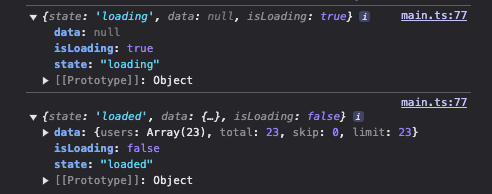
Back in November 2024, I wrote a piece called Creating Custom rxResource API With Observables. In it, I tried to build a tailored rxResource() that hooks into Observables rather than signals. The key advantage of this bespoke function is that, even while relying on Observables, you still have visibility into whether the HTTP request is loading. A further insight I gained was that the same principles could be adapted into a custom pipe that provides these HTTP status signals.
type RxResourceResult<T> = {
  state: "loading" | "loaded" | "error";
  isLoading: boolean;
  data: T | null;
  error?: unknown;
};
/**
 * used mainly for API requests to include HTTP state & data
 * about the HTTP call. Similar to rxResource
 */
 export function loadingStatus<T>():
     OperatorFunction<T, RxResourceResult<T>>
 {
  return (source) =>
    source.pipe(
      map((result) => ({
        state: "loaded" as const,
        data: result,
      })),
      // setup loading state
      startWith({
        state: "loading" as const,
        data: null,
      }),
      // handle error state
      catchError((error) =>
        of({
          state: "error" as const,
          error,
          data: null,
        })
      ),
      // map the result to the expected type
      map(
        (result) =>
          ({
            ...result,
            isLoading: result.state === "loading",
          } satisfies RxResourceResult<T>)
      )
    );
 }
Summary
While RxJs comes with a rich set of operators for transforming data within the pipe chain, there are times when you need a tailored, more targeted operation. In this article, you learned that an operator is fundamentally a function returning OperatorFunction if it changes the stream’s type, or MonoTypeOperatorFunction when the type remains unchanged.
Several practical use cases for such custom operators were examined. For me, objectChangedFields() and loadingStatus() stand out as particularly handy. If you enjoyed this piece, check out the linked Github repository, which contains these and other custom pipes. Your feedback is welcome, and you can find me on dev.to | LinkedIn.