Global utilities
Debugging is a crucial competency for any software developer. Many argue it takes twice the effort of writing initial code. Given this, it's vital to make full use of every resource and method available to ease the process. Here, we'll look at some of the most valuable ones for your regular Angular development practice.
We'll begin with the functions that Angular exposes through the global ng namespace. You can access this API directly from the console:

The purpose of most of these functions is pretty clear from their names, and they are all set up in the publishDefaultGlobalUtils function:
export function publishDefaultGlobalUtils() {
  publishGlobalUtil('ɵsetProfiler', setProfiler);
  publishGlobalUtil('getDirectiveMetadata', getDirectiveMetadata);
  publishGlobalUtil('getComponent', getComponent);
  publishGlobalUtil('getContext', getContext);
  publishGlobalUtil('getListeners', getListeners);
  publishGlobalUtil('getOwningComponent', getOwningComponent);
  publishGlobalUtil('getHostElement', getHostElement);
  publishGlobalUtil('getInjector', getInjector);
  publishGlobalUtil('getRootComponents', getRootComponents);
  publishGlobalUtil('getDirectives', getDirectives);
  publishGlobalUtil('applyChanges', applyChanges);
}
As you can observe, the majority of them are implemented within the
discovery utils.
Initially, we'll focus on the functions that accept a DOM node as their input. These methods are designed to fetch the class instances associated with a given DOM node:
- getComponent
- getDirectives
- getRootComponents
- getListeners
- getOwningComponentLet’s examine these in detail.
Initiating with a DOM node
From a DOM node, you can conveniently find the component instance that is responsible for it. There are three distinct ways to resolve a component from a DOM element:
- getComponent
- getOwningComponent
- getRootComponents
Let's consider the following scenario:
@Component({
  selector: 'app-root',
  template: `
    <div>i'm just a regular div</div>
    <child-cmp></child-cmp>
  `,
})
export class AppComponent {}

@Component({
  selector: 'child-cmp',
  template: `<div>I am a child component</div>`,
})
export class ChildComponent {}
If you have a DOM element that serves as the host for a component, you can employ the
getComponent
function:
const childComponentElement = document.querySelector('child-cmp');
const appComponentInstance = ng.getComponent(el.nativeElement);
To verify it returns the expected component instance, you can store a reference to the instance within the ChildComponent constructor:
@Component({...})
export class ChildComponent {
  constructor() {
    window.childComponentInstance = this;
  }
}
and subsequently perform a straightforward comparison:
const childComponentElement = document.querySelector('child-cmp');
const appComponentInstance = ng.getComponent(el.nativeElement);

appComponentInstance === window.childComponentInstance; // true
When you possess a reference to a DOM element that resides inside a component’s template, you can use
getOwningComponent
to determine the component whose view contains that element. This means that if you pass it the DOM element for ChildComponent,
it will return the reference to the parent AppComponent:
const instance = ng.getOwningComponent(document.querySelector('child-cmp'));
instance.constructor.name; // AppComponent
This operation applies to any element, not just a component’s host:
const instance = ng.getOwningComponent(document.querySelector('app-root div'));
instance.constructor.name; // AppComponent
The final method, getRootComponents,
allows you to get the top-level component of a component tree
(change-detection tree).
Most apps will only have one such component (barring modals rendered in portals), so this function will generally return an array with a single highest-level component:
const printName = (rootComponent) => rootComponent.constructor.name;

printName(ng.getRootComponents(document.querySelector('app-root div'))[0]); // AppComponent
printName(ng.getRootComponents(document.querySelector('child-cmp'))[0]); // AppComponent
printName(ng.getRootComponents(document.querySelector('child-cmp div'))[0]); // AppComponent
Fetching directives
To obtain the directive instances attached to a DOM node, you should use the
getDirectives
utility. Consider this example:
@Directive({
  selector: '[custom]',
})
export class CustomDirective {}

@Component({
  selector: 'child-cmp',
  template: `<div custom>I am a child component</div>`,
})
export class ChildComponent {}
Calling this function will give you an instance of the CustomDirective class:
const directives = ng.getDirectives(document.querySelector('[custom]'));
console.log(directives[0].constructor); // class CustomDirective {}
It's important to note that this function does not include component instances. Therefore, invoking getDirectives on a child-cmp element will produce an empty array.
Retrieving event listeners
Similarly, you can obtain a collection of event listeners linked to a DOM element. If we take the directive from earlier and add an event listener to it:
@Directive({
  selector: '[custom]',
})
export class CustomDirective {
  @HostListener('click') logMe() {}
}
You can then use the
getListeners
method to find the listeners attached by this directive:
ng.getListeners(document.querySelector('[custom]'));
The result is a list of event listeners, each wrapped
within Angular’s internal callback:
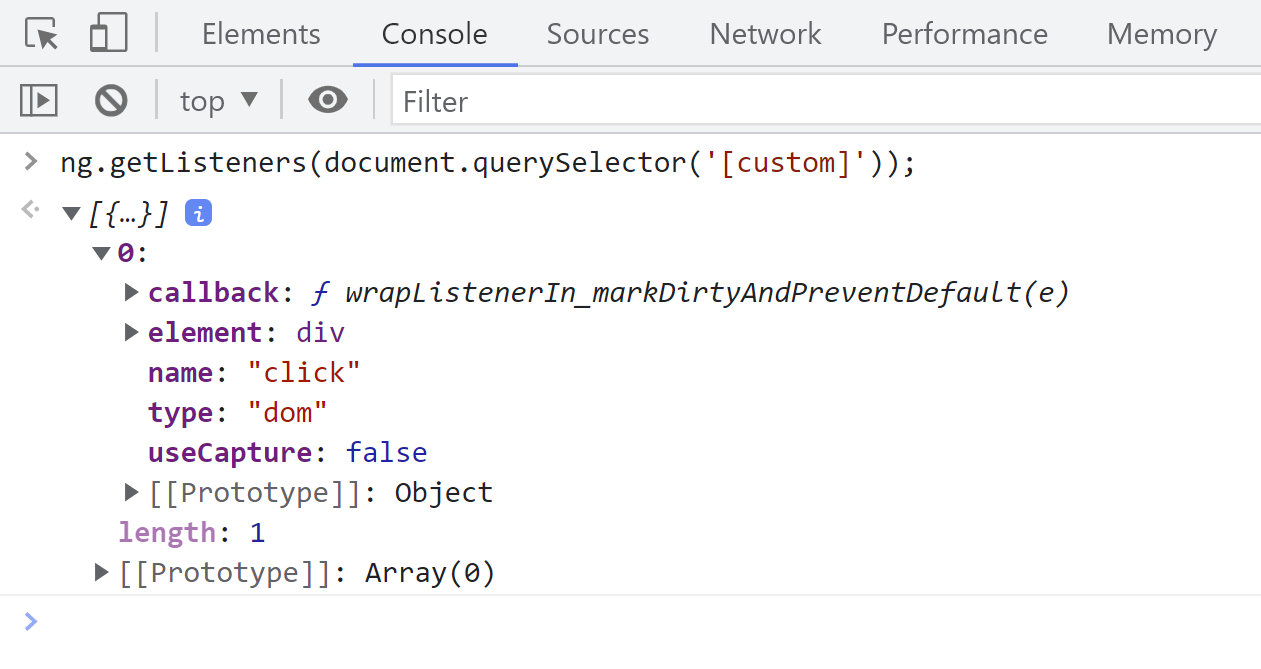
Keep in mind, this list does not reflect listeners added outside the Angular framework, such as those registered directly on the DOM via the addEventListener method.
Initiating with a class instance
You can also navigate in the opposite direction and find the DOM node for a given component or directive instance. The following example demonstrates this:
const hostElement = document.querySelector('child-cmp');
const instance = ng.getComponent(hostElement);
ng.getHostElement(instance) === hostElement; // true
As shown in the
source code,
this operation retrieves the relevant context and extracts the native DOM node from it:
export function getHostElement(componentOrDirective: {}): Element {
  return getLContext(componentOrDirective)!.native as unknown as Element;
}
The concept of context is quite extensive, so let's examine it in more detail next.
Understanding context
The
getContext
method accepts a DOM element and returns the component instance whose view contains that DOM element. This makes it quite similar to the getOwningComponent method we discussed earlier.
However, there's a key difference when the element is part of an embedded view created by a view container, like with *ngIf or *templateOutlet. In such cases,
it provides the context of the embedded view rather than the owning component.
Let's illustrate this with an example:
@Component({
  selector: 'app-root',
  template: `
    <div>Just a plain div</div>
    <child-cmp></child-cmp>

    <ng-container *ngTemplateOutlet="t; context: embedCtx"></ng-container>
    <ng-template #t let-name="name">
      <div class="embed">Inside the template: {{ name }}</div>
    </ng-template>
  `,
})
export class AppComponent {
  embedCtx = {
    name: 'Ace',
  };
}

@Component({
  selector: 'child-cmp',
  template: ` <div>I am a child component</div> `,
})
export class ChildComponent {}
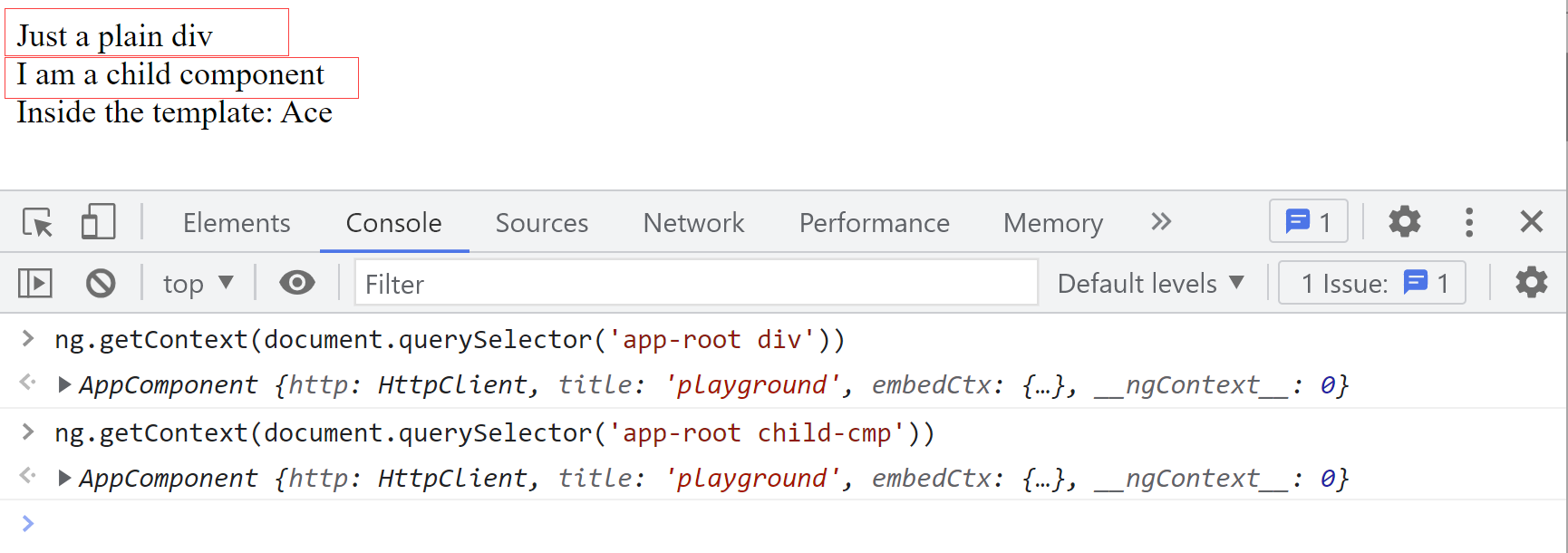
If we feed the div or child-cmp node into the getContext function, we'll receive an instance of the AppComponent:
But, if we query a DOM element that is inside the ng-template,
we'll get the context object provided to the ngTemplateOutlet directive:
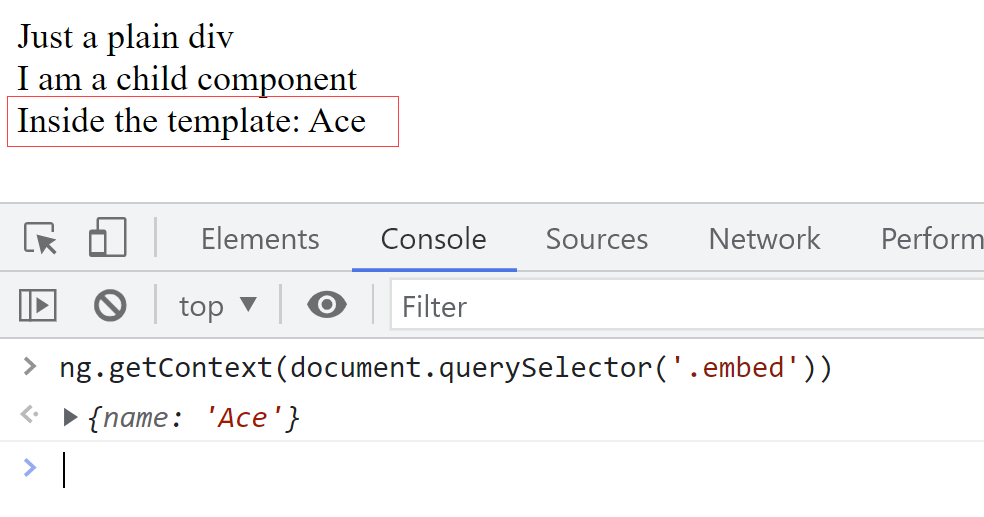
This is the same object that is accessible from the AppComponent instance. Here's a way to verify this:
const appComponentInstance = ng.getComponent(
  document.querySelector('app-root')
).embedCtx;
const domElementInsideEmbeddedView = ng.getContext(
  document.querySelector('.embed')
);

appComponentInstance === domElementInsideEmbeddedView; // true
One surprising aspect is that querying an element with a directive applied still returns the owning component, not the directive. So, if we attach a directive to a div element:
@Component({
  selector: 'app-root',
  template: ` <div custom>i'm just a plain div with a directive</div> `,
})
export class AppComponent {}

@Directive({
  selector: '[custom]',
})
export class CustomDirective {}
Passing this div element to the getContext method will return the AppComponent instance:
const instance = ng.getContext(document.querySelector('[custom]'));
instance.constructor.name; // 'AppComponent'
To get a directive instance, you'll need to rely on the getDirectives method covered earlier.
Retrieving an injector
To get the Injector that is associated with a particular element, component, or directive, you can use the getInjector method. For instance, given this setup:
@Component({
  selector: 'app-root',
  template: ` <child-cmp></child-cmp> `,
})
export class AppComponent {}

@Component({
  selector: 'child-cmp',
  template: `<div>I am a child component</div>`,
})
export class ChildComponent {}
To find the injector for ChildComponent,
you would query the child-cmp element and pass it to this utility:
const injector = ng.getInjector(document.querySelector('child-cmp'));
This function yields a NodeInjector that encapsulates a TNode and an LView:
export function getInjector(elementOrDir: Element|{}): Injector {
  const context = getLContext(elementOrDir)!;
  const lView = context ? context.lView : null;
  if (lView === null) return Injector.NULL;

  const tNode = lView[TVIEW].data[context.nodeIndex] as TElementNode;
  return new NodeInjector(tNode, lView);
}
Here, LView points to the parent LView; in our case, this is the view describing the root app-root component. The tNode represents the ChildComponent within the TView created for AppComponent.
You can also obtain an equivalent injector through the component's constructor:
@Component({
  selector: 'child-cmp',
  template: `<div>I am a child component</div>`,
})
export class ChildComponent {
  constructor(injector: Injector) {
    window.inj = injector;
  }
}
It's a different object, but it contains the identical set of tokens:
const injector = ng.getInjector(document.querySelector('child-cmp'));
inj._tNode === injector._tNode; // true
inj._lView === injector._lView; // true
Triggering change detection
Angular also provides a way to kick off change detection from the console using the applyChanges method. Internally, it flags a component for checking (to handle OnPush components) and then performs change detection synchronously on the root component:
export function applyChanges(component: {}): void {
  ngDevMode && assertDefined(component, 'component');
  markViewDirty(getComponentViewByInstance(component));
  getRootComponents(component).forEach((rootComponent) =>
    detectChanges(rootComponent)
  );
}
You can think of this as the equivalent of app-wide change detection triggered via the tick method on the ApplicationRef.
To see the impact of applyChanges, let's add a logging function to the template:
@Component({
  selector: 'child-cmp',
  template: `<div>log()</div>`,
})
export class ChildComponent {
  log() {
    console.log(`Change detection has been executed`);
  }
}
After running it, you'll see the log message appear in the console:
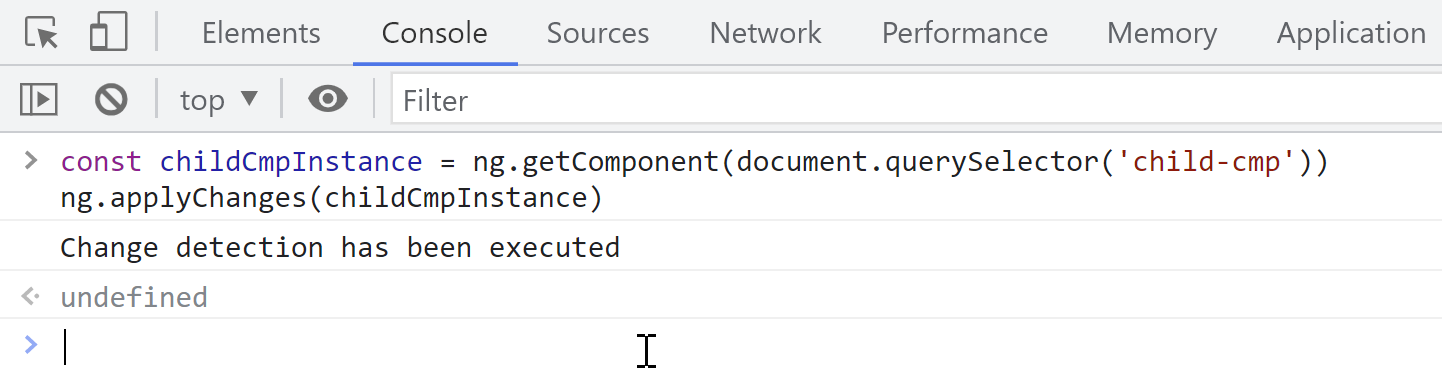
There is no debug utility for running a local change detection. To achieve that, you'll need to get the ChangeDetectorRef from the injector. Getting the injector is straightforward, but you need the correct token to access the associated change detector. Since Angular no longer exposes these tokens at ng.coreTokens, you must expose the token yourself. Perhaps in this manner:
import { ChangeDetectorRef } from '@angular/core';
import { bootstrapApplication } from '@angular/platform-browser';
import { AppComponent } from './app/app.component';

(window as any).coreNgTokens = {
  'ChangeDetectorRef': ChangeDetectorRef
}

bootstrapApplication(AppComponent, {}).catch((err) =>
  console.error(err)
);
Then, you can obtain the cdRef like this:
const childCmpInjector = ng.getInjector(document.querySelector('child-cmp'));
const cdRef = childCmpInjector.get(coreNgTokens.ChangeDetectorRef);
cdRef.detectChanges();
We'll stop here for now. The setProfiler function hasn't been covered yet; we'll reserve that for another discussion. Additionally, we haven't touched on
getDirectiveMetadata.
This function is not commonly used; when given an instance of a directive or component, it returns debug-level (partial) metadata for that class.