The DebugElement
serves as a standard helper while writing unit tests, standing in for a DOM node plus whatever it hosts, like directives.
Angular’s official documentation walks through multiple ways to apply it.
A sample pulled from those very docs appears below:
beforeEach(() => {
  fixture.detectChanges(); // trigger initial data binding

  // find DebugElements with an attached RouterLinkStubDirective
  linkDes = fixture.debugElement.queryAll(By.directive(RouterLink));

  // get attached link directive instances
  // using each DebugElement's injector
  routerLinks = linkDes.map((de) => de.injector.get(RouterLink));
});
An internal specification,
change_detection_integration,
documents numerous scenarios. In one such case, pulling directives linked to a DOM node relies on DebugElement:
describe('change notification', () => {
    describe('updating directives', () => {
      it('should happen without invoking the renderer', fakeAsync(() => {
           const ctx = createCompFixture('<div testDirective [a]="42"></div>');
						const nodes = ctx.debugElement.queryAllNodes(By.directive(dirType));
            const directives = nodes.map(node => node.injector.get(TestDirective))
            expect(directives[0].a).toEqual(42);
         }));
    });
The DebugElement abstraction comes into play during tests whenever you need to confirm a specific DOM state.
It offers a collection of properties and methods designed for exactly that purpose.
Angular's own test suite exercises these very utilities within
debug_node_spec.ts:
it('should list all child nodes', () => {...})
it('should list all component child elements', () => {...})
it('should list conditional component child elements', () => {...})
it('should list child elements within viewports', () => {...})
it('should list element attributes', () => {...})
it('should list element classes', () => {...})
it('should list providerTokens', () => {...})

it('should get element classes from host bindings', () => {...})
it('should query child elements by css', () => {...})
it('should query child elements by directive', () => {...})
it('should query projected child elements by directive', () => {...})
it('should support querying on any debug element', () => {...})
The majority of the API is built around simplifying how you validate connections between nodes.
You have two options — inspect it directly, or use the
By
helper to perform the lookup. For a complete overview of what DebugElement offers in the testing context,
the spec file demonstrates a wide range of API usage patterns.
Beyond testing
Internally, DebugElement serves as a wrapper around a DOM node. Its construction happens inside the
getDebugNode
function, triggered when a query is performed:
export function getDebugNode(nativeNode: any): DebugNode|null {
  if (nativeNode instanceof Node) {
    if (!(nativeNode.hasOwnProperty(NG_DEBUG_PROPERTY))) {
      (nativeNode as any)[NG_DEBUG_PROPERTY] = nativeNode.nodeType == Node.ELEMENT_NODE ?
          new DebugElement(nativeNode as Element) :
          new DebugNode(nativeNode);
    }
    return (nativeNode as any)[NG_DEBUG_PROPERTY];
  }
  return null;
}
In order to grab the element’s reference, the DOM node must be handed over to the getDebugElement function.
Even though this function is exposed as public API, it isn’t placed in the global scope. You can, however, manually bind it
to the window object in this manner:
platformBrowserDynamic().bootstrapModule(AppModule)
  .then(ref => {
    (window as any).getDebugNode = getDebugNode;
  })
  .catch(err => console.error(err));
At this point, you could reach that same function from the DevTools console:
const childComponentHostEl = document.querySelector('child-cmp');
const debugEl = window.getDebugNode(childComponentHostEl);
The DebugElement API includes methods that rely on the global discovery utilities discussed
earlier in this series.
To illustrate, the context getter invokes both getComponent and getContext behind the scenes:
get context(): any {
  return getComponent(this.nativeNode) || getContext(this.nativeNode);
}
When you call the getter, it returns a parent context for the element — commonly, this points to an ancestor component instance that controls the element. If the element belongs to an embedded view (like one generated by *ngFor), then the context is that embedded view’s context. In the case of the structural directive *ngFor, the context is supplied through NgForOf, where the $implicit property holds the current row’s value. For instance, this would be the hero in *ngFor="let hero of heroes".
More discovery utils
From a debugging perspective, what truly matters about the API that DebugElement exposes is the set of discovery utilities it provides — these aren’t available in the global ng namespace. Two getters stand out as potentially valuable:
- references
- providerTokens
With the references getter, you get a dictionary that maps template local variables (like #foo) to their associated objects, using the variable name from the template as the key. Meanwhile, the providerTokens getter lists the lookup tokens for a component’s injector. This set includes both the component itself and any tokens that the component declares in its providers metadata.
To show how this works, consider a component that exposes the ApplicationRef token and includes a template with a local variable f pointing to a div element:
@Component({
  selector: 'app-root',
  template: '<div custom #f>Just a plain div with a local variable</div>',
  providers: [{ provide: ApplicationRef, useExisting: ApplicationRef }],
})
export class AppComponent {}
After acquiring the DebugElement reference, the provider tokens can be enumerated in the following manner:
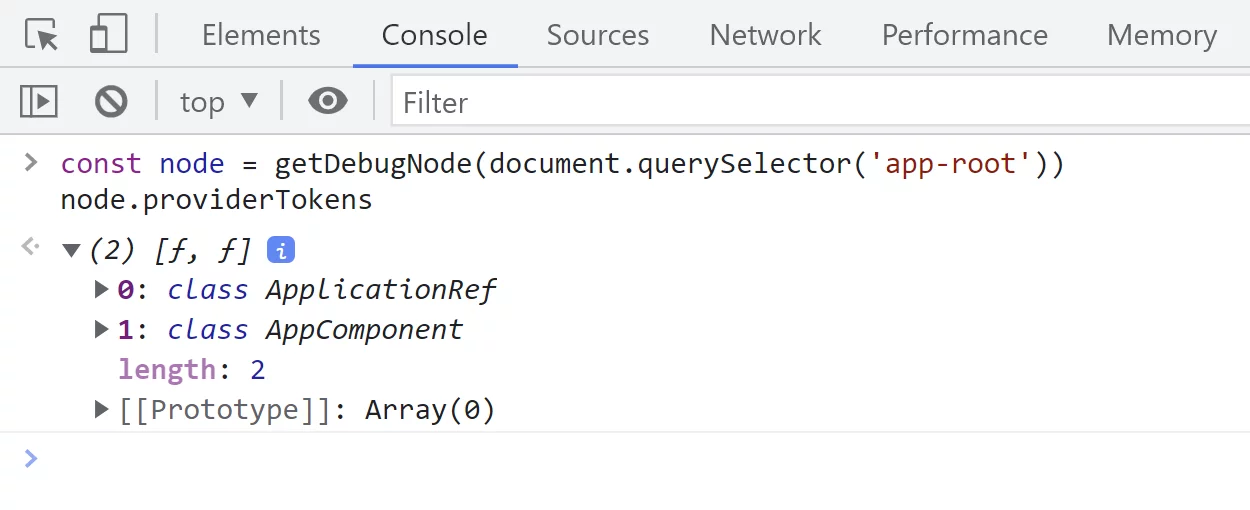
Every component and directive registers itself within an element injector, as you're likely aware. This is precisely why the AppComponent instance appears next to the ApplicationRef token in the debug output.
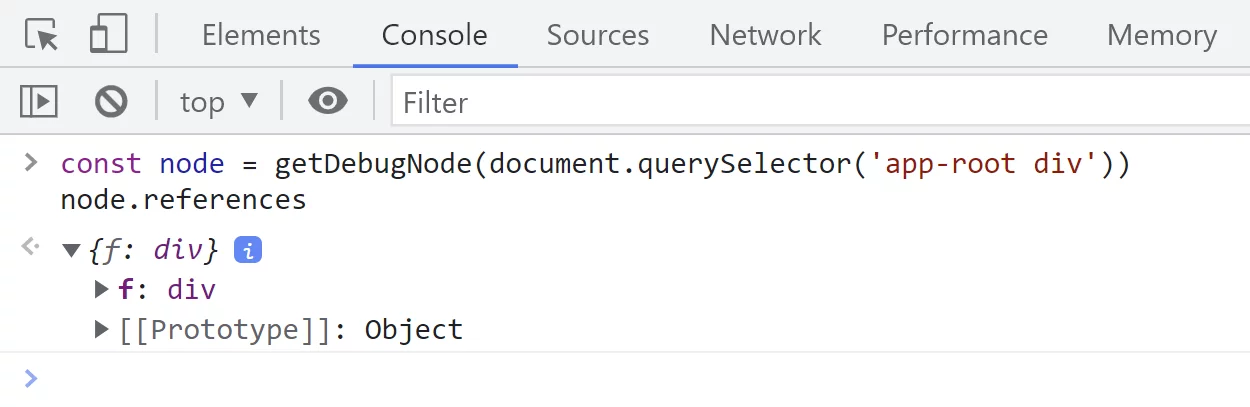
To inspect local references established via the #f template syntax, this is what we do:
The remaining portions of the API are quite intuitive and require no further elaboration.
They rely on every discovery helper method we have already examined. For convenience, here is the pertinent API section:
export class DebugNode {
	nativeNode
	get listeners() {}
	get context() {}
	get injector() {}
	get parent() {}
	get references() {}
	get providerTokens() {}
}

export class DebugElement extends DebugNode {
    get nativeElement(): any {}
    get name() {}
    get properties() {}
    get attributes() {}
    get styles() {}
    get classes() {}
    get childNodes() {}
    get children() {}

    // Returns the first `DebugElement` that matches the predicate at any depth in the subtree.
    query(predicate: Predicate<DebugElement>): DebugElement {
        const results = this.queryAll(predicate);
        return results[0] || null;
    }

    // Returns all `DebugElement` matches for the predicate at any depth in the subtree.
    queryAll(predicate: Predicate<DebugElement>): DebugElement[] {
        const matches: DebugElement[] = [];
        _queryAll(this, predicate, matches, true);
        return matches;
    }

    // Returns all `DebugNode` matches for the predicate at any depth in the subtree.
    queryAllNodes(predicate: Predicate<DebugNode>): DebugNode[] {
        const matches: DebugNode[] = [];
        _queryAll(this, predicate, matches, false);
        return matches;
    }

    /**
    * Triggers the event by its name if there is a corresponding listener in the element's
    * `listeners` collection.
    *
    * If the event lacks a listener or there's some other problem, consider
    * calling `nativeElement.dispatchEvent(eventObject)`.
    *
    * @param eventName The name of the event to trigger
    * @param eventObj The _event object_ expected by the handler
    *
    * @see [Testing components scenarios](guide/testing-components-scenarios#trigger-event-handler)
    */
    triggerEventHandler(eventName: string, eventObj?: any): void {
        const node = this.nativeNode as any;
        const invokedListeners: Function[] = [];

        this.listeners.forEach(listener => {
          if (listener.name === eventName) {
            const callback = listener.callback;
            callback.call(node, eventObj);
            invokedListeners.push(callback);
          }
    });

    // We need to check whether `eventListeners` exists, because it's something
    // that Zone.js only adds to `EventTarget` in browser environments.
    if (typeof node.eventListeners === 'function') {
      // Note that in Ivy we wrap event listeners with a call to `event.preventDefault` in some
      // cases. We use '__ngUnwrap__' as a special token that gives us access to the actual event
      // listener.
      node.eventListeners(eventName).forEach((listener: Function) => {
        // In order to ensure that we can detect the special __ngUnwrap__ token described above, we
        // use `toString` on the listener and see if it contains the token. We use this approach to
        // ensure that it still worked with compiled code since it cannot remove or rename string
        // literals. We also considered using a special function name (i.e. if(listener.name ===
        // special)) but that was more cumbersome and we were also concerned the compiled code could
        // strip the name, turning the condition in to ("" === "") and always returning true.
        if (listener.toString().indexOf('__ngUnwrap__') !== -1) {
          const unwrappedListener = listener('__ngUnwrap__');
          return invokedListeners.indexOf(unwrappedListener) === -1 &&
              unwrappedListener.call(node, eventObj);
        }
      });
    }
}