What Makes an Angular Architecture Truly Scalable?
Finding the right architectural blueprint for Angular applications is a question many developers wrestle with. A quick search for “scalable Angular applications” returns numerous articles that share common ground. Here, I aim to distill the essential principles, examine their shortcomings, and then propose an architectural approach of my own.
A frequently repeated piece of advice is to insert a middle layer between UI components and the underlying service layer. This intermediary is often labeled an “Abstraction” or “Facade,” and it acts as a sandbox — it merely forwards calls from the view to the core services without containing any business logic itself. Decoupling the view from the core logic brings several advantages:
- UI components stay lean because they don't need to inject dependencies related to state management or asynchronous operations.
- Both individual components and the whole application benefit from easier unit testing, as mocking various parts becomes more straightforward.
- Responsibilities are more clearly separated. The UI is unaware of where data originates or where it gets stored; interactions happen through a well-defined API boundary.
- Teams can develop on different layers independently, since those layers are decoupled.
The second prevailing idea in these articles centers on state management and data flow. Redux, a predictable state container, has become the dominant choice for Angular projects. By implementing Redux, developers gain:
- A centralized application state, serving as the single source of truth.
- An immutable state, which enables the use of OnPush change detection for improved runtime performance.
- Apparent debuggability through time-travel debugging, allowing the recreation of past states with ease.
- A unidirectional data flow that tends to result in fewer unexpected bugs.
A third concept frequently highlighted is the split between Container and Presentational components, often referred to as Smart and Dumb components. Container components, true to their name, are higher-level components that house child components. Presentational components, on the other hand, are typically leaf nodes in the component tree. Their sole communication mechanism with the outside world is via the @Input and @Output decorators, receiving data and emitting events respectively. Only container components are permitted to interact with services and embed business logic, earning them the “smart” label.
For those wanting to dig deeper into these topics, the following resources are worth exploring:
- Angular Architecture and Specific Layers
- Developing scalable Angular applications
- A scalable Angular 2 architecture
- A scalable angular architecture (part 2)
- NgRx + Facades: Better State Management
- Angular architecture patterns — High level project architecture
- Component architecture with Angular
- Container Components with Angular
These are all powerful concepts, yet they have weaknesses in specific contexts. For example:
- Real-time interfaces that rely on a push or messaging architecture, where the backend initiates data delivery to the frontend rather than waiting for REST calls triggered by user actions.
- UIs built with Canvas or WebGL technology. Such interfaces lack individual HTML elements for each graphical object; only a single canvas tag exists in the DOM. Thus, mapping components to each drawing element is impractical.
- Applications with intricate workflows. Deciding where to implement the overall workflow orchestration is ambiguous, and creating an extra dedicated layer feels like over-engineering.
- There are instances where presentational components shouldn't have to thread data through a deep tree of parents and children. They might directly use a service to avoid the boilerplate of repeated inputs and outputs, a problem addressed in this common design pitfall article.
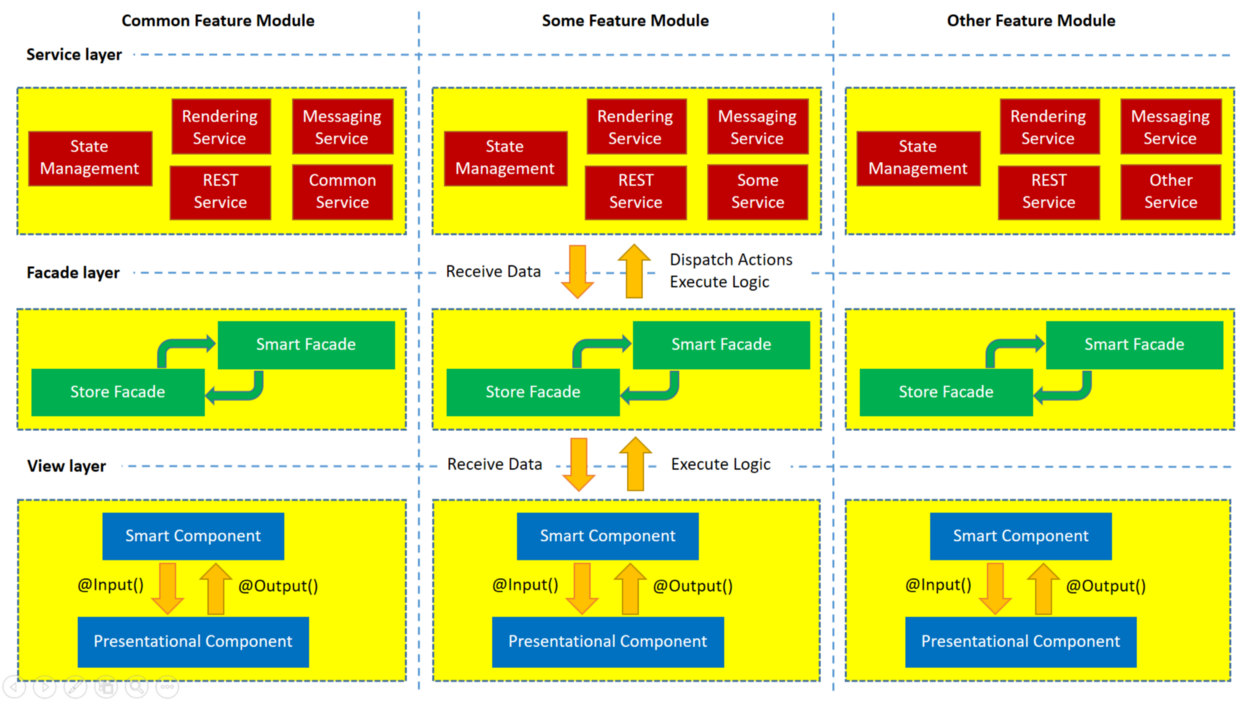
To address these gaps, I propose a refined take on the scalable architecture. Here are its primary guiding rules:
- Code is organized into a horizontal stack of layers. Each layer — the view, the facade, and the service — has a distinct, non-overlapping responsibility.
- There is also a vertical split by feature modules. This is a standard Angular practice called feature modules. A common shared module holds functionality used across several feature modules.
- Data flows in one specific order: Service layer → Facade layer → View layer. Event emission, business logic execution, and state management dispatch all travel in the opposite direction: View layer → Facade layer → Service layer.
- Business logic can live in "smart" components or in "smart" facades. The term “smart” is a more apt descriptor for logic-bearing parts of the software than “container,” which can be misleading. User-triggered, view-specific logic typically resides in smart components. In contrast, facades can handle more complex workflow orchestration, especially in situations involving real-time bidirectional communication, such as over WebSocket. We might call these smart facades.
- View layers of different modules must not have import dependencies on each other. The view of one feature module can, however, inject facade layers from any other module.
- Facade layers of different modules are free to interact horizontally. This provides the view layer of one module an indirect pathway to the services of another module across the application.
- As for services, their layers can also communicate with each other from different modules, depending on specific requirements.
The diagram below illustrates these architectural building blocks.
Consider a hypothetical feature module named SelectionModule to visualize the data flow. Its SelectionFacade orchestrates the logic triggered by a user click. When a user clicks on the canvas, a graphic element is detected. Consequently, a “select” action is sent to the Redux store through the StateManagement service. The store then determines which graphic elements are related to the selection, and this information is queried via the StoreFacade. The selected elements are rendered visibly, e.g., with a unique color, by the RenderingService. Following this, a subscription to a specific topic, handled by MessagingService, receives data pushed by the backend which is subsequently rendered in real time.
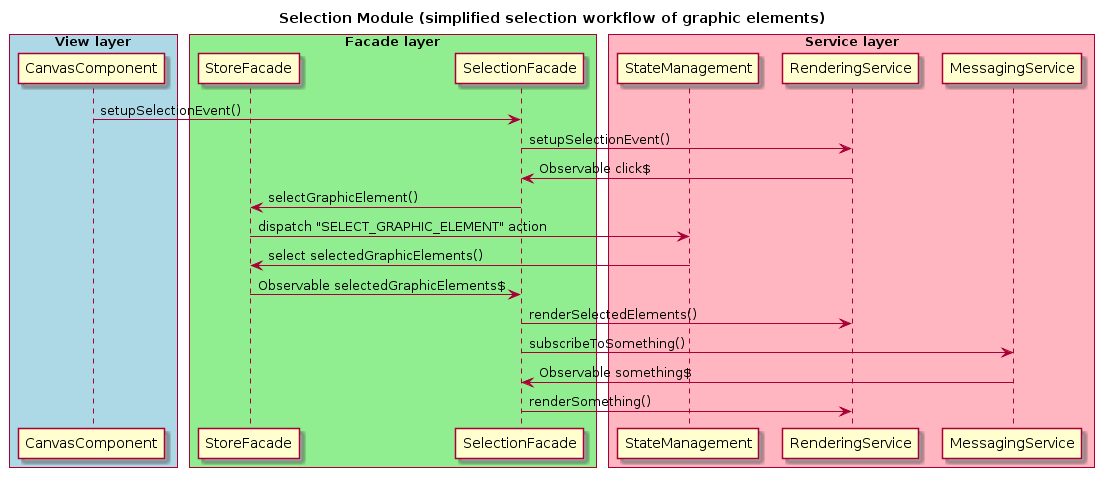
In this example, SelectionFacade is considered "smart," while StoreFacade acts purely as a data-access proxy and is thus "dumb."
That’s all for now. I hope you find this useful!
===== Edit. 04.03.2019. =====
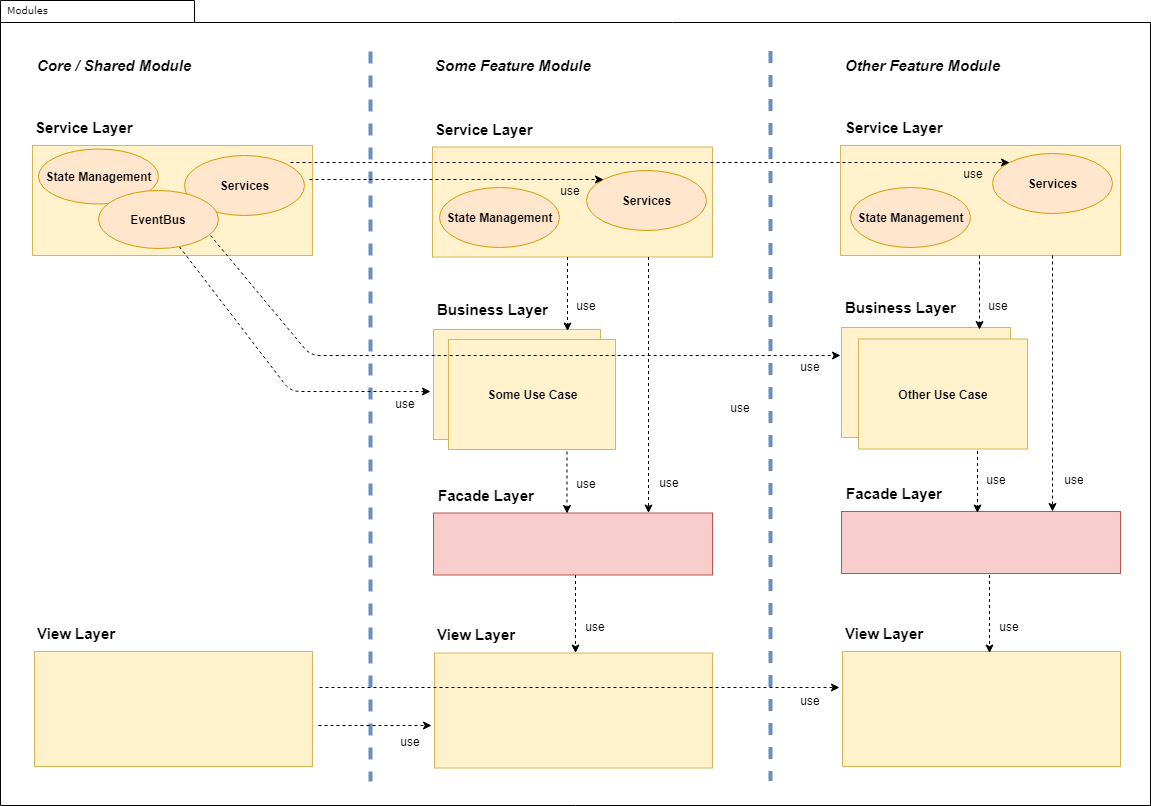
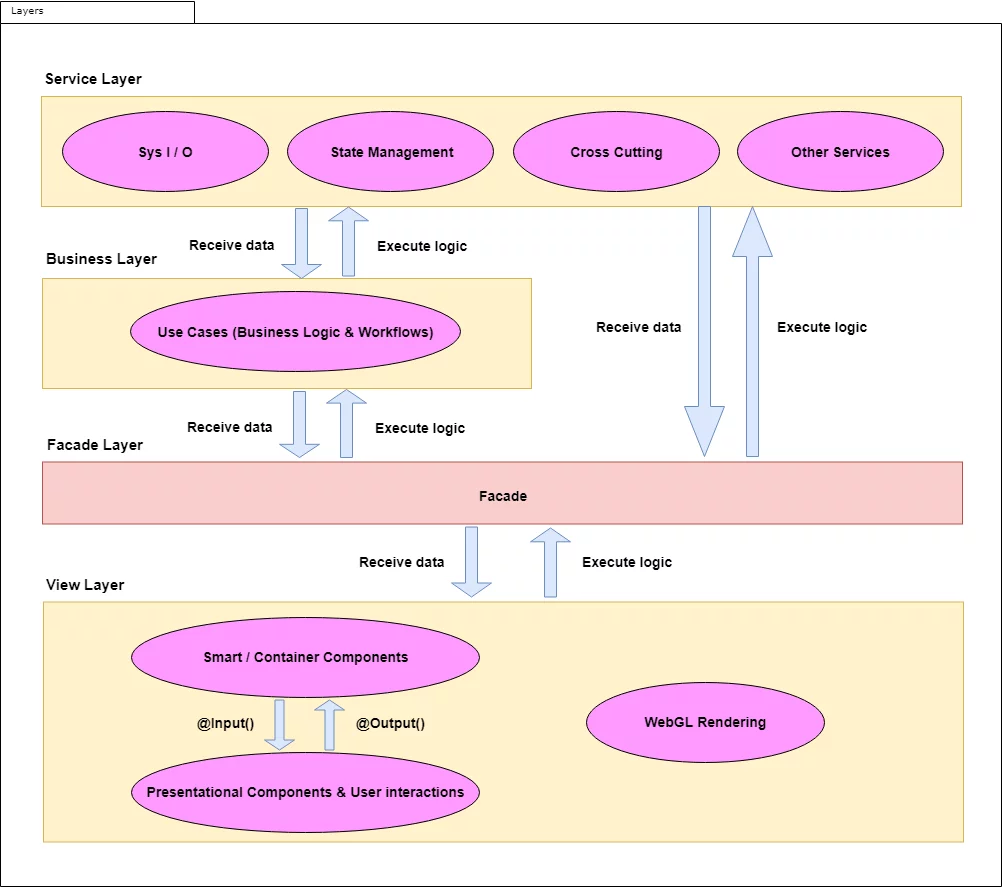
Upon applying this architecture to a real project, some modifications were necessary. A fourth layer has been added: the business layer. This is now the designated home for all use cases and workflow logic. The facade layer has been simplified to a dumb intermediary. The updated architecture can be understood by examining it from two perspectives: its layer structure and its module organization.
Layer view
Module view