The Role of APP_INITIALIZER in Dynamic Configuration
Angular applications typically rely on either environment.ts files or the APP_INITIALIZER token to manage configuration settings. While both approaches appear to serve the same purpose—storing values needed for the application to function—they differ significantly in how they operate:
- Using environment.ts Files: Configuration values are embedded directly into the build output, becoming part of the final bundle. This ensures a fast startup, but comes with trade-offs. Larger configurations bloat the bundle size, and any modification requires a full rebuild and redeployment.
- Using APP_INITIALIZER Token: This approach loads configuration at runtime. The settings are fetched during application startup, so updates can be applied without rebuilding or redeploying. This proves invaluable for applications that need distinct configurations across environments or clients.
To summarize, environment.ts ties configuration directly to the build, increasing bundle size and reducing flexibility. Conversely, APP_INITIALIZER enables runtime updates, offering greater adaptability and simpler maintenance. This article examines the latter approach in detail.
Practical Scenario
Imagine a project deployed for multiple clients, each requiring unique settings. To maintain a single shared codebase, the application must fetch its configuration at runtime. The goal is to allow configuration updates without altering application code—meaning changes should not necessitate a rebuild or redeployment. In this example, the configuration includes:
- company name
- api url – each client uses different api hosts
- theme – the default ui theme
- language
- enabled features such as chat, payment and notifications
- support email
The use of the APP_INITIALIZER token is explored here as a solution to these requirements, contrasted with the conventional environment.ts file method. The article also shows how to validate settings using Zod.js, ensuring the configuration fully satisfies the application's requirements.
Understanding the APP_INITIALIZER Token
Let's delve into what APP_INITIALIZER actually is. Based on the official documentation, it serves as:
"A DI token that you can use to provide one or more initialization functions.
The provided functions are injected at application startup and executed during app initialization. If any of these functions returns a Promise or an Observable, initialization does not complete until the Promise is resolved or the Observable is completed.
You can, for example, create a factory function that loads language data or an external configuration, and provide that function to the APP_INITIALIZER token. The function is executed during the application bootstrap process, and the needed data is available on startup."
APP_INITIALIZER is a dedicated Angular token that allows one or more functions to execute at startup. These functions run during the app initialization process. For instance, a function could be created to load configuration data from a JSON file. By leveraging APP_INITIALIZER, this function runs automatically at startup, ensuring configuration data is promptly available.
With a clear grasp of APP_INITIALIZER's purpose, we can now proceed to illustrate how dynamic configuration loading is implemented.
Implementing Dynamic Configuration with APP_INITIALIZER
Essentially, this example solution entails the following steps:
- At startup, the application fetches the config.json file.
- The configuration content is parsed and passed to a dedicated service.
- The service can then be used to retrieve and process the configuration as needed.
Let's examine the application's entry point, which is the main.ts file:
function initializeAppFactory(
  httpClient: HttpClient,
  configService: ConfigService
) {
  const url = './config.json';
  return () =>
    httpClient.get(url).pipe(
      tap((config) => {
        const dto = parseDTO(config);
        if (dto.success) {
          configService.setConfig(dto.data);
        } else {
          console.error('Invalid config.json', dto.error);
        }
      })
    );
}


bootstrapApplication(AppComponent, {
  providers: [
    provideHttpClient(),
    {
      provide: APP_INITIALIZER,
      useFactory: initializeAppFactory,
      multi: true,
      deps: [HttpClient, ConfigService],
    },
  ],
});
The code defines and uses a factory function (initializeAppFactory) to load a configuration file (config.json) during application startup. This guarantees the app is properly configured before it begins execution.
The initializeAppFactory function is invoked by Angular during the initialization phase. It injects two services: HttpClient and ConfigService. The HttpClient service handles the HTTP GET request to retrieve the config.json file. Once fetched, the file's content is parsed with the zod.js library. This ensures the configuration is valid and dependable before the app starts operating. For more details, refer to the article on parsing and mapping API responses using zod.js. This same technique can be applied to parsing configuration files. Simply put, zod.js allows you to define a schema for the expected data, verify that the supplied data meets all criteria, and infer the type from the schema. The code implementation is shown below:
import { z } from 'zod';
// Define the schema for the config
const schema = z.object({
  companyName: z.string(),
  apiUrl: z.string(),
  theme: z.string(),
  language: z.string(),
  features: z.object({
    enableChat: z.boolean(),
    enablePayments: z.boolean(),
    enableNotifications: z.boolean(),
  }),
  supportEmail: z.string(),
});


// Infer the type from the schema
export type ConfigDTO = z.infer<typeof schema>;


// Parse the config if matches the schema
export function parseDTO(source: unknown) {
  return schema.safeParse(source);
}
Returning to initializeAppFactory, if the DTO is parsed successfully, the configuration is handed off to ConfigService. The service's role here is straightforward—it stores the configuration and exposes it for use across the application. It acts as a wrapper around the APP_INITIALIZER token. As both the application and its configuration evolve, the service could be extended with specific methods to access particular configuration sections.
@Injectable({
  providedIn: 'root',
})
export class ConfigService {
  #config!: ConfigDTO;


  setConfig(config: ConfigDTO) {
    this.#config = config;
  }


  getConfig() {
    return this.#config;
  }
}
Finally, in any part of the app, ConfigService can be injected, and the configuration can be utilized:
config = inject(ConfigService).getConfig();Config.json
Now, let's examine a sample config.json file. It's a straightforward JSON file that can contain any data needed for the application to function. Crucial to note is that the data structure must align with the schema and be correctly parseable by zod.js.
{
  "companyName": "Customer One",
  "apiUrl": "https://api.customer1.com/v1/",
  "theme": "dark",
  "language": "en-US",
  "features": {
    "enableChat": true,
    "enablePayments": false,
    "enableNotifications": true
  },
  "supportEmail": "support@customer1.com"
}
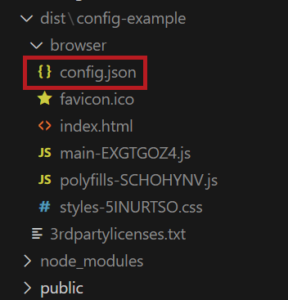
A notable advantage is that this file is excluded from the bundle both during development and after the build process. This means it can be updated easily even after the app is built—for instance, directly on the hosting server. Any modifications to this file take effect immediately without requiring a rebuild, and the JavaScript files can stay as they are. It also enables the deployment of identical bundles with varied configurations. The build output below illustrates this.
Comparing with environment.ts Files
As noted earlier, Angular offers a different method for managing application configuration via the environment.ts file. However, can this approach achieve the same flexibility as the APP_INITIALIZER token? The answer is no. The environment.ts file is compiled into the build, meaning its contents are hard-coded into the final application bundle. This limitation makes it impossible to update or adjust configuration after the application has been built and deployed. In contrast, the APP_INITIALIZER token enables fetching configuration data dynamically at runtime, allowing you to change application behavior without a rebuild or redeployment. This makes APP_INITIALIZER particularly valuable for applications needing distinct configurations across different deployment environments.
Drawbacks of APP_INITIALIZER_TOKEN in Angular
While APP_INITIALIZER_TOKEN is highly useful, it does have drawbacks. A primary concern is that when used to fetch data from an external service, any latency or failures with that service can block the app from starting. For example, if the service is slow or experiences issues, the app might be delayed or fail to boot altogether.
However, in the scenario presented here, a local JSON file is loaded—one that resides on the same server as the app. In this case, delays are typically not a concern. Since the file is local, it loads quickly with minimal network overhead. Thus, any delay from loading the JSON file is unlikely to pose a significant issue.
Final Thoughts
The APP_INITIALIZER token proves to be a powerful tool for dynamically configuring Angular applications at runtime. By loading a file such as config.json during startup, you can easily manage settings like API URLs, themes, default language, and feature toggles without touching the application code. This method offers greater flexibility than the conventional environment.ts file, as it supports configuration updates even after the app has been built and deployed. This makes it easier to tailor the application for different clients without rebuilding or redeploying. Additionally, employing Zod.js for validation ensures the configuration data is accurate and dependable. Overall, this approach streamlines managing multiple configurations and simplifies maintaining a single codebase across diverse customer environments.
Source code: https://github.com/maciejkoch/config-example