Data service layer
When building an Angular application, you'll often encounter situations where the data coming from a backend doesn't match what your UI expects. Two common pain points stand out. First, the API might omit fields that are documented as required. For instance, a user endpoint that should always include an email address might occasionally return only { "name": "John Doe" }. Accessing the missing property without a guard will lead to runtime errors or unpredictable behavior in your templates.
Second, the shape of the payload can be unnecessarily deep. A response like { "user": { "details": { "profile": { "contacts": { "email": "john.doe@example.com" } } } } } forces you to navigate multiple levels just to retrieve a single value. If the backend changes its nesting, your extraction logic breaks. Even when the structure is stable, working with such a model clutters your component code with repetitive traversal and null-checks.
To address both issues, you need a solid layer between the raw HTTP response and your application logic. This layer should verify that the data meets your requirements, transform it into a model that your app can consume directly, and surface problems early. The following sections walk through a service-based approach that leverages the zod.js library for schema validation and type inference.
Data service
The service below is responsible for fetching the raw payload, validating it against a predefined schema, and converting it into a shape that matches your app's needs. Its name includes "data" to signal that this is its sole duty.
import { HttpClient } from '@angular/common/http';
import { inject, Injectable } from '@angular/core';
import { catchError, map, Observable, of } from 'rxjs';
import { User } from '../users.model';
import { parseDTO } from './users.dto';
import { fromDTO } from './users.mapper';


@Injectable({
  providedIn: 'root',
})
export class UsersDataService {
  httpClient = inject(HttpClient);


  fetchUsers(): Observable<User[]> {
    const url = 'https://dummyjson.com/users';
    return this.httpClient.get(url).pipe(
      map((response) => {
        const dto = parseDTO(response);
        if (dto.success) {
          return fromDTO(dto.data);
        } else {
          console.error(dto.error);
          return [];
        }
      }),
      catchError((error) => {
        console.error(error);
        return of([]);
      })
    );
  }
}
Upon receiving a response, the service attempts to parse it. If parsing succeeds, all required properties are present with the correct types, and the result can be safely mapped into an application-optimized model. The parsed object is referred to as a DTO — a data transfer object — which represents your contract with the backend.
If parsing fails, meaning the response deviates from the expected structure, you can handle the error as needed. The example returns an empty array, but you could just as easily return undefined, a default value, or a user-friendly error message. The choice depends on what your application needs to do next.
Data transfer object
The core of this architecture lives in the users.dto.ts file, which contains the schema definition, the parse function, and the inferred TypeScript type.
import { z } from 'zod';


const usersSchema = z.object({
  users: z.array(
    z.object({
      id: z.number(),
      firstName: z.string(),
      lastName: z.string(),
      age: z.number().optional(),
      gender: z.string(),
      address: z.object({
        address: z.string(),
        city: z.string(),
        state: z.string(),
      }),
      company: z.object({
        address: z.object({
          address: z.string(),
          city: z.string().optional(),
          state: z.string(),
        }),
        name: z.string(),
      }),
    })
  ),
});


export type UsersDto = z.infer<typeof usersSchema>;


export function parseDTO(source: unknown) {
  return usersSchema.safeParse(source);
}
This relies on zod.js, a TypeScript-first schema declaration and validation library. According to its documentation, it provides three significant capabilities:
- Defining schemas: supports primitives, complex nested objects, optional and nullable fields, discriminated unions, and more. Essentially, you can describe any JSON structure, including API responses.
- Type inference: automatically derives the TypeScript type from a schema, eliminating the need to write a DTO type manually.
- Parsing: validates an input object against the schema conditions and converts it into the DTO type on success. On failure, it returns a detailed, human-readable error that explains what went wrong.
In the example, userSchema is built to reflect the response from the dummy API at https://dummyjson.com/users. The full response contains many properties, but you only include the ones your application actually needs. The schema uses the relevant types such as string, object, and array. For more complex cases, the zod documentation covers additional features.
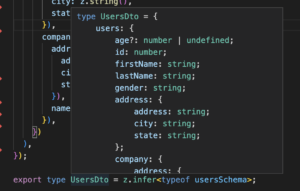
Next, the infer utility type is applied to generate the UserDto type directly from the schema. If you hover over this type in your editor, you'll see that all properties — including optional ones — are correctly inferred. This removes the risk of manual type mismatches.
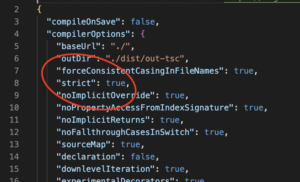
It's important to note that the strict mode in tsconfig.json must be enabled. Without it, TypeScript would treat every inferred property as optional, which weakens the safety guarantees that zod provides. Enabling strict mode is strongly recommended to get the full benefit of TypeScript's type system.
Mapper
The final piece of the puzzle is the user.mapper.ts file, which handles the conversion from the DTO into an interface that your application can use directly.
An "optimized" model is one that is simple, flat, and has property names that clearly indicate their purpose. The goal is to make it easy to display in templates or use in business logic without any extra transformation steps. In this case, the User interface is defined as:
export interface User {
  id: number;
  fullName: string;
  age?: number;
  gender: string;
  company: {
    name: string;
    address: string;
  };
  address: string;
}
The mapper is a pure function that takes an array of UsersDto and returns an array of User objects. Because the response has already been successfully parsed, you don't need to re-check whether each property exists or has the right type. Zod's validation gives you full confidence that the data matches the schema.
import { join } from 'lodash';
import { User } from '../users.model';
import { UsersDto } from './users.dto';


export function fromDTO(dto: UsersDto): User[] {
  return dto.users.map((user) => {
    const companyAddress = user.company.address;
    const userAddress = user.address;
    const fullName = `${user.firstName} ${user.lastName}`;
    return {
      id: user.id,
      fullName,
      age: user.age,
      gender: user.gender,
      company: {
        name: user.company.name,
        address: join(
          [companyAddress.address, companyAddress.city, companyAddress.state],
          ', '
        ),
      },
      address: join(
        [userAddress.address, userAddress.city, userAddress.state],
        ', '
      ),
    };
  });
}
At this point, the list of users can be consumed directly in your component, and everything is already in the desired shape.
Why not just use a generic type?
You might be wondering why you can't simply add a generic type to the get method of the HttpClient service. At first glance, that would seem to return the response in the expected type, making all this parsing unnecessary. However, there's a critical flaw: a generic type in TypeScript is a compile-time assertion, not a runtime guarantee. The actual response could be completely different from what you declared.
Consider this modified service that uses a generic type.
import { HttpClient } from '@angular/common/http';
import { inject, Injectable } from '@angular/core';
import { catchError, tap, Observable, of } from 'rxjs';
import { User } from '../users.model';


@Injectable({
  providedIn: 'root',
})
export class UsersDataService {
  httpClient = inject(HttpClient);


  fetchUsers(): Observable<User[]> {
    const url = 'https://dummyjson.com/users';
    return this.httpClient.get<User[]>(url).pipe(
      tap((users) => console.log(users)),
      catchError((error) => {
        console.error(error);
        return of([]);
      })
    );
  }
}
Even though the API is known to return a different model, no compile-time error is raised. The Angular compiler trusts your type annotation and assumes the response is an array of User. However, when the code runs, you'll see a structure that is completely different from what you expected.
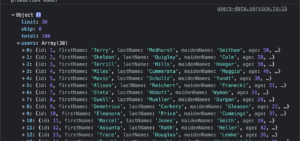
This mismatch inevitably leads to bugs or runtime errors in parts of the application that are hard to trace back to the root cause. That's why parsing the response and handling errors as early as possible is so important. With the architecture presented here, validation happens immediately after the backend sends the data.
Conclusion
By putting together the DTO, data service, and mapper, you can fetch data in your components and receive it in a shape that is ready to use. This approach addresses the challenges that come with API responses and brings several benefits:
- It acts as a safety net if the API and app fall out of sync, preventing unexpected failures.
- The response is validated, so you know that all required fields exist and have the correct types.
- The model is tailored to your application's needs, with clear property names and a structure that is easy to work with.
Repository: https://github.com/maciejkoch/angular-data-service-zod