This piece is meant to be instructive, highlighting one of the more intriguing Angular capabilities that tends to fly under the radar. At the same time, it serves as a promotional vehicle for our open source library, since you might not realize you need it — though I am confident you do. At just 1kB gzip, it will enhance your developer experience across a wide range of scenarios, which we will examine closely. If you are already familiar with this library, stay tuned because I have a few new features to announce.
So what exactly is event management in Angular? It is what happens behind the scenes when you use (click) in your template. Have you ever paused to consider the mechanics involved in capturing an Escape key press with (keydown.esc)? In this exploration, we will dig into the source code to understand this underappreciated public API and discover how we can harness it to our advantage.
The EventManager service
In Angular, templates are processed by what we call a Renderer. We won't spend time dissecting its inner workings; instead, let's focus on one specific method:
listen(
  target: 'window' | 'document' | 'body' | any,
  event: string,
  callback: (event: any) => boolean,
): () => void {
  (typeof ngDevMode === 'undefined' || ngDevMode) &&
    this.throwOnSyntheticProps &&
    checkNoSyntheticProp(event, 'listener');
  if (typeof target === 'string') {
    target = getDOM().getGlobalEventTarget(this.doc, target);
    if (!target) {
      throw new Error(`Unsupported event target ${target} for event ${event}`);
    }
  }

  return this.eventManager.addEventListener(
    target,
    event,
    this.decoratePreventDefault(callback),
  ) as VoidFunction;
}
Whenever you write (window:resize) or (keydown.esc), this method is invoked. In the former case, the target will be the string window; in the latter, it will be the element where you attached the listener. As you can observe, once the actual target is resolved from the string, the method simply hands off the event listening responsibility to the eventManager. What is this mysterious entity? It is a global Angular service exposing this key method:
addEventListener(
  element: HTMLElement,
  eventName: string,
  handler: Function
): Function {
  const plugin = this._findPluginFor(eventName);
  return plugin.addEventListener(element, eventName, handler);
}
It is essentially a single line that accepts a target, an event name (exactly as you typed it, such as keydown.esc), and a callback. It yields a cleanup function that the Renderer invokes when the element gets destroyed. At this point, it becomes clear that the real substance lies in the plugins. What exactly are they? Let's investigate.
The EventManagerPlugin abstraction
While the collection of available plugins is supplied via the public token EVENT_MANAGER_PLUGINS, the abstract class itself was only made public in Angular 17. That doesn't preclude leveraging it in older versions, but 17+ makes things simpler from a typing perspective. The interface is quite straightforward, though. To create our own plugin, we merely need to implement two methods:
abstract supports(eventName: string): boolean;
abstract addEventListener(element: HTMLElement, eventName: string, handler: Function): Function;
What plugins ship with the framework out of the box? There are three:
DomEventsPlugin— this is your jack-of-all-trades. It acts as the default fallback, using nativeaddEventListenerwith the event name as provided.KeyEventsPlugin— this plugin handles events like(keydown.esc). It subscribes to all keydown events outside of zone.js, ensuring change detection isn't triggered for insignificant key presses. When the key matchesesc, it fires the callback inside zone.js.HammerGesturesPlugin— this plugin is optional and activates when you include HammerModule. It streamlines the integration of Hammer.js gesture events for touch interactions.
Because EVENT_MANAGER_PLUGINS operates as a multi token, we have full freedom to expand the set with our own plugins, just as HammerModule does. Getting started is simple. Let's craft our first plugin to get a sense of what's achievable and how.
Building custom plugins
How frequently do you pass the $event object to a callback solely to invoke .stopPropagation()? If you work heavily with the DOM, as I do, you've likely done this on occasion. Wouldn't it be elegant to declaratively write (click.stop) and let Angular handle it for you? Achieving this with plugins is remarkably straightforward. Take a look:
export class StopEventPlugin extends EventManagerPlugin {
  supports(eventName: string): boolean {
    return eventName.split('.').includes('stop');
  }

  addEventListener(element: HTMLElement, eventName: string, handler: Function): Function {
    const wrapped = (event: Event) => {
      event.stopPropagation();
      handler(event);
    }

    return this.manager.addEventListener(element, eventName.replace('.stop', ''), wrapped)
  }
}
Next, we add this constant to the providers during app bootstrap, making the plugin available to the EventManager:
export const STOP_PLUGIN = {
  provide: EVENT_MANAGER_PLUGINS,
  multi: true,
  useClass: StopEventPlugin,
};
What did we accomplish here? We inspected the event name for the .stop segment and declared that our plugin supports an event when it includes that modifier. Then, within the addEventListener function, we performed three actions:
- Removed that modifier from the event name.
- Added a small arrow function wrapper that invokes
.stopPropagation()on the event before passing it to the original callback. - Returned this processed data to
EventManagerso it could select the appropriate plugin for this particular event.
This represents a remarkably non-invasive method of extending Angular's behavior. We wrote very little code, so the likelihood of introducing bugs is minimal. Moreover, we've integrated our logic directly into the existing machinery. This means we can write something like (keydown.esc.stop) and everything still functions as expected. Quite handy when you need to close a dropdown while keeping a modal dialog open.
In this context, WebStorm offers a fantastic feature called Web Types. This enables you to expand autocomplete and type checking for your custom events against a JSON schema, yielding something like this:
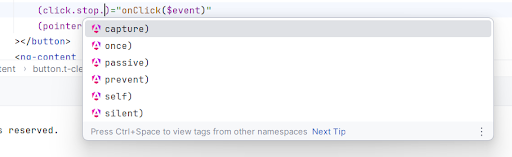
Your callback will then still recognize that $event is a MouseEvent. The list above gives a hint of what we'll cover next. You've likely guessed we can also design a similar plugin for .preventDefault(), but that's merely scratching the surface. This straightforward API unlocks numerous possibilities, and over time we've collected a variety of useful plugins into one compact library. Let's review what we've assembled so far.
Introducing @taiga-ui/event-plugins
We recently shipped the next major iteration of our library to align with Taiga UI 4. This release brings several new capabilities, along with an updated Angular version and some mild refactoring. Besides the aforementioned .stop and .prevent plugins, what else do we have in store for you?
The SilentEventPlugin
Recall how the built-in KeyEventsPlugin steps outside zone.js for irrelevant keys to prevent unnecessary change detection? While we all await stable zoneless Angular, you might also want certain callbacks to execute without triggering change detection. For instance, if you want to prevent focus from shifting upon a click, you can accomplish this with the following line in the host of your component or directive: '(mousedown.prevent.silent)': '0'. This stops the default behavior of the mousedown event — which is to move focus — and does so outside the NgZone. The 0 is simply the shortest possible empty callback. Most of these plugins can be chained together this way.
The SelfEventPlugin
There are times when you wish to disregard bubbled events. Typically, you'd accomplish this by checking whether currentTarget matches the event's target. Using the same callback-wrapping technique described above, this becomes trivial. With this plugin, just write (transitionend.self) and rest assured you won't react to transitions from nested DOM elements that might be outside your control.
The OptionsEventPlugin
This ranks among the most critical plugins in the collection, as it doesn't merely improve DX but also introduces a capability previously unattainable with conventional Angular event listeners. You know how addEventListener accepts an options object as its final argument? Crucially, it enables listening to events during the capturing phase. If this term is unfamiliar, read up on it. In essence, it's the inverse of bubbling, traversing from the top of the DOM tree downward. Not only does it let you hear events from child nodes that don't bubble, but it also positions your callback as a "first responder" firing ahead of all others. This proves immensely useful for managing execution order.
The ResizeEventPlugin (new)
We're all aware of the resize event on window, but what about tracking size changes on a specific DOM element? That's where ResizeObserver comes into play. While we have Web APIs for Angular — our open source effort to bring Web APIs into Angular idiomatically — it still necessitates importing a directive that wraps the observer underneath. An event plugin, conversely, gets registered just once in the global providers, and from then on you can simply write (resize) on any element to receive notifications about its size variations.
The GlobalEventPlugin (new)
Recall how the initial Angular source snippet resolved global objects like window, document, or body? Yet these aren't the sole global entities implementing the EventTarget interface. For example, you might want to detect keyboard visibility or orientation changes via the resize of visualViewport. With this plugin, you can write (visualViewport>resize) — analogous to the built-in approach but using > instead of : — and it will search for that global object on globalThis.
Practical Applications
With all these tools at our disposal, let's see what we can build in a modest app featuring two components. Picture a form with an input that expands automatically and a submit button. While we await the arrival of field-sizing, we can implement such an input using a clever trick. We'll render the actual input invisible and absolutely positioned, displaying the text in a span beneath it. Examine this demo and let's walk through each plugin usage:
First, we have (mousedown.prevent.silent): "0" on the submit button. This ensures that tapping the button on mobile doesn't cause focus to leave the input. Otherwise, the on-screen keyboard would disappear, the layout would shift, and the click event might never fire. As of this writing, this exact issue manifests in the Airbnb chat web app.
The second plugin application is (click.capture.silent) inside our button. We leverage the capturing phase to respond to this event first. When our button enters a loading state, we halt propagation of the click event. This prevents duplicate form submissions while we await the response. You might wonder why we don't simply disable the button. That approach raises accessibility concerns. A disabled button loses focus and fails to communicate its status to screen readers. In our implementation, it would audibly announce "Loading" as the button label, and we could pair this with aria-disabled to signal that the button is momentarily inactive.
Finally, in our auto-growing input, when you type enough text to cause overflow — the native input begins scrolling. We need to compensate for its scroll position in our span, which is conveniently done with text-indent CSS since it accepts negative values. However, the scroll event doesn't bubble, leaving us without a way to listen for it in the parent. This is an ideal scenario for the .capture event plugin, as it allows us to intercept this event during the capturing phase as it travels from top to bottom, even for non-bubbling events.
Through this compact example, you can see how custom event plugins elevate your DX. They let you express common scenarios — like preventing default event behaviors — in concise declarative statements. Beyond that, they accomplish in a single line what was previously awkward in Angular, such as capturing events during the capturing phase, which can prove incredibly useful.
Wrapping Up
Angular's event handling, as is often the case, can be significantly enhanced through Dependency Injection — arguably the framework's most powerful feature. Now that the EventManagerPlugin abstract class is part of the public API, it has become a first-class extension point, making it well worth your time to understand how it works. @taiga-ui/event-plugins offers a solid foundation, packed with numerous ready-made conveniences. However, it by no means covers every possibility. You may devise an elegant and ergonomic solution tailored to a specific challenge you face. Should you believe your approach has broader utility, contributing it to our library is a great option. Likewise, if you have a promising concept but are uncertain about the optimal implementation, submitting a feature request can leverage the community's collective expertise to refine and advance the library.