This article is an excerpt from my Angular deep dive course
The modern web ecosystem consists of many interconnected components. The browser provides the DOM to represent on-screen content and an API to modify that representation. It executes JavaScript in response to various asynchronous events triggered by user interactions. Typically, JavaScript is split between framework logic and application logic. Application logic contains the business rules that handle input and modify the application state. The framework's responsibility is to translate that application state into DOM modifications. This process is labelled rendering in general terms, though Angular refers to it as change detection.
Angular's change detection is triggered after every asynchronous event. The underlying premise is that virtually any event leads to a state modification that should be reflected in the DOM and ultimately on the screen.
For Angular to detect when the application state may have changed, it must be aware of when these events take place. The zone.js library is instrumental in this process. It patches browser APIs so that all asynchronous operations in the browser are detectable. Angular subscribes to the hooks provided by zone.js and employs notifications regarding DOM events, timers, AJAX/XHR, Promise, and others as signals to trigger change detection.
Angular does not communicate with zone.js straight away; it uses NgZone, which acts as a wrapper around zone.js. This limits the set of events that Angular is informed about (details are covered in a dedicated chapter on zone.js).
Consider the following simple example to walk through each step:
import { Component } from '@angular/core';

@Component({
  selector: 'app-root',
  template: `
    <div class="container">
      <div>
        <button (click)="fetchData()">Fetch data</button>
        <div>title: {{title}}</div>
      </div>
    </div>
  `,
  ...
})
export class AppComponent {
  title = null;

  async fetchData() {
  const response = await fetch('http://example.com/movies.json')
    const todo = await response.json();
    this.title = todo.title;
  }
}
When the button is clicked, the sequence is as follows:
- The browser detects the click and places the event handler into the event queue (browser side).
- The zone.js starts with zoneAwareCallback, which simply executes the callback registered by Angular.
- Angular executes a wrapper around the component template's callback; this wrapper marks the view and all its ancestor views as dirty.
- Angular invokes the component method
fetchDatathrough the event listener that is registered in the template function. - The business logic within
fetchDatainitiates a network request. - The request is intercepted by
zone.js, which schedules a macrotask with the browser. - The event completes, and
zone.jstriggers onMicrotaskEmpty throughNgZone. - Angular responds by performing app-wide change detection via ApplicationRef.tick.
- Change detection modifies the DOM and executes other associated side effects.
At this stage, JavaScript passes control back to the browser.
The event is handled; business logic has changed the application state, and Angular has adjusted the DOM through change detection. The browser can now render those updates on screen and proceed with executing the macrotask tied to the network request.
The browser updates the display using the standard rendering pipeline:
- **Style calculation** – determining which CSS rules match which elements based on selectors like
.headlineor.nav > .nav__item. Once the rules are identified, they are applied and the final styles for every element are calculated. - **Layout** – with the applicable rules known, the browser can compute each element's size and position. Since the web's layout model means elements influence each other (for example, the
<body>width often impacts child widths, and this cascades throughout the tree), the process can be heavy for the browser. - **Paint** – this fills in the pixels: text, colors, images, borders, and shadows — essentially every visible part of the elements. Drawing usually occurs on multiple surfaces, commonly referred to as layers.
- **Compositing** – as different parts of the page may have been drawn on separate layers, they must be placed on the screen in the correct order for correct rendering. This is critical for overlapping elements, since any error could cause one element to incorrectly sit above another.
Additional details are available here.
This diagram outlines how all the mentioned actors interact:

You can observe the operations described above in the Chrome Dev Tools profiler. The call stack for the click handler looks like this:
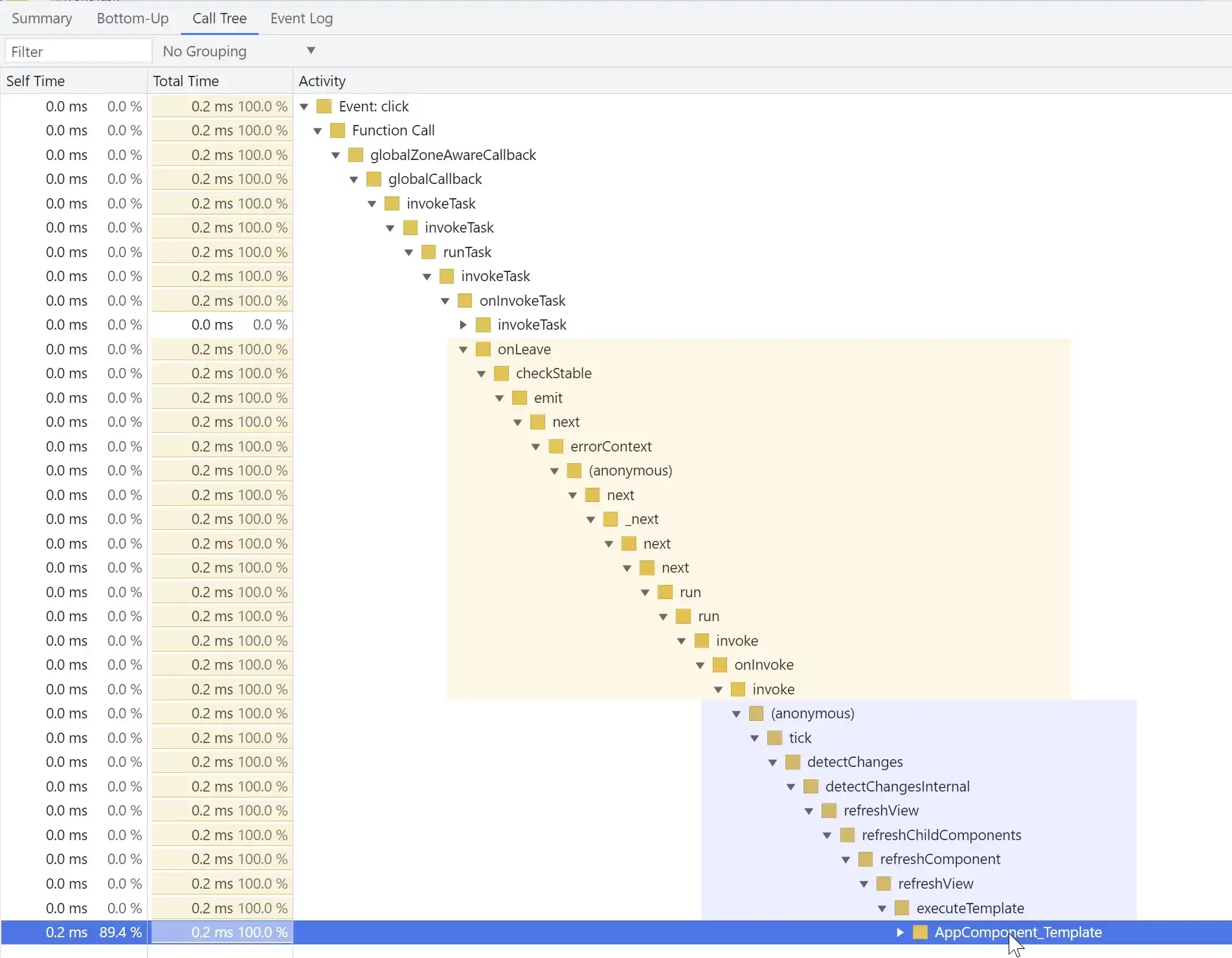
And these are the browser tasks that follow once JavaScript yields:

For more advanced topics like those discussed above, check out the course

If you think an important aspect is missing, please let me know in the comments!

in depth knowledge we trust