
Understanding Number Representation in JavaScript
Let’s explore why 0.1+0.2 does not equal 0.3 and why 9007199254740992 is the same as 9007199254740993 when working with JavaScript.
In languages with static typing, such as Java or C, developers have access to multiple numeric data types. For instance, storing an integer within the range [-128;127] can be done with a ‘byte’ in Java or a ‘char’ in C, each occupying just 1 byte. For larger integers, ‘int’ or ‘long’ types are available, consuming 4 and 8 bytes respectively. When fractional values are needed, ‘float’ (4 bytes) and ‘double’ (8 bytes) come into play. These are commonly known as floating point formats, and we’ll dig into why that name makes sense shortly.
JavaScript, however, offers no such variety. The ECMAScript specification defines a single numeric type: the ‘double-precision 64-bit binary format IEEE 754 value’. This type handles both whole numbers and fractions, mirroring the `double` type found in Java and C. Many newcomers to JavaScript assume that a simple `1` is stored in 64 bits as shown here:

But in reality, it looks like this:

This misunderstanding can lead to quite a bit of confusion. Consider this loop written in Java:
for (int i=1; 1/i > 0; i++) {
    System.out.println("Count is: " + i);
}
How long does it execute? Clearly, it stops after just one pass. On the second iteration, the counter i becomes 2, and 1/2 evaluates to 0.5, which gets truncated to 0 because i is an integer. The condition 1/2 > 0 then fails.
What about the same loop in JavaScript?
for (var i=1; 1/i > 0; i++) {
    console.log("Count is: " + i);
}
Surprisingly, this loop runs forever. The result of 1/i is treated as a floating point number, not an integer, leading to unexpected behavior. Let’s take a closer look at why.
Another head-scratcher for those new to JavaScript is the result of 0.1 plus 0.2. Instead of 0.3, the console shows 0.30000000000000004, making 0.1+0.2 unequal to 0.3. This issue comes up so frequently on Stack Overflow that a special note had to be added:
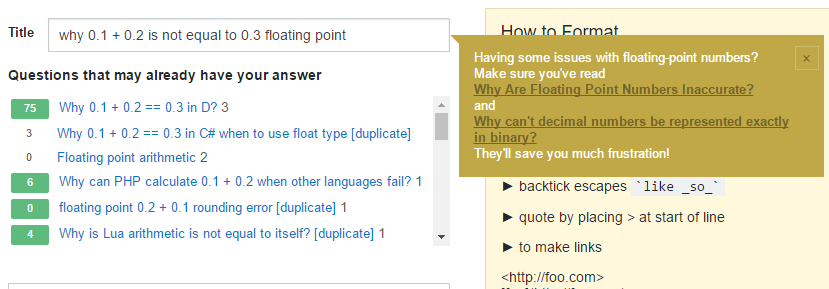
Interestingly, this behavior is often blamed on JavaScript, but any language using floating point numbers exhibits the same quirk. If you use ‘float’ or ‘double’ in Java or C, you’ll get the identical result. Another curious detail is that 0.1+0.2 isn’t exactly 0.30000000000000004 as shown in the console; the true value is 0.3000000000000000444089209850062616169452667236328125.
In this piece, we’ll break down the mechanics of floating point numbers and revisit both the for loop and the 0.1+0.2 examples from above.
It’s worth mentioning BigInt, a new numeric primitive in JavaScript that can represent integers with arbitrary precision. With
_BigInt_s, you can safely store and operate on large integers even beyond the safe integer limit for_Number_s. It was introduced in V8 this year and is supported in Chrome 67+ and Node v10.4.0+. You can read more about it here.
Scientific Notation and Numeric Representation
Before diving into floating point and the IEEE754 standard, we need to grasp what scientific notation means for representing numbers. In its general form, a number in scientific notation can be expressed as:

Significand indicates the count of significant digits. It’s also frequently called Mantissa or Precision. Leading and trailing zeros don’t count as significant—they merely serve as placeholders. Base defines the numeric system’s base, like 10 for decimal or 2 for binary. Exponent dictates how far the radix point shifts left or right to recover the original number.
Every number can be written in scientific notation. For example, the number 2 in decimal and binary systems looks like this:

An exponent of zero means no shifting is needed. Let’s try another example — the number 0.00000022. The significant digits are 22, so we drop the zeros:

This calculation shows why the exponent decreases as the radix point moves right. By multiplying, we isolated just the significand digits:

Since we multiplied by 8, we had to compensate by dividing, which is why the exponent is -8. The same logic, but with division, applies to the number 22300000:

Here, the radix point moved left, so the exponent rose. Scientific notation is a convenient way to handle very large or very small numbers. Depending on the exponent, the significand might represent an integer or a fractional value. A negative exponent shifts the radix point left; a positive one shifts it right, often indicating large integers.
It’s also essential to know what a normalized number is. A number is normalized when it’s written in scientific notation with a single nonzero digit before the radix point. So, our earlier numbers in normalized form look like:

As you might guess, binary numbers always have 1 before the radix point. Normalization makes it easy to compare numbers by their magnitude or order.
Scientific notation is essentially a floating point representation. The term floating point comes from the radix point’s ability to “float” or be placed anywhere relative to the significant digits. As we saw, the exponent determines the original position.
Floating Point and the IEEE754 Standard
The IEEE Standard for Floating-Point Arithmetic (IEEE 754) covers many aspects of floating point math, but we’re focusing on how numbers are stored, rounded, and added. I’ve put together a detailed guide on rounding binary numbers. Rounding happens frequently when the chosen format lacks enough bits for a number. It’s a vital concept, so make sure you understand it well. Now, let’s look at storage. Our examples will mostly use the binary system.
How Numbers Are Stored
The standard defines two common formats—single and double precision. They differ in bit count, which affects the range of numbers they can hold. The process of converting a scientifically notated number to IEEE754 form is identical across formats, save for the bits assigned to mantissa and exponent.
IEEE754 floating point allocates bits for the sign, mantissa (significant digits), and exponent. Here’s the bit distribution for double-precision (64 bits per number), which JavaScript uses for its Number type:

The sign bit takes 1 bit, the exponent gets 11 bits, and the mantissa receives 52 bits. Here’s a table showing bit allocation for each format:

The exponent is stored in offset binary format. I’ve written an in-depth article on this format and how it differs from two’s complement. Take a moment to familiarize yourself with it, as I’ll use it when converting numbers to floating point.
Examples of Integer Storage
To illustrate the bit distribution, let’s see how the integers 1 and 3 are stored. The number 1 is the same in every numeric system, so no conversion is needed. Its scientific form is:

This gives us a mantissa of 1 and an exponent of 0. From this, you might guess the floating point representation looks like:

Let’s verify if that’s accurate. JavaScript has no built-in way to see a number’s bit pattern, but I’ve crafted a simple function that reveals it regardless of your computer’s endianess. Here it is:
function to64bitFloat(number) {
    var i, result = "";
    var dv = new DataView(new ArrayBuffer(8));

    dv.setFloat64(0, number, false);

    for (i = 0; i < 8; i++) {
        var bits = dv.getUint8(i).toString(2);
        if (bits.length < 8) {
            bits = new Array(8 - bits.length).fill('0').join("") + bits;
        }
        result += bits;
    }
    return result;
}
With this, you can see the number 1 is stored like so:

This is far from what we assumed. The mantissa holds no digits, and the exponent is full of 1s. Let’s find out why.
First, each number is converted from its normalized scientific form. Why is that helpful? If the digit before the radix point is always 1, there’s no need to store it, freeing up an extra bit for mantissa digits. During calculations, hardware adds that leading 1 back. Since 1 has nothing after the radix point in normalized form, and the leading digit isn’t stored, the mantissa ends up being all zeros.
Now, where do the 1s in the exponent come from? As I said, the exponent uses offset binary. If we compute the offset:

we see it matches exactly what’s in our representation. Under offset binary, the stored value really is 0. If that’s unclear, my article on offset binary should clear things up.
Let’s apply what we’ve covered to represent the number 3 in floating point. In binary, it’s 11. If that’s fuzzy, check my detailed article on decimal-binary conversion. After normalization, 3 looks like this (in binary):

There’s a single digit 1 after the radix point, which goes into the mantissa. As before, the leading digit before the radix point isn’t stored. Normalization also yields an exponent of 1. Let’s see how that appears in offset binary, and we’ll have everything we need:

A key point about the mantissa: digits are stored in the same order they appear in scientific form, left to right from the radix point. With that in mind, let’s assemble the floating point representation:

Using the function from earlier, you’ll see our representation is spot on.
Why 0.1+0.2 Yields 0.30000000000000004
With a solid understanding of how numbers are stored, we can now examine this famous example. A common high-level explanation is:
Fractions whose denominator is a power of two can be represented finitely in binary. Since the denominators of 0.1 (1/10) and 0.2 (1/5) aren't powers of two, these values can't be stored exactly in a binary format. When stored as IEEE-754 floating point numbers, they must be rounded to the mantissa's available bits — 10 bits for half-precision, 23 for single, or 52 for double. Depending on available precision, the floating-point approximations of 0.1 and 0.2 might be slightly above or below their decimal counterparts, but never equal. Consequently, 0.1+0.2 can never equal 0.3.
While this explanation works for many, the clearest way to grasp what's happening internally is to manually perform the calculations a computer executes. Let's do that now.
Converting 0.1 and 0.2 to Floating Point
First, we need to see the bit pattern for 0.1 in floating-point representation. The initial step is converting 0.1 to binary, which can be done using the multiplication-by-2 algorithm. I've detailed this process in an article on decimal-binary conversion algorithms. Converting 0.1 to binary produces an infinite repeating fraction:

The next stage involves representing this value in normalized scientific notation:

Given that the mantissa only holds 52 bits, we must round this infinite number to 52 bits after the radix point.

According to the rounding rules in the IEEE-754 standard, which I've covered in my article on binary number rounding, we need to round the number up to:

Finally, we calculate the exponent's offset binary representation:

When placed into the floating-point format, the number 0.1 shows this bit pattern:

I recommend working through the floating-point representation of 0.2 yourself. You should arrive at the following scientific notation and binary forms:

Adding 0.1 and 0.2
Reassembling the numbers from their floating-point representation back into scientific form gives us:

For addition, both numbers must share the same exponent. Per the rules, we adjust the number with the smaller exponent to match the larger one. So, we change the exponent of -4 on the first number to -3 to match the second:

Now, we can add them:

The result must be stored in floating-point format, so we normalize the sum, round if needed, and compute the exponent in offset binary.

The normalized number falls exactly between the two rounding options, so we apply the tie-breaking rule and round up to the even number. This yields the following normalized scientific form:

When converted to floating-point format for storage, this produces the following bit pattern:

This exact bit pattern is what gets saved when you run 0.1+0.2. To arrive at this, the computer rounds three times — once for each operand and once more for their sum. Storing 0.3 directly requires only one rounding operation. These varying rounding procedures result in different bit patterns for 0.1+0.2 compared to 0.3. When JavaScript evaluates the comparison 0.1+0.2 === 0.3, it's comparing these stored bit patterns. Since they differ, the result is false. If a format existed where the bit patterns matched despite rounding, 0.1+0.2 === 0.3 would return true , even though 0.1 and 0.2 cannot be finitely represented in binary.
You can verify the bits for 0.3 using the function I shared earlier, to64bitFloat(0.3). The pattern will differ from what we computed for the sum 0.1+0.2.
To see the decimal value these stored bits represent, reconstruct the bits into scientific form with a zero exponent and convert to decimal. The actual decimal stored for 0.1+0.2 is 0.3000000000000000444089209850062616169452667236328125
whereas for 0.3 it's 0.299999999999999988897769753748434595763683319091796875.
Why the for Loop Runs Forever
The reason a for loop never terminates comes down to the number 9007199254740991. Let's explore what's unique about this value.
Understanding Number.MAX_SAFE_INTEGER
Typing Number.MAX_SAFE_INTEGER into the console returns the key number 9007199254740991. What makes this number so special that it warrants its own constant? According to the ECMAScript Language Specification:
The value of Number.MAX_SAFE_INTEGER is the largest integer n such that n and n + 1 are both exactly representable as a Number value. The value of Number.MAX_SAFE_INTEGER is 9007199254740991 (2⁵³−1).
MDN adds further clarification:
Safe in the constant name refers to the ability to represent integers exactly and to correctly compare them. For example,
Number.MAX_SAFE_INTEGER + 1 === Number.MAX_SAFE_INTEGER + 2will evaluate to true, which is mathematically incorrect.
It's important to note this isn't the largest representable integer. For instance, 9007199254740994, which is MAX_SAFE_INTEGER + 3, can be represented accurately. The absolute maximum representable number is Number.MAX_VALUE, equal to 1.7976931348623157e+308. Interestingly, certain integers between MAX_SAFE_INTEGER and MAX_VALUE cannot be represented. In fact, between MAX_SAFE_INTEGER and MAX_SAFE_INTEGER + 3, there's an integer that can't be stored: 9007199254740993. If you type this into the console, it evaluates to 9007199254740992. JavaScript silently transforms the original number into one that's one less.
To understand this, we first examine the bit representation of 9007199254740991 (MAX_SAFE_INTEGER) in floating point:

which converts to the following scientific form:

To achieve a binary number with zero exponent, we shift the radix point 52 positions to the right, resulting in:

Storing MAX_SAFE_INTEGER uses every mantissa slot with an exponent of 52. With all slots occupied, the only way to store the next value is to bump the exponent up to 53. At exponent 53, we shift the radix point 53 places right. However, since we only have 52 mantissa digits, a 0 gets appended at the end. For exponent 54, two zeros are appended; for 55, three, and so on.
What's the consequence? You might already see the pattern. All numbers larger than MAX_SAFE_INTEGER will terminate with 0, meaning no odd integer above MAX_SAFE_INTEGER can be represented in 64-bit floating point. To store some of these, the mantissa would need more than 52 bits. Let's see this happening:

Notice that 9007199254740993 and 9007199254740995 cannot be represented in 64-bit floating point. As the exponent grows, the range of unrepresentable numbers expands dramatically.
The Infinite Loop
Let's revisit the for loop example:
for (var i=1; 1/i > 0; i++) {
    console.log("Count is: " + i);
}
It never completes. Earlier, I noted this occurs because the result of 1/i is treated as a floating-point value, not an integer. With your newfound understanding of floating-point mechanics and Number.MAX_SAFE_INTEGER, the reason becomes clear.
For the loop to exit, the counter i would need to reach Infinity, because 1/Infinity > 0 evalutes to false. But that never happens. As explained earlier, some integers can't be stored and get rounded to the nearest even number. In this loop, JavaScript increments i by 1 until it hits 9007199254740993, which equals MAX_SAFE_INTEGER+2. This is the first integer that can't be stored, so it's rounded down to the nearest even integer, 9007199254740992. The loop gets trapped at this value, unable to move past it, creating an infinite loop.
A Brief Look at NaN and Infinity
To round out this discussion, I'll offer a quick overview of NaN and Infinity. NaN means Not a Number and differs from Infinity, though both are special cases in floating-point representations and operations. They're distinct because they have an exponent of 1024 (11111111111), unlike Number.MAX_VALUE, which uses an exponent of 1023 (111111111101).
Because NaN is a floating-point value, it's no surprise that typeof NaN returns "number" in the browser. Its representation has an all-ones exponent and a non-zero digit in the mantissa:

Various mathematical operations produce NaN, such as 0/0 or Math.sqrt(-4). Some JavaScript functions can also return NaN, like parseInt when given an invalid string, e.g., parseInt("s"). A particularly interesting trait is that any comparison involving NaN returns false. For example, each of these operations evaluates to false:
NaN === NaN
NaN > NaN
NaN < NaN

NaN > 3
NaN < 3
NaN === 3
NaN, and only NaN, is never equal to itself. JavaScript provides the isNaN() function to check for NaN values.
Infinity is another floating-point special case, designed to handle overflows and operations like 1/0. It's represented with an all-ones exponent and zeros in the mantissa:

For positive Infinity, the sign bit is 0; for negative Infinity, it's 1. MDN's article lists operations that yield Infinity. Unlike NaN, Infinity can be safely used in comparisons.