
I strongly believe that mastering web fundamentals is essential. That’s why I often pose intriguing questions about web development architecture or the platform’s APIs. These questions give me insight into a developer’s passion for their craft—how far they’ve pushed their learning.
Just last week I posted this question on Twitter:
Imagine this HTML:
<div class="a">
    <span></span>
</div>
<div class="b"></div>
Here is a piece of JavaScript that relies on the appendChild method:
const span = document.querySelector(‘span’);
const divB = document.querySelector(‘.b’);
divB.appendChild(span);
what happens to the child span element when this runs?
- it stays in div A
- a copy of it is placed in div B
- it is relocated to div B
The outcome turned out to be quite remarkable:
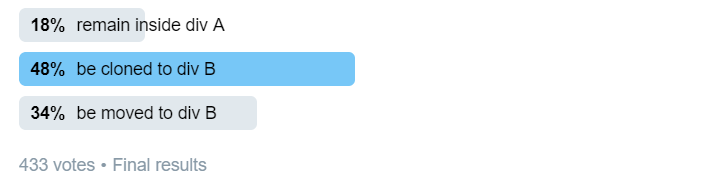
Honestly, it did not catch me off guard when a large portion of developers who responded to my query believed the span would be duplicated. I frequently pose this question during interviews, and that response is the one I hear most often. Still, I can understand the reasoning behind it. This is a genuinely perplexing question.
In reality, the span gets relocated to the second parent element, div B, rather than being replicated. You can confirm this by visiting MDN and checking the documentation for the appendChild method. Here is the official statement from those docs:
According to the
Node.appendChild()specification, this method attaches a node to the end of a specified parent node’s child list. In cases where the given child references an already-existing node within the document,appendChild()transfers that node from its original location to a new one (it is not mandatory to detach the node from its existing parent prior to appending it to a different parent).
Thus, we could wrap up the discussion right there. Yet, because I enjoy diving deep into topics, I aim to offer a thorough explanation and introduce you to some key DOM concepts along the journey.
This piece marks the kickoff of a series focused on helping you master web essentials. I will post intriguing questions on Twitter, then follow up with detailed answers in the form of concise articles. We will examine specifications and uncover the foundations on which web frameworks are built.
DOM nodes
Let’s begin by looking at DOM nodes. What occurs when you visit a webpage? The browser sends a request and receives a response that always includes HTML. Since HTML is essentially plain text, how does JavaScript interact with it? The browser’s rendering engine parses the HTML and generates JavaScript objects that map to the HTML elements. This is how the term “Document Object Model,” often shortened to DOM, came into being—each HTML tag occurrence produces a single JavaScript object instance.
Applying this to the HTML presented in the question:
<div class="a">
    <span></span>
</div>
<div class="b"></div>
When a browser encounters this markup, it generates two separate instances of HTMLDivElement alongside a single HTMLSpanELement. Both div elements receive their respective classes as part of that process. To replicate the browser’s behavior manually, the following approach would work:
// <div class="a">
const divA = document.createElement('div');
divA.classList.add('a');

// <div class="b"></div>
const divB = document.createElement('div');
divB.classList.add('b');

// <span></span>
const span = document.createElement('span');

// a few checks
divA.className; // "a"
divB.className; // "b"
divA instanceof HTMLDivElement // true
divB instanceof HTMLDivElement // true
span instanceof HTMLSpanElement // true
Node tree
So now we have JavaScript objects. These objects are stored in memory and go by the name nodes. The key point: nodes never exist in isolation. Instead, they’re organized into a specific structure — a tree.
Why are we so sure? Most of what developers rely on is laid out in specifications. The JavaScript language is covered by the EcmaScript spec, while the web platform is handled by whatwg.
Look at the relevant section of the spec, and this is what it states:
Document,DocumentType,DocumentFragment,****Element****,Text,ProcessingInstruction, andCommentobjects (simply called nodes)
take part in a tree, referred to as the node tree.
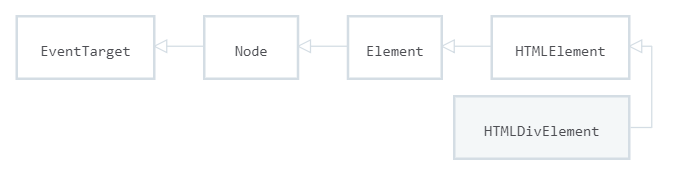
One crucial detail: a div and a span both belong to the Element node type. This class hierarchy diagram highlights that:
Let’s look at how the spec defines a tree:
A tree is a finite hierarchical tree structure… An object that participates in a tree has a parent, which is either null or an object, and has children…
On the web, the node trees we work with take a specific form, referred to as the Document tree:
A document tree is a node tree whose root is a document.
That is exactly the origin of the Document in the Document Object Model (DOM).
Building a document tree
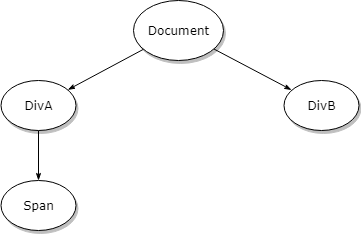
Earlier, we created individual DOM nodes in isolation. Now we can arrange them into a tree — we just append the div elements to the Document and the span element to DivA.
document.appendChild(divA);
document.appendChild(divB);
divA.appendChild(span);
This gives us the the following tree:
Consider the scenario from the previous question: the goal is to relocate the node to a different parent element.
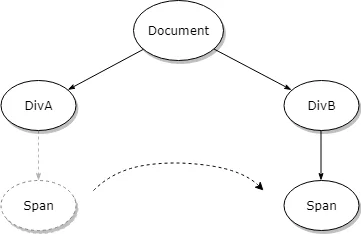
Using the appendChild method:
divB.appendChild(span);
Why does the node travel instead of being duplicated?
One might naturally expect the node to be copied. Yet, several consequences make that outcome highly unlikely:
- copying the node via appendChild leaves you with no direct handle on the new instance:
const span = document.querySelector(‘span’);
const divB = document.querySelector(‘.b’);
divB.appendChild(span);
In the snippet shown above, when the node is cloned, the span variable may refer to either the copy or the original instance. That means the reference to one of the two DOM node instances is lost.
- If the target element has a deeply nested child tree, the intended behavior is ambiguous. Should the subtree be duplicated as well? Deep-cloning an object is costly and tricky, particularly when circular references exist.
- When a node is cloned, duplicate IDs may appear.
Why is it impossible for a node to be a child of two parents?
Let’s revisit the tree definition. Reading it again reveals the explanation:
… An object that participates in a tree has a parent****, which is either null or an object****, and has children…
Thus, every node in a tree, aside from the root, holds exactly one upward connection to an object called its parent—not multiple, but zero or one only.
Consequently, moving a node to another parent demands that it be detached from the previous one beforehand****,**** since a single node cannot have two parents!