
While SSR received only minor adjustments, the standout addition for those of us focused on performance in Angular 17 is clearly the new block template syntax and, in particular, the defer block.
In an earlier entry on boosting initial load performance with Angular 17's deferrable views, we covered the code>@defer syntax and its capabilities.
Deferring offers a straightforward and readable approach to postpone loading heavy 3rd-party libraries until they are actually required. Here, we walk through how to apply this easy initial load optimization.
Two-Part Case Study
A while back, we wrote about the importance of initial load performance, with an emphasis on SSR. Later, we showcased Angular 17's Deferrable Views. In this follow-up, we demonstrate a fast way to enhance the loading of Angular apps that rely on substantial 3rd-party libraries, using standalone components and code>@defer.
Developers often find themselves depending on such libraries, sometimes ones that cannot be tree-shaken. The reasons are numerous, but we won't explore those debates here. Instead, our focus is on using @defer to effortlessly lazy-load these heavy, resource-intensive dependencies.
For our demonstration, we are using two large dependencies:
- AnyChart for charts
- Flexmonster for pivot tables
The complete demo is available on GitHub: https://github.com/L-X-T/ng-defer-large-deps-demo. Start by checking out the main branch to see the base case.
Note that we use the vendor: true build flag to separate the 3rd-party code into its own vendor bundle. The main bundle, which contains only our source, and the vendor bundle are both loaded eagerly when the app starts.
We also rely on two tools to compare the builds and measure initial load performance, both with and without deferring:
- Webpack Bundle Analyzer for examining the static build
- Chrome Lighthouse for initial load performance metrics
Baseline Build
First, we run Webpack Bundle Analyzer (WBA) on the main branch to establish our baseline:
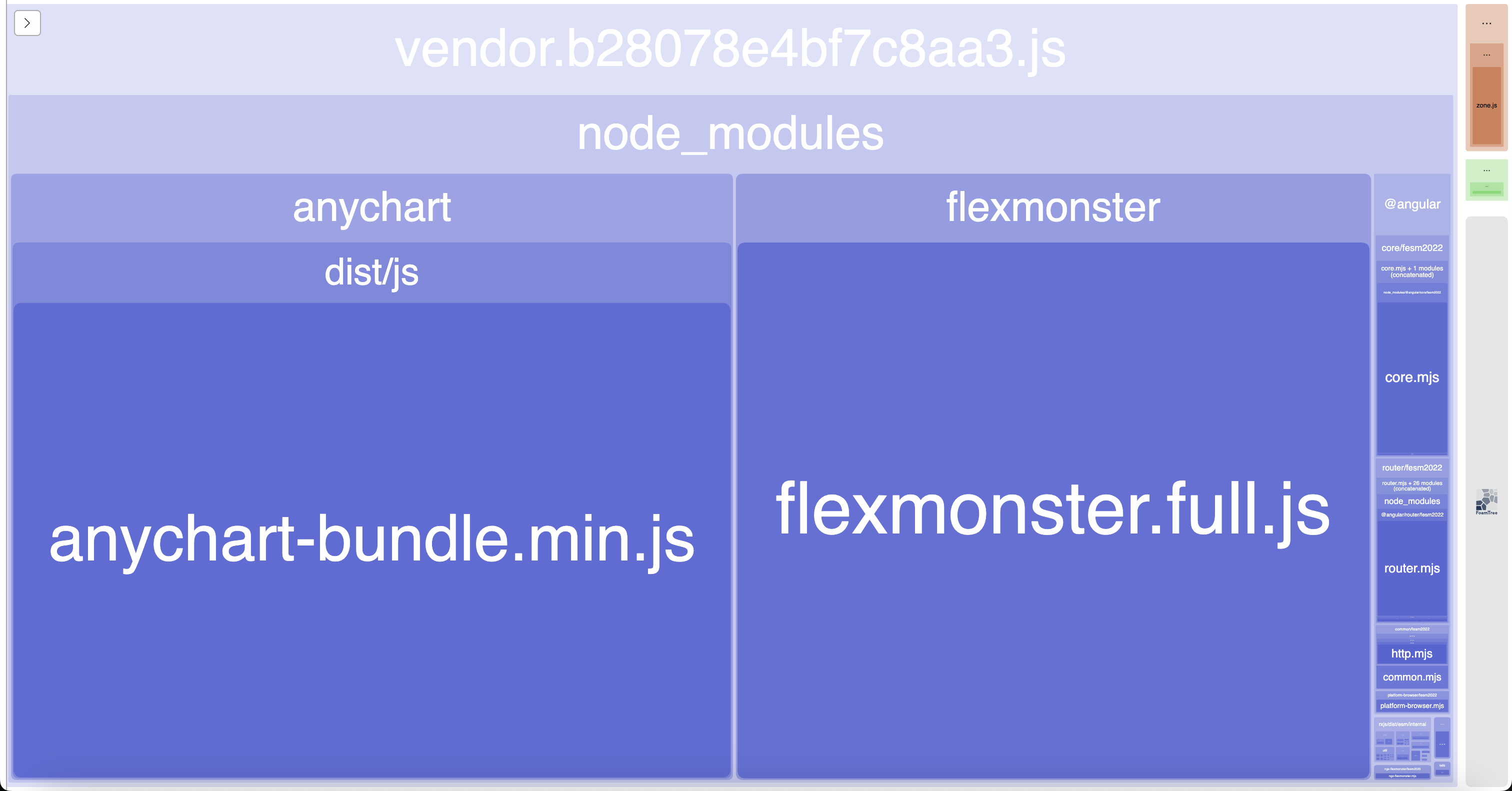
As seen, the vendor bundle constitutes nearly 99% of the total build size, coming in at 4.81MB. This happens because the anychart and flexmonster imports are not tree-shakable, so the libraries are included in full.
Baseline Metrics
Next, we run Chrome Lighthouse on the base setup using the mobile performance preset:
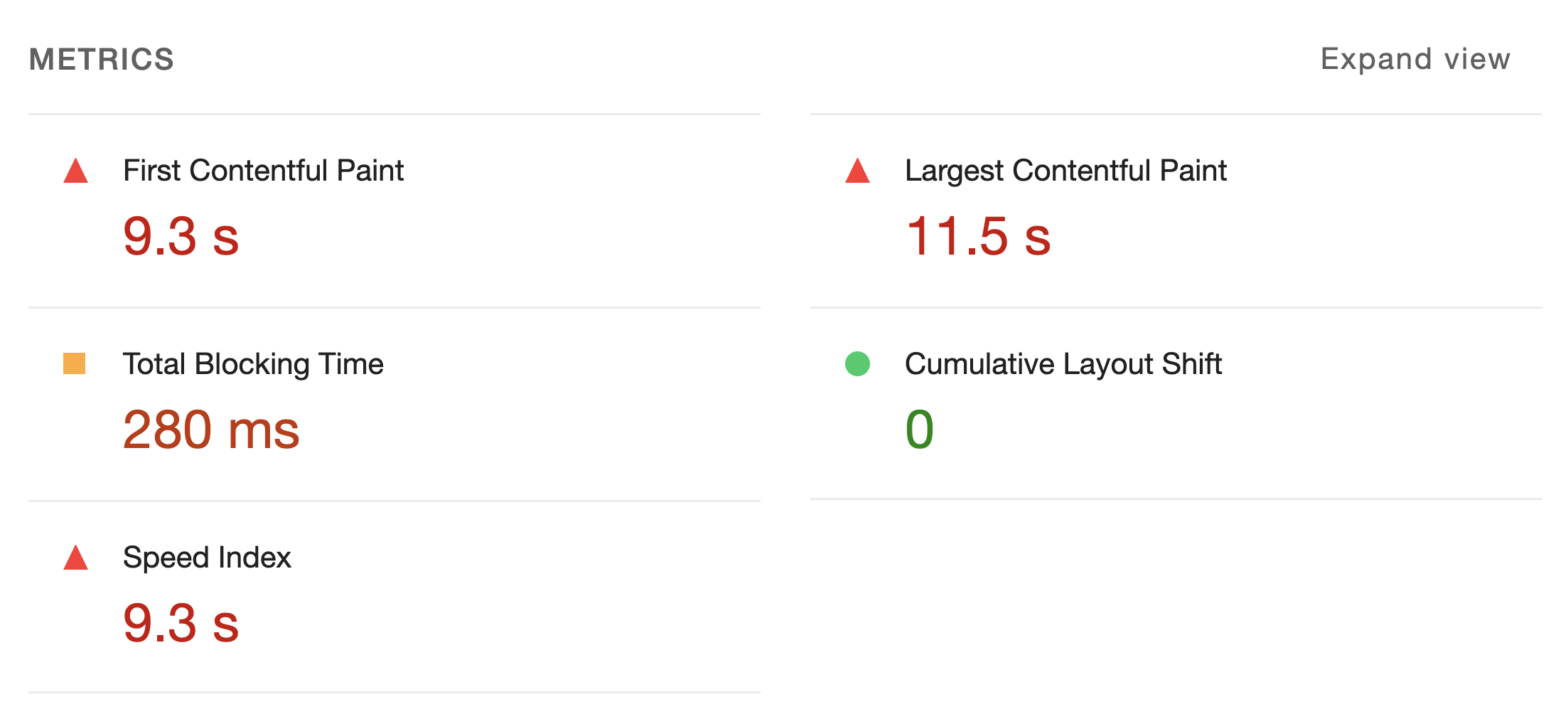
Unsurprisingly, the performance metrics are suboptimal here, as the browser has to fetch the large vendor bundle just to start the application.
If these metrics are unfamiliar, our post on measuring initial load performance provides a good introduction.
Our next step is to enhance this by deferring the charts and the pivot table.
Deferring the Charts
We'll begin with the charts. This first example uses various on triggers for demonstration purposes.
All modifications for this step are in the deferred-charts branch.
Here is a sample of the code:
@defer (on viewport) {
  <app-chart [id]="chart.id" [data]="chart.data" />
} @placeholder {
  <p>Chart is loading immediately.</p>
}
Deferred Charts Build
Checking the updated bundle analyzer output:
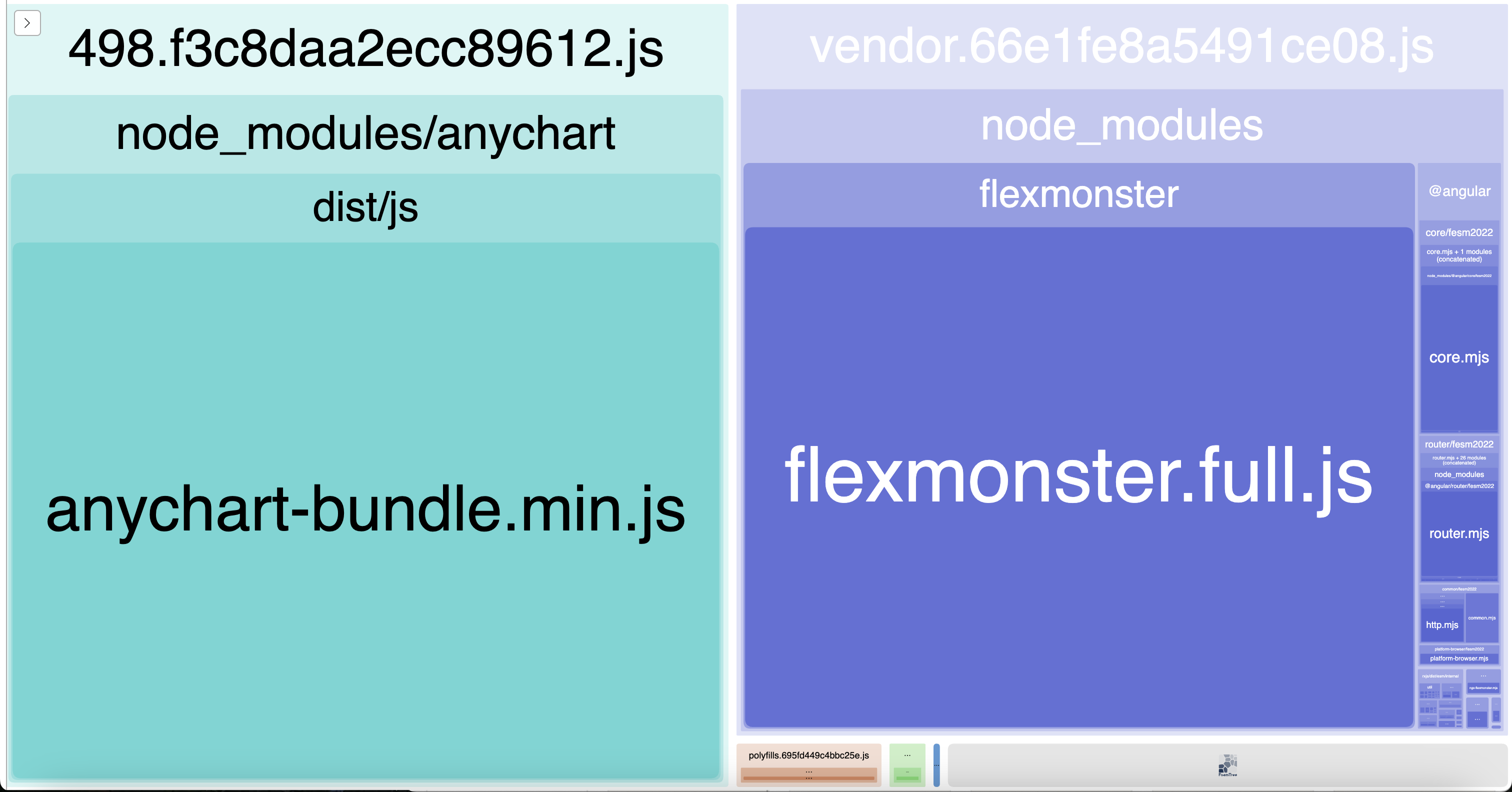
Notice the new lazy chunk 498 that now contains anychart. The vendor chunk has been reduced to 2.39MB.
Deferred Charts Metrics
Running Chrome Lighthouse once more gives us:

The performance metrics show a notable improvement, though there's still room for growth.
Deferring the Pivot Table
Moving on to the pivot table.
The changes for this are in the deferred-pivot-table branch.
Here is the code>@defer block for the pivot table:
@defer (on immediate) {
  <app-pivot-table />
} @placeholder {
  <p>Pivot table is loading immediately.</p>
}
Deferred Pivot Table Build
Let's inspect the final build analyzer result:

Another lazy chunk 595 has been created, this time for flexmonster. The vendor chunk has been further reduced, now down to 0.27MB!
Deferred Pivot Table Metrics
One final run of Chrome Lighthouse yields:
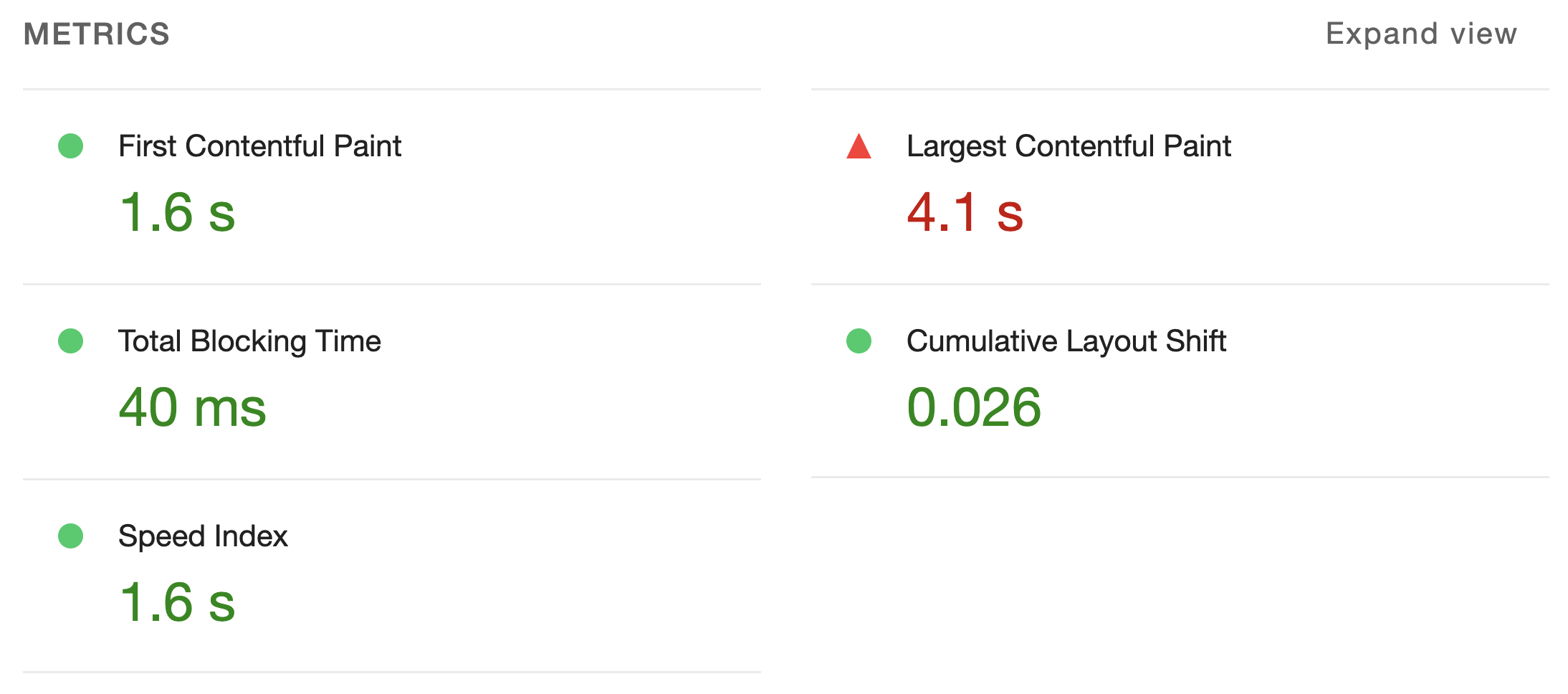
At this point, the metrics have improved even more; they are now acceptable, with some falling into the "good" category.
Performance Workshop
For those interested in a deeper dive into Angular, we offer a range of workshops, available in both English and German.
- Performance Workshop 🚀
- Best Practices Workshop 📈 (includes performance topics)
- Accessibility Workshop ♿
Final Thoughts
With Angular 17, the Deferrable Views feature, especially the @defer block, has greatly simplified dynamic loading of standalone components. It not only smooths the process but also boosts Initial Load Performance by delaying heavy components—like those tied to big third-party libraries—until they're actually needed.
In this article, we showed how easy it is to achieve an initial loading quick-win by wrapping very large 3rd-party dependencies in @defer.
Further Reading
- Why is Initial Load Performance so Important? by Alexander Thalhammer
- Angular Update Guide to V17 incl. migrations by Alexander Thalhammer
- What's new in Angular 17 by Manfred Steyer
- Introducing Angular 17 by Minko Gechev
- Deferrable Views with Jessica Janiuk on Angular YouTube
- Deferrable Views in the Angular Docs
- Complete Guide for Server-Side Rendering (SSR) in Angular by Alexander Thalhammer
This post was authored by Alexander Thalhammer. Connect with me on Linkedin, X or giThub.