Understanding pluralization
A frequently encountered challenge in the i18n space is pluralization — adjusting the text shown to users based on a variable’s value. Most libraries implement the ICU format, which gives us two distinct pluralization mechanisms: select and plural.
It’s worth noting that both @angular/localize and ngx-translate ship with ICU support out of the box. For Transloco users, the transloco-messageformat package adds this capability.
Pluralization by number
This pattern comes into play when the text should change according to a numeric value. Most languages follow a two-form system — singular versus plural. However, this isn’t universal; Ukrainian, for example, requires four distinct forms.
In practice, our applications most often need three variants:
- Zero entries
- Exactly one entry
- Multiple entries
The plural syntax:
"amountInStock": "… {amount, plural, =0 {Brak przedmiotów} one {Jeden przedmiot} other {Wiele przedmiotów (#)}}"As demonstrated above, the plural expression starts with curly braces. The first argument names the parameter — in this case, amount. Next, we declare the pluralization type: either plural or select. The remaining arguments define the conditions.
={amount}marks a specific condition, followed by the text in curly braces that gets returned when that condition holdsotherfunctions as a fallback — its text displays when none of the preceding conditions match- Within any condition, the
#symbol stands in for the numeric argument passed in
Select-based pluralization
The select format suits situations where the output text depends on a string value.
"itemType": "… {itemCode, select, grapes {Fruit} carrot {Veggie} other {Unknown}}",Like before, curly braces open the expression, followed by the parameter name and the pluralization type — select. After that come the conditions paired with their respective translations.
Pluralization in action
Let’s integrate the transloco-messageformat package into our project by running the install command:
npm and @ngneat/transloco-messageformat
Once installed, we swap out Transloco’s transpiler. This requires providing MessageFormatTranspiler inside AppModule.
@NgModule({
  declarations: [...],
  imports: [...],
  providers: [
    {provide: TRANSLOCO_TRANSPILER, useClass: MessageFormatTranspiler}
  ],
  bootstrap: [...]
})
export class AppModule {}
With the setup complete, we’ll prepare sample data for our storage application. First, define an interface in types/storage-item.interface.ts:
export interface StorageItem {
  itemCode: string;
  amount: number;
  price: number
}
Now let’s populate some sample data within the component:
@Component({
  selector: 'app-root',
  templateUrl: './app.component.html',
  styleUrls: ['./app.component.scss']
})
export class AppComponent {
  // …

  storage: StorageItem[] = [
    { itemCode: 'grapes', amount: 0, price: 3.49 },
    { itemCode: 'carrot', amount: 1, price: 1.99 },
    { itemCode: 'cookie', amount: 55, price: 0.1 },
  ]

  // …
}
We render this data in the template via the ngFor directive. As we build the paragraphs, the parameters are passed as the second argument to the t function.
<ng-container *transloco="let t">
  <select (change)="onLanguageChange($event)">
    …
  </select>

  <h1>{{ t("foodStorage") }}</h1>

  <ng-container *ngFor="let item of storage">
    <hr>
    <h2>{{t("item.code", {code: item.itemCode}) }}</h2>
    <p>{{t("item.type", {code: item.itemCode}) }}</p>
    <p>{{ t("item.amountInStock", {amount: item.amount}) }}</p>
    <p>{{ t("item.price", {price: item.price | currency}) }}</p>
  </ng-container>
</ng-container>
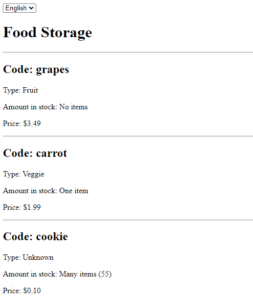
Once this is done, the resulting view should resemble the screenshot provided below.
Scaling challenges in i18n apps
As applications grow, runtime-based i18n libraries introduce certain hurdles. Among the most common are zombie keys, slower initial loading, and missing translation entries.
Zombie keys
Maintaining tidy translation files is no trivial endeavor. Zombie keys are those that no longer correspond to any usage in the codebase. How do they appear? Someone removes the feature that used a key but forgets to clean up the associated translation entry. A stray key here or there isn’t catastrophic. But as this pattern spreads, the bundled size inflates needlessly. Keep an eye on key usage consistently. Editor extensions can assist in spotting and purging these leftover keys.
Lazy-loading translations
As the key count grows, another pain point emerges. The loading time of a JSON translation file scales with its size. Once you accumulate thousands of keys in one file, the performance hit becomes noticeable. A straightforward remedy — supported by most libraries — is to break translations into per-module chunks and load them lazily alongside the corresponding feature modules.
Missing keys
Managing expansive translation sets across multiple languages means a key occasionally slips through the cracks. The good news is that catching these omissions isn’t hard, and several approaches exist:
- Editor plugins can flag missing keys. This works well for smaller projects where translation files are still manageable.
- Translation management platforms often report completion statistics, showing which keys remain untranslated. This shines in mid-to-large projects, though it’s feasible in smaller ones — more details later in this article.
- Alternatively, a custom script can scan the codebase for any missing key occurrences.
Building a script to detect missing keys
A lightweight script offers a flexible way to hunt down absent keys. We can execute it whenever needed, or even wire it into a pre-commit hook using husky to block commits that contain missing translations.
Missing-keys-finder.js
const fs = require('fs/promises');

const i18nFolderPath = 'src/assets/i18n';

const getTranslationKeys = (parsedTranslation, prefix = '') => {
  let keys = [];
  for (let key in parsedTranslation) {
    const value = parsedTranslation[key];


    if (typeof value === 'string') {
      keys.push(prefix + key);
    } else {
      keys = [...keys, ...getTranslationKeys(value, prefix + `${key}.`)];
    }
  }
  return keys;
};

const findMissingTranslations = async (filePath) => {
  const i18nFiles = await fs.readdir(i18nFolderPath);

  const parsedTranslations = {};
  let translationKeys = new Set();

  for (const fileName of i18nFiles) {
    const fileContent = await fs.readFile(`${filePath}/${fileName}`, 'utf8');
    const fileTranslationKeys = getTranslationKeys(JSON.parse(fileContent));

    parsedTranslations[fileName] = fileTranslationKeys;
    fileTranslationKeys.forEach((key) => translationKeys.add(key));
  }

  const missingKeys = {};
  let missingTranslations = 0;

  for (let key of [...translationKeys]) {
    for (let language in parsedTranslations) {
      if (!parsedTranslations[language].includes(key)) {
        missingKeys[language] = [key, ...(missingKeys[language] ?? [])];
        missingTranslations++;
      }
    }
  }

  for (let langFile in missingKeys) {
    const missingTranslations = missingKeys[langFile];


    if (missingTranslations && missingTranslations.length > 0) {
      console.log(
        `? File ${langFile} is missing following translations:\n[${missingTranslations
          .map((key) => `"${key}"`)
          .join(' ')}]`
      );
    }
  }

  if (missingTranslations) {
    console.log(
      `\n❌ You're missing a total of ${missingTranslations} translations`
    );
    process.exit(1);
  }


  console.log('✅ No missing translations were found. Well done!');
  process.exit(0);
};

findMissingTranslations(i18nFolderPath);
The script above pulls translations from all files inside the directory specified in i18nFolderPath. After gathering the data, it compares the key sets, identifies what’s missing, and prints the findings to the console.
Now we’ll register the script in package.json so it’s accessible via an npm command.
{
  "name": "translations-app",
  "version": "0.0.0",
  "scripts": {
    "ng": "ng",
    "start": "ng serve",
    …
    "find-missing-keys": "node missing-keys-finder.js"
  },
  "dependencies": {
    …
  }
}
To verify everything works, execute the following in your terminal:
npm run find-missing-keys
The output should look close to what’s shown below.

Additional considerations
- Every text element on a page deserves attention — don’t overlook attributes like
placeholder,title,aria-label, oralt. - For images or infographics containing text, offer alternative versions. Store the file paths in the translation files and reference them via the
srcattribute using your i18n library. - Angular Material users should ensure all interactive components are translated. Beyond obviously translatable items like tooltips and snack bars, remember
mat-paginator. It has built-in tooltips that can be customized throughMatPaginatorIntl. - Set the page title according to the user’s language. A custom class extending
TitleStrategycan overrideupdateTitleto use the title defined in the route. See this example implementation for guidance.
Formatting data for international audiences
Is translation the whole story? Not quite. True internationalization goes beyond swapping text — it’s a multi-faceted process. One key aspect is adapting how data is formatted to match regional conventions.
Angular offers a set of pipes to handle internationalized data formatting with minimal fuss:
DatePipe— formats date valuesCurrencyPipe— formats currency amountsDecimalPipe— formats numeric valuesPercentPipe— formats percentage values
The role of LOCALE_ID
LOCALE_ID is an injection token that sets the global locale code for the app. Angular’s built-in pipes rely on this token when formatting data.

Looking at the screenshot above, the formatting variations across locales are substantial — particularly for currencies and dates. Naturally, one might assume that swapping the token value at runtime is all it takes. Unfortunately, it’s not that straightforward.
Modifying LOCALE_ID at runtime
The challenge with changing LOCALE_ID begins immediately. Because the token stores a string rather than a reference type, we can’t mutate it after initialization the way we could with an object.
Angular’s own localization approach sidesteps this by generating separate builds for each supported language — a point to keep in mind when weighing runtime libraries.
That said, a dynamic LOCALE_ID is achievable, as demonstrated in this implementation.
Streamlining Key Management in the IDE and Through External Platforms
Editing Translations via a Visual Interface
Handling translation files often becomes a chore — adding a new entry or fixing an existing one can require hours of scrolling through massive files. A practical solution is to rely on IDE plugins that provide a graphical editor for these keys.
These tools significantly improve the developer experience, particularly when they present the data in a column-based layout. Once you get used to a UI editor, you will likely find that the overhead of hopping between files drops dramatically, and adding, viewing, or modifying keys becomes much more straightforward.
Extensions for VS Code
- i18n Ally — a feature-packed extension that covers a wide array of i18n needs. It supports extracting, editing, and previewing translations. In my view, this is the strongest option available for VS Code.
- i18n json editor — a straightforward tool that lets you manage your translations within a simple visual editor.
Plugins for JetBrains IDEs
- Easy i18n — this plugin provides a table or tree view for working with translation keys. It also includes functionality like flagging missing keys and letting you change translations directly from the template.
Leveraging External Services for Key Management
There is also a whole category of dedicated translation management platforms. In my experience, these can be transformative, especially on large projects with many contributors, including professional translators. In such environments, developers often end up manually pasting handed-off translations into JSON files — an error-prone process that consumes time and can introduce subtle typos.
Adopting an external service can elevate the workflow considerably. Below is a list of the advantages these services typically provide:
- A full edit log for each translation entry
- Tools to manage application release cycles
- Built-in connections to CI/CD pipelines
- Machine translation via DeepL, Google Translate, or Amazon Translate
- Alerts for issues like incomplete or missing translations
- Capabilities for organizing keys with tags, comments, and flags. This enriches the context available to translators without enlarging the files themselves.
Options for deploying the platform on your own infrastructure
A few examples of such external services are:
Conclusion
As you can see, notwithstanding its seemingly straightforward nature, internationalizing an application involves many subtleties. Before adopting any i18n setup, it’s wise to evaluate which library fits your needs and to understand both its strengths and any limitations.
What approaches have you adopted for i18n? What libraries or services have proven useful?