
Wrapping Micro Frontends with Web Components
In the first installment of this series, we explored how Native Federation combined with esbuild works in a modern Angular setup. That discussion assumed a uniform framework version across every Micro Frontend and the shell. When that assumption doesn’t hold — when Micro Frontends arrive with different framework stacks or different releases of the same stack — you’ll need a different strategy.
As pointed out in a previous article, mixing frameworks and versions isn’t something you’d typically add without a compelling reason. Such a need usually surfaces when you’re dealing with existing legacy codebases or trying to bundle independent products into a single suite.
📂 Source Code
(see branch nf-web-comp-mixed)
Hiding Frameworks Behind Web Components
The first step toward supporting multiple frameworks or versions is to introduce a layer of abstraction. A widely used technique here is representing each entire Micro Frontend as a Web Component. This isn't the typical fine-grained Web Component meant for UI reuse; instead, these are coarse-grained components where each one stands for a whole business domain. The illustration below shows a React app starting up inside a Web Component, all nested in an Angular host shell:

Writing a Web Component that delegates rendering to a framework — rather than imperatively building the DOM — is straightforward. Angular eases this path further with the @angular/elements package. It doesn't require you to hand-write the glue code; it takes an existing Angular component and generates the Web Component wrapper around it on the fly.
Install the @angular/elements package using npm (npm i @angular/elements). In combination with Standalone Components, it can be used quite succinctly:
import { NgZone } from '@angular/core';

(async () => {
  const app = await createApplication({
    providers: […],
  });

  const mfe2Root = createCustomElement(AppComponent, {
    injector: app.injector,
  });

  customElements.define('mfe2-root', mfe2Root);
})();
The snippet you see above replaces the usual application bootstrap. The createApplication function spins up an Angular app and its root injector. Any providers you need can be listed in the providers array. In this context, though, we skip component bootstrapping: instead, createCustomElement turns a standalone component into a custom element.
The browser API's customElements.define function then registers that new element globally as mfe2-root. After registration, whenever the markup contains <mfe2-root></mfe2-root>, the browser renders it together with the underlying Angular component. Remember that a custom element name must include a hyphen by spec. This rule prevents any accidental clash with standard HTML element names.
To offer this Web Component through Native Federation, you have to add the file that registers it — here, bootstrap.ts — to the exposes section in federation.config.js:
exposes: {
  './web-components': './projects/mfe2/src/bootstrap.ts',
},
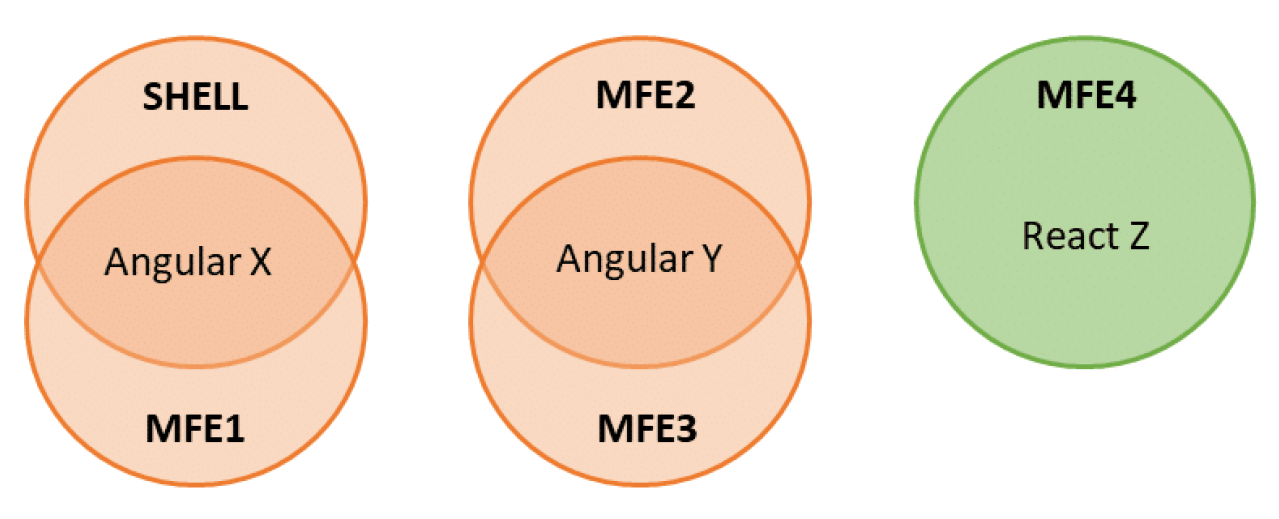
This hybrid strategy delivers the strongest of both approaches: Native Federation allows libraries plus frameworks to be shared among Micro Frontends that all operate on identical versions. Adding a Web Component layer gives the flexibility to bring in other frameworks or version mixes without further ado:
Bringing Web Components into a Shell
Serving a Web Component through Native Federation is only half the journey. You also have to load something like that into your shell. Given that the Angular Router understands Angular Components only, the natural fit is to create an Angular wrapper around the Web Component:
import { loadRemoteModule } from '@softarc/native-federation-runtime';

@Component({
  selector: 'app-wrapper',
  standalone: true,
  imports: [CommonModule],
  templateUrl: './wrapper.component.html',
  styleUrls: ['./wrapper.component.css']
})
export class WrapperComponent implements OnInit {
  elm = inject(ElementRef);

  async ngOnInit() {
    await loadRemoteModule('mfe2', './web-components');
    const root = document.createElement('mfe2-root');
    this.elm.nativeElement.appendChild(root);
  }
}
That WrapperComponent loads the requested Web Component through Native Federation and constructs an HTML element that becomes the mount point in the DOM. In the listing above, the necessary identifiers — mfe2, ./web-components, and mfe2-root — are hard-coded. To reuse this WrapperComponent across various scenarios, you'd be better off parametrizing that data, perhaps through an @Input:
@Component([...])
export class WrapperComponent implements OnInit {
  elm = inject(ElementRef);

  @Input() config = initWrapperConfig;

  async ngOnInit() {
    const { exposedModule, remoteName, elementName } = this.config;

    await loadRemoteModule(remoteName, exposedModule);
    const root = document.createElement(elementName);
    this.elm.nativeElement.appendChild(root);
  }
}
Below you find the definition for the initWrapperConfig constant along with its associated WrapperConfig type:
export interface WrapperConfig {
    remoteName: string;
    exposedModule: string;
    elementName: string;
}

export const initWrapperConfig: WrapperConfig = {
    remoteName: '',
    exposedModule: '',
    elementName: '',
}
Something worth noting: since Angular 16, you can map route parameters directly to component @Input properties. Enable that behavior during application bootstrap:
bootstrapApplication(AppComponent, {
  providers: [
    provideRouter(
      APP_ROUTES,
      withComponentInputBinding()
    )
  ],
});
That option allows route definitions written like the following:
export const APP_ROUTES: Routes = [
  [...],
  {
    path: 'passengers',
    component: WrapperComponent,
    data: {
      config: {
        remoteName: 'mfe2',
        exposedModule: './web-components',
        elementName: 'mfe2-root',
      } as WrapperConfig,
    },
  },
  [...]´
];
Coordinating Zone.js
Angular currently leans on Zone.js to manage change detection, exposed inside the framework through the NgZone service. To avoid subtle breakdowns, all Micro Frontends and the shell should resolve to the same NgZone instance. A shell can achieve that sharing by placing its own NgZone into the global scope from the AppComponent:
@Component([…])
export class AppComponent {
  constructor() {
      globalThis.ngZone = inject(NgZone);
  }
}
The Micro Frontends then pick up that same instance during their bootstrap sequence:
const app = await createApplication({
  providers: [
    globalThis.ngZone ? { provide: NgZone, useValue: globalThis.ngZone } : [],
    provideRouter(APP_ROUTES),
  ],
});
Good news is on the horizon: as Signals gain traction, Angular is moving toward a future without Zones. Once that day arrives, we can drop this workaround entirely.
Web Components Carrying Their Own Routes
Things become more engaging when a Micro Frontend inside a Web Component has its own internal routing. At that moment, two routers are fighting over the URL — one for the shell, one within the Micro Frontend:
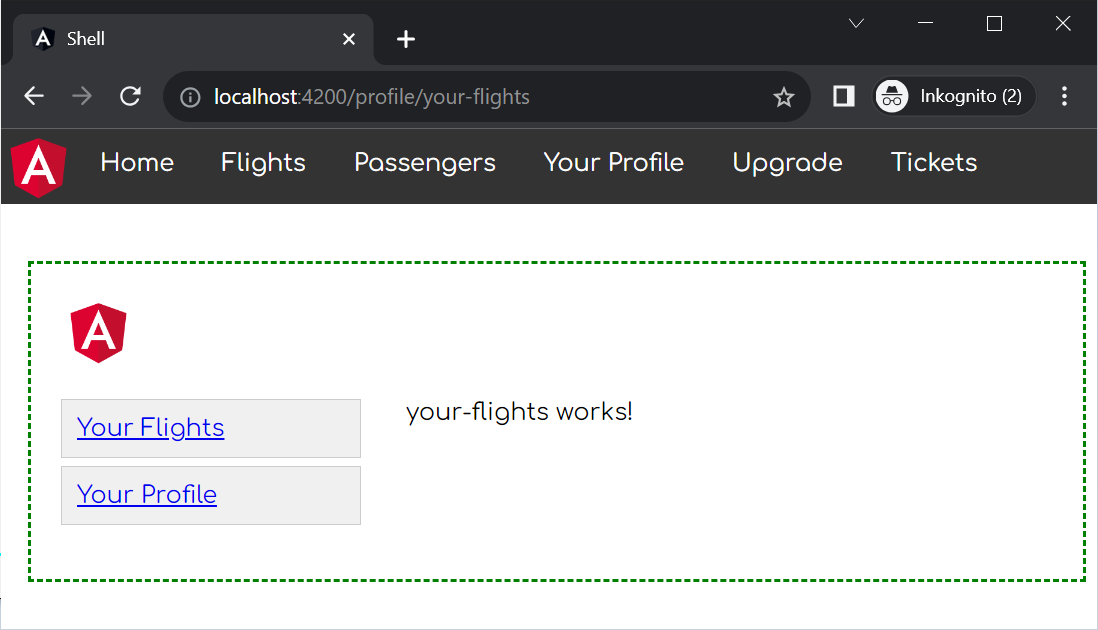
A proven pattern keeps both routers out of each other's way:
- Each route found in the Micro Frontend gets a prefix that is unique across the application.
- The host shell instructs its router to consider only the first segment. That segment decides which Micro Frontend gets loaded. After that point, the child router takes over and matches the remaining segments.
An UrlMatcher allows you to restrict what part of the URL each router should care about:
[…]
import { loadRemoteModule } from '@angular-architects/native-federation';
import { WrapperComponent } from './wrapper/wrapper.component';
import { WrapperConfig } from './wrapper/wrapper-config';
import { startsWith } from './starts-with';

export const APP_ROUTES: Routes = [
  […]
  {
    matcher: startsWith('profile'),
    component: WrapperComponent,
    data: {
      config: {
        remoteName: 'mfe3',
        exposedModule: './web-components',
        elementName: 'mfe3-root',
      } as WrapperConfig,
    },
  },
  […]
];
Typically, the Angular Router decides between routes based on configured paths. UrlMatchers give you a different kind of hook: these are functions that determine whether a given route matches. Take the startsWith helper, for example — it checks if the path starts with a segment that you provide.
In our current example, the shell router leverages that matcher to see if the URL begins with profile.
Helping Routers Inside Web Components
For a router embedded inside the Web Component to respond properly to navigation events, it requires a little assistance. Within the accompanying sample code, there is a utility connectRouter which the Micro Frontend invokes from its AppComponent:
@Component({ … })
export class AppComponent implements OnInit {
  constructor() {
    connectRouter();
  }
}
Up next: More Architectural Guidance
If you'd like to dive deeper into Angular architecture at enterprise scale, our free eBook (5th edition, 12 chapters) has you covered:
- What criteria help divide a large application into smaller sub-domains?
- How do you ensure the architecture stays maintainable over years or even decades?
- How does Module Federation address your Micro Frontend needs?
Go ahead and grab your copy here!
Final Thoughts
Mixing several frameworks (or multiple versions of the same framework) certainly shouldn’t be your starting point. Yet when a good reason exists, you can make the combination work by abstracting away each Micro Frontend. For this abstraction, wrapping them into Web Components is a commonly adopted route.
But be mindful: no vendor officially guarantees that its framework will tolerate sharing a browser tab with some other framework (or with yet another version of itself). Additionally, you need a few compromises — around router coordination or sharing a single Zone.js instance, among others. The Zone.js concern is already on its way out, given the push toward Zone-less change detection driven by Signals.
One more trade-off to mention is the growth in bundle size. Lazy loading di different Micro Frontends that rely on different frameworks or versions can alleviate some of that. The next part of this series offers further approaches to improve performance in Micro Frontend landscape.