The Angular ecosystem is undergoing a significant transformation. Standalone Components reduce the framework’s footprint and streamline the process of creating Web Components via Angular Elements. The upcoming esbuild integration, which becomes the default starting with version 17, offers a substantial boost in build speed compared to the long-standing webpack pipeline. Our measurements show a 3 to 4 times improvement in build times. Angular 17 also introduces refreshed server-side rendering capabilities. Combined with ongoing hydration work and the planned deferred loading feature, these changes promise noticeable gains in runtime performance.
This series explores these developments in depth. Here, the focus is on Standalone Components and esbuild.
📂 Source Code
(see branches nf-standalone-solution and nf-standalone-router-config)
Module Federation as a Game Changer
Since its arrival in webpack 5, Module Federation has been widely regarded as a turning point for micro frontend architecture. It enables separately built and deployed application fragments to be fetched on demand:

A shell application, also known as the host, declares URL segments that resolve to Micro Frontends (officially termed remotes). These remotes publish pieces of code—be it components or Angular modules. At runtime, the shell can pull these pieces into the browser.
Beyond loading code, Module Federation facilitates runtime dependency sharing. Even when several independently built Micro Frontends rely on Angular, the framework itself is fetched only once.
Angular CLI: esbuild replaces webpack and thus Module Federation!
Except for a handful of pre-release builds, the Angular CLI’s default bundler has been webpack from the start. That choice made sense for years, given webpack’s dominance in tooling. However, newer alternatives now provide significantly better build throughput by relying on native code and building parallelization in from the start.
The frontrunner among these is esbuild. Angular 16 shipped it as an experimental builder, and version 17 makes it the default. The result is a noticeable speedup for both ng serve and ng build.
But this switch poses a problem for micro frontends: Module Federation is tightly coupled to webpack, so it does not work with esbuild. The following sections offer a way forward.
Native Federation with esbuild
To keep the well-established concepts of Module Federation without being tied to webpack, the Native Federation project was established. It mirrors the options and configuration of Module Federation, yet remains compatible with any build tool. This is achieved by leaning on native browser features like EcmaScript modules and Import Maps. The intent is to guarantee long-term browser support and to leave the door open for alternative implementations.
Native Federation hooks into the build process at two points: before the bundler runs and right after it finishes. The choice of bundler is therefore irrelevant:
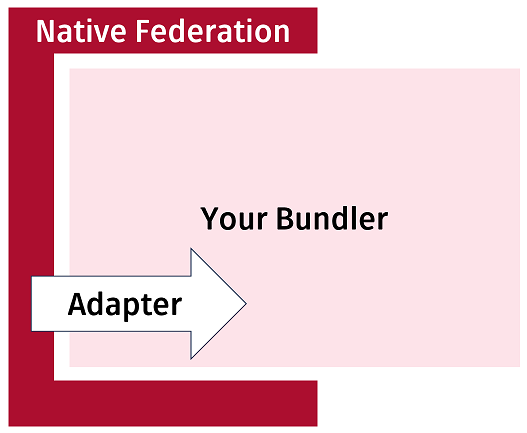
Because Native Federation must generate some bundles of its own, it hands that task to the bundler in use. A set of interchangeable adapters connects each bundler.
The screenshot below illustrates a working example composed of Angular, esbuild, and Native Federation:
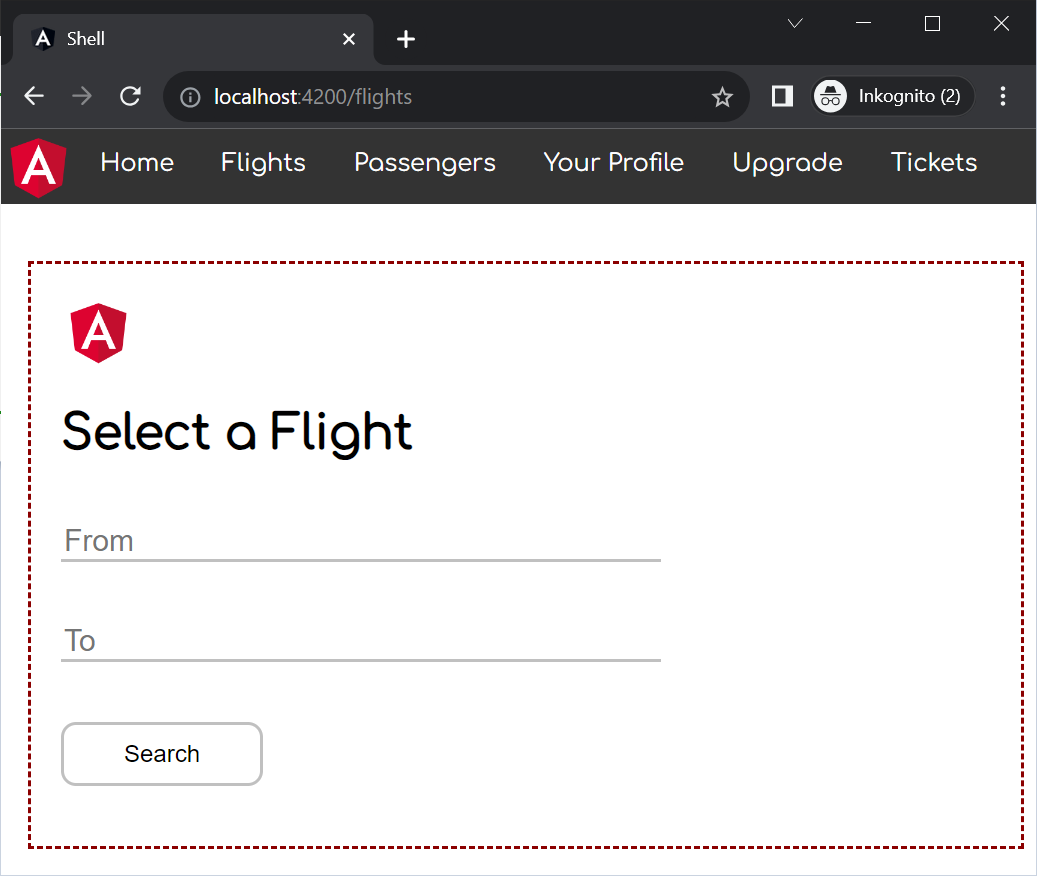
Here, the shell has loaded a remotely built and deployed Micro Frontend into its interface via Native Federation.
Both the shell and the Micro Frontend use Angular, yet Native Federation ensures Angular is loaded only once. To achieve this, Native Federation takes a cue from Module Federation and assigns the remotes and shared libraries to dedicated bundles. These bundles are standards-compliant EcmaScript files that any other tool could generate. Information about their locations is persisted in metadata files:
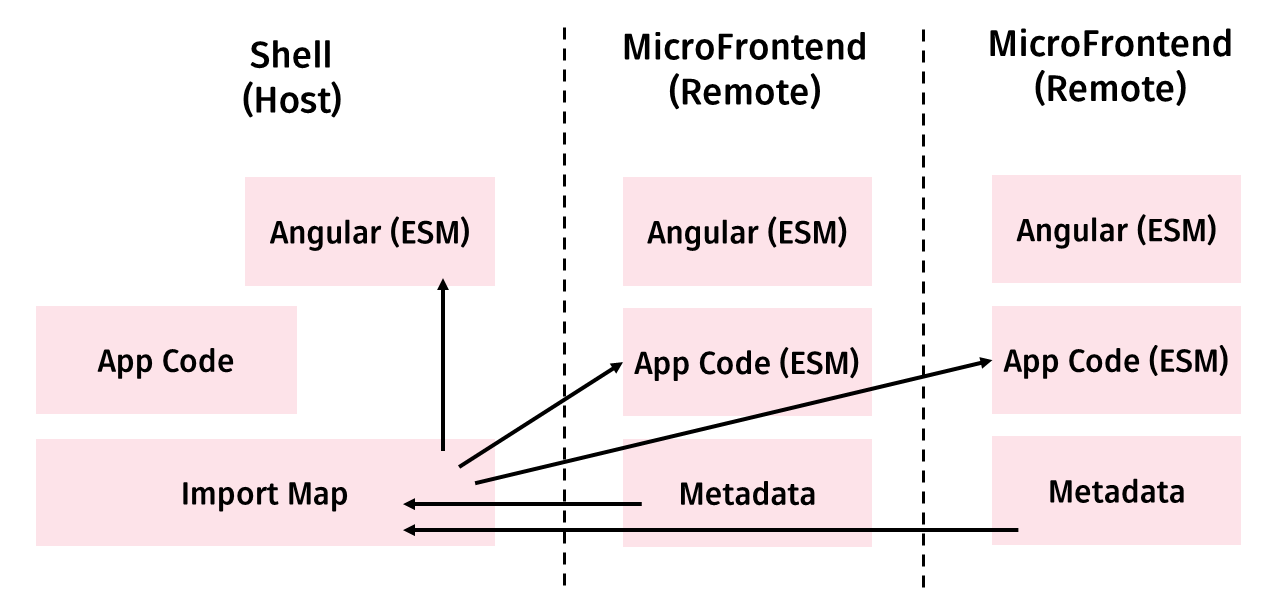
Those metadata files form the basis for a standards-compliant Import Map, which tells the browser exactly where to fetch each required bundle.
Native Federation: Setting up a Micro Frontend
For Angular projects built with the CLI, Native Federation ships an ng-add schematic. Running the following command adds Native Federation to the mfe1 project and configures it as a remote, i.e., a Micro Frontend:
ng add @angular-architects/native-federation --project mfe1 --port 4201 --type remoteIn addition, the schematic creates a federation.config.js file that dictates Native Federation’s behavior:
const { withNativeFederation, shareAll } = require('@angular-architects/native-federation/config');

module.exports = withNativeFederation({

  name: 'mfe1',

  exposes: {
    './Component': './projects/mfe1/src/app/app.component.ts',
  },

  shared: {
    ...shareAll({ singleton: true, strictVersion: true, requiredVersion: 'auto' }),
  },

  skip: [
    'rxjs/ajax',
    'rxjs/fetch',
    'rxjs/testing',
    'rxjs/webSocket',
    // Add further packages you don't need at runtime
  ]

});
The name property gives the remote a unique identifier. The exposes field lists which source files the remote intends to share with a host. These files are compiled and shipped alongside the remote but remain loadable into the host at runtime. Since the host need not know full file paths, exposes provides short aliases for them.
In this example, the remote publishes its AppComponent for the sake of demonstration. Any other component could take its place, though. Lazy routing configurations that point to several components of a feature are a typical choice.
The shared section declares which dependencies the remote is willing to share with other remotes and with the host. Rather than typing out every npm package, the shareAll helper picks up all packages registered under dependencies in package.json. You can find details about the parameters passed to shareAll in this blog article.
The skip list is where you place packages that shareAll should leave out. This trims build and startup costs a little. It is also mandatory to add any package meant for NodeJS, since these cannot be compiled for use in the browser.
Native Federation: Setting up a Shell
The host, otherwise known as the Micro Frontend Shell, can likewise be prepared with ng add:
ng add @angular-architects/native-federation --project shell --port 4200 --type dynamic-hostThe dynamic-host type encodes that the remotes to be loaded are listed in a configuration file:
{
    "mfe1" : "http://localhost:4201/remoteEntry.json"
}
By default, this federation.manifest.json is placed in the host’s assets folder. Treating it as an asset means the manifest can be swapped at deployment time. That allows tuning the application to the environment it runs in.
The manifest assigns each remote’s name to its metadata, output by Native Federation as remoteEntry.json during the build. Though ng add produces this manifest, it is still wise to review it—ports may need adjusting, and entries that are not actual remotes should be removed.
The ng add command also writes a federation.config.js for hosts:
const { withNativeFederation, shareAll } = require('@angular-architects/native-federation/config');

module.exports = withNativeFederation({

  shared: {
    ...shareAll({ singleton: true, strictVersion: true, requiredVersion: 'auto' }),
  },

  skip: [
    'rxjs/ajax',
    'rxjs/fetch',
    'rxjs/testing',
    'rxjs/webSocket',
    // Add further packages you don't need at runtime
  ]

});
Hosts normally skip the exposes entry because they rarely publish files for other hosts. If a host must double as a remote, adding it is perfectly fine.
Native Federation is initialized through the main.ts file, which ng add also alters. The manifest is loaded as shown here:
import { initFederation } from '@angular-architects/native-federation';

initFederation('/assets/federation.manifest.json')
  .catch(err => console.error(err))
  .then(_ => import('./bootstrap'))
  .catch(err => console.error(err));
By calling initFederation, the metadata of every remote is read, and an Import Map is generated. The browser relies on that map to load the shared libraries and exposed modules. Control then moves to bootstrap.ts, which boots the Angular application using the standard calls (bootstrapApplication or bootstrapModule).
All the configuration described so far is generated by ng add. To actually load code from a remote, the host’s router needs a lazy route:
[…]
import { loadRemoteModule } from '@angular-architects/native-federation';

export const APP_ROUTES: Routes = [
  […],
  {
    path: 'flights',
    loadComponent: () =>
      loadRemoteModule('mfe1', './Component').then((m) => m.AppComponent),
  },
  […]
];
The loadRemoteModule helper loads the remote’s AppComponent. It takes the remote’s name from the manifest (mfe1) and the name under which the remote exposes the target file (./Component).
Exposing a Router Config
Exposing just one component through Native Federation is often too fine-grained. Features usually span many components, and exposing them as a unit is more practical. Luckily, any TypeScript or EcmaScript construct can be exposed. For coarse-grained features, you could expose an NgModule with its own subroutes. With Standalone Components, though, a simple routing configuration is enough. That is the approach taken here:
import { Routes } from "@angular/router";
import { FlightComponent } from "./flight/flight.component";
import { HolidayPackagesComponent } from "./holiday-packages/holiday-packages.component";

export const APP_ROUTES: Routes = [
    {
        path: '',
        redirectTo: 'flights',
        pathMatch: 'full'
    },
    {
        path: 'flight-search',
        component: FlightComponent
    },
    {
        path: 'holiday-packages',
        component: HolidayPackagesComponent
    }
];
The routing configuration is then registered in the Micro Frontend’s federation.config.js under exposes:
const { withNativeFederation, shareAll } = require('@angular-architects/native-federation/config');

module.exports = withNativeFederation({

  name: 'mfe1',

  exposes: {
    './Component': './projects/mfe1/src/app/app.component.ts',

     // Add this line:
    './routes': '././projects/mfe1/src/app/app.routes.ts',
  },

  shared: {
    ...shareAll({ singleton: true, strictVersion: true, requiredVersion: 'auto' }),
  },

  skip: [
    'rxjs/ajax',
    'rxjs/fetch',
    'rxjs/testing',
    'rxjs/webSocket',
    // Add further packages you don't need at runtime
  ]

});
On the shell side, the router points directly at this configuration:
[...]
import { loadRemoteModule } from '@angular-architects/native-federation';

export const APP_ROUTES: Routes = [
  [...]

  {
    path: 'flights',
    // loadChildreas instead of loadComponent !!!
    loadChildren: () =>
      loadRemoteModule('mfe1', './routes').then((m) => m.APP_ROUTES),
  },

  [...]
];
The shell’s navigation links also need to be updated:
<ul>
    <li><img src="../assets/angular.png" width="50"></li>
    <li><a routerLink="/">Home</a></li>
    <li><a routerLink="/flights/flight-search">Flights</a></li>
    <li><a routerLink="/flights/holiday-packages">Holidays</a></li>
</ul>

<router-outlet></router-outlet>
Communication between Micro Frontends
Shared libraries enable communication between Micro Frontends. A word of caution is warranted: a micro frontend setup is meant to decouple its parts. When one frontend depends on data from another, the opposite happens. In practice, most solutions share only a small set of context values—the logged-in user, the active client, or some global filters, for example.
A shared library is the starting point for exchanging information. It can be a dedicated npm package or a library living inside the Angular workspace. To create one inside the workspace, run:
ng g lib authHere, the library is called auth. To pass data around, the library hosts a stateful service. For brevity, a minimal one suffices:
@Injectable({
  providedIn: 'root'
})
export class AuthService {
  userName = '';
}
This simple service acts as a blackboard. One Micro Frontend writes values into it, and another reads those values. A more ergonomic alternative is publish/subscribe, where consumers stay updated on changes. RxJS subjects provide a straightforward way to implement that pattern.
Libraries from a monorepo are best referenced via path mappings in the tsconfig.json:
"compilerOptions": {
    "paths": {
      "@demo/auth": [
        "projects/auth/src/public-api.ts"
      ]
     },
     […]
}
Notice that the mapping points to the public-api.ts in the library’s source. Nx follows this convention by default, but the plain Angular CLI refers to the dist folder instead. If you use the CLI, you must adjust that entry manually.
The same path mapping needs to be consistent across all parties that communicate.
Looking Ahead: Architectural Insights
If you're eager to dive deeper into large-scale Angular design patterns, our complimentary ebook (now in its 5th edition, spanning 12 chapters) offers a wealth of knowledge.
- What are the definitive guidelines for partitioning a vast application into distinct sub-domains?
- How can long-term maintainability—spanning years or even decades—be guaranteed for your architecture?
- What Micro Frontend strategies does Module Federation bring to the table, and how do they compare?
Ready to get started? Grab your copy instantly via this download link.
Wrapping Up
Adopting the latest esbuild builder yields a notable leap in compilation speed. That said, the widely-used Module Federation approach remains tied to webpack. Native Federation, by contrast, mirrors that same conceptual framework but is built to be bundler-agnostic, enabling compatibility across any toolchain. Leveraging standard web features like native EcmaScript modules and Import Maps, it paves the way for varied implementations and stands as a durable, future-proof option.