Resize Observer: An Overview
Resize Observer tracks modifications to a DOM element's dimensions. It monitors the target element for size changes and reacts accordingly.
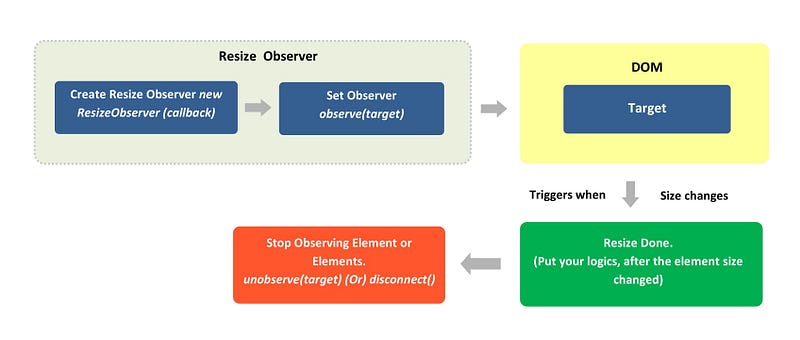
Resize Observer Flow Diagram
When Does Resize Observer Trigger?
- When a target element gets inserted into or removed from the DOM.
- When the target element's display property is set to none.
- When the target element's size undergoes any change.
Resize observers will not notify us in these scenarios:
- When CSS Transforms are applied.
- For non-replaced inline elements.
Core Concepts:
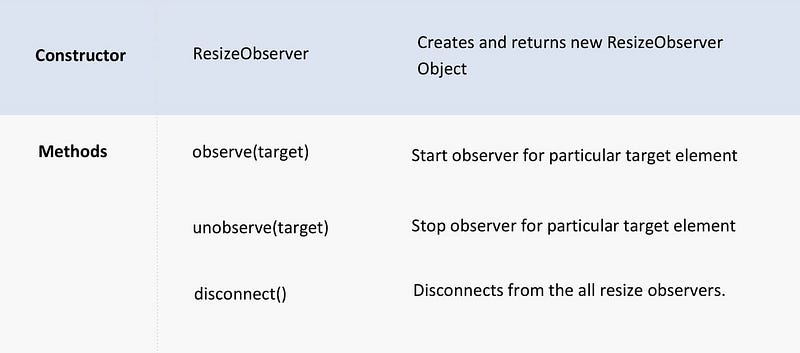
Key Concepts
These concepts were already covered in the previous article. Since we are familiar with them, implementing resize observers becomes straightforward.
Typical Use Cases:
- Adjusting DOM element styling when the element size changes — for example, updating CSS properties like color or background.
- Adding or removing DOM elements dynamically as the target element's size changes.
Resize Observer is the tool to choose whenever tracking DOM element dimensions is required — that's the fundamental idea behind it.
Let's work through one of these use cases: I'll modify a DOM element whenever its size changes.
Modifying DOM Elements on Size Change:
The codepen above shows a basic resize observer implementation. Let's examine it step by step.
Step 1: Setting Up the Basic UI
The screenshot below shows the UI from that codepen example.
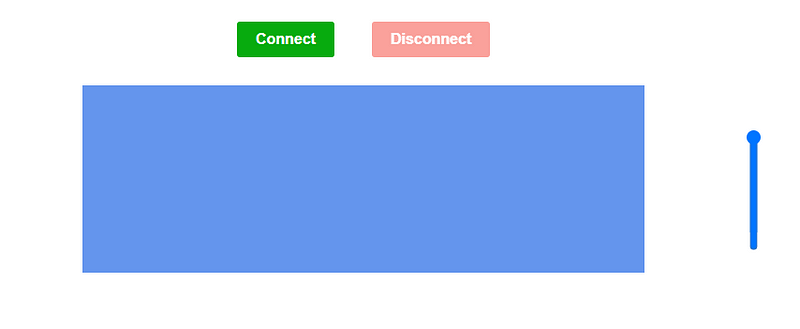
Resize Observer Example — UI
Step 2: Creating a Resize Observer
Create a resize observer instance and designate the target element for observation.
const box = document.querySelector('.box'); //Target

const resizeObserver = new ResizeObserver(entries => //Resize observer creation
  console.log(entries);
});

let connect = () => {
  resizeObserver.observe(box); //start resizeObserver
});

let disconnect = () => {
  resizeObserver.unobserve(box); //stop resizeObserver
  resizeObserver.disconnect(); //stop all resizeObservers
});
Here, I've instantiated the resize observer. 'box' serves as the target. The connect and disconnect methods control when observation starts and stops.
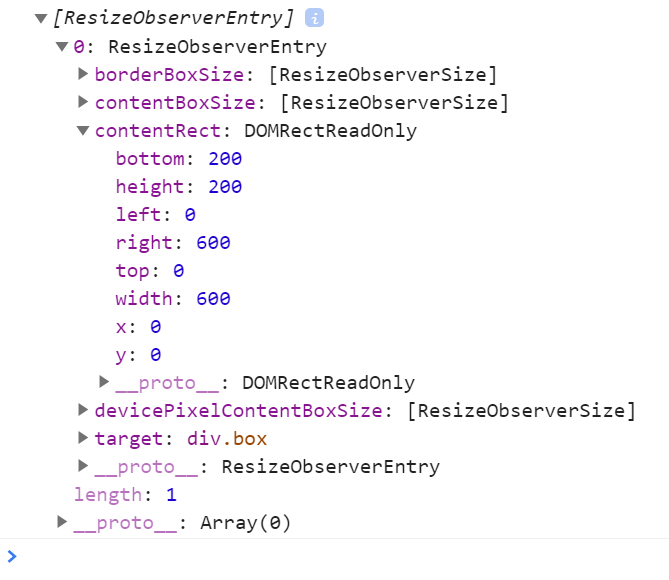
Let's inspect the console output.
Console Output:
Console Output
The observer fires notifications whenever the target's size shifts. The logged details contain useful information about the element — including borderBoxSize, contentBoxSize, and contentRect.
Step 3: Adding DOM Modification Logic Inside the Callback
const resizeObserver = new ResizeObserver(entries =>{
  //Add Logic Here
});
As with our previous examples, the UI includes two buttons: "connect" and "disconnect". Clicking connect invokes observe(target), starting observation. When size changes occur, the callback fires and executes our DOM modification logic. The logic here is straightforward — toggling the background color CSS property.
Step 4: Disconnecting the Observer
let disconnect = () =>{
  observer.unobserve(box); //Stop observer.
  observer.disconnect(); //Stop all observers.
}
Use the 'unobserve()' method to stop watching a specific element, or call the disconnect() method to stop all observers at once.
Output:
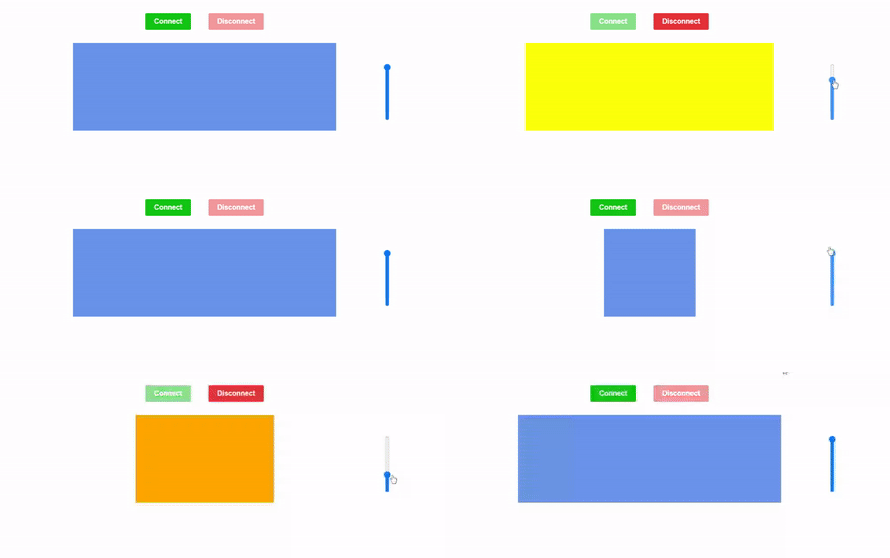
Resize Observer Output
That's all there is to it — quite simple, right? Give it a try in your own projects; it's likely to prove useful.
Note: This particular use case could technically be handled with an input change event. However, consider a different scenario: when the browser window is resized, a 'window.resize()' event in JavaScript could help track viewport changes. We could then measure element dimensions. Yet, this approach demands significant effort and complex logic — and it fires on every viewport change, which can cause performance problems. Resize Observer is the efficient solution for monitoring element size modifications.
If you've encountered other useful scenarios, feel free to share them in the comments — they could help other developers.
Performance Observer: An Overview
The Performance Observer interface monitors performance entries — records used for measuring performance, including marks, measurements, navigation events, and resources. Any time these entries are added or removed, the observer triggers a notification.
The term "performance entry" might be unfamiliar, so let's go over some fundamentals of the Performance API.
The Performance API:
Measuring performance is crucial for web applications — everyone wants their site to be fast. Performance APIs are essential tools for this. The API includes several different interfaces.
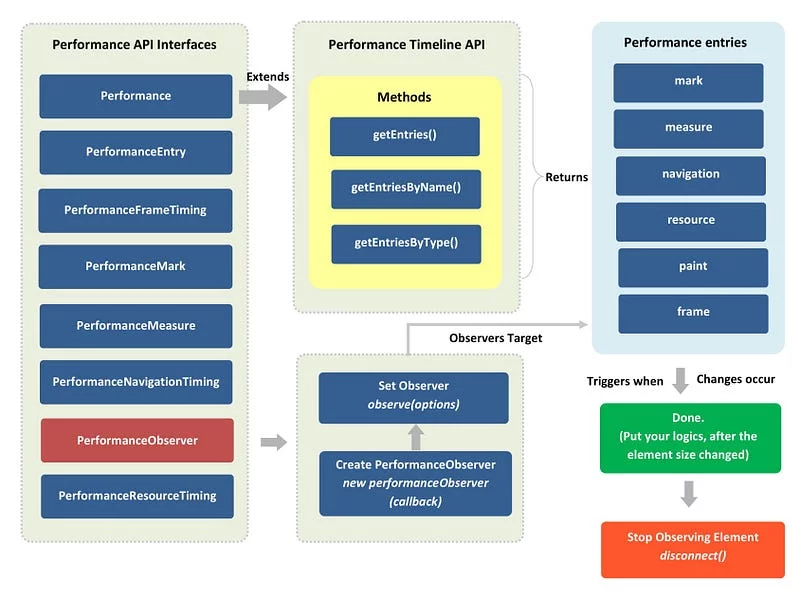
Performance Observer Flow Diagram
Performance Timeline API:
The Performance Timeline API extends the Performance interface, adding three methods: getEntries(), getEntriesByName(), and getEntriesByType(). These methods return performance entries.
Performance Entries:
Anything we measure using the Performance APIs is considered a performance entry. The diagram lists the types. Entries can be created explicitly via mark() or measure() methods, or indirectly — for example, when an image resource gets loaded.
Performance Observers are designed to watch these performance entries, notifying us whenever entries are added or removed.
A performance observer is one of the interfaces within the Performance API — an additional feature. Our focus here, though, is specifically on the Performance Observer API.
Core Concepts:

Concepts
Use Cases:
- Track performance entities and supply more precise data to performance analytics tools.
- Measure JavaScript elapsed time for script logic or loops.
Performance Observer is the tool of choice when tracking performance entries is required — that's its core principle.
Measuring Loop Elapsed Time:
Step 1: Setting Up the Basic UI
The screenshot below shows the UI from that codepen example.

Performance Observer Example — UI
Step 2: Creating a Performance Observer
Create a performance observer instance and specify which entry types to monitor.
var observer = new PerformanceObserver(list => {
  console.log(list.getEntries());
});

observer.observe({entryTypes: ['resource', 'mark', 'measure']}); //start observer

performance.mark('start');

for(let i=0; i<1000;i++){
  console.log('print');
}

performance.mark('end');

function markDone() {
  performance.mark('done');
}

performance.measure('start to end', 'start', 'end');

function disconnect(){
  observer.disconnect(); //disconnect observer
}
Two mark() calls are created here — one before the for loop, another after it completes. Then, a measure() method calculates the elapsed time.
Step 3: Disconnecting the Observer
function disconnect(){
  observer.disconnect(); //disconnect observer
}
To stop observation, call the 'disconnect()' method.
Output:

And there it is! The same approach extends to measuring time for service calls, events, and other operations.
Summary:
Observer APIs offer significant benefits. They cut down on manual effort and help eliminate unnecessary code.
- Mutation Observer — watches over the DOM tree for changes.
- Intersection Observer — tracks the visibility and position of DOM elements.
- Resize Observer — observes changes in DOM element dimensions.
- Performance Observer — monitors performance-related entries.
Thank you for exploring the observers APIs with us.