NgRx Component Store Debounce Selectors
I've been incorporating @ngrx/component-store into my projects to handle component-level state, and it has become a valuable tool. This discussion focuses specifically on the debounce configuration available within the select method, explaining both its practical implications and the underlying mechanics. For foundational knowledge on component-store usage, refer to this introduction video by Alex Okrushko.
Exploring the Debounce Option
The {debounce} flag found in the select method configuration is the focus of this post. The official documentation describes its function like so.
Selectors are synchronous by default, meaning that they emit the value immediately when subscribed to, and on every state change. Sometimes the preferred behavior would be to wait (or debounce) until the state „settles” (meaning all the changes within the current microtask occur) and only then emit the final value. In many cases, this would be the most performant way to read data from the ComponentStore, however its behavior might be surprising sometimes, as it won’t emit a value until later on. This makes it harder to test such selectors.
This concept was initially confusing to me. To clarify it, I constructed a practical Stackblitz example to observe the tangible difference this option makes on selector behavior.
Setting Up the Demo
The demonstration involves setting up a ComponentStore within the AppComponent, managing a single boolean toggle state.
interface AppCompState {
  toggle: boolean;
}
Following that, two distinct selectors are created for this toggle. One is configured with debouncing enabled, while the other operates with the default, non-debounced behavior.
update$ = this.select((s) => s.toggle, { debounce: false });

updateDebounced$ = this.select((s) => s.toggle, { debounce: true });
To test the synchronous nature mentioned in the docs, I've set up a couple of methods. These methods check the toggle state and immediately set it back, much like a child repeatedly turning a TV back on right after it's been switched off.
A crucial distinction is that the second toggler incorporates a delay(0) operator. This makes its toggleState invocation asynchronous, which is key to the demonstration.
// Set up synchronous auto toggle back
this.select((s) => s.toggle)
  .pipe(take(1))
  .subscribe(() => this.toggleState());

// Set up asynchronous auto toggle back using delay(0)
this.select((s) => s.toggle)
  .pipe(delay(0), take(1))
  .subscribe(() => this.toggleState());
Two separate buttons in the demo interface trigger these different toggling behaviors.
Synchronous Scenario Results
Upon clicking the "Update Sync" button, only the selector without debouncing (debounce: false) produces emissions. This non-debounced selector outputs each and every change to the toggle value.
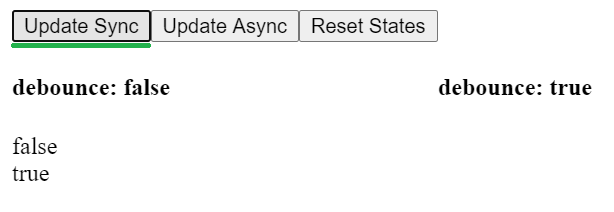
The debouncing selector, however, remains silent. This happens because the toggle value originates as true, is set to false, and then is reverted to true – all within a single synchronous microtask. The debounceSync function holds off on emitting intermediate values. Since the final value at the end of that microtask is still true, and the select method includes a distintUntilChanged guard, the selector emits nothing.
Asynchronous Scenario Results
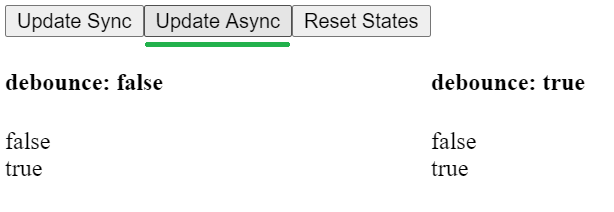
In contrast, clicking "Update Async" leads to emissions from both selectors. The debounceSync function, true to its name, only delays synchronous sequences. With asynchronous updates occurring in separate microtasks, the debounced selector emits each individual toggle change.
Interpreting the Significance
Performance Gains
As suggested in the documentation, leveraging debounce: true can lead to performance improvements. By only emitting the final value at the end of a microtask, the selector prevents downstream actions and re-renders from firing for transient state changes. In the demo, the debounced selector's lack of emission translates to no extra work being done, showcasing how debouncing can cut down on unnecessary processing.
State Consistency
Debounced selectors can also provide more consistent and logically sound state emissions. Consider a selector that depends on multiple, interdependent properties. By using {debounce:true}, you ensure the selector only emits after all involved properties have reached a stable, final state, avoiding the emission of temporary or 'invalid state' values that might occur partway through a set of updates.
A Look at the debounceSync() Implementation
The core implementation of this logic lives in the NgRx source code. It was originally authored by Nicholas Jamieson in the rxjs-etc library. NgRx, operating under the MIT license, has incorporated it directly, satisfying all licensing conditions and avoiding the need for an additional dependency while gaining this useful feature.
How Selector Debouncing is Applied
Within the select method of component-store, a line of code evaluates the debounce configuration. Based on this, it either adds the debounceSync() operator to the observable pipeline or passes the original, unmodified stream through.
this.stateSubject$.pipe(
     config.debounce ? debounceSync() : (source$) => source$,
     map(projector)
);
Here is the core code for debounceSync. Initially, I found its logic quite opaque! To overcome this, I resorted to our trusty console.log and engaged in some hands-on experimentation. You can run a similar test in this Stackblitz project.
export function debounceSync<T>(): MonoTypeOperatorFunction<T> {
  return source =>
    new Observable<T>(observer => {
      let actionSubscription: Subscription | undefined;
      let actionValue: T | undefined;
      const rootSubscription = new Subscription();
      rootSubscription.add(
        source.subscribe({
          complete: () => {
            console.log("COMPLETE", { actionSubscription, actionValue });
            if (actionSubscription) {
              observer.next(actionValue);
            }
            observer.complete();
          },
          error: error => {
            console.log("ERROR", { actionSubscription });
            observer.error(error);
          },
          next: value => {
            console.log("NEXT", { actionSubscription, value });
            actionValue = value;
            if (!actionSubscription) {
              actionSubscription = asapScheduler.schedule(() => {
                console.log("ASAP", { actionSubscription, actionValue });
                observer.next(actionValue);
                actionSubscription = undefined;
              });
              rootSubscription.add(actionSubscription);
            }
          }
        })
      );
      return rootSubscription;
    });
}
Setting Up the Experiment
For my experimentation, I created two data streams. The first is generated by interval, which provides an asynchronous source of values. The second uses from over an array, which emits its values synchronously.
console.warn("Before interval");

interval(1).pipe(
  debounceSync(),
  take(3)
).subscribe(val => console.log("interval", val));

console.warn("Before from");

from([10, 20, 30]).pipe(
  debounceSync()
).subscribe(val => console.log("fromArray", val));

console.warn("After From");
Observing the output from these streams, combined with the logging I inserted into the debounceSync() function, we get the following picture.
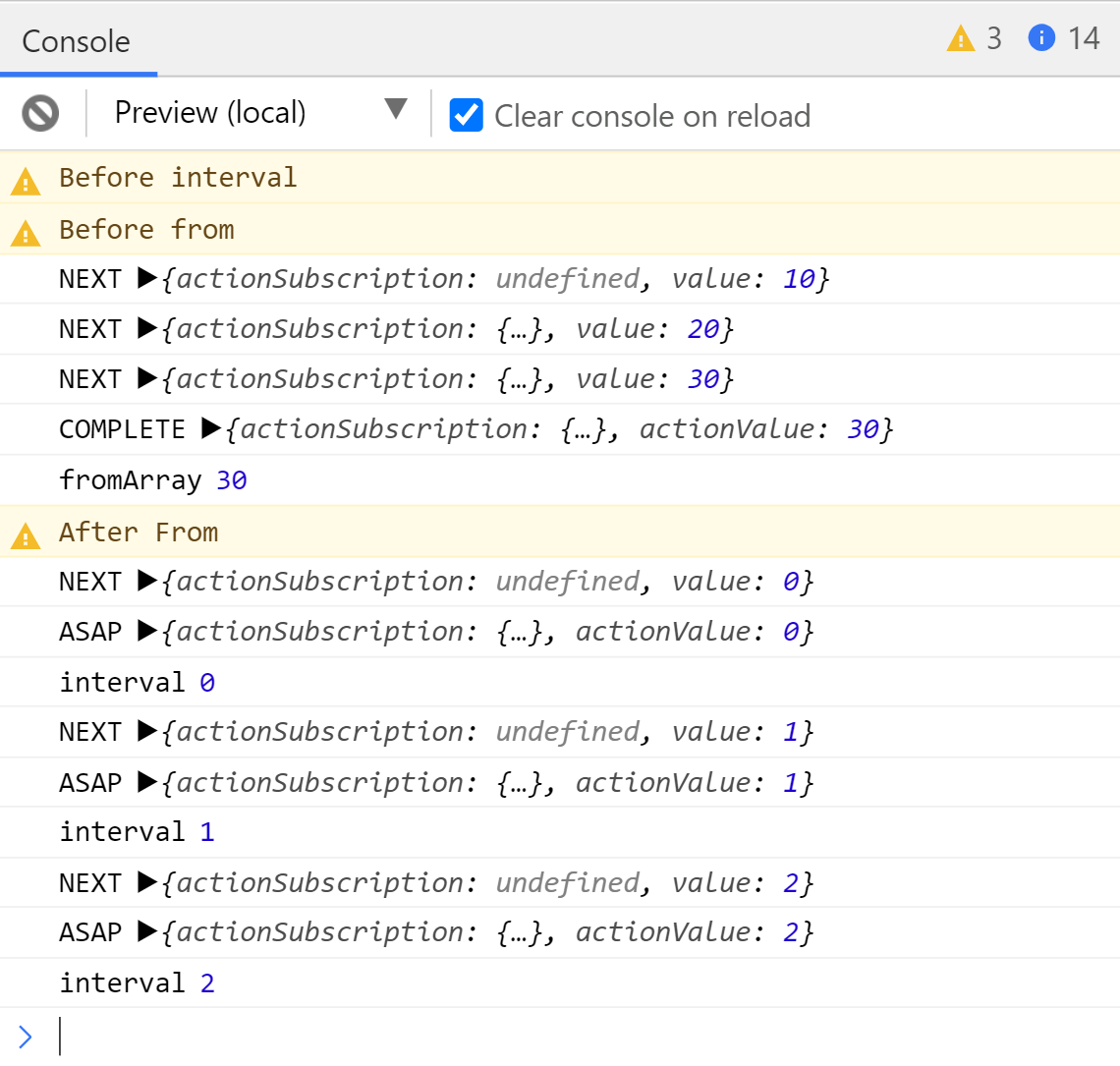
A notable observation is the absence of interval output between the „Before interval” and „Before from” log statements. This is because the interval emissions are asynchronous and are queued for later execution. What is particularly striking is that its output appears only at the very end, even after the fromArray emissions. This illustrates the fundamental principle that synchronous code executes before asynchronous tasks, and it confirms that Observables can operate synchronously.
This ordering is dictated by the JavaScript Event Loop. If this concept is unclear, I recommend reading this excellent explanatory article before proceeding. It includes helpful visual aids to clarify the concept.
Analyzing the Differences
An interesting comparison can be made between the console outputs from the synchronous from stream (on the left) and the asynchronous interval stream (on the right).
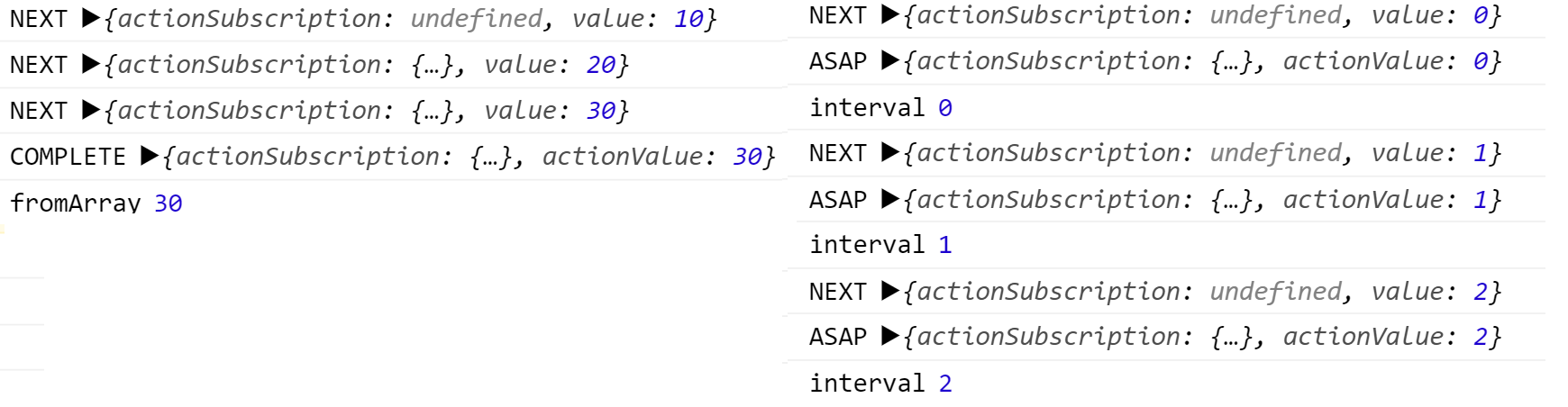
In both instances, the initial value triggers the creation of an actionSubscription because it's currently undefined. This subscription's call-back method is registered with the asapScheduler.
asapScheduler: Perform task as fast as it can be performed asynchronously
Within that call-back, the pending value is forwarded to the next observer in the chain, and the actionSubscription is then cleared to prepare for the next event.
next: value => {
   console.log("NEXT", { actionSubscription, value });
   actionValue = value;
   if (!actionSubscription) {
       actionSubscription = asapScheduler.schedule(() => {
           console.log("ASAP", { actionSubscription, actionValue });
           observer.next(actionValue);
           actionSubscription = undefined;
       });
       rootSubscription.add(actionSubscription);
   }
}
Within Synchronous Streams
For a purely synchronous stream, the actionSubscription call-back never gets a chance to execute. All synchronous events occupy the call stack, and they must complete before the asapScheduler can run its queued task. Therefore, subsequent sync values only update the internal actionValue, and they are not passed along to the observer.
Since the from operator completes synchronously after emitting its three values, the asapScheduler task remains unrun. This is precisely why the complete method in the operator checks for an active actionSubscription. If one is pending, it emits the final actionValue to the observer before invoking the complete notification. This check ensures that data is emitted even in this synchronous scenario.
complete: () => {
    if (actionSubscription) {
        observer.next(actionValue);
    }
    observer.complete();
},
Notice that in this synchronous case, only the last value is emitted. This is the very reason the function is called debounceSync – it effectively debounces sequences of synchronous events into a single, final emission.
Within Asynchronous Streams
With asynchronous events, as generated by interval, every value is successfully emitted through the actionSubscription. This is feasible because the asapScheduler gets a chance to execute its task between individual asynchronous emissions. After it fires, the actionSubscription is cleared. When the next value arrives, a new actionSubscription is created, allowing that value to eventually be emitted through its call-back as well.
Concluding Thoughts
The debounceSync() operator functions by continuously storing the incoming value in a local variable called actionValue. This stored value is only forwarded downstream when the observable completes, or once the current call stack has been cleared, meaning all ongoing synchronous events have finished executing. The asynchronous call-back mechanism relies on the asapScheduler to ensure any delay introduced is kept to an absolute minimum.
After breaking this down, the excerpt from the official docs resonates much more clearly.
Sometimes the preferred behaviour would be to wait (or debounce) until the state „settles” (meaning all the changes within the current microtask occur) and only then emit the final value.
Implications for Feedback Loops
It's important to highlight that, particularly with synchronous event chains, this debouncing mechanism offers a significant benefit. It can allow feedback loops commonly found in selector logic to settle into a stable state before an emission is made. While this wasn't the primary focus of our demo, it stands out as a key advantage of this feature.
A Note on Alternate Implementations
This function's behavior is broadly equivalent to using the debounceTime operator with a delay of 0 and the asapScheduler.
debounceTime(0, asapScheduler)
According to Alex Okrushko of the NgRx core team, this was the initial approach considered. However, it had the downside of creating unnecessary timers for this specific purpose. Nicholas Jamieson then introduced this custom debounceSync operator, designed to deliver optimal performance, which was subsequently adopted into NgRx.
Further Exploration
Much of my understanding came from conversations on the NgRx Discord channel, which I highly recommend joining.
The concept of debouncing isn't limited to a component-level store. There's an ongoing initiative to apply similar principles to the entire Angular application via event coalescing, which could have a substantial impact on application performance, similar to what we've seen here with selectors.