Illustrative Example
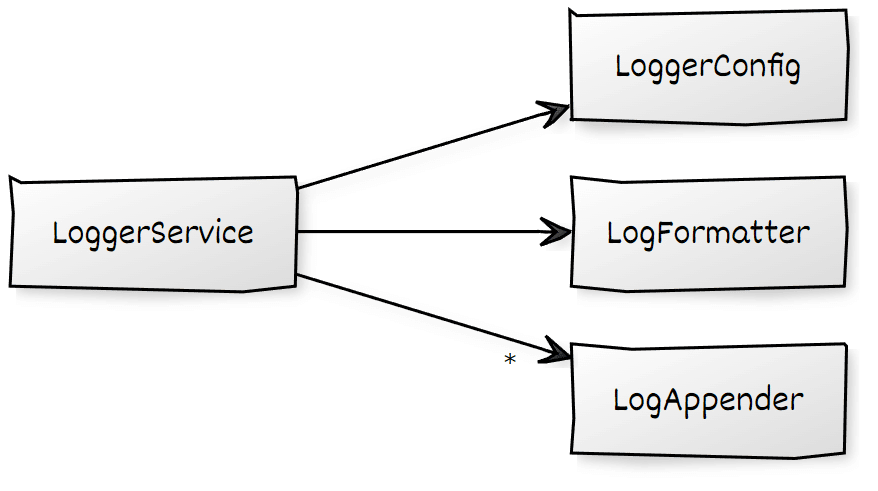
To demonstrate the patterns discussed here, we'll use a minimal logger library. It's stripped to the essentials but rich enough to showcase every pattern's implementation.
A LogLevel enum classifies every log entry:
export enum LogLevel {
  DEBUG = 0,
  INFO = 1,
  ERROR = 2,
}
For simplicity, the logger library covers just three levels.
The abstract LoggerConfig specifies what can be configured:
export abstract class LoggerConfig {
  abstract level: LogLevel;
  abstract formatter: Type<LogFormatter>;
  abstract appenders: Type<LogAppender>[];
}
It's deliberately abstract since interfaces cannot serve as DI tokens. A constant typed as this class supplies default values:
export const defaultConfig: LoggerConfig = {
  level: LogLevel.DEBUG,
  formatter: DefaultLogFormatter,
  appenders: [DefaultLogAppender],
};
Before a message reaches a LogAppender, it is processed by a LogFormatter:
export abstract class LogFormatter {
  abstract format(level: LogLevel, category: string, msg: string): string;
}
Like LoggerConfiguration, LogFormatter is an abstract class used as a token. Consumers can swap in their own formatter or stick with the default supplied by the library:
@Injectable()
export class DefaultLogFormatter implements LogFormatter {
  format(level: LogLevel, category: string, msg: string): string {
    const levelString = LogLevel[level].padEnd(5);
    return [${levelString}] ${category.toUpperCase()} ${msg};
  }
}
Another interchangeable piece, LogAppender, is responsible for pushing the formatted message to a destination log:
export abstract class LogAppender {
  abstract append(level: LogLevel, category: string, msg: string): void;
}
The default appender sends output to the console:
@Injectable()
export class DefaultLogAppender implements LogAppender {
  append(level: LogLevel, category: string, msg: string): void {
    console.log(category + ' ' + msg);
  }
}
While only a single LogFormatter is allowed, multiple LogAppenders may coexist. For instance, one appender could write to the console while another forwards to a backend.
This is achieved by registering each LogAppender as a multi provider, so the injector hands back an array. Since arrays can't act as DI tokens, an InjectionToken is used:
export const LOG_APPENDERS = new InjectionToken<LogAppender[]>("LOG_APPENDERS");The LoggserService takes the LoggerConfig, the LogFormatter, and an array of LogAppenders through DI, exposing methods to log at various LogLevels:
@Injectable()
export class LoggerService {
  private config = inject(LoggerConfig);
  private formatter = inject(LogFormatter);
  private appenders = inject(LOG_APPENDERS);

  log(level: LogLevel, category: string, msg: string): void {
    if (level < this.config.level) {
      return;
    }
    const formatted = this.formatter.format(level, category, msg);
    for (const a of this.appenders) {
      a.append(level, category, formatted);
    }
  }

  error(category: string, msg: string): void {
    this.log(LogLevel.ERROR, category, msg);
  }

  info(category: string, msg: string): void {
    this.log(LogLevel.INFO, category, msg);
  }

  debug(category: string, msg: string): void {
    this.log(LogLevel.DEBUG, category, msg);
  }
}
The Golden Rule
Before diving into the patterns, one principle deserves emphasis:
Whenever possible, use
@Injectable({providedIn: 'root'})!
This approach is ideal for most application code and many library scenarios. It's straightforward, tree-shakable, and compatible with lazy loading. The lazy-loading benefit owes less to Angular itself and more to the bundler, which places any code only used in a lazy chunk into that chunk.
Pattern: Provider Factory
Intentions
- Supplying services for a reusable library
- Setting up configuration for that library
- Replacing specific implementation pieces
Description
A Provider Factory is a function that returns an array of providers for a library. That array is cast into Angular's EnvironmentProviders type, ensuring it can only be used in environment scopes — primarily the root scope and those introduced by lazy route configurations.
Both Angular and NGRX tend to put these functions in files named provider.ts.
Example
The provideLogger function accepts a partial LoggerConfiguration and builds providers from it:
export function provideLogger(
  config: Partial<LoggerConfig>
): EnvironmentProviders {
  // using default values for missing properties
  const merged = { ...defaultConfig, ...config };

  return makeEnvironmentProviders([
    {
      provide: LoggerConfig,
      useValue: merged,
    },
    {
      provide: LogFormatter,
      useClass: merged.formatter,
    },
    merged.appenders.map((a) => ({
      provide: LOG_APPENDERS,
      useClass: a,
      multi: true,
    })),
  ]);
}
Any missing values fall back to the defaults. Angular's makeEnvironmentProviders wraps this Provider array inside an EnvironmentProviders instance.
With this in place, a consuming app can bootstrap the logger in the same manner as other libraries, such as HttpClient or the Router:
bootstrapApplication(AppComponent, {
  providers: [

    provideHttpClient(),

    provideRouter(APP_ROUTES),

    [...]

    // Setting up the Logger:
    provideLogger(loggerConfig),
  ]
}
Occurrences and Variations
- This is standard across all libraries examined.
- Provider Factories for the
RouterandHttpClienttake an extra optional parameter for features (see the Feature pattern below). - Rather than passing the concrete service, NGRX lets you supply either a token or the actual reducer object.
- The
HttpClientaccepts an array of functional interceptors via awithfunction (see the Feature pattern). Those functions are also registered as services.
Pattern: Feature
Intentions
- Enabling and tuning optional capabilities
- Ensuring these capabilities remain tree-shakable
- Registering related services in the active environment scope
Description
The Provider Factory accepts an optional list of feature objects. Each feature has a kind discriminator and a providers array. The kind field enables validation of the combination of features provided. For example, the HttpClient could have mutually exclusive options for enabling or disabling XSRF token handling.
Example
Here, a color feature sets different colors for messages based on their LoggerLevel:

An enum categorizes features:
export enum LoggerFeatureKind {
    COLOR,
    OTHER_FEATURE,
    ADDITIONAL_FEATURE
}
Each feature maps to an object type LoggerFeature:
export interface LoggerFeature {
  kind: LoggerFeatureKind;
  providers: Provider[];
}
To provide the color feature, a factory named with the convention withFeature is defined:
export function withColor(config?: Partial<ColorConfig>): LoggerFeature {
  const internal = { ...defaultColorConfig, ...config };

  return {
    kind: LoggerFeatureKind.COLOR,
    providers: [
      {
        provide: ColorConfig,
        useValue: internal,
      },
      {
        provide: ColorService,
        useClass: DefaultColorService,
      },
    ],
  };
}
The Provider Factory receives any features via an optional second parameter structured as a rest array:
export function provideLogger(
  config: Partial<LoggerConfig>,
  ...features: LoggerFeature[]
): EnvironmentProviders {
  const merged = { ...defaultConfig, ...config };

  // Inspecting passed features
  const colorFeatures =
    features?.filter((f) => f.kind === LoggerFeatureKind.COLOR)?.length ?? 0;

  // Validating passed features
  if (colorFeatures > 1) {
    throw new Error("Only one color feature allowed for logger!");
  }

  return makeEnvironmentProviders([
    {
      provide: LoggerConfig,
      useValue: merged,
    },
    {
      provide: LogFormatter,
      useClass: merged.formatter,
    },
    merged.appenders.map((a) => ({
      provide: LOG_APPENDERS,
      useClass: a,
      multi: true,
    })),

    // Providing services for the features
    features?.map((f) => f.providers),
  ]);
}
The kind field on each feature validates what's been passed in. If the combination is valid, the feature's providers are merged into the final EnvironmentProviders.
The DefaultLogAppender picks up the ColorService (provided by the color feature) through dependency injection:
export class DefaultLogAppender implements LogAppender {
  colorService = inject(ColorService, { optional: true });

  append(level: LogLevel, category: string, msg: string): void {
    if (this.colorService) {
      msg = this.colorService.apply(level, msg);
    }
    console.log(msg);
  }
}
Since features are optional, DefaultLogAppender calls inject with optional: true. Without this, an exception would be raised if the feature isn't active. It must also check for null.
Occurrences and Variations
- The
Routerrelies on it for features like preloading strategies or debug tracing. - The
HttpClientuses it for interceptors, JSONP configuration, and enabling or disabling XSRF token handling. - Both the
RouterandHttpClientconstrain the allowed features to a union type (e.g.export type AllowedFeatures = ThisFeature | ThatFeature), which improves autocompletion in editors. - Some versions inspect the current
Injectorto determine which features have been activated—an imperative alternative tooptional: true. - Angular's own feature objects prefix
kindandproviderswithɵ, marking them as internal.
Pattern: Configuration Provider Factory
Intentions
- Configuring services that are already set up
- Adding services and tying them into existing ones
- Adjusting a service's behavior from an inner environment scope
Description
Configuration Provider Factories extend the functionality of an already-registered service. They can register extra services and rely on an ENVIRONMENT_INITIALIZER to resolve those services and the service being extended, then wire them together.
Example
Suppose we have an extended LoggerService that supports adding a LogAppender per category:
@Injectable()
export class LoggerService {

    private appenders = inject(LOG_APPENDERS);
    private formatter = inject(LogFormatter);
    private config = inject(LoggerConfig);
    [...]

    // Additional LogAppender per log category
    readonly categories: Record<string, LogAppender> = {};

    log(level: LogLevel, category: string, msg: string): void {

        if (level < this.config.level) {
            return;
        }

        const formatted = this.formatter.format(level, category, msg);

        // Lookup appender for this very category and use
        // it, if there is one:
        const catAppender = this.categories[category];

        if (catAppender) {
            catAppender.append(level, category, formatted);
        }

        // Also, use default appenders:
        for (const a of this.appenders) {
            a.append(level, category, formatted);
        }

    }

    [...]
}
To associate a LogAppender with a category, we can set up another Provider Factory:
export function provideCategory(
  category: string,
  appender: Type<LogAppender>
): EnvironmentProviders {
  // Internal/ Local token for registering the service
  // and retrieving the resolved service instance
  // immediately after.
  const appenderToken = new InjectionToken<LogAppender>("APPENDER_" + category);

  return makeEnvironmentProviders([
    {
      provide: appenderToken,
      useClass: appender,
    },
    {
      provide: ENVIRONMENT_INITIALIZER,
      multi: true,
      useValue: () => {
        const appender = inject(appenderToken);
        const logger = inject(LoggerService);

        logger.categories[category] = appender;
      },
    },
  ]);
}
This factory registers a provider for the LogAppender class—but we actually need an instance, not the class itself. That instance's dependencies must be resolved via the Injector, which happens automatically when the appender is injected.
That resolution occurs within the ENVIRONMENT_INITIALIZER, a multi provider keyed on the token ENVIRONMENT_INITIALIZER that points to a function. That function receives both the LogAppender and the LoggerService, then binds the appender to the logger.
This lets us extend an existing LoggerService, even one coming from a parent scope. For example, the LoggerService from the root scope can be extended with an additional category that's only set up inside a lazy route:
export const FLIGHT_BOOKING_ROUTES: Routes = [
  {
    path: '',
    component: FlightBookingComponent,

    // Providers for this route and child routes
    // Using the providers array sets up a new
    // environment injector for this part of the
    // application.
    providers: [
      // Setting up an NGRX feature slice
      provideState(bookingFeature),
      provideEffects([BookingEffects]),

      // Provide LogAppender for logger category
      provideCategory('booking', DefaultLogAppender),
    ],
    children: [
      {
        path: 'flight-search',
        component: FlightSearchComponent,
      },
      [...]
    ],
  },
];
Occurrences and Variations
@ngrx/storeregisters feature slices using this pattern.@ngrx/effectswires up effects that a feature provides.- The
withDebugTracingfeature subscribes to theRouter'seventsobservable using this pattern.
Pattern: NgModule Bridge
Intentions
- Avoiding breakage for existing
NgModule-based code when migrating to Standalone APIs. - Enabling those parts of the app to set up
EnvironmentProviderscoming from a Provider Factory.
Note: For fresh code, this pattern is often unnecessary—the Provider Factory can be invoked directly in the consuming (legacy) NgModules.
Description
The NgModule Bridge is an NgModule that pulls (some of) its providers from a Provider Factory (see the Provider Factory pattern). To give the caller finer control over what's set up, static methods like forRoot may be offered, optionally accepting a configuration object.
Example
The NgModule below lets you configure the logger in the classic way:
@NgModule({
  imports: [/* your imports here */],
  exports: [/* your exports here */],
  declarations: [/* your delarations here */],
  providers: [/* providers, you _always_ want to get, here */],
})
export class LoggerModule {
  static forRoot(config = defaultConfig): ModuleWithProviders<LoggerModule> {
    return {
      ngModule: LoggerModule,
      providers: [
        provideLogger(config)
      ],
    };
  }

  static forCategory(
    category: string,
    appender: Type<LogAppender>
  ): ModuleWithProviders<LoggerModule> {
    return {
      ngModule: LoggerModule,
      providers: [
        provideCategory(category, appender)
      ],
    };
  }
}
To prevent reimplementing the Provider Factory logic, the module's methods delegate to the factory. Since consumers are already familiar with such static methods from existing NgModule conventions, no new concepts are needed.
Occurrences and Variations
- All libraries examined depend on this pattern to preserve backward compatibility.
Pattern: Service Chaining
Purpose
- Enabling a service to forward calls to another instance of itself residing in a parent injector scope.
Explanation
When a service is provided in multiple nested environment injectors, Angular typically resolves the instance from the current injector only. As a result, invoking the service from a nested scope bypasses any configuration or logic set up in the parent scope. To address this, the service can explicitly request its own instance from an ancestor injector and then delegate the call to that instance.
Illustration
Consider a scenario where the logger library is re-provided for a lazy-loaded route:
export const FLIGHT_BOOKING_ROUTES: Routes = [
  {
    path: '',
    component: FlightBookingComponent,
    canActivate: [() => inject(AuthService).isAuthenticated()],
    providers: [
      // NGRX
      provideState(bookingFeature),
      provideEffects([BookingEffects]),

      // Providing **another** logger for this part of the app:
      provideLogger(
        {
          level: LogLevel.DEBUG,
          chaining: true,
          appenders: [DefaultLogAppender],
        },
        withColor({
          debug: 42,
          error: 43,
          info: 46,
        })
      ),

    ],
    children: [
      {
        path: 'flight-search',
        component: FlightSearchComponent,
      },
      [...]
    ],
  },
];
This creates a new set of Logger services within the lazy route's environment injector, effectively shadowing the root-level implementations. Consequently, any component within the lazy scope that injects LoggerService will interact only with this local set, leaving the root services untouched.
To circumvent this isolation, we can retrieve the parent's LoggerService instance. To be precise, it's not necessarily the immediate parent but the "closest ancestor injector" that offers a LoggerService. Once obtained, the current service can act as a proxy, delegating to the parent instance. This forms a chain of service instances:
@Injectable()
export class LoggerService {
  private appenders = inject(LOG_APPENDERS);
  private formatter = inject(LogFormatter);
  private config = inject(LoggerConfig);

  private parentLogger = inject(LoggerService, {
    optional: true,
    skipSelf: true,
  });
  [...]

  log(level: LogLevel, category: string, msg: string): void {

    // 1. Do own stuff here
    [...]

    // 2. Delegate to parent
    if (this.config.chaining && this.parentLogger) {
        this.parentLogger.log(level, category, msg);
    }
  }
  [...]
}
When using the inject function to fetch the parent's LoggerService, you must supply optional: true to prevent an error if no ancestor injector provides this service. Additionally, skipSelf: true is essential to ensure the search begins from the parent injector upwards, avoiding a self-resolution which would return the current instance.
The example also introduces a chaining option within the LoggerConfiguration, giving consumers the flexibility to toggle this delegation behavior on or off.
Known Uses and Variants
- The
HttpClientimplements this pattern to ensure thatHttpInterceptorsdefined in parent scopes are also executed. Further details on chaining HttpInterceptors are discussed here. In this case, the chaining is enabled through a dedicated feature, which works by registering an additional interceptor that forwards to services in ancestor scopes.
Pattern: Function-Based Service
Purpose
- Simplifying library consumption by accepting plain functions in place of classes.
- Minimizing layers of abstraction by offering a direct, stateless entry point.
Explanation
Rather than mandating that consumers implement and provide a class conforming to a specific interface, a library can also accept standalone functions. Internally, these functions can be registered with the injector as values using useValue.
Illustration
In this example, a consumer is allowed to pass a function implementing the LogFormatter contract directly to provideLogger:
bootstrapApplication(AppComponent, {
  providers: [
    provideLogger(
      {
        level: LogLevel.DEBUG,
        appenders: [DefaultLogAppender],

        // Functional CSV-Formatter
        formatter: (level, cat, msg) => [level, cat, msg].join(";"),
      },
      withColor({
        debug: 3,
      })
    ),
  ],
});
To facilitate this, the Logger defines a LogFormatFn type that captures the expected signature of such a function:
export type LogFormatFn = (
  level: LogLevel,
  category: string,
  msg: string
) => string;
Since functions cannot be used as injection tokens, a dedicated InjectionToken is introduced to act as the registration key:
export const LOG_FORMATTER = new InjectionToken<LogFormatter | LogFormatFn>(
  "LOG_FORMATTER"
);
This InjectionToken is designed to accommodate both the traditional class-based LogFormatter and the new functional form. This dual support ensures backward compatibility with existing code. Because of this flexibility, provideLogger must handle both variants, applying a slightly different registration strategy for each:
export function provideLogger(config: Partial<LoggerConfig>, ...features: LoggerFeature[]): EnvironmentProviders {

    const merged = { ...defaultConfig, ...config};

    [...]

    return makeEnvironmentProviders([
        LoggerService,
        {
            provide: LoggerConfig,
            useValue: merged
        },

        // Register LogFormatter
        //  - Functional LogFormatter:  useValue
        //  - Class-based LogFormatters: useClass
        (typeof merged.formatter === 'function' ) ? {
            provide: LOG_FORMATTER,
            useValue: merged.formatter
        } : {
            provide: LOG_FORMATTER,
            useClass: merged.formatter
        },

        merged.appenders.map(a => ({
            provide: LOG_APPENDERS,
            useClass: a,
            multi: true
        })),
        [...]
    ]);
}
Class-based implementations are registered using useClass, whereas the functional ones are supplied via useValue.
Additionally, any consuming code that injects the LogFormatter must be versatile enough to call either the object-oriented method or the plain function:
@Injectable()
export class LoggerService {
  private appenders = inject(LOG_APPENDERS);
  private formatter = inject(LOG_FORMATTER);
  private config = inject(LoggerConfig);

  [...]

  private format(level: LogLevel, category: string, msg: string): string {
    if (typeof this.formatter === 'function') {
        return this.formatter(level, category, msg);
    }
    else {
        return this.formatter.format(level, category, msg);
    }
  }

  log(level: LogLevel, category: string, msg: string): void {
    if (level < this.config.level) {
      return;
    }

    const formatted = this.format(level, category, msg);

    [...]
  }
  [...]
}
Known Uses and Variants
- The
HttpClientsupports functional interceptors, which can be registered using a dedicated feature (see the Feature pattern). - The
Routeralso permits the use of regular functions for implementing route guards and resolvers.
Looking Ahead: Architecture Insights
For a deeper look into designing Angular applications at scale, our complimentary eBook (5th edition, 12 chapters) covers the following topics:
- What criteria should guide the breakdown of a large application into manageable sub-domains?
- How can we ensure the long-term maintainability of a solution over many years?
- What options for building Micro Frontends does Module Federation offer?
Grab your copy by downloading it right now!