
Understanding Web Components
“Web Components is a suite of different technologies allowing you to create reusable custom elements — with their functionality encapsulated away from the rest of your code — and utilize them in your web apps.” MDN web docs
Put simply, Web Components let developers define custom elements that the browser renders just like native ones, such as <button>.
Why this matters
At first glance, this may not seem particularly significant. Even though frameworks differ in their internals, they all share the concept of reusable components that render to the DOM.
Consider a Date Picker as an example.
A quick search for “Javascript Date Picker” yields countless results. Some are built with vanilla Javascript, others rely on jQuery, and many more target various frameworks. The implementations differ widely, yet most overlap heavily in functionality.
For a solo developer or a small team working with a single framework, this is hardly an issue — you pick one and move on. But in larger organizations that juggle multiple frameworks, keeping design and behavior consistent across the entire software landscape becomes difficult.
A single Web Component that works across all frameworks while offering identical functionality can eliminate a great deal of redundant effort and frustration.
Beyond simple components
Building straightforward Web Components like a Date Picker works well for a reusable component library, but is there more potential? Micro-Frontends are currently gaining traction.
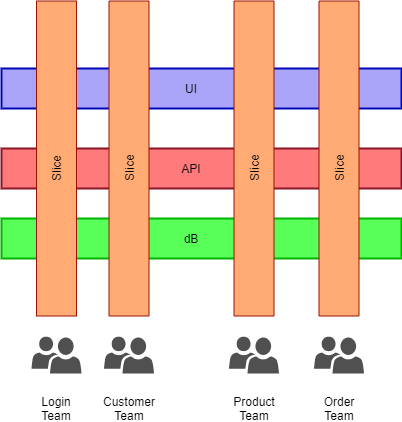
Micro-Frontends involve structuring your frontend as a set of loosely coupled, smaller applications. These mini-apps are meant to mirror backend microservices. This results in encapsulated domain-level vertical slices, such as Login, Customer Profile, Products, or Order Process.
Such vertical slicing grants each domain its own autonomy, which translates into incremental upgrades, independent deployment cycles, and a more decoupled codebase. This becomes especially valuable when dealing with enterprise-scale applications. Web Components play a pivotal role in making this architectural style feasible.
When one Web Component bundles multiple sub-components that together represent a single domain, a clear path toward Micro-Frontends emerges.
Using Web Components
A key advantage of Web Components is that browsers treat them like ordinary HTML elements. They come with a constructor and lifecycle callbacks. When the HTML parser encounters the tag, it creates a new node for the custom element.
Through the CustomElementRegistry object, new Custom Elements can be added to the page.
class HelloWorldClass extends HTMLElement {

    constructor() {
        // Always call super first in constructor
        super();
    }
    …
    …
}

customElements.define('hello-world', HelloWorldClass);
The final line above registers the HelloWorldClass, which becomes active whenever the tag “hello-world” is parsed.
Seems straightforward? Certainly, if a hello-world type element is all you need. But what about the conveniences we’ve grown accustomed to — custom events, attributes, properties, and the reflection of properties onto attributes? The complexity quickly rises:
class HelloWorldClass extends HTMLElement {
    static get observedAttributes() {
        return ['title’];
    }

    get disabled() {
        return this.hasAttribute('disabled');
    }

    set disabled(val) {
        if (val) {
            this.setAttribute('disabled', '');
        } else {
            this.removeAttribute('disabled');
        }
    }

    constructor() {
        // Always call super first in constructor
        super();
        // Setup a click listener on <hello-world> itself.
        this.addEventListener('click', e => {
            ...
        });
    }

    // Only called for the disabled and open attributes due to observedAttributes
    attributeChangedCallback(name, oldValue, newValue) {
        switch (name) {
            case 'title':
                this.component.title = newValue;
                break;
        }
    }

    get title(){
        return this.hasAttribute(title);
    }

    set title(value) {
        if (val) {
            this.setAttribute(‘title’, val);
        } else {
            this.removeAttribute(‘title’);
        }
    }

    …
}
Notice how things escalate, and that’s just for a single event and one attribute.
In the Angular ecosystem, @angular/elements comes to the rescue. This package takes any component you choose and wraps it into a Custom Element. It handles all the bindings automatically and scaffolds everything the component needs to manage both view and state.
The best part? It only takes two lines of code:
import { createCustomElement } from '@angular/elements';

createCustomElement(component, config);
The Web Component specification has made it possible for developers to create reusable components that run natively in the browser. This is ideal for building component libraries, ensuring consistent design and behavior across an organization’s suite of applications — without locking developers into any single framework. Taking things further, Web Components can also help design and implement Micro-Frontends. The nearly plug-and-play nature they offer enables domain teams to work independently. The idea of decoupling services and adopting microservices has become a common backend practice, and now Web Components bring that same flexibility to the frontend, avoiding less appealing alternatives like iFrames.