Objective
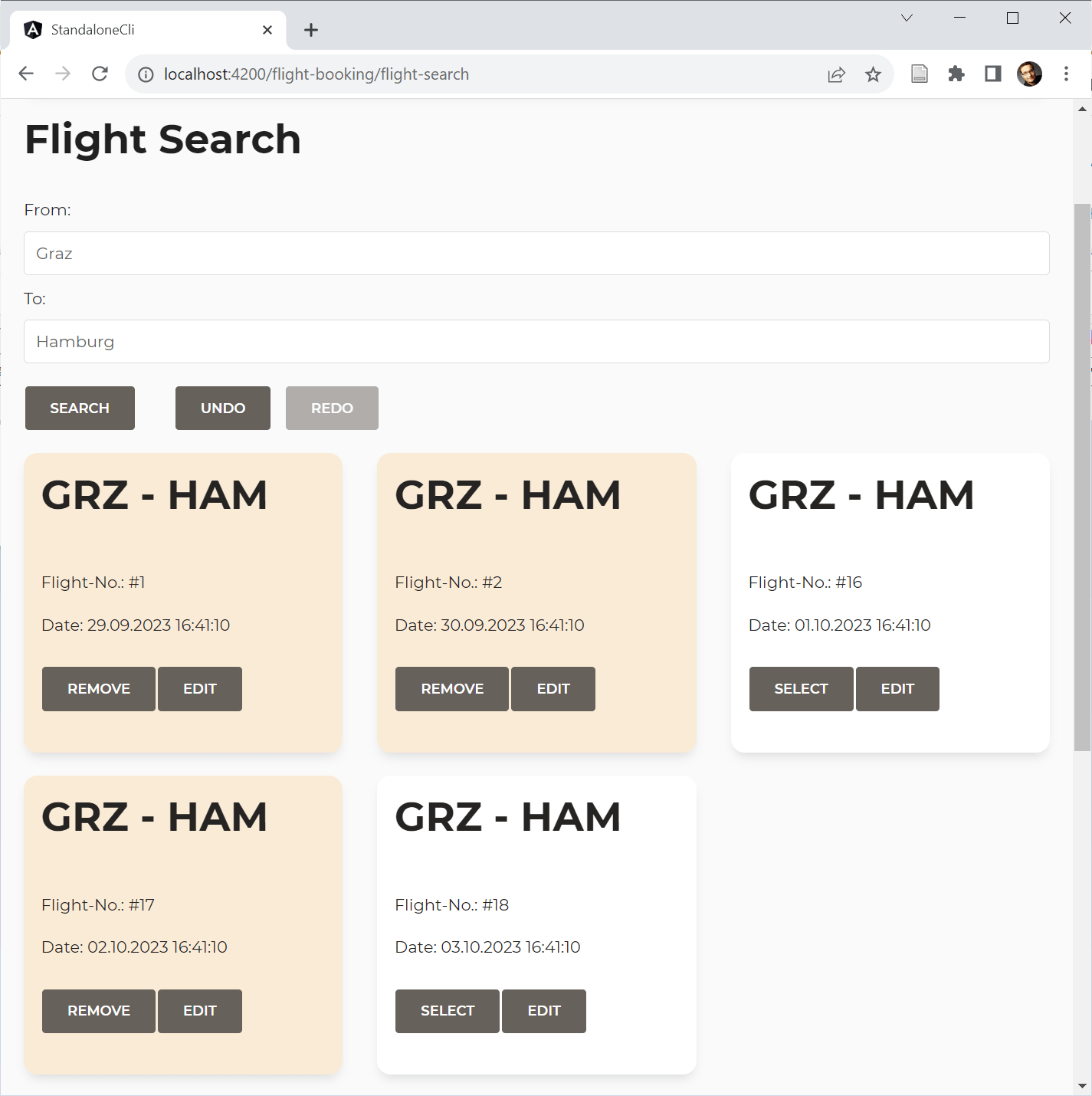
This article demonstrates how to build custom features for the Signal Store that enable entity search, multi-selection, display of selected items, and Undo/Redo functionality.
The demo application built on these custom features looks like this:
Here is the complete code required to configure the store, including Undo/Redo and integration with a backend data service:
export const FlightBookingStore = signalStore(
  { providedIn: 'root' },
  withEntities<Flight>(),
  withCallState(),
  withDataService(FlightService, { from: 'Graz', to: 'Hamburg'} ),
  withUndoRedo(),
);
The @ngrx/signals/entities package is used for entity management. The remaining logic is extracted into three reusable custom features: withCallState (covered in an earlier post), withDataService, and withUndoRedo. The latter two are examined in detail below.
The DataService Custom Feature
The DataService feature establishes state for a search filter and wires it to an Angular service that retrieves entities based on that filter. Future iterations could extend this feature to handle saving and deleting entities through the service, but those operations are omitted here since they don't add new conceptual material.
To keep the feature generic, a set of shared types describes everything it interacts with:
import { EntityId } from "@ngrx/signals/entities";
[...]

export type Filter = Record<string, unknown>;
export type Entity = { id: EntityId };

export interface DataService<E extends Entity, F extends Filter> {
    load(filter: F): Promise<E[]>;
}
These types define the shape of the search filter, what constitutes an entity, and the expected DataService contract. The EntityId type originates from @ngrx/signals/entities and accepts either string or number values.
Assuming entities are plain objects with an id property is one of the conventions @ngrx/signals/entities uses to keep code concise. If your primary key uses a different name, you can configure the package accordingly. For this example, the default convention is used.
Workshop Announcement: Angular Architecture
Deepen your expertise in building enterprise-scale, maintainable Angular apps through our Angular Architecture workshop!
More Information (English Workshop) | More Information (German Workshop)
Building a Generic Custom Feature
The withDataService function returns the feature as shown here:
export function withDataService<E extends Entity, F extends Filter, S extends DataService<E, F>>(dataServiceType: Type<S>, filter: F) {
    [...]
}
Its type parameter specifies the entity type, the search filter, and the DataService. When invoking this generic function, you only supply the DataService and an initial filter; TypeScript infers the rest:
withDataService(FlightService, { from: 'Graz', to: 'Hamburg'} ),Internally, withDataService relies on signalStoreFeature to assemble the custom feature:
export function withDataService<E extends Entity, F extends Filter, S extends DataService<E, F>>(dataServiceType: Type<S>, filter: F) {
    return signalStoreFeature(
        // Our expectations to the store:
        {
            state: type<{
                callState: CallState,
                entityMap: Record<EntityId, E>,
                ids: EntityId[]
            }>(),
            props: type<{
                entities: Signal<Entity[]>
            }>(),
            methods: type<{}>()
        },

        // Composing several features:
        withState( [...] ),
        withComputed( [...] ),
        withMethods( [...] )
    );
}
As explained in the first article of this series, signalStoreFeature composes existing features into a new one. You can add state via withState, computed signals via withComputed, and methods via withMethods.
One notable difference this time: the feature declares expectations for the store it is attached to. It requires the callState feature (which provides a callState property) and the entity feature (which supplies entityMap, ids, and the computed entities signal).
These expectations are encoded in the first argument passed to signalStoreFeature, which describes the expected state properties (state), computed signals (signals), and methods. Since no methods are expected, the methods key can be omitted rather than pointing to type<{}>().
To prevent naming conflicts, the entity feature permits custom property names. This example sticks with defaults, but a later article demonstrates type-safe handling of dynamic property names.
The rest of the custom feature adds state properties, computed signals, and methods on top of the expected features:
export function withDataService<E extends Entity, F extends Filter, S extends DataService<E, F>>(dataServiceType: Type<S>, filter: F) {
    return signalStoreFeature(
        // First parameter contains
        // Our expectations to the store:
        // If they are not fulfilled, TypeScript
        // will prevent adding this feature!
        {
            state: type<{
                callState: CallState,
                entityMap: Record<EntityId, E>,
                ids: EntityId[]
            }>(),
            props: type<{
                entities: Signal<Entity[]>
            }>(),
            methods: type<{}>()
        },
        withState({
            filter,
            selectedIds: {} as Record<EntityId, boolean>,
        }),
        withComputed(({ selectedIds, entities }) => ({
            selectedEntities: computed(() => entities().filter(e => selectedIds()[e.id]))
        })),
        withMethods((store) => {
            const dataService = inject(dataServiceType)
            return {
                updateFilter(filter: F): void {
                    patchState(store, { filter });
                },
                updateSelected(id: EntityId, selected: boolean): void {
                    patchState(store, ({ selectedIds }) => ({
                        selectedIds: {
                            ...selectedIds,
                            [id]: selected,
                        }
                    }));
                },
                async load(): Promise<void> {
                    patchState(store, setLoading());
                    const result = await dataService.load(store.filter());
                    patchState(store, setAllEntities(result));
                    patchState(store, setLoaded());
                }
            };
        })
    );
}
Creating a Compatible Data Service
Data services must implement the DataService interface described earlier, typed with the relevant entity and the search filter expected by the load method:
export type FlightFilter = {
    from: string;
    to: string;
}

@Injectable({
  providedIn: 'root'
})
export class FlightService implements DataService<Flight, FlightFilter> {
  baseUrl = `https://demo.angulararchitects.io/api`;

  constructor(private http: HttpClient) {}

  load(filter: FlightFilter): Promise<Flight[]> {
    [...]
  }

  [...]
}
The Undo/Redo Feature
The Undo/Redo feature is structured similarly. Internally, it maintains two stacks—an undo stack and a redo stack—each holding StackItem objects:
export type StackItem = {
    filter: Filter;
    entityMap: Record<EntityId, Entity>,
    ids: EntityId[]
};
Each StackItem captures a snapshot of the current search filter and the entity feature state (entityMap, ids).
Configuration is handled through the UndoRedoOptions type:
export type UndoRedoOptions = {
    maxStackSize: number;
}

export const defaultUndoRedoOptions: UndoRedoOptions = {
    maxStackSize: 100
}
This options object lets you cap the stack size. When the stack exceeds the limit, older entries are removed following a First In, First Out policy.
The withUndoRedo function adds the feature with this structure:
export function withUndoRedo<_>(options = defaultUndoRedoOptions) {

    let previous: StackItem | null = null;
    let skipOnce = false;

    const undoStack: StackItem[] = [];
    const redoStack: StackItem[] = [];

    [...]

    return signalStoreFeature(
        // Expectations to the store:
        {
            state: type<{
                filter: Filter,
                entityMap: Record<EntityId, Entity>,
                ids: EntityId[]
            }>(),
        },
        [...]
        withMethods((store) => ({
            undo(): void { [...] },
            redo(): void { [...] }
        })),
        withHooks({
            onInit(store) {
                effect(() => {
                    const filter = store.filter();
                    const entityMap = store.entityMap();
                    const ids = store.ids();

                    [...]
                });
            }
        })

    )
}
Note that current TypeScript versions require the dummy type parameter _ to make the feature composable with other typed features.
Like withDataService, it calls signalStoreFeature and specifies its store expectations in the first argument. It introduces undo and redo methods that restore state from the respective stacks. The onInit hook at the end sets up an effect that pushes the original state onto the undo stack after each change.
One distinguishing aspect of this implementation: the feature holds internal state—the undoStack and redoStack—outside the Signal Store itself.
The complete implementation is available in the 📂 GitHub repository (🔀 Branch: arc-signal-store-custom-examples). For an alternative version that stores feature-internal state inside the Signal Store, check the 🔀 arc-signal-custom-examples-undoredo-alternative branch.
Consuming the Store in a Component
To use the 7-line Signal Store in a component, simply inject it and delegate to its signals and methods:
@Component( [...] )
export class FlightSearchComponent {
  private store = inject(FlightBookingStore);

  // Delegate to signals
  from = this.store.filter.from;
  to = this.store.filter.to;
  flights = this.store.entities;
  selected = this.store.selectedEntities;
  selectedIds = this.store.selectedIds;

  // Delegate to methods
  async search() {
    this.store.load();
  }

  undo(): void {
    this.store.undo();
  }

  redo(): void {
    this.store.redo();
  }

  updateCriteria(from: string, to: string): void {
    this.store.updateFilter({ from, to });
  }

  updateBasket(id: number, selected: boolean): void {
    this.store.updateSelected(id, selected);
  }

}
Summary and Next Steps
Generic custom features dramatically reduce boilerplate for recurring tasks. In this article, a Signal Store for a straightforward use case was implemented in just 7 lines. While building such features generically requires upfront effort, the investment pays off when multiple use cases follow the same pattern.
Custom features can delegate to existing ones, and the NGRX Signal Store API ensures those dependencies are satisfied. The feature declares which state properties, computed signals, and methods it expects—if they're missing, TypeScript raises a compilation error.
For simplicity, this example used the default property names from the orchestrated features. However, custom names are supported to avoid conflicts. The entity feature, for instance, handles dynamic properties without sacrificing type safety. The next article shows how to apply this approach to your own custom features.
Further Reading on Architecture
Explore enterprise-scale Angular architecture guidance in our free eBook (5th edition, 12 chapters):
- What criteria help split a large application into sub-domains?
- How do you ensure the solution stays maintainable over years or decades?
- What Micro Frontend options does Module Federation offer?