Understanding the Signal Store Fundamentals
Introduced shortly after Angular 17, the NGRX Signal Store provides a notably lightweight approach to state management. It has no direct dependency on RxJS and operates entirely on Signals. What truly sets it apart, though, is how easily it can be extended. Through what are known as custom features, developers can centralize recurring logic with remarkable ease.
The initial custom feature example below is intentionally simple. From there, the complexity ramps up: a feature's consumer must be able to control the names of the signals and methods the feature creates. Without this capability, naming collisions become a real problem. As the subsequent examples demonstrate, achieving this flexibility does not require compromising TypeScript's strict type checking.
The patterns shown here draw inspiration from work by Marko Stanimirović, an NGRX core team member responsible for the Signal Store, as well as the @ngrx/signals/entity package that ships with the store.
📂 Source Code (Branch: arc-signal-store-custom-typed)
A Quick Primer on the Signal Store
Before diving in, let's get everyone up to speed on the core concepts of the NGRX Signal Store. A comprehensive overview is available in an earlier article.
Since version 17, NGRX ships the Signal Store within the @ngrx/signals package. The central piece is the signalStore function, which instantiates a new store. Technically speaking, this store is an Angular service that holds state signals, computed (derived) signals, and methods for mutating that state:
import {
  patchState,
  signalStore,
  withHooks,
  withMethods,
  withComputed,
  withState,
} from '@ngrx/signals';

[…]

export const FlightBookingStore = signalStore(

  { providedIn: 'root' },

  // State Properties
  withState({
    from: 'Paris',
    to: 'London',
    initialized: false,
    flights: [] as Flight[],
    basket: {} as Record<number, boolean>,
  }),

  // Calculated State
  withComputed(({ flights, basket, from, to }) => ({
    selected: computed(() => flights().filter((f) => basket()[f.id])),
    criteria: computed(() => ({ from: from(), to: to() })),
  })),

  // Extension
  withCallState(),

  // Methods
  withMethods((state) => {
    const { basket, flights, from, to, initialized } = state;
    const flightService = inject(FlightService);

    return {
      load: async () => {
        if (!from() || !to()) return;

        // Updating the extension’s state (callState)
        patchState(state, setLoading());

        const flights = await flightService.findPromise(from(), to());
        patchState(state, { flights });

        // Updating the extension’s state (callState)
        patchState(state, setLoaded());

      },
    };

  })
);
Remarkably, even at this foundational level, the Signal Store is already composed entirely of features. The functions withState, withComputed, and withMethods are three such features that equip the store with properties — both raw and derived signals — as well as methods.
The withCallState function serves as a straightforward first custom feature. It introduces a callState signal that can report whether data is currently loading, has finished loading, or encountered an error. Specifically, it provides these signals:
callState: Capable of holding the valuesinit,loading,loaded, or an object containing an error message.loading: A computed signal returningtruewhenevercallStateequalsloading.loaded: A computed signal returningtruewhenevercallStateequalsloaded.error: A computed signal yielding the error message stored incallState, ornullif none exists.
The CallState feature also exposes updater functions such as setLoading and setLoaded. Consumers use these functions — as shown in Listing 1 — to modify the callState value. In general, updaters allow consumers to alter state without needing to understand its internal structure.
The following listing depicts a simple component leveraging the FlightBookingStore. It forwards calls to the various signals and its load method, while also reading the loading signal set up by the CallState feature:
@Component({ … })
export class FlightSearchComponent {
  private store = inject(FlightBookingStore);

  // Getting Signals from Store
  from = this.store.from;
  to = this.store.to;
  basket = this.store.basket;
  flights = this.store.flights;
  selected = this.store.selected;

  // Getting Signal from Extension
  loading = this.store.loading;

  async search() {
    this.store.load();
  }
}
Building a Basic Extension
Here's a minimal first version of the CallState feature used previously:
import {
  SignalStoreFeature,
  signalStoreFeature,
  withComputed,
  withState,
} from '@ngrx/signals';

[…]

export type CallState = 'init' | 'loading' | 'loaded' | { error: string };

export function withCallState() {
  return signalStoreFeature(
    withState<{ callState: CallState }>({ callState: 'init' }),
    withComputed(({ callState }) => ({
      loading: computed(() => callState() === 'loading'),
      loaded: computed(() => callState() === 'loaded'),
      error: computed(() => {
        const state = callState();
        return typeof state === 'object' ? state.error : null
      }),
    }))
  );
}
This is a function that returns whatever signalStoreFeature produces. In turn, signalStoreFeature simply bundles existing features together: withState sets up the callState property, and withComputed defines the computed signals based on it.
The updaters provided by the feature return only the subset of state being modified:
export function setLoading(): { callState: CallState } {
  return { callState: 'loading' };
}

export function setLoaded(): { callState: CallState } {
  return { callState: 'loaded' };
}

export function setError(error: string): { callState: CallState } {
  return { callState: { error } };
}
Where the Real Work Begins: Typing
The CallState implementation from the prior section neatly addresses a common requirement. Once written, individual applications can plug the feature directly into their stores.
However, this version has a limitation: the signal names are hard-coded as callState, loading, loaded, and error. This becomes problematic when a store needs the feature more than once — for instance, managing separate call states for flights and passengers within the same store.
To solve this, we should let consumers choose the names of the introduced signals. That's the goal for the next iteration. Getting this extension to be type-safe requires some careful thought about how withCallState is typed.
Currently, our withCallState function has no explicit return type. TypeScript infers one by examining the returned value, recognizing that a callState property exists.
The inferred type is a SignalStoreFeature<Input, Output>. Here, Input describes what signals and methods the feature expects from the store, while Output describes what new signals and methods it contributes. Our feature has no prerequisites from the store, but it does add a callState signal plus computed signals like loading. Consequently, the Input and Output types look like this:
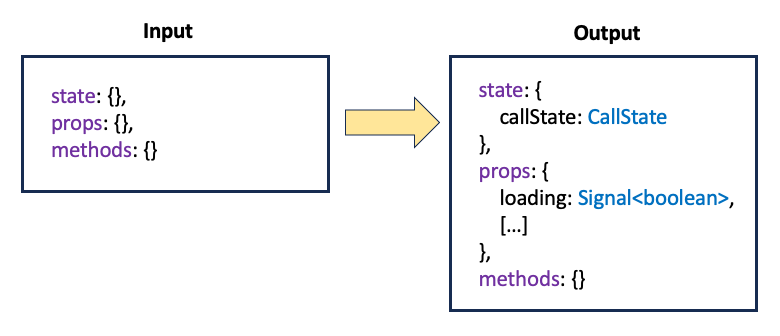
Notice that state refers to the raw signal being introduced, whereas the signals property encompasses the computed signals derived from it. This is, at least, how it appears from the outside.
Internally, the situation is more involved. The withState call first creates the callState signal, and only afterward does withComputed layer on the derived signals. As a result, there are two distinct outputs internally, which get merged through a helper type.
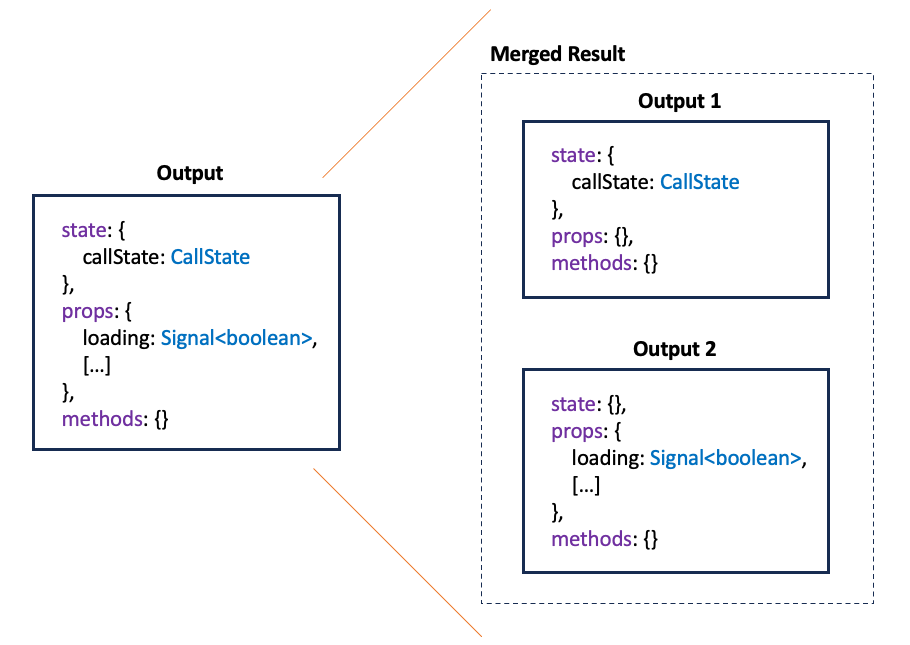
For clarity, the illustration above labels this helper type Merged Result. In reality, the Signal Store defines several internal types to handle this merging.
Logically, the internal and external views are equivalent, but TypeScript might need a small nudge — in the form of a type assertion — to see that. Explicitly writing out the internal view is tedious and currently impractical, since the necessary helper types aren't exposed in the Signal Store's public API. That's why the approach here mirrors patterns found throughout the Signal Store's own source: pairing a function overload with the external view against a function implementation that uses a bare SignalStoreFeature rather than SignalStoreFeature<Input, Output>:
// Overloading with External View
export function withCallState()
  : SignalStoreFeature<
    {
      state: {},
      props: {},
      methods: {}
    },
    {
      state: {
        callState: CallState
      },
      props: {
        loading: Signal<boolean>,
        loaded: Signal<boolean>,
        error: Signal<{ error: string } | null>
      },
      methods: {}
    }>;
// Implementation with Internal View
export function withCallState(): SignalStoreFeature {
  return signalStoreFeature(
    withState<{ callState: CallState }>({ callState: 'init' }),
    withComputed(({ callState }) => ({
      loading: computed(() => callState() === 'loading'),
      loaded: computed(() => callState() === 'loaded'),
      error: computed(() => {
        const state = callState();
        return typeof state === 'object' ? state.error : null
      }),
    }))
  );
}
Leaving SignalStoreFeature without type parameters means it relies on more generic Input and Output types that make no assumptions about specific names or data shapes.
Going Deeper: Angular Architecture Workshop
Advance your skills in building enterprise-grade, maintainable Angular applications through our interactive online Angular Architecture workshop!
All Details (English Workshop) | All Details (German Workshop)
Typing and Dynamic Properties – How Do They Work Together?
With the basic type structure established, the next step is to make property names configurable. Mirroring the approach in @ngrx/signals/entity, users should be able to pass a prefix when enabling the feature:
export const FlightBookingStore = signalStore(
  { providedIn: 'root' },

  withState({ … }),
  withComputed(( … ) => ({ … })),

  withCallState({ prop: 'flights' }),
  withCallState({ prop: 'passengers'}),

  […]
);
This prefix should be reflected in the property names the feature creates. For instance, the initial invocation of withCallState would yield these properties:
flightsCallState(state)flightsLoading(computed)flightsLoaded(computed)flightsError(computed)
A second call produces the corresponding set of properties:
passengersCallState(state)passengersLoading(computed)passengersLoaded(computed)passengersError(computed)
Handling these properties at runtime is straightforward, since JavaScript is inherently dynamic. The real difficulty lies in making TypeScript aware of them.
To achieve this, you first need a type-level representation of the prefix. Here, we leverage the fact that string literals can act as types:
export type BoxStatus = 'open' | 'closed';
const candyBox: BoxStatus = 'open';
String Literal Union Types are commonly used in TypeScript to emulate enums. This approach is actually closer to EcmaScript than using the enum keyword. Interestingly, nothing compels us to offer multiple options, so this single-value variant is perfectly valid:
export type BoxStatusAfterHolidays = 'closed';We now have a type that holds exactly one string value. This pattern is exactly what we need to represent our prefix in the type system. First, we define a type that derives the signal name based on the prefix:
export type NamedCallState<Prop extends string> = {
  [K in Prop as `${K}CallState`]: CallState;
};
This is a mapped type, transforming one type into another. The type parameter Prop extends string represents the source type, which can be any string used as a type. Note that "string" is lowercase here, since we're dealing with a specific string type rather than the String object type. The K in Prop syntax iterates over the members of the type, which in this case reduces to a single string. In more complex scenarios, the in keyword can loop through properties of a broader type.
We apply the same logic to the computed signals:
export type NamedCallStateComputed<Prop extends string> = {
  [K in Prop as `${K}Loading`]: Signal<boolean>;
} & {
    [K in Prop as `${K}Loaded`]: Signal<boolean>;
} & {
    [K in Prop as `${K}Error`]: Signal<string | null>;
};
Because a mapped type allows only one mapping, we combine multiple mapped types using the intersection operator (&). With both types defined, we can now specify the signature of withCallState:
export function withCallState<Prop extends string>(config: {
  prop: Prop;
}): SignalStoreFeature<
  { state: {}, props: {}, methods: {} },
  {
    state: NamedCallState<Prop>,
    props: NamedCallStateComputed<Prop>,
    methods: {}
  }
>;
export function withCallState<Prop extends string>(config: {
  prop: Prop;
}): SignalStoreFeature {
[…]
}
At this point, the type system understands the configured properties. The next step is to establish these properties at runtime, using a helper function called getCallStateKeys:
function getCallStateKeys(config: { prop: string }) {
  return {
    callStateKey: `${config.prop}CallState`,
    loadingKey: `${config.prop}Loading`,
    loadedKey: `${config.prop}Loaded`,
    errorKey: `${config.prop}Error`,
  };
}
This helper produces the same mappings at runtime that the types define at compile time. The revised withCallState implementation uses these names to set up the corresponding properties:
[…]
export function withCallState<Prop extends string>(config: {
  prop: Prop;
}): SignalStoreFeature {
  const { callStateKey, errorKey, loadedKey, loadingKey } =
    getCallStateKeys(config);

  return signalStoreFeature(
    withState({ [callStateKey]: 'init' }),
    withComputed((state: Record<string, Signal<unknown>>) => {

      const callState = state[callStateKey] as Signal<CallState>;

      return {
        [loadingKey]: computed(() => callState() === 'loading'),
        [loadedKey]: computed(() => callState() === 'loaded'),
        [errorKey]: computed(() => {
          const v = callState();
          return typeof v === 'object' ? v.error : null;
        })
      }
    })
  );
}
To handle the dynamic properties correctly, the updaters also accept a matching parameter:
export function setLoading<Prop extends string>(
  prop: Prop
): NamedCallState<Prop> {
  return { [`${prop}CallState`]: 'loading' } as NamedCallState<Prop>;
}
This approach is consistent with what you'll find in @ngrx/signals/entity. The updater gets used like this:
load: async () => {
  patchState(state, setLoading('flights'));
  […]
}
More Examples: CRUD and Undo/Redo
In the prior article, I showcased features for implementing CRUD operations and Undo/Redo. The repository below contains a variation of these features that uses the dynamic properties described here.
📂 Source Code (see 🔀 branch arc-signal-store-custom-examples-typed)
Conclusion
The NGRX team has a reputation for exceptionally clever use of TypeScript's type system. The outcome is an API that is both easy to use and thoroughly type-safe.
In this discussion, we adopted the role of the library author and explored how to apply the same patterns to custom Signal Store features. This gives users the ability to configure property names, preventing naming clashes while retaining full type safety.
This journey involves TypeScript features that application developers rarely encounter in their daily work, which can make these patterns seem somewhat involved. The upside is that they're only necessary when crafting highly reusable solutions. Once we put on the application developer hat again, we benefit from a comfortable, fully-typed API.
What's next? More on Architecture!
For deeper insights into enterprise-scale Angular architectures, our free eBook is available (5th edition, 12 chapters):
- What criteria guide the decomposition of a large application into sub-domains?
- How can you ensure the solution remains maintainable for years or decades?
- What does Module Federation offer for Micro Frontends?
Feel free to download it here now!