Harnessing Reactivity for Rendering
Reactivity has found its way into numerous JavaScript UI frameworks, from React to Angular and everything in between. You might have integrated MobX into a React project, employed reactive templates in Vue, utilized RxJS with Angular, or had Svelte compile its reactive system directly into your codebase.
SolidJS distinguishes itself as a UI rendering library constructed entirely upon a reactive foundation. It isn't merely a mechanism for automating state management. Rather, it constitutes the renderer, the components, and every facet of how the library operates.
It turns out this strategy delivers remarkable performance. And by remarkable, I mean exceptionally fast:
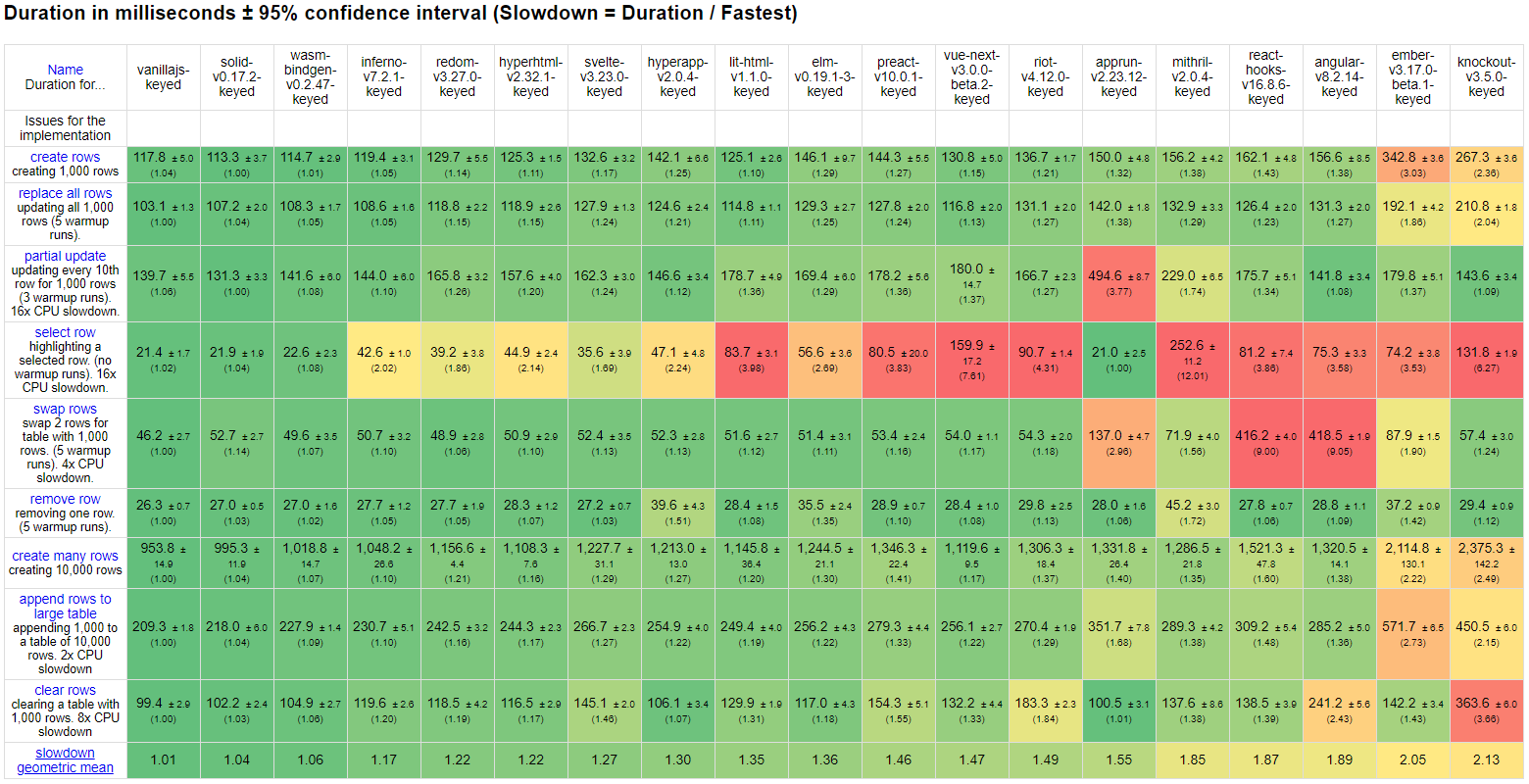
JS Framework Benchmark June 2020
Note: Both VanillaJS and WASM-Bindgen serve as reference implementations for JavaScript and WASM respectively. They employ the most optimal handcrafted code to execute the benchmarks without relying on any library.
This approach also fosters powerful composition patterns. Every reactive primitive is atomic and composable. More importantly, each primitive is accountable solely to the reactive life-cycle.
Consequently, there are no "Hook Rules," no this bindings, and no concerns about stale closures.
What often remains unclear, however, is how one transitions from the straightforward example of automatically triggering a console.log to fully updating views.
Today, I aim to demonstrate how a complete renderer can be built using nothing more than a reactive system, and how we can evolve from that introductory demo to a full-featured library like Solid:
const Greeting = (props) => (
  <>Hi <span>{props.name}</span></>
);

const App(() => {
  const [visible, setVisible] = createSignal(false),
    [name, setName] = createSignal("Josephine");

  return (
    <div onClick={() => setName("Geraldine")}>{
      visible() && <Greeting name={ name } />
    }</div>
  );
});

render(App, document.body);
Understanding Reactive Effects
First, it's essential to recognize that reactivity isn't inherently a system or a solution. It's a technique for modeling a problem. Numerous problems can be addressed through reactivity, and each solution may carry its own advantages or drawbacks depending on the context.
So there's no silver bullet here—nothing innate to reactivity itself. Reactivity incurs a real performance cost during creation, and if handled carelessly, it can transform your software into a tangled web of cascading updates. We'll delve into that later.
By now, hopefully you've experimented with a reactivity system so that the following example appears familiar:
const [name, setName] = createSignal("John");

createEffect(() => console.log(`Hi ${name()}`)); // prints: Hi John

setName("Julia") // prints: Hi Julia

setName("Janice") // prints: Hi Janice
I'm using Solid's syntax here, but Vue, MobX, React, Knockout, and Svelte all offer variations. We create a simple reactive atom (signal) holding the value "John". Then we establish a side effect computation that tracks whenever name changes and logs a greeting to the console. When we assign a new value to the name, that effect re-runs, logging fresh greetings in the console.
If this looks unfamiliar or you're curious about the underlying mechanics, check out Finding Fine-Grained Reactive Programming.
So if we intend to render the DOM, we should treat it as a side effect as well:
const [name, setName] = createSignal("John");

const el = document.createElement("div");
createEffect(() => el.textContent = `Hi ${name()}`);
// <div>Hi John</div>

setName("Julia") // <div>Hi Julia</div>

setName("Janice") // <div>Hi Janice</div>
In many ways, that's the entire story. We create a DOM element and wire up the updates. To update an attribute or a class, we would follow a very similar pattern.
const [selected, setSelected] = createSignal(false);

const el = document.createElement("div");
createEffect(() => el.className = selected() ? "selected" : "");
// <div></div>

setSelected(true) // <div class="selected"></div>
Naturally, this approach wouldn't scale well for large, complicated applications. We need to address several more aspects before we can legitimately call this a renderer.
Composition and Scalability
The initial hurdle is that this pattern doesn't scale if we can't modularize the approach. While we can create DOM elements and effects to update them, we'll eventually reach a point where we need to conditionally append or remove elements.
const [visible, setVisible] = createSignal(false);

const el = document.createElement("div");
createEffect(() => {
  if (visible()) {
    const text = document.createTextNode("Hi "),
      el2 = document.createElement("span");
    el2.textContent = "Joseph";
    el.appendChild(text);
    el.appendChild(el2);
  } else el.textContent = "";
});
// <div></div>

setVisible(true); // <div>Hi <span>Joseph</span></div>
setVisible(false); // <div></div>
If desired, we can even abstract this into a function—a sort of component. In the following example, our component can accept a name to render:
function Greeting(props) {
  const text = document.createTextNode("Hi "),
    el = document.createElement("span");
  el.textContent = props.name;
  return [text, el]; // A fragment... :)
}

const [visible, setVisible] = createSignal(false);

const el = document.createElement("div");
createEffect(() => {
  if (visible()) {
    el.append(...Greeting({ name: "Joseph" }));
  } else el.textContent = "";
});
// <div></div>

setVisible(true); // <div>Hi <span>Joseph</span></div>
setVisible(false); // <div></div>
This leads us to our first challenge: what if we want the name to change dynamically?
Well, we need to convert the name into a signal so that we can track the change. But this has implications when the greeting becomes visible. Simply tracking and updating will trigger the entire effect, re-running it will recreate the component and append the nodes again! We must avoid this.
Where a Virtual DOM library like Vue could recreate its virtual representation and diff it freely, we face a real cost in creating DOM nodes. While we could always replace content upon update, this would be comparatively expensive.
Libraries like Svelte handle this by compiling each component into essentially two functions: a creation path and an update path. On creation, the initial code runs. But when the reactive system triggers, it executes the update path instead.
This compiled approach can work effectively, but it demands more consideration around components because when a child component executes, it's either created, marked for update due to prop changes, or left unchanged. This stems from the fact that dynamic children's creation code may still fall under their parent's update path.
Alternatively, the simplest solution, which many reactive systems naturally support, involves nesting effects. Since the reactive scope operates like a stack, only the currently running computation tracks. So we could update our component as follows:
function Greeting(props) {
  const text = document.createTextNode("Hi "),
    el = document.createElement("span");
  createEffect(() => el.textContent = props.name());
  return [text, el]; // A fragment... :)
}
This approach has a notable caveat: the observer pattern used by these reactive libraries can lead to memory leaks. Computations that subscribe to signals outliving them are never released as long as the signal remains in use. Whenever the signal updates, these computations will fire again even if they're no longer referenced anywhere.
This also carries the downside of retaining old DOM element references in closures for DOM side effects. So we need to manage their disposal. Fortunately, this isn't the most challenging problem to solve.
Establishing Reactive Roots
Think about it: every time the parent effect re-runs, everything created during that function's execution gets recreated. So during creation, we can register all computations created under that scope, just as we track dependencies. Then, upon re-running or disposal, we dispose of those computations the same way we unsubscribe from all dependencies.
We can achieve this largely transparently to the end consumer, provided we have a way to gather top-level computations. For this, our application must run within a reactive root:
function Greeting(props) {
  const text = document.createTextNode("Hi "),
    el = document.createElement("span");
  createEffect(() => el.textContent = props.name());
  return [text, el]; // A fragment... :)
}

const rendered = createRoot(() => {
  const [visible, setVisible] = createSignal(false),
    [name, setName] = createSignal("Josephine");

  const el = document.createElement("div");
  createEffect(() => {
    if (visible()) {
      el.append(...Greeting({ name }));
    } else el.textContent = "";
  });

  return el;
});

document.body.appendChild(rendered);
Roots also grant us the ability to arbitrarily control disposal by injecting themselves as the owner. For Solid, the dispose method is an optional parameter of the createRoot function, which can be useful for more complicated memoization scenarios.
let dispose = [],
  mapped = [],
  prevList = [];

onCleanup(() => {
  for(const d of dispose) d();
});

let parent = document.createElement("div");
createEffect(() => {
  const list = signal(),
    nextDispose,
    nextMapped;
  for(const [index, item] of list.entries()) {
    const prevIndex = prevList.findIndex(item);

    // move to new position
    if (prevIndex > -1) {
      nextMapped[index] = mapped[prevIndex];
      nextDispose[index] = dispose[prevIndex];
      dispose[prevIndex] = null;
    } else {
      // create new row
      createRoot(disposer => {
        dispose[index] = disposer;
        nextMapped[index] = createFn(item);
      });
    }
  }
  // cleanup unused nodes skipping holes
  for(const d of dispose) d && d();

  dispose = nextDispose;
  mapped = nextMapped;
  prevList = list;

  // naive replace
  parent.textContent = "";
  parent.append(...mapped);
})
Above is a very basic implementation of a reactive map, akin to what you'd use to transform a list of items into DOM nodes within a view. This effect re-runs whenever the list changes, but it's meticulous about not recreating DOM nodes that were generated in previous runs.
Normally, re-running the effect would release all child computations, but because each one lives in its own root, we manually control the disposal of only the rows that were removed.
Furthermore, this example introduces onCleanup, a method for scheduling disposal when the parent is disposed of or re-runs. This small integration with the reactive execution life-cycle provides the final piece for managing other side effects of the reactive system that extend beyond core rendering.
At this juncture, we possess most of the tools required to efficiently render our views. We can:
- Handle the creation and update of DOM nodes
- Manage the disposal of nested conditional and dynamic flows
- Modularize our code effectively
However, further improvements can enhance both performance and user experience.
Leveraging Reactive Memoization
Derivations are common in reactive libraries because they allow us to automatically derive a value from other signals. In many libraries, these are called computed values since they're pure computations that return a new value.
But from a nested rendering perspective, they can be viewed differently. Upon execution, when re-evaluating an effect, these functions don't re-run—they simply return the cached value from their previous run. That's why in Solid, I refer to them as memos.
While they're mostly unnecessary if they're being read from an effect anyway—there's no need to wrap them in an additional reactive primitive—they allow us to perform expensive work only once. This is ideal for tasks like DOM or component creation.
function MyList() {
  const [list, setList] = createSignal(["Anita", "Andrew", "A.J."]),
    [visible, setVisible] = createSignal(false),
    nodes = createMemo(map(list, (item) => {
      const li = document.createElement("li");
      li.textContent = item;
      return li;
    }));

  const el = document.createElement("ul");
  createEffect(() => {
    if (visible()) {
      el.append(...nodes());
    } else el.textContent = "";
  });
  return el;
}
Imagine map is a function similar to the one from the previous section's last example, which reactively maps a list to DOM nodes. But instead of appending them, it returns those nodes via a function call.
Without the createMemo, every time visible's value changes to true we'd be re-running the function. It might not find any differences or create new DOM nodes, but it would still iterate over that list, performing all lookups and comparisons.
Instead, whenever visible changes to true and nodes is called, it just returns the results from the last run. Only when list changes is the more expensive routine executed again.
Returning to our original example, consider what happens if we use a condition instead of a simple boolean:
const rendered = createRoot(() => {
  const [count, setCount] = createSignal(0),
    [name, setName] = createSignal("Josephine");

  const el = document.createElement("div");
  createEffect(() => {
    if (count() > 5) {
      el.append(...Greeting({ name }));
    } else el.textContent = "";
  });

  return el;
});

document.body.appendChild(rendered);
Every time count changes, we re-run the effect. Sure, when it's under 6, we're not doing much damage, but 6, 7, 8, 9… we keep recreating the child component and its DOM nodes.
A more interesting use of memos arises when they're configured to notify only when their value changes. In that case, they can serve the exact opposite purpose. They act as a powerful tool to isolate cheaper calculations nested inside more expensive computations that don't wish to re-run unless things have genuinely changed.
const rendered = createRoot(() => {
  const [count, setCount] = createSignal(0),
    [name, setName] = createSignal("Josephine"),
    // memo with equality comparator
    visible = createMemo(() => count() > 5, undefined, (a, b) => a === b);

  const el = document.createElement("div");
  createEffect(() => {
    if (visible()) {
      el.append(...Greeting({ name }));
    } else el.textContent = "";
  });

  return el;
});

document.body.appendChild(rendered);
This essentially brings us back to the original behavior: only when count passes the threshold and the results shift from false to true—or vice versa—do we re-run our effect.
Components
We touched on composition earlier, but let's circle back with the knowledge we've accumulated. In such a system, what exactly constitutes a component?
You've already encountered them — they're simply functions. This pattern of composing reactive primitives in the same manner one composes Hooks is all that's required. onCleanup provides the mechanism for lifecycle management.
Fundamentally, a component is nothing more than a factory function producing DOM nodes connected to state through closures of effectful functions. However, a few additional considerations come into play.
Reactive Isolation
When we first explored making our Greeting component update its name dynamically, we considered the following approach, but it carried the side effect of recreating the component with each update:
function Greeting(props) {
  const text = document.createTextNode("Hi "),
    el = document.createElement("span");
  el.textContent = props.name(); // reactive access will be tracked upstream
  return [text, el]; // A fragment... :)
}
Protection against this is advisable. Most reactive libraries offer an ignore or untracked utility. In Solid, this is called sample. It establishes a new scope where reactive signals go untracked. Using it serves as a safeguard to ensure that accesses outside your effects and memos don't trigger upstream re-renders, potentially replacing significant portions of your view unexpectedly.
Wrapping your components in sample is therefore a wise precaution. It also permits intentional access to reactive variables outside an effect when you deliberately want them to remain static.
Universal Props
What happens when the consumer of your Greeting component passes a plain string instead of a dynamic value? Checking whether something is a function at every access point becomes awkward. And what if you'd prefer to use modern reactive accessors like proxies?
One common approach in other libraries is encouraging developers to use an isObservable check. But this still demands constant attention. An alternative that frees component authors from this burden involves regulating the props object itself.
By mapping wrapped functions to getters on the props, you achieve universal access. Consider this:
const props1 = {
  name: "Jacob"
}

const [name, setName] = createSignal("Jacob");
const props2 = {
  get name() { return name() }
}

function Greeting(props) {
  const text = document.createTextNode("Hi "),
    el = document.createElement("span");
  createEffect(() => el.textContent = props.name);
  return [text, el]; // A fragment... :)
}

Greeting(props1); // <div>Hi <span>Jacob</span></div>

Greeting(props2); // <div>Hi <span>Jacob</span></div>
The component author decides whether props.name is dynamic while accessing it uniformly. The consumer supplies props consistently. You might think you could skip creating that effect altogether if the prop is known to be static, but we can also detect this when no subscriptions occur after the first execution. If the effect never updates, it becomes removable.
Wrapping may seem laborious, though. But we can handle this (along with sample) using a helper. Whether explicitly or by detecting functions, we can transform props and invoke our component as needed.
function dynamicProperty(props, key) {
  const src = props[key];
  Object.defineProperty(props, key, {
    get() {
      return src();
    },
    enumerable: true
  });
}

function createComponent(Comp, props, dynamicKeys) {
  if (dynamicKeys) {
    for (let i = 0; i < dynamicKeys.length; i++)
      dynamicProperty(props, dynamicKeys[i]);
  }
  return sample(() => Comp(props));
}
Dynamic Components
Given our pattern of creating real DOM nodes and effects that return those nodes, one might wonder how to return something changeable without parent access?
As with any runtime function-based creation method — HyperScript, React.createElement, and similar — execution proceeds inside-out. In other words, children are typically finished before their parents.
The solution, as you'll see is the case for everything else, is lazy evaluation. Returning a function shifts control back to the parent, determining when creation should occur — an incredibly powerful mechanism.
// conditional component that renders props.children
// when props.test === true
function iff(props) {
  comst cond = createMemo(() => props.test, undefined, (a, b) => a === b);

  return () => cond() ? props.children : undefined;
}

iff({ test: () => count() > 5, children: () => Greeting({ name }) })
Naturally, this means el.append no longer suffices. So let's examine how everything fits together.
Templating
At this juncture, we possess nearly everything needed to manually wire up performant reactive views. But honestly, that's considerable effort. At this point, plain vanilla JavaScript could handle these examples just fine.
The final ingredient is templating to simplify our lives, sparing us from writing all this code manually. Several options exist:
- Wrap all element and component creation in a HyperScript
hfunction that determines the appropriate code path for iteration and conditionals at runtime — a purely runtime approach. - Analyze strings or Tagged Template Literals at runtime, using dynamic code generation to produce code resembling our earlier examples.
- Employ a custom parser or JSX template at compile time to generate code similar to what we've explored.
Solid supports all three approaches, each with its own tradeoffs.
The first is certainly the simplest but will always trail optimized runtime-only approaches in performance — you perform the same operations while incurring higher creation costs. Nothing can be inferred since structure becomes apparent only during function execution. Additionally, being plain JavaScript, you end up doing more manual wiring.
The second option carries inherent limitations. String-based approaches restrict you to a limited DSL, especially for expressions, unless you bring your own sophisticated parser, which adds bytes. Tagged Template Literals expose expression execution, meaning you must still wrap your own expressions carefully.
A custom DSL or JSX is therefore highly desirable because analysis lets us generate code nearly verbatim from our examples. We automatically handle identifying and wrapping dynamic expressions. We can detect which code gets used to selectively import it for tree-shaking benefits. This approach yields both the smallest and fastest output.
But rather than walking you through building a Babel plugin, we'll examine the final few helpers necessary to support all these approaches.
Insert
First, let's address content insertion. As noted, element.append won't hold up. Things become considerably more intricate with multiple ranges under the same parent, though I'll keep code examples focused on the straightforward case.
We can insert text, nodes, functions, or arrays of those. Text and nodes are straightforward — we simply replace existing content with the new value.
function insert(parent, value, current) {
  if (value === current) return current;
  const t = typeof value;

  if (t === "string" || t === "number") {
    if (t === "number") value = value.toString();
    current = parent.textContent = value;
  } else if (value == null || t === "boolean") {
    current = parent.textContent = "";
  /*... Handle functions and arrays ... */
  } else if (value instanceof Node) {
    if (Array.isArray(current)) {
      parent.textContent = "";
      parent.appendChild(value);
    } else if (current == null || current === "") {
      parent.appendChild(value);
    } else parent.replaceChild(value, parent.firstChild);
    current = value;
  } else console.warn(`Skipped inserting ${value}`);

  return current;
}
Functions and arrays pose greater challenges, primarily because functions are tricky and arrays may contain them.
Arrays require reconciliation, and numerous algorithms exist. Since this piece is common across all rendering approaches (VDOM, Single Pass Reconciling, or Reactive), I won't detail it here.
Functions, however, are truly the key to pulling everything together. As I mentioned earlier, most runtime techniques execute inside-out to some degree.
VDOM libraries remain unconcerned since they diff in a second pass after creating the virtual tree. Single Pass Reconcilers typically place heavy boundaries on components to break execution into clear top-down anchor points.
But reactivity operating under a scope requires a different strategy. My approach involves recursive reactive layering. Consider how the function portion of the insert utility works:
// at top of function:
while (typeof current === "function") current = current();

// in the conditional
if (t === "function") {
  createEffect(() => (current = insert(parent, value(), current)));
  return () => current;
}
Passing a function creates an effect that tracks its own child insert. Regardless of what the function returns, it knows how to handle inserting the new value.
What becomes interesting is when that function also returns a function. We end up nesting effects, isolating their updates from each other as we did earlier, all executing in top-down order. No matter how many nested dynamic components stack up, each re-evaluates only at its level and downward.
Arrays with dynamic components operate similarly, except we attempt to flatten values at each level into a single array. Memos prove especially valuable here — when one branch of a fragment updates, you don't necessarily want to re-evaluate the others.
At the deepest layer where all values resolve, we can then diff against the DOM and apply changes.
Spread
This is the other runtime method carrying some complexity. While named properties passed individually can be analyzed, spreads must be handled at runtime, making them inherently dynamic. You iterate over a lengthy series of conditionals performing various updates, all wrapped within an effect.
function spread(node, props) {
  let = prevProps = {};
  createEffect(() => {
    let info,
      p = props();
    for (const prop in p) {
      if (prop === "children") {
        insert(node, props.children);
        continue;
      }
      const value = props[prop];
      if (value === prevProps[prop]) continue;
      if (prop === "style") {
        style(node, value, prevProps[prop]);
      } else if (prop === "ref") {
        value(node);
      } else if ((info = Attributes[prop])) {
        if (info.type === "attribute") {
          node.setAttribute(prop, value);
        } else node[info.alias] = value;
      } else if (prop.indexOf("-") > -1 || prop.indexOf(":") > -1) {
        node.setAttribute(
          prop.replace(/([A-Z])/g, g => `-${g[0].toLowerCase()}`),
          value
        );
      } else node[prop] = value;
    }
    prevProps = p;
  });
}
Here, a helper manages diffing style objects, and we leverage insert to handle children. A lookup exists for known attribute names like class or for to set them correctly.
In compiled approaches like JSX, unless the end-user spreads onto HTMLElements, we can avoid including this code. But with what we have, constructing a simple HyperScript h function becomes quite easy.
function h(...args) {
  let e;
  function item(l) {
    const type = typeof l;
    if (l == null) void 0;
    else if ("string" === type) {
      // create element tag
      if (!e) e = document.createElement(l);
      // create child text node
      else e.appendChild(document.createTextNode(l));
    // simple non-string value
    } else if ("number" === type ||
      "boolean" === type ||
      l instanceof Date ||
      l instanceof RegExp) {
      e.appendChild(document.createTextNode(l.toString()));
    // insert element or array
    } else if (l instanceof Element || Array.isArray(l)) {
      insert(e, l);
    // spread element attributes
    } else if ("object" === type) {
      spread(e, l);
    } else if ("function" === type) {
      // component
      if (!e) {
        let props = {}, dynamic = [], next = args[0];
        // grab props object if present
        if (
          typeof next === "object"
          && !Array.isArray(next)
          && !(next instanceof Element)
        )
          props = args.shift();

        // test for dynamic expressions
        for (const k in props) {
          if (typeof props[k] === "function") dynamic.push(k);
        }

        // handle children
        props.children = args.length > 1 ? args : args[0];
        if (
          props.children
          && typeof props.children === "function"
          && !props.children.length
        )
          dynamic.push("children");

        // create the component
        e = createComponent(l, props, dynamic);
        args = [];
      // dynamic function expression
      } else insert(e, l);
    }
  }

  // evaluate arguments
  while (args.length) item(args.shift());
  // return element
  return e;
}
That's essentially it. Combining insert, spread, and createComponent, we have everything necessary to complete our template DSL.
Now we can transform our example into HyperScript, adding a click handler for good measure:
function Greeting(props) {
  return ["Hi ", h("span", () => props.name)];
}

const rendered = createRoot(() => {
  const [visible, setVisible] = createSignal(false),
    [name, setName] = createSignal("Josephine");

  return h(
    "div",
    { onclick: () => setName("Geraldine")},
    () => visible() && h(Greeting, { name })
  );
});

document.body.appendChild(rendered);
Not exactly the JSX from the article's beginning, but functionally equivalent. Achieving true JSX would require compilation, which seems perfect material for another day.
Wrap Up
Well, color me impressed — you've reached the end. We've constructed a reactive renderer with a runtime-only HyperScript template DSL.
You now have a clearer picture of how a reactive renderer functions. It involves considerable pattern matching, decomposition, and establishing safeguards for efficient rendering.
The code from this article won't simply piece together and run standalone. I've trimmed several areas for simplicity and omitted all optimizations. But the core components are all covered.
Even compiled approaches like Solid's JSX and Svelte employ similar code and tackle the same challenges. They simply optimize more effectively — detecting reactive expressions, identifying expression grammar, and grouping instructions optimally.
Well, it's been quite a journey. Until next time.