Example Application
The demonstration used throughout this discussion is the classic introductory example of reactive programming: a straightforward timer that increments once per second.

What makes this simple case so valuable is that it already contains enough substance to examine the subtle yet meaningful distinctions that come with Streaming Resources. A modified version of the same example also serves to illustrate how these resources interact with RxJS.
Structure of a Streaming Resource
Unlike standard resources, the Loader associated with a streaming resource consistently returns a particular shape:
PromiseLike<Signal<ResourceStreamItem<T>>>This shape is a Promise that resolves to a Signal containing a ResourceStreamItem, which represents either the latest emitted value or an error condition. The Angular type definition appears as follows:
type ResourceStreamItem<T> = {
    value: T;
} | {
    error: Error;
};
Given that this Signal can adopt multiple values or error states across time, it effectively constitutes a data stream.
To instantiate a streaming resource, the code relies on the same resource function used for conventional resources. However, rather than a standard Loader, a Streaming Loader is supplied through the stream property:
const myResource = resource({
  params: params,
  stream: async (loaderParams) => {

    // 1. Create Signal representing the Stream
    const result = signal<StreamItem<number>>({
      value: 4711
    });

    // 2. Set up async logic updating the Signal
    […]

    // 3. Set up clean-up handler triggered by AbortSignal
    loaderParams.abortSignal.addEventListener('abort', () => {
      […]
    });

    // 4. Return Signal
    return result;
  },
});
Thanks to the async keyword, there is no need to manually construct the Promise that delivers the Signal. The Loader can be broken down into four distinct phases, which are marked by comments in the listing above:
- Initially, the Streaming Loader establishes a fresh Signal to represent the data stream, assigning it an initial value.
- Next, the Streaming Loader launches an asynchronous operation that yields multiple results over time, publishing each result sequentially through the Signal.
- The Streaming Loader also handles cleanup duties, ensuring the underlying asynchronous operation is terminated once its values are no longer required.
- Finally, the Streaming Loader returns the Signal.
To supply this cleanup behavior, the Streaming Loader takes advantage of the AbortSignal provided by the Resource API, which is accessible within the parameter object passed in. Interestingly, these phases align closely with the typical pattern employed when working directly with the Observable constructor in the RxJS ecosystem.
Switch-Map Behavior When Moving Between Streams
The defined cleanup logic is executed whenever the application no longer needs the current data stream. This can happen for two distinct reasons. The first is when Angular tears down the building block that hosts the resource. Consider a component containing a resource: when the user navigates away, the router destroys that component, and Angular likewise destroys the resource.
The second situation arises when the Resource's params Signal changes. Every alteration triggers the Streaming Loader, which then produces a new stream. During the transition from one stream to another, the Resource API adopts semantics equivalent to switchMap in RxJS:
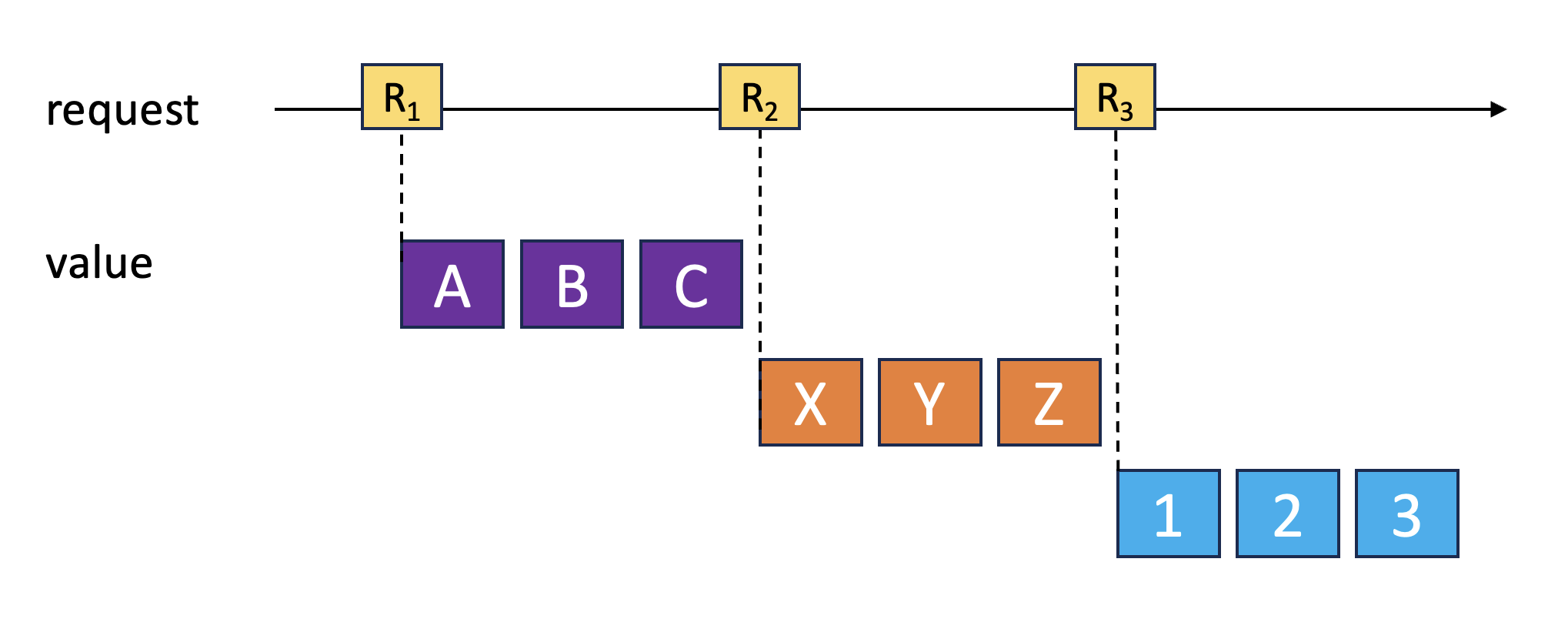
In practical terms, the resource always consumes only the most recent stream. This strategy is commonly favored when dealing with data loading. As is standard with Signals in Angular, the objective is to offer straightforward concepts for typical scenarios. For more elaborate requirements, applications can turn to libraries such as RxJS.
Further Learning: Angular Architecture Workshop (Remote, Interactive, Advanced)
Develop expertise in building enterprise-scale, maintainable Angular applications through our Angular Architecture workshop!
English Version | German Version
A Simple Resource-driven Timer
With the fundamental structure of a Streaming Resource covered, let's examine a concrete implementation: a timer that increments a number at a specified interval. The following listing shows this timerResource from the consumer's perspective:
@Component([…])
export class TimerResourceComponent {

  startValue = signal(0);
  timer = timerResource(1000, this.startValue);

  forward(): void {
    this.startValue.update((v) => nextSegment(v));
  }
}

function nextSegment(currentValue: number): number {
  return Math.floor(currentValue / 100) * 100 + 100;
}
The timer delivers a stream that begins counting from the designated start value. The first argument to timerResource specifies the desired interval in milliseconds. The starting point is determined by the startValue Signal. Whenever this Signal changes, the timer transitions to a new stream. To illustrate this behavior, the forward method advances to the next multiple of one hundred, moving from 17 to 100 or from 123 to 200, for instance.
Factory for the Streaming Resource
To make the streaming resource for the timer easy to use, the timerResource function acts as a simple factory:
export function timerResource(
  timeout: number,
  startValue: () => number
): ResourceRef<number | undefined> {

  const params = computed(() => ({
    startValue: startValue(),
  }));

  const result = resource({
    params: params,
    stream: async (loaderParams) => {
      const counter = loaderParams.params.startValue;
      […]
    }
  });

  return result;
}
This factory accepts the desired interval (timeout) along with a signal containing the default value. For this signal, timerResource only cares about the Getter, which is why it types the signal as () => number.
The function returns a ResourceRef<number | undefined>. The type parameter reflects the values flowing through the stream. Because the resource does not specify a defaultValue, it automatically begins with the value undefined.
The computed signal params captures all parameters that invoke the Loader. Since only startValue serves as a trigger in this example, the Computed Signal may seem like an unnecessary intermediary. Nevertheless, this approach is worth keeping, especially because it allows for easy extension of triggers later and makes the name startValue available within the Streaming Loader. In this case, the Loader can access the current value through param.params.startValue.
Streaming Loader for the Timer
The streaming loader follows the four-section structure outlined earlier:
const result = resource({
  params: params,
  stream: async (loaderParams) => {
    let counter = loaderParams.params.startValue;

    // 1. Create Signal representing the Stream
    const resultSignal = signal<StreamItem<number>>({
      value: loaderParams.params.startValue,
    });

    // 2. Set up async logic updating the Signal
    const ref = setInterval(() => {
      counter++;
      console.log('tick', counter);

      if (counter === 7 || counter === 13) {
        resultSignal.set({ error: new Error('bad luck!') });
      } else {
        resultSignal.set({ value: counter });
      }
    }, timeout);

    // 3. Set up clean-up handler triggered by AbortSignal
    loaderParams.abortSignal.addEventListener('abort', () => {
      console.log('clean up!');
      clearInterval(ref);
    });

    // 4. Return Signal
    return resultSignal;
  },
});
The Loader implements the asynchronous counting operation using the traditional JavaScript setInterval function. To showcase how error states behave, the timer raises an error for the values 7 and 13, ensuring that even superstitious users find what they need.
Because of setInterval's asynchronous nature, step 4 completes before the callback in step 2 executes for the first time. Consequently, the Loader first returns the Signal with its initial value, and only afterward does the Signal gradually receive new values.
Template
The template renders either the current value or an error message:
<h2>Streaming Resource Demo</h2>

<p>
  <button (click)="forward()">Forward</button>
</p>

@if (timer.error()) {
<p><b>Error</b> due to {{ timer.error()?.message }}</p>
}
@else {
<p><b>Timer:</b> {{ timer.value() }}</p>
}

<p><b>Status:</b> {{ timer.status() }}</p>
One important note: accessing the value while in an error state is not permitted, as doing so would throw an exception. Therefore, the conditional check for an error is essential.
Testing the Streaming Resource
When experimenting with the example, you'll observe the counter incrementing every second. In place of the values 7 and 13, an error is reported. Unlike RxJS, however, such an error does not terminate the stream. As soon as the Streaming Loader produces a new value, the resource makes it available.
The image below displays the console output from the Loader:
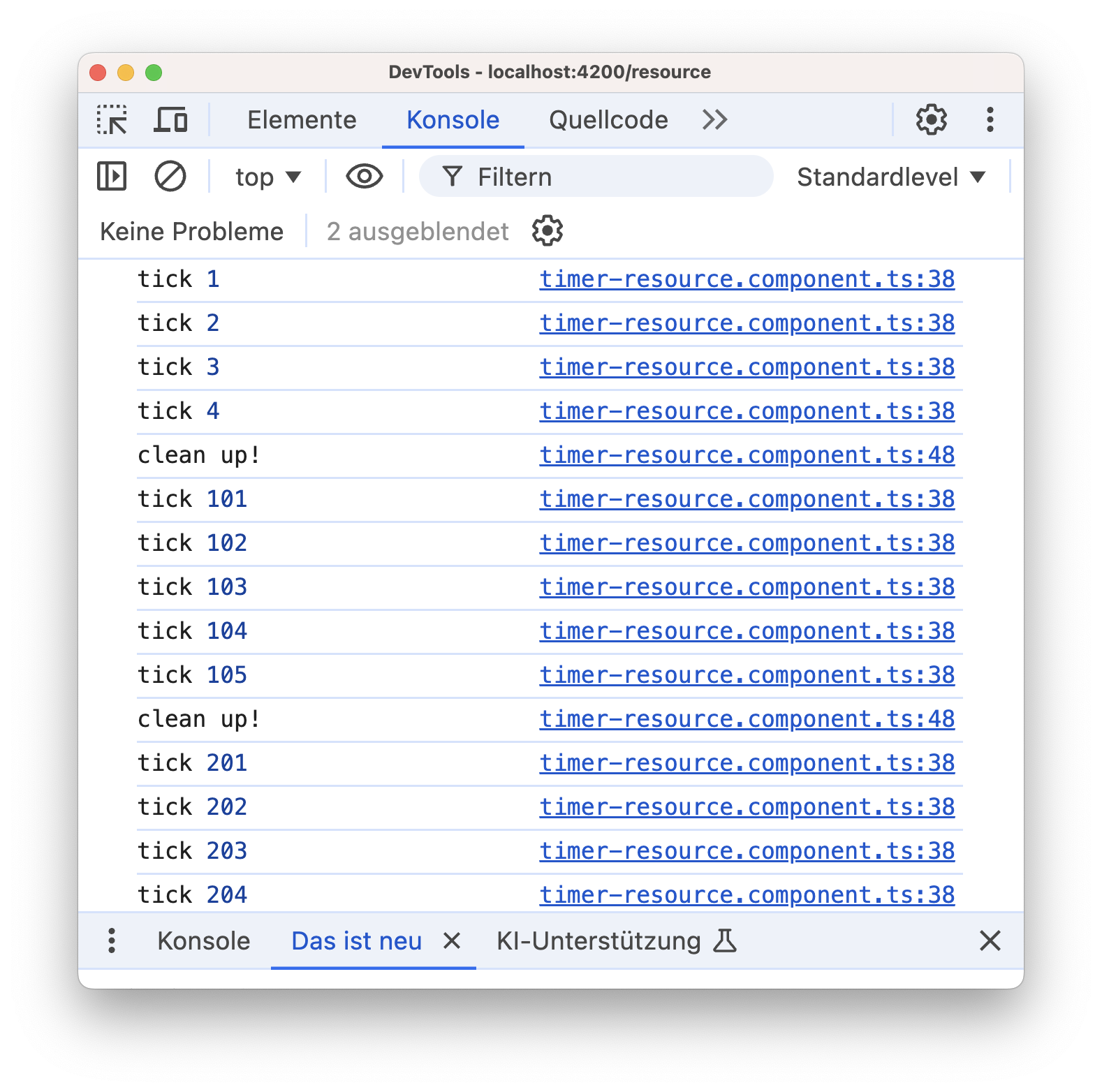
It highlights that the Streaming Resource exclusively uses the newest stream, leading to switch-map semantics.
Shortly before each clean up! message, the user invoked the forward function. This causes a new value in startValue, which in turn re-triggers the Loader. The resource signals the AbortSignal of the old stream, whose abort handler terminates it. From that point forward, the resource relies on the new stream generated by the loader, continuing with the next multiple of one hundred.
Interoperability with RxJS and Observables
Alongside the Resource API, Angular 19 also brought the rxResource into the picture, which bridges the gap to the RxJS ecosystem. Starting with Angular 19.2, rxResources are always Streaming Resources. This means an rxResource progressively delivers the values contained in the Observable returned by the stream function. To demonstrate this, the next listing presents a variation of the earlier timer built on rxResource:
export function timerResource(
  timeout: number,
  startValue: () => number
): ResourceRef<number | undefined> {

  const params = computed(() => ({
    startValue: startValue(),
  }));

  return rxResource({
    params: params,
    stream: (loaderParams) => {
      const startValue = loaderParams.params.startValue;
      return interval(timeout).pipe(
        map((v) => v + startValue + 1),
        startWith(startValue),
        tap((v) => console.log('counter', v)),
        switchMap((value) => {
          if (value === 7 || value === 13) {
            return throwError(() => new Error('bad luck'));
          }
          return [value];
        })
      );
    },
  });
}
This implementation is more concise, thanks to the wealth of operators RxJS offers. In principle, analogous helper functions could be created for Signals and Resources as well. However, the impression is that the Signals world is moving toward more use-case-specific, coarse-grained building blocks like timerResource. Whether this observation holds true remains to be seen.
Key Considerations When Employing Streams with rxResource
A critical divergence between how Observables and Streaming Resources behave emerges when an error occurs. This is precisely where the semantics of Observables and resources collide. An Observable closes itself automatically upon encountering the first unhandled error. As a result, the Observable inside the rxResource does not recover after that initial error, which in our example surfaces in place of the value 7.
However, the rxResource as a whole can emerge from the error state by switching to a new stream. This requires, for instance, a change in the params signal. Such a change re-triggers the Loader, which returns a fresh Observable.
As always, switch-map semantics come into play when transitioning to new Observables. This means the rxResource consumes only the most recent Observable at any given time, closing its predecessors by unsubscribing from them.
Summary
Streaming Resources offer a way to represent data streams without depending on RxJS. The asynchronous Streaming Loader updates a Signal that represents the stream. The Resource's params Signal triggers the Streaming Loader, which supplies a new data stream and shuts down the previous one—this mirrors the switch map semantics familiar from RxJS.
The rxResource, which provides the bridge to RxJS, now functions as a Streaming Resource by default. Unlike Observables, a Resource that hits an unhandled error is not closed; it can continue publishing values. Yet because the rxResource is built on an Observable, the current stream cannot recover from an error state. Still, it is feasible to transition to a new stream when the application re-triggers the Streaming Loader.