
The Case for Micro-Frontends
Over the last decade, frontend applications have grown considerably in complexity. Business logic is no longer confined to the backend; a significant portion now lives on the client side. This shift has introduced a new kind of monolith—the frontend application itself.
As these applications expand, they often encompass multiple domains of responsibility (for instance, navigation, user management, and authorization), yet they are developed, deployed, and hosted as a single, unified unit.
While the codebase frequently shows signs of separation—with directories for each module, library, or even sub-application—this division rarely extends beyond the source code level.
Micro-frontends change this paradigm. They allow different applications to operate independently, not just in the code repository, but throughout the entire lifecycle—development, deployment, and hosting. This approach aims to deliver:
- Decoupled applications with loose coupling
- Accelerated development, debugging, and testing cycles
- Better performance through smaller code chunks
- Complete isolation during testing, development, and deployment phases
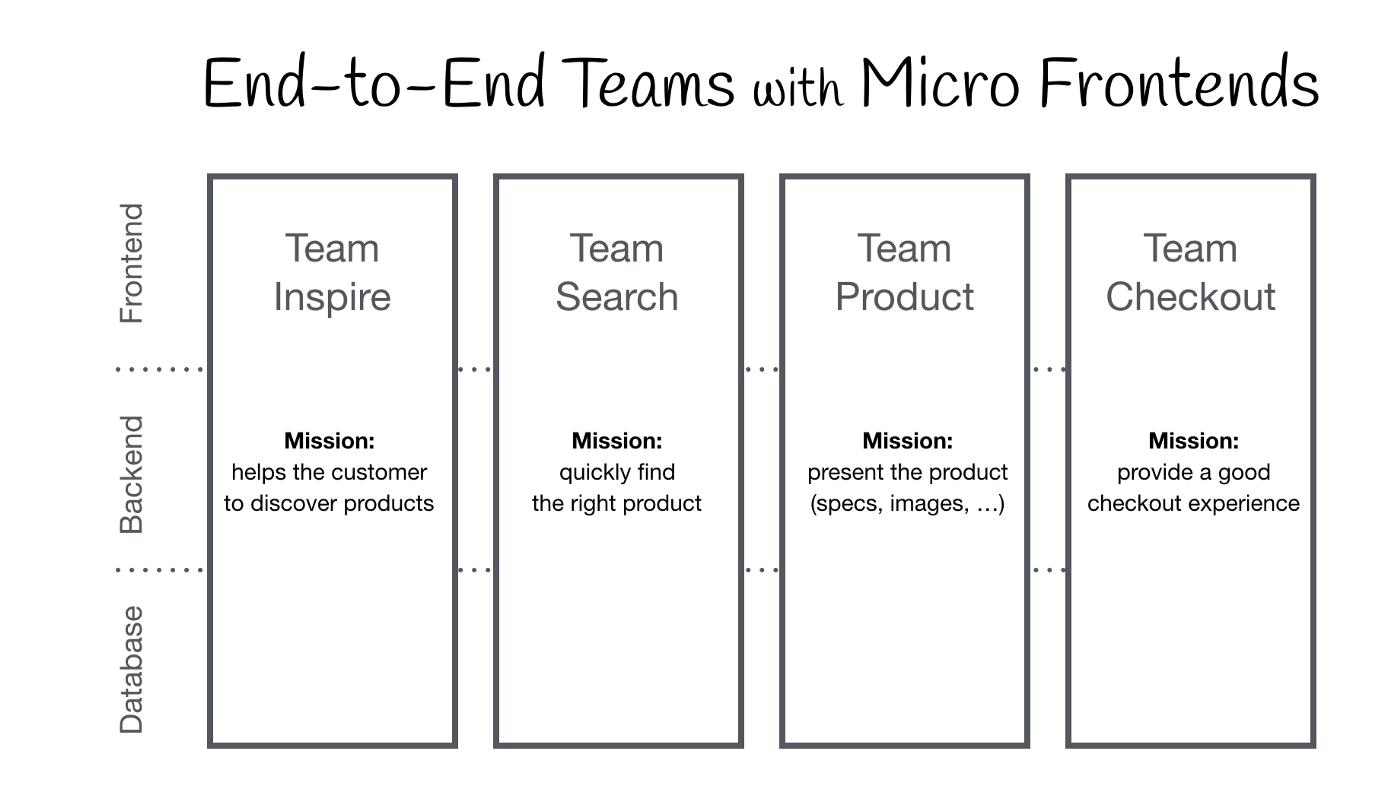
E2E Domains held by different teams
Architecture Overview
We'll examine a frontend system composed of a shell and three domain-specific applications:
- Shell — This serves as the primary entry point, dynamically loading each micro-application based on the current URL path. It is also responsible for triggering authorization within route guards.
- Navigation — This handles all navigation logic and state management. It includes the navigation bar component and the underlying navigation services.
- User — This manages user-related logic and state. It fulfills this via user queries, store management, a user-info component, and a dedicated user administration page.
- Feed — This is responsible for retrieving and rendering feed items. Notably, each feed item incorporates the logic and state from the User application for its specific context.
Each of these applications follows a layered architectural pattern:
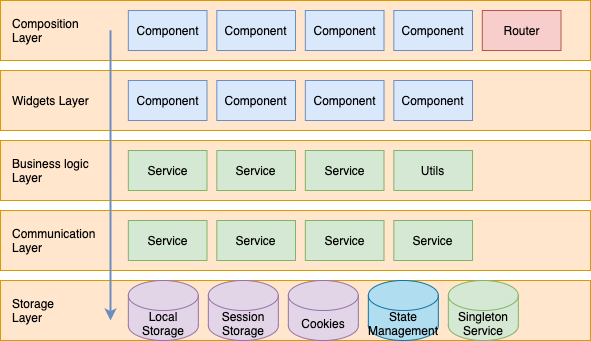
- Composition layer — Contains the application's pages and their corresponding route configurations.
- Widgets layer — Holds the specific domain components used to construct the pages within the composition layer.
- Business logic layer — Encompasses services and utilities that implement the core domain rules and operations.
- Communication layer — Includes services designed for interacting with external service providers, such as backend APIs.
- Storage layer — Handles data persistence. This can be in-memory storage, like state management libraries, or disk-based storage such as cookies, IndexedDB, and local storage.
Navigating the Complexity
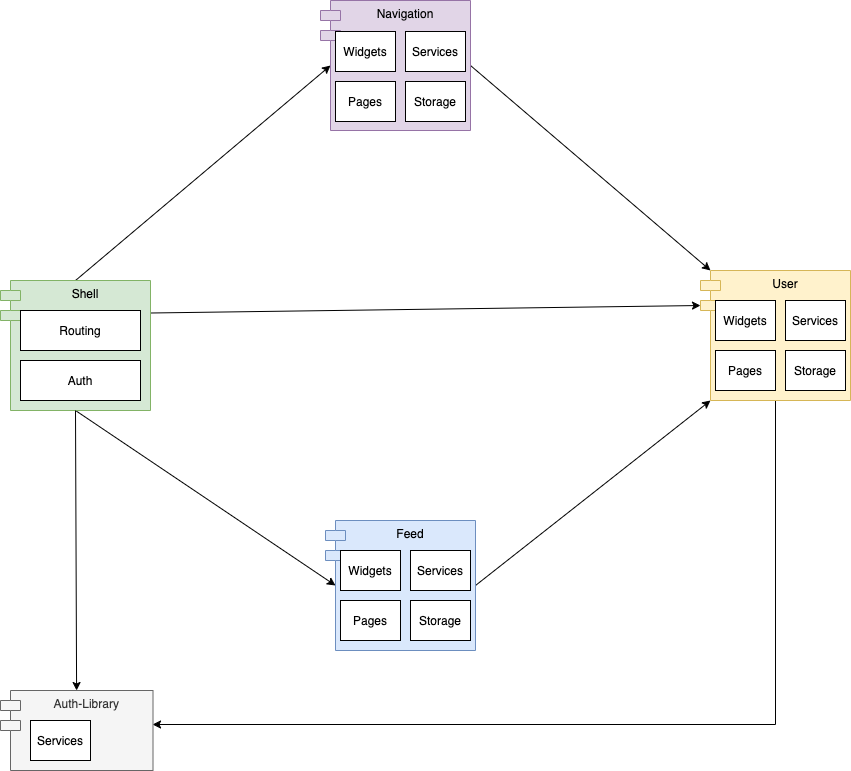
In our diagram, there's a clear dependency from both the Navigation and Feed applications onto the User application.
Module Federation is the key technology that enables us to load these micro-frontends at runtime without constructing a full, monolithic dependency graph. This grants us the ability to build and deploy each application independently. However, it's crucial to remember that these separate applications ultimately coexist and run together within the user's browser as a single monolith.
This reality creates new stability challenges for frontend architectures:
- What occurs when we roll out a new version of a single application (like the User app)?
- How do we proactively determine which parts of the system are impacted by a change?
- How can we ensure that a deployment doesn't introduce undiscovered breaking changes?
- How can we prevent tight coupling between applications that are hosted side-by-side?
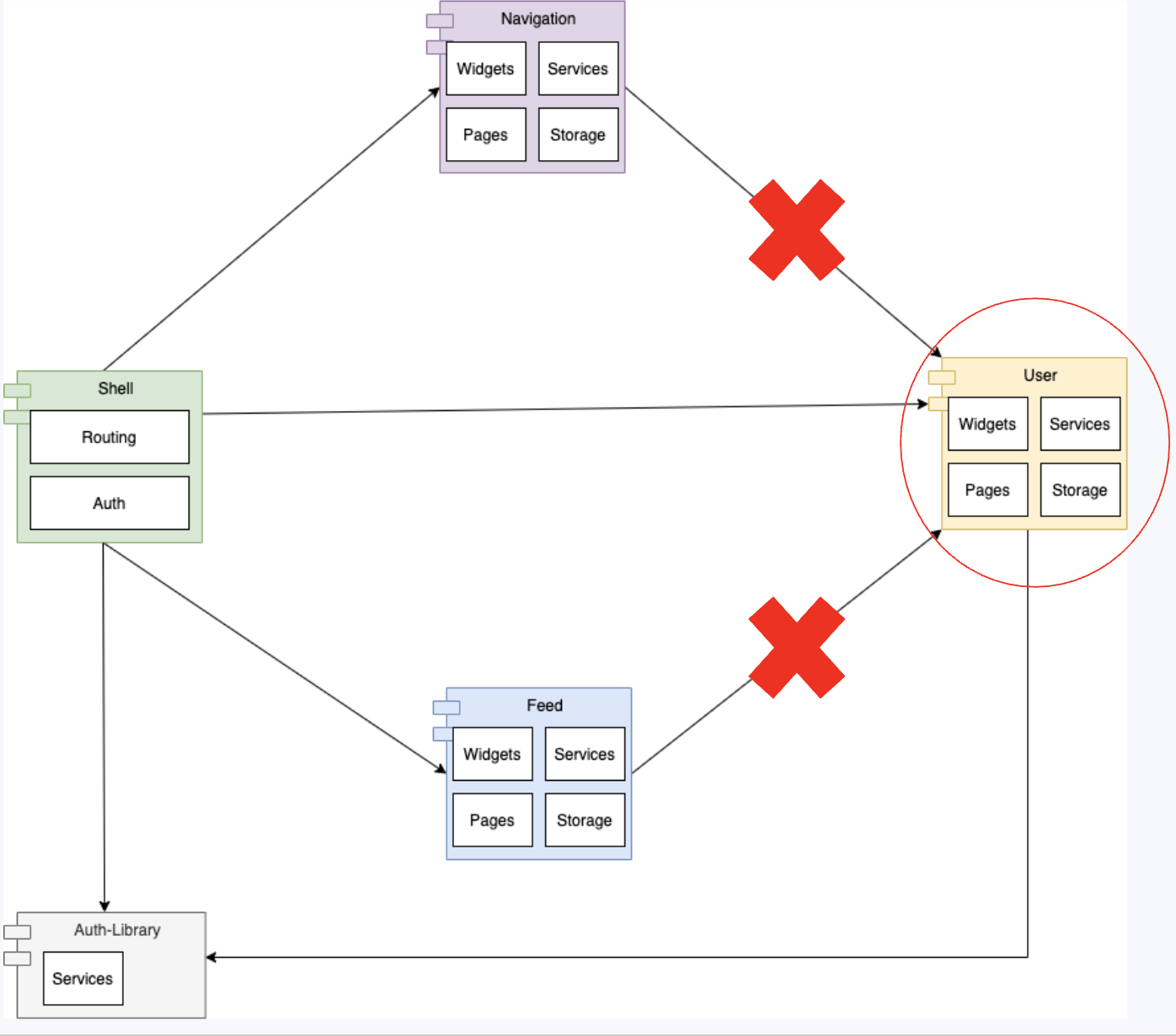
Consider a scenario where a developer modifies a widget within the User application. This specific widget is also used by the Feed and Navigation applications. If the developer's change violates the component contract by altering its inputs or outputs (props), it creates a problem. This would result in a runtime error when the new version loads within the existing applications. The consequence is a cascading failure throughout the frontend after the new User application version goes live.
Addressing the Challenge
Before proposing a solution, let's define the set of requirements for our micro-frontend applications:
-
Each application must be independently developed, tested, and served as its own unit.
-
Updates to one application should be instantly available for integration into other consuming applications.
-
The widgets and services an application offers should be reusable and easily swappable.
-
Internal models and logic must be fully encapsulated so that any modifications have no impact on the application's consumers.
-
Any change must be mapable to its dependency graph, allowing us to trigger only the relevant test suites and build processes.
If we revisit the initial setup, it satisfies the first three requirements. However, it falls short of the crucial stability guarantees offered by the last two requirements. Let's explore distinct strategies to manage this complexity:
Strategy 1: The Shared Libraries Approach
To enhance system stability, we must prevent hidden breaking changes from slipping through. The libraries approach tackles this by leveraging the versioning system of npm packages. When an application is built, it 'seals' the specific version of each library it depends on. This ensures that a consumer can never accidentally pull in a library version containing breaking changes.
With Module Federation, we can configure these shared libraries. This configuration can specify an acceptable package version range according to the npm semantic versioning conventions.
This strategy restructures our monolith into 4 distinct layers:
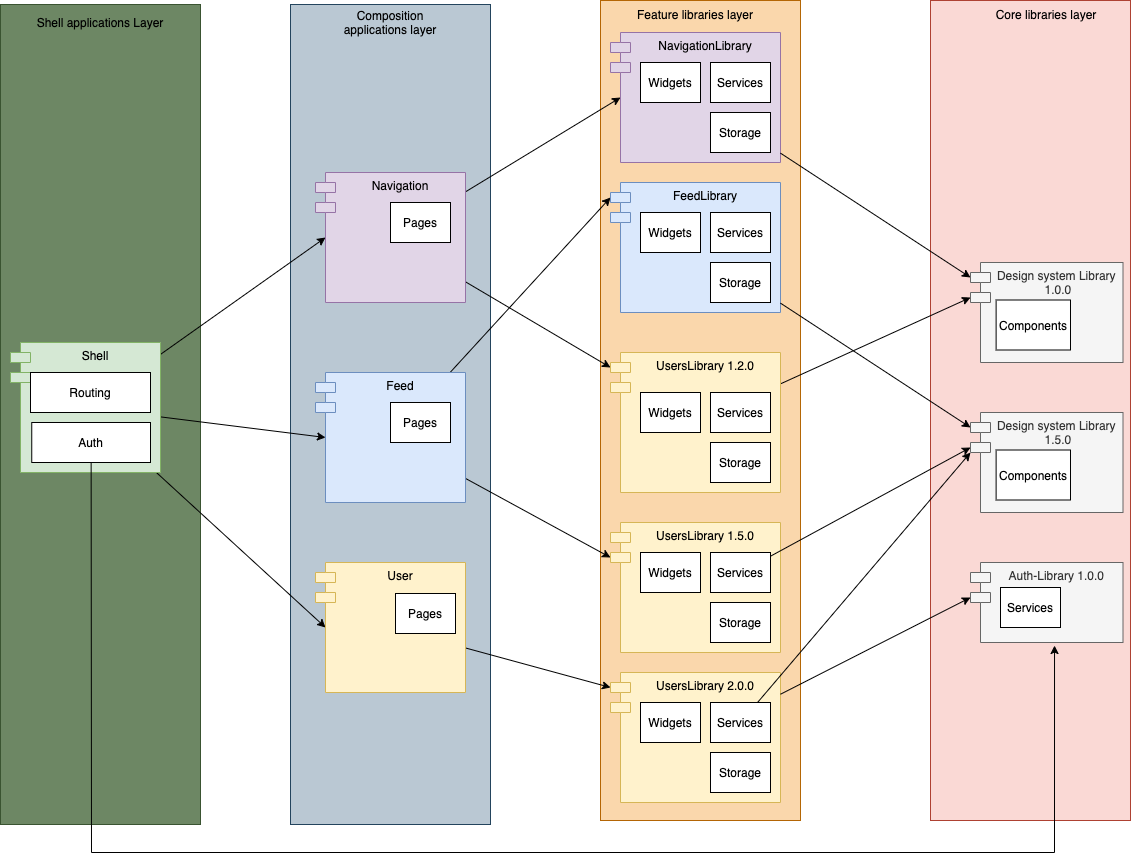
Libraries 4 layers approach
- Core Library — This layer consists of domain-agnostic libraries. They serve as the foundational building blocks for the feature libraries layer.
- Feature libraries layer — This layer holds domain-specific business logic, data storage, and widgets. These widgets are built using the component kit from the Core Library plus any additional components unique to that specific domain.
- Composition applications — This layer contains domain-specific routes and pages. The pages are constructed by combining widgets, services, and the business logic found in the Feature libraries layer.
- Shell — The application's entry point. It typically functions as a container and router that loads each micro-application according to the URL path. This layer may also manage authorization.
While this strategy effectively addresses requirements 1, 3, 4, and 5, it forces a compromise on requirement 2. A modification to a library does not automatically flow to its consumers. Instead, each consuming application must be rebuilt and redeployed to pick up the new library version.
Implementation
Folder Structure:
- apps
  - user
  - feed
  - navigation
  - shell
- libs
  - users-lib
  - feed-lib
  - navigation-lib
  - auth
Webpack Configuration:
plugins: [
  new ModuleFederationPlugin({
      name: "user",
      filename: "remoteEntry.js",
      exposes: {
          './bootstrap': './apps/user/bootstrap.module.ts',
      },
      shared: share({
        "@angular/core": { singleton: true, strictVersion: true, requiredVersion: '^12.0.0' },
        "@angular/common": { singleton: true, strictVersion: true, requiredVersion: '^12.0.0' },
        "@angular/common/http": { singleton: true, strictVersion: true, requiredVersion: '^12.0.0' },
        "@angular/router": { singleton: true, strictVersion: true, requiredVersion: '^12.0.0' },
        "@mfe/auth": { singleton: true, strictVersion: true, requiredVersion: '^1.0.0' },
        "@mfe/user": { singleton: true, strictVersion: true, requiredVersion: '^1.5.0' },        ...sharedMappings.getDescriptors()
      })
  }),
  sharedMappings.getPlugin()
],
Benefits
- Components, services, and even entire compositional pieces are easily shared across applications.
- Effortless prevention of breaking changes through version locking at build time.
Drawbacks
- Potential for data corruption due to conflicts when multiple versions of the same library run concurrently and override states or local storage.
- Increases in the overall bundle size, as core libraries might get loaded more than once if different applications resolve to different versions.
- Complexities in the deployment process, as significant changes require a cascading rebuild of the entire dependency tree.
Strategy 2: The Anti-Corruption Layer Approach
What is an Anti-Corruption Layer?
An anti-corruption layer is a collection of Public-APIs that an application exposes for its integrations. These Public-APIs act as strict contracts or interfaces. Their main goal is to shield the application's internal models and business logic complexity from external consumers. This API is typically exposed in the form of exported modules, components, and classes like facades and adapters.
This layer can be designed to operate in a single direction or both directions, allowing it to both fetch and send data.
Façade
This is a service that offers a simplified interface to a complex underlying application. It encapsulates the heavy lifting involved in starting or interacting with the application. A façade often provides a limited, integration-focused subset of the application's full functionality.
Adapter
This service is responsible for converting the interface and the data model of one object into a different structure or interface that is compatible with what the consumer application expects.
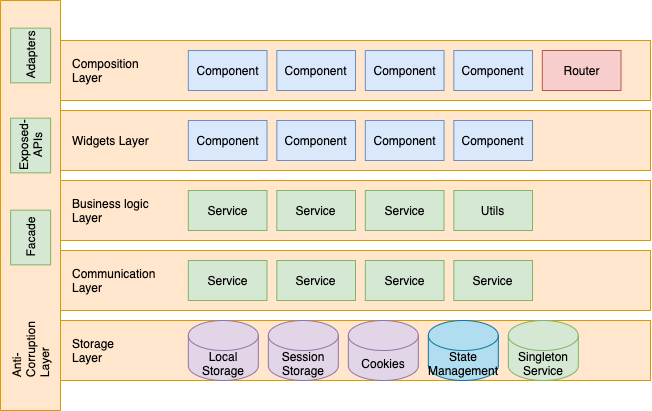
The Evolved 4-Layer Approach
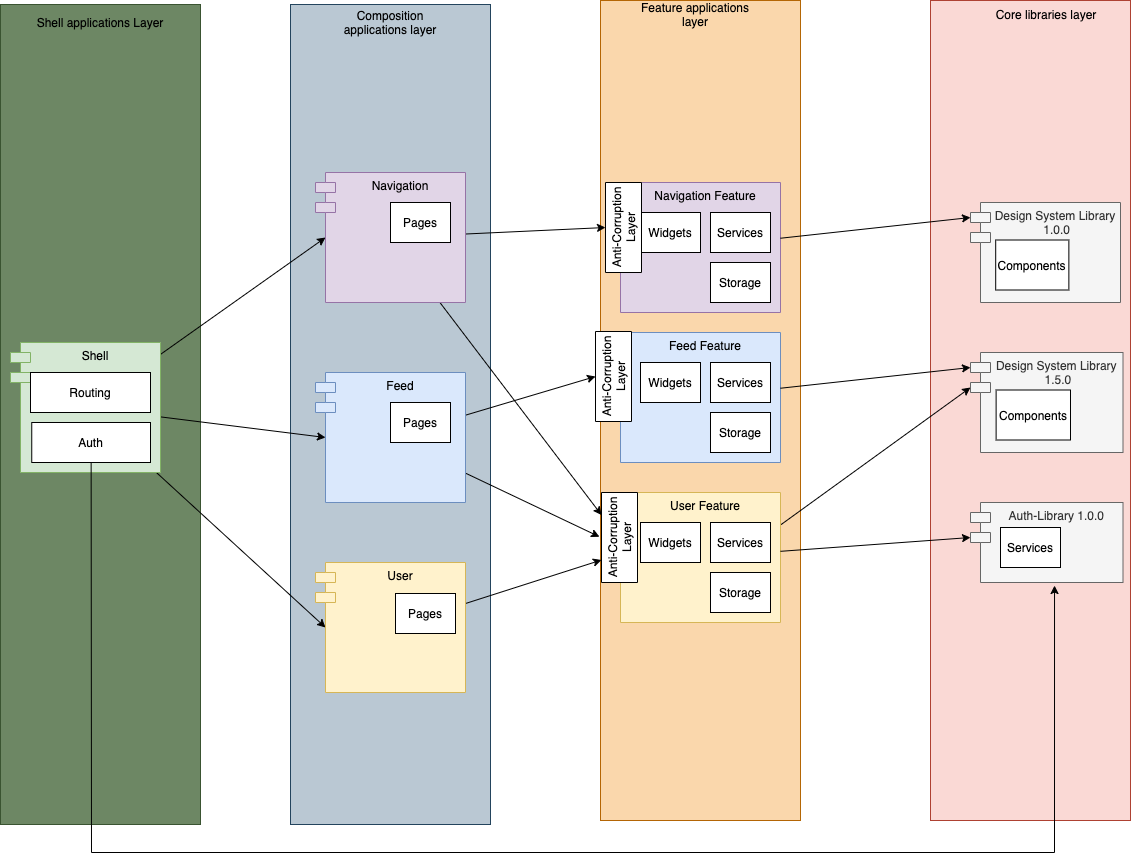
Anti-Corruption 4 Layered Approach
The primary change here is transforming the Feature layer from a set of libraries into fully-fledged applications. This allows widgets and services to be served instantaneously to consumers. Still, we need to safeguard against breaking changes, which is precisely the role of the anti-corruption layer.
-
Core Library — This layer continues to play the same role, housing domain-agnostic building blocks for the layers above it.
-
Feature application layer — This layer is elevated from 'library' to 'application' and contains the domain's core logic, storage, and widgets.
These widgets are built on the Core Library's component kit and include domain-specific custom components.
Crucially, every exposed component and piece of logic is now guarded by the anti-corruption layer to ensure consumer stability. -
Composition applications — The pages and routes here are constructed from the widgets and services provided by the Feature application layer.
-
Shell — The entry point, acting as the main container and tool for loading micro-applications based on routing.
Implementation
Folder Structure:
- apps
  - user
    - src
      - modules
        - bootstrap
          - bootstrap.module.ts
    - public-api.ts
    - public-api.d.ts
  - feed
     - src
      - modules
        - bootstrap
          - bootstrap.module.ts
    - public-api.ts
    - public-api.d.ts
  - navigation
    - src
      - modules
        - bootstrap
          - bootstrap.module.ts
    - public-api.ts
    - public-api.d.ts
  - shell
- libs
  - auth
Webpack Configuration:
plugins: [
  new ModuleFederationPlugin({
      name: "user",
      filename: "remoteEntry.js",
      exposes: {
          './public-api': './apps/user/public-api.ts',
      },
      shared: share({
        "@angular/core": { singleton: true, strictVersion: true, requiredVersion: '^12.0.0' },
        "@angular/common": { singleton: true, strictVersion: true, requiredVersion: '^12.0.0' },
        "@angular/common/http": { singleton: true, strictVersion: true, requiredVersion: '^12.0.0' },
        "@angular/router": { singleton: true, strictVersion: true, requiredVersion: '^12.0.0' },
        "@mfe/auth": { singleton: true, strictVersion: true, requiredVersion: '^1.0.0' },
        ...sharedMappings.getDescriptors()
      })
}),
  sharedMappings.getPlugin()
],
TypeScript Configuration:
To help us proactively map the dependency graph, we will expose the type definition files for our facades and adapters. We'll consume these definitions during the build process of consumer applications, using them to run static code analysis.
{
...
"paths": {
  "@mfe/feed": ["apps/feed/public-api.d.ts"],
  "@mfe/navigation-bar": ["apps/navigation-bar/public-api.d.ts"],
  "@mfe/user": ["apps/user/public-api.d.ts"]
}
...
}
Benefits
- Seamless sharing of components, services, and entire application compositions.
- Automatic and smooth propagation of new features and updates from the source application to its consumers, without requiring a rebuild on their side.
- Breaking changes are contained by the anti-corruption layer instead of leaking downstream.
- Refactoring and internal changes are simplified because the application's internal workings are fully encapsulated.
Drawbacks
- Introduces a new architectural layer that requires ongoing maintenance.
- Requires a learning curve and team education to fully understand the pattern.
- Does not replace the need for integration tests to fully guarantee that no breaking changes slip through the anti-corruption layer.

Extras
A demo project in React implements the anti-corruption layer (with slight variations from the description above).
A demo project in Angular using the anti-corruption layer.

Micro-Frontend Demo Application
This reference frontend consists of:
- Shell Application
- Feed Application (displayed in Blue)
- Navigation Application (displayed in Purple)
- User Application (displayed in Yellow)
As outlined earlier, both the Feed and Navigation applications consume components and functionality from the User application. The Shell application, in turn, brings together the compositional applications from the Feed, Navigation, and User apps to render the various pages for the end user.