Working with multiple asynchronous data sources in an Angular component is a common challenge. Developers who are new to the framework often stumble into pitfalls here and may reach for suboptimal fixes. This article introduces a simple, effective approach to keep such components clean and maintainable.
Scenario: Handling several Observables in a component
Angular's design encourages a reactive style built on Observable and Promise. This is evident across HttpClient requests, FormControl's valueChanges, the Router's navigate method, and third-party integrations like @ngrx/store, where state is accessed via selector functions that return Observables.
Consider a component that needs to present data drawn from various sources.
@Component({
  selector: 'app-pseudo-page',
  standalone: true,
  imports: [AsyncPipe],
  templateUrl: './pseudo-page.component.html',
  styleUrl: './pseudo-page.component.css',
})
export class PseudoPageComponent {
  private readonly todoService = inject(TodoListService);
  private currentPageSubject = new BehaviorSubject<number>(1);
  readonly currentPage$ = this.currentPageSubject.asObservable();
  private readonly currentUser$ = inject(CurrentUserService).currentUser$;

  readonly loggedTime$ = interval(1000);
  readonly todoList$ = this.currentPage$.pipe(
    switchMap((page) => this.todoService.getTodos(page, 10))
  );

  prevPage() {
    this.currentPageSubject.next(
      this.currentPageSubject.value - 1 < 1
        ? 1
        : this.currentPageSubject.value - 1
    );
  }
  nextPage() {
    this.currentPageSubject.next(
      this.currentPageSubject.value + 1 > 10
        ? 10
        : this.currentPageSubject.value + 1
    );
  }
The template relies on the async pipe to handle subscriptions. It manages the lifecycle for you: it subscribes when data is needed, forwards each new emission to the view, and cleans up the subscription upon component destruction. There's no need for manual subscription handling.
Let's render the data in the template. A common trick is to combine async with the as keyword inside an @if block to create a local variable.
<div class="pseudo-page__header">
  <h3>Hello {{ currentUser$ | async }} !</h3>
  <h3>You are logged for {{ (loggedTime$ | async) || 0 }} s</h3>
</div>
<div class="pseudo-page__container">
  <div class="pseudo-page__todo-list">
    <h2>There is your todo-list</h2>
    <ul>
      @for (element of (todoList$ | async); track element.id) {
        <li>{{ element.title }}</li>
      }
    </ul>
    <div class="pseudo-page__actions">
      <button class="pseudo-page__button" (click)="prevPage();" [disabled]="((currentPage$ | async)  || 1) <= 1">Prev</button>
      <div>{{currentPage$ | async}}</div>
      <button class="pseudo-page__button" (click)="nextPage();" [disabled]="((currentPage$ | async) || 1) >= 10">Next</button>
    </div>
  </div>
</div>
While this code works, the template's logic is starting to get unwieldy. Even though async is convenient, each pipe represents an independent subscription. This can lead to unnecessary overhead and make the template harder to manage. The ViewModel pattern offers a clean way to refactor this.
View-Model in Angular
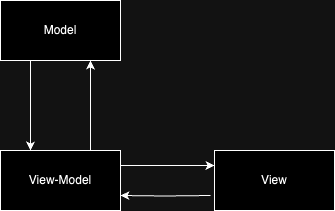
The View Model is the core of the MVVM (Model-View-ViewModel) architectural pattern. It serves as a bridge that decouples the Model (the data layer) from the View (the UI). In essence, a ViewModel is an object that determines, in collaboration with the Model, exactly what data the View will display.
Mapping this concept to Angular's building blocks yields the following:
- Model: Your component class and the data it manages.
- View: The component's template.
- View-Model: A public property on the component that is used within the template.
Putting it into practice
Let's apply this concept to the earlier example.
First, we'll create a variable, conventionally named vm$, which will be the single source of data for the template. This is achieved by using the combineLatest operator to merge all our streams and the map operator to shape their combined output into a single object.
  readonly vm$ = combineLatest([
    this.loggedTime$,
    this.currentPage$,
    this.currentUserService.currentUser$,
    this.todoList$,
  ]).pipe(
    map(([loggedTime, currentPage, currentUser, todoList]) => {
      return {
        loggedTime,
        currentPage,
        currentUser,
        todoList
      }
    })
That's the only change required in the component's TypeScript file. Now, we pass vm$ into the template. Instead of having multiple async pipes scattered around, we use just one to access our consolidated data object. Since vm$ represents the complete data state of the component, it's best practice to place this assignment near the very top of the template for clarity.
@if (vm$ | async; as vm) {
  <div class="pseudo-page__header">
    <h3>Hello {{ vm.currentUser }} !</h3>
    <h3>You are logged for {{ vm.loggedTime }} s</h3>
  </div>
  <div class="pseudo-page__container">
    <div class="pseudo-page__todo-list">
      <h2>There is your todo-list</h2>
      <ul>
        @for (element of vm.todoList; track element.id) {
          <li>{{ element.title }}</li>
        }
      </ul>
      <div class="pseudo-page__actions">
        <button class="pseudo-page__button" (click)="prevPage();" [disabled]="((vm.currentPage)  || 1) <= 1">Prev</button>
        <div>{{vm.currentPage }}</div>
        <button class="pseudo-page__button" (click)="nextPage();" [disabled]="((vm.currentPage) || 1) >= 10">Next</button>
      </div>
    </div>
  </div>
}
With this setup, whenever any of the source Observables inside combineLatest emits, the component is automatically updated. This holds true even when the component uses the OnPush change detection strategy; you won't need to manually trigger change detection via ChangeDetectorRef. The async pipe is one of the few built-in mechanisms that automatically flags a component for updates when its data source changes.
Adopting this pattern clarifies the responsibilities of the component versus the template. The template now interacts with a distinct, minimal data set and the functions it needs, rather than having direct access to every stream. As a bonus, you can freely insert other RxJS operators—such as switchMap, delay, or map—into the vm$ pipeline to manipulate the data flow.
  readonly vm$ = combineLatest([
    // our source is "interval" but we want to display in template nice formated time m:ss
    this.loggedTime$.pipe(
      map((time) => {
        const minutes = Math.floor(time / 60);
        const seconds = time - minutes * 60;
        return [minutes, ('0' + seconds).slice(-2)];
      }),
      map((time) => time.join(':')),
      startWith(0)
    ),
    this.currentPage$,
    this.currentUserService.currentUser$,
    this.todoList$.pipe(startWith([])),
  ]).pipe(
    map(([loggedTime, currentPage, currentUser, todoList]) => {
      return {
        loggedTime,
        currentPage,
        currentUser,
        todoList,
      };
    })
  );
This looks familiar...
You might recognize this as a recommended practice when working with @ngrx/store or @ngrx/component-store. Since the store's selectors return Observables, and a component often needs to react to several selectors at once, consolidating them into a single vm$ stream is the idiomatic approach.
Sticking with structural directives? No issue.
You might be thinking, "What if I'm on an older Angular version that doesn't have the new control flow syntax?" The good news is that this is a pattern, not a feature. It doesn't mandate any specific library versions or APIs, so you can achieve the same result with more traditional tools.
Before control-flow blocks like @if and @for, we used structural directives such as *ngIf and *ngFor. These can be applied to an <ng-container/> or any other element to manage the subscription in the template, just as we did with @if.
<ng-container *ngIf="(vm$ | async) as vm">
    <!-- Access to your data as vm.SOMETHING -->
     <div class="pseudo-page__header">
        <h3>Hello {{ vm.currentUser }} !</h3>
        <h3>You are logged for {{ vm.loggedTime }} s</h3>
    </div>
    ...
</ng-container>
It's worth noting that there are specialized libraries designed for this exact purpose. For instance, the RxLet directive from @rx-angular/template offers improvements and solves certain edge cases compared with the more generic @if or *ngIf approaches.
Looking ahead: @let syntax
Keep an eye out for the upcoming @let syntax, which is slated for Angular 18.1. This will allow you to declare variables directly within the template itself. With this feature, you can create the vm property directly without wrapping it in an @if block.
@let vm = (vm$ | async);
<!-- Access to your data as vm.SOMETHING  -->
 <div class="pseudo-page__header">
    <h3>Hello {{ vm.currentUser }} !</h3>
    <h3>You are logged for {{ vm.loggedTime }} s</h3>
</div>
Wrapping up
The combination of @if + async + combineLatest is a robust and widely-used solution, but you may need variations depending on your specific constraints.
- Note that
combineLatestwill only emit once every source has produced a value. If one of your streams is waiting on something, the combined stream will remain silent. You can often fix this by using thestartWithoperator on the source that might initially be idle. - Be careful when using
@ifto assign theasyncvalue. If the resultingvmobject evaluates to a "falsy" value (e.g.,0,false,null), the@ifblock will be treated as empty and the component content will not be rendered.
This technique has become a foundational part of my own development workflow for creating well-structured "smart components," and I hope it proves just as useful for you.
The full runnable example used in this guide is available on StackBlitz—feel free to experiment with it.