Signals
Signals represent arguably the most significant addition in Angular 16. This straightforward reactive primitive lays the groundwork for future fine-grained change detection that won't rely on Zone.js. A signal is essentially an object containing a value. Consumers have the ability to read and modify this value, and they can also receive notifications whenever the value undergoes changes:
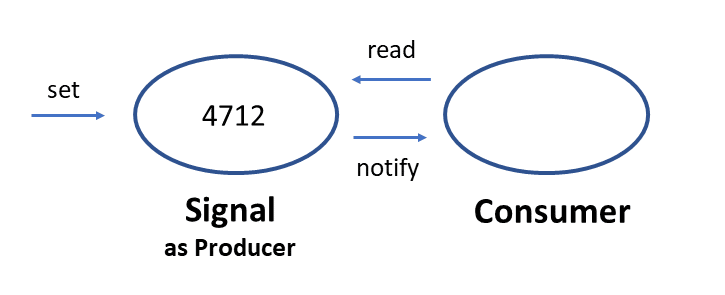
When a component template references a signal, Angular automatically schedules change detection upon that signal's modification. The following example demonstrates this pattern, where the properties bound in the template — from, to, and flights — all exist as signals:
import { computed, effect, signal } from '@angular/core';
[…]

@Component([…])
export class FlightSearchComponent implements OnInit {

  from = signal('Hamburg'); // in Germany
  to = signal('Graz'); // in Austria
  flights = signal<Flight[]>([]);

  flightRoute = computed(() => this.from() + ' to ' + this.to());

  constructor() {
    effect(() => {
      this.search();
    });
  }

  async search() {
    if (!this.from() || !this.to()) return;

    const flights = await this.flightService.findPromise(
      this.from(),
      this.to()
    );
    this.flights.set(flights);
  }

}
The signal function, exported from the @angular/core package, handles signal creation. This function returns what's known as a WritableSignal<T> — a signal that application code can both read from and write to. Here, T denotes the type of the managed value. In many scenarios, signal can deduce this type from the provided default value. When type inference isn't possible, an explicit type parameter must be supplied to signal, as demonstrated with the flight property.
The search method both reads from and writes to these signals. Getters and setters come into play here as well. To invoke the getter, the signal is treated as a function call. The setter, conversely, is exposed through a set method on the signal.
The illustrated code also constructs a computed signal via the computed function. This computed signal re-evaluates the provided lambda whenever any of the signals it depends on change. The result of computed has the type Signal<T>. In contrast to the earlier-mentioned WritableSignal<T>, this variant is read-only.
Within the constructor, the effect function establishes a side effect. Each time a consumed signal within it changes, the supplied lambda expression executes once more. Signals referenced inside invoked functions, such as search, are equally tracked by effect.
The component's template binds directly to these signals:
<input [ngModel]="from()" (ngModelChange)="from.set($event)" name="from">
<input [ngModel]="to()" (ngModelChange)="to.set($event)" name="to">

<b>{{ flightRoute() }}</b>

<div class="row">
  <div *ngFor="let f of flights()">
    <app-flight-card [item]="f" [(selected)]="basket()[f.id]" />
  </div>
</div>
Signal modifications prompt Angular to execute change detection and refresh the rendered view. This behavior mirrors that of observables bound via the async pipe. Consequently, enabling the OnPush change detection strategy can further optimize performance when working with signals.
Nonetheless, subsequent Angular releases are expected to advance this concept further with fine-grained change detection. Such an approach would enable updates to specific template sections rather than re-rendering entire templates.
Compared to Observables, Signals eliminate the need for manual unsubscription. When a component or template consumes a signal, Angular automatically handles deregistration upon that component's destruction. This principle extends to usage within other Angular constructs like services or directives — the lifecycle of the consumer aligns with that of the encompassing building block.
In Angular 16, signals launch as a developer preview. This designation means their API may evolve in future iterations. Similar to standalone components, signals will interoperate with existing code seamlessly. There's no urgency to migrate: current applications don't require immediate changes.
RxJS-Interop
Signals and RxJS share common ground, particularly in enabling reactive application architectures. However, signals deliberately maintain a minimalist design, primarily serving change detection purposes. The RxJS interop layer introduced in Angular 16 bridges the simplicity of signals with the extensive capabilities of RxJS. This interop layer resides in the @angular/core/rxjs-interop namespace, offering utilities to convert signals to observables and vice versa:
import { toObservable, toSignal } from '@angular/core/rxjs-interop';
[…]

from = signal('Hamburg');
to = signal('Graz');

from$ = toObservable(this.from);
to$ = toObservable(this.to);

flights$ = combineLatest({ from: this.from$, to: this.to$ }).pipe(
  debounceTime(300),
  tap(() => this.loading.set(true)),
  switchMap((combi) => this.flightService.find(combi.from, combi.to)),
  tap(() => this.loading.set(false))
);

flights = toSignal(this.flights$, { initialValue: [] });
The toObservable function transforms the from and to signals into their observable counterparts. This conversion unlocks RxJS operators such as combineLatest, debouceTime, and switchMap. The outcome is an observable emitting arrays of Flight objects. Meanwhile, toSignal generates a signal derived from that observable.
Because a signal always holds a value — unlike an observable — the example supplies an initial value. Alternatively, the consumer of toSignal could guarantee synchronous emission of an initial value from the observable (using something like startsWith). In that case, the requireSync property should be set to true:
flights = toSignal(this.flights$, { requireSync: true });In either scenario, toSignal infers the resulting signal's type from the observable. In the displayed case, this produces a signal<Flight[]>. When neither initialValue nor requireSync is employed, toSignal incorporates undefined into the type signature. The result becomes a Signal<Flight[] | undefined> starting with undefined as its initial value.
Signals created from observables maintain ties to the consuming building block's lifecycle — such as a component or service. The reverse, however, doesn't apply to observables derived from signals. The Angular team chose to preserve standard RxJS semantics here. Should you want an observable subscription tied to the building block's lifetime, the interop-layer offers the takeUntilDestroyed operator:
interval(1000)
  .pipe(takeUntilDestroyed())
  .subscribe((counter) => console.log(counter));
Non-destructive Hydration
Single page applications (SPAs) deliver strong runtime performance. Yet the initial page load often takes noticeably longer compared to conventional web applications. This delay stems from the browser needing to download substantial JavaScript bundles alongside the initial HTML before rendering can commence. The First Meaningful Paint (FMP) typically arrives only after several seconds:
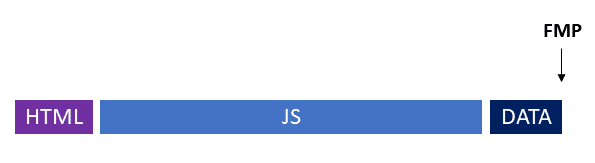
While these few seconds rarely trouble business applications, they matter significantly for public-facing web solutions like online stores. Keeping bounce rates low — achievable through minimized waiting times — becomes a priority in such contexts.
For these scenarios, server-side rendering of SPAs is common practice, allowing the server to deliver a pre-rendered HTML page. The visitor sees content promptly. Once JavaScript bundles finish loading, interactivity kicks in. The illustration below clarifies this: FMP now occurs earlier, yet the page only becomes interactive later (measured as Time to Interactive, TTI).
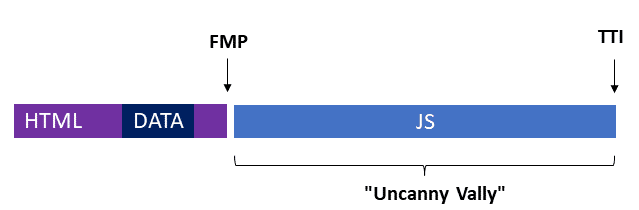
To accommodate applications where initial load performance is critical, Angular has supported server-side rendering (SSR) from its early versions. Historically, though, this SSR behaved "destructively." That is, the loaded JavaScript re-rendered the complete page, replacing all server-rendered markup with client-rendered markup. Unfortunately, this process introduces a noticeable delay and occasional flickering. Metric analysis reveals this degrades startup performance.
Angular 16 directly tackles this by reutilizing the server-rendered markup when the JavaScript bundles execute in the browser. This approach is termed non-destructive hydration. Here, "hydration" describes the process of making a delivered page interactive through JavaScript.
To leverage this feature, start by installing the @nguniversal/express-engine package for SSR support:
ng add @nguniversal/express-engineFollowing installation, non-destructive hydration activates through the standalone API provideClientHydration:
// app.config.ts
export const appConfig: ApplicationConfig = {
  providers: [
    provideClientHydration(),
  ]
};
The listing accomplishes this within the app.config.ts file. The ApplicationConfig type defined there is consumed in main.ts during application bootstrapping. Incidentally, the CLI generates the app.config.ts file when scaffolding a new application using the --standalone flag.
For debugging applications leveraging SSR or hydration, the schematics establish the npm script ssr:dev:
npm run ssr:devThis script launches a development server — created by a particularly delightful Austrian colleague — that runs the application in debug mode on both server and client sides simultaneously.
More Details on Hydration in Angular
When an SPA makes Web API calls via HTTP during server-side rendering, the responses get automatically embedded as a JSON fragment within the rendered page. Upon hydration, the browser's HttpClient consumes this fragment instead of reissuing the identical request. This mechanism accelerates hydration. When this behavior isn't wanted, the withNoHttpTransferCache function disables it:
provideClientHydration(
    withNoHttpTransferCache()
),
Successful non-destructive hydration requires that server-rendered markup matches what the client would generate. This alignment can't always be assured, particularly with third-party components or libraries directly manipulating the DOM. For such cases, the ngSkipHydration attribute allows disabling hydration per-component:
<app-flight-card
      ngSkipHydration
      [item]="f"
      [(selected)]="basket()[f.id]" />
Angular prohibits data binding on this attribute. Additionally, ngSkipHydration must evaluate to either zero or true. To exclude hydration for all instances of a component, the attribute can be set through a host binding:
@Component({
  […]
  host: { 'ngSkipHydration': 'true' }
})
When multiple Angular applications coexist on the same page, Angular needs an identifier to distinguish them. The APP_ID token fulfills this role:
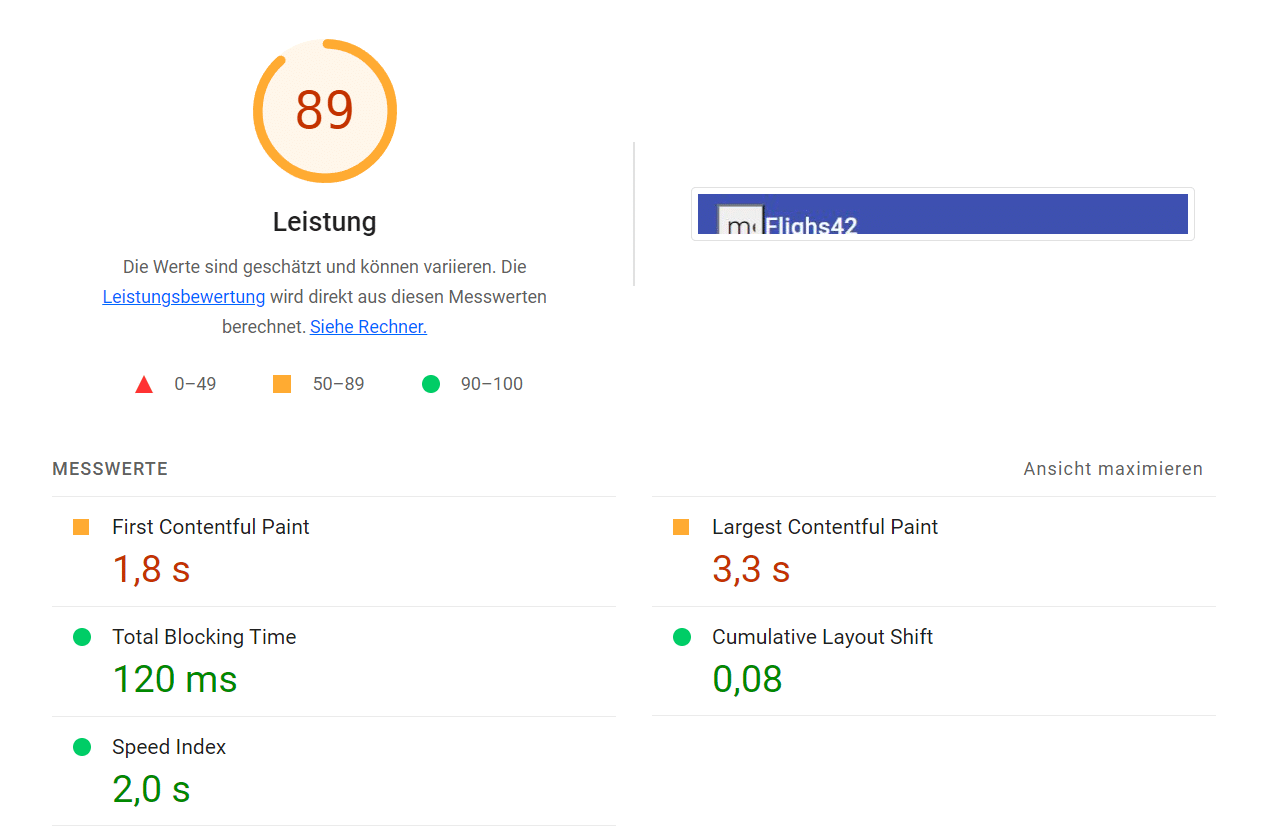
{ provide: APP_ID, useValue: 'myApp' },The impact of the new non-destructive hydration is genuinely noteworthy. The two figures below present Lighthouse metrics for the sample application used. The first measures classic SSR, the second reflects the new non-destructive hydration.
Classic SSR:
SSR with Non-Destructive Hydration
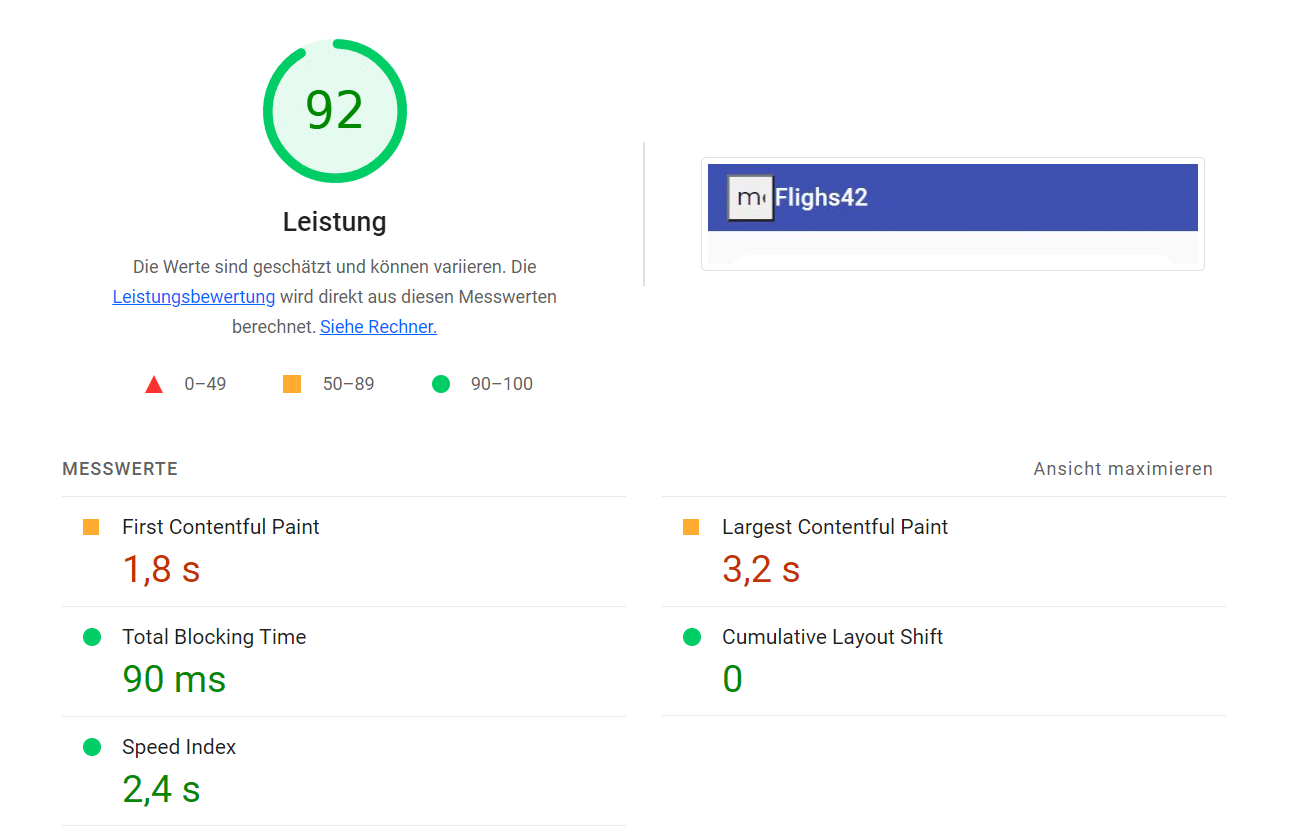
Beyond generating a production build and enabling HTTP compression on the node-based web server responsible for SSR, no further optimizations were applied.
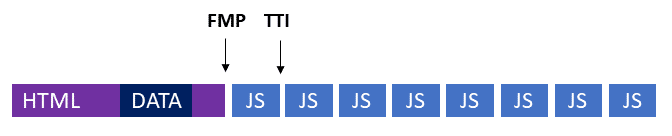
Like Signals, non-destructive hydration ships in Angular 16 as a developer preview. Building on this foundation, the Angular team intends to investigate additional hydration strategies. Progressive hydration and partial hydration are under discussion:
Progressive Hydration:
Partial Hydration:
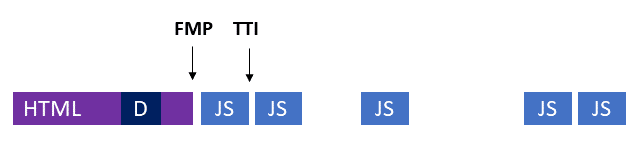
Progressive hydration involves the browser fetching multiple smaller bundles rather than a single large one. This enables currently needed application sections to become interactive more swiftly. Partial hydration, on the other hand, aims to exclude certain bundles from download entirely. Code governing static page regions, along with code for components outside the visible viewport, can remain unloaded.
Inputs as Mandatory Fields
A modest yet valuable improvement concerns required inputs for components. These are properties that must be supplied when a component is integrated. This eliminates the need for the component to verify against undefined and avoids extending the property's type to include undefined. Designating an input as mandatory involves setting the new required flag to true:
@Component({ … })
export class FlightCardComponent {
  @Input({ required: true }) item: Flight = initFlight;
     […]
}
Router
The router received several thoughtful refinements as well. It can now be configured to pass routing parameters directly to component inputs. For instance, if a route is invoked with ;q=Graz, the router assigns the value Graz to the input named q:
@Input ( ) q = '' ;Retrieving parameter values via the ActivatedRoute service becomes unnecessary. This feature applies to parameters within the data object, the query string, and the matrix parameters characteristic of Angular. When conflicts arise, precedence follows that same ordering — values from data win if present, then the query string, and finally matrix parameters. To avoid disrupting existing applications, this option requires explicit opt-in. Enabling it involves passing the withComponentInputBinding function to provideRouter:
provideRouter(
  APP_ROUTES,
  withComponentInputBinding()
),
Additionally, the router now exposes a lastSuccessfulNavigation property furnishing details about the current route:
router = inject(Router);
[…]
console.log(
  'lastSuccessfullNavigation',
  this.router.lastSuccessfulNavigation
);
DestroyRef
As noted earlier, Angular links the lifetime of Signal consumers to the surrounding Angular building block, like the current component. This is achieved through the newly introduced DestroyRef — a service that notifies you right before the associated building block is about to be torn down:
destroyRef = inject(DestroyRef);
[…]

const sub = interval(1000)
        .subscribe((counter) => console.log(counter));

const cleanup = this.destroyRef.onDestroy(() => {
  sub.unsubscribe();
});

// cleanup();
The onDestroy method takes a callback. DestroyRef triggers this callback just before destruction of the current building block occurs. In the example above, this approach is used to terminate a subscription. If you change your plans, you can invoke the returned cleanup function, as indicated by the trailing comment. In such a scenario, the callback is unregistered and thus will not fire when the building block gets destroyed.
Injection Context
Initially built for internal needs, the inject function has made dependency injection more convenient in recent versions. Yet, as its usage expanded to application-level code, developers now regularly encounter the term injection context. This refers to the locations in code where inject is permitted: default property values in classes, constructors, or a factory for a provider. Furthermore, as shown below, an injection context can be established via the injector.
Attempting to use it elsewhere in the app will lead to an error:
ngOnInit(): void {
  // Errror: not in InjectionContext!
  const flightService = inject(FlightService);
}
Previously, a function had no way to detect the context it was invoked in. As a result, it could not provide a helpful error message to the caller. That gap is now closed with the new assertInjectionContext function:
function selectAllFlights(): Observable<Flight[]> {
  assertInInjectionContext(selectAllFlights);
  const store = inject(Store);
  return store.select(selectFlights);
}
If assertInInjectionContext runs outside of an injection context, it raises an error. To help the caller pinpoint the issue, the error message includes the name of the current function, which is supplied as an argument.
When a fresh injection context needs to be created on demand, Angular 16 offers the runInInjectionContext function, which takes over from the earlier EnvironmentInjector.runInContext method:
function selectAllFlights2(injector: Injector): Observable<Flight[]> {
  let store: Store | undefined;
  runInInjectionContext(injector, () => {
    store = inject(Store);
  });
  if (store) {
    return store.select(selectFlights);
  }
  return of([]);
}
The runInInjectionContext function requires a reference to an injector, which itself must be obtained through dependency injection — for example, using inject.
Improvements to the CLI: Standalone, Jest and esbuild
With Angular 16, several schematics have been updated to accommodate standalone components. For instance, ng new now includes a --standalone flag. Additionally, both the SSR schematics referenced earlier and the @angular/service-worker package now support Standalone APIs.
The CLI team has also devoted considerable effort to the new esbuild-based builder as part of Angular 16. While still in an experimental phase, early results are compelling. Initial tests on large applications have shown build time reductions by a factor of 3 to 4. Moreover, ng serve now adopts this builder when it is set for ng build. To experiment with the new builder, swap out the following line in the angular.json file
"builder" : "@angular-devkit/build-angular:browser" ,with
"builder" : "@angular-devkit/build-angular:browser-esbuild" ,Summary
With release 16, the Angular team pushes forward in its mission to make the framework both more current and more lightweight. Signals herald a fresh approach to granular change detection, while non-destructive hydration marks the first step toward advanced hydration scenarios, which are especially relevant for public-facing web applications.
Support for required inputs, binding of routing parameters, and the new DestroyRef add further convenience to the developer experience. In parallel, the CLI now enables scaffolding of applications with standalone components, and the still-experimental esbuild-based builder significantly boosts build performance for Angular projects.
More on Modern Angular?
Discover everything about Standalone Components in our complimentary eBook:
- The guiding principles behind Standalone Components
- Migration approaches and compatibility with existing code
- Standalone Components in relation to the router and lazy loading
- Standalone Components and Web Components
- Standalone Components with DI and NGRX
Access our eBook here:

You can download it right now!