Tree-Shakable Providers
With Angular 6, the providedIn property was introduced for providers, enabling services to be tree-shakable. For those unfamiliar with the concept, tree shaking is the process of eliminating unused code from an application. In practice, this means if a service is created but never used, it will be excluded from the final production bundle. For a deeper dive, Lars has written a helpful blog post on the topic.
Why the any scope?
Now that we understand the rationale behind 'root'—making services tree-shakable—let's explore providedIn: 'any'. To grasp this, we need to look at how forRoot, forChild, and lazy loading work. If you've used Angular Router or NgRx, you're likely familiar with these static methods.
The core issue with lazy-loaded modules is that with providedIn: 'root', even when you expect a fresh service instance, you'll get the same singleton. This isn't always the desired behavior. When a module is lazy-loaded, you'd typically expect a new instance to be created alongside it.
Let's walk through some code to illustrate the previous problem and how 'any' (note the quotes—important to distinguish from TypeScript's any type) provides a solution.
What we are going to achieve
- A configuration service that accepts parameters like
apiEndpointandtimeout. - Two lazy-loaded modules, employee and department, each needing the config service with distinct values.
The problem with using the root scope
Start by creating a new Angular 9 app. If you'd rather not install Angular 9 globally, use this command:
npx -p @angular/cli ng new providerdemo
For those with Angular CLI 9 already installed globally, simply omit npx -p @angular/cli from the commands.
Next, generate two lazy-loaded modules with components:
npx -p @angular/cli ng g module employee --routing --route employee --module app

npx -p @angular/cli ng g module department --routing --route department --module app
Create a value provider and an interface. Place these in a new shared folder since multiple modules will use them:
export interface Config {
  apiEndPoint: string;
  timeout: number;
}
demo.config.ts
import { InjectionToken } from '@angular/core';
import { Config } from './demo.config';

export const configToken = new InjectionToken<Config>('demo token');
demo.token.ts
Now, create a service called ConfigService that reads from the token and uses it for operations. Generate it with:
npx -p @angular/cli ng g service shared/config
After creation, fill in the service with the following code:
import { Injectable, Inject } from '@angular/core';
import { configToken } from './demo.token';
import { Config } from './demo.config';

@Injectable({
  providedIn: 'root'
})
export class ConfigService {

  constructor(@Inject(configToken) private config: Config) {
    console.log('new instance is created');
  }

  getValue() {
    return this.config;
  }
}
config.service.ts
Let's integrate this service into the Employee and Department components associated with their respective modules. We'll simply output the values from the Token:
import { Component, OnInit } from '@angular/core';
import { ConfigService } from '../shared/config.service';

@Component({
  selector: 'app-employee',
  templateUrl: './employee.component.html',
  styleUrls: ['./employee.component.css']
})
export class EmployeeComponent implements OnInit {

  constructor(private configService: ConfigService) { }

  ngOnInit(): void {
    console.log(this.configService.getValue());
  }
}
employee.component.ts
import { Component, OnInit } from '@angular/core';
import { ConfigService } from '../shared/config.service';

@Component({
  selector: 'app-department',
  templateUrl: './department.component.html',
  styleUrls: ['./department.component.css']
})
export class DepartmentComponent implements OnInit {

  constructor(private configService: ConfigService) { }

  ngOnInit(): void {
    console.log(this.configService.getValue());
  }
}
department.component.ts
Next, pass two distinct configurations for Employee and Department by adding the following to both modules:
import { NgModule } from '@angular/core';
import { CommonModule } from '@angular/common';

import { EmployeeRoutingModule } from './employee-routing.module';
import { EmployeeComponent } from './employee.component';
import { Config } from '../shared/demo.config';
import { configToken } from '../shared/demo.token';

export const configValue: Config = {
  apiEndPoint: 'abc.com',
  timeout: 3000
};


@NgModule({
  declarations: [EmployeeComponent],
  imports: [
    CommonModule,
    EmployeeRoutingModule
  ],
  providers: [{
    provide: configToken, useValue: configValue
  }]
})
export class EmployeeModule {
  constructor() { }
}
employee.module.ts
import { NgModule } from '@angular/core';
import { CommonModule } from '@angular/common';

import { DepartmentRoutingModule } from './department-routing.module';
import { DepartmentComponent } from './department.component';
import { Config } from '../shared/demo.config';
import { configToken } from '../shared/demo.token';

export const configValue: Config = {
  apiEndPoint: 'xyz.com',
  timeout: 4000
};


@NgModule({
  declarations: [DepartmentComponent],
  imports: [
    CommonModule,
    DepartmentRoutingModule
  ],
  providers: [{
    provide: configToken, useValue: configValue
  }]
})
export class DepartmentModule { }
department.module.ts
Notice the difference lies in the config values. Let's run the app and check the outcome, keeping providedIn set to 'root'. To test, add routes to app.component.html:
<a routerLink="employee">Employee</a>
<br>
<a routerLink="department">Department</a>
<router-outlet></router-outlet>
app.component.html
Run the app with:
npx -p @angular/cli ng serve -o
The app starts fine, but clicking a route triggers an error. We expected to see different config values, yet instead we hit an error:
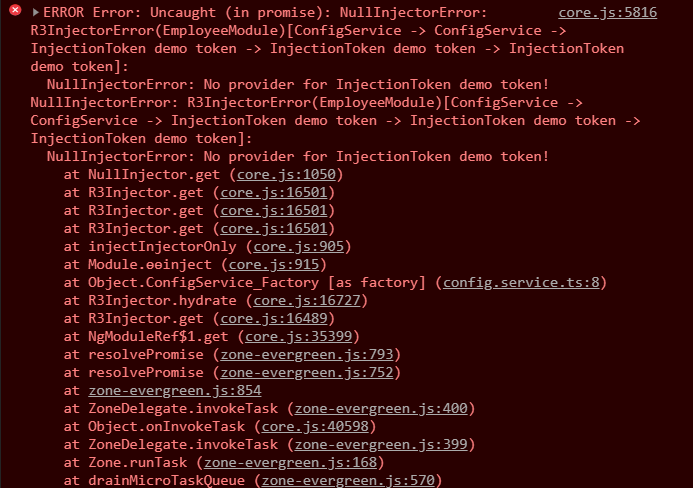
provider-error
So what went wrong here?
Everything seemed correct—we expected distinct values for the employee and department components, but an error appeared. This stems from providedIn: 'root'. The diagram below shows what went on:
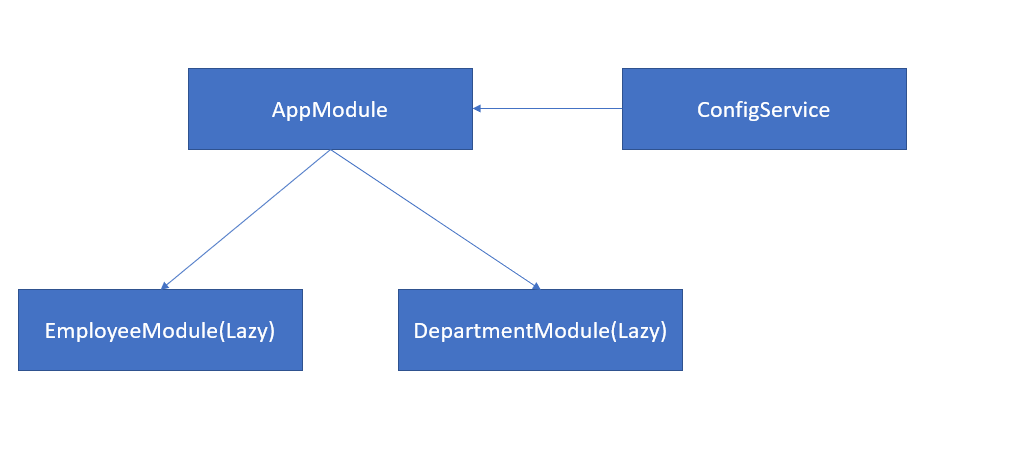
Figure 1. Root provider scope.
With providedIn: 'root', the service is registered with AppModule. When a route is activated, the service looks for a config value that isn't there. To fix this, update AppModule:
import { BrowserModule } from '@angular/platform-browser';
import { NgModule } from '@angular/core';

import { AppRoutingModule } from './app-routing.module';
import { AppComponent } from './app.component';
import { Condfig } from './shared/demo.config';
import { configToken } from './shared/demo.token';


export const configValue: Config = {
  apiEndPoint: 'def.com',
  timeout: 5000
};

@NgModule({
  declarations: [
    AppComponent
  ],
  imports: [
    BrowserModule,
    AppRoutingModule
  ],
  providers: [{
    provide: configToken, useValue: configValue
  }],
  bootstrap: [AppComponent]
})
export class AppModule { }
app.module.ts
Now the app runs, and clicking routes shows the same two values for both components—consistent with Figure 1.
apiEndPoint: 'def.com'
timeout: 5000
What we wanted to achieve
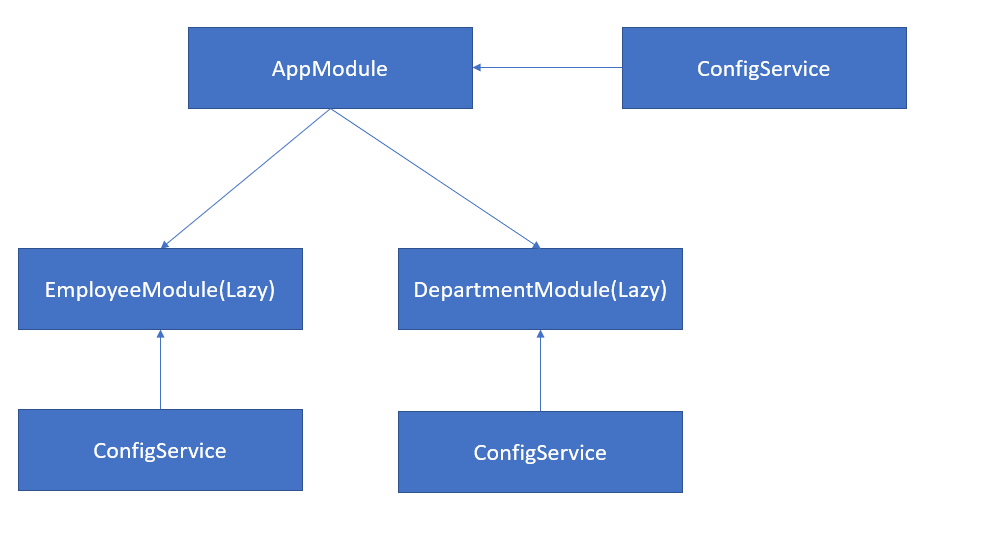
Figure 2. Injector provider scope.
In reality, the goal was something like Figure 2, where each module gets its own instance. With providedIn: 'root', that's impossible. Previously, the fix involved writing forRoot and forChild static methods so each component could have its own instance.
Alternatively, you could provide ConfigService in each module separately, but that sacrifices tree-shakability.
@NgModule({
  providers: [
    ConfigService,
    {
    provide: CONFIG_TOKEN, useValue: CONFIG_VALUE
  }]
}
export class EmployeeModule { }
Now, change the providedIn property for ConfigService:
@Injectable({
  providedIn: 'any'
})
Rerun the app and check the console:
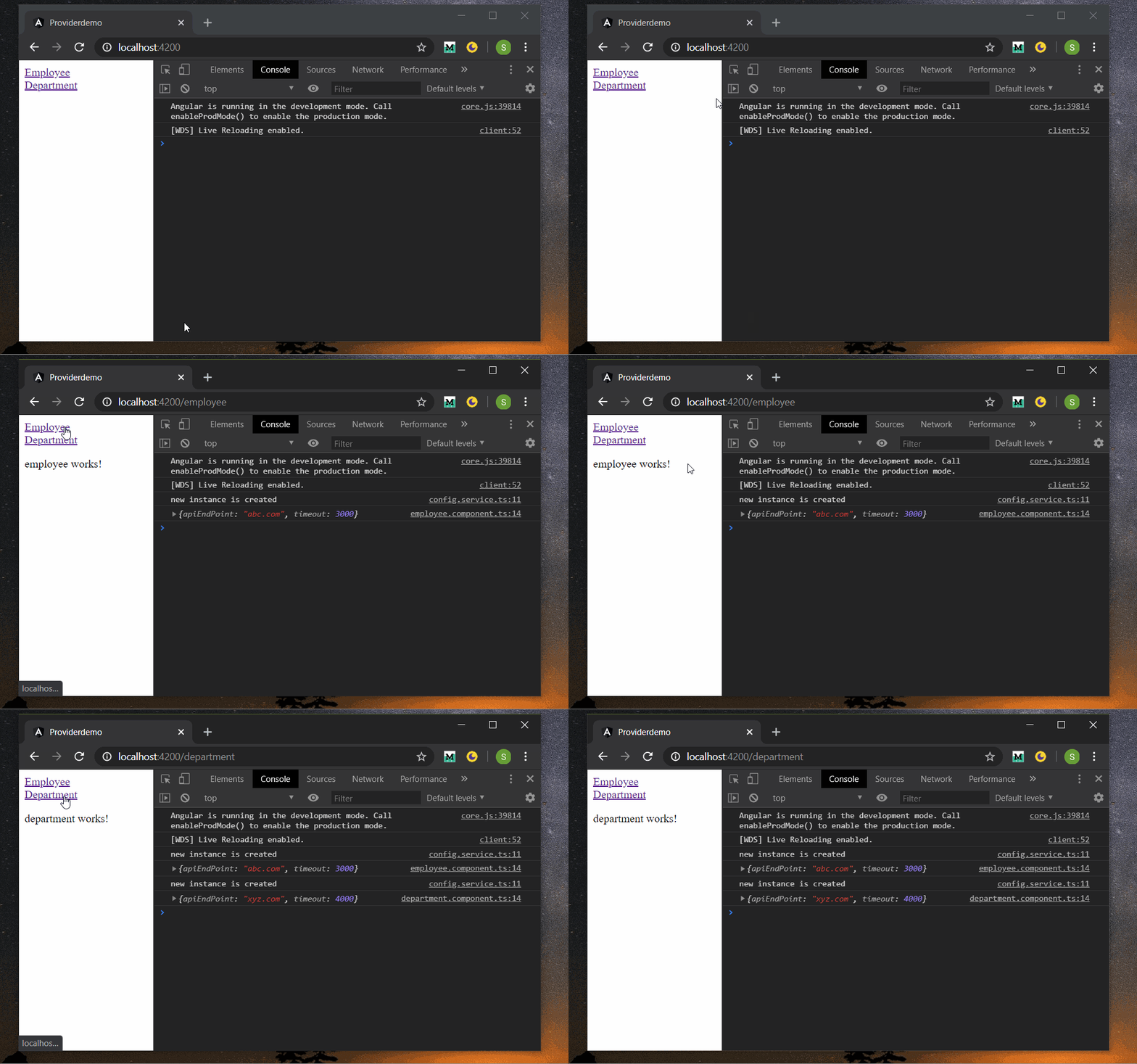
Final App
Success! We now have separate instances without needing forRoot or forChild static methods, and the service remains tree-shakable.
Here’s what happened: with providedIn: 'any', all eagerly loaded modules share a single instance, while each lazy-loaded module gets its own ConfigService instance, as seen below.
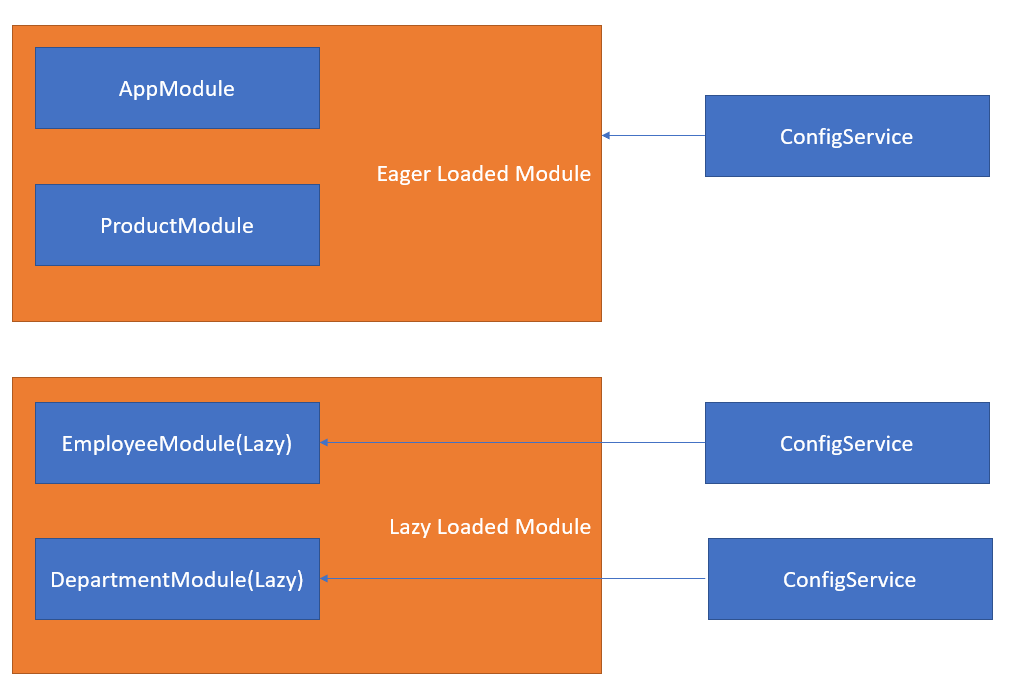
Figure 3. Any provider scope.
Conclusion
Previously, getting a new service instance for lazy-loaded modules was a challenge. The new 'any' value simplifies this. You can provide any token, and developers can set values per lazy-loaded module, with the service automatically creating a fresh instance for each.
You can download the code for this project from GitHub.