
Background and purpose
Every Angular developer has likely seen this console error at some point:
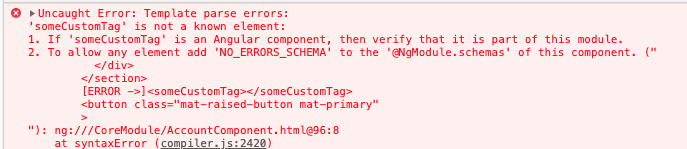
Typically, it appears when a component is missing from a module's declarations, making Angular unaware of its existence. Interestingly, the same error can surface for native HTML elements:
<img src="https://wp.angular.love/wp-content/uploads/2024/07/content-image2-534.png" alt="<button data-someAttr="{{someValue}}" >Save</button>" loading="<button data-someAttr="{{someValue}}" >Save</button>" className="" style={{marginBottom: '30px'}}/>
<button data-someAttr**\=”**{{someValue}}**”** \>**Save**</button>
The article's demo project, available here, reproduces these errors when run.
While the standard fix involves using [attr.someAttr]="someValue" syntax, a deeper question arises: how does Angular determine that a button lacks such an attribute? Additionally, can we bypass Angular's validation for custom scenarios—for instance, web components outside Angular's scope or specific non-standard attributes? This is where ElementSchemaRegistry from the '@angular/compiler' package enters the picture.
Foundation and interface
Angular employs two distinct mechanisms for validating component templates:
- Generating Type Checking Blocks — details can be found in Alexey Zuev's article here.
- The compiler instance leveraging
TemplateParser, which invokes methods ofDomElementSchemaRegistry(an implementation ofElementSchemaRegistry) to validate the template's AST (Abstract syntax tree) nodes.
Acting as an abstract class, ElementSchemaRegistry defines the interface that a schema class must implement for Angular to validate component templates—checking whether an element exists or whether a given attribute is valid for a particular element. The definition appears as follows:
import { SchemaMetadata, SecurityContext } from '../core';

export abstract class ElementSchemaRegistry {
  abstract hasProperty(
    tagName: string,
    propName: string,
    schemaMetas: SchemaMetadata[]
  ): boolean;

  abstract hasElement(tagName: string, schemaMetas: SchemaMetadata[]): boolean;

  abstract securityContext(
    elementName: string,
    propName: string,
    isAttribute: boolean
  ): SecurityContext;

  abstract allKnownElementNames(): string[];

  abstract getMappedPropName(propName: string): string;

  abstract getDefaultComponentElementName(): string;

  abstract validateProperty(name: string): { error: boolean; msg?: string };

  abstract validateAttribute(name: string): { error: boolean; msg?: string };

  abstract normalizeAnimationStyleProperty(propName: string): string;

  abstract normalizeAnimationStyleValue(
    camelCaseProp: string,
    userProvidedProp: string,
    val: string | number
  ): { error: string; value: string };
}
Notably, the interface exposes methods like hasElement and hasAttribute to perform these checks. What's happening under the hood?
The DomElementSchemaRegistry implementation
Browser-specific element validation relies on the DomElementSchemaRegistry class. This class maintains a comprehensive registry of DOM entities and their associated attributes. The full listing is available here:
const SCHEMA: string[] = [  '[Element]|textContent,%classList,className,id,innerHTML,*beforecopy,*beforecut,*beforepaste,*copy,*cut,*paste,*search,*selectstart,*webkitfullscreenchange,*webkitfullscreenerror,*wheel,outerHTML,#scrollLeft,#scrollTop,slot' +      /* added manually to avoid breaking  changes */
...
Generating this list involves exporting browser IDL (interface description language), a detail confirmed by comments in the [compiler-cli](https://github.com/angular/angular/tree/3959511b80ff8abb55b8c8858a6080472bff1589/packages/compiler-cli)/[src](https://github.com/angular/angular/tree/3959511b80ff8abb55b8c8858a6080472bff1589/packages/compiler-cli/src)/[ngtsc](https://github.com/angular/angular/tree/3959511b80ff8abb55b8c8858a6080472bff1589/packages/compiler-cli/src/ngtsc)/[typecheck](https://github.com/angular/angular/tree/3959511b80ff8abb55b8c8858a6080472bff1589/packages/compiler-cli/src/ngtsc/typecheck)/[src](https://github.com/angular/angular/tree/3959511b80ff8abb55b8c8858a6080472bff1589/packages/compiler-cli/src/ngtsc/typecheck/src)/[dom.ts](https://github.com/angular/angular/blob/3959511b80ff8abb55b8c8858a6080472bff1589/packages/compiler-cli/src/ngtsc/typecheck/src/dom.ts#L63) file, one of the places where DomElementSchemaRegistry gets instantiated.
`DomElementSchemaRegistry`, a schema * maintained by the Angular team via extraction from a browser IDL.
With a catalog of DOM elements and validation methods in place, the question becomes: how does Angular actually put this to use?
Operational details
DomElementSchemaRegistry sees use across both AOT and JIT compilation paths. Here's a closer look.
AOT Compiler
- When TypeScript's
ts.createProgrambegins, it requires a compiler instance produced by the compiler factory function. - The compiler factory (in the AOT path) establishes a
schemaParserand passes it to anew TemplateParser(…)call; thistemplateParserinstance subsequently goes into the compiler instance's constructor (see here).
export function createAotCompiler(
compilerHost: AotCompilerHost, options: AotCompilerOptions,
errorCollector?: (error: any, type?: any) =>
void): {compiler: AotCompiler, reflector: StaticReflector} {
...
const elementSchemaRegistry = new DomElementSchemaRegistry();
const tmplParser = new TemplateParser(
config, staticReflector, expressionParser, elementSchemaRegistry, htmlParser, console, []);
...
const compiler = new AotCompiler(
config, options, compilerHost, staticReflector, resolver, tmplParser,
new StyleCompiler(urlResolver), viewCompiler, typeCheckCompiler,
new NgModuleCompiler(staticReflector),
new InjectableCompiler(staticReflector, !!options.enableIvy), new TypeScriptEmitter(),
summaryResolver, symbolResolver);
return {compiler, reflector: staticReflector};
}
The compiler instance includes several methods, though focus here is on _compileComponent and _createTypeCheckBlock. Both invoke _parseTemplate, which performs templateParserInstance.[parse](https://github.com/angular/angular/blob/8.2.x/packages/compiler/src/template_parser/template_parser.ts#L89). This kicks off template parsing (employing the visitor pattern to traverse the AST), during which the DomElementSchemaRegistry instance and TemplateParseVisitor work together to determine whether each AST node (corresponding to a template element) is valid.
Illustrations of this can be found here and here, showing the source of the errors shown in the beginning:
private _assertElementExists(matchElement: boolean, element: html.Element) {
const elName = element.name.replace(/^:xhtml:/, '');
if (!matchElement && !this._schemaRegistry.hasElement(elName, this._schemas)) {
let errorMsg = `'${elName}' is not a known element:\n`;
errorMsg +=
`1. If '${elName}' is an Angular component, then verify that it is part of this module.\n`;
if (elName.indexOf('-') > -1) {
errorMsg +=
`2. If '${elName}' is a Web Component then add 'CUSTOM_ELEMENTS_SCHEMA' to the '@NgModule.schemas' of this component to suppress this message.`;
} else {
errorMsg +=
`2. To allow any element add 'NO_ERRORS_SCHEMA' to the '@NgModule.schemas' of this component.`;
}
this._reportError(errorMsg, element.sourceSpan !);
}
JIT compiler
The AOT compiler creates a TemplateParser instance explicitly (recall that the parser then depends on the schemaRegistry, which is a DomElementSchemaRegistry instance):
//angular/angular/blob/8.2.x/packages/compiler/src/aot/compiler_factory.ts
...
const elementSchemaRegistry = new DomElementSchemaRegistry();
const tmplParser = new TemplateParser(config, staticReflector, expressionParser, elementSchemaRegistry, htmlParser, console, []);
...
For JIT compilation, Angular leverages the Injector to instantiate the required dependencies for its compiler_factory:
export const COMPILER_PROVIDERS = <StaticProvider[]>[
...
{ provide: DomElementSchemaRegistry, deps: []},
{ provide: ElementSchemaRegistry, useExisting: DomElementSchemaRegistry},
...
]
This setup implies that in JIT builds, one can replace DomElementSchemaRegistry with a custom ElementSchema class—a topic we'll examine next.
Understanding the mechanics opens the door for practical exploration. How can this knowledge benefit your Angular development? Let's examine concrete scenarios.
Practical applications of DomElementSchemaRegistry
Let's begin with CUSTOM_ERRORS_SCHEMA when working with custom elements inside an Angular application.
CUSTOM_ERRORS_SCHEMA
If you've attempted to integrate custom elements in Angular (detailed coverage available here), you likely recall that to avoid template errors, CUSTOM_ERRORS_SCHEMA must be included in the schemas:[] array of the NgModule decorator:
import { NgModule, CUSTOM_ELEMENTS_SCHEMA } from '@angular/core
...
@NgModule({
declarations: [AppComponent],
schemas: [ CUSTOM_ELEMENTS_SCHEMA ],
...
})
export class AppModule {}
The reason? Angular has no awareness of custom element tags, interpreting them as template mistakes. You might wonder what mechanism allows CUSTOM_ELEMENTS_SCHEMA to suppress this error. Let's examine that.
The template parser relies on a DomElementSchemaRegistry instance, accessed via _schemaRegistry, to validate template nodes. Two key methods on this registry are _schemaRegistry.hasElement and _schemaRegistry.hasProperty. Their implementations appear in [dom_element_schema_registry.ts](https://github.com/angular/angular/blob/master/packages/compiler/src/schema/dom_element_schema_registry.ts#L285):
hasProperty(tagName: string, propName: string, schemaMetas: SchemaMetadata[]): boolean {
  if (schemaMetas.some((schema) => schema.name === NO_ERRORS_SCHEMA.name)) { return true; }
  if (tagName.indexOf('-') > -1) {
    if (isNgContainer(tagName) || isNgContent(tagName)) {
    return false;
    }
    if (schemaMetas.some((schema) => schema.name === CUSTOM_ELEMENTS_SCHEMA.name)) { return true;}
  }
...
}


hasElement(tagName: string, schemaMetas: SchemaMetadata[]): boolean {
  if (schemaMetas.some((schema) => schema.name === NO_ERRORS_SCHEMA.name)) { return true; }
  if (tagName.indexOf('-') > -1) {
    if (isNgContainer(tagName) || isNgContent(tagName)) { return true; }
  if (schemaMetas.some((schema) => schema.name === CUSTOM_ELEMENTS_SCHEMA.name)) { return true; }
}
...
}
Focus on this specific portion:
if (tagName.indexOf('-') > -1) {
  if (isNgContainer(tagName) || isNgContent(tagName)) {
    return false;
  }
  if (
    schemaMetas.some((schema) => schema.name === CUSTOM_ELEMENTS_SCHEMA.name)
  ) {
    return true;
  }
}
This logic means: when a template tag contains a hyphen (-), is neither ng-content nor ng-container, and CUSTOM_ELEMENTS_SCHEMA is listed among the module's schemas (schemaMetas variable), the tag is deemed acceptable. Essentially, Angular scans for a dash in the tag name, and upon finding one, classifies it as a custom element.
Feel free to experiment with the code located in the 2_CUSTOM_ELEMENTS_SCHEMA branch of the article demo project.
Applying NO_ERRORS_SCHEMA in unit tests
The Angular source above also clarifies how NO_ERRORS_SCHEMA operates:
if (schemaMetas.some((schema) => schema.name === NO_ERRORS_SCHEMA.name)) {
  return true;
}
When NO_ERRORS_SCHEMA is placed in the ngModule decorator's schemas property, Angular bypasses all validation checks.
This proves handy during component testing when you'd rather not configure the child component within the TestBed module.
// my-parent.component.ts
@Component({
  selector: "app-my-parent",
  template: `
    <div>
      <child></child> <!-- Don't want to instantiate child -->
    </div>
    <button (click)="doSomething()">Start</button>
  `,
  styleUrls: ["./my-parent.component.scss"],
})
export class MyParentComponent {
  constructor() {
  }

  doSomething() {
    // some code
  }
}

// my-parent.spec.ts
...
beforeEach(async(() => {
  TestBed.configureTestingModule({
    declarations: [MyParentComponent],
    schemas: [NO_ERRORS_SCHEMA],
  }).compileComponents()
}))
Without NO_ERRORS_SCHEMA, Angular errors out, stating that <child></child> is unrecognized. If the <child> component isn't part of your test scope, you now understand how to bypass its validation. Note that some developers consider this practice questionable, so the choice is yours. The implementation is available in the 3_NO_ERRORS_SCHEMA branch of the demo repository.
Extending ElementSchemaRegistry with a custom class for exclusion rules
JIT Compiler approach
This becomes necessary when your site combines Angular with other frameworks, requiring certain custom elements or attributes to be added to the exclusion list.
A relevant scenario surfaced in a StackOverflow discussion:
The component template contains custom elements and attributes (utilized by third-party non-Angular code):
_<foo></foo>_>_<div data-bar="{{ bar }}"></div>_This triggers a compiler error:
_Template parse errors:_>_'foo' is not a known element:_What's the method for registering the foo element and data-bar attribute in the compiler schema?
An excellent solution was provided by Alexey Zuev:
One approach is to subclass
_DomElementSchemaRegistry_in this manner:
//main.ts
import {
  DomElementSchemaRegistry,
  ElementSchemaRegistry,
} from '@angular/compiler';
import { SchemaMetadata } from '@angular/core';
const MY_DOM_ELEMENT_SCHEMA = ['foo'];
const MY_CUSTOM_PROPERTIES_SCHEMA = {
  div: {
    bar: 'string',
  },
};
export class CustomDomElementSchemaRegistry extends DomElementSchemaRegistry {
  constructor() {
    super();
  }
  hasElement(tagName: string, schemaMetas: SchemaMetadata[]): boolean {
    return (
      MY_DOM_ELEMENT_SCHEMA.indexOf(tagName) > -1 ||
      super.hasElement(tagName, schemaMetas)
    );
  }
  hasProperty(
    tagName: string,
    propName: string,
    schemaMetas: SchemaMetadata[]
  ): boolean {
    const elementProperties =
      MY_CUSTOM_PROPERTIES_SCHEMA[tagName.toLowerCase()];
    return (
      (elementProperties && elementProperties[propName]) ||
      super.hasProperty(tagName, propName, schemaMetas)
    );
  }
}
platformBrowserDynamic().bootstrapModule(AppModule, {
  providers: [
    {
      provide: ElementSchemaRegistry,
      useClass: CustomDomElementSchemaRegistry,
      deps: [],
    },
  ],
});
With this, Angular no longer flags <foo> as a template error.
However, this technique is limited to JIT compilation — verify it in the 4_Customizing_element_schema branch of the demo project. Is there a way to adapt this for AOT builds?
AOT Compiler version
As a reminder, the JIT compiler leverages COMPILER_PROVIDERS:
{ provide: ElementSchemaRegistry, useExisting: DomElementSchemaRegistry},
This made substituting ElementSchemaRegistry with a custom class straightforward, as shown earlier. Yet, for the AOT compiler, this isn't feasible because the [schemaRegistry](https://github.com/angular/angular/blob/8.2.x/packages/compiler/src/aot/compiler_factory.ts#L86) is created directly within the factory:
const elementSchemaRegistry = new DomElementSchemaRegistry();
To replicate the previous example under AOT, we must modify the DomElementSchemaRegistry.hasProperty (or hasElement) methods somehow (credit goes to Alexey Zuev for sharing this strategy):
JavaScript allows overwriting nearly anything.
A viable tactic involves creating `ng.js` and executing it as
node ng serve –aot
or
node ng build –prod#Angular pic.twitter.com/cvpM07JDyW— Alexey Zuev (@yurzui) February 4, 2020
The complete code example is below:
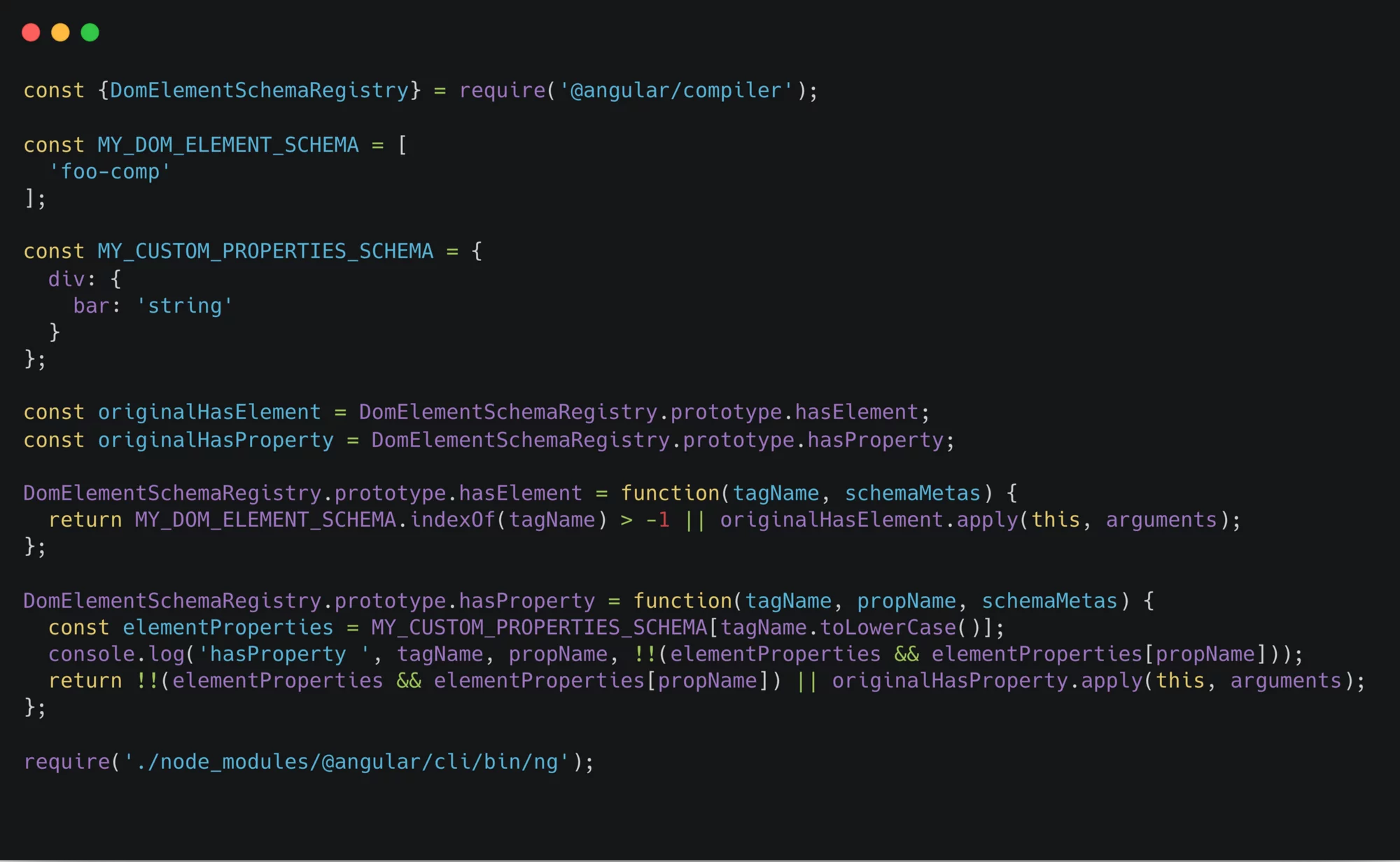
ng-new.js — Redefining DomElementSchemaRegistry.hasElement
So, what's the underlying principle?
We take the original DomElementSchemaRegistry.hasElement logic, augment it with our exclusion checks (while still invoking the original method afterward), and wrap it up. To test this, clone the repository and run node ng serve --aot or node ng build --aot. Keep in mind that ng here refers to our custom ng.js, not the standard Angular CLI.
I've integrated this code into ng-new.js within the 4_Customizing_element_schema branch of the demo project. After cloning and switching to that branch, executing node ng-new build --prod completes without issues. Conversely, using the standard ng build —prod command results in template errors.
Limitations
A notable observation: even with an exclusion defined for custom attributes, like so:
<div bar="{{title}}">Angular removed bar attribute from that div silently</div>
Angular still strips the bar attribute. To preserve it, you must employ Angular's attr binding syntax—although then the custom exclusion becomes unnecessary:
<div [attr.bar]="title">Angular keep bar attribute if we use [attr.bar]="" notation</div>
For custom attributes, the only scenario where schema exclusion works effectively is with non-dynamic attributes:
<div bar="NonDymanicValue">Angular removed bar attribute from that div silently</div>
Real-world customization of ElementSchema
Two notable projects come to mind that implement a customized elementSchemaRegistry.
Angular Terminal Platform
Ever wondered about launching an Angular application inside a terminal window? It's surprisingly straightforward.
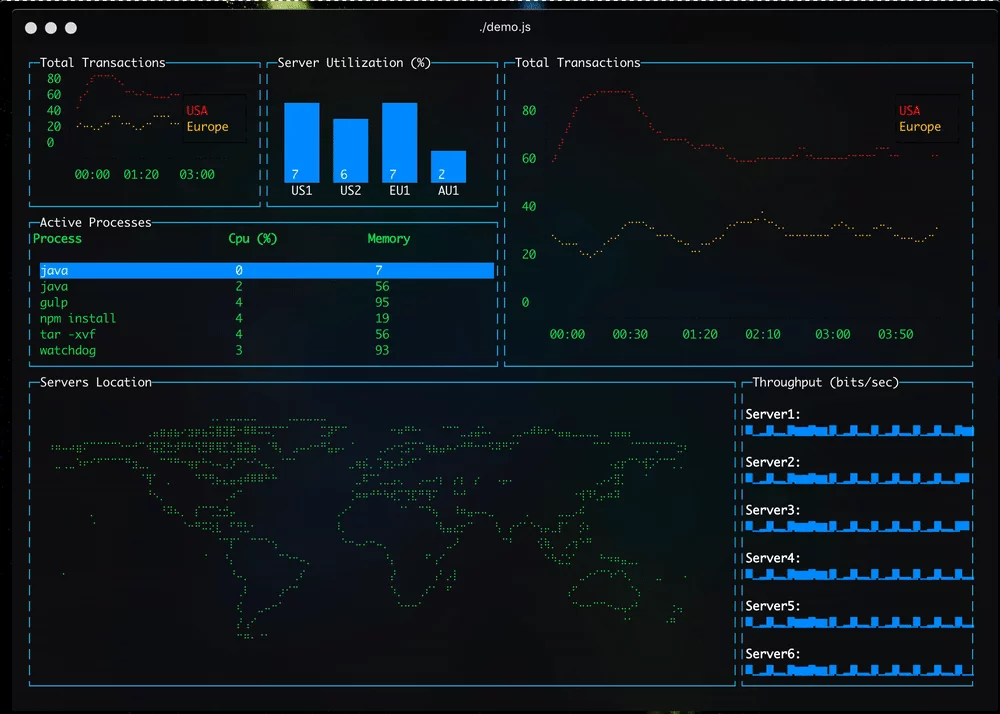
The project's schema-registry.ts is linked here. Its approach is simple — it accepts everything:
// projects/platform-terminal/src/lib/schema-registry.ts
export class TerminalElementSchemaRegistry extends ElementSchemaRegistry {
hasProperty(_tagName: string, _propName: string): boolean {
  return true;
}
hasElement(_tagName: string, _schemaMetas: SchemaMetadata[]): boolean {
return true;
}
...


// projects/platform-terminal/src/lib/platform.ts
...
{ provide: ElementSchemaRegistry, useClass: TerminalElementSchemaRegistry, deps: [] },
By this point in the article, you should grasp its workings.
Applications Node-GUI
This initiative enables Angular applications to function as desktop apps, comparable to Electron.
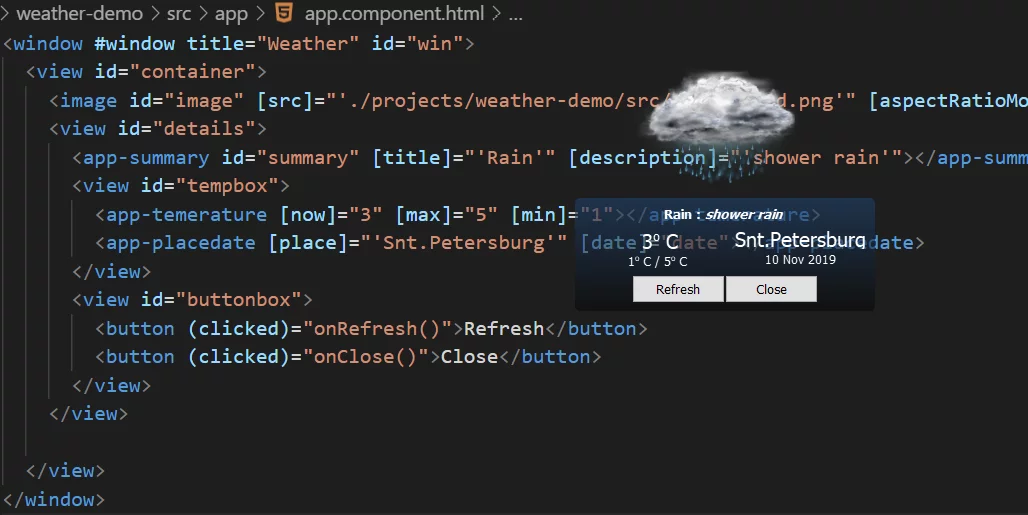
The author employs NodeguiElementSchemaRegistry, which also permits everything by always returning true from hasElement and hasProperty. Similar to the terminal project, ElementSchemaRegistry is redefined through COMPILER_OPTIONS in the platform-dynamic.ts file:
provide: COMPILER_OPTIONS,
  useValue: {
    providers: [{
     provide: ElementSchemaRegistry,
     useClass: NodeguiElementSchemaRegistry,
     deps: []
   }
...
Wrap-up
Let's summarize the key points:
- Angular relies on
ElementSchemaRegistry, specifically itsDomElementSchemaRegistryimplementation, to verify the legitimacy of elements and attributes within component templates. - A
DomElementSchemaRegistryinstance is passed toTemplateParser, which the compiler employs to traverse all template AST nodes in both JIT and AOT modes. - Custom validation rules are achievable. This is straightforward for JIT compilers (
platformBrowserDynamic) and more complex yet still possible for AOT builds. - Validation can be entirely disabled by specifying
CUSTOM_ELEMENTS_SCHEMAorNO_ERRORS_SCHEMAwithin theschemasproperty of thengModuleconfiguration.
All the code referenced throughout this article is available here.