
An architectural approach to better Angular applications
This article presents an architectural approach to structuring your Angular applications. It aims to provide clear answers on how to organize your code so that it remains readable, testable, and maintainable.
The content is based on a talk delivered at the 2019 RVA JavaScript Conference in Richmond, Virginia. You can watch the talk here:
To get the most out of this material, you may find it helpful to watch the video while following along with the text.
All code examples from both the talk and this article are available in this GitHub repository.
Defining the Terminology
Our discussion will focus on Angular Templates, Components, and Services. Here is what we mean by each term:
Templates
The HTML portion of a component
Components
The TypeScript class portion of a component
Services
Injectable classes
Core Principles
The following core principles will serve as our guide:
- Templates: Declarative and Dumb
- Components: Smart and Thin
- Services: Fat and Happy (Specific)
We will explore what these principles mean and how to put them into practice within your Angular code.
Why Adopt This Approach?
Based on my own experience, adhering to these principles has resulted in code that is more readable, testable, and maintainable.
Specifically, this consistent approach enhances readability for other developers, particularly those already familiar with the pattern.
Our code becomes more testable since Services are inherently straightforward to test.
It also helps us keep our code DRY (Don't Repeat Yourself). Logic housed in Services can be easily reused across multiple components.
This approach allows us to fully leverage Angular features such as the async pipe.
It reduces coupling by preventing Templates from directly referencing Services.
Let's dive in and begin our discussion on how to structure your Templates.
Templates
Templates are the Lloyd Christmas of Angular.

Lloyd Christmas and Harry Dunne: please tell me where I can find one of those suits.
Templates should be Declarative and Dumb.
The Case for Declarative Templates
Your Templates should be Declarative and NOT Imperative.
Declarative code specifies WHAT should be done
Imperative code dictates HOW it should be done
Declarative Templates focus on what to display. They avoid specifying the exact mechanism used to display it.
Avoid complex logic
Declarative Templates steer clear of intricate logic, such as expressions using && and ||. These complex expressions should be moved into functions within your Components.
Keep it small and simple
Divide your HTML into smaller, simpler Templates. However, ensure that this division adds clarity rather than introducing unnecessary complexity.
*ngIf usage
The top-level template should be the only one concerned with whether an object is loaded. Sub-components should typically assume they are given a valid object whenever they are rendered.
<div *ngIf="selectedTask">
   <rva-task-detail [task]="selectedTask" (done)="done($event)">
   </rva-task-detail>

   <rva-task-history [task]="selectedTask">
   </rva-task-history>
</div>
In the example above, note that *ngIf is managed by the parent Template. This allows the rva-task-detail and rva-task-history components to render without verifying if selectedTask is valid.
Illustrative example of declarative template
Let's examine some Template code to illustrate the contrast between a declarative and an imperative approach.
In one of my projects, I needed to build a search filter for processes based on their state. Essentially, I required a set of toggleable buttons to control flags for the search criteria.
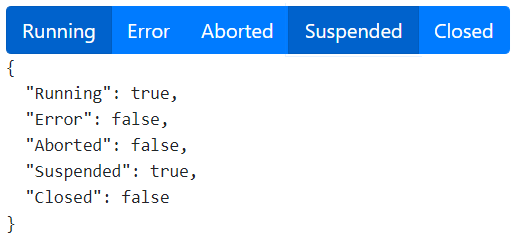
While I could have created a specific component with the five buttons, each linked to a field in the JSON object, I often find myself thinking:
Why just engineer something when you can OVER-engineer it?
This reminds me of that amusing xkcd comic where an engineer builds a generic system just to pass the salt:
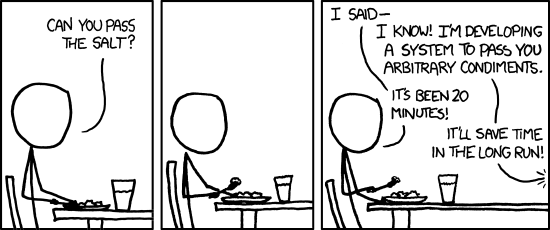
https://xkcd.com/974/
So, I opted to create a generic component that accepts a JSON object containing a set of Boolean flags and generates a button for each flag.
Imperative Template Pattern (Less Ideal)
An imperative version of the Component might look like this:
@Component({
   selector: 'rva-imperative-flags',
   template: `
     <div class="btn-group-toggle">
       <rva-flag-checkbox
         *ngFor="let state of Object.keys(flags)"
         [(flag)]="flags[state]"
         [label]="state"
       >
       </rva-flag-checkbox>
     </div>
   `,
 })
 export class ImperativeFlagsComponent {
   @Input() flags: any;

   public Object = Object;
 }
Our component uses *ngFor to render an rva-flag-checkbox for each key present in the flags object.
As you can see, this imperative version explicitly tells the Template HOW to derive the list of keys by utilizing the static Object.keys() function. We also have to expose the Object class as a public reference within our Component so the Template can access it.
Declarative Template Pattern (Better)
Let's see if we can refine this and make our Template declarative:
@Component({
   selector: 'rva-declarative-flags',
   template: `
     <div class="btn-group-toggle">
       <rva-flag-checkbox
         *ngFor="let state of keys(flags)"
         [(flag)]="flags[state]"
         [label]="state"
       >
       </rva-flag-checkbox>
     </div>
   `,
 })
 export class DeclarativeFlagsComponent {
   @Input() flags: any;

   public keys(obj: any) {
     return Object.keys(obj);
   }
 }
Now our template simply states WHAT it needs. It requires the keys for the flags object, and it's up to the Component to determine HOW to obtain them.
However, perhaps we can improve this further. If you're anything like me, you might be thinking:
I've never met a piece of code that I didn't want to refactor.
Pushing Declarative Further (Even Better)
We can make our Template even more declarative:
@Component({
   selector: 'rva-declarativer-flags',
   template: `
     <div class="btn-group-toggle">
       <rva-flag-checkbox
         *ngFor="let state of states()"
         [(flag)]="flags[state]"
         [label]="state"
       >
       </rva-flag-checkbox>
     </div>
   `,
})
export class DeclarativerFlagsComponent {
   @Input() flags: any;

   public states() {
     return Object.keys(this.flags);
   }
}
Now, our Template directly asks for the states. It has no knowledge of the flags object whatsoever.
This introduces a principle we will revisit when we discuss Components:
Component functions should be specific.
The Concept of Dumb Templates
A Template is considered Dumb when it has no knowledge of any other part of the application except:
- Its own Component
- The Templates of its sub-components
More specifically, Templates should not directly access Services that are injected into the Component. If a Template requires data from a Service, it should obtain it through a function exposed by the Component. In fact, component services should almost always be private. Let's establish this as a guiding principle:
Services should almost always be private in the Component constructor.
Let's examine some code examples to illustrate the difference between smart and dumb Templates.
Smart Template Pattern (Less Ideal)
Here's an example of a Template attempting to be intelligent:
@Component({
   selector: 'rva-bad-foo',
   template: `
     <p>{{fooService.getFoo()}}</p>
   `,
})
export class BadFooComponent {
   constructor(
     public fooService: FooService
   ) { }
}
In this scenario, the Template needs to be aware of both the Service and the precise function to call on FooService. Consider how complex this could become if getFoo() required parameters.
Also, note that we were forced to make FooService public.
Dumb Template Pattern (Preferred)
In this example, our Template is dumb, and our Component is smart:
@Component({
   selector: 'rva-good-foo',
   template: `
     <p>{{getFoo()}}</p>
   `,
})
export class GoodFooComponent {
   constructor(
     private fooService: FooService
   ) { }

   public getFoo(): string {
     return this.fooService.getFoo();
   }
}
Our dumb Template only knows that it needs to invoke the getFoo() function. This allows us to keep the FooService private.
Furthermore, our dumb component helps reduce coupling within our application:
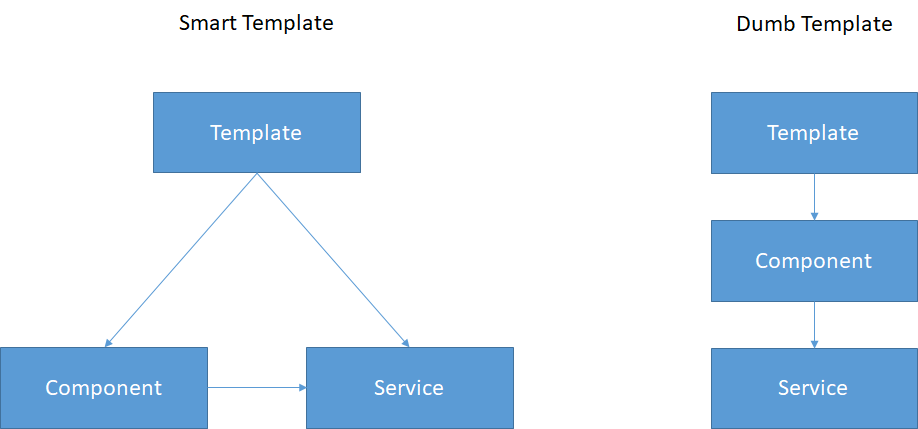
Count the arrows
Notice that the smart Template has 50% more coupling points than the dumb Template.
Remember:
When it comes to Templates:
dumber is better.
Now that we've covered Templates, let's move on to discuss Components.
Components
Components are the rock climbers of Angular.

Tommy Caldwell and Kevin Jorgeson climbed the Dawn Wall in Yosemite in 2015
Components should be Thin and Smart.
Or, if you prefer, you could phrase it like my friend Lars Gyrup Brink Nielsen:
Components should be lean, mean, view controlling machines.
- Lars Gyrup Brink Nielsen
Lars shares my interest in Angular Architecture. You can check out one of his talks here:
Smart Components Explained
A smart Component knows and controls precisely what the current state of the Template is.
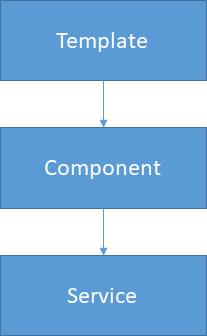
The Component dictates exactly how to interact with the data model or Services based on user actions.
A key method for keeping our Components smart and our Templates dumb is to use very specific functions within the Component. It's better to prefer many small, specific functions over a few large, generic ones. Let's look at an example:
Using Generic Component Functions
In this first example, we have a simple Template that shows a Done button and a Remove button. Clicking either button should trigger the corresponding function on the Service.
@Component({
   selector: 'rva-fat-buttons',
   template: `
     <button (click)="handle(action.Done)">Done</button>
     <button (click)="handle(action.Remove)">Remove</button>
   `,
})
export class FatButtonsComponent {
   @Input() task: Task;
   public action = Action;

   constructor(
     private taskService: TaskService
   ) { }

   handle(action: Action) {
     if (action === Action.Done) {
       this.taskService.completeTask(this.task);
     } else if (action === Action.Remove) {
       this.taskService.removeTask(this.task);
     }
   }
}
OK, this code isn't terrible. It has a bit of a Flux Reducer feel to it. However, we can probably simplify it to enhance readability.
Using Specific Component Functions
In this refactored version, we transform our single generic function into two distinct functions.
@Component({
   selector: 'rva-thin-buttons',
   template: `
     <button (click)="done()">Done</button>
     <button (click)="remove()">Remove</button>
   `,
})
export class ThinButtonsComponent {
   @Input() task: Task;

   constructor(
     private taskService: TaskService
   ) { }

   done() {
     this.taskService.completeTask(this.task);
   }

   remove() {
     this.taskService.removeTask(this.task);
   }
}
Notice how this simplification improves the code not only within our Component but also within the template itself.
This serves as a prime example of a principle for Component functions:
Component functions should be specific, NOT generic
The Importance of Thin Components
So, we've covered the Smart aspect. Now let's delve into what it means for our Components to be Thin.
A Component is considered Thin when it only contains the code essential for:
- Managing the view
- Invoking Services
Any data processing logic should be delegated to Services.
Another useful tip for maintaining thin components is the principle:
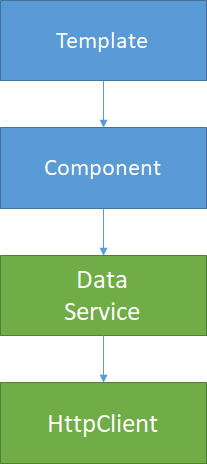
Components should not inject HttpClient service.
Ensure that any Web Service HTTP calls are wrapped within a dedicated back end data Service.
Thin Components and Testability
One compelling reason to move processing code into Services is that they are generally easier to test than Components. A private function within a Component often transforms into a public function in a Service, making it straightforward to test.
These public functions are:
- Easier to test
- Easier to mock
Does Smarter Mean Fatter?
At this point, you might ask, "But doesn't making my component smarter sometimes make it fatter?"
Well, yes, sometimes it does.
There will be situations where you must choose between conflicting principles:
- Handle it in the Component (smarter component)
- Handle it in a Service (thinner component)
So, how do we decide?
The answer is: Like a Boss!

You might be thinking, "OK, nice gif. But what does that actually mean?"
When faced with a decision about whether to place logic in the Component or the Service, think of your Component as a smart but somewhat lazy boss.
The Boss:
- knows exactly what needs to be done in each situation
- ensures it gets done
- delegates the actual execution
Here's another principle for you to consider:
Component: Code that DECIDES
Service: Code that PROCESSES
Let's look at an example applying this principle:
export class TasksContainerComponent implements OnInit {
   public tasks$: Observable<Task[]>;
   public selectedTask: Task;

   constructor(
     private taskService: TaskService,
     private taskMultiService: TaskMultiService,
   ) { }

   ngOnInit() {
     if (this.taskMultiService.isMulti()) {
       this.tasks$ = this.taskMultiService.getTasks();
     } else {
       this.tasks$ = this.taskService.getTasks();
     }
   }

   public select(task) {
     this.selectedTask = task;
   }
 }
Notice that the code in ngOnInit() exemplifies Code that DECIDES and therefore belongs in the Component.
I've noticed that most developers tend to leave too much code in the Component. Conversely, because I've been following this philosophy for a while, I'm often tempted to move too much code into the Service.

This brings to mind a famous quote from Albert Einstein that fits this situation perfectly.

"Everything should be made as simple as possible, but no simpler."
- Albert Einstein
We can adapt Einstein's words to create a principle for our Components:
Components should be as thin as possible, but no thinner.
Let's proceed to discuss Services.
Services
In Angular, Services are the heavyweights of the application architecture.

Kisenosato is one of only three Sumo Grand Champions worldwide, and he is the sole champion from Japan.
Services should be Fat and Happy.
A Service finds happiness when its purpose is clearly defined and narrow in scope.
Fat Services
By Fat, I mean that all business logic belongs inside your Services. Whenever you are unsure whether code should live in a Service or a Component, choose the Service. Build up that Service while keeping your Component lean.
It is perfectly acceptable to create a Service that exists solely to support a particular Component. These classes, which encapsulate presentation-related logic, are commonly called Presenters. Typically, these Presenter Services should be registered in the component-specific provider, and their files can reside in the same folder as the Component.
Happy Services
Services feel content when they can concentrate on:
- Handling a single responsibility.
- Executing that responsibility exceptionally well.
Much like a Sumo wrestler, a Service can grow quite large. Nevertheless, regardless of its size, it excels at just one particular style of combat.
Happy Services are SOLID
The SOLID principles were first described in Martin’s paper Design Principles and Design Patterns. The acronym itself, however, was coined later by Michael Feathers.
I want to highlight two of these principles specifically:
Single Responsibility Principle:
A class should have only one single responsibility.
Interface Segregation Principle:
Many client-specific interfaces are preferable to a single, general-purpose one. So do not shy away from creating numerous small Services.
State-full or Stateless Services?
A question I occasionally hear is:
"Should Services be state-full or stateless?"
The answer is: Yes
What I mean is that your Services should either be dedicated to managing state or remain entirely stateless.
State-full Services
A State-full Service should be used to manage your application state, or any other kind of state for that matter. Some examples include:
- A Presenter that helps manage the state of a Component
- An NgRx Store
- An application state Service
Stateless Services
On the other hand, if your Service is just a collection of functions for processing, keep it Stateless. Stateless Services handle tasks like:
- Processing
- Data mapping
- HTTP Calls
- Etc.
In your Stateless Services, favor pure functions. Pure functions are functions that:
- Given the same input, always return the same output.
- Don't produce side effects.
Avoid building state into processing Services like REST API wrappers. For instance, imagine our application uses a REST API to retrieve data from a back-end data store. We should create a Stateless Service that exposes functions for calling that REST API. The Service will probably need some details, such as the server URL or other connection information. You might be tempted to add an initialize() function or inject some connection object into the Service. Resist that urge. Keep the Service stateless and pass the connection object into the functions that require it.
Let’s examine an example:
State-full Service Example
In this example, we have a Service with an initialize function that takes a Server object containing a connection URL.
export class StatefullService {
   constructor(
     private http: HttpClient
   ) { }

   private server: Server;

   public initialize(server: Server) {
     this.server = server;
   }

   public getItems(): Observable<Item[]> {
     return this.http.get<Item[]>(this.server.url);
   }
}
Notice that we now have to remember to call initialize() first. Additionally, our Service really should include some error handling to check if this.server is undefined and alert the developer.
Stateless Service Example
In this example, we will keep the Service stateless by requiring the Server connection object to be passed in as a parameter.
export class StatelessService {
   constructor(
     private http: HttpClient
   ) { }

   public serverFactory(url: string): Server {
     return new Server(url);
   }

   public getItems(server: Server): Observable<Item[]> {
     return this.http.get<Item[]>(server.url);
   }
}
You will see that we no longer need to remind the developer to call the serverFactory() function. The compiler enforces this call because that is where we obtain the Server object.
I encountered this exact scenario in my own code, and it made supporting a multi-server system considerably easier.
The takeaway is that Services should be either:
- Completely stateless
- Completely about managing state
Services: Final Thoughts
Keep these principles regarding services in mind:
Services should almost always be private in the Component constructor.
Components decide what gets done, but Services actually do it.
Services should do one thing and do it well.
Summary
Let’s bring everything together with a recap of our guiding principles:
Templates

Declarative and Dumb like Lloyd Christmas
Components

Smart and Thin like rock climbers
Services

Fat but very Specific like sumo wrestlers
If you found this article helpful, please give the video on YouTube a thumbs up.
Thanks!