How Payment Request API Brings Declarative Payments to Angular
The last time you completed a purchase online with a single tap via Google Pay, Apple Pay, or a card — how often does that actually happen? For me, it is rare. Every new e-commerce site presents yet another unique form. I end up hunting for my card and typing in every digit from it. The next store I buy from forces me to repeat the entire routine.
There is a better route, though. Over the past couple of years, the browser-standard Payment Request API has made this pain point manageable in current browsers. Here is how you can adopt it in Angular.
The basic idea
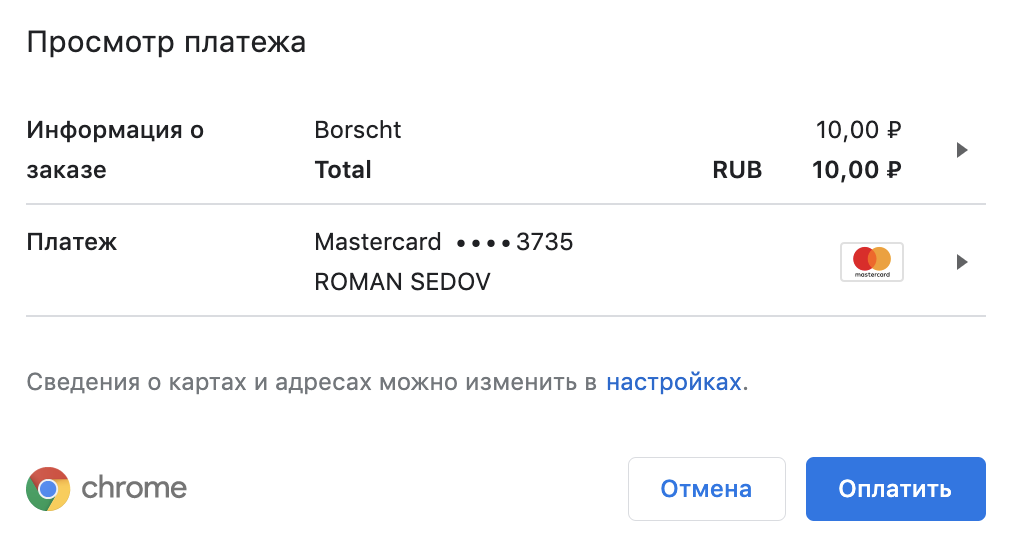
The Payment Request API is supported by nearly every modern browser. It triggers a native modal where a user can finalize payment within moments. In Chrome, that interface looks something like this:
And here is the same modal in Safari, with fingerprint verification via Apple Pay:
Speed is not its only advantage — the dialog also carries plenty of detail. It shows a complete breakdown of the order as well as each separate line item. It can request additional user information like an email address, phone number, or delivery destination. Customization is broad, although the API’s ergonomics leave something to be desired.
Bringing it into Angular
Angular ships with no built-in abstraction for the Payment Request API. One option is to inject the Document token through the DI scope, pull the Window object off the document, and then operate on window.PaymentRequest. That is the safest direct route.
import {DOCUMENT} from '@angular/common';
import {Inject, Injectable} from '@angular/core';

@Injectable()
export class PaymentService {
   constructor(
       @Inject(DOCUMENT)
       private readonly documentRef: Document,
   ) {}

   pay(
       methodData: PaymentMethodData[],
       details: PaymentDetailsInit,
       options: PaymentOptions = {},
   ): Promise<PaymentResponse> {
       if (
           this.documentRef.defaultView === null ||
           !('PaymentRequest' in this.documentRef.defaultView)
       ) {
           return Promise.reject(new Error('PaymentRequest is not supported'));
       }

       const gateway = new PaymentRequest(methodData, details, options);

       return gateway
           .canMakePayment()
           .then(canPay =>
               canPay
                   ? gateway.show()
                   : Promise.reject(
                         new Error('Payment Request cannot make the payment'),
                     ),
           );
   }
}
Working with Payment Request without a wrapper layer introduces friction. Unit testing gets more involved, SSR breaks because the API is missing from the server environment, and you are tied to a global.
The WINDOW injection token from @ng-web-apis/common solves the global reference in a DI-safe manner. From there, you can define a custom token, PAYMENT_REQUEST_SUPPORT, that verifies browser support for Payment Request before any attempt to invoke it. That prevents any call to an unsupported feature from ever occurring.
export const PAYMENT_REQUEST_SUPPORT = new InjectionToken<boolean>(
   'Is Payment Request Api supported?',
   {
       factory: () => !!inject(WINDOW).PaymentRequest,
   },
);
export class PaymentRequestService {
   constructor(
       @Inject(PAYMENT_REQUEST_SUPPORT) private readonly supported: boolean,
       ...
    ) {}

request(...): Promise<PaymentResponse> {
       if (!this.supported) {
           return Promise.reject(
               new Error('Payment Request is not supported in your browser'),
           );
       }
      ...
   }
Wiring it up inside a service
An Angular-friendly approach
With the token in place, working with Payment Request becomes reasonably secure. Still, the API remains the raw browser interface — you must assemble a large set of data across three parameters and convert everything into the expected structure.
That is not the Angular spirit. Dependency Injection, services, directives, and reactive streams are there to improve our workflow. Let me show a fully declarative option that makes Payment Request simple to use.
The shopping cart in the example above is powered by this piece of code:
<div waPayment [paymentTotal]="total">
   <div
       *ngFor="let cartItem of shippingCart"
       waPaymentItem
       [paymentLabel]="cartItem.label"
       [paymentAmount]="cartItem.amount"
   >
       {{ cartItem.label }} ({{ cartItem.amount.value }} {{ cartItem.amount.currency }})
   </div>

   <b>Total:</b>  {{ totalSum }} ₽

   <button
       [disabled]="shippingCart.length === 0"
       (waPaymentSubmit)="onPayment($event)"
       (waPaymentError)="onPaymentError($event)"
   >
       Buy
   </button>
</div>
That implementation relies on three dedicated Angular directives:
- waPayment — defines the boundaries for a single payment transaction. It requires a PaymentItem object containing the label and overall total for the charge.
- Every cart entry sits inside a waPaymentItem directive, acting as a declarative PaymentItem for the transaction.
- A click on the button triggers the PaymentRequest modal in the browser. That modal either returns a PaymentResponse or throws. The waPaymentSubmit directive emits both outcomes.
That yields a clean, minimal interface both for initiating payment and handling the outcome — true to Angular conventions.
The directives communicate with each other:
- The payment directive gathers all its child payment items through ContentChildren. It also implements PaymentDetailsInit — a key required argument for invoking Payment Request.
@Directive({
   selector: '[waPayment][paymentTotal]',
})
export class PaymentDirective implements PaymentDetailsInit {
   ...
   @ContentChildren(PaymentItemDirective)
   set paymentItems(items: QueryList<PaymentItem>) {
       this.displayItems = items.toArray();
   }

   displayItems?: PaymentItem[];
}
- The output-directive listens for button clicks and surfaces the payment’s ultimate result. It pulls the payment directive from DI, along with payment methods and the extra options you supply.
@Directive({
   selector: '[waPaymentSubmit]',
})
export class PaymentSubmitDirective {
   @Output()
   waPaymentSubmit: Observable<PaymentResponse>;

   @Output()
   waPaymentError: Observable<Error | DOMException>;

   constructor(
       @Inject(PaymentDirective) paymentHost: PaymentDetailsInit,
       @Inject(PaymentRequestService) paymentRequest: PaymentRequestService,
       @Inject(ElementRef) {nativeElement}: ElementRef,
       @Inject(PAYMENT_METHODS) methods: PaymentMethodData[],
       @Inject(PAYMENT_OPTIONS) options: PaymentOptions,
   ) {
       const requests$ = fromEvent(nativeElement, 'click').pipe(
           switchMap(() =>
               from(paymentRequest.request({...paymentHost}, methods, options)).pipe(
                   catchError(error => of(error)),
               ),
           ),
           share(),
       );

       this.waPaymentSubmit = requests$.pipe(filter(response => !isError(response)));
       this.waPaymentError = requests$.pipe(filter(isError));
   }
}
The complete package
All of that led to a packaged library, @ng-web-apis/payment-request.
- The entire source is hosted on Github.
- You can also see the live demo, which served as the source for the screenshots and GIFs above, over at our sample page.
That gives you an immediate, production-ready way to interact with the Payment Request API through either a service or directives, without the usual boilerplate.
This library is published and maintained by @ng-web-apis — an open-source collective focused on idiomatic, lightweight wrappers around native Web APIs for Angular. Visit the project site for more APIs that Angular does not handle natively, such as Web Audio, Web MIDI, and Geolocation.