Understanding change detection and component trees in Angular applications
This article is an excerpt from my Angular Deep Dive course
In component-driven web applications, composition happens by placing child components inside templates. Because of this, it's natural to describe an Angular app as a component tree. But behind the scenes, Angular operates with a lower-level concept called View. A View represents the smallest set of elements that are created and removed together. All core operations—including property checks and DOM updates—happen at the view level. So it's more precise to say that Angular works with a tree of views, and a component is just a higher-level representation of a view.
Data structures behind views
The View structure is defined by the LView interface. LView holds all the data required for processing instructions as they're invoked from the template. Both components and embedded views get their own LView. To differentiate, we call views tied to components "component views," while embedded views are generated from ViewContainerRef using template references, like ng-template elements.
Angular tracks the hierarchy of views using specific fields on LView:
export const PARENT = 3;
export const NEXT = 4;
export const CHILD_HEAD = 13;
export const CHILD_TAIL = 14;

export interface LView {
  [CHILD_HEAD]: LView|LContainer|null;
  [CHILD_TAIL]: LView|LContainer|null;
  [PARENT]: LView|LContainer|null;
  [NEXT]: LView|LContainer|null;
}
To walk through the view tree, Angular relies on these traversal utilities.
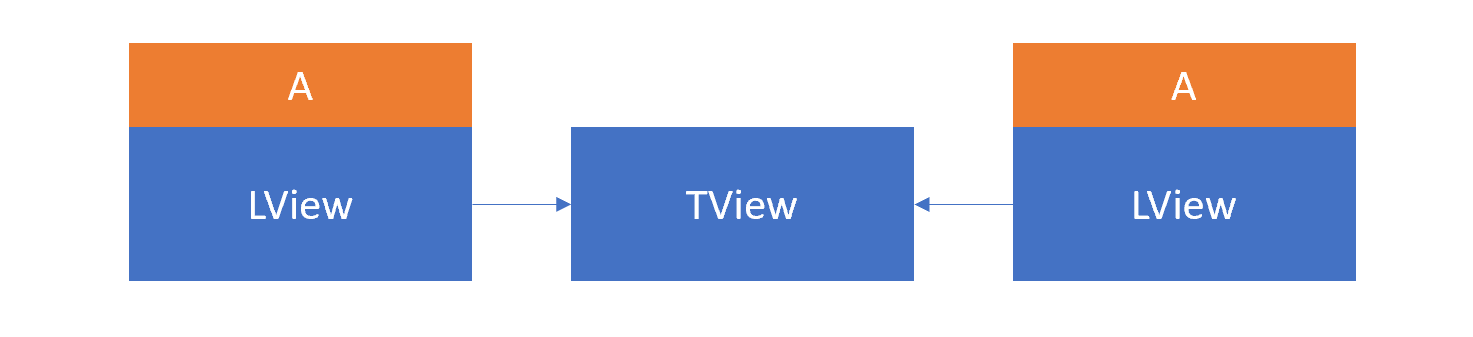
There's also the TView structure, which contains static metadata for a given LView. The same TView is reused across all LViews of the same type. In practice, each component instance has its own LView, but all these instances share a single TView.
Angular also defines several view types like this:
export const enum TViewType {
  Root = 0,
  Component = 1,
  Embedded = 2,
}
Component and Embedded types are straightforward. The Root type is a special case—it's used to bootstrap top-level components. This type combines with an LView that takes an existing DOM node not managed by Angular and wraps it so other components can be mounted inside.
Each view is directly linked to one component, and vice versa. The view keeps a reference to the component class instance through the CONTEXT property. All checks and DOM updates are executed on the view level.
For a template that uses component A twice, the data structures would look like this:
The change detection tree
In typical applications, there's one primary tree of component views, starting from the component referenced in index.html. However, other root views can exist—these are usually created through portals for things like dialogs, tooltips, and other elements that need to appear outside the main tree for visual reasons (for example, to avoid overflow:hidden constraints).
Angular stores the top-level views of these trees in the _views property of ApplicationRef. These trees are called change detection trees because they're traversed during global change detection. The tick method goes through each tree in _views and invokes detectChanges for every view:
@Injectable({ providedIn: 'root' })
export class ApplicationRef {
  tick(): void {
    try {
      this._runningTick = true;
      for (let view of this._views) {
        view.detectChanges();
      }
      if (typeof ngDevMode === 'undefined' || ngDevMode) {
        for (let view of this._views) {
          view.checkNoChanges();
        }
      }
    } catch (e) { ... } finally { ... }
  }
}
Notice that tick also runs checkNoChanges across the same set of views.
Adding dynamic views to ApplicationRef
Angular lets you render a component into a standalone DOM element that lives outside the standard change detection tree. However, these views still need to be checked. To support this, ApplicationRef exposes attachView() and detachView() methods, which add or remove standalone views from the change detection trees. This essentially registers those views in the _views array that gets processed each detection cycle.
Let's walk through an example. We have a component M we want to instantiate dynamically and mount into a DOM node that's not part of the main Angular tree. Here's the setup:
@Component({
  selector: 'l-cmp',
  template: 'L'
})
export class L {
  constructor(moduleRef: NgModuleRef<any>, appRef: ApplicationRef) {
    const factory = moduleRef.componentFactoryResolver.resolveComponentFactory(M);

    let newNode = document.createElement('div');
    newNode.id = 'placeholder';
    document.body.prepend(newNode);

    const ref = factory.create(moduleRef.injector, [], newNode);
    appRef.attachView(ref.hostView);
  }
}

@Component({
  selector: 'm-cmp',
  template: '{{title}}'
})
export class M {
  title = 'I am the component that was created dynamically';
}
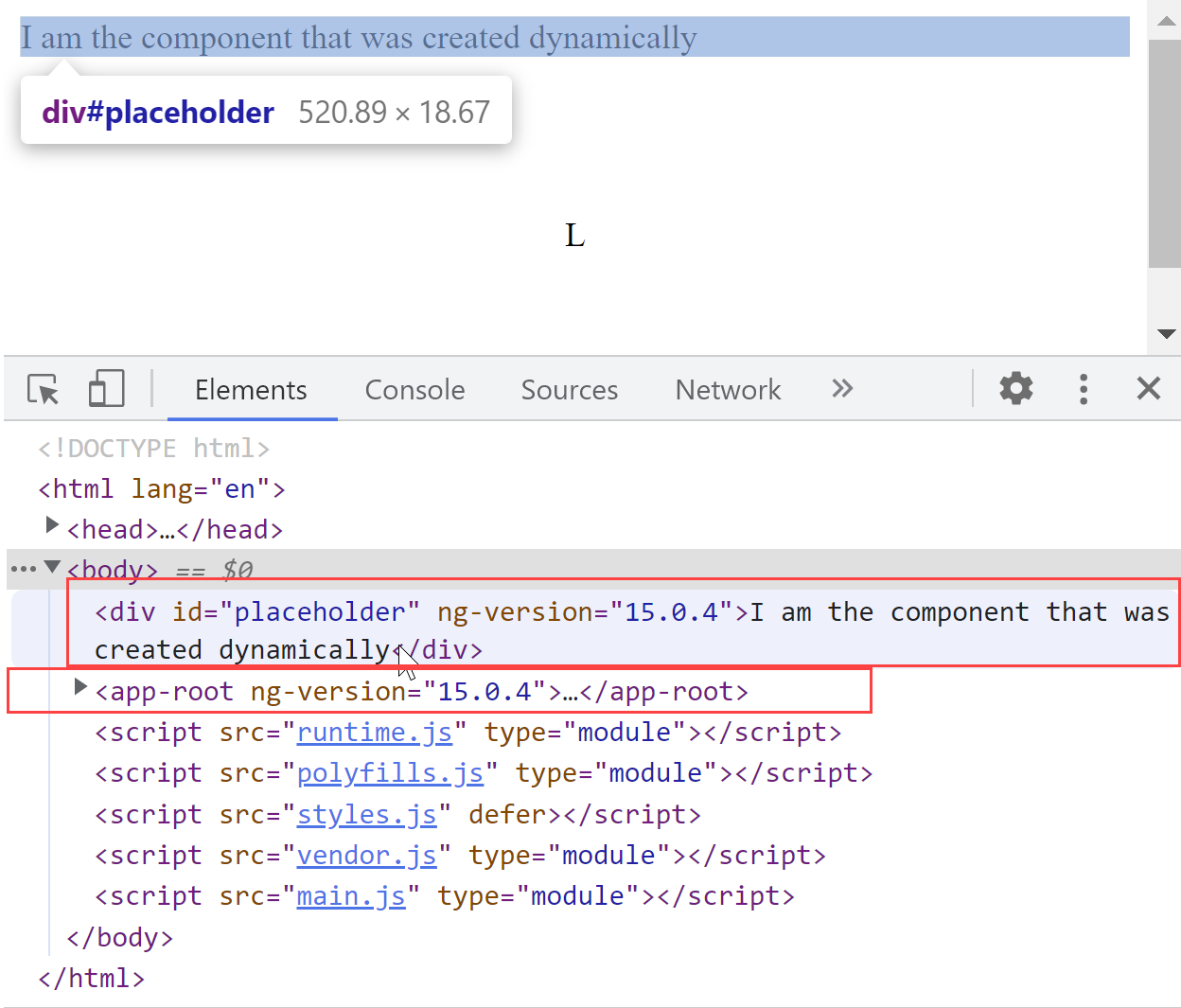
After running this, here's what the DOM structure looks like:
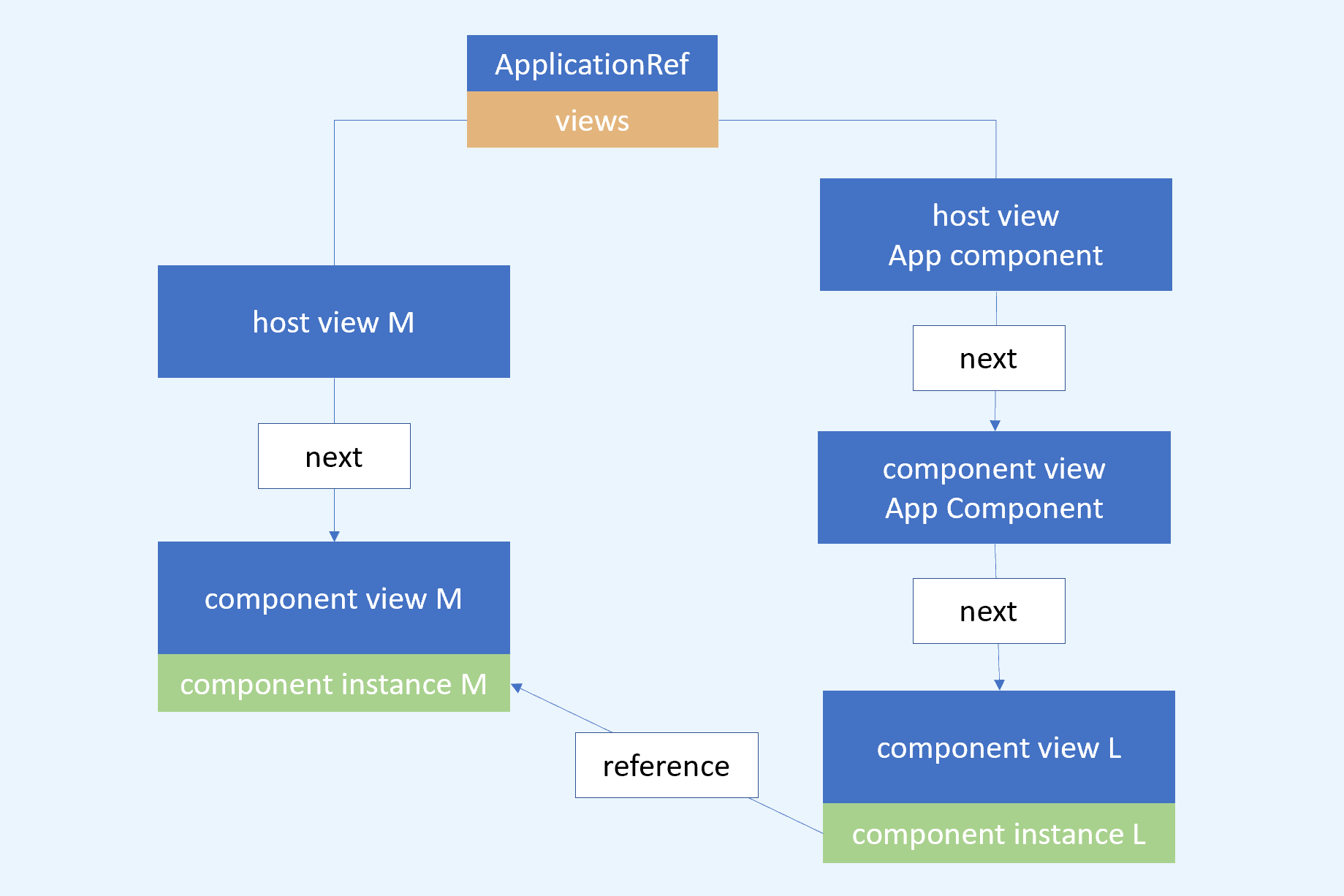
If we inspect the _views property, this is what appears:
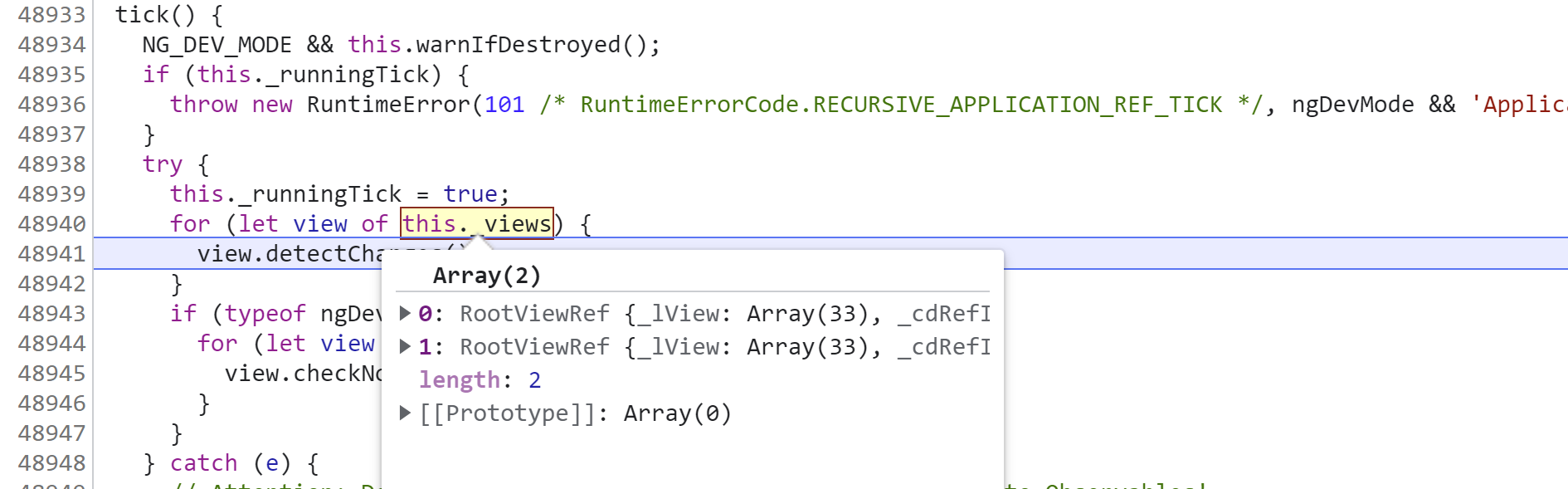
Using the console, we can figure out what these RootViewRef instances refer to:
const TVIEW = 1;
const CONTEXT = 8;
const CHILD_HEAD = 13;

const view_1 = appRef._views[0];
const view_2 = appRef._views[1];

view_1._lView[TVIEW].type // 0 - HostView
view_1._lView[CONTEXT].constructor.name // M

view_1._lView[CHILD_HEAD][TVIEW].type // 0 - HostView
view_1._lView[CHILD_HEAD][CONTEXT].constructor.name // M

view_2._lView[CONTEXT].constructor.name // AppComponent (RootView)
view_2._lView[TVIEW].type // 0 - HostView

view_2._lView[CHILD_HEAD][CONTEXT].constructor.name // AppComponent (ComponentView)
view_2._lView[CHILD_HEAD][TVIEW].type // 1 - ComponentView

view_2._lView[CHILD_HEAD][CHILD_HEAD][CONTEXT].constructor.name // L
The diagram below makes these connections clearer:
Bootstrapping several root components
It's also possible to bootstrap more than one root component at startup:
@NgModule({
  declarations: [ AppComponent, AppRootAnother ],
  imports: [  BrowserModule ],
  bootstrap: [ AppComponent, AppRootAnother ]
})
export class AppModule {}
This results in two root views and corresponding HTML tags:
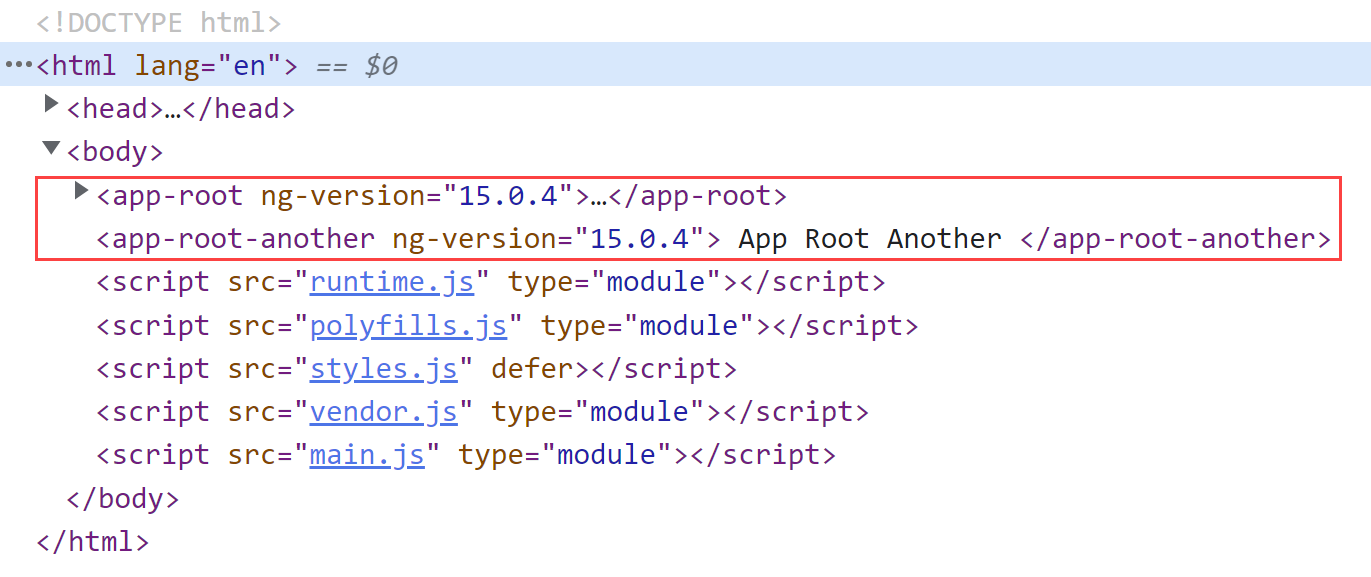
The key requirement is that index.html includes tags for both selectors:
<!doctype html>
<html lang="en">
<head>
  <meta charset="utf-8">
  <title>LearnAngular</title>
</head>
<body>
  <app-root></app-root>
  <app-root-another></app-root-another>
</body>
</html>
With this approach, Angular creates two independent change detection trees. Both get registered in ApplicationRef._views, and when ApplicationRef.tick() is called, Angular runs change detection for both trees. This behaves much like using attachView. Still, both trees belong to the same ApplicationRef, so they share the injector configured for the AppModule.
For deeper exploration of these topics check out the full course

If you think something important is missing here, let me know in the comments!