Dependency Injection (DI) is a widely adopted and effective mechanism for managing dependencies in software. It simplifies how components obtain the services they need, enhances testability, and encourages adherence to the Dependency Inversion Principle. Despite its benefits, a deep understanding of its internal workings often eludes many developers, preventing them from leveraging its full potential. This article delves into the mechanics of Angular's DI, examines the hierarchy of injectors, and explains how this architecture evolved with the arrival of standalone components.
Understanding the Injector
To appreciate how DI functions in Angular, one must first understand how injectors deliver services. The core process can be broken down as follows:
- Angular identifies the injector relevant to the current context.
- It invokes
Injector.get(token), where the token corresponds to the requested service.
- If the injector has the token registered, it either returns an already existing instance or constructs and returns a new one.
Consider a basic implementation of an injector that we might write ourselves:
type InjectionToken = string; // unique identifier

abstract class Injector {
  abstract get(token: InjectionToken): any; // function for getting a service
}

type Record = {
  factory: () => any; // factory for creating a service
  value: any; // existed service
}

export class ModuleInjector extends Injector {
  private records: Map<InjectionToken, Record>; // responsible for storing services

  constructor(providers: Array<[InjectionToken, Record]>) {
      this.records = new Map(providers);
  }

  get(token: InjectionToken): any {
      if (!this.records.has(token)) { // if token is not found then throw an error
          throw new Error(`Could not find the ${token}`);
      }

      const record = this.records.get(token);

      if (!record.value) { // if an instance is not created then just create it
          record.value = record.factory();
      }

      return record.value;
  }
}
Angular gathers all service definitions from the
providers arrays in modules, components, and classes decorated with
@Injectable({providedIn: …}). These definitions are used to populate a
Map that enables service lookup. The underlying process in Angular resembles this simplified version:
// gathering all providers and creating an injector
const injector = new Injector([
    ['SomeService', () => new SomeService()],
    ['AnotherService', () => new AnotherService()]
    ...
]);

// when a component creates, then Injector.get is called
injector.get('SomeService') // => SomeService instance
However, Angular doesn't operate with just one injector; it relies on a hierarchical structure. During application bootstrap, a tree of injectors is established. When the current injector cannot resolve a token, Angular traverses up to the parent injector. We can replicate this behavior in our custom injector:
export class ModuleInjector extends Injector {
  private records: Map<InjectionToken, Record>;
  private parent: Injector;

  constructor(
      providers: Array<[InjectionToken, Record]>,
      parentInjector: Injector
  ) {
      this.records = new Map(providers);
      this.parent = parentInjector; // save the parent injector
  }

  get(token: InjectionToken): any {
      if (!this.records.has(token)) {
          // attempt find a token in the parent injector
          return this.parent.get(token);
      }
      ...
  }
}
Each new injector stores a reference to its parent. If the token isn't found in the current injector, the search moves up the tree. But what happens when the token isn't found anywhere? This is where a special injector, the
NullInjector, comes into play.
export class NullInjector implements Injector {
  get(token: ProviderToken): any {
    const error = new Error(`NullInjectorError: No provider for ${stringify(token)}!`);
    error.name = 'NullInjectorError';
    throw error;
  }
}
The
NullInjector serves as the root of the entire injector hierarchy. If a search through the chain of injectors fails to locate the token, the
NullInjector is invoked, which throws the well-known error:
NullInjectorError: No provider for MyService!.
Now that this concept is clear, let's examine the different types of injectors Angular uses and how they are interconnected. We'll first review the injector hierarchy as it existed before Angular 14, and then explore the modifications introduced with
standalone components.
The Hierarchy of Injectors
Core Injectors
During the bootstrap process, Angular creates three primary injectors:
- NullInjector: Its sole purpose is to raise an error if a token is not found.
- Platform Injector: It manages services that should be shared among multiple applications within the same Angular project.
- Root Injector: It hosts Angular's default services, as well as those provided via
@Injectable({ providedIn: 'root' }) or declared in the providers property of the AppModule metadata.
When requesting a service, Angular first checks the Root Injector. If it's not found there, the search proceeds to the Platform Injector. If the service remains elusive, the
NullInjector will throw an error. This flow can be visualized as follows:

There's a subtle point to keep in mind: if a module with providers is imported into the
AppModule, it does not get its own injector. Instead, its services are merged into the Root Injector.
@NgModule({
    providers: [MyService]
})
export class MyModule {}

@NgModule({
    imports: [MyModule],
    providers: [Service]
})
export class AppModule {}

// as a result the root injector contains two services:
// [Service, MyService]
This was something I personally found counterintuitive when learning Angular—my initial assumption was that each module would have its own dedicated injector.
Lazy-Loaded Module Injectors
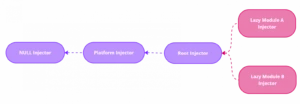
Beyond the three core injectors, Angular creates a separate injector for each
lazy-loaded module.
@NgModule({
    providers: [MyService]
})
export class LazyModule {
}

export const ROUTES: Route[] = [
  {
      path: 'lazy',
      loadChildren: () => import('./lazy-module').then(mod => mod.LazyModule)
  },
]
When a service is provided in the
providers array of a lazy-loaded module, that module's injector is responsible for instantiating it for its own components. This service remains scoped to that module and is invisible to the rest of the application.
If a component within a lazy-loaded module needs a service, the lookup begins with the module's own injector. If the service isn't found, the search continues up the standard chain:
Root Injector → Platform Injector → NullInjector.
Node Injectors
In addition to module-level injectors, Angular utilizes a different kind: the
node (element) injector.
- The root component always creates a node injector for itself.
- A node injector is created for every HTML element that corresponds to a component selector or serves as a host for directives.
To add a service to a component's node injector, you must provide it in the
providers or
viewProviders property of the component's metadata.
@Component({
  selector: 'app-child',
  template: '',
  providers: [Service], // provide Service to NodeInjector
  // or
  // viewProviders: [Service]
})
export class ChildComponent {
    constructor(
        private service: Service  // injected from NodeInjector
    ) {
    }
}
The key distinction between a node injector and a module injector is their lifecycle. A node injector is created when its associated component is created and is destroyed when the component is destroyed. Consequently, the services registered with it have the same
creation and destruction lifecycle.
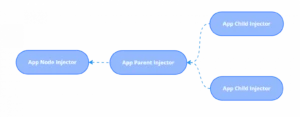
Node injectors also form a hierarchy, much like module injectors. The service lookup starts from the current node injector and ascends through the parent components until it either finds the service or reaches the root component. Consider the following component tree:
<app-root>
    <app-parent>
        <app-child></app-child>
        <app-child></app-child>
    </app-parent>
</app-root>
If a service is injected into the
app-child component, the resolution order will be:
app-child → app-parent → app-root.
Complete Injector Tree
@Component({...})
export class Component {
    // how does it work?
    constructor(private readonly service: Service) {
    }
}
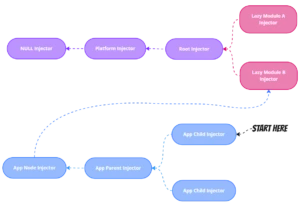
When a component requires a service, Angular's resolution process first queries its own node injector. If the service isn't there, the search propagates through the parent node injectors, then to the lazy-loaded module injectors, and finally up the default chain:
Root Injector → Platform Injector → NullInjector. This final injector throws an error if the token remains unresolved.
I've created an example on
StackBlitz that illustrates these concepts in detail. For hands-on exploration, I recommend installing the
Angular DevTools extension, which lets you inspect the injector tree directly.
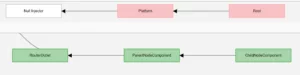
This is what the injector tree looks like in
Angular DevTools.
If you need a quick reference, you can consult the
cheatsheet created by Chris Kohler. It's a valuable resource for any DI-related questions.
The Standalone Revolution
Environment Injectors
The release of standalone components in Angular 14 brought about a significant shift in the injector hierarchy. Angular now employs the
EnvironmentInjector in favor of module injectors. In a purely
standalone application, there are no modules, so the Angular team adopted this more consistent naming convention. Despite the new name, the resolution order for the core injectors remains unchanged:
Root Environment Injector → Platform Environment Injector → NullInjector.
To provide a service at the root level, you have two primary methods: using the
@Injectable({ providedIn: 'root' }) decorator, or using the
ApplicationConfig provider, which now replaces the
AppModule providers array.
export const appConfig: ApplicationConfig = {
  providers: [SomeService],
};

bootstrapApplication(AppComponent, appConfig).catch((err) =>
  console.error(err)
);
Route Environment Injectors
Angular 14 also introduced the
loadComponent function, which facilitates the lazy-loading of components, analogous to how
loadChildren works for modules. It's a common guess that
loadComponent might also set up a dedicated injector, but that's not the case. In fact,
loadComponent does not create a new injector.
export const ROUTES: Route[] = [
  {
      path: 'lazy',
      // it does not create a new injector :(
      loadComponent: () => import('./lazy.component').then(c => c.LazyComponent)
  },
]
If you need to scope services to a particular route (similar to a lazy-loaded module's injector), you can use the
providers property within the route configuration. This setup will generate a separate injector for that specific route and all its child routes, regardless of whether the route is lazy-loaded.
export const ROUTES: Route[] = [
    {
        path: 'route-with-providers',
        component: ChildComponent,
        // it does create a new injector for the route
        providers: [SomeService],
        children: [...]
    },
]
Here is the full service resolution process:
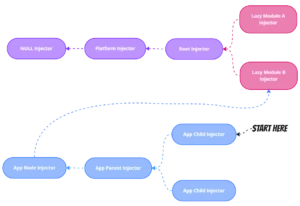
You can see a working example of this on
StackBlitz.
Backward Compatibility with NgModule
Recognizing that migrating to standalone components is an incremental process, the Angular team added backward compatibility with the older NgModule approach. A standalone component can import either another standalone component or a traditional module.
@Component({
  standalone: true,
  selector: 'app-child',
  imports: [
    SomeComponent, // standalone component
    SomeModule // "old" NgModule
  ],
  template: ``,
})
export class ChildComponent {
}
While this feature eases the transition, it can also introduce unexpected behavior, especially when a module with services is imported into a standalone component. Because standalone components are meant to be independent units, it would be architecturally inconsistent for their imported services to leak into the global root injector. Therefore, a standalone component must encapsulate this logic itself.
To address this, Angular creates a special injector-wrapper for standalone components that import any modules, even if those modules don't have providers. This wrapper is responsible for collecting and managing the services declared by the imported modules.
An injector-wrapper is generated under three specific circumstances:
- During bootstrap: This occurs if the root component imports modules or uses another component that does.
- For dynamically created components: This happens when a dynamic component imports modules or uses a component that does.
- For routed components: This is triggered when a routed component imports modules or uses a component that does.
Let's examine each of these scenarios.
- During Bootstrap
If we import a component that includes modules into our
AppComponent, an injector-wrapper will be instantiated.
@Component({
  standalone: true,
  selector: 'app-root',
  imports: [ChildComponent], // the component with modules inside
  template: `
    <app-child /><app-child />
  `,
})
export class AppComponent {
}
The hierarchy of environment injectors will then have this structure:

- Dynamically Created Components
An injector-wrapper is created when a dynamically created component imports modules, or when it uses another component that does.
@Component({
  ...
})
export class AppComponent {
  click(): void {
    // dynamically creation of component with modules
    const compRef = this.viewContainerRef.createComponent(ChildComponent);
    compRef.changeDetectorRef.detectChanges();
  }
}
- Routed Components
If a route targets a component that imports modules, or that itself uses a component with modules, an injector-wrapper is created for it as well.
export const ROUTES: Route[] = [
    {
        path: 'child',
        // the component with modules inside
        component: ChildComponent,
    },
]
For a more hands-on understanding of these examples, please see the prepared cases on
StackBlitz. You can also investigate them on your own using Angular Devtools.
Final Thoughts
Thank you for reading. Rather than a formal conclusion, I'd like to open a discussion. There's a school of thought that suggests placing every service in the root injector to avoid worrying about Angular's injector hierarchy altogether. However, I believe a more nuanced approach is beneficial. What's your perspective on this?
Feel free to reach out if you have any questions!