
This article is an excerpt from my Angular Deep Dive course
Angular provides two distinct strategies for managing change detection behavior at the component level. These strategies, defined in the compiler, are known as Default and OnPush:
export enum ChangeDetectionStrategy {
  OnPush = 0,
  Default = 1
}
These strategies dictate whether a child component gets checked when Angular processes change detection for its parent. The strategy assigned to a component applies to all nested directives, as they are evaluated alongside the host component. Once set, a strategy cannot be changed at runtime.
The default strategy, known internally as CheckAlways, means the component undergoes regular automatic change detection unless the view is explicitly detached. The OnPush strategy, internally called CheckOnce, skips change detection unless the component is flagged as dirty. Angular has built-in mechanisms to flag a component automatically, but you can also do it manually via the markForCheck method available on ChangeDetectorRef.
When you specify a strategy through the @Component() decorator, the Angular compiler stores it in the component's definition by way of the defineComponent function. For instance, with a component like this:
@Component({
  selector: 'a-op',
  template: `I am OnPush component`,
  changeDetection: ChangeDetectionStrategy.OnPush
})
export class AOpComponent {}
the compiler generates a definition that appears as follows:

When Angular creates an instance of the component, it uses this definition to assign the corresponding flag on the LView object representing the component's view:

Consequently, every LView created for this component will carry either the CheckAlways or Dirty flag. For the OnPush strategy, the Dirty flag is cleared immediately after the first change detection pass.
These flags on LView are evaluated within the refreshView function when Angular decides whether to check a component:
function refreshComponent(hostLView, componentHostIdx) {
  // Only attached components that are CheckAlways or OnPush and dirty
  // should be refreshed
  if (viewAttachedToChangeDetector(componentView)) {
    const tView = componentView[TVIEW];
    if (componentView[FLAGS] & (LViewFlags.CheckAlways | LViewFlags.Dirty)) {
      refreshView(tView, componentView, tView.template, componentView[CONTEXT]);
    } else if (componentView[TRANSPLANTED_VIEWS_TO_REFRESH] > 0) {
      // Only attached components that are CheckAlways
      // or OnPush and dirty should be refreshed
      refreshContainsDirtyView(componentView);
    }
  }
}
Let's dig deeper into how each strategy operates.
Default strategy
With the default change detection strategy, a child component is always checked whenever its parent gets checked. The sole exception is if you detach the child's change detector explicitly:
@Component({
  selector: 'a-op',
  template: `I am OnPush component`
})
export class AOpComponent {
  constructor(private cdRef: ChangeDetectorRef) {
    cdRef.detach();
  }
}
The emphasis on the parent being checked is crucial. If the parent isn't checked, the child won't be either, even with the default strategy. This is because Angular handles a child's check as part of processing the parent.
Angular doesn't impose any particular pattern for detecting state changes, which is why it defaults to checking everything. A good example of an enforced pattern would be object immutability for @Input bindings—something the OnPush strategy relies on, as we'll see.
Here's a straightforward two-component hierarchy:
@Component({
  selector: 'a-op',
  template: `
    <button (click)="changeName()">Change name</button>
    <b-op [user]="user"></b-op>
  `,
})
export class AOpComponent {
  user = { name: 'A' };

  changeName() {
    this.user.name = 'B';
  }
}

@Component({
  selector: 'b-op',
  template: `<span>User name: {{user.name}}</span>`,
})
export class BOpComponent {
  @Input() user;
}
Clicking the button triggers an event handler where we modify user.name. During the subsequent change detection cycle, the child B component gets checked, and the UI updates:

Even though the reference to the user object stayed the same—it was mutated internally—the new name still appears on screen. This illustrates why Angular checks all components by default. Without immutability guarantees, Angular can't determine if inputs changed and prompted an update to the component's state.
OnPush aka CheckOnce strategy
Although Angular doesn't force immutability, it offers a way to signal that a component's inputs are immutable, thereby reducing unnecessary checks. This comes via the OnPush change detection strategy, a common performance optimization. Internally called CheckOnce, it means change detection is paused for a component until marked dirty, then runs once, and pauses again. Marking can happen automatically or through markForCheck.
Let's revisit the earlier example, but now designate OnPush for the B component:
@Component({...})
export class AOpComponent {
  user = { name: 'A' };

  changeName() {
    this.user.name = 'B';
  }
}

@Component({
  selector: 'b-op',
  template: `
    <span>User name: {{user.name}}</span>
  `,
  changeDetection: ChangeDetectionStrategy.OnPush
})
export class BOpComponent {
  @Input() user;
}
After this change, Angular no longer detects the mutation in user.name:

Notice that B is still checked during the initial bootstrap—it renders the starting name A. However, it's ignored in later change detection cycles, so clicking the button doesn't update the display from A to B. This happens because the reference to the user object passed down via @Input remains unchanged.
Before diving into how a component gets marked dirty, here are the scenarios Angular uses to test OnPush behavior:
should skip OnPush components in update mode when they are not dirty
should not check OnPush components in update mode when parent events occur

should check OnPush components on initialization
should call doCheck even when OnPush components are not dirty
should check OnPush components in update mode when inputs change
should check OnPush components in update mode when component events occur
should check parent OnPush components in update mode when child events occur
should check parent OnPush components when child directive on a template emits event
The final set of test cases confirms that automatic dirty marking happens under these conditions:
- an
@Inputreference gets a new value - an event bound within the component itself fires
Let's examine each one.
@Input() bindings
In many cases, you only need to re-check a child when its inputs change—especially for pure presentational components fed solely through bindings.
Take our previous example:
@Component({...})
export class AOpComponent {
  user = { name: 'A' };

  changeName() {
    this.user.name = 'B';
  }
}

@Component({
  selector: 'b-op',
  template: `
    <span>User name: {{user.name}}</span>
  `,
  changeDetection: ChangeDetectionStrategy.OnPush
})
export class BOpComponent {
  @Input() user;
}
As shown earlier, clicking the button and mutating the name in the callback leaves the screen unchanged. This is because Angular does a shallow check on input parameters, and the user object's reference stays the same. Direct mutation doesn't produce a new reference, so the component isn't flagged dirty.
To make Angular notice the change, you must swap out the reference to user. Creating a new instance rather than modifying the old one will do the trick:
@Component({...})
export class AOpComponent {
  user = { name: 'A' };

  changeName() {
    this.user = {
      ...this.user,
      name: 'B',
    }
  }
}
And now it works as expected:

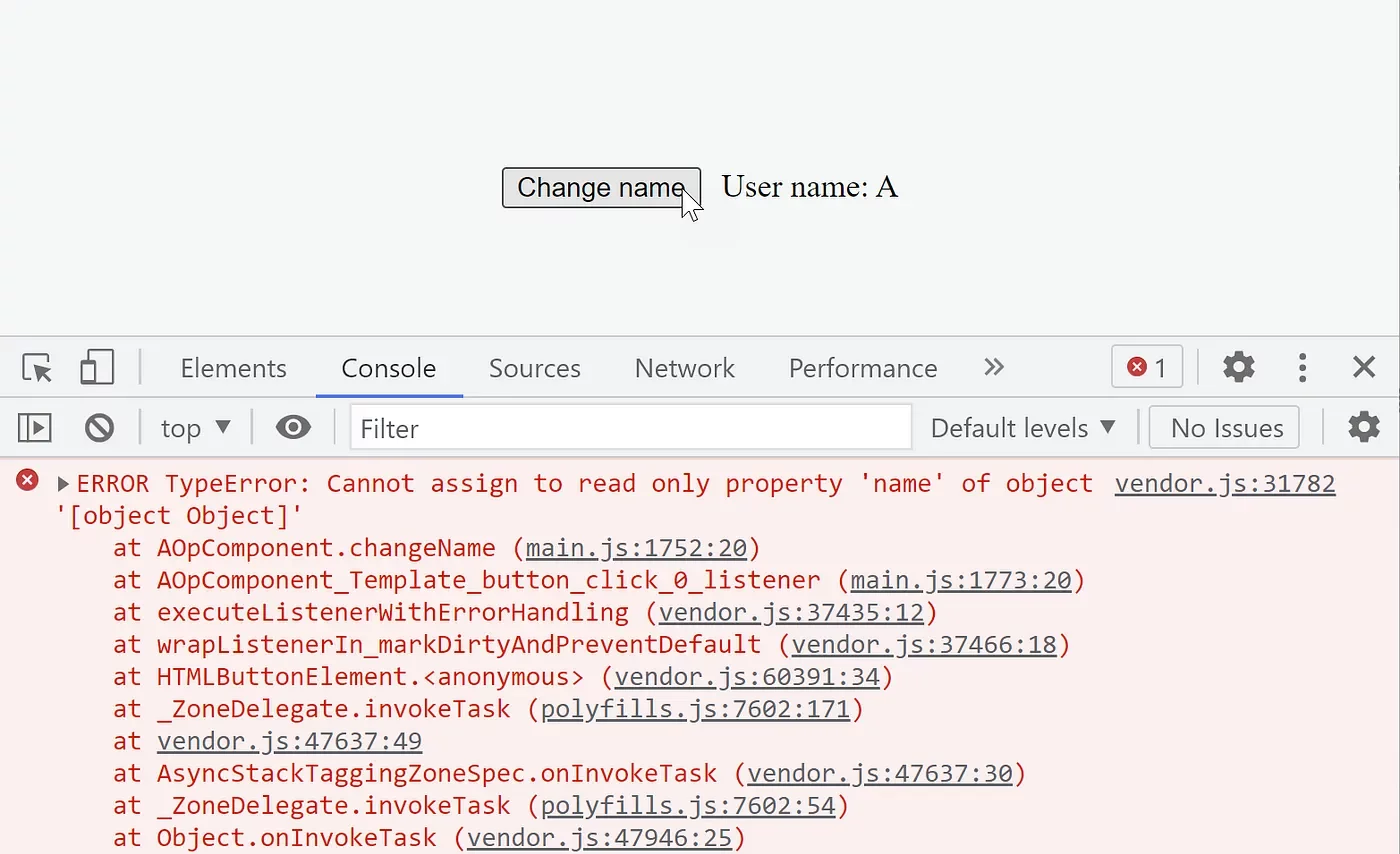
You can enforce immutability on objects using a recursive Object.freeze approach:
export function deepFreeze(object) {
  const propNames = Object.getOwnPropertyNames(object);

  for (const name of propNames) {
    const value = object[name];
    if (value && typeof value === 'object') {
      deepFreeze(value);
    }
  }

  return Object.freeze(object);
}
Attempting to mutate the object then triggers an error:
Alternatively, a library like immer is often the go-to solution:
import { produce } from 'immer';

@Component({...})
export class AOpComponent {
  user = { name: 'A' };

  changeName() {
    this.user = produce(this.user, (draft) => {
      draft.name = 'B';
    });
  }
}
That functions just fine too.
Bound UI events
When any native event fires on a component, Angular marks all its ancestors—up to the root—as dirty. The reasoning is that an event might trigger changes anywhere up the tree. Since Angular can't predict the impact, it erring on the side of caution and checks every ancestor.
Imagine a hierarchy of OnPush components like this:
AppComponent
    HeaderComponent
    ContentComponent
        TodoListComponent
            TodoComponent
If we bind an event listener within the TodoComponent template:
@Component({
  selector: 'todo',
  template: `
    <button (click)="edit()">Edit todo</button>
  `,
  changeDetection: ChangeDetectionStrategy.OnPush
})
export class TodoComponent {
  edit() {}
}
Angular flags all ancestor components as dirty before running the event handler:
So the set of components marked for a single check looks like this:
Root Component -> LViewFlags.Dirty
     |
    ...
     |
 ContentComponent -> LViewFlags.Dirty
     |
     |
 TodoListComponent  -> LViewFlags.Dirty
     |
     |
 TodoComponent (event triggered here) -> markViewDirty() -> LViewFlags.Dirty
In the next change detection run, Angular processes the full chain of TodoComponent's ancestors:
AppComponent (checked)
    HeaderComponent
    ContentComponent  (checked)
        TodosComponent  (checked)
            TodoComponent (checked)
Notice that HeaderComponent is skipped, as it isn't an ancestor of TodoComponent.
Manually marking components as dirty
Let's loop back to the example where we swapped the user object reference to update the name. That allowed Angular to spot the change and flag B automatically. Now, suppose we'd rather keep the same reference but still update the name. In that case, we mark the component dirty ourselves.
We can do this by injecting changeDetectorRef and calling its markForCheck method to tell Angular this component needs attention:
@Component({...})
export class BOpComponent {
  @Input() user;

  constructor(private cd: ChangeDetectorRef) {}

  someMethodWhichDetectsAndUpdate() {
    this.cd.markForCheck();
  }
}
What could serve as someMethodWhichDetectsAndUpdate? The NgDoCheck hook is an excellent fit. Angular runs it before checking the component, though it still happens during the parent's check. That's where we place our comparison logic and flag the component when we detect a discrepancy.
The choice to execute NgDoCheck even for OnPush components trips people up. But it makes sense once you realize it's part of the parent's change detection. Also note that ngDoCheck fires only for the top-most child. If that child has its own children and isn't checked, their ngDoCheck won't run.
Don't use
ngDoCheckto log when a component is being checked. Instead, use an accessor function in the template like this{{ logCheck() }}.
Now, let's add our custom comparison inside NgDoCheck and mark the component dirty when we see a change:
@Component({...})
export class AOpComponent {...}

@Component({
  selector: 'b-op',
  template: `
    <span>User name: {{user.name}}</span>
  `,
  changeDetection: ChangeDetectionStrategy.OnPush
})
export class BOpComponent {
  @Input() user;
  previousUserName = '';

  constructor(private cd: ChangeDetectorRef) {}

  ngDoCheck() {
    if (this.user.name !== this.previousUserName) {
      this.cd.markForCheck();
      this.previousUserName = this.user.name;
    }
  }
}
Keep in mind that markForCheck doesn't itself trigger or guarantee a change detection run. For more on that, see the chapter on manual control.
Observables as @Inputs
Let's up the complexity. Suppose our child B component receives an RxJs-based observable that emits updates asynchronously—similar to what you'd see in an NgRx setup:
@Component({
  selector: 'a-op',
  template: `
    <button (click)="changeName()">Change name</button>
    <b-op [user$]="user$.asObservable()"></b-op>
  `,
})
export class AOpComponent {
  user$ = new BehaviorSubject({ name: 'A' });

  changeName() {
    const user = this.user$.getValue();
    this.user$.next(
      produce(user, (draft) => {
        draft.name = 'B';
      })
    );
  }
}
So we get a stream of user objects in the child. We need to subscribe, compare incoming values, and mark the component dirty when necessary:
@Component({
  selector: 'b-op',
  template: `
    <span>User name: {{user.name}}</span>
  `,
  changeDetection: ChangeDetectionStrategy.OnPush
})
export class BOpComponent {
  @Input() user$;
  user = null;

  constructor(private cd: ChangeDetectorRef) {}

  ngOnChanges() {
    this.user$.subscribe((user) => {
      if (user !== this.user) {
        this.cd.markForCheck();
        this.user = user;
      }
    });
  }
}
The logic inside ngOnChanges mirrors what the async pipe does internally:
export class AsyncPipe {
  transform() {
    if (obj) {
      this._subscribe(obj);
    }
  }

  private _updateLatestValue(async, value) {
    if (async === this._obj) {
      this._latestValue = value;
      this._ref!.markForCheck();
    }
  }
}
That's why the standard practice is to hand off the subscription and comparison work to the async pipe. The only caveat is that objects must stay immutable.
Below is the B component implementation using the async pipe:
@Component({
  selector: 'b-op',
  template: `
    <span>User name: {{(user$ | async).name}}</span>
  `,
  changeDetection: ChangeDetectionStrategy.OnPush
})
export class BOpComponent {
  @Input() user$;
}
There's a suite of test cases covering the async pipe's interaction with different types:
describe('Observable', () => {
	describe('transform', () => {
	  it('should return null when subscribing to an observable');
	  it('should return the latest available value');
	  it('should return same value when nothing has changed since the last call');
	  it('should dispose of the existing subscription when subscribing to a new observable');
	  it('should request a change detection check upon receiving a new value');
	  it('should return value for unchanged NaN');
	});
});
describe('Promise', () => {...});
describe('null', () => {...});
describe('undefined', () => {...});
describe('other types', () => {...});
This particular test addresses the scenario we've been discussing:
it('should request a change detection check upon receiving a new value', done => {
    pipe.transform(subscribable);
    emitter.emit(message);

    setTimeout(() => {
      expect(ref.markForCheck).toHaveBeenCalled();
      done();
    }, 10);
});
The pipe subscribes to the observable within its transform method and flags the component as dirty each time the observable pushes a new message.
If you're after more in-depth material along these lines, check out the course:

If you believe something important is missing here do let me know in the comments!