
A brief look at Angular 7 TypeScript transformers
TypeScript introduced support for custom transformers back in version 2.3. This extensibility point let developers push beyond the limits of the standard compiler. Soon after, nearly anyone managing a TypeScript compilation pipeline wanted to leverage this capability. Angular was no exception.
The initial pull request to move toward transformer-based compilation landed on 10 Jun 2017. Quite some time has elapsed since then, and today Angular depends heavily on these custom transformers.
Here I will take a concise tour of the Angular transformers that are mostly relevant for AOT. I’ll split them into two groups: those coming from the @angular/compiler-cli package and those specific to @angular/cli.
All examples assume Angular version 7.2.1
Transformers from Angular compiler-cli
When you invoke the ngc command, your code is handed to Angular’s wrapper around the TypeScript Program, which is capable of performing the following transformations:
# Inline resource
Library authors are probably familiar with this one.
It swaps out templateUrl/styleUrls in @Component for the corresponding template/styles.
You can turn on this transformer through tsconfig.json:
angularCompilerOptions {
  enableResourceInlining: true
}

Source: @angular/compiler-cli/src/transformers/inline_resources.js
# Lower expressions
Most of us have probably encountered errors along these lines:
Error: Error encountered resolving symbol values statically. Function calls are not supported. Consider replacing the function or lambda with a reference to an exported function.
This typically happens when writing metadata like:
providers: [{provide: Token, useFactory: () => new SomeClass()}]
The lower expressions transformer converts a construct such as () => new SomeClass() into a variable that is exported from the module. The compiler can then import that variable without having to analyze the original expression.
This transformation applies only to a narrow set of fields: useValue, useFactory, data, id and loadChildren.
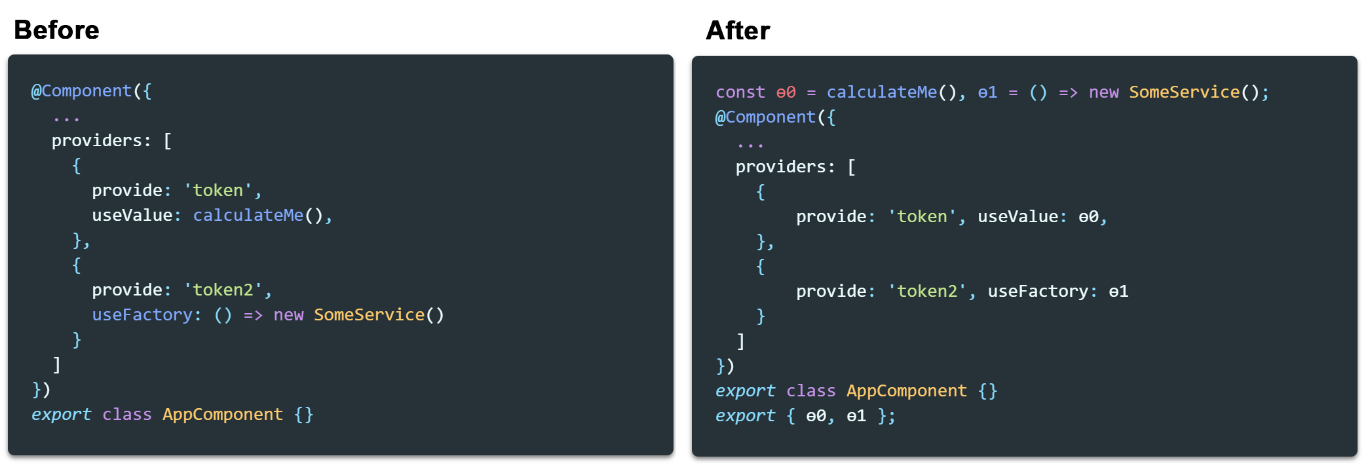
For a deeper dive, check the official documentation.
The lower expression transformer is active by default. To turn it off, use the disableExpressionLowering flag:
angularCompilerOptions {
  disableExpressionLowering: true
}
Source: @angular/compiler-cli/src/transformers/lower_expressions.js
# Node emitter transformer
This is the central ngc transformer. It takes the SourceFiles produced by the AOT compiler and adds a JSDoc comment at the top of each file containing Closure Compiler-specific "suppress" annotations.
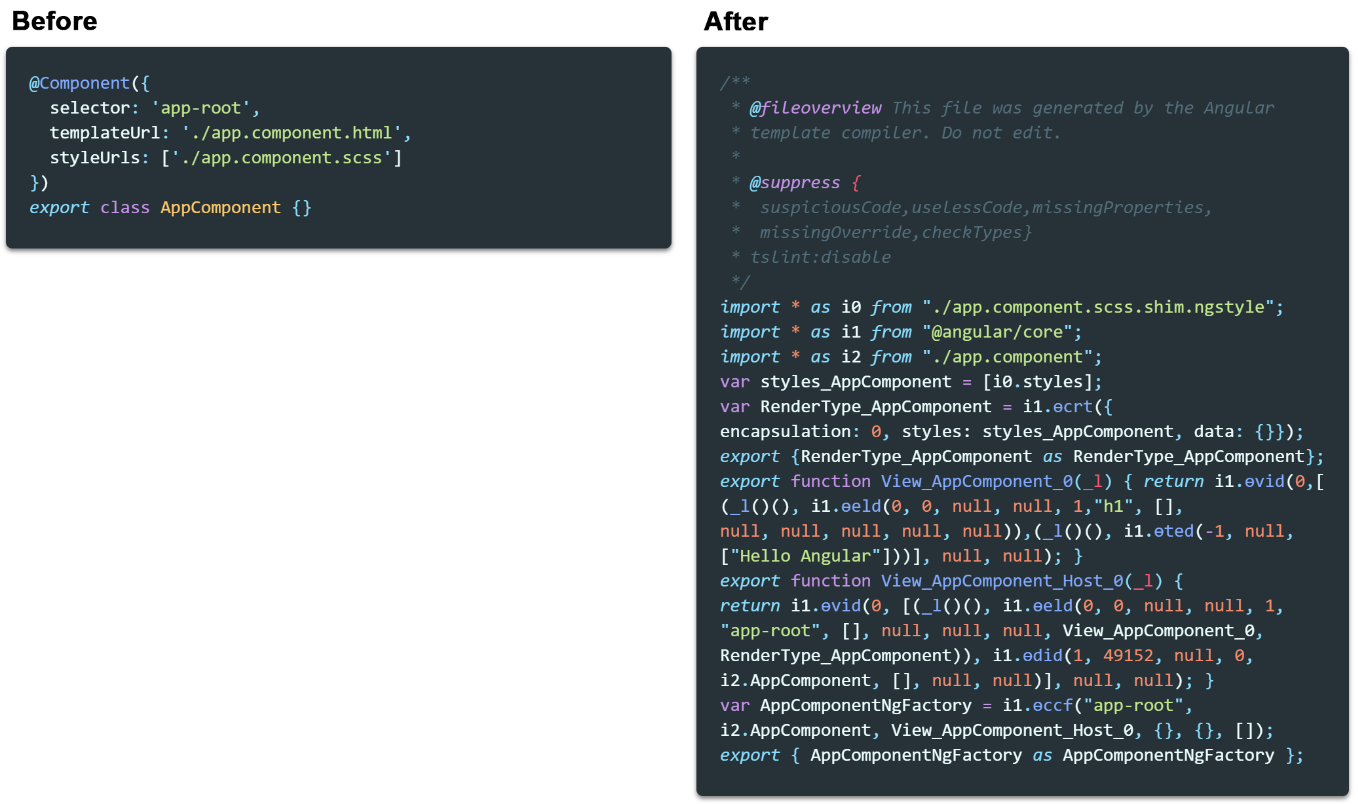
Source: @angular/compiler-cli/src/transformers/node_emitter_transform.js
# Angular class transformer
It appends the static methods that partial modules request.
This transformer relies on the PartialModules mechanism introduced with the Ivy renderer. In Render2, it is used to turn Injectable classes into static ngInjectableDef properties.
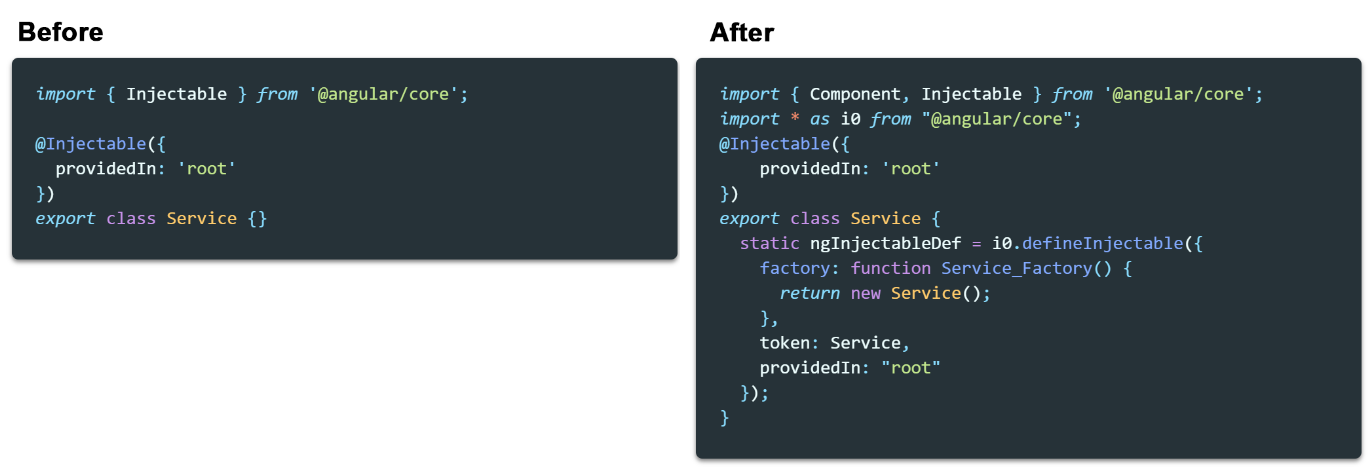
Source: @angular/compiler-cli/src/transformers/r3_transform.js
# DecoratorStripTransformer (ivy only)
It eliminates decorators such as:
[‘Component’, ‘Directive’, ‘Injectable’, ‘NgModule’, ‘Pipe’, ];
because they have been "reified" into ngComponentDef, ngDirectiveDef, ngInjectableDef and similar fields.
This is used in the legacy ngtsc mode (when enableIvy=true).
Source: @angular/compiler-cli/src/transformers/r3_strip_decorators.js
Cli ngtools/webpack transformers
The ng cli command hides another set of transformers:
# Replace resources (Jit only)
This one swaps resources for webpack’s require calls, so all resources are pulled in at runtime.

Source: @ngtools/webpack/src/transformers/replace_resources.js
# Remove decorators
It strips all decorators that originate from the @angular/core module.
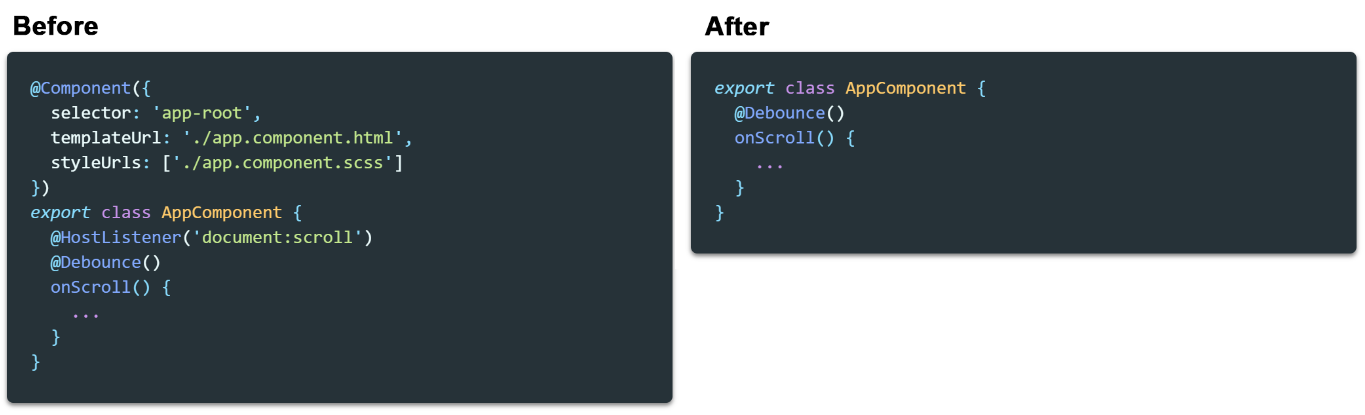
One curious detail: if a decorator is imported from another module, it will be left intact.
proxy-core-decorators.ts
import { Component } from '@angular/core';
export { Component };
module-jit.ts
import { Component } from './proxy-core-decorators'
@Component({ // won't be removed
  ...
})
export class SomeComponent {}
So this behavior can be exploited to keep Angular decorators for JIT compilation.
Source: @ngtools/webpack/src/transformers/remove_decorators.js
# Register Locale Data (browser only)
It brings locale data into the main entry point.
Essentially, this comes into play when you pass a locale through cli arguments like
--locale=fr
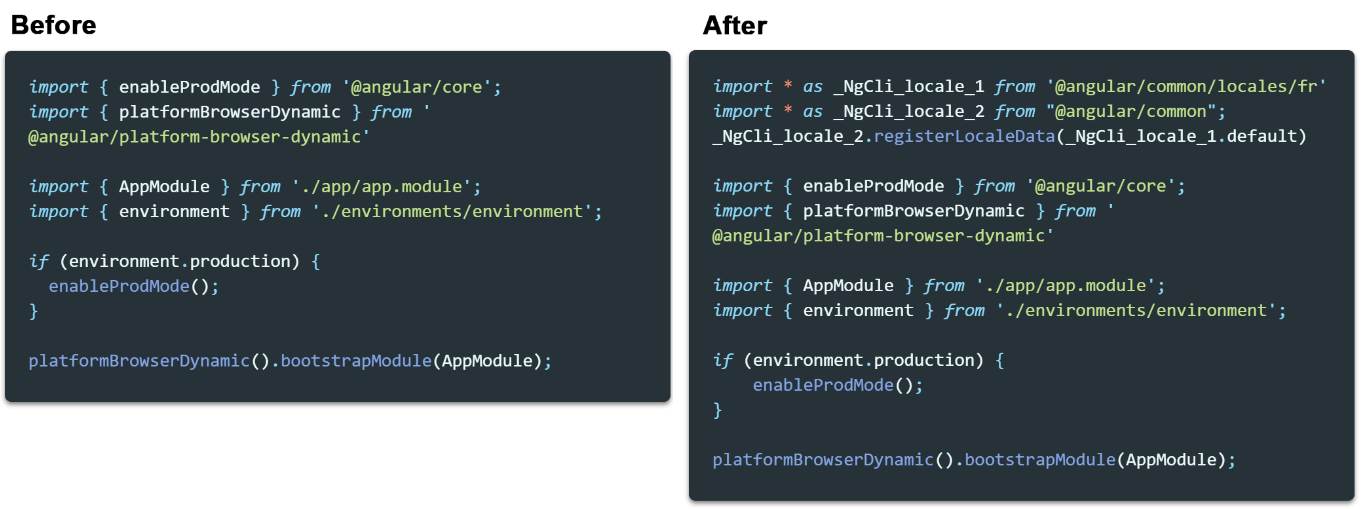
Source: @ngtools/webpack/src/transformers/register_locale_data.ts
# Replace bootstrap(aot only)
It converts platformBrowserDynamic().bootstrapModule(AppModule) into platformBrowser().bootstrapModuleFactory(AppModuleNgFactory)

Gotchas:
The expression platformBrowserDynamic().bootstrapModule(AppModule); must appear exactly once, or the replacement will not happen. Also, you cannot split this call into two separate statements like:
const platform = platformBrowserDynamic();
platform.bootstrapModule(AppModule);
Source: @ngtools/webpack/src/transformers/replace_bootstrap.ts
# Replace server bootstrap (server aot only)
Similar to the previous one, but targeting the server side.

Source: _@_ngtools/webpack/src/transformers/replace_server_bootstrap.ts
# Export lazy module map (server only)
If you work with Angular SSR, you’ve probably seen this snippet in the server.ts file:
// * NOTE :: leave this as require() since this file is built Dynamically from webpack
const {LAZY_MODULE_MAP} = require('./dist/server/main');
This transformer is what makes that import possible.

Source: @ngtools/webpack/src/transformers/export_lazy_module_map.ts
# Export ngfactory(server aot only)
This one also supports an import found in server.ts.
// * NOTE :: leave this as require() since this file is built Dynamically from webpack
const {AppServerModuleNgFactory, LAZY_MODULE_MAP} = require('./dist/server/main');

Source: @ngtools/webpack/src/transformers/export_ngfactory.ts
# PlatformTransformers (public API)
This exposes a way to supply your own custom transformer.
As an illustration, here is how native-script applies its own bootstrap replacement:
webpack.config.js
new AngularCompilerPlugin({
    platformTransformers: aot ? [nsReplaceBootstrap(() => ngCompilerPlugin)] : null,
Summary
Angular makes extensive use of TypeScript custom transformers. If you’re not digging into Angular internals, knowing their inner workings might seem unnecessary. Still, this kind of insight can save you a lot of debugging time when the build behaves unexpectedly.