RxJS: passing asyncScheduler as an argument vs using the observeOn operator
If schedulers in RxJS are new to you, I've written a concise overview in my article on queueScheduler. In essence, asyncScheduler ensures that every value is delivered in its own macrotask (in terms of the browser's event-loop task queue). To dive deeper into how the event-loop operates, check out this excellent video and this detailed write-up.
When you need to attach a scheduler to an observable sequence, you have two distinct options:
- Several creation functions (for instance of, from, range, and others) accept an optional
SchedulerLikeparameter, like so:
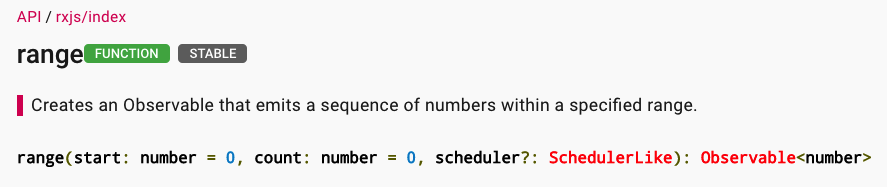
range documentation on rxjs-dev.firebaseapp.com
As a concrete illustration:
of(1,2,3, asyncScheduler)
2. Alternatively, you can achieve the same effect using the observeOn operator:
Here's an example:
of(1,2,3).pipe(observeOn(asyncScheduler))
Both approaches result in each individual data emission being placed in its own macrotask (meaning every emission gets queued in the browser's event-loop macrotask queue).
However, the mechanics behind each method differ subtly. In most scenarios, this distinction doesn't matter, but there are edge cases where it can become relevant.
Let's break down how each solution operates in detail:
Passing the scheduler as an argument
of(1,2,3, asyncScheduler).subscribe(console.log)
The sequence of events:
ofsends out the first value following the scheduler's timing (in this case, the next macrotask)- It then places the subsequent value into the scheduler's queue (another macrotask)
- This pattern of steps 1 and 2 continues for each following emission.
Because only the next value's emission is scheduled in the browser's event-loop queue, there's a theoretical window where other macrotasks could be interleaved between the produced values.
And with the observeOn approach?
of(1,2,3).pipe(observeOn(asyncScheduler)).subscribe(console.log)
The process:
1. of emits all its values at once, and these are collected by the observeOn operator.
2. observeOn then schedules each value individually using the specified scheduler (each in a separate macrotask in this example), placing these tasks sequentially into the event-loop queue.
Consequently, all emission tasks are queued back-to-back, meaning there's no room for other tasks to slip in between them.
You can verify these observations in this codepen.
Below is our code for the argument scheduler variant:
let Rx = window['rxjs'];
const {of,
       queueScheduler,
       asapScheduler,
       asyncScheduler,
       animationFrameScheduler
      } = Rx;
const {observeOn, tap} = Rx.operators;
console.clear();

setTimeout(() => console.log('It will runs just after this Macrotask'))

 let source$ = of(1, 2, 3, asyncScheduler).pipe(
   tap((v) => console.log('tap ', v))
 )

source$.subscribe((v) => {
  console.log('Value ', v);
  Promise.resolve().then(() => console.log('Microtask value ', v));
  setTimeout(() => console.log('MAcrotask value ', v), 0);
});
Inside the subscription callback, I use console.log to display the value for the current macrotask. Additionally, Promise.resolve.then is employed to log the value in a microtask immediately following the current macrotask. Finally, setTimeout is used to print the value in another macrotask, following the event-loop's queue order.
And here's the resulting output:
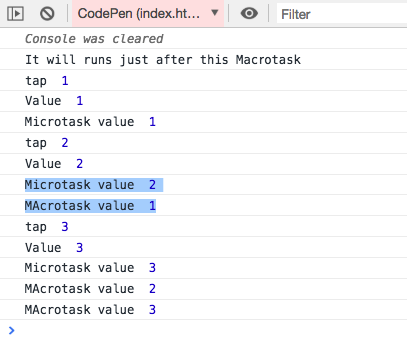
Notice what's happening here? Macrotask value 1 appears after Microtask value 2. Why does this matter? It indicates that even before the of observable made its first emission, it had already queued the next emission in the event-loop.
I've teamed up with Packtpub.com to create a comprehensive RxJS course covering numerous practical details for tackling everyday development tasks with this powerful library. It's suitable for beginners while also delving into advanced concepts. Check it out!
Now, let's examine the output when asyncScheduler is applied via the observeOn operator:
let Rx = window['rxjs'];
const {of,
       queueScheduler,
       asapScheduler,
       asyncScheduler,
       animationFrameScheduler
      } = Rx;
const {observeOn, tap} = Rx.operators;
console.clear();

setTimeout(() => console.log('It will runs just after this Macrotask'))

let source$ = of(1, 2, 3).pipe(
   tap((v) => console.log('tap ', v)),
   observeOn(asyncScheduler)
 )

source$.subscribe((v) => {
  console.log('Value ', v);
  Promise.resolve().then(() => console.log('Microtask value ', v));
  setTimeout(() => console.log('MAcrotask value ', v), 0);
});
Scheduler with ObserveOn operator gist
The output here takes a different shape:
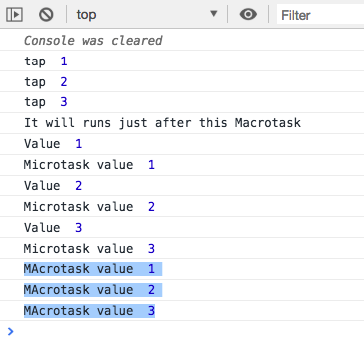
The of observable first emits all its values in one go. Then, observeOn schedules each emission in its own macrotask and pushes them into the event-loop queue. This is why all the setTimeout log calls from the subscription handler appear at the end — the event loop queue was already populated with the tasks scheduled by 'observeOn'.
Final thoughts
When dealing with a substantial number of emitted values, passing the scheduler directly as a factory function argument proves to be significantly more CPU and memory efficient. So, if you're planning to apply asyncScheduler to an expression like:
range(0, 1e10).pipe(tap(v => doSomething(v)))
it's better to pass it as an argument to range.
// non-efficient
range(0, 1e10).pipe(
  tap(v => doSomething(v)),
  observeOn(asyncScheduler)
)
// efficient
range(0, 1e10, asyncScheduler).pipe(
  tap(v => doSomething(v))
)
I trust you found this exploration valuable. Feel free to share your own experiences where RxJS schedulers proved useful in the comments!
Enjoyed this piece? Let's stay connected on Twitter.
From section 4 onwards, my RxJS video course covers advanced material — so if you're already familiar with RxJS, there's plenty for you too: higher-order observables, anti-patterns, schedulers, unit testing, and more! Give it a shot!